
Last month's GA4 report can make a Cincinnati business owner feel like they've got more traffic than ever and somehow fewer real leads. That's usually the first clue something's off. Bot traffic in Google Analytics can make your marketing look busy while messing with the numbers that drive budget, SEO, and sales decisions.
If you're looking at sessions, conversions, and source reports and thinking, "This doesn't match the phone calls we're getting," trust that instinct. Bots don't need to flood your site to do damage. A small amount of junk traffic can bend your read on what's working, what's wasting money, and what deserves more attention.
The right response isn't panic. It's to treat analytics hygiene like basic business maintenance, the same way you'd care about payroll, bookkeeping, or the heat map insights you use to understand what people do on a page. For a useful companion on behavior tracking, Stamina's heat map insights are worth a look because they help you compare real user movement against noisy analytics signals.
Why Your Google Analytics Numbers May Be Lying to You
A lot of owners assume GA4 is "smart enough" to sort out the junk. It isn't. GA4 still needs a human to ask hard questions, especially when the traffic looks active on paper but nothing in the business changes.
The dashboard can look healthy while the pipeline goes flat
That's the trap. You see sessions rising, maybe even a few more form fills, and it feels like the campaign is gaining traction. Then the sales team says the leads are thin, the CRM looks empty, and the close rate isn't budging.
That mismatch is where bot traffic in Google Analytics does its worst work. It doesn't just show up as weird traffic from a strange country or a sketchy referral. It can also sit inside your "good" campaigns and make a bad channel look profitable.
Practical rule: If traffic goes up but real conversations with customers don't, don't celebrate the chart. Check the quality of the traffic first.
GA4 changed the game, and old bot advice is incomplete
Universal Analytics had a different model and a lot of the old blog advice still sounds like it applies. It doesn't. GA4 is event-based, so a fake visitor can look busier than you'd expect if it triggers page views, scrolls, or even a conversion event.
That's why this topic matters to small and mid-sized businesses in Cincinnati. You're not trying to become an analyst. You're trying to protect ad spend, SEO decisions, and lead quality from being warped by junk data.
By the time you finish a proper audit, you should know how to spot suspicious patterns, filter what GA4 can catch, and validate whether the leads in your CRM are real. That's the only way to keep marketing honest.
What Bot Traffic Actually Is and How GA4 Handles It
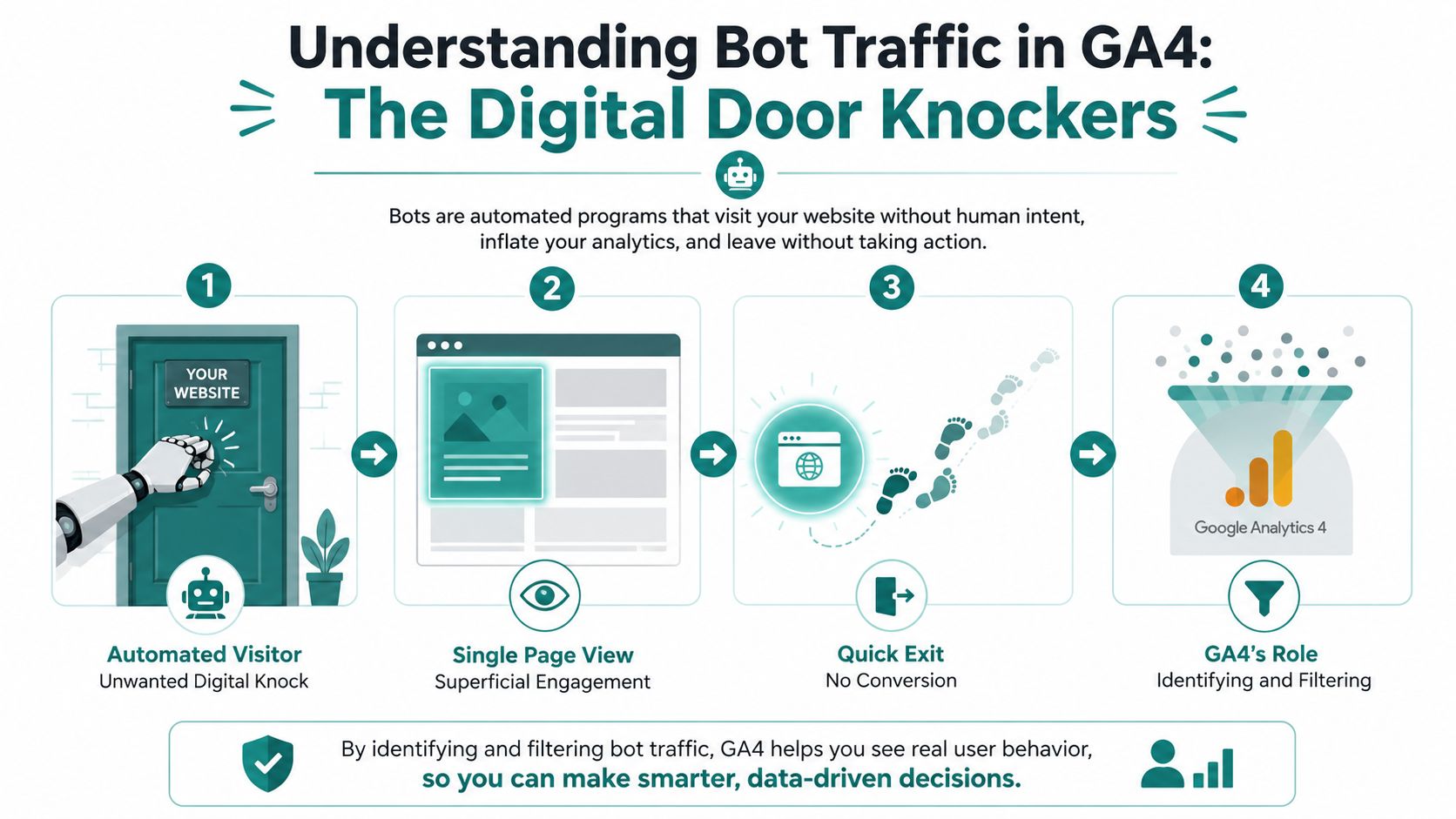
Think of bot traffic like automated visitors that knock on your digital door, look into one room, and leave. Some are helpful. Some are harmful. A few sit in a gray area, like monitoring tools and AI crawlers that aren't trying to hurt you but still complicate your reports.
The difference between good bots and bad bots
Good bots include search engine crawlers like Googlebot and Bingbot. They help search engines understand your site and index it properly. They're part of the web, and you don't want to block them blindly.
Bad bots are different. They scrape content, stuff credentials, spam forms, and generate junk sessions that pollute your analytics. Gray-area bots fall somewhere in the middle, often tied to monitoring, automation, or AI systems that can still confuse GA4 if you're not watching closely.
GA4 does have a known-bot filter for traffic that matches recognized bot and spider patterns. That filter helps, but it doesn't solve the whole problem. Industry guidance is clear that you need additional controls, because the built-in filter only removes part of the noise.
Why GA4 is easier for bots to distort
GA4 tracks events, not just page hits. That means a bot can land on a page, trigger a scroll, and even fire a conversion event without ever acting like a real prospect. If your setup is loose, a fake lead can look just as valid as a real one inside the report.
GA4 tells you what happened in the property. It does not prove intent.
That's the line business owners need to remember. A session in GA4 is not the same thing as a real customer. You still need to compare the analytics data against form records, CRM entries, and closed deals if you want the truth.
The Warning Signs You Can Spot in GA4 Right Now
Open GA4 and start with Traffic acquisition. Sort by sessions. Then ask a blunt question, which sources are driving volume that doesn't look like customer behavior? If you see referral domains you don't recognize, that's not a curiosity, it's a lead.
Start with the reports you already have
The fastest read comes from three places, Traffic acquisition, Landing page, and Demographic details. The best signal to watch is not just source volume. It's whether the source has near-zero engagement.
Verified GA4 guidance flags suspicious sources, countries, and landing pages with 0 to 1 second average engagement time, bounce rates close to 100%, and in some cases 1 page per session. Another useful marker is sessions that last under 5 seconds and stop at a single page, because that kind of shallow activity rarely looks like a real visitor's path. The warning signs also tend to cluster around odd URLs, repetitive source and medium values, and device or geo fingerprints that don't match the business's real customer base.
Here's the practical test. If the traffic source is strong on volume but weak on engagement, treat it as suspicious until proven otherwise. If the source is unfamiliar, even better reason to inspect it before you spend another dollar.
| Signal | Where to Look in GA4 | Threshold to Flag |
|---|---|---|
| Near-zero engagement | Traffic acquisition, Landing page | 0 to 1 second average engagement time |
| Bounce-like behavior | Landing page, Traffic acquisition | Bounce rates close to 100% |
| Single-page traffic | Landing page | 1 page per session or very shallow page depth |
| Very short sessions | Engagement reports, Explorations | Under 5 seconds |
| Odd referral sources | Traffic acquisition | Referral domains you don't recognize |
What the patterns usually mean
A flood of 100% new users can be real in rare cases, but when it appears with tiny engagement windows and strange landing pages, it usually points to automation. The same goes for traffic that piles into one page and leaves. That's not curiosity. That's a machine testing your site or your analytics stack.
If you want a simple rule, use this one. First, flag the source. Then check engagement time. Then compare device and geography against your normal customer profile. If all three look wrong, stop treating it like genuine demand.
For a deeper look at how analytics work connects to broader reporting, the team at HDM's analytics solutions page lays out the kind of measurement cleanup that supports better decision-making.
The Hidden Damage Bots Do to Conversions and Attribution
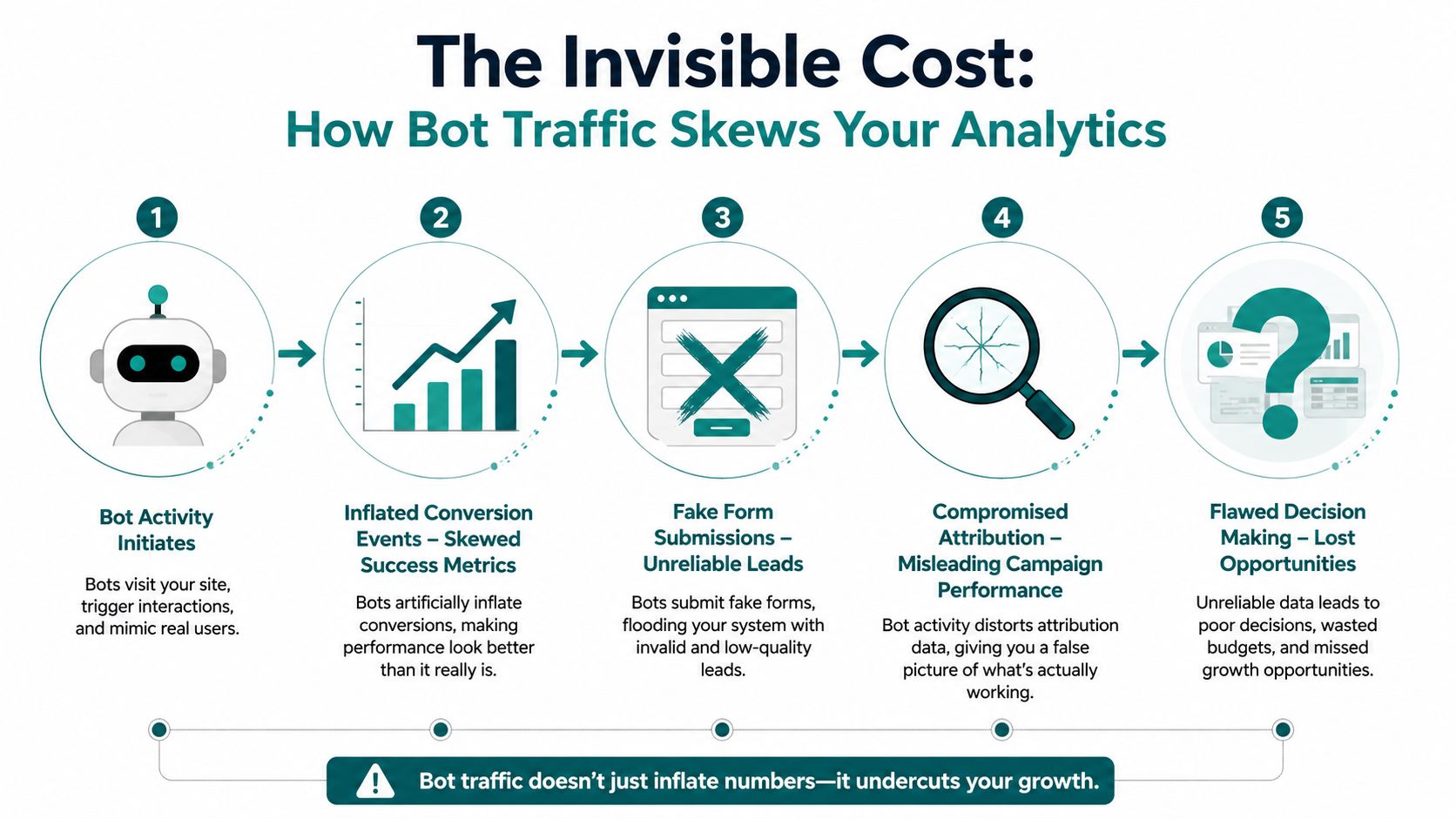
Most articles obsess over traffic spikes. That's the wrong fight. The true damage is quieter. Bots can make a campaign look productive by inflating conversions, faking form submits, and stuffing your attribution reports with junk.
The false success problem
GA4 doesn't know whether a form submit came from a human who needs a quote or a bot that filled every field with nonsense. If your event setup is loose, the fake activity can trigger the same conversion logic as a real lead. That means your reports can look healthy while the pipeline stays weak.
That's why a spike in conversion events is not automatically good news. If the CRM doesn't show a matching rise in real opportunities, the numbers are lying to you. A campaign can look like a winner inside GA4 and still be producing garbage.
How to audit the damage without overcomplicating it
Start with a clean comparison between GA4 and your CRM. Look at form submissions, then compare them to actual leads that made it into HubSpot, Salesforce, or even a tight spreadsheet. If the handoff doesn't line up, you've got a measurement problem, not a sales mystery.
Use this simple checklist:
- Check event counts: Compare GA4 conversion events against actual records in your CRM.
- Review lead quality: Scan for junk names, bad emails, and obviously fake phone numbers.
- Watch for sudden jumps: If form submissions rise but qualified leads don't, dig into the source.
- Compare closed deals: Real revenue should show up outside GA4, not just inside the dashboard.
Don't let a pretty conversion chart talk you into a bad budget decision.
If you need help separating useful lead data from junk, top software for lead validation can give you a cleaner downstream check, especially if your forms are getting hammered by low-quality submissions.
For Cincinnati owners, this matters because ad money is too expensive to waste on fake demand. Attribution only helps if the leads are real enough to follow through.
For a deeper read on why attribution gets messy fast, multi-touch attribution is worth studying once you've cleaned the obvious noise.
A Layered Playbook for Filtering and Blocking Bot Traffic
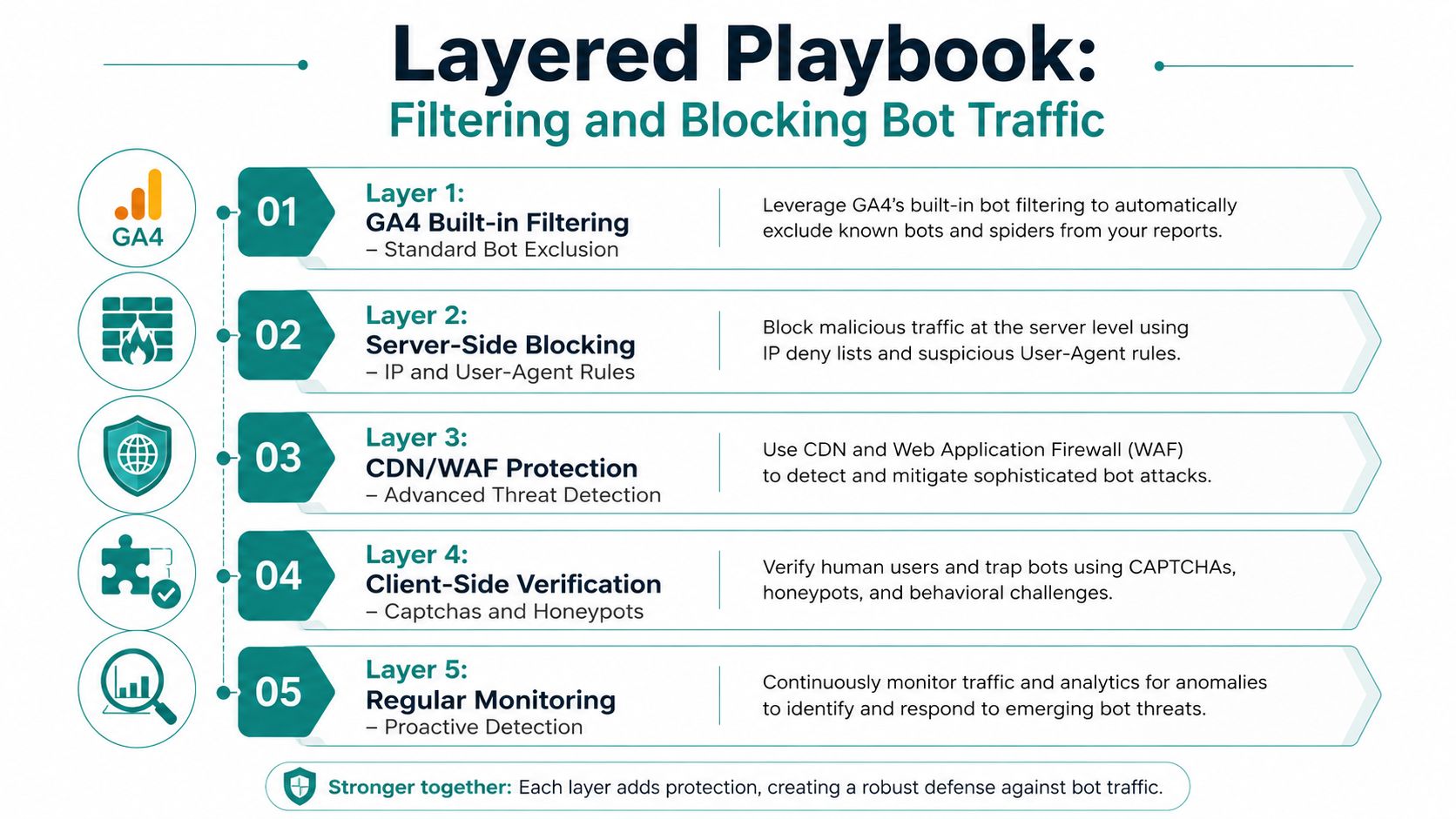
There's no magic switch here. You deal with bot traffic in layers, because no single control catches everything. If someone tells you one filter will fix it all, they're selling you a fantasy.
Start with the easy wins
Layer 1 is GA4's automatic known-bot exclusion (it's always on and can't be configured) plus hostname validation. Make sure hits only come from hostnames you trust. If traffic shows up from a place your site never uses, don't ignore it.
Layer 2 is IP-based exclusions and referral hygiene. You want to block known junk at the measurement level and keep bad referral sources from muddying the reports. This is basic cleanup, not fancy work.
Add protection where the bad traffic enters
Layer 3 is Google Tag Manager hygiene. Check that your tags only fire where they should, and don't let headless-browser noise trigger events you care about. A sloppy tag setup gives bots too many ways in.
Layer 4 is server-side tagging through a GTM server container. That lets you strip out a lot of client-side junk before it reaches GA4. If you're running paid ads or you depend on lead volume, this is the layer I'd push hardest once the basics are stable.
Layer 5 is network-level protection through a WAF or CDN such as Cloudflare, Bot Fight Mode, or a dedicated bot mitigation tool. This is the strongest place to stop abuse because it cuts off bad traffic before it even loads your tags. It's more worth it for lead-gen and e-commerce sites where abuse is measurable.
The simplest priority order for a typical Cincinnati small business is this, start with layers 1 and 2, move to layer 4 if paid media matters, and consider layer 5 when the business is large enough that bot abuse has a real cost. That keeps you from overengineering the problem.
For ongoing site protection and maintenance, Website Wellness is a smart mindset to adopt because bot defense works best when it's part of regular upkeep, not a one-time cleanup.
There's also a reason to keep your defenses balanced. You want to stop bad bots without making the site clunky for real users. That's the line every good agency and developer should understand.
Validating Real Demand Through Your CRM and Lead Pipeline
GA4 can tell you a form submitted. Your CRM tells you whether a real person showed up, followed up, and had any value. That gap is where a lot of owners finally realize the traffic problem wasn't just traffic.
Reconcile the numbers before you trust them
Pull GA4 form submit data and compare it against the actual leads in HubSpot, Salesforce, or your own pipeline tracker. If the counts are close but the quality is awful, you've got bot contamination or bad lead capture. If GA4 says the campaign is crushing it but sales says the leads are thin, believe sales.
That's also where UTM hygiene matters. Clean UTM parameters help you see what really drove a lead. Bad or duplicated UTMs can make bot traffic look like your best channel, which is a great way to spend more money on the wrong source.
If the campaign "wins" in GA4 but loses in the CRM, the CRM is usually telling the truth.
What a weekly validation routine should look like
A good routine doesn't need to be fancy. It just needs to be consistent.
- Match submissions to CRM records: Check whether each GA4 conversion has a real lead attached.
- Score lead quality: Mark obvious junk, mismatched company names, and fake contact data.
- Review channel tags: Confirm UTMs are consistent across forms, ads, and landing pages.
- Inspect sales follow-through: Real leads should create sales activity, not just dashboard noise.
A Cincinnati HVAC company can get fooled by a "winning" Google Ads campaign if bots are filling out quote forms and inflating conversion counts. The fix is simple in concept, but not always easy in practice. Reconcile the CRM against GA4, then judge the campaign by real lead quality, not by event volume.
That's the discipline that keeps bot traffic from steering the whole marketing plan.
Quarterly Governance and Monitoring Habits That Keep GA4 Honest
Clean analytics isn't a project you finish. It's a habit you keep. If you only look for bot traffic when someone panics about a bad month, you're already behind.
Use a short quarterly audit and write it down
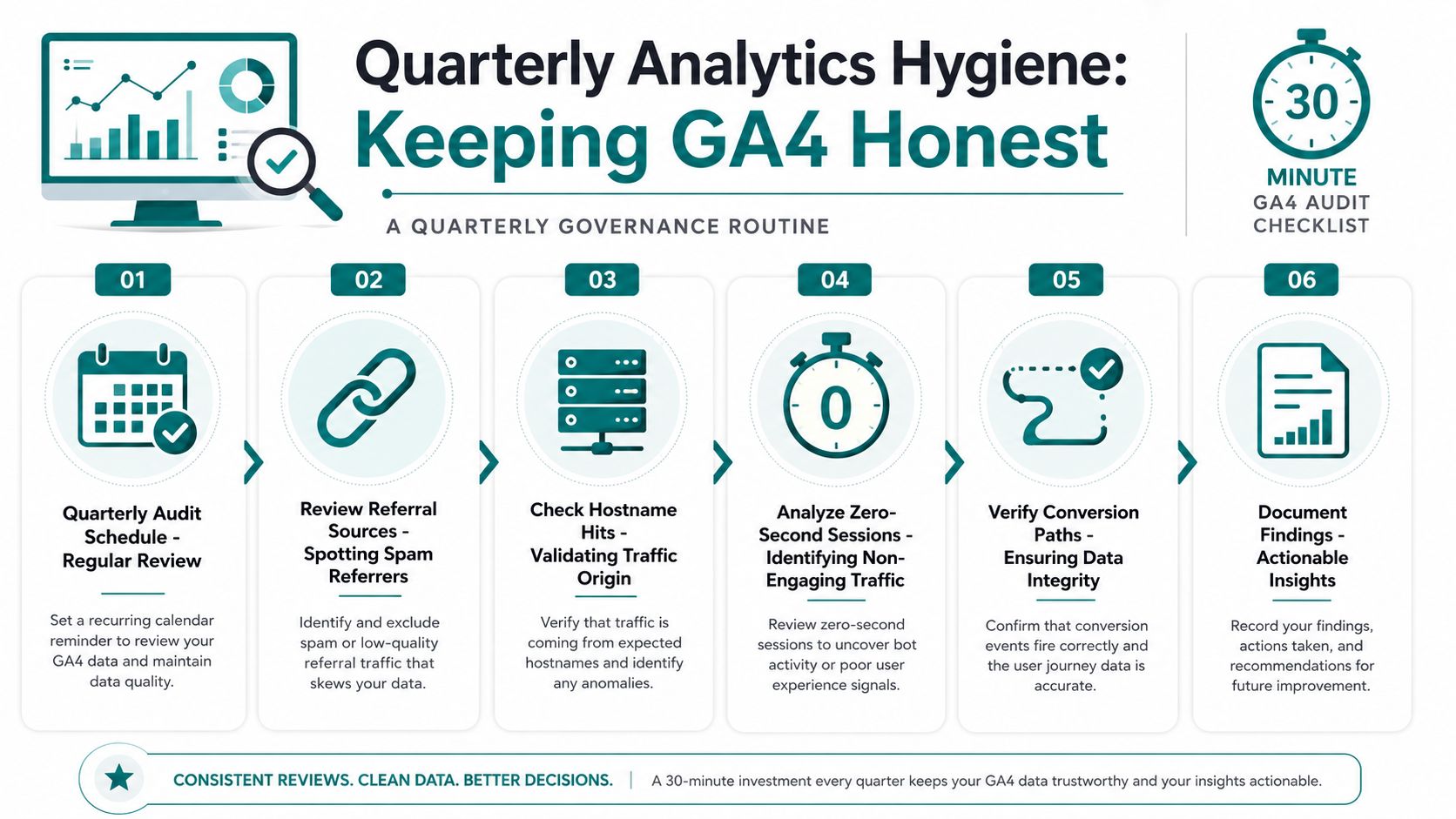
Set a 30-minute audit at the start of each quarter. Check referral sources, hostname hits, zero-second sessions, server-log gaps, and CRM-to-GA4 conversion matches. Then write a short summary so someone on your team can see what changed.
A simple log beats memory every time. When you track suspicious sources and repeated patterns quarter after quarter, the trends get obvious. That's how you catch slow contamination before it turns into a reporting mess.
Automate what you can, then keep humans in the loop
GA4 explorations can be set up to surface the worst offenders automatically. You can also watch for sudden drops in engagement time, which often show up before people notice a traffic spike. Don't wait for a monthly report to tell you something smells wrong.
For teams that want a broader governance framework, PlotStudio AI comprehensive guide is useful because it reinforces the bigger idea, good data needs rules, review, and ownership.
Use the monthly report to make bot noise visible, not hidden. Include suspicious sources, major engagement anomalies, and any CRM mismatches. That gives owners a cleaner read and keeps false wins from getting baked into the next budget.
If you want a Cincinnati team that will clean up GA4, pressure-test your lead quality, and make sure your marketing decisions are based on real demand, HDM is a good place to start. HDM works on analytics, SEO, paid media, and website health with the same blunt goal, getting you better data and better leads. Reach out if you want a practical audit and a plan you can use.