

A Cincinnati bakery owner opens a website project, sees example.com, www.example.com, and blog.example.com, and suddenly the question is simple but slippery, which address matters? One developer talks about the root domain, another mentions the DNS root, and a third says the "naked domain" needs a redirect. It's easy to feel like the site has five different home addresses when you really only need one clear answer.
That confusion matters because the wrong setup can create mixed signals for search engines, messy tracking, and avoidable setup problems across your site. If you're comparing web design or SEO help in Greater Cincinnati, the basic domain choices are worth understanding before anyone touches your hosting, redirects, or SSL. The good news is that the idea behind a root domain is straightforward once you separate the everyday web meaning from the deeper DNS meaning.
Understanding the Core Concept of Root Domain
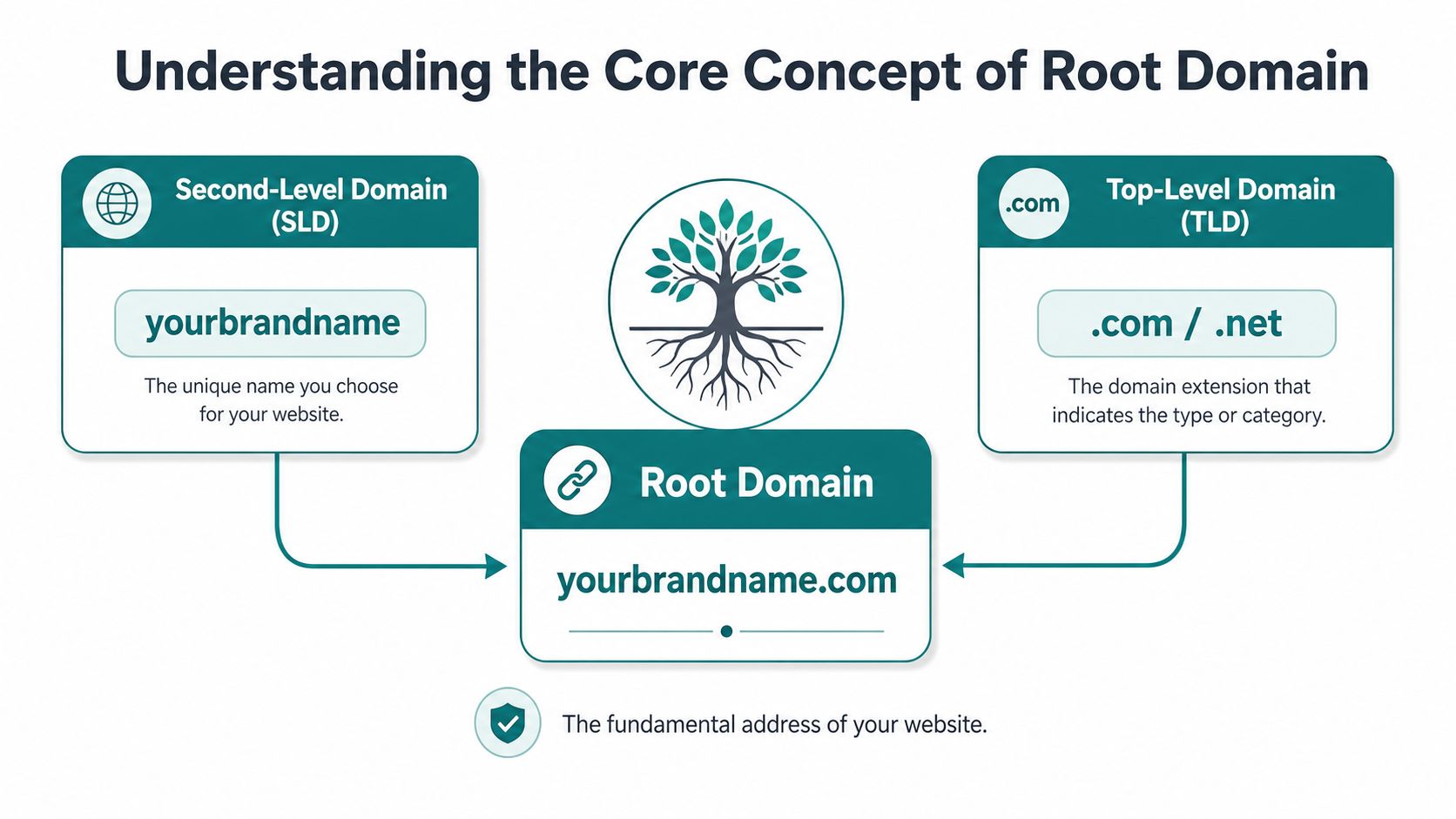
A root domain is the main registered web address people recognize, the name made from your unique brand part plus the ending, like example.com. It sits above everything else on the site, which means the rest of your web presence, subdomains, and page paths all hang off that one base address. In simple business terms, it's the storefront name on the door, not the individual aisles inside the store. The root domain is the highest visible website address level that combines the second-level domain and the top-level domain, and it is the parent namespace that contains all subdomains and page paths. Wikipedia's root name server reference
For a non-technical owner, the easiest way to think about it is this. example.com is the base address, www.example.com is a version of that address, and shop.example.com is another branch under the same brand. The root domain is the anchor that tells browsers and search engines what the main identity of the site is.
Practical rule: if a URL has extra text before the brand name or extra folders after it, you're no longer looking at the root domain itself.
You'll also hear people call this the apex domain or naked domain in casual conversation. Those labels usually point to the same business-facing idea, the preferred top-level site address customers should remember and return to. If you're building a site from scratch, a solid starting point is to make sure that one domain version is treated as the primary home, not a side version competing with it. For a deeper planning mindset, HDM's SEO baseline guide on the foundation every website needs fits well with that approach.
Explaining Domain Hierarchy DNS and Terminology
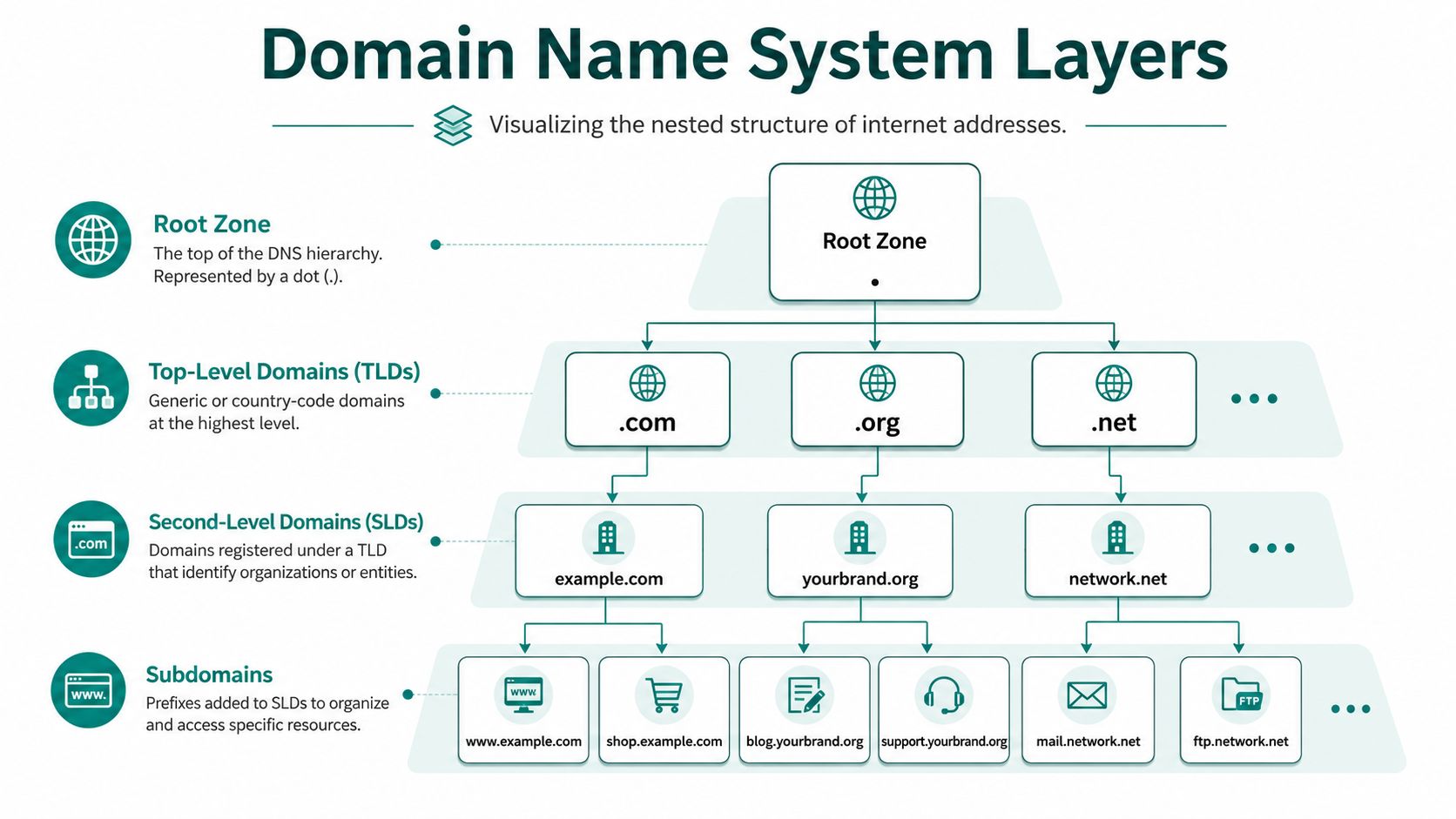
The naming stack starts with the DNS root, which is not the same thing as the root domain people talk about in marketing or SEO. The DNS root is the empty apex at the top of the internet's naming hierarchy, and root name servers sit there as the first stop in name resolution. That detail matters because the word "root" gets used for two different ideas, and many beginner guides blur them together. A major underserved angle is the confusion between the root domain used in everyday web and SEO language and the DNS root used in infrastructure, where the DNS root is the empty apex served by root name servers. Sitechecker's root domain explanation
The layers business owners actually deal with
The part you register with a provider is the second-level domain plus the top-level domain, which gives you the registrable base such as example.com. Above that sits the DNS root, and below that sit subdomains like www.example.com or blog.example.com. A clear overview of domain naming can also help here, so if you want a broader glossary alongside this guide, the essential UK guide on domain names is a useful companion read.
A few terms often get mixed up in meetings:
- Root domain: the registered base address, like example.com.
- Subdomain: a branch before the main name, like www or shop.
- Path: the page part after the domain, like a blog folder or product page.
- DNS root: the top of the naming system, not a website address.
The simplest way to keep the language clean is to ask, "Am I talking about the business's main site address, or the top of the internet naming tree?"
That distinction helps when you talk to a developer, a host, or an SEO consultant. If someone says the domain is "pointing to the wrong place," they may be talking about the registrable root domain, a subdomain, or the DNS root resolution path. For Cincinnati SMBs, precise wording saves time because it prevents one person from fixing hosting while another assumes the issue is branding.
SEO Cookie and SSL Implications
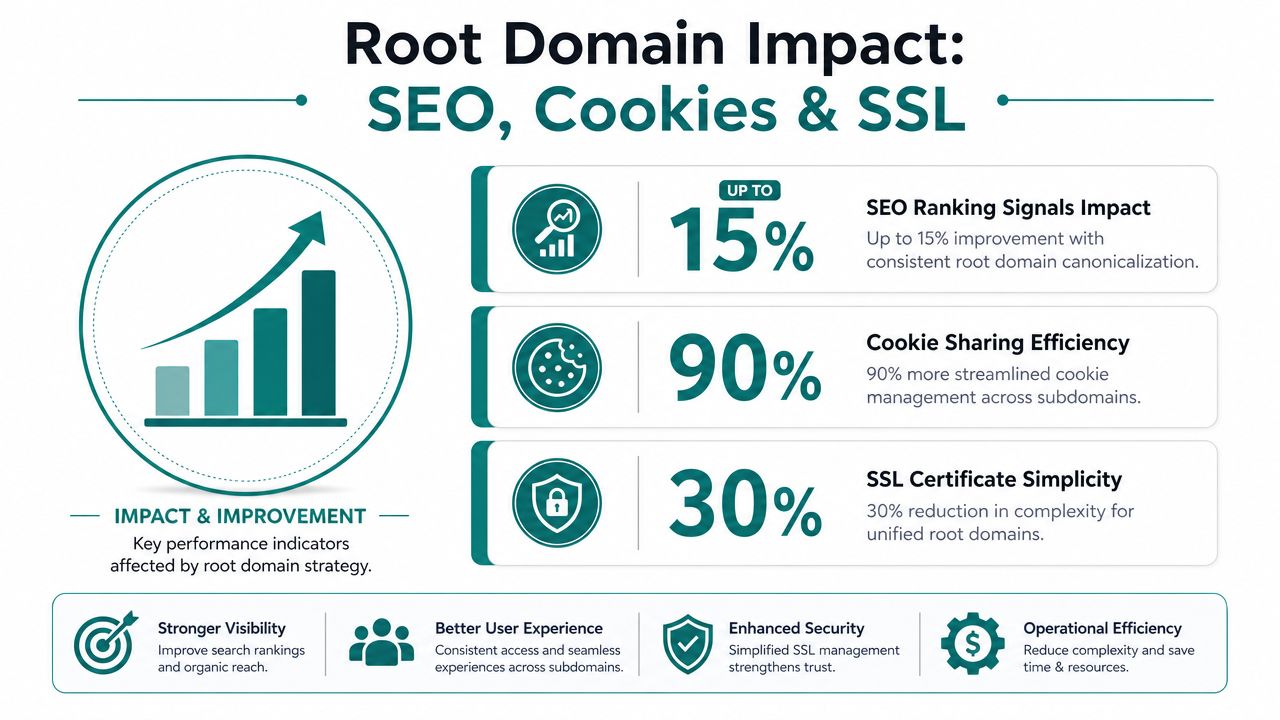
A domain choice looks small on paper, but it affects how your site behaves in practice. From an infrastructure and SEO standpoint, the root domain is the highest practical ownership boundary for a site, so consolidating canonical versions under one root domain is a standard practice for preserving authority and avoiding fragmentation of crawl signals. Hyperone's glossary entry on root domains makes that ownership boundary idea clear.
Why consistency matters to search and sessions
When your site resolves to more than one preferred version, search engines can see a split identity. One version might collect links, another might get indexed, and a third might send users to the same content through a different hostname. That's how simple setup choices turn into duplicate signals, confusing analytics reports and weakening the clean story you want your website to tell.
Cookies and SSL matter for the same reason. Cookies often behave differently across hostnames, so a root-domain-first setup can make session handling easier across related sections of a site. SSL certificates also need to match the hostnames people visit, so a mismatch between preferred and alternate versions can create avoidable friction. For a practical HTTPS perspective, Transactional LLC's guide to HTTPS for SEO is a good companion reference.
If your team is planning a redesign or migration, treat the domain choice as part of the security plan, not just the SEO plan. HDM's SSL certificate installation guide is relevant if you're coordinating secure delivery across multiple hostnames.
Business takeaway: a single, consistent root-domain strategy reduces the odds that search engines, browsers, and customers each see a different version of your brand.
When a Cincinnati business works with an agency, the same root-domain decision affects reporting, cookie scope, and the cleanup work after launch. That's why experienced teams usually settle on one preferred version early and then configure the rest to support it. HDM can handle managed hosting and domain setup as part of that workflow, especially when a site needs a clean technical foundation. For site-mapping and crawl planning, site crawlers for technical SEO are often part of the review process.
Setting Up and Canonicalizing Your Root Domain
The cleanest setup starts by deciding which version of the site is the official one, then making every other version support that choice. The root domain is the registered base name made from the second-level domain plus top-level domain, and it explicitly excludes subdomains and any path such as a blog folder, making it the canonical identity browsers and search engines associate with your site's main namespace. ITU Online's root domain definition states that plainly.
A practical setup path
- DNS record configuration. Make sure the records that point traffic to your site are aligned with the version you want customers to use.
- Web host setup. Confirm your hosting provider accepts the preferred hostname and responds correctly for both the base domain and the common alternate version.
- Google Search Console verification. Use verification and property management to reinforce which version should be treated as the primary one.
- 301 redirects. Send every non-preferred variant to the chosen canonical version so browsers and search engines land in one place.
That sequence sounds technical, but the business goal is simple. You want one clear address in ads, emails, social profiles, and search results, because scattered variations create avoidable maintenance work. A seasoned team can save time, since the redirect plan, certificate plan, and crawl review all need to match.
Practical rule: if your printed materials and email signatures say one version while your website loads another, you've already created confusion for customers.
A few signals tell you the setup needs attention. If the site opens at different versions without a clean redirect, if forms behave differently on subdomains, or if your preferred URL doesn't match what search engines show, the canonicalization work likely isn't complete. Small teams often catch this during launch, but it can also surface later after a redesign or platform migration.
For Cincinnati owners who want a hands-off option, this is one of the areas where HDM can be part of the solution set alongside your developer or host, because the domain choice affects both launch readiness and long-term maintenance. If you want a visual reference for the launch sequence, the embedded walkthrough below is a helpful companion.
Common Mistakes and Troubleshooting
The most common mistake is assuming www and the bare domain are interchangeable without any setup work. They aren't, not from a technical management standpoint. If one version loads without a redirect, customers can land on different URLs for the same page, and that inconsistency can ripple into access, email, and link tracking. Because the root domain is the address customers remember and return to, changes or misconfigurations can affect website access, email, and link consistency; agencies like HDM treat it as a foundational asset when planning migrations or redesigns. Zutrix's root domain overview
Fast checks that usually uncover the issue
- Check the visible URL. See whether the browser keeps flipping between the base domain and a subdomain.
- Review redirect behavior. Confirm the non-preferred version lands on the chosen version every time.
- Inspect certificates. Make sure SSL covers the hostnames you operate.
- Watch cookie behavior. Logins, form fills, and cart sessions can fail if hostname handling is inconsistent.
Browser developer tools and DNS checkers can reveal a lot without diving into code. If the problem appears after a redesign, domain migration, or CMS change, the issue is often a missed redirect or a hostname mismatch somewhere in the stack.
HDM's website wellness checklist for a healthy business site is a useful internal reference if you're reviewing maintenance tasks after launch. A quick diagnosis now is usually cheaper than fixing broken sessions, duplicate pages, or email confusion later.
Conclusion
A root domain is the main registered address your customers recognize, while the DNS root is the deeper infrastructure layer that sits at the top of internet naming. Once you separate those two ideas, the rest gets much easier to manage. You can choose one preferred site version, keep redirects clean, protect your SEO signals, and avoid the domain confusion that slows down launches.
For Cincinnati business owners, that clarity matters during web design, SEO planning, and any migration that touches hosting or SSL. The goal isn't to memorize technical jargon, it's to keep your brand's main address stable, secure, and easy to find. If you want an experienced partner to help handle the setup, HDM can step in with practical domain, hosting, and website support.