


What's the point of a polished healthcare website if the first form on it pulls you into HIPAA trouble? That's the question a lot of business owners skip, and it's the one that saves the most time and money when you answer it.
For many Cincinnati practices, clinics, and healthcare-adjacent businesses, HIPAA website compliance isn't about making every page "medical-grade." It starts with a simpler question, does your site actually collect, store, display, or transmit patient information? If it doesn't, the compliance burden may be much lighter than vendors make it sound. If it does, every contact form, scheduler, chat widget, and analytics tag needs a closer look.
Does Your Website Actually Fall Under HIPAA
The cleanest way to think about this is simple. HIPAA only matters for a website when the site touches Protected Health Information, or PHI. That can happen through a contact form, a patient portal, online booking, telehealth intake, or even a chat tool that asks about symptoms or treatment needs.
PHI isn't just a chart in a back office. It can be a name plus a condition, an email plus a symptom, or a date of birth plus a visit reason. If a website lets a patient tell you who they are and why they're reaching out for care, you may already be in HIPAA territory.
A two-minute trigger test
Ask these questions before you spend a dollar on compliant hosting or a redesign:
- Does the site ask about health concerns? If a form invites someone to describe pain, treatment, insurance, or an upcoming procedure, treat it as a PHI touchpoint.
- Does the site send that information somewhere? If submissions go to email, a CRM, a scheduler, or a chatbot transcript, the data path matters.
- Can a patient portal, intake workflow, or secure message be reached from the site? If yes, the site is part of the regulated system, not just marketing.
- Is the site informational only? A brochure site for a wellness brand may not fall under HIPAA in the same way if it never collects patient data.
For a Cincinnati practice planning a new build, that distinction matters before design starts. A marketing-only site can be designed one way. A site that takes appointment requests or symptom details needs a different architecture, different vendor review, and different policies.

If you're still deciding how much of your site needs to be rebuilt, a healthcare-focused development team like HDM's healthcare website development services can help map the patient-data boundary before anyone touches templates or plugins.
Practical rule: if a visitor can type health information into your website, assume the compliance discussion has started.
The Three Rules That Actually Govern Your Website
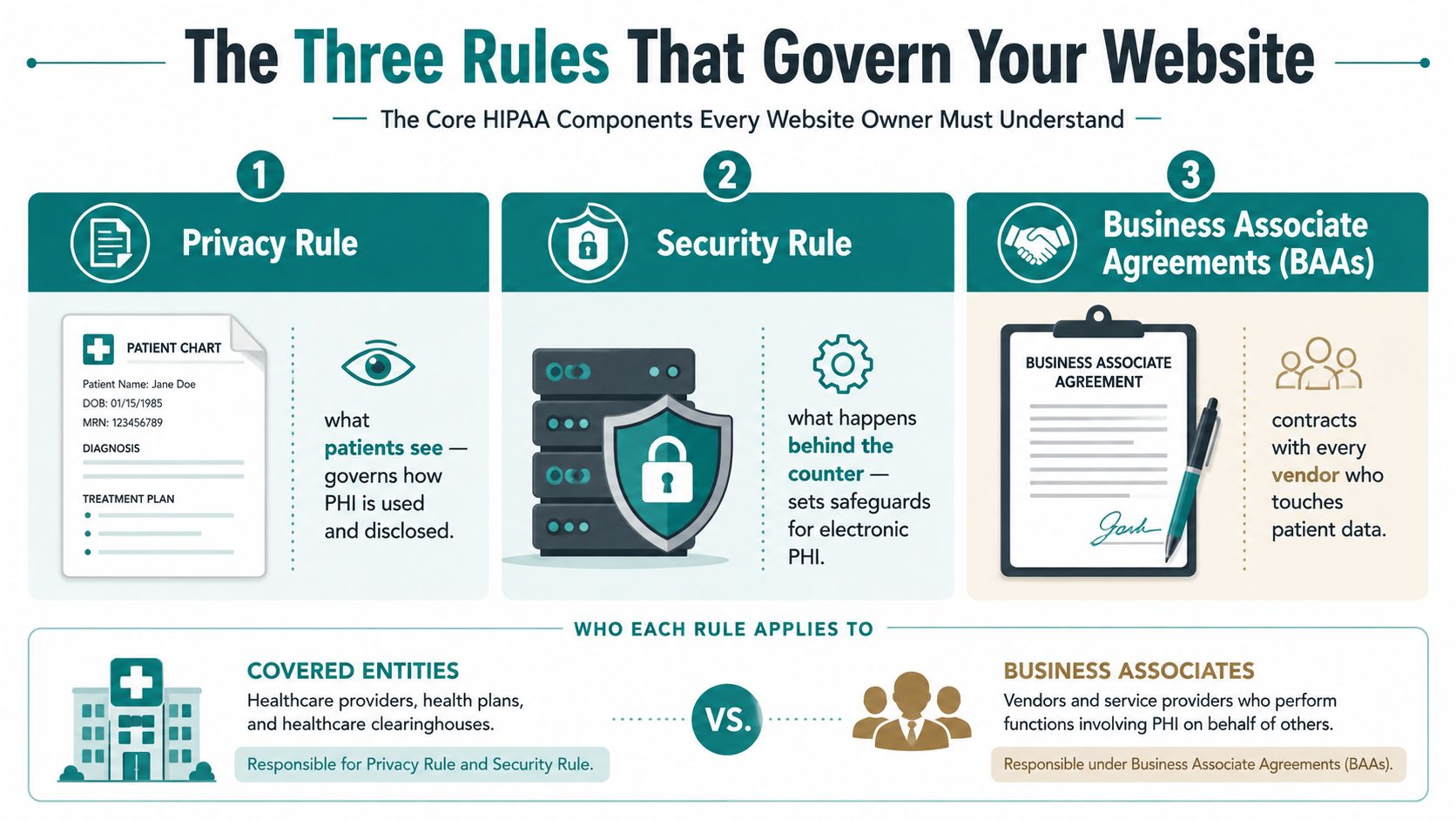
Every serious HIPAA conversation comes back to three things, the Privacy Rule, the Security Rule, and Business Associate Agreements, or BAAs. If a vendor can't explain those in plain English, they probably can't explain the actual risk on your site either.
Think of a front desk at a clinic. The Privacy Rule is what patients are allowed to see and how their information may be used. The Security Rule is what happens behind the counter, who can get into the records, how they're protected, and how the system keeps information from being altered or exposed. BAAs are the contracts with outside companies that help run the office, like the cleaning crew, alarm vendor, or IT provider.
What each rule means in practice
The Privacy Rule governs how PHI is used and disclosed. On a website, that means your notice, your forms, your disclosures, and any patient-facing workflow that explains how information will be shared.
The Security Rule governs electronic PHI, or ePHI. HHS describes technical safeguards such as access controls, audit controls, integrity protections, and transmission security under 45 CFR §164.312, and those map directly to website choices like HTTPS, encrypted storage, logging, and role-based access controls. HHS enforcement data also shows this isn't theoretical. As of October 31, 2024, OCR had received over 374,321 HIPAA complaints, initiated over 1,193 compliance reviews, and resolved 99% of those cases, while also settling or imposing civil money penalties in 152 cases totaling $144,878,972 (HHS enforcement highlights).
BAAs matter because outside vendors don't become harmless just because they sit in your stack. If a hosting company, form builder, email tool, or analytics service can touch ePHI, it needs the right agreement and role definition. That's why a good compliance stack often includes automating HIPAA compliance with SIEM as part of monitoring and alerting, not as a replacement for legal agreements or good configuration (UTMStack's HIPAA compliance monitoring overview).
Website Features That Quietly Handle Patient Data
The highest-risk parts of a healthcare website usually don't look risky at first glance. A plain contact form can become a PHI intake path. A chat widget can collect symptoms in a transcript. A scheduler can move appointment details into a third-party system you don't fully control.
Common site features and their risk levels
| Feature | PHI Risk Level | Typical Mitigation |
|---|---|---|
| Basic informational pages | Low | Keep them free of patient-specific details |
| Contact forms | Medium to High | Limit fields, encrypt transport, route only to compliant destinations |
| Appointment request tools | High | Use signed BAAs, logged access, and secure storage |
| Patient portals | High | Strong authentication, session controls, audit logging |
| Live chat and chatbot transcripts | High | Review prompts, restrict PHI collection, vet vendors carefully |
| Analytics and remarketing tags | Medium to High | Block PHI from tags, review scripts before launch |
| Telehealth integrations | High | Confirm secure transmission, access controls, and vendor terms |
| Reviews widgets and testimonial forms | Medium | Avoid collecting health details in open text |
| Call tracking numbers | Medium | Train staff not to disclose PHI on recorded lines |
The hidden issue is often the handoff. A form may live on your site, but the submission can land in an email inbox, a spreadsheet, a CRM, or a support tool you didn't intend to involve. That's where a lot of businesses lose control of the data path.
A second trap is tooling that seems unrelated to compliance. If your team is considering AI support, a chatbot, or an automated assistant, the web layer needs to be reviewed before launch. HDM's AI chatbot for customer service is a reminder that any conversational tool can create a data trail, and in healthcare that trail has to be treated carefully.
For healthcare forms that need consent or authorization workflows, it also helps to compare your process against a compliant authorization page like BoloSign's HIPAA authorization page. The useful lesson isn't the branding, it's the discipline around what gets collected and how it's disclosed.
How to think about risk in plain English
If a feature can collect PHI, store PHI, forward PHI, or expose PHI to a third party, treat it as a regulated part of the website. That's why HDM and similar healthcare-aware agencies spend time mapping every touchpoint before a redesign, not after the launch email goes out.
Technical and Administrative Controls Explained
The technical side of HIPAA sounds intimidating until you break it into business decisions. Most of them come down to four questions, how is the data protected in transit, how is it protected at rest, who can access it, and who else can touch it?
The controls that matter most
- Encryption in transit: Use HTTPS with TLS 1.2 or newer so data can't be read while it moves between the visitor and your server.
- Encryption at rest: Store ePHI with strong encryption, such as AES-256, so a stolen backup or database isn't readable in plain text.
- Access controls: Give people only the access they need, and use unique credentials with multi-factor authentication for administrators.
- Audit logging: Keep records of logins, changes, and data access so you can trace what happened if something looks off.
- Session timeouts: End inactive sessions so someone doesn't walk away from an open portal.
- Secure backups: Backups should be encrypted and recoverable, because a backup you can't restore is just an expensive copy.
HHS's Security Rule separates safeguards into administrative, physical, and technical categories, and that's useful for owners because it keeps you from treating compliance like a plugin setting. A hosting platform, for example, isn't just a server choice. It affects access, monitoring, backups, and recovery. Independent guidance also stresses that vendors touching ePHI need BAAs, and that risk analysis, audit trails, and incident response procedures belong in the operating model, not just in a policy folder (Accountable HQ's HIPAA website guidance).
Questions to ask before you approve a vendor
- Where is the data stored?
- Who can access it on your side and theirs?
- Does every vendor touching ePHI sign a BAA?
- How do you log access and keep those logs protected?
- What happens if the site or portal needs to be restored from backup?
For Cincinnati owners comparing agencies, these questions are a simple filter. If a vendor can't answer them without hand-waving, they're not ready to handle a healthcare site. If they can, they're speaking the language of operational control, not just design.
The Marketing Tools Most Owners Forget About
The biggest HIPAA surprises usually come from tools the owner never thought of as "data systems." Analytics scripts, tag managers, ad pixels, chat widgets, heatmaps, and email platforms often sit on pages that also collect patient information, which means they can become part of the regulated path even if no one intended that.

Safe path versus shortcut path
The safe path is boring, and that's a compliment. You review each script, confirm whether the vendor can receive PHI, keep collection minimal, and verify that anything touching ePHI sits inside the compliance boundary with the right agreement in place.
The shortcut path is faster on launch day and messier later. Someone drops in a pixel, a chat widget, or a form builder because "it's just marketing," and the tool receives page context, typed text, or identifying details from a patient-facing page. That's how a harmless-looking script becomes a compliance problem.
A lot of agencies miss this because they focus on the page design and not the browser behavior. The browser is where the leak often happens. If a page includes remarketing tags, a call-tracking snippet, or a chat transcript tool, that code can see more than the owner realizes.
If you're building a healthcare growth plan, HDM's digital marketing strategy for healthcare is a useful reminder that growth and compliance have to be planned together, not bolted on later. Marketing tools can still support demand generation, but they need to be chosen and configured with patient data in mind.
The safest marketing stack is the one that asks, before launch, "Can this script see anything it shouldn't?"
That question matters more than the platform name. Two businesses can use the same widget and get very different compliance outcomes depending on how the tool is deployed, what fields it can touch, and whether the vendor is inside the legal boundary.
A Practical Compliance Checklist and Maintenance Roadmap
A good HIPAA web program is built like a facility maintenance plan. You don't inspect the roof once and call the building safe forever. You check it, log it, and revisit it on a schedule.
Pre-launch checklist
- Decide scope. You, your compliance lead, or your agency should confirm whether the site collects, stores, displays, or transmits PHI.
- Inventory vendors. Your team should list hosting, forms, email, analytics, backups, chat, scheduling, and support tools.
- Collect BAAs. Any vendor touching ePHI needs the right agreement before launch.
- Verify encryption. Your developer or IT contact should confirm HTTPS and secure storage.
- Lock down access. Use unique logins, role-based access, and MFA for admin accounts.
- Review logging. Make sure access and form activity are recorded and protected.
- Place the Notice of Privacy Practices. It should be easy to find from the homepage and available for patients to view or print.
- Audit every form and script. Your agency should check what each form sends, where it lands, and which third-party tools can see it.
If you want a second reference point while building your internal version, the HIPAA compliance checklist from CloudOrbis Inc. is a practical companion for comparing your own process against a vendor's proposal.
12-month maintenance roadmap
- Quarterly: Review who has access and remove people who no longer need it.
- Quarterly: Check scripts, plugins, and form workflows for changes.
- Annually: Revisit your risk analysis and update policies if the site changed.
- Annually: Renew or confirm BAAs with active vendors.
- Annually: Test your incident response process with the people who would handle a problem.
- After any major site change: Recheck forms, analytics, chat, and scheduling tools before the new version goes live.
The easiest way to keep this from becoming a paper exercise is to assign ownership. Your agency handles the site audit, your IT contact handles access and backups, and your internal point person keeps the vendor list current. That's how a compliance program stays alive after launch.
Common Pitfalls and How to Avoid Them
A Cincinnati practice owner once tells me the same story in different words, the site looked fine until someone realized the intake form was emailing patient details to a personal inbox. That's not a design problem. It's a workflow problem, and it's exactly the kind that slips through when marketing and compliance never sit in the same meeting.
Another common miss is a chat widget on an appointment page with no BAA and no review of the transcript flow. The widget may seem like a conversion tool, but if it collects symptoms or names, it's part of the PHI path. The fix is simple in concept, review the vendor, restrict the prompts, and remove the tool if it can't be configured safely.
Here are the mistakes I see most often:
- Sending intake data to Gmail. Route patient submissions to a controlled system, not a personal mailbox.
- Adding tracking pixels too early. Review every script before it goes live on a page that can collect PHI.
- Skipping the Notice of Privacy Practices. If the website is part of patient intake, the notice belongs where patients can find it.
- Treating the launch as the finish line. Compliance slips when nobody owns the quarterly review.
The pattern is consistent. The business owner wants growth, the vendor wants the site launched, and no one maps the data path in enough detail. Once you fix that habit, the rest gets easier.
If you're deciding what should happen next, start with scope, map every PHI touchpoint, demand BAAs from every vendor that can touch patient data, and set a recurring review date now instead of "later."
If you want a Cincinnati partner that can help you sort out HIPAA risk before the next redesign, HDM builds and supports websites with security, compliance, and performance in mind. Visit HDM to talk through your current site, the tools connected to it, and what needs to change before you launch the next campaign.