
Your site probably isn't failing because your business lacks demand. It's failing because the website can't keep up with the way you market, sell, and update information now.
A lot of Cincinnati business owners run into the same wall. The team wants to launch a new service page, update location details, roll out a seasonal campaign, or improve SEO landing pages. Then someone discovers the site is hard to edit, the pages load unevenly, forms break when plugins conflict, and every meaningful change needs a developer to untangle old code. That's not a marketing problem. It's a platform problem.
A headless CMS is one way to fix it. In simple terms, it separates your content from your website design. It's akin to separating your storefront from your warehouse. Your team manages products, service descriptions, team bios, articles, and calls to action in one place. Your customer-facing website then pulls that content in and displays it fast, cleanly, and securely.
For growing companies, that separation matters. You can redesign the front end without rebuilding your entire content system. You can publish the same content to a website, app, portal, or kiosk if you ever need to. You also avoid a lot of the clutter that builds up in older all-in-one platforms.
Why Your Website Feels Slow and What to Do About It
A slow website usually feels like a design problem, but it often starts with architecture. If your current site relies on too many plugins, tightly coupled templates, and years of one-off edits, every update gets heavier. Pages become harder to maintain. Marketing gets delayed. SEO improvements turn into technical projects.
That's where headless CMS implementation enters the conversation. Instead of forcing your content management system to also handle every front-end rendering task, a headless setup stores content in one place and delivers it through APIs to a separate front end. For a business owner, the practical outcome is simpler than the terminology. Your site can become faster, easier to evolve, and less dependent on legacy theme limitations.
Market interest is moving in that direction. The headless CMS software market is projected to grow from USD 1,193.9 million in 2026 to USD 9,159.4 million by 2036, at a 22.6% CAGR, according to Future Market Insights' headless CMS software market projection. That doesn't mean every business needs headless. It does mean more companies are choosing flexibility and performance over patching old systems.
What slow really costs
A slow site doesn't just annoy visitors.
-
It slows campaigns down: Marketing teams wait on page edits, approvals, and technical fixes.
-
It hurts trust: Prospects notice when a site feels dated, jumpy, or unreliable.
-
It limits growth: New features, landing pages, and integrations become harder every quarter.
Practical rule: If your website takes more effort to change than your business model, your platform is holding you back.
What to do first
Before talking about a rebuild, get clear on whether the issue is isolated or structural. A performance review should look at page speed, content workflow, plugin bloat, hosting setup, and template limitations together. If you need a benchmark, HDM's Website Performance service is the kind of review that helps separate a quick fix from a full platform decision.
Not every slow site needs headless. But when slowness is tied to how the site is built, not just where it's hosted, a new architecture is often the more economical move.
Is a Headless CMS Right for Your Business
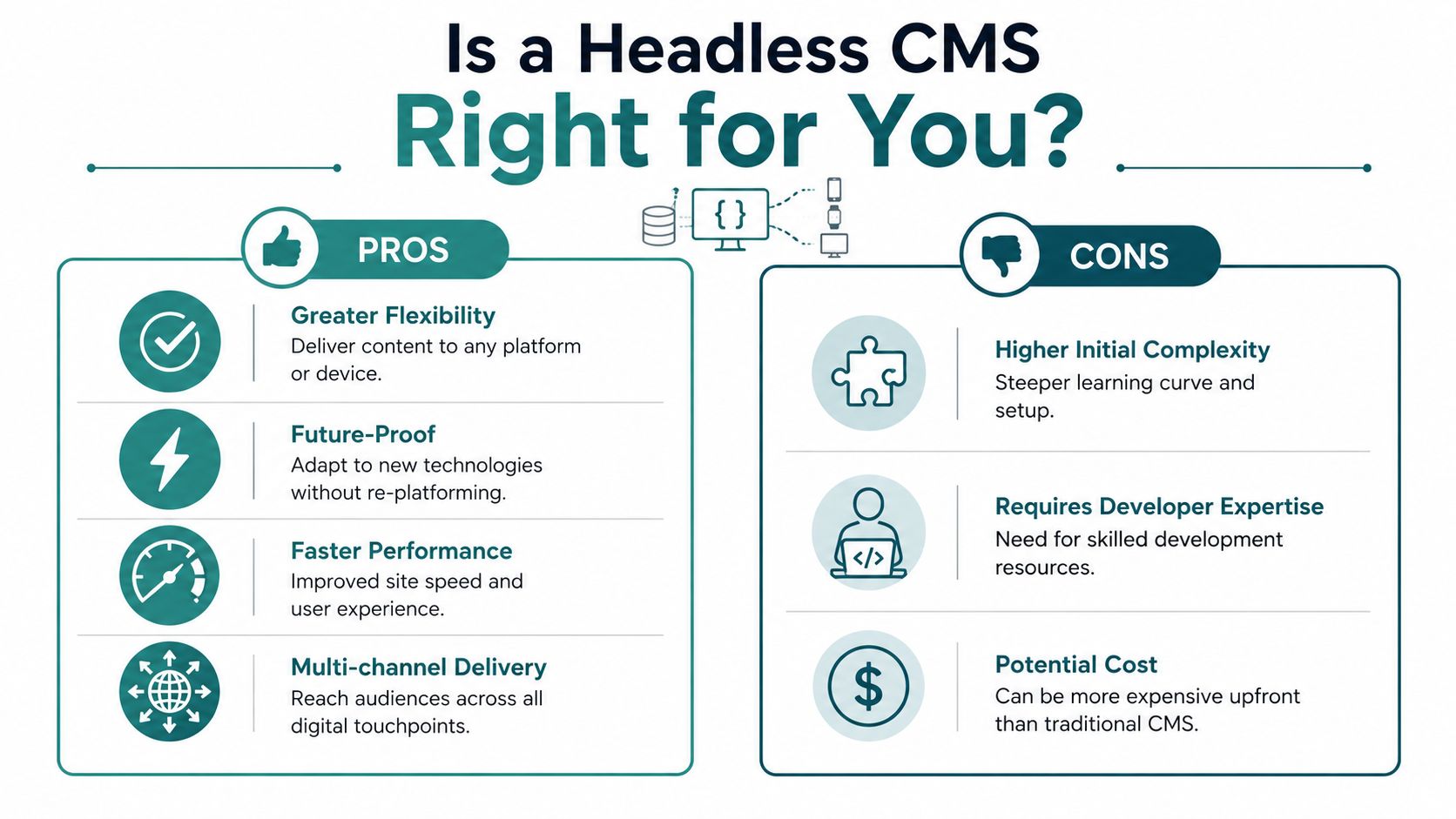
The most useful way to evaluate headless isn't by asking whether it's modern. It's by asking whether it fits how your business operates.
If you run a simple brochure site with a handful of pages and only occasional edits, a traditional CMS may still be the practical choice. If your team publishes often, depends on SEO, needs stronger security, or expects the site to support multiple tools and channels over time, headless becomes a stronger candidate.
This side-by-side view helps clarify the trade-off.
When headless makes business sense
A headless setup tends to fit when your website is more than an online brochure.
| Business situation | Traditional CMS fit | Headless CMS fit |
|---|---|---|
| Basic company site with limited updates | Strong | Usually unnecessary |
| Frequent campaign launches and landing pages | Mixed | Strong |
| Content reused across multiple channels | Weak | Strong |
| Need for custom front-end performance | Mixed | Strong |
| Team relies on plug-and-play visual editing | Strong | Mixed, unless planned well |
One practical example is a business that needs the same content to feed a main website, a customer portal, and future digital signage. In that case, managing content once and publishing it in several places can reduce duplication and make governance easier.
The editing trade-off most owners don't hear about
The biggest surprise in many headless projects isn't technical. It's editorial.
A neutral overview from Acquia notes that separating content from presentation can make visual editing and live preview harder for non-technical teams, which is one of the most important trade-offs to address in implementation strategy, as explained in Acquia's headless CMS glossary. That matters for owners because a fast website doesn't help much if your marketers feel locked out of simple updates.
A good headless build should improve developer flexibility without punishing the people who publish content every week.
That's why "Should we go headless?" is really shorthand for a better question: can your team keep easy preview, approval, and publishing workflows after the switch?
To make that less abstract, this overview is helpful:
Good fit versus bad fit
Here's a simple way to pressure-test the decision:
-
Good fit: You need speed, custom UX, stronger control over performance, and room to connect other systems later.
-
Bad fit: You mainly want a cheaper website with drag-and-drop editing and don't have ongoing development support.
-
Borderline fit: You're growing quickly, but your team still depends on easy page previews and frequent content changes.
For many SMBs, the answer isn't "yes" or "no." It's "yes, if the workflow is designed for marketers from day one."
The Blueprint Your Business Needs Before Building
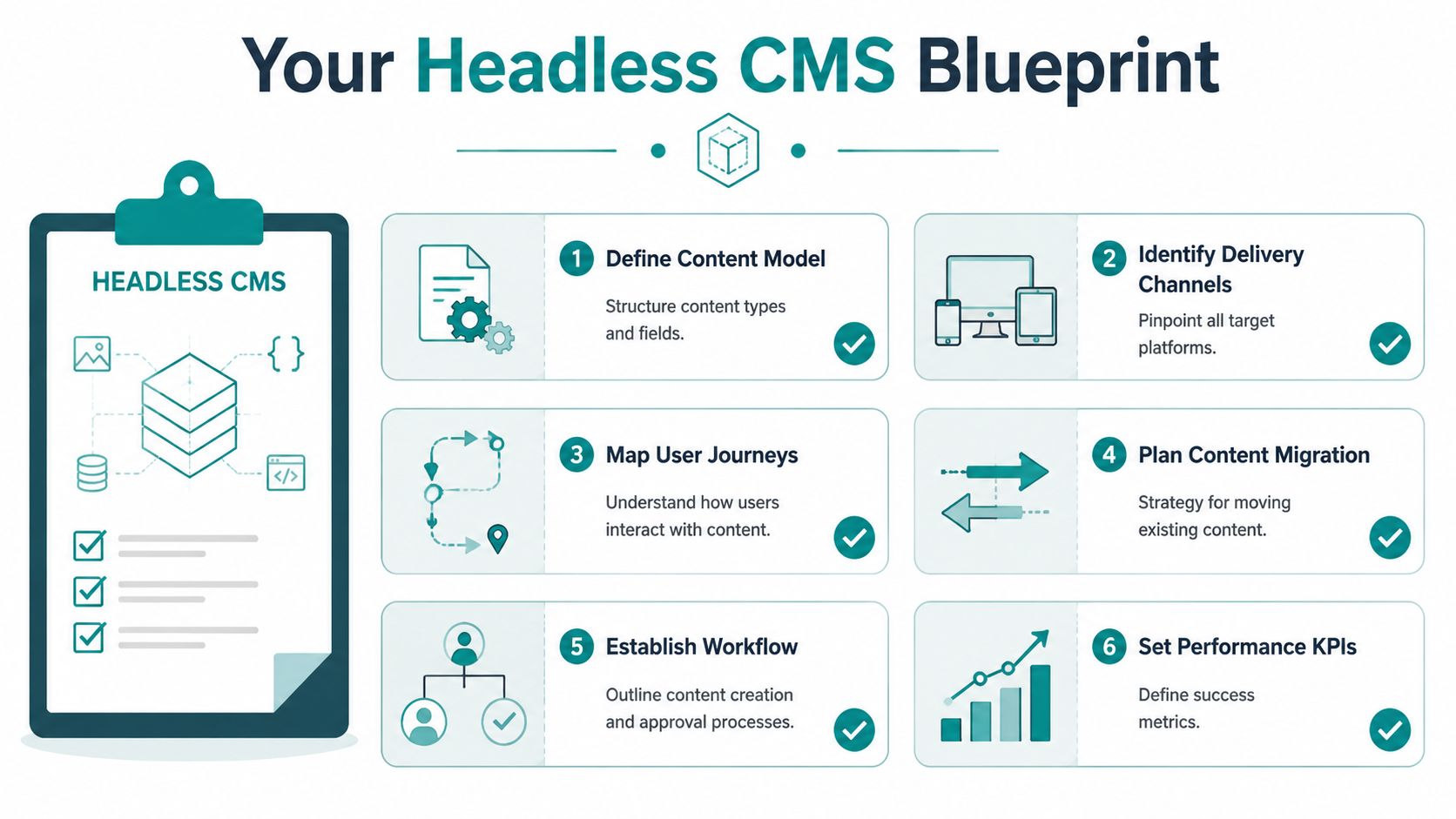
Most headless CMS projects go sideways before anyone writes code. The mistake is choosing tools first and defining the content later.
A successful headless CMS implementation starts with a blueprint for the information your business manages. Not pages. Information. Services, locations, FAQs, testimonials, team bios, product details, case studies, resources, promotions, and forms all need clear structure. If that structure is vague, your new system will still feel messy, just with newer technology.
This planning work is where owners save money. Every unclear content type becomes rework later.
Start with a content audit
A practical implementation guide recommends beginning with a full content audit, defining reusable content models, and building a content preview path before launch, as outlined in this headless CMS implementation guide from Grow Wild Agency. That sequence matters.
The audit tells you what you have, not what you assume is on the site.
Look for:
-
Content that still earns its keep: Core service pages, articles, or resources that support sales and SEO.
-
Content that should be merged: Duplicate pages, outdated location content, and near-identical service descriptions.
-
Content that needs structure: Testimonials, team members, FAQs, events, or product specs that shouldn't live as random text blocks.
Think in building blocks, not web pages
Content modeling sounds technical, but the concept is simple. You define reusable blocks of information so the team can publish them consistently anywhere they're needed.
For example, a service page might include a service name, short summary, long description, benefits list, FAQs, testimonial, related services, and a call to action. If those pieces are modeled well, your team can reuse them across category pages, landing pages, and future channels without rewriting everything.
Owner's lens: If your staff has to recreate the same information in multiple places, your content model is costing you time.
Questions worth answering before development starts
These are the questions that usually expose risk early:
-
Who edits what: If marketing updates pages but leadership approves messaging, the workflow needs to match that reality.
-
What content repeats: If you have multiple locations or service lines, identify shared fields and unique fields now.
-
Where content may go later: Even if you only need a website today, think about portals, mobile tools, sales enablement, or digital displays later.
-
How preview should work: Non-technical teams need to see what a page will look like before publishing.
-
What SEO elements must be editable: Titles, descriptions, redirects, schema-related fields, and image metadata should be manageable without developer intervention.
A strong blueprint reduces future friction. It also prevents overbuilding. Plenty of SMBs don't need an elaborate enterprise content model. They need a clean one that matches how their company sells.
Choosing the Right Technology Stack for Your Goals
Once the blueprint is clear, the technology choices get easier. Business owners don't need to memorize every framework, but they should understand the stack at a practical level because each choice affects speed, maintenance, and future cost.
Most headless builds have three moving parts: the CMS, the front end, and the hosting or deployment layer.
The three parts that matter
| Stack layer | What it does | Common examples |
|---|---|---|
| CMS | Stores and organizes content | Strapi, Contentful, Sanity |
| Front end | Displays the website visitors use | Next.js, React-based builds |
| Hosting | Publishes and serves the site | Vercel, Netlify, cloud platforms |
The right combination depends on your needs. A manufacturer with product data and distributor content may prioritize structured content flexibility. A healthcare group may care more about controlled workflows, security review, and integration planning. A service business focused on lead generation may care most about editing speed and SEO control.
Don't buy enterprise complexity if you don't need it
Owners face the possibility of getting burned. A stack can be technically impressive and still be wrong for the business.
A few examples:
-
A flexible CMS is useful if your content types are varied and likely to change.
-
A modern front end makes sense if performance and custom user experience are priorities.
-
A simpler managed setup may be smarter if your internal team is lean and wants fewer moving parts.
The strongest stack is usually the one your team can still manage a year from now.
A good stack supports change
One advantage of a headless approach is that the pieces aren't welded together. If your business evolves, you can change the front end without replacing the content layer. That flexibility is one reason many agencies build on modern JavaScript frameworks. If you want a plain-English look at why those systems are popular for scaling digital products, HDM has a useful article on building scalable React applications.
This is also the point where one factual mention is useful: HDM builds headless CMS solutions and custom web applications for companies that need content flexibility tied to broader integration and performance goals. For some Cincinnati businesses, that kind of full-stack support matters more than the specific CMS brand name.
Choose a stack based on your publishing workflow and ownership model, not on what sounds advanced in a sales pitch.
Connecting Your Tools and Migrating Your Content
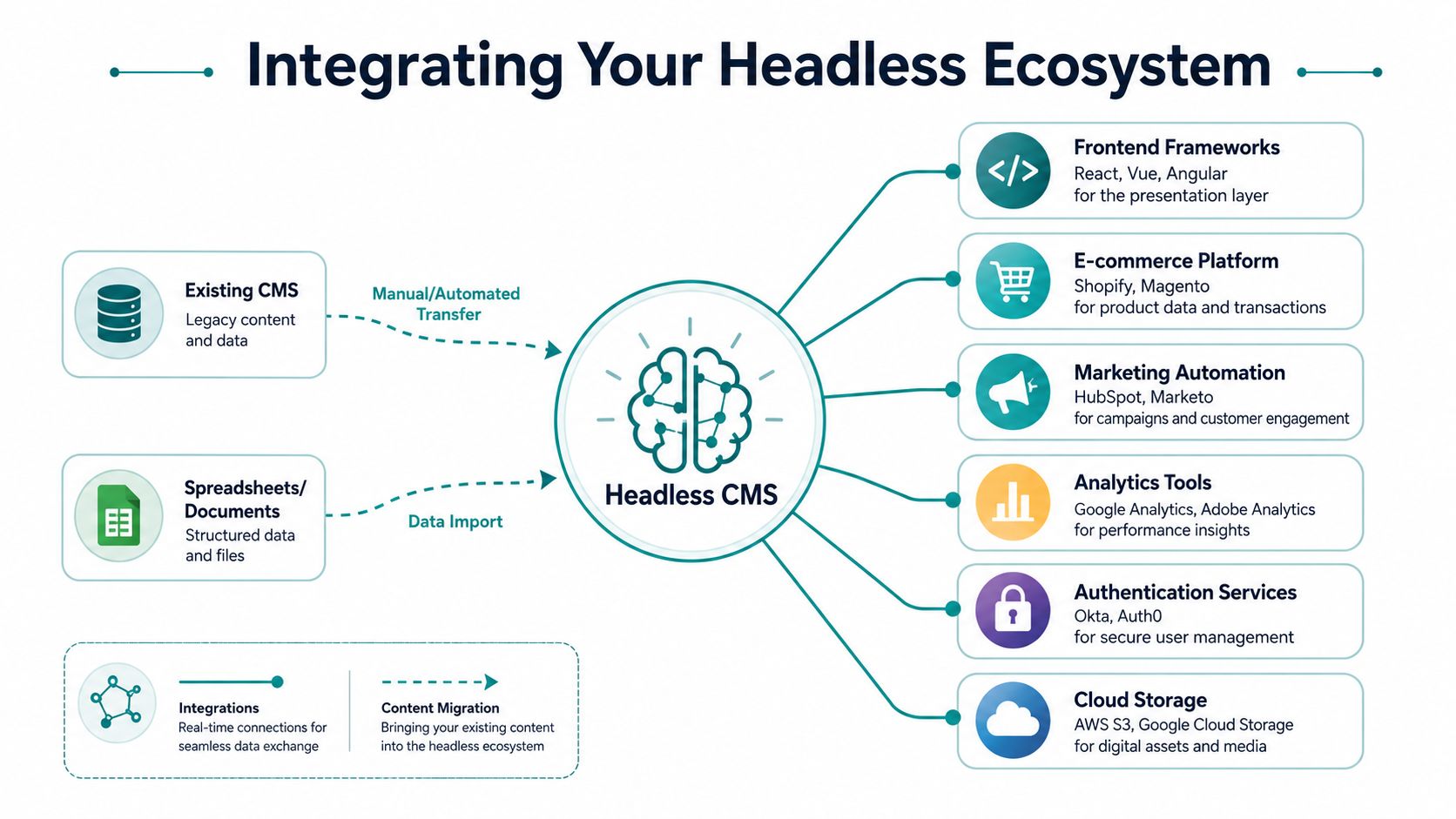
The build isn't where most ownership problems begin. They start after launch, when the website needs to talk to everything else.
A headless site rarely stands alone. It often connects to e-commerce systems, CRMs, analytics platforms, form tools, search tools, asset storage, and authentication services. That's the upside of headless. It's modular. It's also where hidden complexity shows up if no one has defined who will maintain those connections.
What integration looks like in practice
Consider a few common SMB scenarios:
A retailer wants marketing pages to feel faster and more branded than a standard storefront, but still needs product data and checkout to connect cleanly with Shopify.
A healthcare practice wants a high-performance front end, but forms, CRM routing, and location content all need strict governance.
A B2B company wants service pages, resource libraries, and gated content tied into marketing automation and analytics without relying on plugin sprawl.
In each case, the CMS is only one part of the system. The implementation succeeds when the handoffs between systems are reliable.
Migration is part cleanup, part rebuild
Content migration sounds like moving files from one platform to another. It's usually more selective than that.
You'll typically find:
-
Pages worth migrating directly: Core evergreen pages with solid search value.
-
Pages worth rewriting: Thin blog posts, duplicate services, and old campaign pages.
-
Assets needing review: Images without naming standards, missing metadata, or outdated PDFs.
-
Legacy features to replace: Old forms, sliders, calculators, or embeds that don't fit the new stack.
A rushed migration brings old problems into a new architecture. A disciplined one improves structure, editorial workflow, and search readiness at the same time.
The hidden ownership cost after launch
This is the part buyers often underestimate. Brightspot's overview makes the point clearly: the true cost of headless ownership comes from ongoing development complexity and platform orchestration, including integrations, testing, and governance, and the ROI depends on whether the organization has the engineering maturity to sustain that work, as discussed in Brightspot's review of headless CMS pros and cons.
That doesn't mean headless is a bad fit for SMBs. It means you should budget for lifecycle ownership, not just launch.
If your site depends on several APIs, someone needs to own monitoring, updates, testing, and fallback planning after the project is over.
Questions to ask before signing off on migration
-
What content is being migrated as-is, and what is being rewritten
-
Which external tools are mission-critical on day one
-
Who owns failed integrations after launch
-
How will forms, analytics, and SEO elements be tested
-
What happens when a third-party platform changes its API or workflow
If you need custom data flow between your website and other business tools, this kind of work falls under web app integrations. That's often where the core business value sits. Not in the phrase "headless CMS," but in whether your systems work together without adding manual admin work.
Launch, Security, Timelines and Budget
Business owners usually ask two questions near the end of the sales process. How long will this take, and what will it cost us after launch?
The honest answer is that a good headless project should be phased, tested, and staffed like an operational asset. It isn't a one-time design refresh. It's a platform change.
A widely cited implementation guide notes that enterprise migrations to headless CMS typically take 6 to 12 months and are often phased as Weeks 1 to 4 for a pilot, Weeks 5 to 12 for core content, and Weeks 13 to 24 for full migration, with many teams targeting 30 to 50 percent improvement in time-to-market after launch, according to Strapi's headless CMS migration guidance. SMB projects can be narrower in scope, but the lesson still applies. A phased rollout lowers risk.
A realistic launch sequence
A sensible launch path usually looks like this:
Pilot first
Start with one business-critical section, not the whole internet. That might be the home page plus a core service area, a resource hub, or a location section.
The pilot helps answer practical questions:
-
Can your editors use the workflow comfortably?
-
Does preview work the way your team expects?
-
Are forms, analytics, and search elements functioning properly?
-
Does the front end perform the way you intended?
Core content next
Once the pilot is stable, move the pages and content types that drive real business value. For many companies, that means service pages, solution pages, lead forms, FAQs, and blog or resource content.
At this stage, quality control matters more than speed. Redirects need to be mapped. Metadata needs to be verified. Internal linking needs to be reviewed. If those pieces are skipped, the launch creates SEO cleanup work later.
Full migration after validation
The last phase is where teams often get impatient. Don't.
Edge cases frequently arise during this process. Legacy content that doesn't fit the new model. Old PDFs nobody owns. Tool integrations that technically work but create messy reporting. The businesses that get the best long-term ROI from a headless CMS implementation are usually the ones that treat this phase as governance, not just publishing.
Security isn't a launch-day checkbox
Owners often hear that headless improves security because the public-facing website is separated from the content repository. That architectural separation can help, but it doesn't remove responsibility.
Security still depends on how your team handles:
-
Access controls: Who can edit, approve, publish, and administer.
-
API credentials: How keys are stored, rotated, and limited by environment.
-
Third-party tools: Every form tool, analytics script, and integration adds a new dependency.
-
Hosting and deployment practices: The site still needs controlled releases and rollback planning.
-
Compliance needs: Healthcare, legal, and other regulated industries need tighter review.
For healthcare organizations around Cincinnati, this becomes more than a technical preference. A patient-facing site may need to align with HIPAA-related operational expectations, especially around forms, data handling, and vendor processes. That's why security planning has to happen before the build starts, not after the design is approved.
Launching a faster site without a security and maintenance plan is just replacing one kind of risk with another.
Budgeting for the whole lifecycle
There isn't one standard price for headless, and any firm that tosses out a generic number before discovery is guessing. What matters more is understanding the cost categories.
One-time project costs
These usually include strategy, content modeling, design, development, migration, integration setup, QA, and launch preparation.
Ongoing operating costs
These typically include hosting, CMS licensing if applicable, maintenance, dependency updates, monitoring, testing, and editorial support.
Internal time costs
This is the category owners miss most often. Your team will spend time on approvals, content cleanup, workflow changes, and governance. Even with outside support, the business still needs internal ownership.
A healthy budget conversation should separate those three buckets. If it doesn't, you're not looking at the full cost of ownership.
What a good launch checklist includes
Before go-live, make sure your team confirms the practical basics, not just the visual design.
-
Preview is reliable: Editors can review content before it goes live.
-
Redirects are mapped: Old URLs resolve correctly and preserve search equity.
-
Metadata is in place: Titles, descriptions, and other SEO basics are controllable.
-
Performance is validated: The front end has been tested under normal use.
-
Team training is done: The people using the system know how to work in it.
If those items sound ordinary, that's the point. Strong launches usually look boring from the outside. The site works. The team knows what to do. Nothing breaks when marketing needs to move fast next month.
For most SMBs, that's the actual ROI. Not owning a trendy architecture. Owning a website platform that loads quickly, supports SEO, reduces platform friction, and doesn't become a liability every time the business grows.
If you're weighing a headless CMS implementation and want a practical read on fit, workflow, and long-term ownership, HDM can help evaluate whether a headless build makes sense for your business, what it would need to integrate with, and how to scope it around real operating requirements rather than buzzwords.