

A lot of Cincinnati business owners are already doing marketing automation. They just don't call it that.
You reply to contact form emails. You send the same follow-up after a quote request. You remind new clients what happens next. You chase old leads who went quiet. You answer the same "Did you get my form?" message over and over. The problem isn't that these tasks are hard. It's that they pile up, and they usually hit at the worst time.
A prospect fills out your website form late Friday night. Your office is closed. By Monday, they've already talked to two competitors. That's where marketing automation workflows become practical, not flashy. They help your business respond on time, stay organized, and move people forward without requiring someone on your team to sit at a desk around the clock.
What Are Marketing Automation Workflows and Why They Matter
Marketing automation workflows are prebuilt sequences of actions that start when someone does something important. That "something" might be filling out a contact form, booking a consultation, downloading a guide, abandoning an online cart, or going quiet after an estimate.
In plain English, a workflow is your digital follow-up system. It notices an event, applies a rule, and does the next useful thing automatically.

What that looks like in a local business
A Cincinnati home service company might set up a workflow like this:
- Form submission happens: A homeowner requests an estimate from the website.
- Instant response goes out: They receive a confirmation email right away.
- Internal handoff happens: The sales team gets alerted with the lead details.
- Follow-up continues: If nobody books within a few days, the prospect gets a helpful reminder.
A law firm, med spa, or B2B manufacturer can use the same idea. The workflow changes, but the purpose stays the same. Respond faster, reduce manual work, and make sure good leads don't sit untouched.
Why this matters more now
This isn't just enterprise software anymore. The global marketing automation market is projected to reach roughly $15.58 billion by 2030, with SMEs identified as the fastest-growing segment, which is a strong signal that smaller businesses are treating automation as part of normal growth planning, not a luxury add-on (marketing automation market projection).
That matters if you're competing in a crowded local category. When buyers compare two Cincinnati businesses with similar reviews, similar pricing, and similar services, the one that responds clearly and quickly often gets the next conversation.
Practical rule: Automation should handle speed and consistency. Your team should handle judgment and relationships.
A common mistake is thinking workflows are only for email newsletters. They're not. They connect website forms, CRM updates, lead routing, reminders, onboarding, and re-engagement. If you've been exploring broader systems thinking around this topic, HDM also has a useful perspective on marketing automation for agencies, especially if your business has multiple services or a more complex sales process.
What they are not
Marketing automation workflows are not a substitute for strategy. They won't fix a weak offer, a confusing website, or a slow sales team. They also won't make bad messaging feel personal.
What they do well is remove the delay between customer interest and business response. For many small and mid-sized companies, that one improvement changes everything.
How Marketing Automation Workflows Actually Work
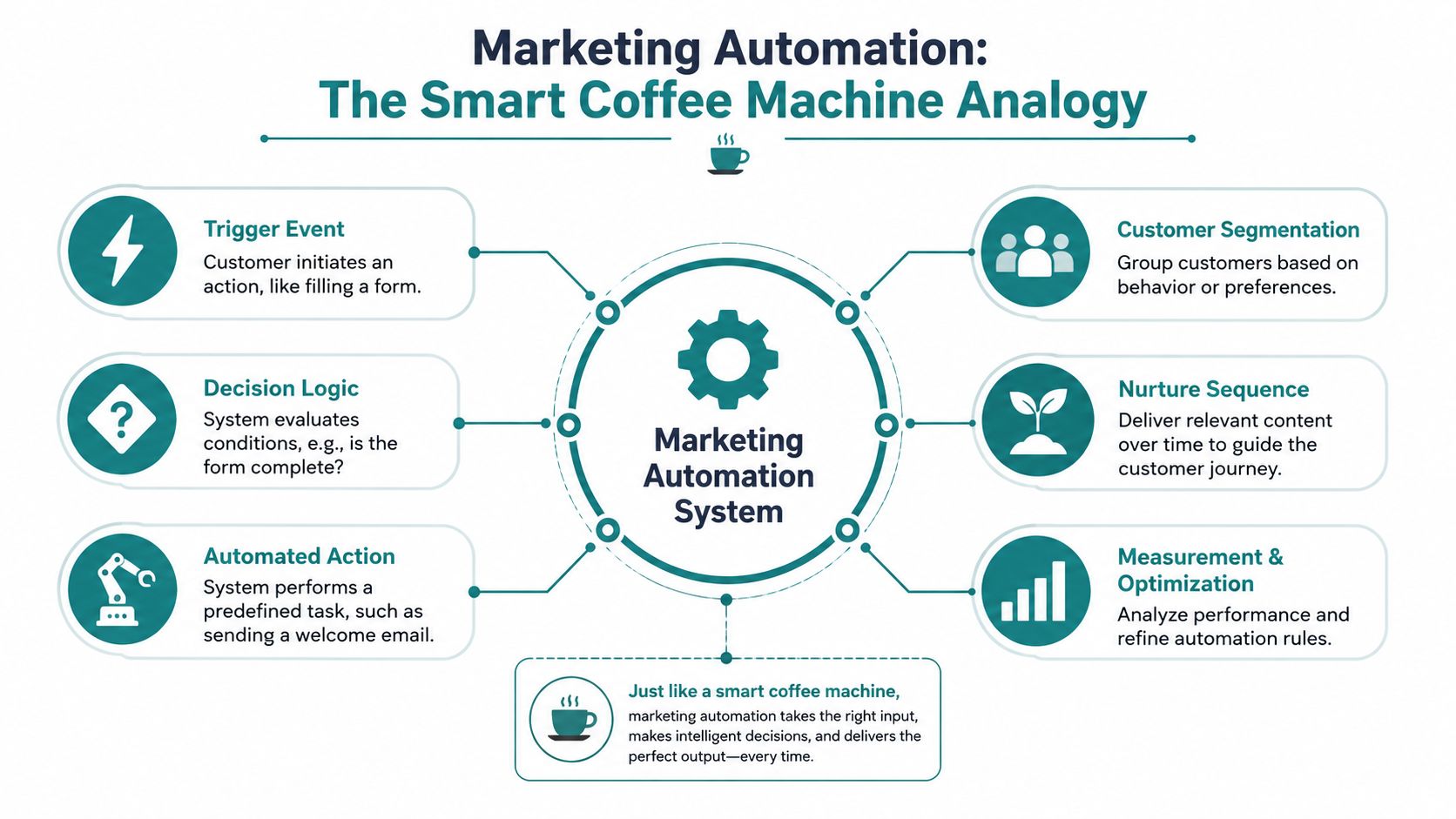
The mechanics of a workflow are straightforward once you break them into four parts: trigger, action, logic, and timing.
For a Cincinnati business owner, that usually means something practical. A prospect fills out a quote form at 9:14 p.m. A customer stops responding halfway through an estimate. A past client visits your service page again after six months. The workflow notices that behavior, applies the rules you set, and handles the next step without waiting for someone on your team to catch it manually.
Here's a simple visual for that model:
Triggers start the workflow
A trigger is the event that starts the process.
For a local company, common triggers include:
- A form fill: Someone requests pricing or a consultation.
- A page visit: A prospect keeps returning to a service page.
- An appointment action: Someone books, reschedules, or cancels.
- A period of inactivity: A lead or customer has gone quiet.
The cleaner the trigger, the more dependable the workflow. In practice, simple event-based triggers tend to run faster and with fewer errors than complicated rule stacks, and Tajo's workflow analysis notes that native event-stream setups can process those events in under 300ms while more complex trigger combinations can lag by several minutes (workflow trigger timing details).
That matters more than it sounds. If a Hyde Park law firm promises a fast callback or a Mason home services company is trying to book jobs before a competitor does, a delayed trigger can turn a good system into a slow one.
Actions do the work
Once the trigger fires, the platform carries out one or more actions.
Those actions often include:
- Sending an email with the right next step
- Creating or updating a contact in HubSpot, ActiveCampaign, or another CRM
- Alerting a salesperson or office manager that follow-up is needed
- Applying a tag or segment like "requested quote" or "interested in SEO"
- Adding the person to a follow-up sequence based on their interest or stage
This is where the time savings become real. Staff stop copying form submissions into spreadsheets, forwarding lead emails by hand, or trying to remember who needs a reminder on Thursday.
Some Cincinnati companies also connect online behavior to offline follow-up. If your sales process includes postcards, handwritten notes, or other physical outreach, this guide to direct mail automation shows how direct mail can fit into the same workflow instead of operating as a separate channel.
Logic and delays control the path
A good workflow does more than send the same message to everyone. It checks what happened and adjusts.
Typical logic rules ask questions like:
- Did the contact open the email?
- Did they click the booking link?
- Have they already become a customer?
- Should sales step in now, or should marketing keep nurturing?
Timing shapes how the workflow feels. A sequence sent too quickly can feel automated in the worst way. A sequence with too much delay can miss the buying window entirely. For many local businesses, the right cadence depends on the type of decision. A roofing estimate after storm damage needs faster follow-up than a long-consideration B2B service sale.
A simple example:
- A prospect downloads a pricing guide.
- The system sends a confirmation email immediately.
- It waits one day.
- If the prospect clicked, the workflow sends a case study or booking prompt.
- If they did not click, it sends a lighter reminder.
- If they request a meeting, the nurture stops and sales gets notified.
That branching logic is what makes automation useful instead of noisy.
Here's a helpful walkthrough if you want to see another explanation in action:
Watch: Marketing automation workflow walkthrough (video)
The structure is consistent across nearly every platform. Something happens. The system responds. Rules decide the next step. Timing controls when it happens. Once that clicks, marketing automation stops feeling like a software category and starts looking like an operations tool for growth.
Real-World Automation Workflows for Cincinnati Businesses
The most useful workflows aren't fancy. They solve routine business moments that happen every week.
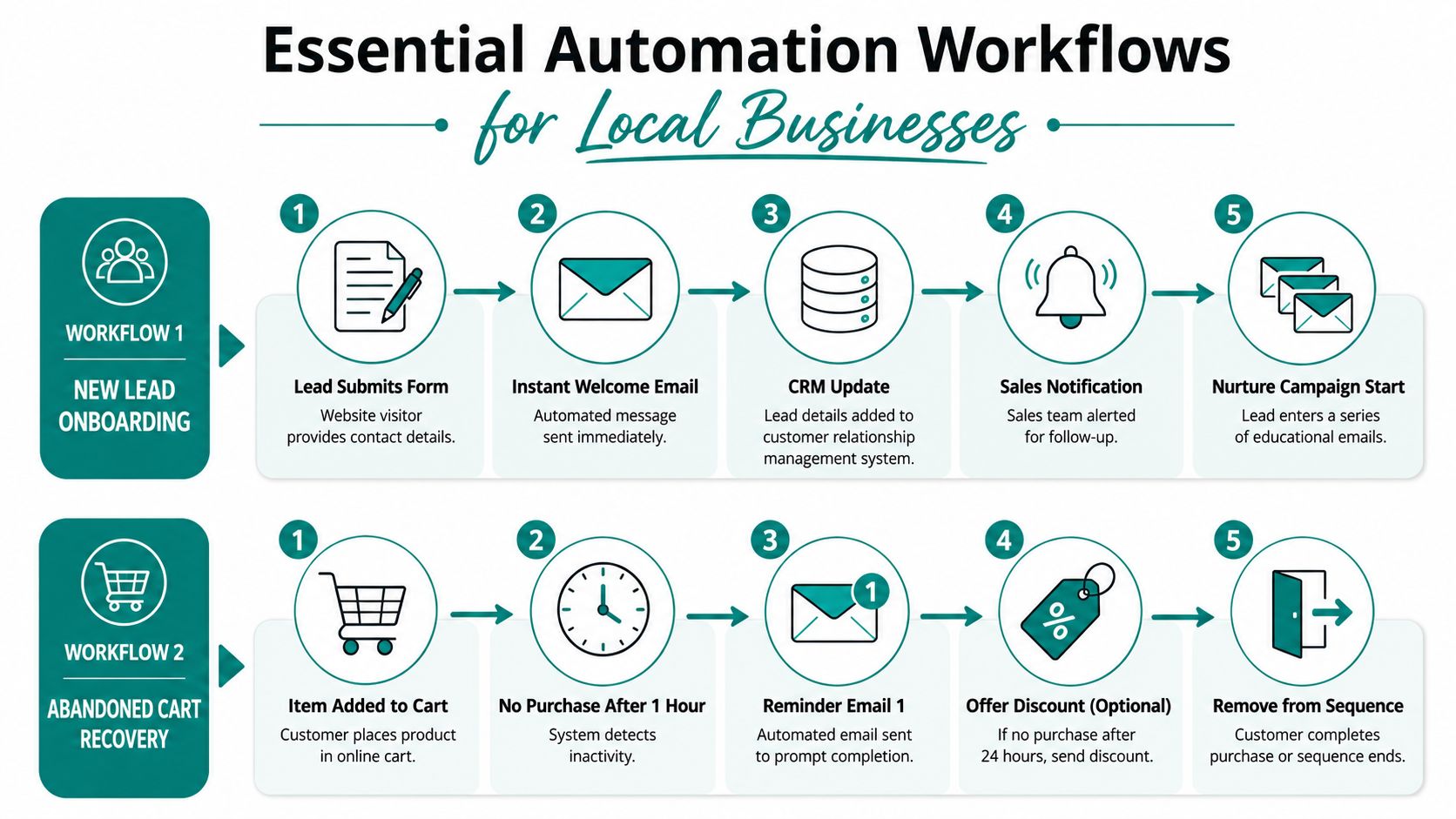
Authoritative guidance recommends seven core workflows for B2B companies: a welcome sequence, lead nurture, MQL notification and routing, re-engagement, post-demo follow-up, client onboarding, and renewal or expansion sequences (seven core workflow types).
For most Cincinnati businesses, the best starting point is to adapt a few of those into everyday situations you already recognize.
Welcome workflow for a new lead
A local accounting firm runs paid search during tax season. Someone finds the site, reads a service page, and fills out a consultation form after dinner.
A good welcome workflow might look like this:
- Immediate message: "Thanks, we received your request."
- Internal alert: The office manager or advisor gets the lead details.
- Next-day follow-up: The prospect receives a short email explaining what the first call covers.
- Reminder path: If they don't schedule, they get one more nudge with a clear booking link.
This type of workflow doesn't replace the consultation. It protects it. It closes the awkward gap between "I'm interested" and "Is anyone there?"
Re-engagement workflow for dormant contacts
A Cincinnati med spa, fitness studio, or home remodeling company often has a long list of past leads and older customers who went quiet.
A re-engagement workflow gives you a structured way to restart that relationship without manually sorting through old spreadsheets.
Example flow:
| Trigger | Action | Purpose |
|---|---|---|
| Contact inactive for a set period | Send a friendly check-in email | Reopen the conversation |
| No response | Share a useful offer or seasonal reminder | Create a reason to act |
| Click but no booking | Notify staff for personal follow-up | Add human outreach at the right moment |
For a local angle, the message can be tied to timing that makes sense in Cincinnati. A landscaping company might re-engage leads before spring demand ramps up. A retailer might reconnect around major shopping weekends. A professional service firm might send a reminder before a known annual deadline.
Local insight: The strongest re-engagement campaigns don't sound like "We miss you." They sound like "Here's why now is a good time to revisit this."
Client onboarding workflow for service businesses
This is one of the most overlooked uses of marketing automation workflows.
A web design agency, law office, CPA firm, or consultant often does the same onboarding steps every time. Send the welcome message. Request documents. Explain timelines. Introduce the point of contact. Confirm next steps.
When that process lives in someone's memory, things get missed. When it lives in a workflow, clients feel guided.
A basic onboarding sequence might include:
- Signed agreement received
- Welcome email sent
- Checklist or intake form delivered
- Internal project task created
- Client reminder if intake isn't completed
- Kickoff scheduling email sent
MQL routing for businesses with a sales team
If your business has separate marketing and sales responsibilities, you need a clean handoff.
A manufacturer, SaaS firm, or commercial contractor might define a marketing-qualified lead as someone who requests a quote, asks for a demo, or repeatedly visits high-intent pages. Once that threshold is reached, the workflow should route the lead to the right salesperson immediately and stop generic nurture emails.
What works:
- Routing based on service type, territory, or product line
- Including the lead's recent activity in the internal notification
- Stopping irrelevant messages once sales is involved
What doesn't work:
- Letting high-intent leads sit in a general newsletter list
- Sending the same sequence to every contact regardless of behavior
- Creating so many branches that nobody on your team understands the system
The best workflows are clear enough that a business owner can still explain them in a few sentences.
How to Implement Your First Automation Workflow
The fastest way to fail with automation is to make it too big.
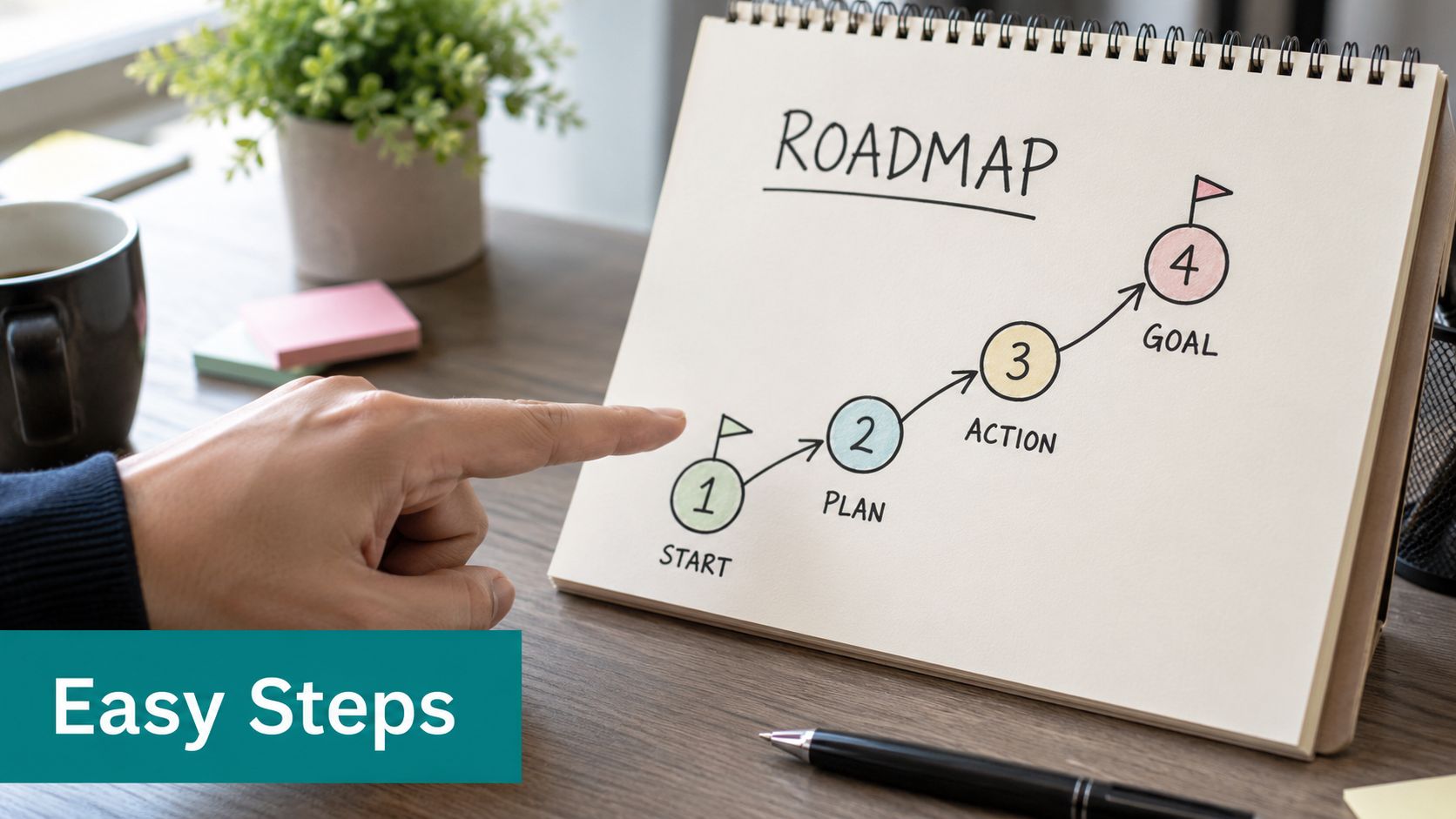
Small businesses should start with high-frequency, repetitive tasks such as lead capture and distribution, email confirmations, and customer onboarding, and they should choose 1 to 3 high-impact, low-complexity workflows instead of trying to automate everything at once (small business workflow starting points).
Step one picks the right process
Start with the task your team repeats constantly.
Good first candidates include:
- Lead follow-up: Website inquiries, quote requests, consultation requests
- Confirmation messages: Appointment receipts, form acknowledgments
- Onboarding tasks: Welcome emails, intake forms, first-step instructions
- Internal routing: Assigning leads to the right person fast
If you're not sure where the time goes, map a handful of recurring processes and write down three things for each one: how often it happens, how long it takes, and where delays usually appear. That exercise quickly shows which process is worth automating first.
Step two chooses a tool that fits your real needs
At this point, owners often overbuy or underbuy.
Mailchimp, ActiveCampaign, HubSpot, and Klaviyo all have workflow features, but the right choice depends on your sales cycle, website setup, CRM needs, and whether you need basic email sequences or broader operational automation.
For businesses that need workflow design tied to web, CRM, and broader business operations, HDM's workflow automation services are one option alongside mainstream software platforms. The important part isn't picking the fanciest tool. It's picking one your team will use and maintain.
Step three maps the workflow before you build
Don't start in software. Start on paper or in a shared doc.
Write it out like this:
| Event | Decision | Action |
|---|---|---|
| Prospect submits form | Is the form complete? | Send confirmation and alert staff |
| No booking after follow-up | Did they click the scheduling link? | Send a reminder or assign manual outreach |
| Customer signs agreement | Has intake been completed? | Send onboarding materials or reminder |
That simple map does two things. It exposes missing steps, and it prevents overcomplicating the build.
A workflow should be easy to sketch before it's easy to automate.
Step four tests before launch
Use your own team as the first contacts in the system.
Submit the forms. Click the links. Don't click the links. Try a typo-filled submission. Try a duplicate. Make sure notifications go to the right people and make sure customers won't receive contradictory messages.
Keep the first launch narrow. One workflow. One audience. One business goal.
That's enough to create momentum. Once the first workflow is stable, you can add another with much less friction.
Measuring What Matters and Optimizing Your Workflows
A workflow that fires on time isn't automatically a good workflow.
Many businesses are commonly misled. The emails went out. The CRM updated. The notification hit Slack. Everything worked technically, but revenue didn't move.
There's a documented gap between operational success and revenue impact. Workflows should be judged against pipeline generation, win rates, and sales cycle length, not just email engagement, and 60% of users report difficulty proving ROI beyond engagement metrics (revenue-focused workflow measurement).
The wrong scoreboard
Open rates and click rates still matter. They can help diagnose problems with subject lines, timing, or content. But they are not the finish line.
If you run a Cincinnati service business, stronger questions look like these:
- Did more leads book consultations?
- Did qualified prospects move to sales faster?
- Did clients complete onboarding with fewer delays?
- Did the sales team close opportunities faster?
Those are business outcomes. They connect automation to revenue instead of activity.
A better way to review workflow performance
Use a simple three-layer review:
- Check delivery first. Did the workflow trigger when it should have? Did the right contacts enter it? Did anyone get stuck?
- Check behavior second. Are people opening, clicking, scheduling, replying, or completing the next step?
- Check revenue impact last. Are more opportunities entering the pipeline? Are deals moving faster? Are dormant leads reactivating into real conversations?
That sequence keeps you from making the classic mistake of celebrating engagement that never becomes business.
If a workflow increases clicks but doesn't improve sales movement, you've improved activity, not performance.
Optimization should be routine
Most automation systems need regular tuning because buyer behavior changes. The copy that worked last quarter may feel stale now. The timing may be off. Your sales process may have changed.
Practical tests include:
- Subject line tests: Two versions of the first email
- CTA tests: "Book a call" versus "Get pricing"
- Timing tests: Different delay windows between messages
- Branching tests: Sending one path to highly engaged leads and another to lower-intent contacts
Keep the changes small enough that you can tell what caused the result. Businesses get into trouble when they rewrite the whole workflow, change the audience, and alter the offer all at once.
Good optimization is less dramatic than commonly expected. It's steady, boring, and profitable.
Your Next Step Toward Automated Growth in Cincinnati
Marketing automation workflows are easier to adopt than they look from the outside.
You don't need a giant tech stack. You don't need a full-time automation specialist. You need one process that wastes time, one clear customer journey, and one practical reason to improve it. For many Cincinnati businesses, that's enough to get real traction.
The bigger shift is mental. Automation isn't about replacing the human side of your business. It protects it. It handles the routine follow-up, the reminders, the internal routing, and the basic consistency your customers expect. Your team still handles trust, sales conversations, service delivery, and relationship-building.
That matters even more as workflows become smarter over time. Adaptive workflows that adjust based on engagement outperform static workflows by 32% in lifetime value retention, which is a strong reminder that good automation shouldn't stay frozen after launch (adaptive workflow performance).
What smart next steps look like
If you're evaluating your options, keep it simple:
- Start with one friction point: A missed lead, slow follow-up, messy onboarding, or weak re-engagement
- Choose one workflow: Build the smallest version that solves the problem
- Review it regularly: Watch for customer behavior, sales feedback, and process breakdowns
- Expand only after it works: Add complexity after you've earned it
For business owners comparing web design, SEO, and digital marketing partners, strategy becomes critical. A website shouldn't just look good. It should connect to the follow-up systems that turn traffic into conversations and conversations into revenue.
If you're in Cincinnati and trying to figure out where automation fits into your marketing, sales, or customer experience, the right next move usually isn't "buy more software." It's mapping the process clearly and building the first workflow that solves a real business problem.
If you want a practical plan for that first workflow, HDM can help you map the customer journey, connect the right tools, and build an automation system that supports real business outcomes instead of just sending more messages.