
96% of businesses have some form of backup, but less than half successfully recover all their data during a real outage or attack. The difference between having copies and restoring usable systems is where business continuity is won or lost.
A Cincinnati business owner may discover that gap on an ordinary Tuesday. An employee opens an invoice folder and finds encrypted files. The accounting application won't launch. The website is offline, customer emails are inaccessible, and the person who set up the backup system is out of the office. A hardware failure, storm, accidental deletion, or ransomware incident can turn routine operations into an urgent business decision.
Backup and disaster recovery is about more than just storing files in another location. It means creating a reliable path back to revenue-producing operations, customer records, websites, applications, and communications. The strongest plans combine protected copies, clear recovery goals, documented responsibilities, and regular restoration tests.

Why Backup and Disaster Recovery Matters Now
A local manufacturer may rely on production schedules, customer specifications, invoices, supplier records, and operational systems spread across servers, laptops, Microsoft 365, and line-of-business applications. A professional services firm may need its website, client portal, email, documents, and accounting platform available every day. If one system fails, employees may lose the ability to serve customers even while the underlying data remains intact.
That exposure makes backup and disaster recovery part of daily operating discipline, not an occasional IT project. A historical SunGard AS disaster recovery infographic records 1,749 disasters from the 1950s through the 1990s and 1,266 disasters during the 2000s alone. The practical lesson is clear. As businesses became more dependent on digital systems, disruptions required documented continuity plans rather than ad hoc technical fixes.
A backup also has to survive the event that makes recovery necessary. Ransomware can encrypt production data and connected backup repositories, while a cloud or SaaS provider may restore the service but leave the customer responsible for deleted records, configurations, permissions, or retention. That shared-responsibility gap is easy to miss until recovery stalls.
Practical rule: A backup plan that has not been restored successfully is an assumption, not a recovery capability.
The risk Cincinnati businesses often underestimate
A small or local company can still hold payment information, credentials, contracts, customer records, and access to critical operations. Limited staff and undocumented procedures can make that business an easier target and leave fewer people available to manage recovery.
The threat extends beyond ransomware. A failed drive, compromised administrator account, corrupted database, deleted SaaS records, or unavailable website can interrupt sales and service. Recovery also becomes far more expensive when backup copies are compromised, because the business may need emergency rebuilding, outside assistance, and prolonged downtime. A tested plan gives employees a defined sequence under pressure, instead of forcing them to coordinate disconnected vendors and systems from memory.
Choosing Your Infrastructure Strategy
When choosing an infrastructure strategy, start with the real-world consequences of a business interruption. Which systems you need to protect, how quickly they must be restored, who is responsible for managing them, and how much complexity your team can absorb matter more than a product label. For a Cincinnati small office, a distributed team, or a business serving regulated clients, there's no universal answer.
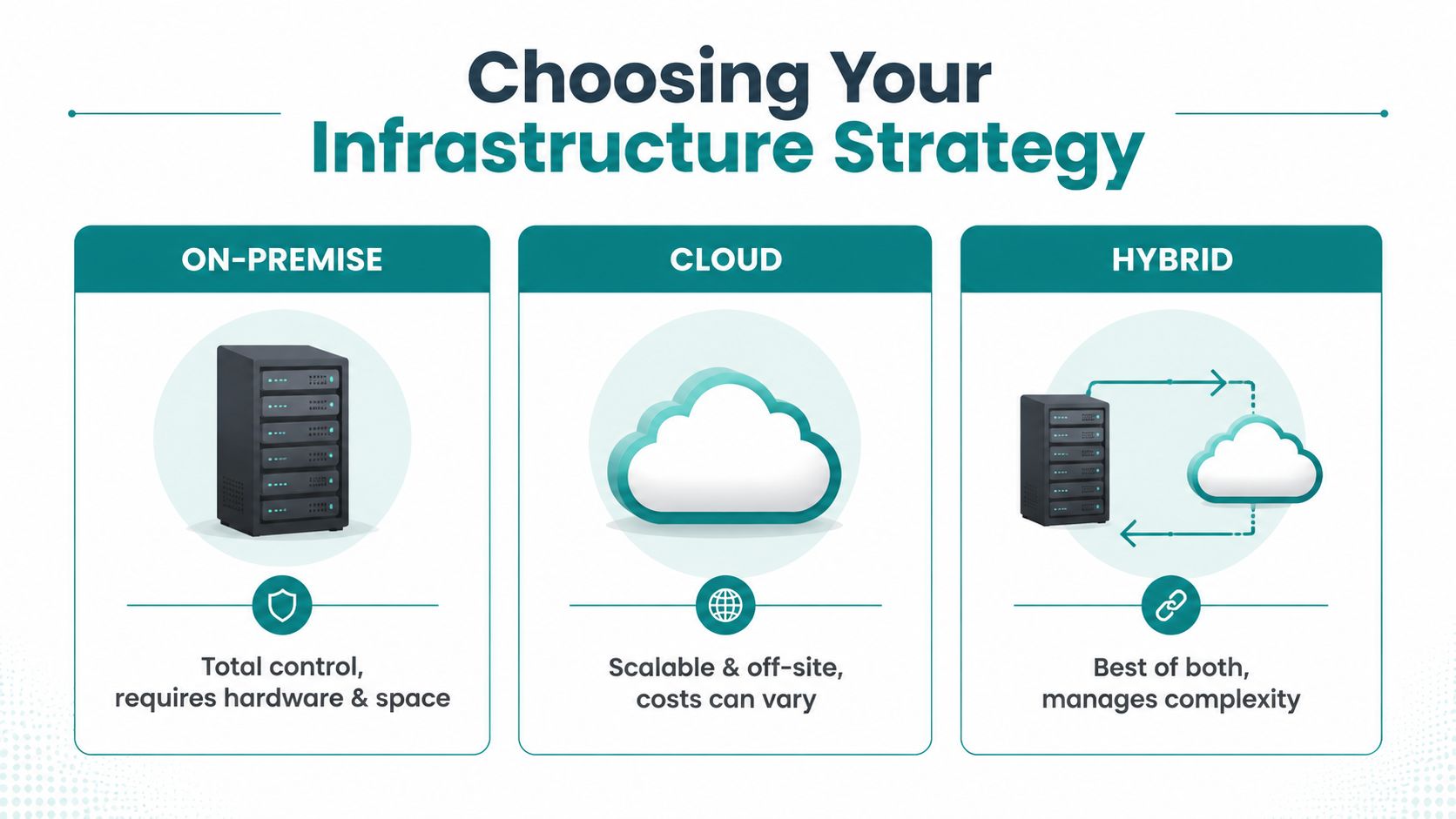
| Strategy | Strength | Trade-off | Best fit |
|---|---|---|---|
| On-premise | Direct physical control and fast access on the local network | Requires hardware, space, maintenance, and an offsite plan | Businesses with capable internal IT and local recovery needs |
| Cloud | Offsite redundancy, flexible capacity, and remote accessibility | Provider dependency, recurring costs, and internet reliance | Distributed teams and businesses avoiding duplicate hardware |
| Hybrid | Combines local recovery speed with offsite resilience | More components to monitor and document | Organizations balancing performance, control, and continuity |
On-premise, cloud, or both
Local backups suit applications that need fast access to large files or that depend on local infrastructure to run. They can't protect a business on their own. A fire, flood, theft, or ransomware incident that reaches both the office and its backup equipment can compromise the copies too. Physical control brings speed and visibility, but keeping backups close to production can actually widen the blast radius of an incident.
Cloud backup reduces hardware maintenance and provides geographically separated copies. That said, a cloud service isn't automatically a complete recovery plan. Providers typically secure and maintain the availability of their own platform, but the business still needs to confirm retention policies, access controls, which applications are actually covered, deletion protection, and the real process for recovering a specific record. HDM's cloud security compliance advice is a useful reference for clarifying where those responsibility boundaries fall.
In a ransomware scenario, a complete but non-isolated backup can still be encrypted or deleted. When choosing a cloud service, confirm which copies remain usable if an administrator account is compromised, and be clear about what the provider will restore versus what your business must rebuild itself.
A hybrid architecture usually strikes the most practical balance between local recovery speed and offsite resilience. Local copies can handle everyday file recovery, while an isolated cloud copy provides a fallback path if the office, servers, or local credentials are compromised. The trade-off is more management work: someone has to monitor both environments, reconcile policies, and decide which copy to use during a given incident.
Choose your architecture based on business impact, not marketing labels. Web design firms, law offices, manufacturers, and medical practices may all use cloud services, but their recovery priorities, data-control requirements, and tolerance for disruption are not the same.
Defining Your Recovery Goals
Start with business consequences, not backup products. Ask two questions: How long can this operation remain unavailable, and how much recent work can the business afford to lose?
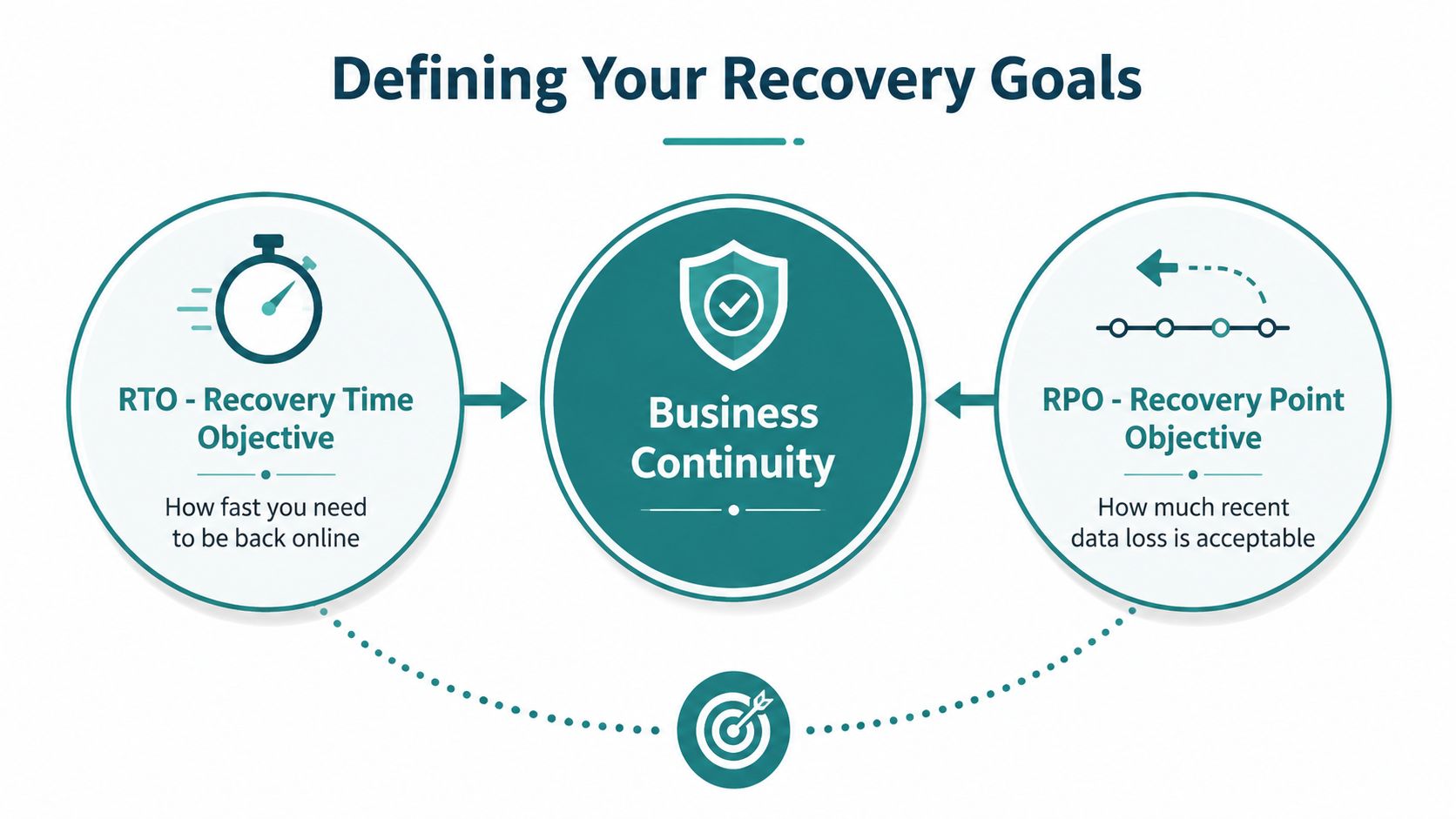
Recovery Time Objective, or RTO, answers the first question. It's the maximum acceptable downtime before the disruption causes unacceptable business harm. Recovery Point Objective, or RPO, answers the second. It's the maximum acceptable data-loss window, measured from the last valid copy of the data.
Translate technical targets into business limits
Think of RTO as the time allowed to reopen the doors and RPO as the amount of today's work you're willing to recreate. An RTO and RPO planning guide gives a straightforward example: an RPO of 15 minutes means the last backup or replication point must be no older than 15 minutes, while an RTO of 2 hours means service must return within two hours.
Use this sequence to set targets:
- List critical services. Include the website, email, customer relationship system, accounting, file storage, production tools, identity platform, and any SaaS application employees need to work.
- Rank business impact. Ask which systems stop sales, prevent delivery, create compliance exposure, or block customer support when unavailable.
- Set an RTO for each service. A public information website may tolerate a different outage than an online ordering system or patient-facing application.
- Set an RPO for each data source. A system that changes constantly may need more frequent protection than an archive that changes rarely.
- Confirm the design can meet both targets. Shorter RPOs require more frequent backups or continuous replication, and shorter RTOs may require automation, standby systems, or faster restore capacity.
AWS-oriented recovery guidance commonly describes tiered targets that range from about 15 minutes of RTO with near-zero RPO for tier-one workloads to 8 to 24 hours of RTO with a 4-hour RPO for tier-three systems, as summarized in this RTO versus RPO technical overview. Those targets aren't a prescription for every company. They show why a generic backup schedule can't answer a business-specific recovery requirement.
The Hard Truth About Data Recovery
A ransomware incident can leave a business with a difficult choice: restore quickly from a compromised backup, or spend far longer determining what remains trustworthy. Paying for backup software does not prove that recovery will work. A job may never have completed, the backup may be corrupted, credentials may no longer function, an application version may have changed, or no one may know which systems must return first.
A 2024 State of the Backup survey summary reported that 39% of IT decision-makers needed to restore data at least once a month. Requests involved archived or deleted data, backup software failure, hard drive failure, and cyberattacks. The same report found that only 42% recovered all their data after data loss, while 58% recovered some but not all data. It also reported that only 57% of backups were successful and 61% of restores met the desired outcome. Those results show the operational gap between having a backup and having a usable recovery path.
Storage is not validation
A backup job can report that data was copied while a restoration test reveals incomplete files, broken dependencies, inaccessible accounts, or retrieval times the business cannot accept. Ransomware makes that gap more expensive. An intact backup can support a controlled recovery, while a compromised or unusable backup can force extended downtime, emergency rebuilding, and outside assistance.
A practical validation program should include:
- File-level recovery: Restore representative documents and confirm employees can open them.
- Application recovery: Test databases, websites, accounting platforms, and connected services, not just folders.
- Credential checks: Verify authorized staff can access recovery tools without relying on one administrator.
- Clean-room procedures: Practice restoring without reconnecting compromised systems or infected credentials.
- Business signoff: Have system users confirm that restored information is usable.
A 2025 backup and recovery report from Unitrends found that more than 60% of organizations believed they could recover from downtime within hours, but only 35% could. Confidence without a drill creates dangerous comfort. Measure elapsed time, missing data, dependencies, staffing, and decisions nobody documented. For cloud and SaaS systems, test what the provider restores and what your team must recover separately.
Compliance and Data Governance
Healthcare practices, legal firms, financial organizations, and professional services companies can't treat backup as a simple storage decision. Their recovery design must account for confidentiality, access history, retention, legal holds, and the risk of exposing sensitive records during restoration.
Encryption should protect information in transit and at rest, but encryption alone doesn't establish a compliant operating model. The business also needs role-based access, controlled administrative privileges, documented retention rules, secure deletion practices, and a recovery process that preserves appropriate oversight. A backup repository containing patient or client information deserves the same seriousness as the production system.
Shared responsibility needs a named owner
Cloud and SaaS providers typically operate the underlying service, but that doesn't mean they automatically preserve every record, version, configuration, permission, or deleted item your organization may need. Your team must understand what the vendor covers and what remains your responsibility.
Ask each provider:
- What data and metadata are included in backup coverage?
- How long are deleted or changed records retained?
- Can administrators restore selected records, or only an entire environment?
- Are backup credentials separated from everyday identity accounts?
- Can the provider demonstrate recovery procedures and audit activity?
- How are legal holds and retention requirements handled?
For healthcare organizations, website and hosting decisions should be evaluated alongside patient privacy and operational continuity. HDM's HIPAA website hosting guidance provides a useful reference point for connecting website infrastructure with healthcare data obligations.
Governance also affects the website itself. A clinic, law firm, or service business may depend on forms, scheduling integrations, analytics, content management, and domain access to generate or support new business. Recovery planning should identify those dependencies without copying sensitive information into unprotected test environments. The best policy is one that employees can follow during a crisis and auditors can understand afterward.
Surviving Ransomware Attacks
Ransomware operators often target the recovery path after encrypting production files. They may steal administrator credentials, delete snapshots, change retention settings, or encrypt backup repositories. A business with only connected copies can find that its safety net was part of the attack surface.
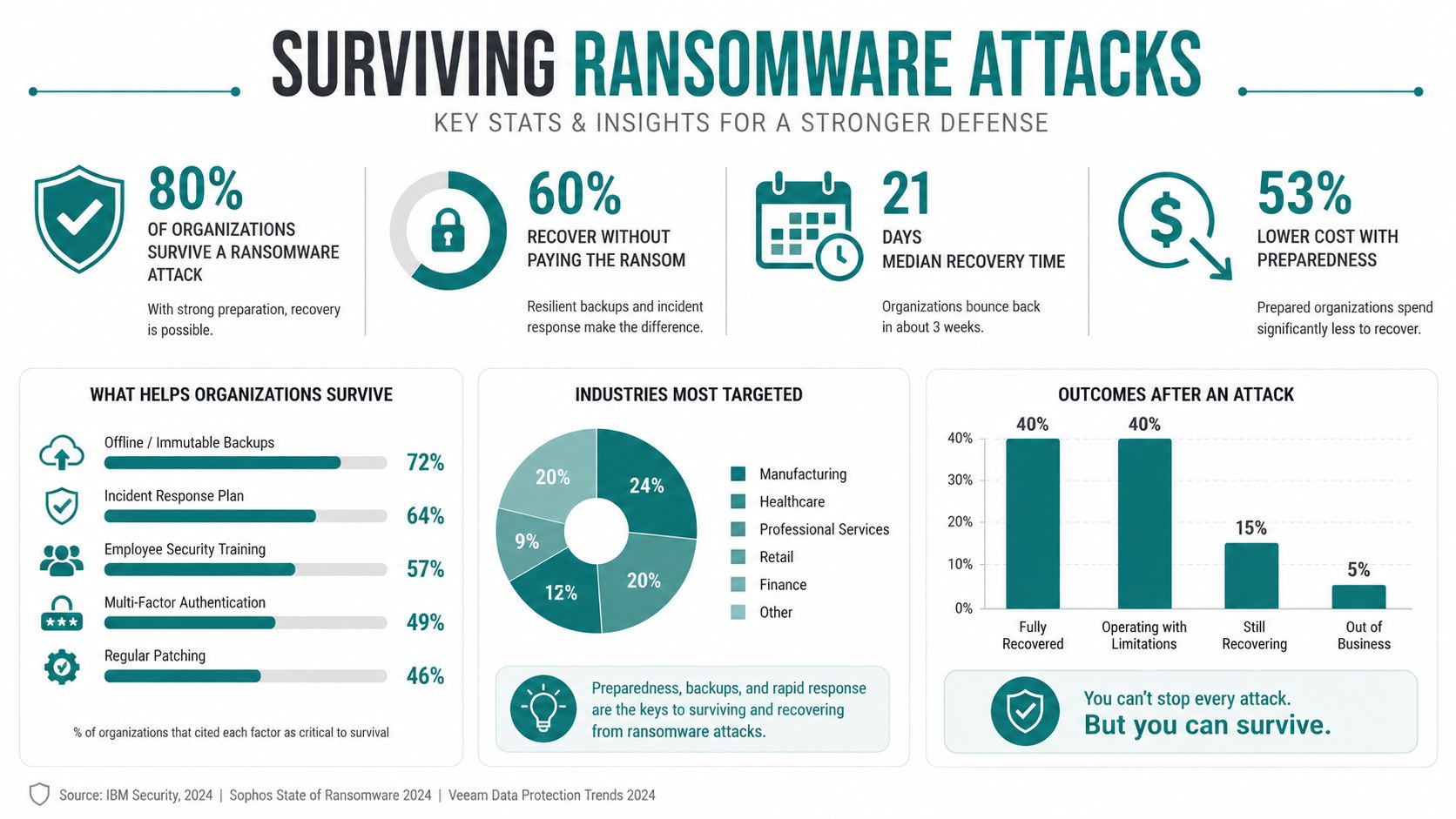
CNIC Solutions' ransomware recovery statistics reports that 96% of ransomware attacks target backup repositories, with 76% of those attempts succeeding. The same resource cites a separate 2025 report summary in which 89% of organizations had backup repositories targeted. The practical question is whether attackers can alter or erase the copies your team needs.
Protect the recovery copy
Immutable backups use controls that block alteration or deletion during a defined protection period. Air-gapped backups remain separated from the production network and its active credentials. Used together, these controls make it harder for an attacker to reach, rewrite, encrypt, or erase the copy needed for restoration.
The cost difference is substantial. The CNIC resource cites median recovery costs of $3 million when backups are compromised versus $375,000 when backups remain intact, an 8x gap. Immutable storage therefore protects more than data. It preserves the recovery option that limits ransomware disruption.
A 2025 European hospital incident documented in this Zenodo study found that immutable backups enabled restoration of operations within 72 hours, faster than the weeks often expected in ransomware recovery. Actual restore speed still depends on data volume, network capacity, application dependencies, and staffing. Immutable copies address trust and access, not every performance constraint.
Recovery principle: Separate backup administration from everyday identity access, then prove that clean copies can be restored without reconnecting compromised systems.
Ransomware resilience also requires endpoint protection, multifactor authentication, patching, least-privilege access, and an incident communications plan. Backup is the final recovery control, not a replacement for preventing unauthorized access. Businesses reviewing their website and digital exposure can use HDM's website security and wellness services as a reference for ongoing protection.
Building Your Action Plan
A workable plan should fit the business you operate today and adapt as your systems change. Start with an inventory, then turn recovery assumptions into written procedures.
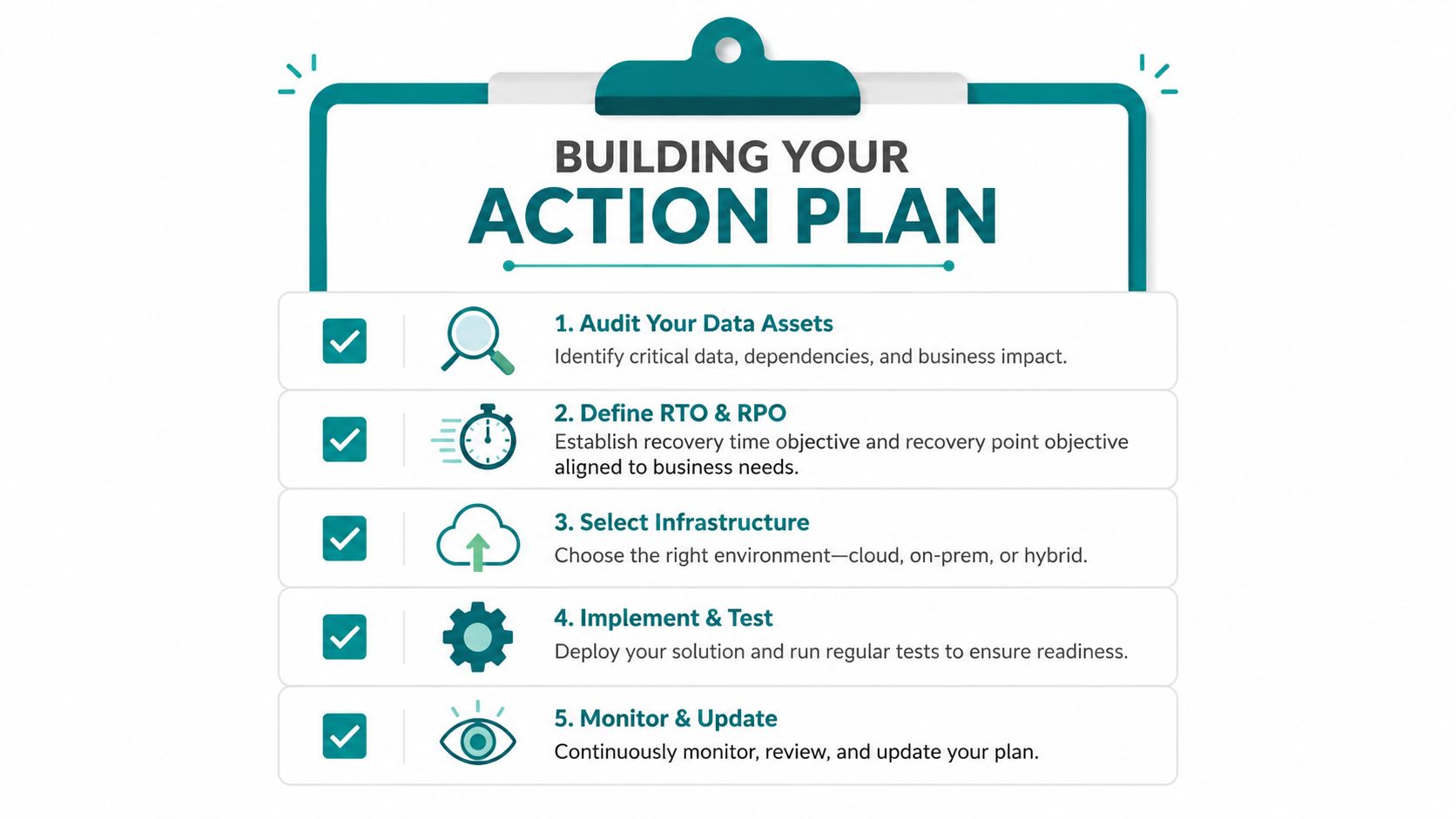
- Audit your data assets. List servers, laptops, websites, SaaS platforms, databases, identity systems, and third-party integrations. Note the owner and business purpose for each.
- Define RTO and RPO. Set acceptable downtime and data loss by workload. Don't let a vendor's default targets decide what your customers or staff can tolerate.
- Select infrastructure. Compare on-premise, cloud, and hybrid options against budget, staffing, compliance, recovery speed, and ransomware isolation.
- Implement and test. Schedule protected backups, verify alerts, restore files and applications, and record the actual results. Use HDM's backup and website wellness services as a reference when evaluating ongoing website protection.
- Monitor and update. Revisit the plan after new software, employees, vendors, office changes, or major process changes. Keep contact details and access procedures current.
Write a runbook that names who declares an incident, who contacts vendors, who approves restoration, which systems return first, and how the business communicates with customers. Store that document somewhere attackers can't modify, and make sure more than one trusted person knows how to use it.
Schedule recovery drills as an operating responsibility, not a one-time project. Measure whether the team can restore the right data, within the intended time, with clean credentials and clear ownership. If the result falls short, adjust the architecture or the business target before a real emergency makes the decision for you.
HDM helps Cincinnati-area businesses protect and improve the digital systems that support growth, including websites, hosting, security updates, backups, performance, and custom applications. Visit HDM to discuss a practical backup and disaster recovery plan that supports your website, customer experience, and day-to-day operations.