


A website can be a growth engine and still become an operational liability overnight. One compromised administrator account, outdated plugin, or failed backup can interrupt sales, expose patient or client information, and leave your team explaining the outage instead of serving customers. Federal agencies reported 30,659 information security incidents in fiscal year 2022 and 32,211 in fiscal year 2023, a 9.9% increase, while the share of agency security programs evaluated as effective rose from 48% to 64% in the same reporting context. The lesson is practical, not dramatic: security controls and disciplined operations matter even in environments with mature requirements.
This guide prioritizes eight cybersecurity best practices by the business risk they reduce for small and mid-sized businesses in the Cincinnati area. The examples include healthcare practices, law firms, manufacturers, professional services companies, and e-commerce businesses. Each practice includes implementation steps, usable policy language, a realistic scenario, monitoring habits, and a connection to incident response.
The controls begin with the most immediate exposure, then move toward the routines that help your business detect, contain, and recover from trouble. Owners can also find broader executive context in these boardroom cybersecurity insights. A web partner such as Cincinnati-area HDM can help coordinate website security updates, backups, access controls, and custom application maintenance when internal resources are limited.
1. Implement Strong Password Management and Multi-Factor Authentication
A stolen password shouldn't be enough to reach your email, accounting platform, website administration, or banking tools. Multi-factor authentication, or MFA, adds another verification step, such as an authenticator app, biometric check, or physical security key. That second layer can stop an attacker even when a password has already been exposed.
CISA identifies a physical security key as the most secure MFA option and recommends that small and medium businesses move away from mobile push notifications toward phishing-resistant MFA because push approvals can be intercepted or abused through fatigue attacks. NIST's small-business guidance recommends enabling phishing-resistant MFA on every account that supports it and describes MFA as one of the fastest and cheapest ways to protect data, with sensitive accounts receiving priority.

Put identity controls in the highest-risk places first
Start with email, accounting software, banking, website hosting, CMS administration, and any system containing customer or employee information. Use a password manager such as Bitwarden, 1Password, or LastPass so each account can have a strong, unique password without forcing employees to memorize dozens of credentials.
- Require MFA for everyone: Don't limit protection to owners or senior leaders. Staff accounts can also expose your systems.
- Prefer stronger verification: Use an authenticator app or security key instead of SMS when the service supports it.
- Protect recovery options: Store backup recovery codes in a secure location separate from the password manager.
- Separate administrator access: Use an administrator account for administrative work and a standard account for routine tasks.
A healthcare practice can require phishing-resistant MFA for patient portal administrators. An online retailer can protect its store dashboard from account takeover, while a law firm can restrict access to case-management systems. If HDM is helping with website development, MFA should be enabled on hosting, CMS, analytics, and deployment accounts before anyone begins routine work.
Practical rule: Every privileged account should have a named owner, MFA, a recovery method, and a documented offboarding path.
Your monitoring routine is straightforward. Review sign-in alerts, investigate unfamiliar devices or locations, and remove access when someone leaves or changes roles. If an account appears compromised, your response plan should direct someone to disable sessions, reset credentials, preserve login evidence, and confirm that forwarding rules or new administrator accounts weren't added. For additional Microsoft 365 guidance, review these F1Group security recommendations.
2. Keep Software, Systems, and Plugins Updated Regularly
Outdated software creates avoidable exposure. Your operating system, browser, business application, WordPress core files, theme, plugin, server, and custom code all need an owner and a maintenance process. Vendors publish updates to address defects and security weaknesses, but the fix only helps after your team or provider installs it.
A Cincinnati professional-services firm may have a relatively small website, yet that site can still connect to lead forms, analytics, CRM tools, payment systems, and staff accounts. An e-commerce business running an old extension can face checkout disruption or unauthorized changes. A healthcare organization that delays updates to a patient-management platform may create security and compliance problems even when no incident is immediately visible.
Make patching a business process
Automatic updates are useful for operating systems, browsers, and lower-risk applications. Critical systems need more care because an update can affect integrations, forms, payment flows, or custom functionality. Test important changes in a staging environment, schedule deployment, and define what happens if the update fails.
- Inventory every system: Include laptops, cloud services, hosting, plugins, themes, APIs, and custom applications.
- Remove unused software: An inactive plugin or abandoned service still adds complexity and may create an attack path.
- Assign patch ownership: Name a person or provider responsible for checking, testing, applying, and documenting updates.
- Verify SaaS responsibilities: Cloud vendors usually maintain their own infrastructure, but your team still controls users, settings, integrations, and data.
For WordPress and application owners, a documented website maintenance plan can connect security updates with performance checks, content changes, and testing. HDM's Website Wellness service is relevant when a business needs ongoing website maintenance, security monitoring, backups, and performance tuning rather than a one-time launch.
A monthly review works well for routine maintenance, with faster handling for urgent vendor notices. Monitor update reports, failed deployments, unsupported components, and unexpected file changes. If an outdated component is exploited, your incident plan should identify the affected system, isolate it, preserve evidence, apply a safe fix, restore clean files if needed, and check connected accounts for misuse.
3. Use Secure, Encrypted Data Backups with Regular Testing
A backup isn't a recovery plan until you can restore from it. Ransomware, accidental deletion, hardware failure, hosting problems, and severe weather can all interrupt operations. The business question isn't whether files are copied. It's whether your team can recover the right data, from a clean version, within a timeframe that customers can tolerate.
FBI and CISA ransomware guidance recommends keeping multiple copies in a physically separate, segmented, and secure location. It also calls for offline backups that are encrypted and immutable, meaning attackers can't alter or delete them.
NIST's small-business fundamentals recommend full encrypted backups of important business data at least once a month. That guidance should be treated as a minimum planning reference, not proof that a monthly schedule is adequate for every business. An online store with frequent orders or a busy medical practice may need more frequent copies.
Test restoration, not just backup completion
Use automated backups for your website hosting, accounting platform, file storage, databases, and critical applications. Keep encryption keys separate from backup data, restrict backup administration, and document who can restore which system.
- Separate locations: Keep an offsite copy and prevent production credentials from controlling every backup.
- Protect against deletion: Use offline, segmented, or immutable storage where possible.
- Test real recovery: Restore files, databases, website components, and application data into a controlled environment.
- Set recovery expectations: Document how long each system can remain unavailable and what gets restored first.
A dental practice needs access to scheduling and patient records. An e-commerce company needs its catalog, orders, customer communications, and payment integrations. A law firm needs matter files and document history. Each business should test the systems that would cause the greatest operational harm if unavailable.
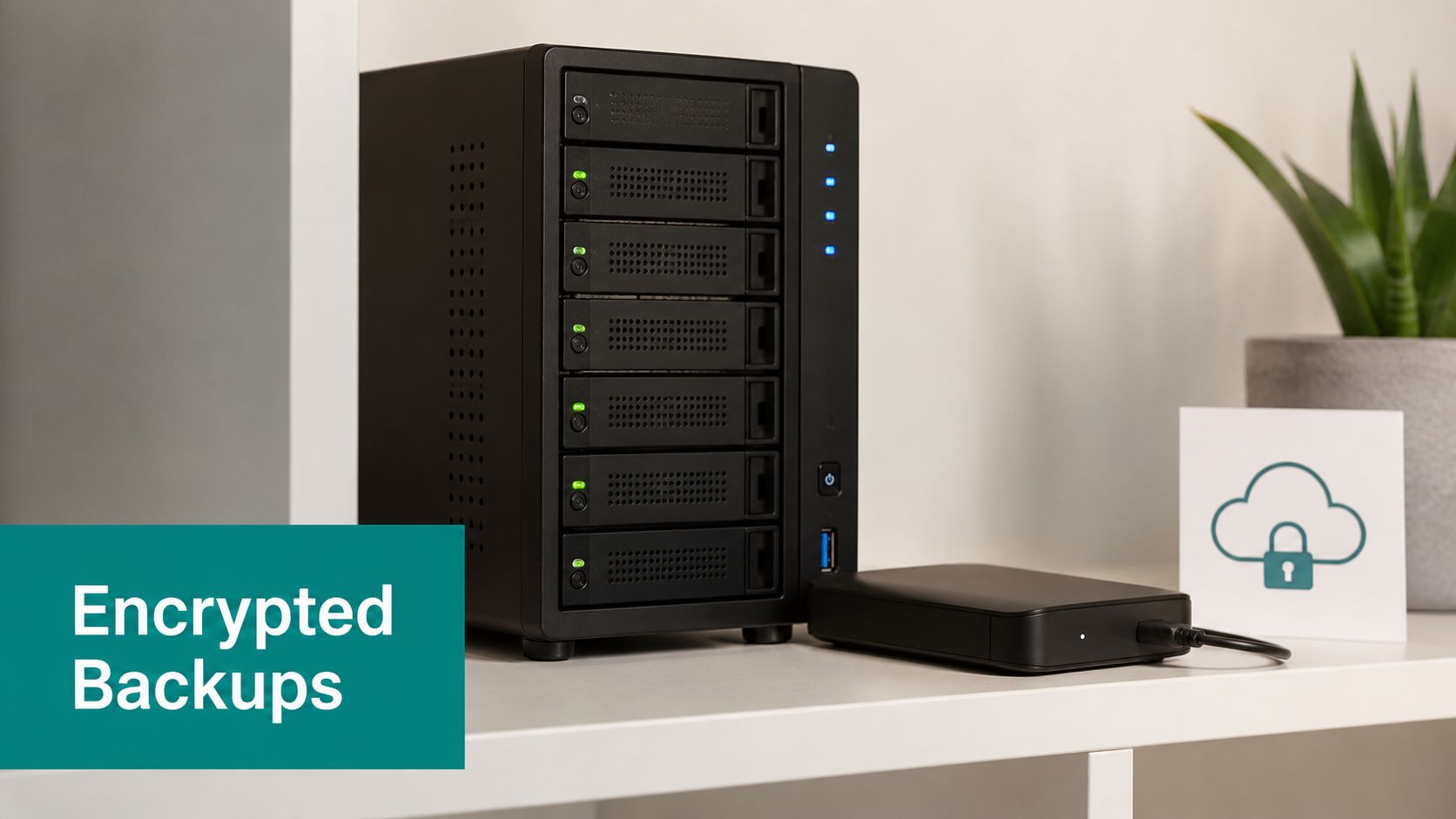
Your monitoring routine should check backup completion, storage health, encryption status, unusual deletion activity, and restoration results. If ransomware appears, the response plan should tell staff to disconnect affected systems without destroying evidence, protect backup infrastructure, contact the appropriate providers, and restore only after the environment is understood. HDM can support website and application recovery planning through backup and disaster recovery services.
4. Train Employees on Phishing, Social Engineering, and Security Awareness
Your employees interact with invoices, login requests, vendor messages, client documents, payment instructions, and customer data every day. Attackers target those normal workflows with fake login pages, convincing emails, urgent phone calls, and requests that appear to come from an executive or trusted supplier.
Training works best when it changes behavior instead of merely documenting attendance. Employees should know how to recognize suspicious requests, verify unusual payment changes through another channel, report a mistake quickly, and pause when an email creates artificial urgency.
Build a no-blame reporting culture
Start with examples that match your business. A law firm can train staff to confirm wire instructions through a known phone number. A healthcare office can practice identifying fake patient messages. An e-commerce team can review credential-harvesting attempts aimed at customer service agents. Remote employees need guidance on home networks, personal devices, shared computers, and secure access.
- Use repeated practice: Short, recurring exercises are easier to absorb than a single annual presentation.
- Teach the full pattern: Cover phishing, voice phishing, suspicious attachments, physical security, removable devices, and incident reporting.
- Make reporting easy: Give employees one clear button, address, or phone contact.
- Reward early warnings: A fast report can limit damage, even when someone clicked first.
The policy can say: "Employees must verify unusual payment, credential, or data requests through an approved secondary channel. Employees must report suspected phishing immediately and won't be penalized for reporting an honest mistake promptly."
Show staff how legitimate email authentication supports trust in business messages. These email authentication practices can help your team understand why sender verification and domain configuration matter, although technical controls won't replace human judgment.
Monitor reports, repeated themes, unusual payment requests, and account activity after suspicious messages. If someone clicks a malicious link, the response should include disconnecting the device when appropriate, changing exposed credentials, reviewing sign-in activity, and checking whether email rules or forwarding settings changed.
5. Secure Your Website with SSL/TLS Encryption and HTTPS
HTTPS protects data moving between a visitor's browser and your web server through SSL/TLS encryption. That protection matters whenever a visitor submits a contact form, signs into a portal, enters payment information, or shares personal details. Browsers also warn visitors about insecure pages, which can undermine trust before someone reads your offer.
For Cincinnati businesses investing in SEO, web design, or digital marketing, HTTPS is part of the technical foundation. Search visibility depends on many factors, but an insecure experience can create friction for visitors and damage confidence in a brand. Payment processors and online-store platforms also expect secure transmission.
Treat certificate management as ongoing maintenance
A certificate that expires can make a functioning website appear broken. Configure automatic renewal, redirect HTTP traffic to HTTPS, and verify that images, scripts, forms, APIs, and embedded services don't load insecurely. HSTS can instruct browsers to use HTTPS and help prevent downgrade attempts, but it should be introduced carefully after confirming that every required subdomain works securely.
- Confirm coverage: Check the main domain, subdomains, staging environments, APIs, and administrative paths.
- Test before launch: Verify forms, logins, checkout, redirects, and third-party integrations.
- Monitor renewal: Keep certificate ownership and renewal alerts with a named person or provider.
- Review configuration: Use a reputable scanner such as SSL Labs to identify configuration concerns.
A professional-services website with a lead form needs visitors to trust that their inquiry is protected. A healthcare portal and e-commerce checkout require more rigorous review because they handle sensitive information. For site owners working with HDM, SSL certificate installation can be included in the launch and maintenance conversation.
Monitor certificate status, failed renewals, mixed-content warnings, and unexpected domain changes. If a certificate problem or compromise appears, your response process should identify the affected domain, coordinate with the hosting or certificate provider, preserve relevant logs, and communicate clearly if customers may have encountered an unsafe page.
6. Implement Access Control and the Principle of Least Privilege
Access control limits what each person, service, and application can do. An accountant doesn't need access to clinical records. A marketing assistant doesn't need payroll permissions. A warehouse employee may need order status but not stored payment details. Giving every user broad access makes routine mistakes and compromised accounts far more damaging.
Start with a role map. List each business function, the systems it uses, the data it handles, and the actions it needs to perform. Then configure permissions around those responsibilities rather than around convenience.
Design permissions around work
For a CMS, separate administrator, editor, author, and viewer roles. For a custom client portal, distinguish customers, support staff, managers, and system administrators. Give employees standard accounts for everyday work and reserve privileged accounts for tasks that require them.
- Remove access promptly: Disable accounts when employees leave and update permissions when responsibilities change.
- Review access regularly: Examine users, groups, service accounts, and shared credentials during a recurring review.
- Avoid shared administrators: Named accounts create accountability and make investigation possible.
- Protect sensitive actions: Require additional verification for payment approvals, exports, permission changes, and other high-impact tasks.
- Centralize where practical: SSO through platforms such as Okta or Azure AD can simplify access management for growing teams.
A healthcare office might separate billing access from clinical records. A law firm might restrict paralegals to assigned matters. An e-commerce store might keep customer payment information away from warehouse operations. These arrangements reduce the scope of harm when an account is misused.
Your policy can state: "Users receive only the access required for their current role. Managers approve access, system owners review it, and administrators remove or change it when employment or duties change."
Monitor permission changes, new administrator accounts, unusual exports, and access outside normal responsibilities. If an account is compromised, least privilege helps responders identify what the attacker could reach and which systems require immediate review. For custom applications, ask the development team, including a partner such as HDM, to build authorization into the application rather than relying on informal instructions.
7. Monitor Networks and Systems for Suspicious Activity
Prevention controls reduce exposure, but visibility tells you when something has changed. Logging records events such as failed sign-ins, successful administrator access, permission changes, file modifications, unusual downloads, and application errors. Monitoring turns those records into alerts or review tasks.
A small business doesn't need to recreate a large enterprise security department to begin. Turn on audit logs for email, accounting, file storage, hosting, the CMS, databases, and cloud services. Use native tools such as AWS CloudWatch, Azure Monitor, or Google Cloud Logging where they fit. WordPress owners can also use reputable security monitoring tools to track suspicious logins and file changes.
Decide what deserves an alert
Start with signals that would require immediate attention:
- Repeated failed logins: Investigate patterns against email, CMS, VPN, and administrative accounts.
- Unexpected privilege changes: Review new administrators, changed roles, and altered access policies.
- Unusual data movement: Look for large exports, unfamiliar destinations, or activity outside normal business needs.
- File encryption or modification: Treat broad, unexpected changes as a possible ransomware signal.
- Geographic or device anomalies: Ask whether unfamiliar access is legitimate before dismissing it.
A law firm might detect a compromised account through an unexpected login pattern. An e-commerce company might notice unusual database exports. A manufacturer could identify suspicious access to proprietary designs. The value comes from connecting an alert to a person who can make a decision, not from collecting logs nobody reviews.
Set a review schedule that matches business risk. Critical systems need frequent review or automated alerts, while lower-risk records can follow a less intensive cadence. Retain logs long enough to investigate incidents and meet applicable obligations, with longer retention decisions for regulated environments.
Your incident response plan should define who receives alerts, which events trigger isolation, how evidence is preserved, and when an outside provider is contacted. If your team can't monitor continuously, a managed security service may be more practical than buying tools that nobody operates. HDM can also help coordinate monitoring for websites and applications through ongoing Website Wellness support.
8. Establish an Incident Response Plan and Test It Regularly
Strong controls lower risk, but they don't guarantee that an incident won't happen. A response plan gives your team a sequence for identifying, containing, investigating, communicating, and recovering from ransomware, compromised accounts, data exposure, malware, and service outages.
Keep the first version usable. Document the likely scenarios, the people responsible, the systems they control, and the decisions that require leadership, legal counsel, insurance representatives, or outside security support. Store a copy where the team can access it if email and shared drives are unavailable.
Connect response steps to business decisions
Your plan should identify the technology owner, executive decision-maker, legal contact, insurer, hosting provider, web developer, forensic resource, and communications lead. Create an out-of-band contact method, such as a maintained phone list, for situations in which primary accounts may be compromised.
- Define severity levels: State which events require an immediate executive response and which can follow routine escalation.
- Prepare communication drafts: Create internal, customer, vendor, and regulatory notification templates for review by the appropriate professionals.
- Document recovery order: Specify which systems return first, who approves restoration, and how the team verifies they are clean.
- Preserve evidence: Tell staff not to erase affected devices, reset everything blindly, or overwrite logs before the response lead gives direction.
- Practice the plan: Run a tabletop exercise so employees can work through decisions without creating a live disruption.
A healthcare organization needs a clear path for assessing possible patient-data exposure. A retailer needs to coordinate store operations, payment providers, customers, and restoration. A SaaS business needs a communication process that keeps customers informed while technical teams investigate. The right plan differs by business, but silence and improvisation create unnecessary risk.
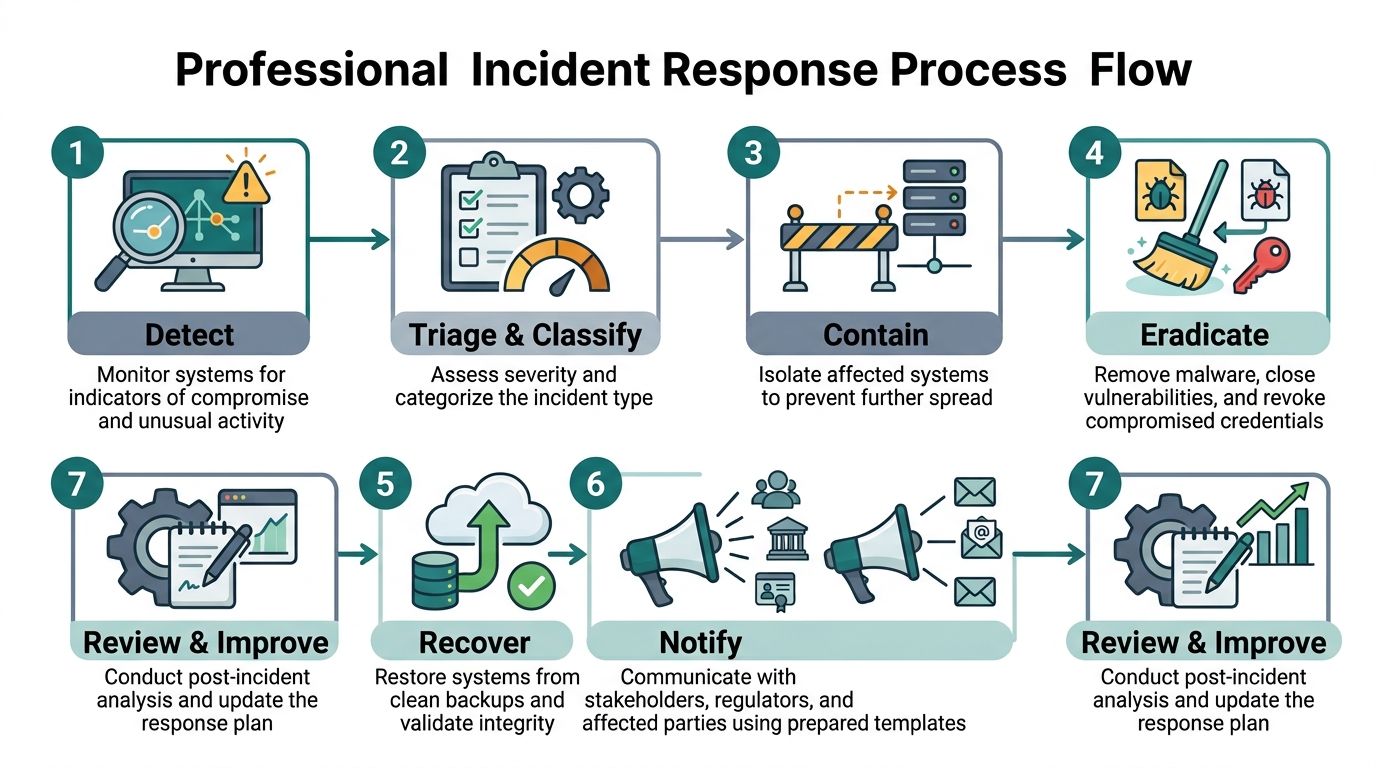
Review the plan annually and after major system changes. Include website hosting, CMS administration, analytics, e-commerce integrations, custom applications, and vendor contacts. If HDM maintains a custom website or application, ask the team to document system-specific recovery and escalation steps.
8-Point Cybersecurity Best Practices Comparison
| Practice | Implementation complexity | Resource requirements | Expected outcomes | Ideal use cases | Key advantages |
|---|---|---|---|---|---|
| Strong Password Management & MFA | Low–Medium: setup & policy rollout | Minimal: auth apps, password manager, admin time | Greatly reduced account takeover risk | All organizations; secure admin/financial accounts | Strong protection against credential compromise; compliance aid |
| Keep Software, Systems, and Plugins Updated | Medium: testing & scheduling required | Moderate: patch tools, staging, IT time | Fewer known-vulnerability exploits | Websites, servers, apps, plugins | Closes known security holes; often free updates |
| Secure, Encrypted Backups with Regular Testing | Medium: design, encryption, test restores | Moderate–High: storage, backup software, key management | Recoverable from ransomware/data loss | Data-critical businesses (healthcare, legal, finance) | Enables recovery without ransom; meets compliance |
| Employee Training on Phishing & Awareness | Low–Medium: ongoing program | Low: training platform, staff time | Fewer successful phishing/social-engineering incidents | All teams, especially remote and customer-facing staff | High ROI; reduces human risk factor |
| SSL/TLS Encryption and HTTPS | Low: certificate install & config | Low: free certs (Let's Encrypt) or paid options | Encrypted transit; improved trust and SEO | E-commerce, forms, SaaS, any site collecting data | Required for payments; builds customer trust |
| Access Control & Least Privilege | Medium–High: role design & enforcement | Moderate: IAM/SSO tools, admin overhead | Limits damage from compromised/insider accounts | Multi-user systems; regulated industries | Minimizes insider risk; simplifies offboarding |
| Monitor Networks for Suspicious Activity | Medium–High: logging & alert tuning | Moderate–High: monitoring/EDR/SIEM, storage, expertise | Faster detection and response; forensic capability | Organizations needing visibility/compliance | Early breach detection; supports investigations |
| Incident Response Plan, Tested Regularly | High: plan creation, roles, exercises | Moderate: time, tabletop/simulations, consultants | Faster containment and recovery; lower incident costs | All organizations handling sensitive data | Reduces chaos; meets regulatory expectations |
Turn the Checklist Into a Monthly Security Routine
Cybersecurity becomes manageable when you treat it as operating discipline instead of a one-time technology purchase. NIST's history illustrates that shift. Its computer security program began in 1972, an early executive guide appeared in 1974, and the first version of the NIST Cybersecurity Framework arrived in 2014, becoming a widely used baseline for managing cyber risk across government and industry. NIST's timeline also records the progression from DES in 1977, to password standards in 1985, incident-response capability in 1996, vulnerability tracking in 1999, the Risk Management Framework in 2004, and software supply-chain guidance in 2021.
The framework matters because a business needs repeatable decisions, not a shelf full of policies. A 2026 benchmark report found that 93% of organizations consider cybersecurity a top or major priority, while 91% use MFA or password management tools and 67% have vulnerability scanning or patch management. The same report found that organizations use different numbers of frameworks, with 46% using one, 31% using two, 17% using three, and 4% using four or more, and reported average annual cybersecurity and compliance spending of 13.71%. The practical lesson is to choose a manageable structure and assign ownership rather than collecting frameworks without implementation.
Use a rhythm your team can sustain
At the start, secure critical email, banking, accounting, hosting, CMS, and administrator accounts. Turn on the strongest available MFA, confirm recovery methods, remove unnecessary users, and record who owns each account.
Each month, review patch status, plugin and theme updates, backup completion, certificate health, security alerts, and vendor notices. Confirm that website forms, checkout, portals, integrations, and custom applications still work after maintenance. When internal capacity is limited, a Cincinnati-area web partner can coordinate these tasks with development and marketing work.
Each quarter, review access permissions, restore selected backups, examine recurring alerts, and reassess third-party access. Supply-chain risk deserves specific attention because a business can harden its own systems and still depend on vendors, subcontractors, software libraries, hosting providers, and integrations it hasn't fully assessed. A 2025 global study reported that 77% of organizations prioritized identifying and closing security gaps, reinforcing that visibility remains a practical challenge.
The people and process gap deserves equal attention. UK survey data found that cybersecurity remained a high priority for 72% of businesses in 2025, yet fewer organizations reported conducting risk assessments, maintaining formal cyber-risk policies, or keeping continuity plans that covered cyber incidents in the 2025/2026 comparison. Knowing the checklist isn't the same as operating it.
Finally, run an incident-response exercise annually and after major changes. Review responsibilities with the person accountable for technology, confirm that your website, CMS, e-commerce, analytics, and custom application vendors understand their responsibilities, and update contact details. If your business needs help with secure website maintenance, backups, custom development, or ongoing Website Wellness support, contact HDM.
HDM helps Cincinnati-area businesses maintain secure websites and applications through ongoing updates, security monitoring, backups, custom development, and performance support. Review your current access, patching, backup, and response routines, then visit HDM to discuss the maintenance and security responsibilities your business needs covered.


