
If you're running a Cincinnati business and training still lives in a mix of shadowing, shared folders, sticky notes, and "ask Sarah, she knows how we do it," you're already paying for that mess. You pay in slow onboarding, uneven service, avoidable mistakes, and frustration from the people who keep rescuing everyone else.
That problem gets sharper in service businesses and regulated fields. A law firm can't afford inconsistent intake procedures. A healthcare practice can't rely on verbal handoff for sensitive workflows. A growing staffing, accounting, or home services company can't keep retraining every new hire from scratch.
An employee training platform fixes a business problem before it fixes a software problem. It gives your company one place to organize what good work looks like, how people learn it, and how you confirm they did.
Why Your Best Employees Might Be Ready to Leave
A familiar pattern shows up in growing companies around Cincinnati.
You hire a new employee. Your operations lead trains them. Then your office manager fills in the gaps. Then a senior team member explains how things "really" get done. By week three, the new hire has heard three versions of the same process, and your strongest people are behind on their own work because they're carrying training on top of everything else.
That arrangement works when you're tiny. It breaks once growth starts to put pressure on the business.
The hidden cost of informal training
Your best employees usually become your default trainers because they know the work, care about quality, and can answer questions fast. The problem is that this makes them the human version of an undocumented system. Every interruption pulls them away from billable work, client service, or leadership responsibilities.
It also creates inconsistency. One new employee gets a thorough onboarding experience. Another gets a rushed one because the team is slammed. A third learns from whoever happened to be available that day.
For firms in HR, staffing, legal, healthcare, and other process-heavy categories, that inconsistency creates real risk. Many of the same operational bottlenecks show up in professional services and HR staffing companies, where growth depends on repeatable systems instead of tribal knowledge.
Practical rule: If one person leaving would erase part of how your business operates, you don't have a training process. You have a dependency.
Why employees leave when training stays messy
People don't just leave for money. They leave when the workplace feels chaotic, when expectations keep changing, and when nobody has time to help them succeed.
Your high performers feel that first. They get tired of repeating the same instructions. Newer employees feel it next. They don't know whether they're doing the job right, and they hesitate to ask because everyone already looks overloaded.
A solid employee training platform gives both groups relief. It turns repeatable knowledge into a repeatable system. That means clearer onboarding, fewer interruptions, and less pressure on the same two or three people to hold the company together.
What Exactly Is an Employee Training Platform
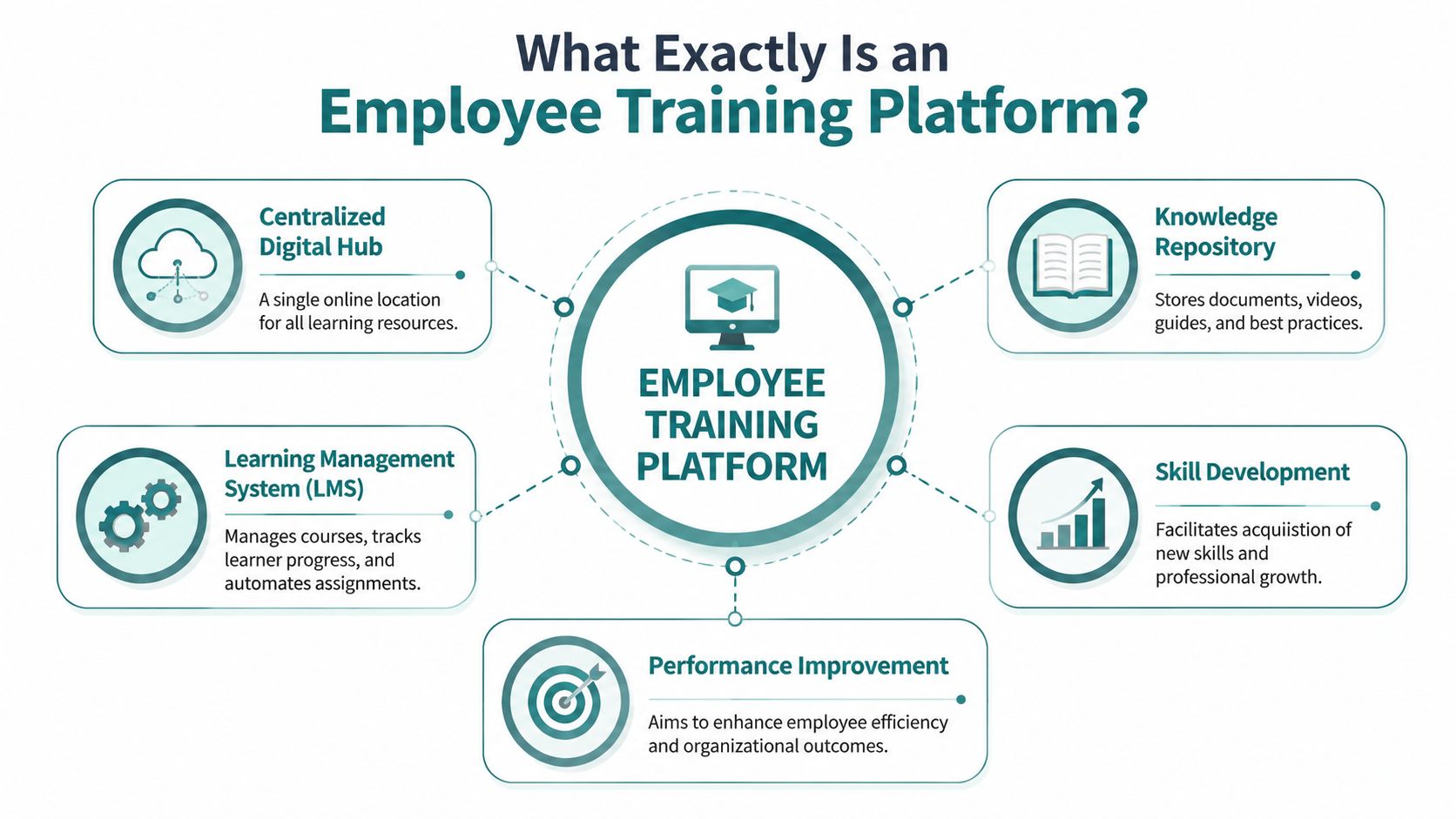
At the simplest level, an employee training platform is a digital playbook for your company. It stores your onboarding steps, process documentation, policy training, software tutorials, job-specific checklists, and continuing education content in one organized system.
Instead of sending people to a maze of Google Drive folders, PDFs, and old email threads, you give them one place to learn the right way to do the job.
Think of it as your operating manual
A good platform doesn't just hold files. It structures information into lessons, paths, and milestones. New hires can move through onboarding in order. Managers can assign training by role. Admin staff can see what was completed and what still needs attention.
That matters because training gets harder as your team spreads out across locations, schedules, and departments. The old "sit next to someone and watch" model falls apart when people work different shifts, serve different offices, or spend most of the day away from a desk.
By 2023, approximately 98% of corporations globally planned to use e-learning platforms, and the corporate e-learning market was projected to grow from $245.5 billion in 2022 to $462.6 billion by 2027, according to Continu's corporate e-learning statistics. That's useful context for a business owner because it shows this is no longer niche software. It's standard operating infrastructure.
What it usually includes
Most employee training platforms combine a few core functions:
-
Content organization: Videos, documents, SOPs, quizzes, and forms live in one place.
-
Course delivery: Employees move through assigned material in a sequence that makes sense.
-
Progress tracking: Managers can confirm completion instead of guessing.
-
Role-based access: A front desk hire doesn't need the same training path as a clinician, paralegal, or estimator.
-
Knowledge preservation: When a senior employee leaves, their know-how doesn't leave with them.
The right platform doesn't just help people learn. It helps the business repeat its standards.
Why this matters to an SMB owner
If you're a non-technical owner, you don't need to obsess over labels. You need to know whether the system will make onboarding faster, protect consistency, and reduce how much your team relies on memory.
That's the value. A training platform gives your business a single source of truth. Every new employee gets the same baseline. Every manager works from the same playbook. Every process is easier to update and maintain.
Decoding the Features That Actually Matter
Software demos can get noisy fast. Vendors love acronyms, dashboards, and feature grids. Most Cincinnati business owners evaluating an employee training platform need something simpler. Which features save time, reduce friction, and make training easier to manage?
Start there.
LMS versus LXP in plain English
An LMS is a Learning Management System. Think of it as structured training software. It assigns courses, tracks completion, and works well when training needs to be documented. That's why LMS tools are common in compliance-heavy environments.
An LXP is a Learning Experience Platform. It usually feels more like a content library employees can browse based on interest or role. If an LMS is required reading, an LXP is closer to a curated learning hub.
For most SMBs, this doesn't have to be a philosophical decision. If your main need is onboarding, standard operating procedures, certifications, and repeatable training, an LMS-style system is usually the better fit. If you're building a broader culture of self-directed professional development, LXP features can help.
The features worth caring about
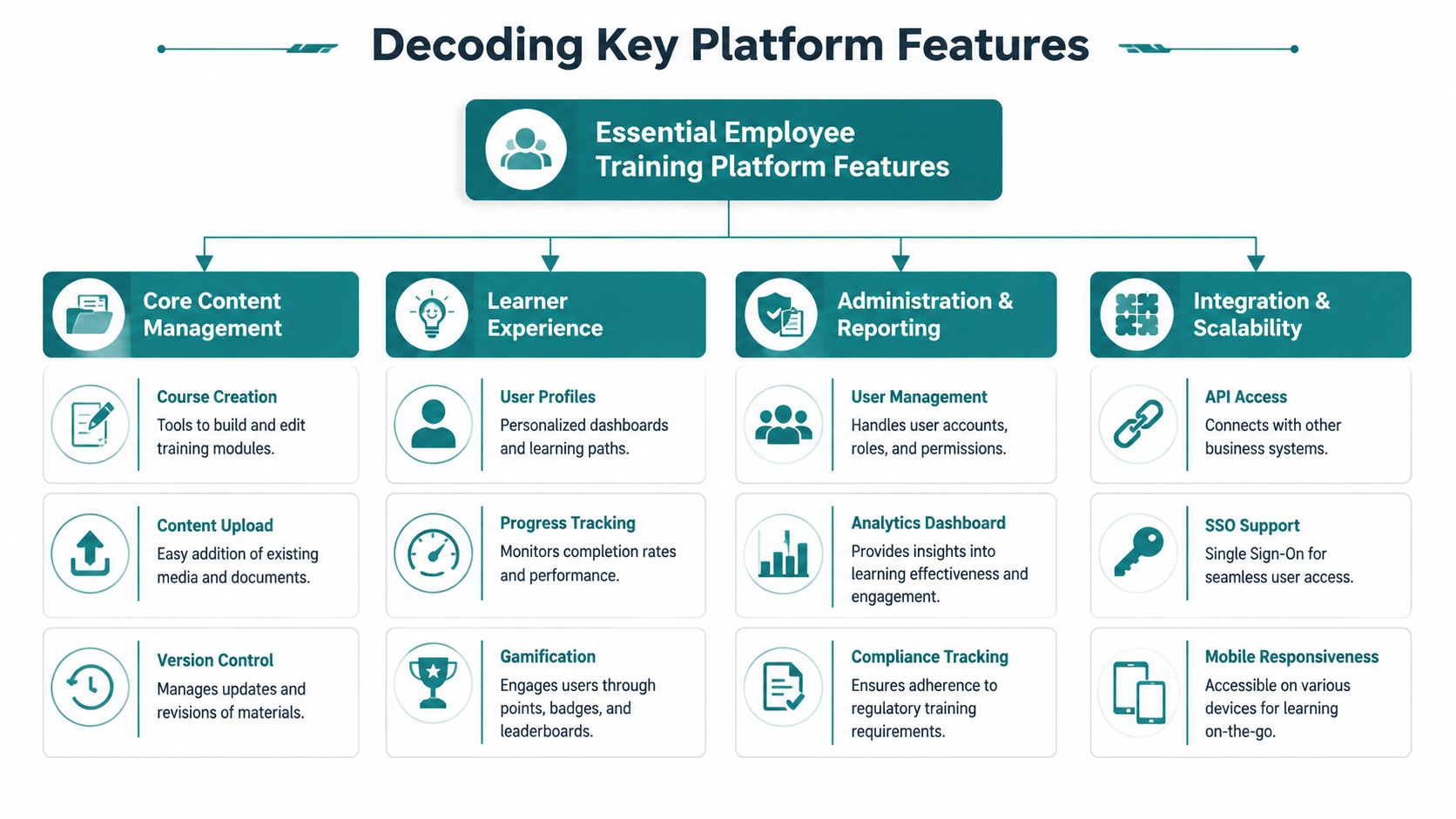
According to D2L's guidance on LMS platforms for employee training, effective employee training platforms support role-based enrollment, adaptive learning paths, and integrations with systems like HRIS or CRM tools. D2L also notes that modern expectations include mobile-ready delivery, offline access, WCAG accessibility, and microlearning modules that are typically 5 to 10 minutes long.
In business terms, this means:
-
Role-based enrollment: The platform assigns the right training automatically based on job title, team, or location. Your admins don't have to manually remember who gets what.
-
Adaptive learning paths: The system can guide employees through different next steps depending on role, progress, or needs.
-
Mobile-ready access: Employees can complete training on a phone or tablet without fighting the interface.
-
Offline access: Useful for field teams, traveling staff, and anyone who doesn't have reliable desktop access during the day.
-
Accessibility support: The platform should work for employees with different access needs. That's not just good practice. It reduces friction for everyone.
SCORM and xAPI without the jargon headache
These two terms sound technical because they are. But the practical takeaway is simple.
SCORM helps training content work across different systems. If you buy third-party courses or want the flexibility to reuse content later, SCORM matters.
xAPI tracks more detailed learning activity. That can be useful if you care about what employees interacted with, not just whether they clicked "complete."
If a vendor can't explain SCORM or xAPI in plain English, there's a good chance support will be painful later too.
Integrations matter more than flashy extras
A platform that's disconnected from the rest of your business creates admin work. A platform that connects to your HR system, CRM, or reporting stack cuts it down.
Ask direct questions:
| Question | Why it matters |
| --- | --- |
| Does it sync with your HR system? | New hires and role changes can trigger training automatically. |
| Can it connect to your CRM or operations tools? | Training data becomes more useful when it lines up with job function and performance context. |
| Does it support single sign-on? | Fewer passwords usually means fewer adoption problems. |
The feature list that wins in a demo isn't always the one that wins in daily use. In practice, simple workflows, easy assignment, clean reporting, and mobile access beat novelty every time.
Off-the-Shelf SaaS vs a Custom-Built Platform
Most businesses make their key decision at this stage.
Do you buy a ready-made training tool and start using it quickly, or do you invest in a custom platform built around how your company already works? Both paths can be right. The wrong move is assuming one is automatically better because it's cheaper upfront or more impressive on paper.
When off-the-shelf tools make sense
A SaaS platform is usually the fastest route. Tools like Moodle, TalentLMS, Trainual, or similar systems can get a basic program live without a major build. If your training needs are standard, your workflows are straightforward, and you mainly need onboarding, policy acknowledgment, and basic progress tracking, this can be a smart place to start.
For many SMBs, especially those formalizing training for the first time, that speed matters. You don't want a six-month project when the actual issue is that new hires need a consistent first week.
Off-the-shelf tools also force discipline. You work within the system's assumptions, which can keep a company from overcomplicating training too early.
Where SaaS starts to pinch
The cracks usually show up when your business doesn't operate like a generic template.
Field-based companies often run into this first. So do healthcare groups, legal teams, and businesses with location-specific workflows. Elucidat's discussion of employee training platforms highlights an issue many buyers miss. Deskless, mobile, and compliance-heavy teams often need mobile-first delivery, offline access with progress syncing, and bulk provisioning more than they need a desktop-first LMS feature stack.
If your technicians, nurses, intake coordinators, drivers, or site staff aren't sitting at a computer all day, a desktop-first platform can become shelfware. It may look strong in a demo and fail in the field.
A side-by-side view
| Factor | Off-the-Shelf Platform | Custom-Built Platform |
| --- | --- | --- |
| Speed to launch | Faster to set up if your needs are standard | Slower because it has to be designed and developed |
| Upfront cost | Usually lower at the beginning | Higher initial investment |
| Fit to workflow | You adapt your process to the software | The platform is shaped around your process |
| Branding and user experience | Limited by vendor controls | Fully tailored to your team and brand |
| Integration flexibility | Depends on the vendor's built-in options | Can be built around your actual systems and data flow |
| Deskless team support | Sometimes strong, sometimes weak | Can be designed mobile-first from day one |
| Compliance handling | Often broad but generic | Can match your exact documentation and approval process |
| Long-term control | Vendor controls roadmap and pricing | You control features, priorities, and ownership approach |
When custom earns its keep
Custom is the right call when training isn't just content delivery. It's part of your operations.
Examples include businesses that need training tied to internal permissions, client portals, certifications, document acknowledgment, shift-specific procedures, or complex approval chains. In those cases, a generic LMS can create just enough friction to frustrate everyone.
For companies exploring that route, it's worth understanding how custom SaaS platforms and web apps are planned and built, because the value isn't "custom" by itself. The value is reducing workarounds.
Buying software is easier. Buying software that fits is harder. Building custom is only worth it when the fit problem is expensive enough to matter.
Training for Healthcare and Other Regulated Fields
In regulated industries, training isn't only about helping employees get better at their jobs. It's also about proving that the right people completed the right instruction, understood the right policies, and followed the right process.
That changes the platform decision.
Generic software can create compliance gaps
A standard training tool may handle basic onboarding just fine. It may even offer quizzes, certificates, and reminders. But regulated businesses usually need more than generic completion records.
Healthcare organizations need to think about privacy, user access, sensitive workflows, and how training records fit into larger compliance expectations. Legal and financial firms have similar concerns. They need consistency, traceability, and tighter control over who sees what and when.
The issue isn't that off-the-shelf tools are automatically bad. The issue is that many of them are built for broad appeal, not your exact risk profile.
Where requirements get more specific
A healthcare practice may need training tied to role-specific access and documented process acknowledgment. A law firm may need to train staff differently based on case type, intake responsibilities, or document handling rules. A financial services company may need a more controlled record of policy updates and employee acknowledgment.
Those needs tend to push companies toward a more customized solution. Not because custom is trendy, but because the cost of "close enough" is too high.
A provider with experience in healthcare digital systems and HIPAA-aware development understands that training software in a regulated setting can't be separated from security, workflow, and documentation.
What to ask before you choose
Use these questions to pressure-test any platform:
-
How does access control work? Can different roles see only the training and information they should?
-
What does the audit trail look like? Can you verify completion, acknowledgment, and updates clearly?
-
How are policy changes handled? Can the platform require staff to review revised procedures?
-
Can it reflect your real workflow? Generic modules often miss the operational detail regulated teams need.
In a regulated business, convenience matters. Defensibility matters more.
If you're in healthcare, legal, or another compliance-heavy field, don't buy based on the prettiest dashboard. Buy based on control, documentation, and fit.
How to Successfully Launch Your Training Program
A lot of employee training platforms fail for the same reason CRM rollouts fail. The company buys software before it decides how the process should work.
The launch matters as much as the platform.
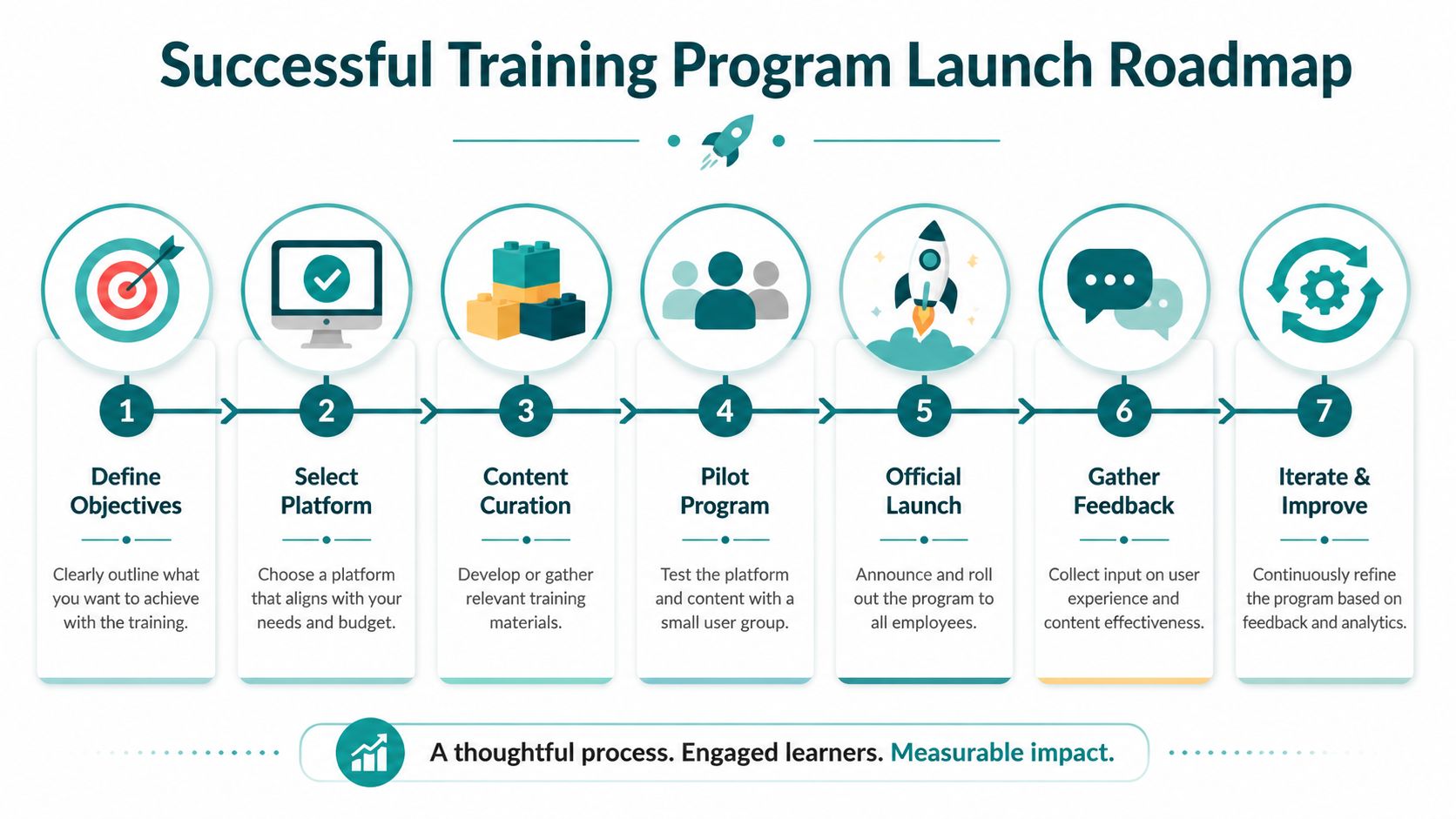
Early in the rollout, a visual roadmap helps keep everyone aligned on what happens first and what comes next.
Start with one business-critical outcome
Don't begin by uploading every document your company has ever created. Start with one process that already causes friction.
That could be new hire onboarding, compliance acknowledgment, intake procedures, patient communication standards, or software training for your front desk team. Keep the first rollout tight enough that you can improve it quickly.
The business case is strong. Companies with comprehensive training programs generate 218% higher income per employee, and 94% of employees say they'd stay longer at a company that invested in their learning and development, according to LevelupLMS training statistics.}
A rollout sequence that works
-
Define what employees should be able to do Focus on observable outcomes. "Understand onboarding" is vague. "Complete a client intake correctly without manager intervention" is measurable.
-
Choose a pilot group Start with one department, one office, or one role. That gives you usable feedback before company-wide launch.
-
Clean up the content Convert scattered files into simple lessons, checklists, or short videos. Remove duplicates and outdated instructions.
Before you build too much, it helps to watch how other teams structure rollout and adoption in practice.
Get manager buy-in early
Employees take training seriously when managers do. If managers treat it like extra homework, the rollout will drag. If managers use it in meetings, onboarding, and performance conversations, people follow.
A few practical habits help:
-
Assign ownership: One person should own rollout decisions, even if several people contribute content.
-
Set expectations clearly: Tell employees what is required, what is optional, and why it matters.
-
Use feedback loops: Ask where people got stuck, what felt repetitive, and what was missing.
-
Recognize completion: Tie progress to onboarding milestones, internal advancement, or team recognition.
Keep improving after launch
The first version won't be perfect. That's normal.
What matters is whether the platform becomes part of how the company operates. Review what gets completed, where users drop off, and which lessons keep generating questions. Then tighten the material, shorten what drags, and update what no longer reflects reality.
"Launch small, fix fast, and build from what your team actually uses."
A Simple Checklist for Choosing the Right Platform
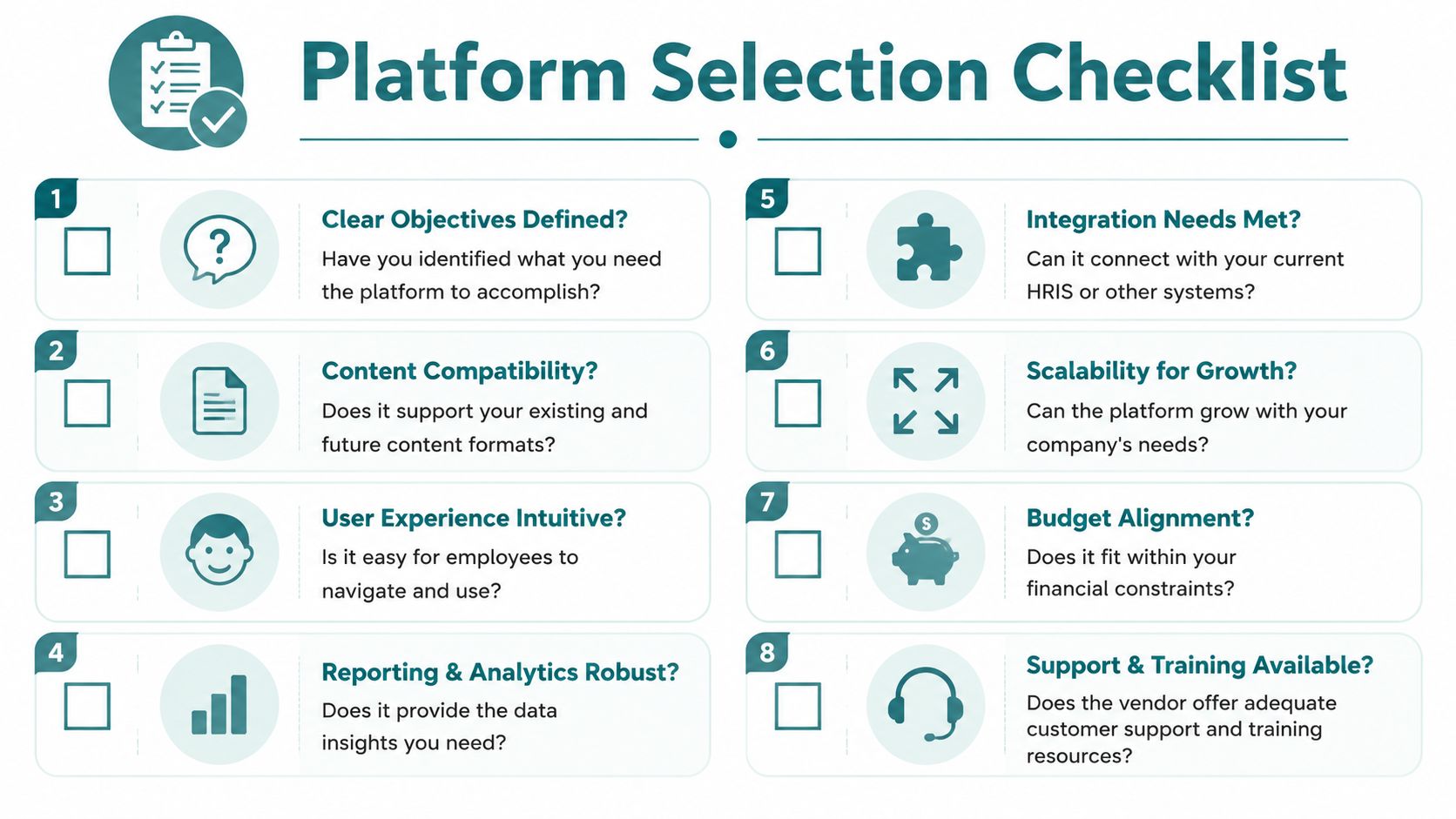
Most business owners don't need a giant vendor matrix. They need a short list of questions that keeps them from buying the wrong thing.
Use this checklist before you sit through demos.
The decision filter
-
What problem are you solving first? If you can't name the pain clearly, every platform will sound right.
-
What content do you already have? Existing SOPs, videos, PDFs, and checklists can shorten setup if they're still accurate.
-
Who are your users? Desk staff, field staff, clinicians, attorneys, technicians, and managers don't use software the same way.
-
Does mobile access matter daily? If your team isn't at a desk, this isn't a nice extra.
-
Are your workflows standard or distinctive? If your operating process gives you an edge, forcing it into generic software may hurt more than help.
-
Do you have compliance requirements? That changes what "good enough" means.
-
Who will own the platform internally? Someone has to maintain content, assignments, and updates.
-
What's realistic for budget and timeline? The best option on paper isn't the best option if your business won't support the rollout.
What a good choice usually looks like
The right employee training platform feels boring in the best way. People can find what they need. Managers can confirm completion. Admin work goes down instead of up. New hires get the same baseline every time.
If you're comparing a simple SaaS tool against a custom build, don't ask which one is more impressive. Ask which one your team will use, maintain, and benefit from a year from now.
If your business needs more than a generic LMS, HDM helps Cincinnati-area companies plan and build digital systems that fit real operations, including custom web apps and compliant platforms for complex industries. If you're weighing off-the-shelf software against a more custom solution, HDM can help you sort out what should be bought, what should be built, and what will effectively move the business forward.