

You can launch a clean website, set up payments, and start running ads, then realize the legal work was never really finished. That's the trap most Cincinnati owners fall into. The store goes live, orders come in, and only later do sales tax thresholds, privacy rules, accessibility gaps, and payment security obligations start biting.
If you're selling online in 2026, online business legal requirements are not a startup checklist you file away. They're operating rules that change as your traffic, data collection, and sales footprint expand. The businesses that stay out of trouble treat compliance like payroll or inventory, something that has to be maintained, not just launched.
Why Online Business Legal Requirements Catch Owners Off Guard
A common pattern looks like this. A Cincinnati shop owner gets a polished site built, turns on checkout, and starts shipping beyond Ohio. A few months later, they discover they've crossed tax thresholds in more than one state and never registered because no one told them the old physical-presence rule is gone.
That's why compliance feels heavier than it should. It's not one law. It's tax registration, privacy notices, cookie consent, payment security, and accessibility, all layered on top of each other. The result is easy to see and hard to fix after the fact.
The mistake is thinking launch equals compliance
The 2018 South Dakota v. Wayfair decision changed the ground rules for online sellers by removing the old physical-presence test for sales tax and opening the door for economic nexus instead, which is why many businesses now have to watch thresholds such as $100,000 in sales or 200 transactions in a state, depending on local law (Launch My Store).
Practical rule: if your site can sell into multiple states, your compliance risk grows with every new market, not just when you "go live."
The same problem shows up with privacy and consent. Once you add analytics, remarketing, or embedded tools, your site becomes a data collection system, not just a brochure. That means the legal work changes when the business changes.
What this means for a Cincinnati owner
The owner who gets into trouble usually isn't careless. They just assumed web design, SEO, and legal setup were separate projects. They aren't.
If you're evaluating an agency, ask how it handles policy placement, consent banners, payment security, and tax readiness in the build itself. That's the kind of planning a firm like HDM should be helping coordinate from day one, because patching compliance onto a live site is always more expensive than building it in.
Choosing Your Business Structure and Registration Path
Start with the entity, not the storefront. If you're selling online without a real business structure, you're mixing personal and business risk in a way that gets ugly fast. The right setup depends on how exposed you want to be, how much admin you can handle, and whether you're solo or building something bigger.
Pick the structure that matches your stage
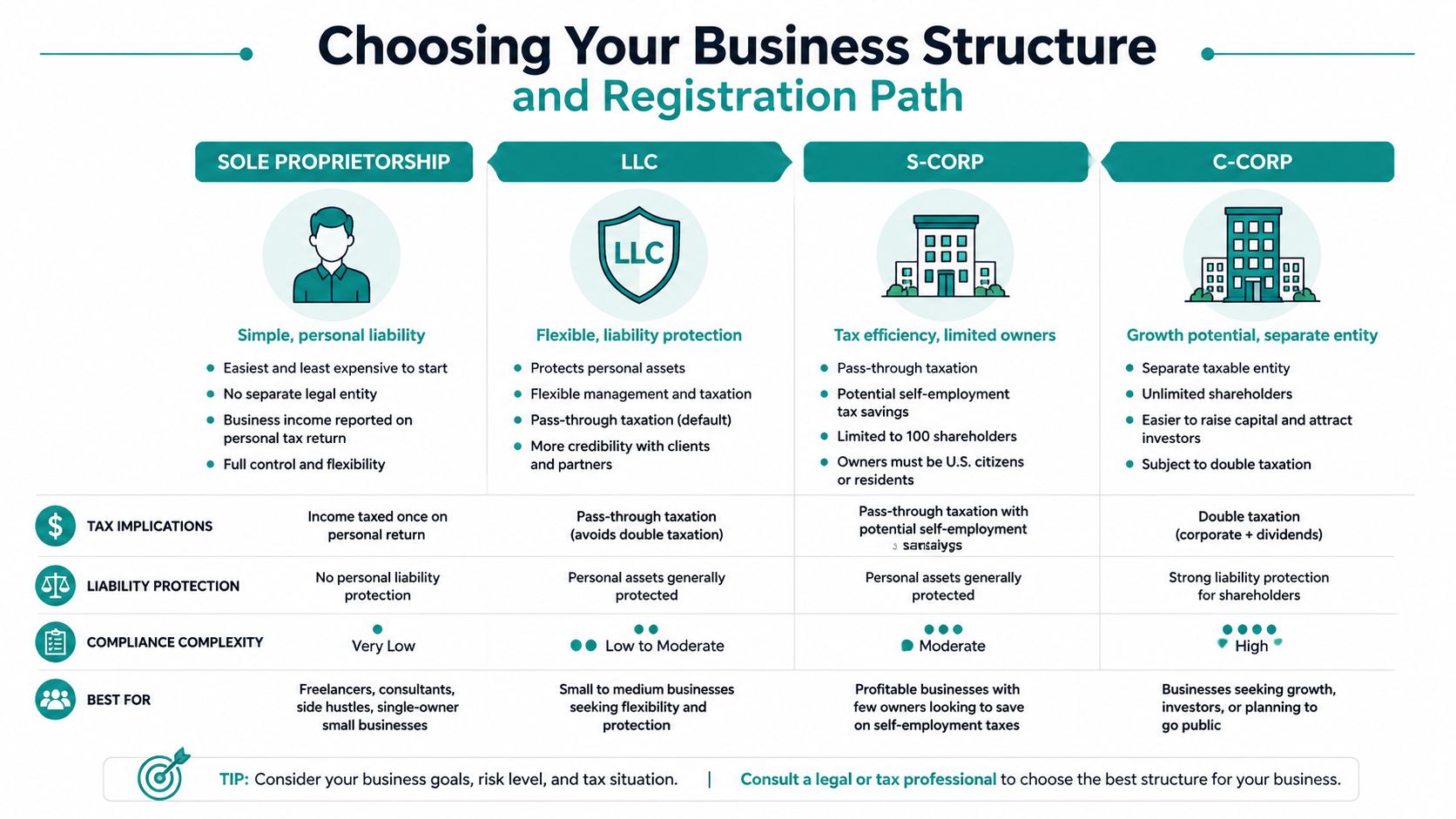
A sole proprietorship is the lightest option. It's simple, but it gives you the least liability separation, which is why it can make sense for a very small side business but not for a growing store that takes payments and stores customer data.
An LLC is the default choice for many Cincinnati SMBs because it separates business and personal liability more cleanly without forcing you into a heavy corporate structure. For a solo consultant, coach, or service business with modest volume, that's usually the right balance. For a product business that expects to grow, it also creates a cleaner path for banking, contracts, and future tax planning.
An S-Corp can become attractive when the business grows enough that you want to think about owner compensation more strategically. A C-Corp is usually the most formal route, which can make sense for larger ventures that expect investors or more complex ownership, but it brings the most ongoing compliance.
Registration is about where you operate, not just where you live
If you form in Ohio, you still need the basics done right. That usually means entity registration in your home state, getting an EIN, and making sure your business bank accounts, tax records, and contracts use the same legal name. If you register in Delaware or Wyoming, that's a strategic choice, not a shortcut. You still have to qualify to do business where you operate.
For Cincinnati businesses, the bigger issue is foreign registration in other states once you create enough presence to trigger it. Don't wait for a surprise notice to figure out you should've registered earlier. If your website, warehouse, contractor network, or fulfillment pattern crosses state lines, the legal footprint follows.
If you want a quick way to sanity-check your setup, an AI legal assistant for business owners like LegesGPT's business resource can help you organize questions before you talk to an attorney. Use it for preparation, not for final legal judgment.
If you're under $10,000 in annual online sales, a simple LLC is usually enough to start with. If you're building a serious brand with recurring revenue and inventory, don't overthink it, set up the structure that protects you and can scale.
Sales Tax Obligations After the Wayfair Decision
The Wayfair decision changed the rules for every online seller. Before that ruling, many remote sellers relied on the physical-presence standard and assumed they were safe until they opened an office or warehouse in a state. That protection is gone. States can now require collection based on economic nexus, which is why sales tax is part of daily online operations instead of a distant legal risk.
Track nexus before it tracks you
The trigger many owners hear most often is $100,000 in sales or 200 transactions in a state during a year, because that is a common economic-nexus threshold in U.S. rules (InCorp). The exact rule still varies by state, so one threshold does not cover every market.
Treat nexus as an ongoing check, not a year-end cleanup. Track where customers are located, watch volume by state, and keep a running view of where you may have crossed the line. If you wait until tax season, you are already behind.
Bottom line: sales tax is not a finance task you hand off once. It is a live compliance process tied to where you sell.
Build tax into the checkout flow
Once you know where nexus exists, the website has to calculate tax correctly. That starts with the right e-commerce platform and continues through your accounting system, which must match what checkout collected. If those systems do not talk to each other, errors pile up fast. A platform that handles tax rules well saves time later, and this guide to choosing an e-commerce platform is worth reviewing before you build.
For many businesses, manual filing works only at the beginning. After that, automation tools are the practical choice because they reduce missed rates, filing mistakes, and the strain of handling multiple states by hand. Once you are past the setup stage, your checkout, filings, and records need to move together.
Marketplaces still need attention
Selling through Amazon or Etsy does not make tax issues disappear. Marketplace rules can shift who collects tax, but they do not erase your need to know where your own obligations begin and end. Keep marketplace sales, direct-site sales, and state registrations in one compliance view so nothing slips through.
For owners who want a deeper tax-planning lens, Suby's tax planning resource is a useful complement to your accountant's advice.
Privacy Policies, Cookie Consent, and Payment Security
Your website starts collecting data as soon as someone lands on it. You are not just publishing content, you are handling personal information, session data, and payment details. If your privacy setup is weak, the problem is legal, and it gets more expensive after launch.
Privacy policy language has to match what the site does
A privacy notice needs to say what data you collect, why you collect it, who you share it with, and how people can request access or deletion where those rights apply. For businesses that handle customer data under GDPR-style regimes, the lawful basis for processing has to be clear, and the site has to support request workflows and policy updates, as outlined in privacy agreement tips for CLM users and Termly.
The mistake I see most often is a generic privacy page copied from another site. That page does not cover you if your site uses email marketing, analytics, live chat, retargeting, or a third-party checkout. Your policy has to reflect the actual data flow, not the template you found online.
Consent comes before non-essential tracking
If you use cookies or tags for analytics and marketing, consent needs to be captured before those tools fire in GDPR-style setups. Essential tracking for core site function is different from non-essential tracking for advertising and measurement. Treat them differently.
That means your consent banner, tag manager, and analytics setup have to work together. If they do not, you may be collecting attribution data in a way that does not match your legal obligations. The page may still function, but the compliance story will not hold up.
For a practical planning reference, HDM's GDPR compliance checklist is useful when you are mapping tools, forms, and disclosures before launch.
Payment security is part of legal compliance
If you take payment online, your checkout has to support secure payment processing that aligns with PCI DSS expectations (Coaches and Company). That affects hosting, plugins, checkout design, and which systems ever touch card data. A polished storefront does not matter if the payment flow is weak.
For Cincinnati businesses, this is a conversation to have before the site is built, not after launch. A local agency like HDM should be helping you think through how design, hosting, and integrations affect compliance, because the wrong setup creates avoidable exposure.
Website Accessibility as a Legal Requirement
Accessibility is not a nice-to-have. It's a legal and commercial requirement that too many owners still treat like a later enhancement. That's a mistake, because inaccessible sites can shut out customers and create legal risk at the same time.
The law now reaches digital experiences
Neutral guidance notes that ADA, Section 508, and the EU Accessibility Act can apply to websites, apps, online documents, and customer portals, with WCAG-aligned features such as keyboard navigation, screen-reader compatibility, alt text, contrast, and captions expected as part of compliance (AudioEye). That's not just a developer concern. It affects the content your team publishes and the way your checkout flows work.
A lot of small businesses still think accessibility only matters to government sites or giant brands. It doesn't. If your customers can't complete a form, move through a menu, or read a PDF, you've created a barrier that can cost you business.
Don't wait for a complaint to audit the site
The fastest way to reduce risk is to test the site against the basics now. Use keyboard-only navigation, check contrast on key pages, make sure images have meaningful alt text, and verify that videos and documents are usable without special workarounds. If you publish PDFs, they need the same care as web pages.
Accessibility also affects conversion. If someone can't finish checkout or book an appointment because the flow isn't usable, that's not just a legal exposure, it's lost revenue. The fix is usually cheaper than the damage.
For a practical operational lens on site health, HDM's website wellness checklist is a smart starting point before you refresh a site or redesign one.
Accessibility should be built into the first draft, not cleaned up after launch.
Ongoing Compliance as Your Business Grows
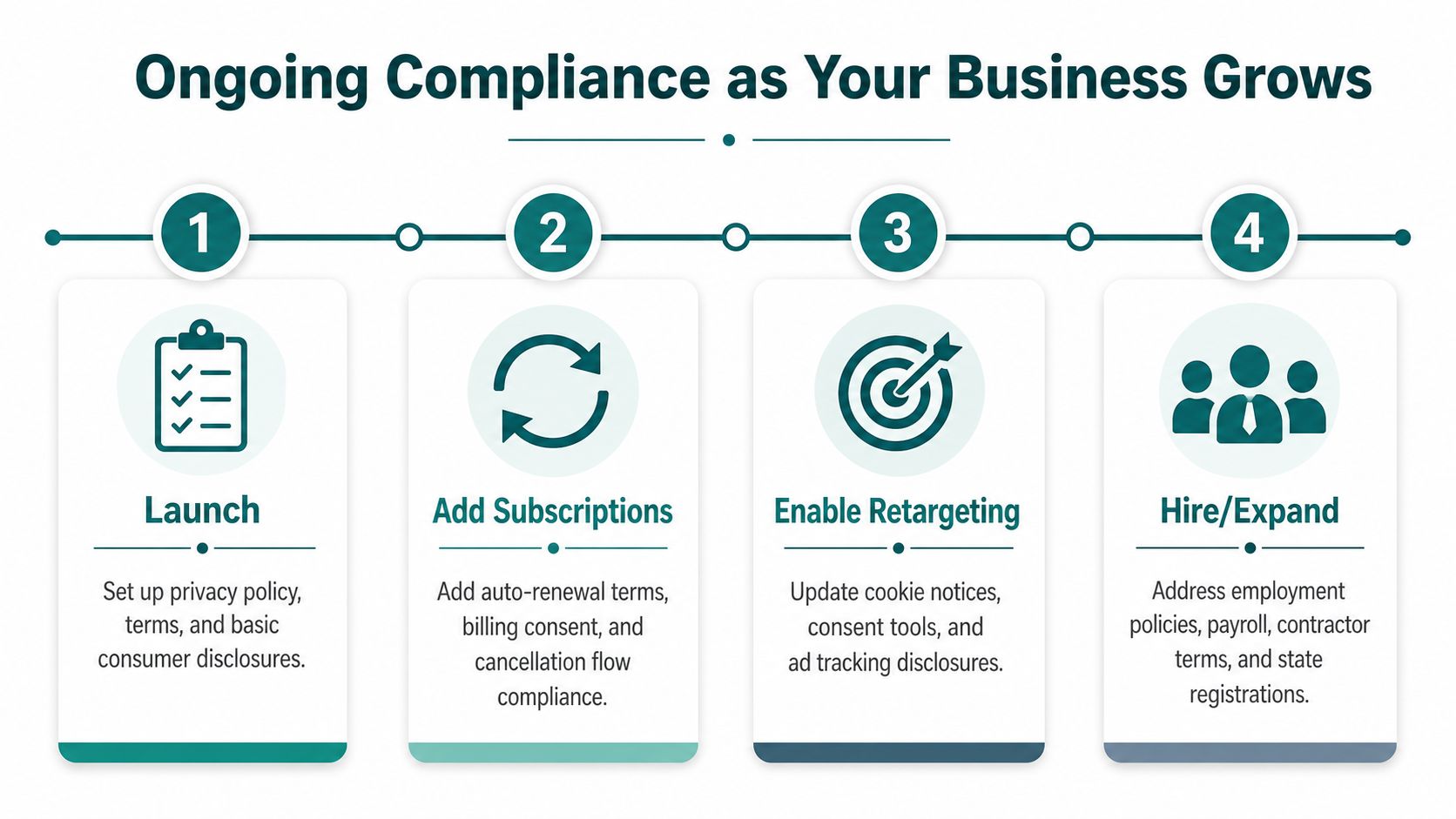
A business can be legally launched and still become noncompliant a few months later. That happens when the model changes faster than the paperwork. New subscriptions, retargeting, extra states, or international customers all create fresh obligations.
Growth triggers that change the rulebook
The biggest shift is often international sales. The UK guidance says online businesses that collect personal data need a clear privacy policy under UK GDPR, and Australian guidance says businesses that store or collect personal information must explain what they hold, what they do with it, and how it's protected (Rocket Lawyer). Add cross-border selling, and your compliance plan has to stretch beyond U.S. state rules.
Email marketing matters too. CAN-SPAM still applies to commercial email, which means your campaigns need the right disclosures and opt-out handling. If you add retargeting, you also need to revisit consent language and tracking logic. If you add a subscription model, your payment and cancellation disclosures need another look.
Make compliance a quarterly review, not a panic response
Quarterly is a sensible rhythm. Review your privacy policy, cookie banner, tax registrations, payment flows, and accessibility basics. Check whether any new tools were added without updating disclosures. Confirm that customer request workflows still work.
If the site changed, the legal notice probably changed too.
Bring in counsel when you expand into new jurisdictions, launch a new payment model, or handle a data issue you can't confidently classify. Handle routine policy updates, banner changes, and process checks internally if your team knows what changed and why. The key is not waiting until a complaint, audit, or tax notice forces the conversation.
Your Prioritized Legal Compliance Checklist
Start with the items that can hurt you immediately. Don't bury them under branding, ads, or SEO work.
Launch essentials
- Business registration and EIN: Form the entity first so contracts, banking, and tax records all point to the same legal business.
- Privacy policy: Publish a policy that matches what your site collects, shares, and stores.
- Secure payment setup: Make sure your checkout and plugin choices support PCI DSS-aligned processing.
Growth triggers
- Sales tax permits: Register where you have nexus, especially when state sales volumes climb.
- Accessibility audit: Check keyboard access, alt text, contrast, captions, and PDF usability before complaints force the issue.
- International VAT or local registrations: Add these when you sell into markets that require them, not after the first foreign order.
Ongoing maintenance
- Policy updates: Refresh privacy and cookie language whenever you add tools, forms, or marketing channels.
- Consent monitoring: Confirm that tracking only starts when consent rules allow it.
- Quarterly compliance review: Recheck tax, accessibility, and data-handling changes before they become problems.
For Cincinnati-area owners comparing web design or digital marketing help, a local team like HDM can coordinate the technical side, privacy placement, cookie consent, secure checkout flows, and accessibility work, so your site doesn't look finished while the compliance layer is still unfinished.
If you're planning a new site or trying to clean up one that's already live, HDM can help you build the compliance pieces into the project instead of bolting them on later. Visit HDM if you want a Cincinnati team that understands how web design, SEO, and digital growth connect to the legal realities of selling online.