Your team is working hard, but the day still feels slippery. A client sends feedback by email, someone else replies in Slack, project notes sit in Asana, and the ultimate decision happens on a Zoom call that nobody documents. By Friday, everyone's busy, yet the work that effectively moves revenue forward feels slower than it should.
This describes the current state for a lot of Cincinnati businesses right now, especially those juggling sales, service, marketing, and operations across a mix of office, home, and field work. Remote team communication isn't just an HR issue. It affects turnaround times, client confidence, compliance, and whether your team has enough uninterrupted time to do quality work.
Why Your Remote Communication Feels Chaotic
A familiar pattern shows up in small and mid-sized businesses. The owner starts the day with good intentions, then gets pulled into a chain of pings, check-ins, and “quick calls.” By lunch, the team has talked constantly but still hasn't closed the loop on approvals, next steps, or ownership.
That chaos usually isn't caused by a lack of tools. Most companies already have plenty of them. Microsoft Teams, Slack, Zoom, email, Google Drive, Monday.com, ClickUp, Asana, and a CRM are all common. The problem is that nobody has decided which tool owns which type of communication.
The business cost is real. Poor communication costs U.S. businesses an estimated $1.2 trillion per year, or roughly $12,506 per employee annually, and remote knowledge workers now spend 57% of their working time on communication tasks, leaving only 43% for actual work creation, according to remote work communication statistics.
Chaos usually looks ordinary
It rarely looks dramatic. It looks like this:
-
Missed handoffs because a designer updates a file in one place while the account manager is checking another
-
Repeated questions because key answers live in private messages instead of a shared system
-
Approval delays because nobody knows whether “urgent” means now, today, or this week
-
Client frustration because the team responds often, but not clearly
Practical rule: If your team needs to ask “Where was that discussed?” more than once a week, your communication system is broken.
Business owners often assume the answer is better discipline. Sometimes it is. More often, the answer is better design. You need a communication structure that reduces decision fatigue and makes the next action obvious.
One useful place to start is tightening the flow of repetitive work with AI workflow automation ideas for growing teams. Automation won't fix vague ownership, but it can remove the routine status-chasing that clogs the day.
The real issue is strategy, not effort
Teams aren't under-communicating. They're over-communicating in the wrong formats. They use live meetings for updates that should be written, and chat messages for decisions that should be documented.
That creates noise, not clarity. And once that pattern takes hold, people compensate by sending even more messages. The team feels responsive, but the business gets slower.
Synchronous vs Asynchronous Communication Explained
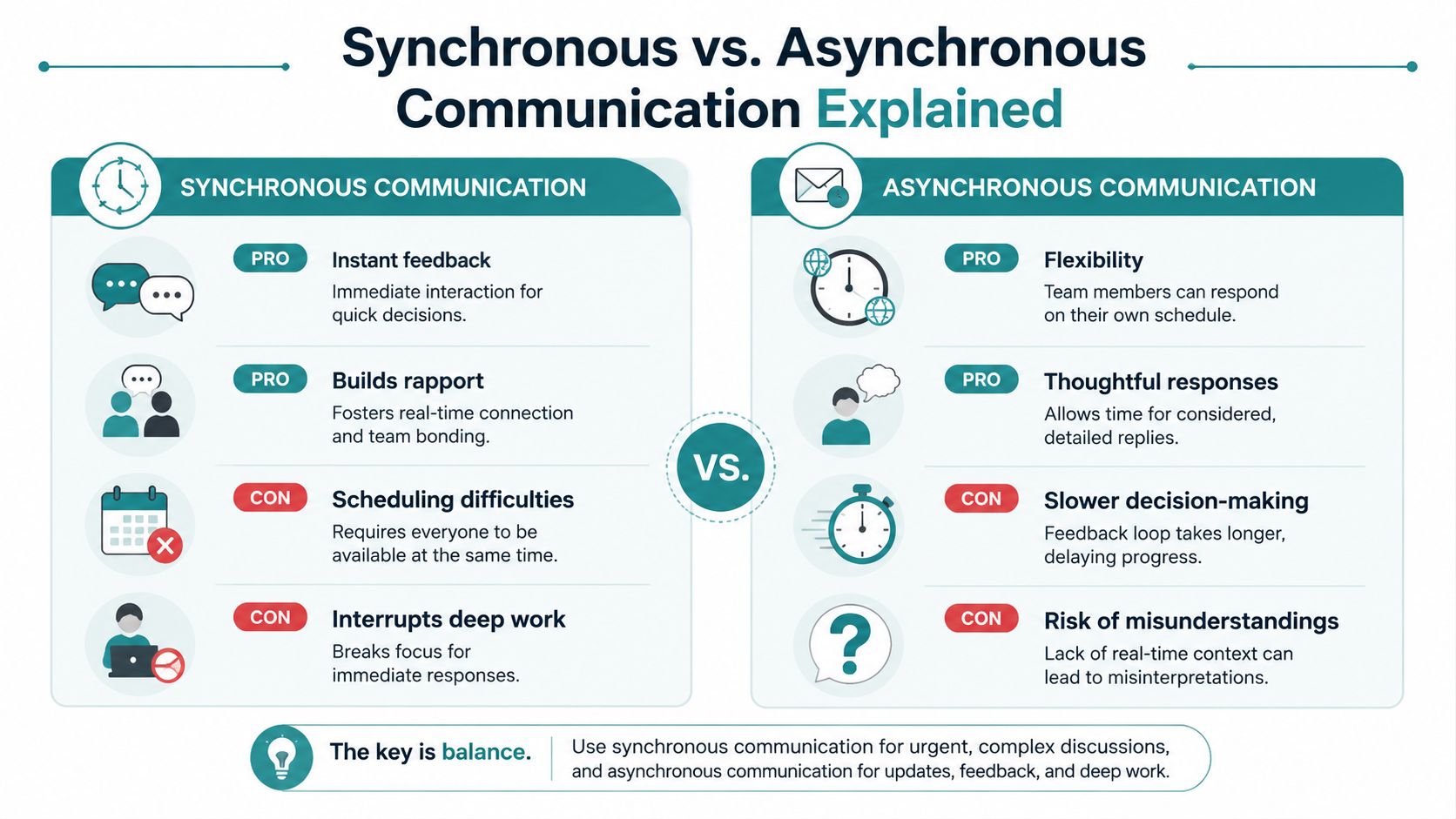
The simplest way to understand remote team communication is this. Synchronous communication happens live. Asynchronous communication happens on a delay.
A phone call is synchronous. A shared Google Doc with comments is asynchronous.
That distinction matters because many businesses default to live communication for nearly everything. It feels faster in the moment. It often creates more interruptions, more dependency, and weaker documentation.
Here's a simple visual breakdown:
What synchronous communication is good for
Use live communication when speed and nuance matter more than documentation.
Examples include:
-
Urgent blockers that are stopping work right now
-
Sensitive conversations like client escalations or personnel issues
-
Complex decisions where people need to ask follow-up questions in real time
-
Relationship-building moments where tone and body language matter
Synchronous communication is valuable. It's just expensive. It requires everyone's attention at the same time, which means it should be reserved for issues that deserve that level of interruption.
What asynchronous communication is good for
Async communication is often the better default for daily operations.
It works best for:
-
Project updates that people can read when they're ready
-
Requests for review on designs, copy, proposals, or code
-
Status reporting that should be searchable later
-
Routine decisions that need a written trail
A lot of business owners are surprised by how much smoother work gets when updates move out of meetings and into a documented system. Teams make fewer assumptions because they can reread what was said.
The volume of remote meetings has increased by 252% since early 2020, with remote workers now averaging 25.6 meetings per week, and that surge leaves knowledge workers with fewer than 3 hours of uninterrupted focus time daily, according to remote meeting research.
Live conversation should solve ambiguity. It shouldn't become the default storage place for important information.
This short video gives a helpful overview if your team is still trying to separate “talk now” from “write first.”
A simple decision rule for business owners
If a message needs an answer right away, use sync.
If it needs clarity, history, or input from multiple people over time, use async.
That's why a documented internal resource library matters so much. A team that stores recurring answers in a searchable system spends less time re-explaining the same things. If you're building that foundation, this guide to knowledge base creation for growing organizations is a smart next step.
Creating a Communication Channel Guide
Most communication problems start with one vague habit. Teams use every channel for everything.
Email becomes a task manager. Slack becomes a decision log. Zoom becomes a filing cabinet. Then nobody can find anything.
A better approach is to create a communication channel guide. Some companies call it a charter. The name doesn't matter. What matters is writing down which channel handles which type of message, who owns the next action, and how quickly people are expected to respond.
Why a written guide matters
When response expectations are unwritten, every employee creates their own rules. One person treats Teams as instant. Another checks it twice a day. A third sends a follow-up email because they don't trust chat.
That ambiguity creates duplicate work and missed deadlines. Effective remote communication requires a written policy that defines expected response times for different message types, such as instant replies for urgent messages and up to 24 hours for standard email inquiries, as outlined in this remote communication policy guidance.
A practical channel guide
Use a table like this as your first draft. Keep it simple enough that your staff can remember it without training slides.
| Channel | Best For (Use Case) | Expected Response Time |
|---|---|---|
| Team chat like Slack or Microsoft Teams | Urgent blockers, quick internal questions, same-day coordination | Instant for urgent items |
| Client approvals, formal decisions, summaries, vendor communication | Within 24 hours for standard inquiries | |
| Project management tool like Asana, ClickUp, Trello, or Monday.com | Tasks, deadlines, status, ownership, deliverables | Update by agreed project deadline or at assigned checkpoints |
| Phone or video call | Sensitive issues, fast resolution, nuanced discussion, escalation | Scheduled or immediate if truly urgent |
| Shared docs in Google Workspace or Microsoft 365 | Collaboration on drafts, agendas, process docs, meeting notes | Comment and review by stated due date |
Rules that stop the usual breakdowns
A good guide doesn't just describe channels. It sets behavioral rules.
-
One source of truth: Every task must live in one system of record, usually Asana, ClickUp, Trello, or Monday.com.
-
Decisions get documented: If a decision happens in chat or on a call, someone posts the final decision in the project tool or sends a summary email.
-
Urgent has a definition: Don't let every request carry the same emotional weight.
-
Ownership is explicit: Every message that requires action should identify the next owner.
Owner-first communication works better than information-first communication. Don't just share an update. Assign the baton.
What works and what doesn't
What works is separating communication by purpose.
What doesn't work is letting convenience decide. A quick Slack message feels efficient until legal language, pricing approval, or scope changes disappear into a thread nobody can retrieve later.
For Cincinnati businesses with client-facing teams, this matters even more. Sales, service, and marketing often overlap. If your web partner, internal staff, and outside vendors are all touching the same campaign or site update, channel discipline keeps projects moving and reduces expensive rework.
Building Repeatable Communication Workflows
Once your channels are clear, the next problem is consistency. Teams know where to talk, but they still reinvent the process every week.
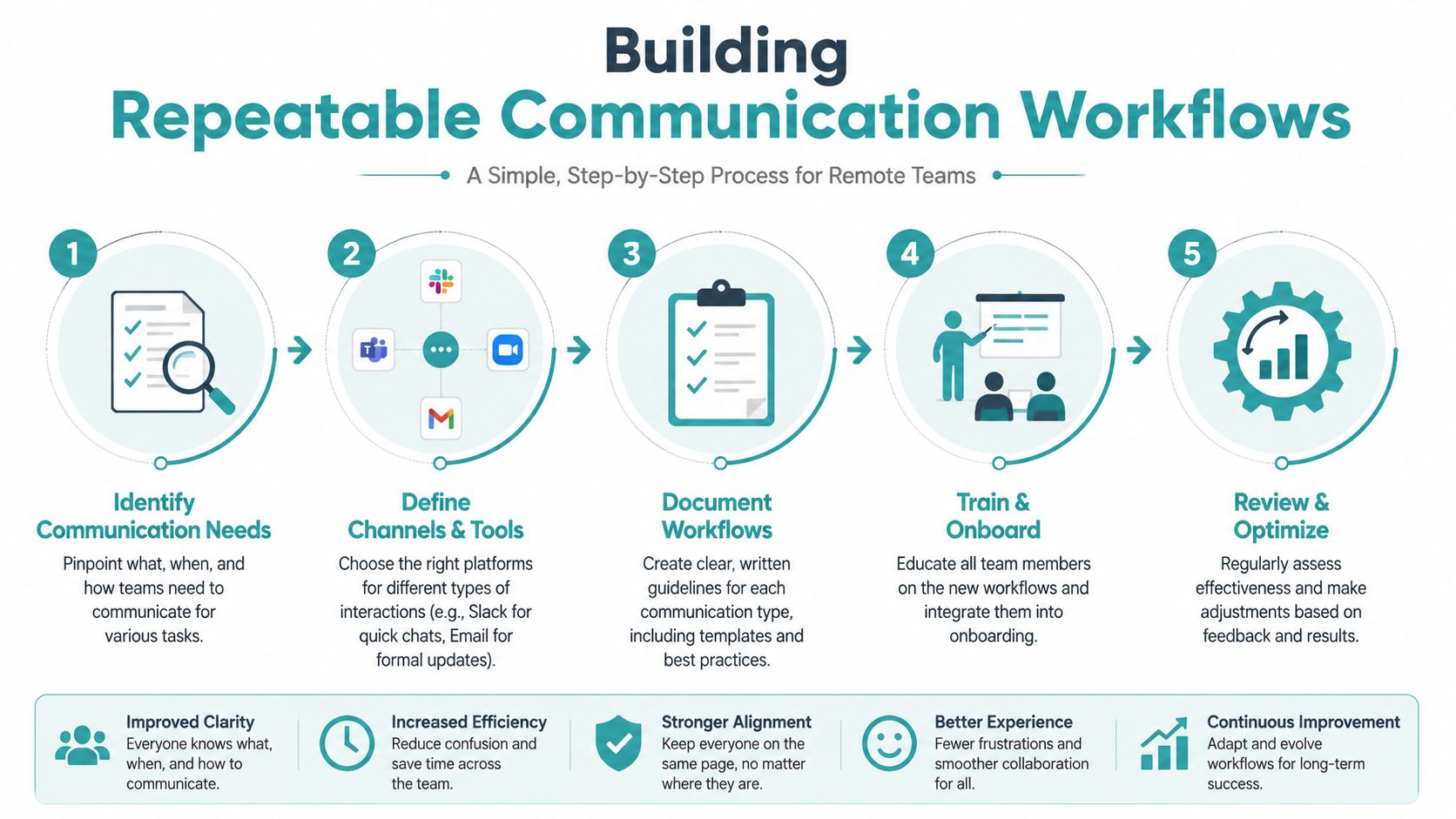
That's where workflows matter. A workflow is just a repeatable sequence for a recurring communication event. Weekly status update. Client approval request. Creative review. Sales-to-operations handoff. New page launch. If it happens often, it needs a standard path.
Why workflows matter more than extra meetings
When companies go remote, teams often communicate less across departments. Research shows company-wide remote work caused collaboration networks to become less interconnected and more siloed, with workers communicating significantly less frequently with people in other business groups. Intentional workflows are needed to rebuild these broken cross-group bridges, according to this analysis of remote collaboration patterns.
That's a big issue for growing businesses. Marketing promises something sales didn't confirm. Operations learns about a campaign after it launches. Client service gets copied too late. The fix isn't more random check-ins. It's a documented handoff.
If you're looking for practical outside reading on systems that boost remote team productivity, that resource is worth skimming because it reinforces the same principle. Clear routines beat constant interruption.
Three workflows worth standardizing first
Written daily stand-up
Skip the daily call unless the team needs it.
Use a shared format like this in Teams, Slack, or your project platform:
-
Yesterday: What I completed
-
Today: What I'm working on
-
Blocked by: What needs input
-
Needs decision from: Person or role
This works especially well for agencies, legal support teams, healthcare admin groups, and internal marketing departments that need visibility without losing the morning to meetings.
Weekly project status update
A weekly status report should answer the same questions every time:
-
Project name
-
Current status
-
What moved this week
-
What's at risk
-
Next milestones
-
Client decisions needed
-
Owner for each next action
This keeps leadership out of the weeds while still giving them enough context to step in if needed.
Client feedback loop
A lot of delays happen because feedback arrives scattered across email replies, PDFs, text messages, and verbal comments.
Use one standard request:
Please place all feedback in this document by end of day Thursday. List each requested change by page or section, and note whether it is required for launch or preferred for a later revision.
That one instruction cuts down on contradictory comments and lets your team respond in one organized pass.
Build the workflow into onboarding
A workflow isn't real until a new hire can follow it without tribal knowledge. Add communication SOPs to onboarding, and store them somewhere searchable.
For teams improving internal coordination alongside campaign execution, documented automation also helps. This guide on marketing automation workflows that reduce manual follow-up pairs well with communication SOPs because it removes a lot of “Did anyone send that yet?” friction.
Security and Compliance in Remote Communication
For regulated businesses, remote team communication isn't just an efficiency topic. It's a risk topic.
If your team handles patient data, legal documents, financial records, intake forms, or confidential client conversations, convenience can get expensive fast. Consumer-grade habits, like sending sensitive files through personal email or discussing private matters in the wrong chat tool, create exposure that many owners don't see until there's already a problem.
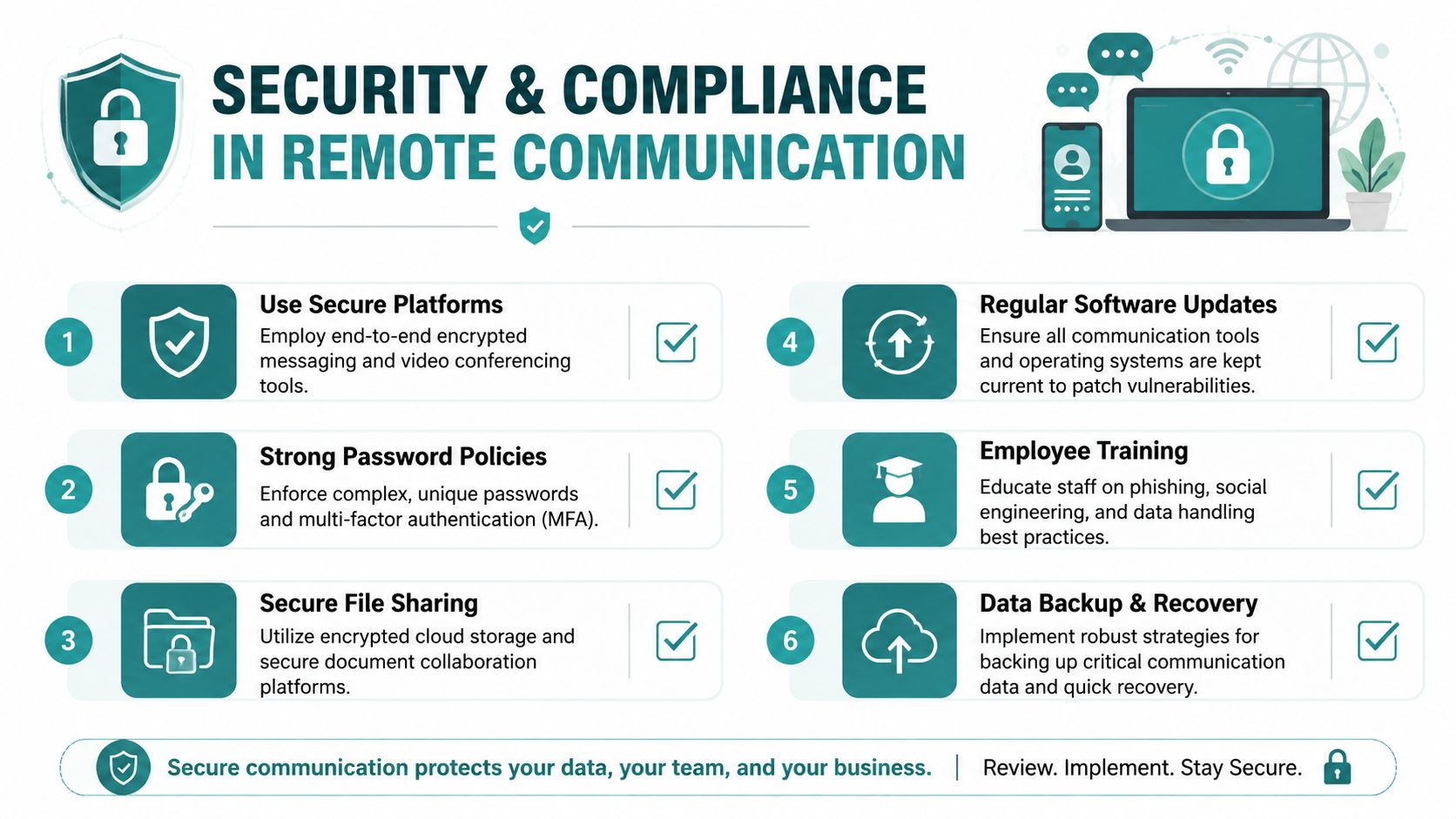
What secure communication looks like in practice
Most businesses need a few baseline rules:
-
Use business-approved platforms: Keep internal and client communication inside managed tools, not personal apps.
-
Control file sharing: Sensitive documents should live in secured cloud storage with permission controls.
-
Require strong access habits: Use unique passwords and multi-factor authentication.
-
Train staff on message risk: Employees need to recognize phishing, spoofing, and social engineering attempts.
For firms that rely heavily on email, these email security best practices for MSPs are useful beyond IT providers because the underlying habits apply to any business that sends contracts, approvals, and client data electronically.
The fastest communication channel isn't the best one if it creates unnecessary legal or reputational risk.
Healthcare and HIPAA concerns
Healthcare businesses in the Cincinnati area need to be especially careful about where protected health information travels. Standard email and casual chat tools may not be appropriate for patient information unless they're configured and managed correctly.
In practice, that means separating routine internal coordination from any communication that includes patient-specific details. Secure messaging portals, controlled document access, audit-friendly systems, and written staff policies matter. So does training. A compliant tool used carelessly is still a liability.
For healthcare organizations, communication discipline also affects patient experience. If intake, scheduling, marketing, and web forms don't connect properly, staff end up copying information by hand or asking patients to repeat details. That slows service and increases the chance of mistakes.
Legal and professional service firms face different pressure
Law firms, consultants, accountants, and other advisory businesses deal with a different version of the same problem. Their currency is trust.
Clients don't always distinguish between a data breach, an accidental forwarding error, and a sloppy communication process. They experience all of it as carelessness. That's why firms should think about confidentiality controls as part of brand protection, not just compliance overhead.
A secure remote communication setup usually includes:
-
Approved communication channels for client matters
-
Documented retention and access rules
-
Clear approval workflows before sensitive files go out
-
A defined escalation path when something looks questionable
If your business operates in a regulated space, secure communication isn't optional. It's part of how you prove professionalism before a prospect ever signs.
How to Measure Communication Effectiveness
A lot of teams track the wrong things. They count messages, meetings, and activity. None of that tells you whether communication is helping the business.
Better remote team communication shows up in execution. Projects move with fewer delays. Clients get clearer answers. Staff spend less time chasing context. The handoff from one department to another feels cleaner.

What to measure instead of noise
Remote communication efficacy is measured through a multi-dimensional system combining deliverable completion rates with qualitative assessments of clarity and documentation quality, where async written communication is treated as a core technical skill, according to this benchmark-focused review of remote communication performance.
For a small or mid-sized business, that translates into a practical scorecard.
-
Response reliability: Are client and internal requests getting answered within your stated expectations?
-
Deliverable completion: Are projects finishing with fewer stalled tasks and fewer “waiting on reply” delays?
-
Documentation quality: Can someone new step into a project and understand decisions without digging through private messages?
-
Meeting usefulness: Did the meeting produce a decision, an owner, and a next step?
-
Cross-team visibility: Can sales, service, operations, and marketing see what affects them without scheduling another call?
A simple owner-level review
Business owners don't need a complicated dashboard to spot communication problems. Review a handful of recent jobs or client interactions and ask:
-
Where did the final decision get recorded?
-
How many channels were used for the same issue?
-
Did someone clearly own the next action?
-
Was there avoidable delay caused by confusion?
-
Could another employee find the answer later?
If those answers are fuzzy, the communication process needs work.
Good communication should lower friction, not increase traffic.
The business outcome that matters
The true win isn't “better collaboration” as an abstract goal. It's more productive time, stronger client trust, cleaner operations, and fewer preventable mistakes.
For Cincinnati businesses investing in web design, SEO, or digital marketing, this matters more than people think. Campaigns fail when approvals stall. Websites launch late when feedback loops are messy. Leads go cold when nobody owns follow-up. Communication is part of growth infrastructure.
If your current process depends on memory, urgency, and whoever happens to be online, it won't scale well. A documented system will.
If your business needs help tightening operations around websites, marketing, client workflows, or compliant digital systems, HDM is a Cincinnati-area partner worth talking to. HDM helps organizations build the kind of structured digital environment that supports clear communication, stronger execution, and measurable growth without adding unnecessary complexity.