

If you're running a business around Cincinnati, your day probably gets chopped into small, expensive fragments. A lead form comes in. Someone has to reply. A customer asks a billing question. Someone has to look up the account. A new client signs. Someone has to send paperwork, update the CRM, notify the team, and schedule the next step. None of those tasks are hard on their own. The problem is the pileup.
That's where AI workflow automation starts to matter. Not as a flashy tech trend, but as a way to stop paying skilled people to copy, paste, sort, route, and chase information across inboxes and software. For small and mid-sized businesses, that can mean faster follow-up, fewer dropped handoffs, and more consistency in sales, marketing, and service.
Putting Your Business Operations on Autopilot
Most business owners don't need more software. They need fewer manual steps.
A lot of local companies already have the core pieces in place. They have a website, a CRM, an email platform, a booking system, maybe QuickBooks, Shopify, HubSpot, or a patient portal. The issue is that these systems often don't work together cleanly, so staff members become the integration layer. They read messages, decide what they mean, move data from one place to another, and try to remember the next action.
AI workflow automation changes that by handling repeatable decisions inside a process. Instead of just triggering a generic alert, it can review incoming information, recognize what kind of request it is, and push it to the right next step.
The business case is getting harder to ignore. The workflow automation market was valued at USD 23.77 billion in 2025 and is projected to reach USD 40.77 billion by 2031, with 9.41% CAGR. That matters because it shows this isn't a niche add-on anymore. It's becoming part of how modern businesses run.
What this looks like for a local business
For a Cincinnati contractor, it might mean routing quote requests by service type and zip code. For a law firm, it might mean organizing intake details before a staff member reviews them. For a medical practice, it might mean moving routine administrative requests into a safer, more structured process.
Practical rule: If your team handles the same type of request over and over, and the first few decisions are predictable, it's probably a candidate for automation.
At HDM, the useful conversations usually don't start with "Which AI tool should we buy?" They start with "Where are we losing time every week?" That question leads to better decisions, because the right-sized opportunity is rarely the loudest one. It's usually the quiet task that steals a few minutes dozens of times a day.
What AI Workflow Automation Really Means
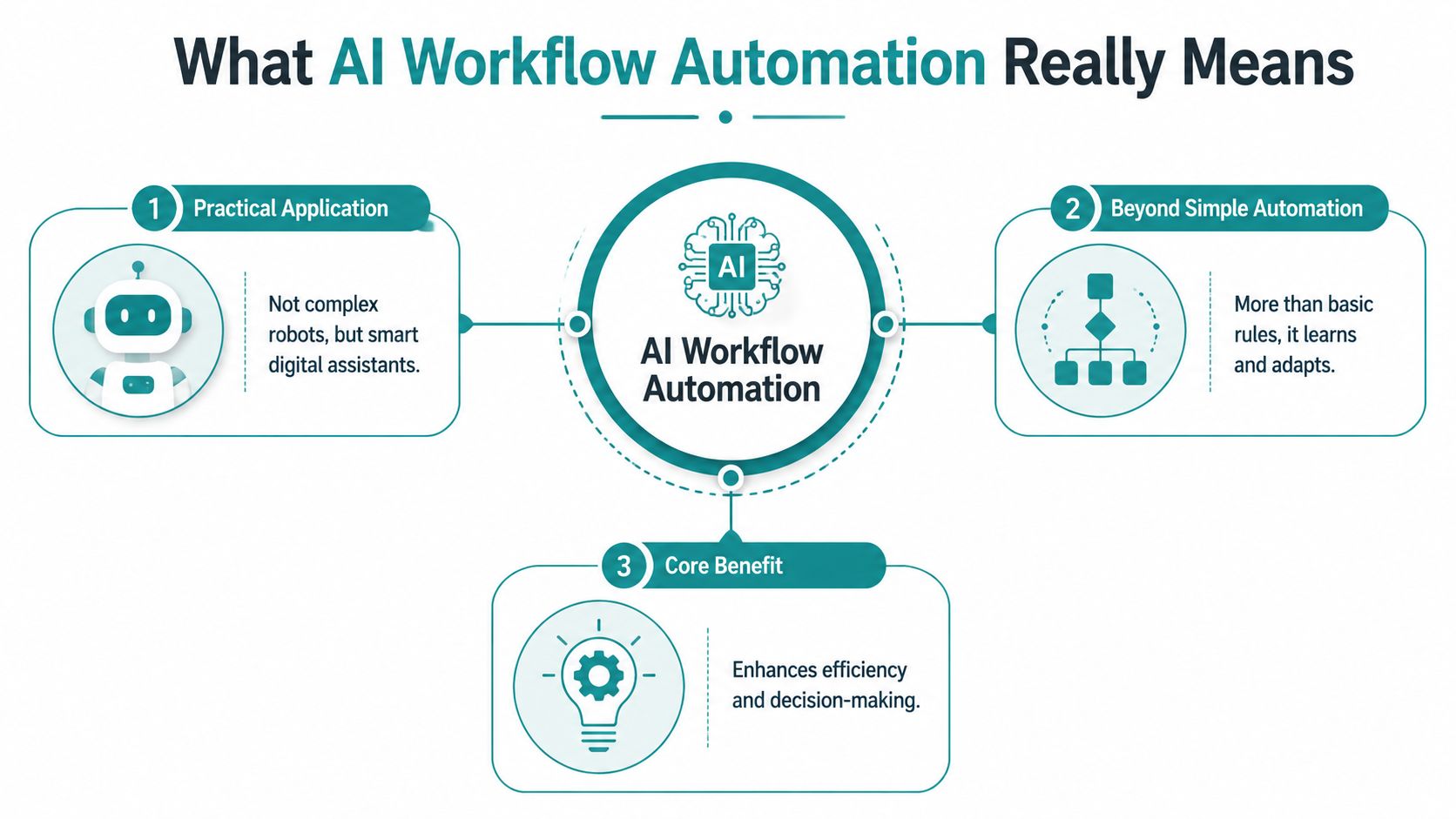
Basic automation follows rules. AI workflow automation handles judgment inside those rules.
If you set up an email autoresponder, that's automation. If a system reads an incoming message, figures out whether it's a sales lead, support issue, refund request, or urgent complaint, then sends it to the right person with a summary, that's AI workflow automation.
The simple way to think about it
Imagine the difference between a light switch and a front-desk coordinator.
A light switch only does one thing when you flip it. A coordinator reads the situation, decides what matters, and routes the request. AI adds more of that coordinator-style layer to software. It helps systems work with messy, real-world inputs like emails, forms, PDFs, transcripts, notes, and customer questions.
That matters because most business operations aren't blocked by a lack of rules. They're blocked by unstructured information.
According to Atlassian's explanation of AI workflow automation, AI workflow automation is most effective at decision points that combine unstructured input with routing logic, such as ticket classification and invoice-data extraction. In other words, the biggest gains often come where a person currently has to read something first, understand it, and decide what happens next.
Where small businesses usually get confused
A lot of owners assume AI means replacing staff or building a complicated custom system. Usually, it means neither.
For an SMB, practical AI workflow automation often looks like this:
-
Lead handling: The system reads a form submission, tags the inquiry, assigns priority, and creates the right follow-up task.
-
Customer service intake: An email or chat request gets summarized and routed so your team starts with context.
-
Document processing: The system pulls key fields from invoices, applications, or onboarding documents and sends them where they need to go.
-
Internal coordination: Notes from calls or meetings become tasks, reminders, or next-step updates instead of getting buried.
What works and what doesn't
The best workflows have a clear handoff. The AI handles interpretation, then your systems or staff handle action.
What tends to fail is using AI as a detached chatbot with no connection to the rest of the business. If it can't update your CRM, trigger an email, assign a task, or log the outcome, it creates more noise than value.
Good AI workflow automation doesn't live off to the side. It sits inside the path the work already takes.
The Real Business Value of Automation
Time savings are nice. Business owners care more about whether those savings show up in labor, speed, and margin.
The strongest case for AI workflow automation isn't that it's interesting. It's that it helps teams stop spending paid hours on repetitive work that doesn't require human judgment every time.
To ground that in numbers, here's one research snapshot worth paying attention to.
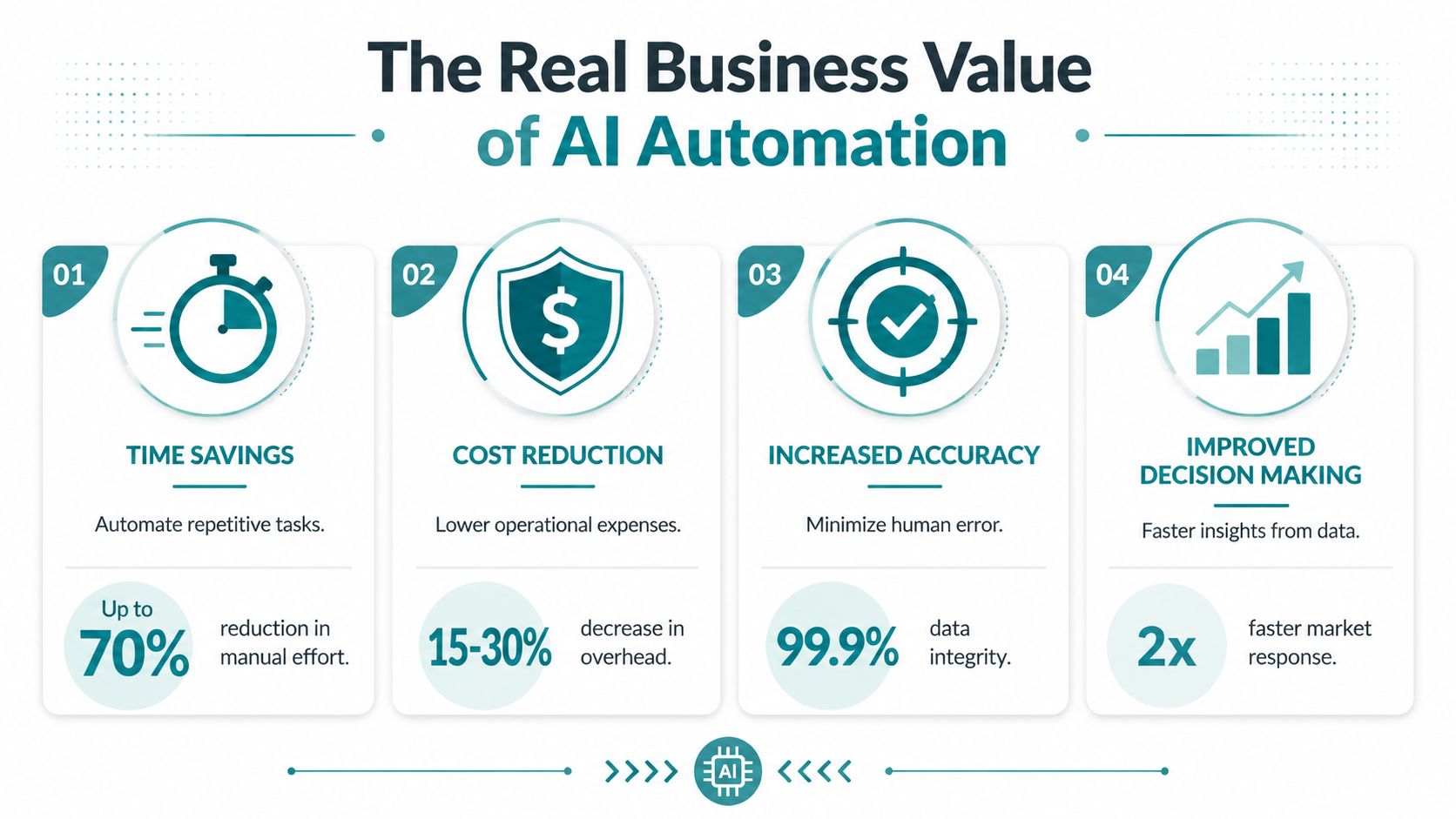
Companies using automated workflows report saving 10 to 15 hours per employee per week, cutting operational costs by 20 to 30 percent, reducing errors by as much as 80 percent, and 60 percent of organizations see positive ROI within 12 months.
That doesn't mean every workflow will produce those results. It does mean the upside is large enough to justify serious evaluation.
What those gains mean in plain business terms
If your office manager spends chunks of every day sorting inquiries, checking forms, sending the same follow-up messages, and fixing preventable mistakes, that labor cost is real. So is the opportunity cost. Those are hours not spent on clients, sales, retention, or process improvement.
A reduction in errors also matters more than many owners first assume. Errors create rework. Rework creates delays. Delays frustrate customers and eat margin. Even a simple workflow, like processing web leads consistently or extracting invoice details accurately, can have a ripple effect across the business.
This video gives a helpful visual overview of where automation fits into daily operations.
The ROI question most owners should ask
Don't ask whether AI can automate your business. Ask whether it can remove repeated labor from a process that happens often enough to matter.
For engineering and operations teams, one practical benchmark is clear. A task that takes 30 minutes and happens 10 times per week reclaims 5 hours weekly when automated well, as noted in Devlyn's guidance on AI workflow automation. That's a useful way to think about smaller companies too. The best opportunities are often boring, frequent, and easy to measure.
A strong first candidate usually checks three boxes:
-
It happens often: Daily or weekly, not once a quarter.
-
It follows a pattern: Even if inputs vary, the route is familiar.
-
It causes drag: Delays, missed follow-up, duplicate work, or preventable mistakes.
The fastest win usually isn't the most advanced workflow. It's the one your staff complains about every week.
Where You Can Use AI Automation in Your Business
The easiest way to understand AI workflow automation is to look at the work already moving through your business. Leads come in. People ask questions. Documents arrive. Staff members need context before they act. Every one of those moments creates a chance to reduce friction.
For most Cincinnati-area SMBs, the strongest use cases sit close to revenue and service. Marketing, sales intake, customer communication, invoicing, scheduling, and reporting are usually better starting points than a massive back-office overhaul.
A practical view by industry
Here's a simple way to picture it.
| Industry | Manual Process Before AI | Automated Workflow With AI | Key Benefit |
| --- | --- | --- | --- |
| Healthcare practice | Staff reads intake forms, routes requests, and follows up manually | AI reviews intake details, organizes request types, and sends the next step to the right team member within a governed workflow | Faster intake and less admin drag |
| Law firm | Team screens inquiries, collects missing information, and sorts documents by hand | AI summarizes intake, flags likely matter type, and prepares a structured handoff for legal staff review | Better response consistency |
| E-commerce store | Staff monitors orders, questions, and post-purchase messages across tools | AI classifies support requests, drafts responses, and triggers follow-up flows after purchase events | Smoother customer experience |
| Professional services firm | New lead submissions sit in an inbox until someone triages them | AI scores the inquiry, routes it by service line, and starts the right nurture or scheduling path | Faster lead response |
| Home services company | Office staff answers repetitive quote and scheduling questions manually | AI sorts requests by urgency, service type, and location, then creates the next action in the system | More efficient dispatch and sales follow-up |
| Marketing team | Monthly reports require manual data gathering and summary writing | AI compiles source inputs, drafts a readable summary, and prepares client-ready reporting for review | Less time spent on recurring reporting |
Marketing and sales workflows
Most businesses already spend money to generate leads. The weak spot is what happens next.
If a contact form, paid ad lead, or website inquiry isn't routed quickly, the value of the campaign drops. AI can help by reading what the prospect submitted, recognizing intent, and triggering the right next step. That might be a callback task for sales, an email sequence for lower-intent leads, or a prompt to collect missing details before your team gets involved.
If you're comparing options, this roundup of AI tools for Ohio small businesses is a useful starting point.
Customer service and operations workflows
Service teams often burn time on intake, not resolution. They read the message, summarize it for themselves, look up account context, and decide who owns it. That work is necessary, but it doesn't need to be fully manual.
AI can take the first pass. It can identify the issue category, pull out the important facts, and route the request with a short summary. Your team still reviews and responds, but they start closer to the answer.
Content and reporting workflows
This is one area many owners overlook. If your business publishes blogs, product updates, email campaigns, or client reports, there are repetitive tasks around preparation and formatting. AI can help organize drafts, summarize performance notes, and support content operations inside your existing systems.
The key is keeping a human review step where brand voice, legal review, or strategic judgment matters.
Your Four-Step Roadmap to Getting Started
Most failed automation projects start with software. Strong ones start with workflow mapping.
If you automate a messy process, you usually just create a faster mess. MIT Sloan makes that point well. The biggest gains come from redesigning the workflow, not just adding AI to individual tasks. The primary value comes from changing how work is sequenced, grouped, and handed off between people and machines.
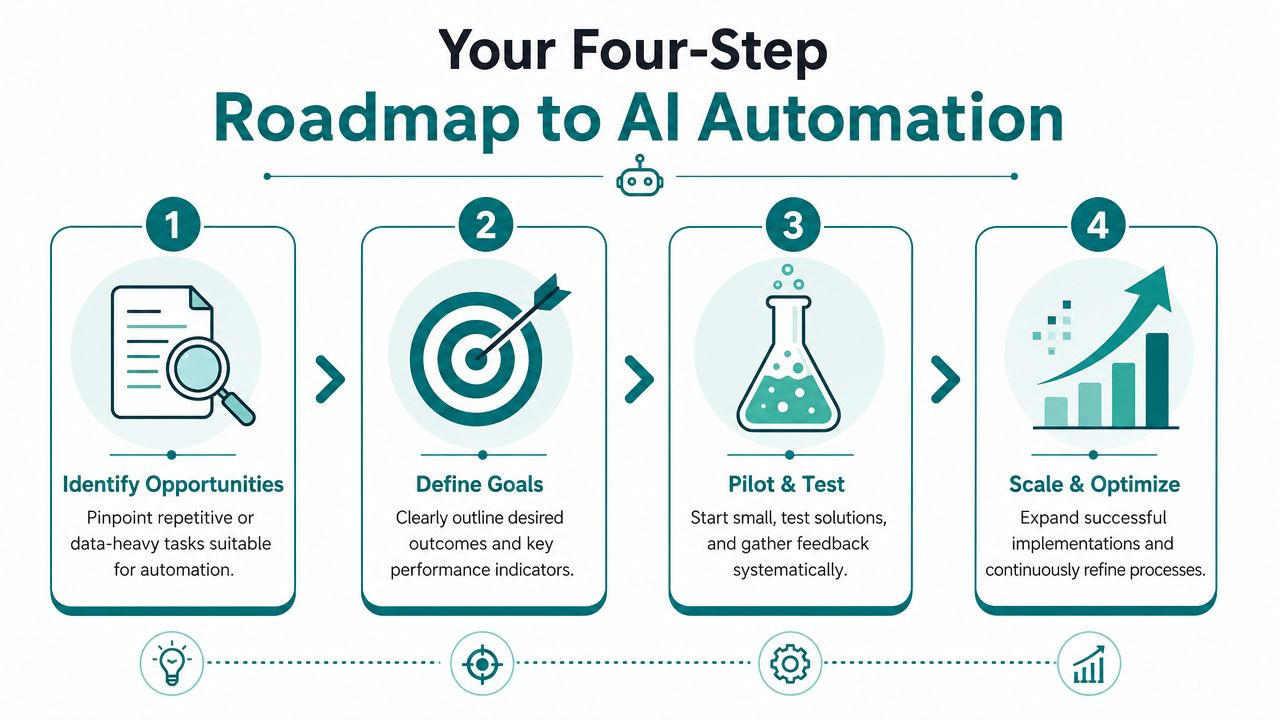
Step 1 Identify the friction
Start where work gets stuck, repeated, or forgotten.
Look for inboxes that act like holding tanks. Look for tasks that require someone to read, interpret, and route information all day. Review places where data gets copied from forms into another platform. Those are strong signals.
A simple audit helps:
-
Track repeat tasks: Write down every recurring task your team handles for one week.
-
Note decision points: Mark where someone has to read an email, form, note, or document and decide what happens next.
-
Find bottlenecks: Focus on the spots that delay revenue, customer response, onboarding, or billing.
Step 2 Fix the process before you automate it
Many businesses often skip ahead too fast.
If two team members handle the same request differently, or if nobody agrees on what qualifies as urgent, AI won't solve that on its own. You need a clean process first. Define the categories, handoffs, approvals, and fallback path when the system isn't confident.
Map the process as it should work. Then automate that version.
Step 3 Choose tools that fit your stack
The right tool depends on what you already use. A company on HubSpot, Shopify, Google Workspace, and QuickBooks has different options than a law firm using Clio or a healthcare group using a patient system with stricter controls.
What matters most is integration. Your workflow should connect to the systems where the work already happens.
Here are useful selection criteria:
- Connection to existing platforms
If the tool can't pass data cleanly to your CRM, website, email platform, or internal systems, your staff will still end up doing manual work.
- Control over prompts and logic
You want the ability to shape how requests are classified, summarized, and routed.
- Review and override options
Human approval matters, especially in regulated or customer-facing workflows.
- Reporting and visibility
You should be able to see what was routed, where it went, and how often staff had to correct it.
For businesses that need strategy, implementation, and custom integration in one place, HDM's roadmap for Cincinnati and Dayton businesses outlines a practical planning approach.
Step 4 Pilot, measure, and expand
Don't automate ten workflows at once. Pick one process with visible pain and measurable output.
Good pilot candidates include lead routing, intake classification, invoice extraction, support triage, or recurring reporting. Measure before and after. Look at response time, staff hours, error correction, and whether the workflow is utilized.
Then improve it. Tighten prompts. Refine categories. Add exceptions. Expand only after the first workflow is stable.
Navigating Security and Compliance in an AI World
A lot of business owners are interested in AI right up until customer data enters the conversation. That's the right instinct.
Once a workflow touches personal information, payment details, legal documents, patient information, or internal records, convenience can't be the only decision factor. Governance matters. Access rules matter. Auditability matters.

What safe automation actually requires
For regulated SMBs, the important question isn't whether AI can automate a step. It's what controls, metrics, and fallback paths are needed to keep the workflow compliant and reliable. Guidance from Flowfinity's practical guide to AI workflow automation is clear that AI should not bypass role-based access controls, authentication policies, or data-governance frameworks.
That means a responsible workflow should include:
-
Permission boundaries: The AI layer shouldn't expose data to people who shouldn't see it.
-
Human review points: Higher-risk actions should require staff approval.
-
Fallback handling: If the system is uncertain, it should escalate instead of guessing.
-
Traceability: You need a record of what happened, who approved it, and what action was taken.
Why regulated industries need more discipline
Healthcare practices, law firms, and financial service providers have less room for error. A workflow that works fine for a retail FAQ bot may be completely inappropriate for patient intake or legal document handling.
In those environments, the best setup is usually narrower and more controlled. Automate intake structure, not final judgment. Automate routing, not unrestricted access. Automate summaries, not unsupervised decisions on sensitive matters.
If your business handles protected health information, this guide to HIPAA-compliant web design helps frame the broader standards your digital systems should support.
Security isn't a feature you add later. It's part of workflow design from the first draft.
Take Your First Step with AI Automation
AI workflow automation isn't just for enterprise companies with large IT departments. It's useful for smaller businesses that already know where their time is leaking. If leads sit too long before follow-up, if staff members keep re-entering data, or if routine customer requests clog the day, there's probably a workflow worth improving.
The smartest starting point is usually narrow. Pick one process. Make sure the steps are clear. Decide what the AI should handle, what your team should still review, and what success looks like. Then run the pilot long enough to learn from it.
For Cincinnati-area businesses, the biggest opportunity is often connecting automation to digital growth work you already pay for. Better lead handling improves marketing ROI. Better intake improves sales speed. Better routing improves customer experience. That's why this isn't separate from your website, SEO, or digital strategy. It's tied directly to how efficiently your business turns attention into revenue and service into retention.
If you're already investing in your online presence, right-sized automation is often the next practical move.
If you're exploring where AI workflow automation fits into your website, lead generation, customer service, or compliance needs, HDM works with businesses across Greater Cincinnati on digital strategy, custom development, and workflow-focused AI implementation.


