


A Cincinnati business owner's Monday rarely starts with strategy. It starts with missed calls, intake forms waiting for someone to enter them, a shared inbox full of questions, and sales leads that arrived after everyone left Friday. By the time the team catches up, the most valuable work has been pushed into another afternoon.
AI automation for business can help, but buying another software subscription isn't the strategy. The practical opportunity is to redesign one operational workflow, give AI a carefully defined role, keep a human responsible for judgment, and measure the result in recovered hours, faster response times, lower rework, and business impact. That approach matters because adoption has moved well beyond experimentation. McKinsey's 2025 Global Survey on AI found that 78% of respondents said their organizations use AI in at least one business function, up from 72% in early 2024 and 55% a year earlier.
For small and mid-sized companies across Greater Cincinnati, the question isn't whether AI is available. It's whether the first workflow you automate will make the business easier to run without creating a new set of errors, privacy problems, or maintenance chores.
What AI Automation Actually Looks Like in a Small Business
At 8:05 on a Monday morning, a local service business owner opens the office door and hears the phone ringing. Three website forms arrived overnight. A customer left a voicemail asking for an urgent update. The shared support inbox contains messages about scheduling, pricing, and a frustrated customer whose issue needs a calm, experienced response.
The old process is familiar. An employee listens to each voicemail, copies details into a spreadsheet or CRM, forwards emails to the right person, and sends follow-ups when someone remembers. Leads wait while the team handles the loudest interruption.
The redesigned process starts before the owner sits down. A phone system creates a transcript and summarizes the voicemail. An AI assistant classifies inbound email by subject and meaning, drafts a response for routine questions, and flags emotional or unusual messages for human review. A digital intake form checks whether required information is present, creates a lead record, and routes it to the right salesperson or coordinator.
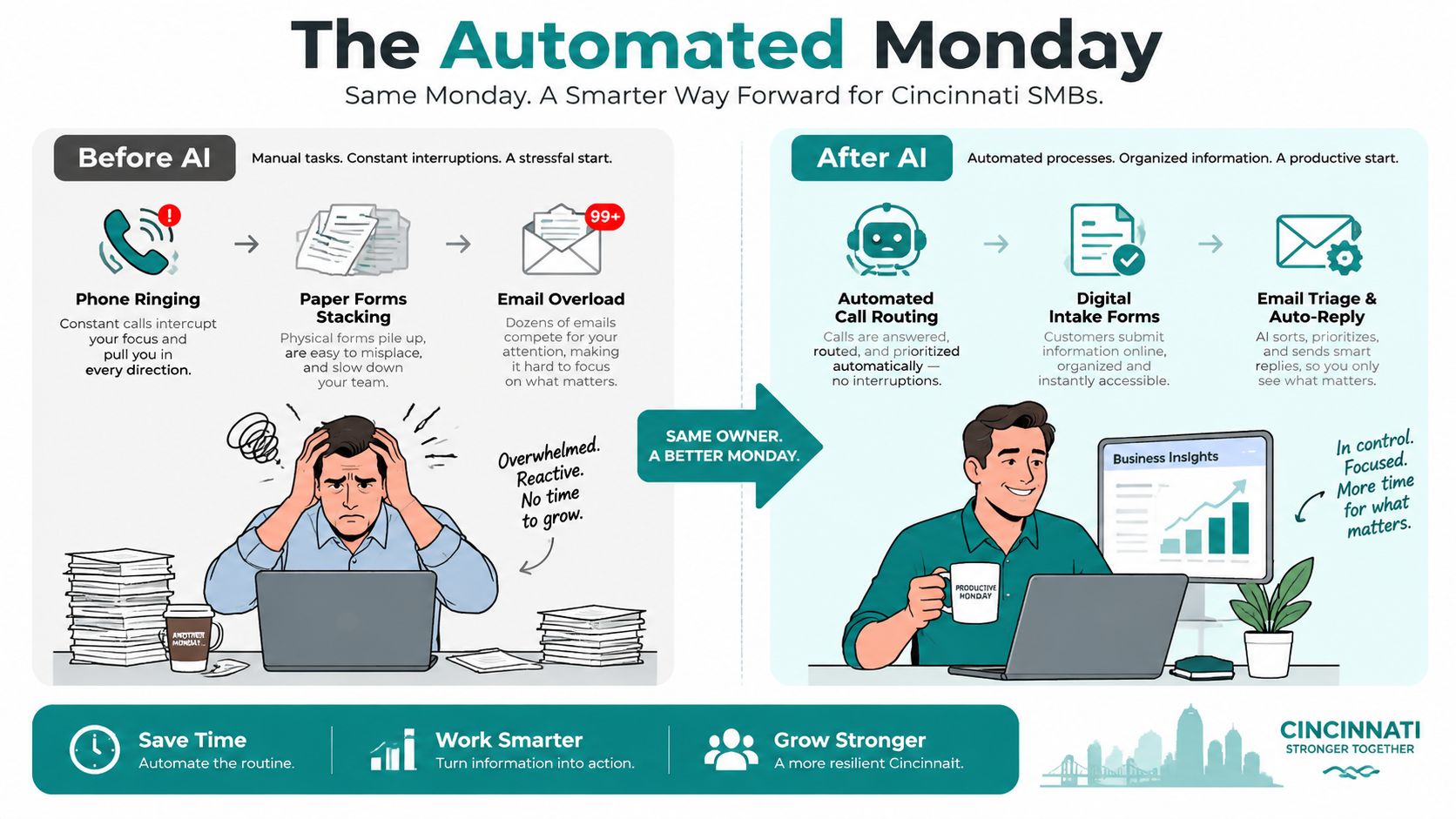
By late morning, the owner isn't manually sorting every request. The team is reviewing exceptions, calling qualified prospects, and handling customers who need judgment. Scheduling, intake, reminders, and routine follow-up can be automated. Advisory work, quote approval, complaint resolution, and sensitive communication should usually be augmented instead.
Automation and augmentation are different jobs
Automated tasks follow defined rules:
- Appointment scheduling: The system offers available times, confirms the booking, and updates the calendar.
- Lead intake: The workflow extracts contact details, service needs, location, and source from a form or email.
- Follow-up: The system sends a reminder when a prospect hasn't responded, subject to clear limits.
- Internal routing: A new request moves to the correct team member based on service type or territory.
Augmented tasks use AI for a first pass while a person remains accountable:
- Case notes: An advisor reviews an AI-generated summary before saving it to the client record.
- Estimating: An estimator uses an AI-drafted quote or scope outline, then checks assumptions and pricing.
- Customer support: A staff member edits the tone and facts before sending a response to an upset customer.
- Marketing content: A marketer uses AI to organize source material, but approves claims, messaging, and brand voice.
Practical rule: Automate the predictable handoffs first. Keep human approval wherever context, emotion, money, safety, or compliance can change the right answer.
AI still fumbles nuance. It may misread an angry customer, invent a missing detail, or treat an unusual request as ordinary. Owners looking for additional examples can review these automation ideas for small business, but the useful question isn't "Which tool should I buy?" It's "Which part of Monday should stop depending on memory?"
Picking the First Workflow That Will Actually Pay Back
The first workflow should be boring, frequent, and measurable. A flashy AI chatbot may attract attention, but a lead-routing process or appointment reminder often creates a clearer operational return because staff already perform the work repeatedly.
Score each candidate across three dimensions:
- Pain: How much staff frustration, delay, or customer friction does the current process create?
- Frequency: How often does the task run during a normal week?
- Risk: What happens if the system makes a wrong decision?
Use a simple Payback Score by adding Pain and Frequency, then subtracting Risk. The formula isn't finance-grade, and it doesn't replace judgment. It forces a useful conversation about why one workflow deserves attention before another.
| Workflow Candidate | Pain (1-5) | Frequency (1-5) | Risk (1-5) | Payback Score |
|---|---|---|---|---|
| Lead intake and routing | 4 | 5 | 2 | 7 |
| Appointment reminders | 3 | 5 | 1 | 7 |
| Invoice chasing | 4 | 4 | 2 | 6 |
| Employee onboarding | 3 | 2 | 2 | 3 |
| Review requests | 2 | 4 | 1 | 5 |
The strongest first candidates usually have high frequency and low risk. Appointment reminders, form-to-CRM entry, routine lead qualification, and internal notifications fit that pattern. Invoice chasing can work too, but the language and timing need careful review because a poorly worded message can damage a customer relationship.
A useful selection test
Ask whether a human already performs the task almost on autopilot. If someone copies information from one system to another, checks a predictable condition, or sends a standard reminder, software can probably handle much of that work more consistently. If the task requires negotiation, legal interpretation, clinical judgment, or a relationship-sensitive decision, start with AI drafting and review rather than full autonomy.
Write the workflow on one page before choosing a platform:
- Workflow name: Use a specific label, such as "Website lead intake for residential roofing."
- Trigger: Identify what starts it, such as a form submission or inbound email.
- Inputs: List the fields and documents the system needs.
- AI task: Define whether AI classifies, summarizes, extracts, or drafts.
- Human checkpoint: Name the person who approves exceptions.
- Success measure: Choose hours saved, response time, cycle time, or rework.
- Stop condition: State when the workflow must pause and escalate.
For a deeper implementation lens, review HDM's guide to AI workflow automation. The important outcome is a named workflow with an owner, not a general ambition to "use AI more."
Choosing the Right AI Architecture for Your Team
Small businesses usually encounter three architecture choices. The right one depends on the workflow, the team maintaining it, and the consequence of failure. It shouldn't be selected because a vendor's product tour looked impressive.
| Architecture | Best For | Typical Cost | Maintenance Burden | Time to First Win |
|---|---|---|---|---|
| Embedded AI | Solo owners and small teams already using a CRM, email, or help desk | Existing subscription plus possible feature upgrade | Low | Fast |
| Automation platforms | Operations leads connecting marketing, sales, and service apps | Platform subscription, usage, and connected app fees | Moderate | Fast to moderate |
| Custom builds | Core revenue workflows with unusual rules or proprietary data | Discovery, development, hosting, and ongoing support | High | Moderate to slow |
Embedded AI
Embedded features inside tools such as HubSpot, Salesforce, Microsoft 365, Google Workspace, or a customer support platform are often the safest starting point. The data already lives in the system, permissions are familiar, and staff don't have to learn an entirely separate interface.
The trade-off is limited flexibility. An inbox assistant may draft replies, but it may not understand the rules that connect your CRM, scheduling system, accounting platform, and dispatch calendar.
Connected automation platforms
Tools such as Zapier, Make, and n8n connect applications and add AI steps between them. A form can trigger data extraction, a CRM record, a Slack notification, and a draft email without someone re-keying every detail. Make can offer visual control for more involved workflows, while n8n-style setups may suit teams that want more hosting and technical control.
This tier creates more opportunity, but it also creates more places for a workflow to break. The operations owner needs to understand triggers, permissions, failed runs, and what happens when an app changes its fields.
Custom builds
A direct API integration or custom application makes sense when the workflow is central to revenue, requires proprietary logic, or cannot be handled reliably by standard connectors. It also creates the largest maintenance obligation. Model changes, API updates, security reviews, prompt revisions, and staff training all become part of ownership.
Choose the simplest architecture that can meet the workflow's requirements. Complexity should follow business value, not lead it.
Before committing, compare the AI strategy services from HDM with an internal build or a platform-led approach. Account for hidden costs, including user seats, model usage, integration limits, monitoring, and the staff time required to maintain prompts and exception rules.
Data, Integrations, and HIPAA-Aware Handling
AI workflows fail when the underlying data is incomplete. A lead may exist in a website form, a shared inbox, a spreadsheet, and a CRM, with different spellings and no clear indication of which record is current. Before connecting an AI tool, spend a day inventorying where customer, lead, and operational information lives.
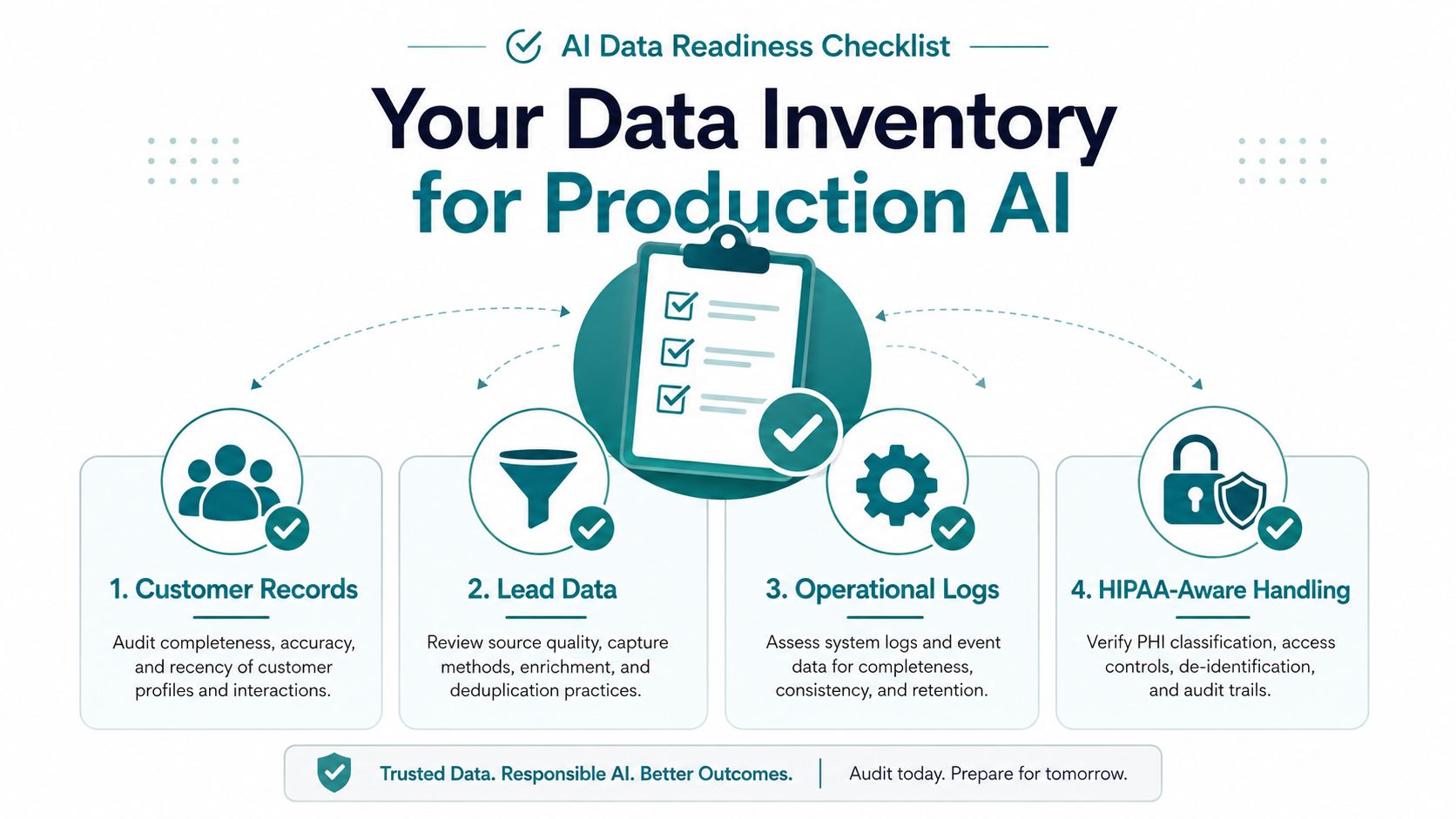
For each source, record the system name, owner, purpose, access level, and fields available. Look for missing identifiers, inconsistent status labels, duplicate records, absent timestamps, and unclear ownership. A production workflow typically needs a dependable identifier, timestamp, source, status, and owner for every item it processes.
Integration patterns that fit SMBs
- Native connectors: Zapier, Make, and n8n can connect common SaaS applications without a custom integration.
- Direct API calls: A developer can connect systems directly when a connector lacks the required action or data.
- Middleware: A central integration layer can normalize information before it reaches the AI step or the destination system.
Keep AI away from data it doesn't need. If the workflow only needs a service category and appointment window, don't send an entire customer history to a language model.
HIPAA-aware handling in Greater Cincinnati
A dental clinic or mental health practice serving patients in Greater Cincinnati should treat AI automation as a privacy and process-control decision, not a simple productivity upgrade. A vendor that handles protected health information may need a Business Associate Agreement, and the practice should confirm that the specific product and configuration support the intended use.
Minimum-necessary access means the workflow receives only the information needed for its task. Audit logging records who accessed data, what the workflow did, and whether a human approved the result. De-identification can support internal analysis when patient identity isn't required. A clinic might summarize operational trends using records stripped of names and direct identifiers, while keeping identifiable patient details inside approved systems.
Review prompt logging, whether the vendor trains models on submitted data, where information is stored, and which vendors receive it. PHI shouldn't travel through an unapproved consumer chatbot just because it produces a convenient draft. Healthcare organizations can use this HIPAA website compliance guidance as part of a broader review, but legal and compliance counsel should make the final determination.
Before signing, verify:
- Data location: Know which applications receive and retain information.
- Access controls: Confirm role-based permissions and administrator visibility.
- Audit records: Check whether workflow actions and approvals are logged.
- Retention rules: Understand deletion, export, and backup behavior.
- Human review: Define which outputs require approval before delivery.
- Incident response: Ask how the vendor reports and handles unauthorized access.
Training Staff and Redesigning Daily Workflows
At a small HVAC company in Blue Ash, the office manager used to type every new lead into the CRM. On a busy Tuesday, she copied the customer's name, address, equipment issue, and preferred appointment window while calls continued around her.
A redesigned assistant reads the submitted form, drafts the CRM entry, flags urgent language, and places the record in a review queue. The office manager checks the fields and approves the entry in two clicks. She isn't removed from the process. She's no longer spending her morning on transcription.
That distinction matters when staff worry that automation means job loss. The honest explanation is that AI changes task ownership before it changes job titles. The team still needs people to resolve exceptions, protect customer relationships, and decide what the business should do. It doesn't need experienced employees wasting attention on repetitive copying.
Three moves that make adoption stick
Rewrite the SOP before writing the prompt. If the current procedure lives in one employee's head, AI will expose the ambiguity. Document the trigger, required fields, decision rules, approval point, and escalation path first.
Give every role a handoff. The receptionist identifies missing information. The AI drafts the record. The service manager reviews urgent cases. The owner receives an exception report. No step should end with "someone handles it."
Review edge cases weekly. Set aside a short meeting to inspect incorrect classifications, awkward wording, missing fields, and customer complaints. Update the SOP and prompt from real examples instead of guessing what might go wrong.
Use a direct meeting agenda:
- What task is changing?
- What will AI do?
- What will AI never do?
- Who approves the output?
- How can staff report a failure?
- What will the team measure this week?
| Role | First 30-Day Responsibility | Handoff |
|---|---|---|
| Workflow owner | Monitor runs, approve changes, report results | Escalates failures to the operations lead |
| Front-office staff | Review data quality and approve routine outputs | Sends missing or unclear records back |
| Subject-matter expert | Check high-risk classifications and drafts | Resolves exceptions |
| Manager | Review weekly metrics and edge cases | Authorizes process changes |
| Agency or developer | Maintain integrations and technical controls | Documents fixes and releases |
Assign one owner to each workflow. If everyone owns it, nobody investigates the failed run, updates the prompt, or notices that an integration stopped working.
Measuring ROI and Building a 90-Day Rollout Plan
A dashboard full of AI-generated emails, summaries, or classifications doesn't prove value. Owners need to connect the workflow to time, speed, quality, and the financial statements.
Track leading indicators weekly:
- Hours saved: Record staff time before and after the workflow.
- Cycle time: Measure how long intake, quoting, or follow-up takes.
- Error and rework rate: Count corrections, duplicate records, and returned tasks.
- Inbound response time: Compare how quickly leads or customers receive a useful response.
Then track lagging indicators that reach the P&L:
- EBIT contribution: Estimate the operational improvement that remains after software and integration costs.
- Cost to serve: Compare the labor and operating effort required for each customer or transaction.
- Customer retention: Watch whether service consistency supports repeat business.
McKinsey reports that 39% of surveyed organizations reported any EBIT impact from AI in 2025, and most of those organizations said the impact represented less than 5% of EBIT. The lesson isn't that AI lacks value. It's that adoption alone doesn't guarantee material financial results. Targeted process redesign beats broad deployment without measurement.
Deloitte's 2026 enterprise AI report reports that 66% of organizations report productivity and efficiency gains from AI adoption. Treat that as a benchmark to investigate, not a promise to copy. Your baseline determines whether a workflow pays back.
A practical 90-day sequence
| Phase | Days | Key Activities | Owner | Exit Criteria | ROI Checkpoint |
|---|---|---|---|---|---|
| Select and baseline | 1 to 30 | Name one workflow, map inputs, record current time and quality | Owner or operations lead | Baseline exists and risks are documented | Confirm the problem is measurable |
| Shadow mode | 31 to 60 | Run AI against real inputs while humans review every output | Workflow owner | Staff can identify and correct exceptions | Compare time, cycle time, and rework |
| Controlled cutover | 61 to 90 | Allow routine outputs to proceed, keep escalation rules active, review dashboard | Manager and workflow owner | Results meet agreed quality and efficiency thresholds | Calculate hours recovered and EBIT contribution |
Use a worked example carefully. If a seven-person professional services firm estimates that each role can reclaim 12 hours per week, the capacity calculation is 7 × 12 × 52 = 4,368 hours annually. That figure doesn't become a dollar amount until the firm applies its own loaded labor cost, then subtracts tool, integration, training, and maintenance costs. The correct conclusion is recovered capacity, not guaranteed profit.
If the rollout slips, cut scope before lowering standards. Remove extra integrations, reduce the workflow to one input source, keep human approval, and postpone autonomous customer messaging. Don't cut logging, security controls, ownership, or baseline measurement.
Your First Seven Days With AI Automation
A small business owner can make meaningful progress in one week without turning the company into a technology project. The objective is a controlled pilot, not a complete transformation.
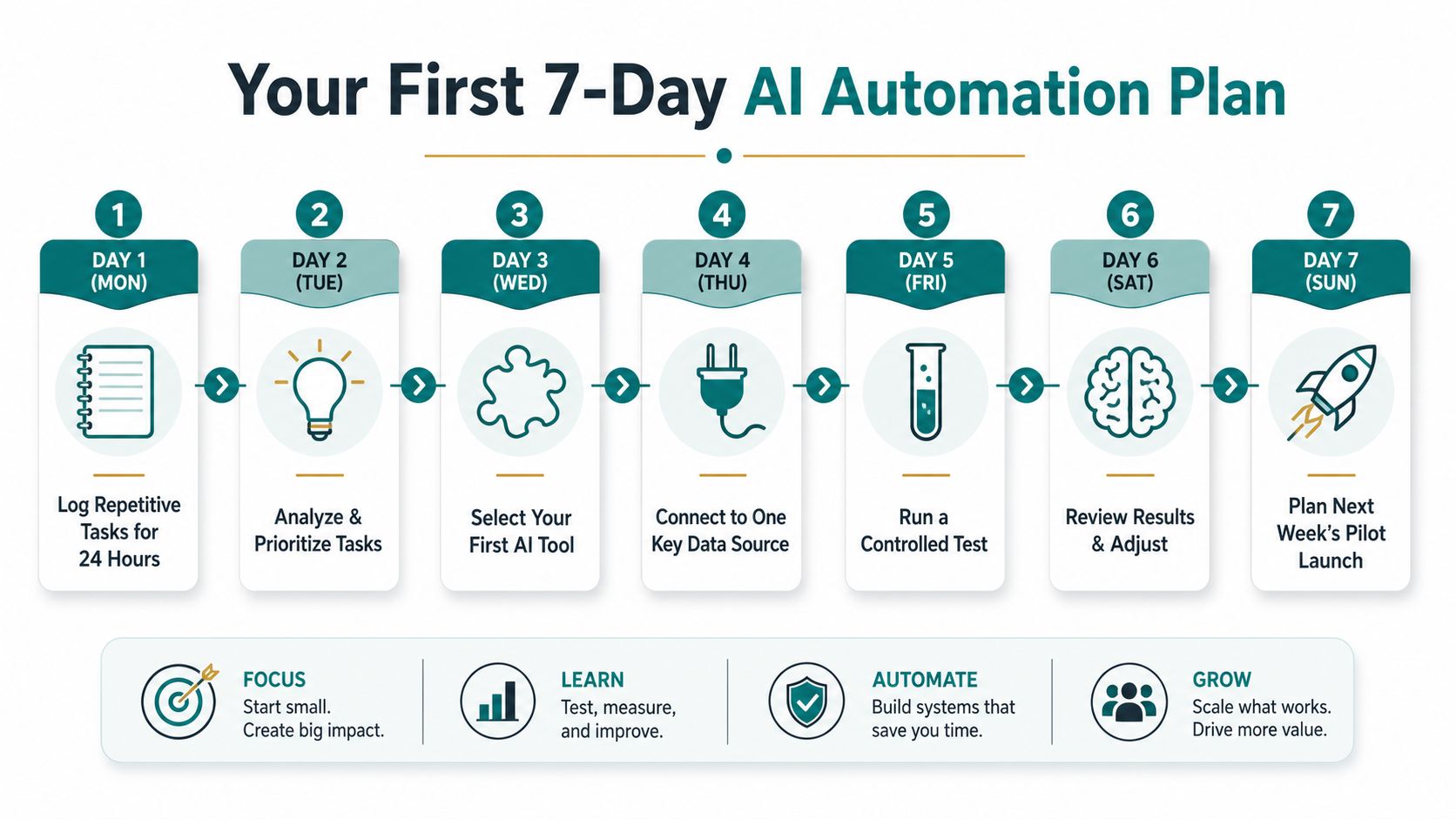
Day 1
Log repetitive tasks for one working day. Note who performs each task, what starts it, where information is copied, how long it takes, and what usually goes wrong. Ask staff to record interruptions rather than relying on memory.
Day 2
Score candidates for pain, frequency, and risk. Pick one workflow with a clear trigger and a visible human approval point. If two candidates tie, choose the one with cleaner data.
Day 3
Map the data sources. Identify the form, inbox, CRM, calendar, spreadsheet, or accounting system involved. List the minimum fields required and note where duplicates or missing values appear.
Day 4
Choose the architecture tier. Use embedded AI if the need sits inside an existing platform. Use Make or n8n when several applications must connect. Consider a custom build only when the workflow is important enough to justify development and ongoing maintenance.
Day 5
Draft the prompt, guardrails, and escalation path. Tell the system what information to extract, what it must never assume, what tone to use, and when to stop. Make a human approval step mandatory for sensitive or uncertain cases.
Day 6
Run the workflow in shadow mode against real inputs without sending anything to customers or changing production records. Review accuracy, tone, field mapping, and failure messages. Edit the instructions based on actual examples.
Day 7
Write a one-page SOP and decide whether the pilot is ready for limited use. Name the workflow owner, define the weekly review, and record the baseline you'll compare against.
The most common mistakes are predictable:
- Automating a broken process: Fix unclear ownership and unnecessary steps first.
- Skipping human review: Keep approval where errors can affect trust, money, privacy, or safety.
- Measuring output volume: Count hours saved, cycle time, quality, and business impact instead of celebrating how many drafts the system created.
The pace is realistic for a Cincinnati owner who still has customers to serve and payroll to run. Start with one workflow, learn from its exceptions, and expand only after the business can explain what improved.
If you're evaluating AI automation alongside a new website, SEO program, or digital marketing plan, HDM can help map the workflow, connect the right systems, and build measurable automation around your existing operations. Visit HDM to discuss a practical first pilot for your Cincinnati-area business, with human review, data controls, and ROI measurement built into the plan.