

Your team already has a knowledge base. It's just scattered across inboxes, old PDFs, Google Docs, Slack threads, sticky notes, and the memory of the one employee everyone interrupts all day.
That setup works until it doesn't. A customer asks the same billing question for the fifth time this week. A new hire gets three different answers to the same process question. Your sales team promises something support would've corrected in seconds if the information were easy to find. What looks like a documentation problem is usually an operations problem.
That's why knowledge base creation matters. For a Cincinnati business owner, this isn't about buying another piece of software. It's about building a company asset that reduces repeated work, improves consistency, and makes information usable by customers, employees, and partners.
Start with Your Strategy Not Your Software
A lot of businesses start backward. They demo tools first, compare features second, and only later ask what the knowledge base is supposed to accomplish.
That approach creates a polished system full of low-value content. The better starting point is operational friction. Where does your team lose time because people can't find or trust information?
Decide who the knowledge base is for
Some businesses need a customer-facing knowledge base. Others need an internal knowledge base for staff. Many need both, but they shouldn't be treated as the same project.
A customer knowledge base should answer practical questions fast. Think setup help, account questions, troubleshooting, policy clarifications, and common buying objections.
An internal knowledge base usually supports execution. That might include onboarding, standard operating procedures, sales playbooks, compliance documentation, pricing guidance, and service delivery steps.
If you're in healthcare, legal, manufacturing, or any regulated environment, this distinction matters even more. Internal documentation may contain protected or sensitive information that should never be published publicly. A patient FAQ and an internal HIPAA workflow don't belong in the same access layer.
Start with questions your business already hears
One of the most useful recommendations in knowledge base creation is to audit existing sources before writing anything. Expert guidance recommends reviewing support tickets, live chat, onboarding calls, training documents, and release notes, then clustering repeated questions into themes so you build from real demand instead of guesses, as outlined in this knowledge base audit workflow.
That advice sounds simple because it is. It also works.
Use the material you already have:
-
Support inboxes: Look for repeated customer confusion, not just formal complaints.
-
Sales emails: These often reveal what buyers need clarified before they commit.
-
Onboarding calls: New clients expose the assumptions your team forgets to explain.
-
Internal chat threads: If employees keep asking the same question, that topic deserves a home.
-
Shared folders and old documents: These show what your business has already tried to document.
Practical rule: Don't start by documenting everything. Start by documenting what people repeatedly ask and what repeatedly slows work down.
Define success in business terms
A strong knowledge base should change something measurable in the business. For one company, that may mean fewer repetitive support tickets. For another, it may mean cleaner onboarding. For a sales-driven organization, it may mean account managers can access approved answers without waiting on leadership.
A year from now, success should sound like this:
-
Customers find answers without calling your office
-
Employees stop reinventing explanations
-
New hires ramp faster because the basics are written down
-
Sensitive processes are handled consistently
-
Information lives in a system, not in one person's head
That's also why content planning matters as much as platform choice. If the input is messy, the system will organize the mess. Businesses that need help defining that input often benefit from a clearer content strategy process, especially when the knowledge base needs to support marketing, support, and sales at the same time.
Ask the hard questions early
Before you build, answer these plainly:
| Question | Why it matters |
| --- | --- |
| Who needs access? | Public, staff-only, partners, or a mix all require different permissions. |
| What content is high risk? | Compliance, pricing, legal language, and HR policies need review controls. |
| Who owns updates? | If nobody owns accuracy, the knowledge base decays fast. |
| What should happen less often? | Repetitive calls, duplicate questions, and internal bottlenecks are the real targets. |
A knowledge base is only valuable when it removes friction your business experiences. If you can't name that friction, you're not ready to choose software.
Choose the Right Technology Foundation
Once the strategy is clear, the technology conversation gets easier. You're no longer asking, "What's the best platform?" You're asking, "What setup fits the way this business works?"
That's a different question, and it leads to better decisions.
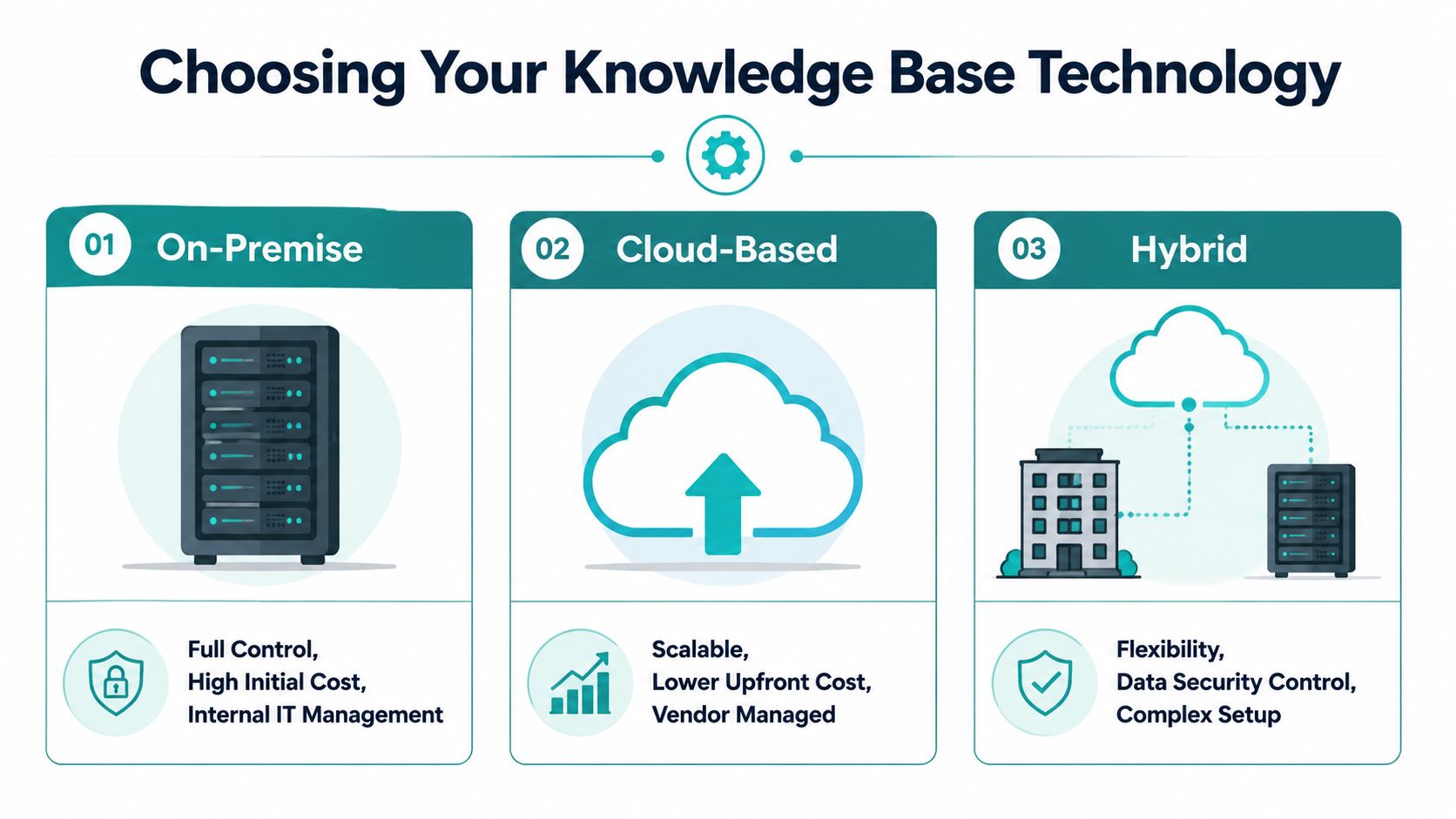
Three common paths
Most small and mid-sized businesses end up choosing one of these routes.
| Option | Best for | Trade-offs |
| --- | --- | --- |
| SaaS knowledge base platform | Teams that want to move quickly with less technical setup | Easier launch, but less flexibility and more vendor dependence |
| Website CMS such as WordPress | Businesses that want the knowledge base tied closely to the main site | Familiar, but can become clunky if permissions or workflows get complex |
| Headless or custom content system | Companies that need the same knowledge in multiple places | More planning up front, but stronger long-term flexibility |
SaaS platforms are fast, but opinionated
Tools like Zendesk Guide or Help Scout can make sense if your support team already works inside that ecosystem. They're generally easier to launch, and they often include built-in search, article management, and permissions.
The downside is control. You may end up adapting your process to the tool instead of the other way around. That becomes a problem when your business has specific needs, such as separate internal and external content, custom approval flows, CRM connections, or regulated data handling.
For a smaller team with straightforward support needs, SaaS can be enough. For a business with multiple departments, it often starts feeling tight.
A CMS works when the website is the hub
Some companies build the knowledge base directly into WordPress or another site CMS. That can be practical when the content is mostly public, your team already knows how to edit the site, and SEO matters because people search for these answers online.
This route can work well for FAQs, product help centers, service explanations, and onboarding content. It's less ideal when you need robust internal permissions, complex content relationships, or distribution into other systems.
A CMS-first build is often the middle ground. It's not as turnkey as SaaS and not as flexible as headless, but it can be the right answer if simplicity matters more than advanced architecture.
Headless is stronger when content needs to travel
A headless CMS separates content from presentation. In plain English, that means you manage the information once and publish it wherever you need it. Your website, client portal, internal dashboard, mobile app, or chatbot can all pull from the same source.
That matters more than most owners realize. If your sales team needs approved product answers in a portal, your support team needs troubleshooting docs, and customers need public how-to articles, a shared content foundation prevents duplication.
A knowledge base becomes far more useful when the same answer can appear in the right place without being rewritten by three departments.
For businesses with more complex digital operations, that's where custom client portals and web applications start to matter. The knowledge base stops being a standalone help center and becomes part of how the business delivers service.
Security and compliance should shape the platform choice
If you're a healthcare practice, behavioral health organization, legal office, or any company handling sensitive records, software selection can't be based on design alone. Access control, hosting model, audit trails, and integration boundaries all matter.
That doesn't automatically mean you need an on-premise system. It does mean you should be careful about where content lives, who can see it, and whether certain workflows involve protected information.
A public article explaining appointment prep is one thing. Internal process guidance connected to patient or employee data is another.
Don't confuse modern search with magic
The underlying idea of a knowledge base has changed a lot. Amazon S3 launched in 2006 as a durable storage layer, and by 2023 AWS documented Bedrock Knowledge Bases as managed retrieval systems built around vector stores, syncing, embeddings, and semantic search in its Bedrock Knowledge Bases documentation. For a business owner, the practical takeaway is simple: modern systems can do more than store documents. They can help people find the right information based on meaning, not just exact keywords.
That's useful, but it doesn't replace structure, governance, or clear writing. AI-assisted retrieval can improve access. It can't fix bad source content.
Design an Intuitive Content Structure
A knowledge base can have excellent content and still fail if nobody can find anything.
The easiest analogy is a grocery store. You don't want milk hidden behind six layers of signs, and you don't want frozen food filed under "household utilities" because someone on the team thought that label sounded smart. People expect a structure that feels obvious.
Keep the structure shallow
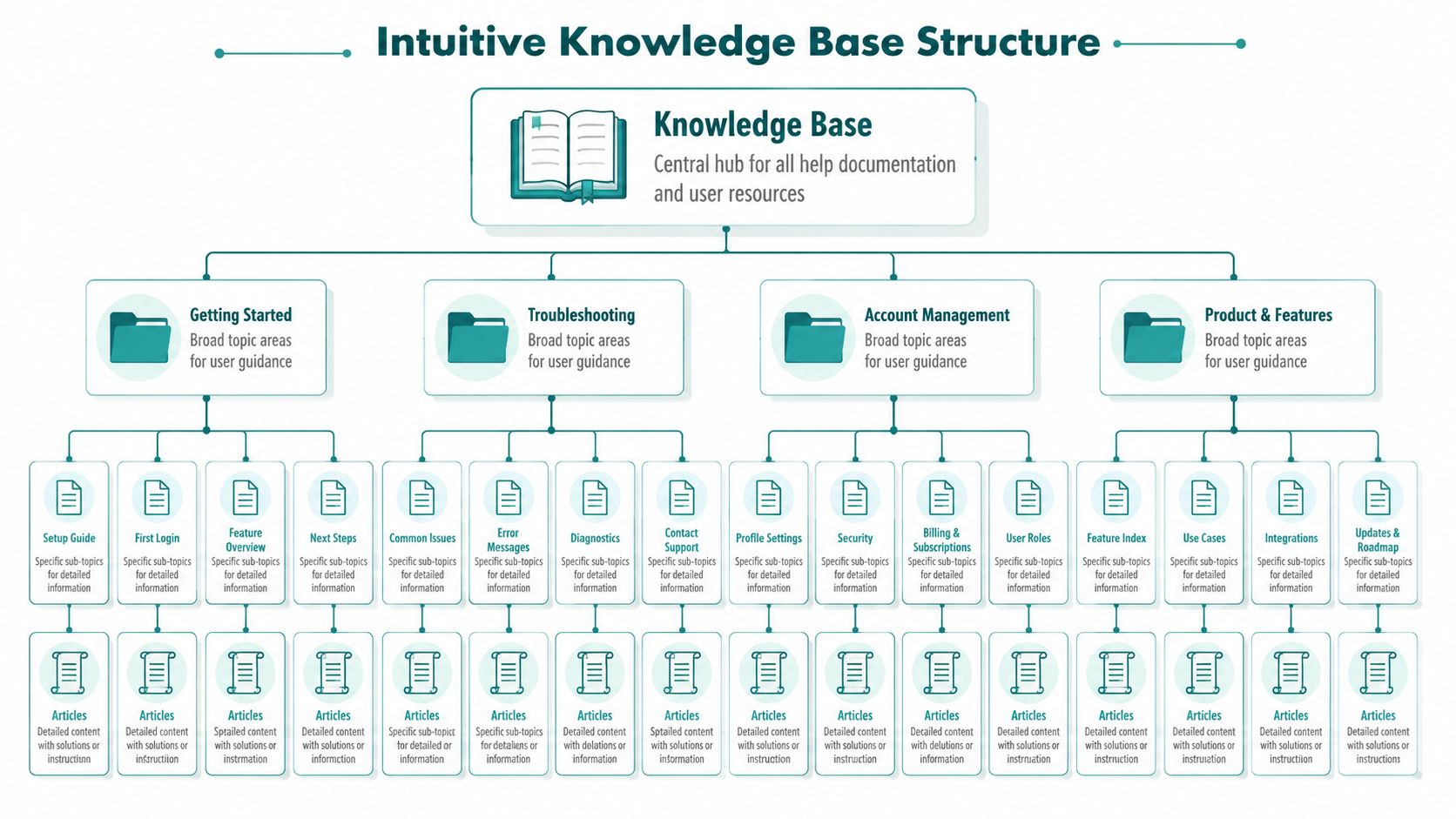
Expert guidance recommends a shallow information architecture with a few top-level categories, only 2 to 3 levels of subcategories, and stronger emphasis on search and tagging rather than deep hierarchies, as described in this knowledge base structure guide.
That advice saves businesses from a common mistake. They create too many categories, then bury useful content in a maze.
For most businesses, top-level categories like these are enough:
-
Getting Started
-
Billing and Account
-
Features or Services
-
Troubleshooting
-
Policies and Compliance
-
Team Operations for internal use
If users have to click through layer after layer to reach a basic answer, the structure is doing too much.
Use category names people would actually say
Internal language causes more confusion than owners expect. Your team may say "credential lifecycle management," while users search for "reset my password." Those are not the same thing in practice.
Choose names based on everyday language:
| Weak label | Better label |
| --- | --- |
| Authentication Services | Login and Password Help |
| Commercial Engagement Workflow | Sales Process |
| Revenue Operations Documentation | Billing and Invoices |
This is one reason the earlier audit step matters so much. Repeated real-world questions give you the vocabulary your audience already uses.
If a category name needs explanation, it probably needs a rewrite.
Standardize the article format
Even small knowledge bases benefit from templates. When every article looks different, readers don't know where to find the answer, and writers waste time reinventing the structure.
A few article templates usually cover most needs:
-
How-to article: Steps, screenshots, expected result, and next action
-
Troubleshooting article: Symptom, likely causes, fix, escalation path
-
Policy article: Rule, who it applies to, exceptions, approval owner
-
Reference article: Definitions, settings, requirements, related links
A good template also protects quality. It prompts the writer to include what the reader needs, not just what the writer happens to remember.
Build navigation for scanning, not browsing
Users don't leisurely explore a knowledge base. They arrive with a problem. They scan headings, jump to bullets, and look for reassurance that they're in the right place.
That means articles should include:
-
Clear titles that match the question
-
Short intros that confirm relevance
-
Subheadings that break up tasks
-
Bulleted steps when sequence matters
-
Related articles for natural next moves
A simple structure beats a clever one every time. The business benefit is direct. Customers solve problems faster, and your staff spend less time translating your own documentation.
Establish a Sustainable Content Workflow
Most knowledge bases don't fail because the first batch of articles is weak. They fail because nobody maintains them after launch.
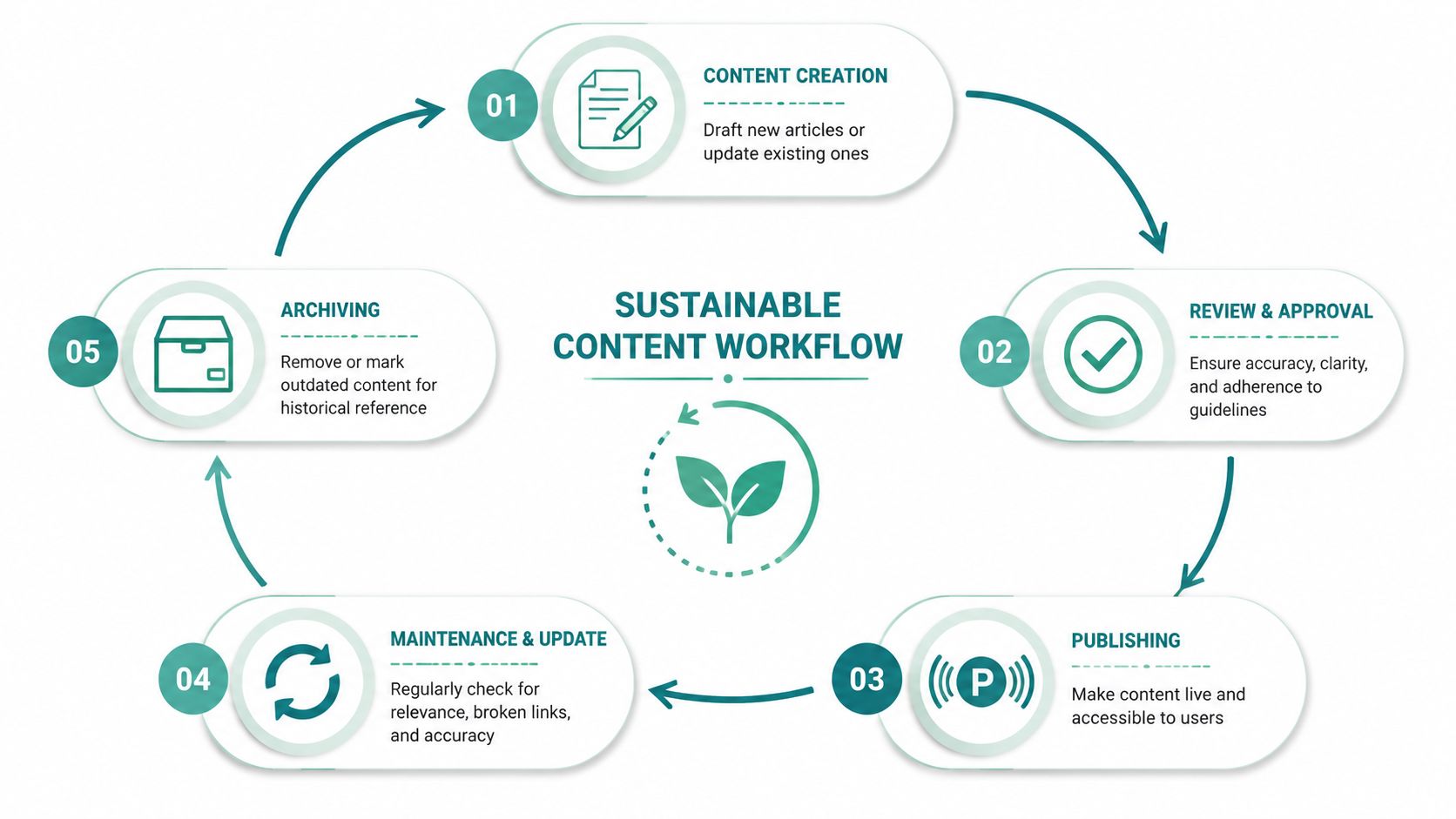
A useful article starts with one question, gets written down, reviewed, published, used, updated, and eventually retired. If that cycle isn't defined, the system fills with contradictions and dead content.
Follow one article through the process
A customer submits a support request: "Why does my invoice show two charges?"
Support answers it manually. Then the same question comes in again. Sales gets a version of it. Accounting gets pulled in. Now it's no longer a one-off. It's a content candidate.
A workable process looks like this:
-
Capture the question from support, sales, onboarding, or internal operations.
-
Assign a draft owner who understands the topic well enough to explain it clearly.
-
Review for accuracy with the team that owns the process, often finance, operations, HR, or compliance.
-
Publish in the right location with tags, related links, and the correct permissions.
-
Revisit later when the process changes or the article stops helping.
That's the discipline most businesses skip. They treat documentation like an extra task instead of part of service delivery.
Pick owners based on knowledge, not job title
The best writer isn't always the best source, and the best source usually isn't the person who should publish directly.
A healthier workflow separates roles:
| Role | Responsibility |
| --- | --- |
| Subject matter owner | Knows the answer and approves accuracy |
| Content editor | Makes the answer clear, readable, and consistent |
| Publisher | Handles formatting, tags, placement, and visibility |
| Reviewer | Confirms sensitive or regulated content is safe to release |
For a small company, one person may wear several hats. That's fine. The key is that each article still has an owner.
Operational advice: Every article should have a named person responsible for whether it stays accurate.
Migrate old content without carrying over the junk
Most businesses already have documentation. The problem is quality control. Legacy docs often contain duplicate instructions, outdated screenshots, old policy language, or references to software you no longer use.
Don't import everything blindly.
Use a simple triage model:
-
Keep: Still accurate and frequently needed
-
Rewrite: Important but unclear, inconsistent, or outdated
-
Archive: No longer current, but worth keeping for record purposes
-
Delete: Duplicative or obsolete content that adds confusion
This process is especially important for internal operations content. Old process documents can create expensive mistakes because employees assume "if it's in the system, it must be right."
Keep governance lightweight
Businesses hear "governance" and imagine committee meetings. That's not necessary.
A lightweight governance model usually includes:
-
A style guide for headings, screenshots, tone, and naming
-
A review rule for sensitive content such as HR, legal, and healthcare workflows
-
A freshness schedule so critical articles get checked regularly
-
An archive policy so outdated content doesn't stay live forever
If your process is too heavy, nobody follows it. If there's no process, the knowledge base loses trust. The middle ground is where sustainable knowledge base creation is effective.
Optimize for Usability and Integration
A knowledge base has no value if people won't use it. That sounds obvious, but many businesses still treat usability like a design detail instead of the core requirement.
People use a knowledge base when it gives them the answer faster than asking someone else.

Search matters more than beautiful navigation
Navigation helps. Search does the heavy lifting.
A good knowledge base search should tolerate imperfect wording, spelling variation, and natural language. If a customer searches "can't log in" and your article is titled "password reset process," the system still needs to connect those ideas.
That's where teams often underinvest. They focus on page layout and ignore search quality, tagging, synonyms, and article titles. The result is predictable. People try once, fail to find the answer, and go back to calling or emailing your staff.
Good search also matters internally. Employees don't search with polished terminology. They type whatever comes to mind in the moment, often under time pressure.
Integration is what turns content into infrastructure
The strongest knowledge bases don't live in isolation. They connect to the tools your team already uses.
A few examples make this concrete:
-
CRM integration: Sales reps can pull approved product, pricing, or onboarding answers without digging through folders.
-
Helpdesk integration: Customers get article suggestions before they submit a support request.
-
Client portal integration: Logged-in users see relevant documentation next to the services they've purchased.
-
Team communication integration: Internal policies and procedures are easier to access from the tools employees already open every day.
This matters for efficiency, but also for consistency. When the same source content feeds multiple touchpoints, your business gives fewer conflicting answers.
For organizations exploring AI-enabled support, this becomes even more valuable. A chatbot is only as useful as the content it can retrieve. If that's part of your roadmap, it helps to think about knowledge design alongside AI chatbots and assistants, not after the fact.
The cheapest support interaction is the one that never becomes a ticket because the right answer appeared at the right moment.
Industry context changes what usable means
A healthcare organization may need a knowledge base that separates public education from staff-only procedures and patient-support flows. A manufacturing company may need quick access to troubleshooting guides on the floor. A professional services firm may care more about proposal support, onboarding, and policy consistency.
Usability should reflect the environment. In some businesses, mobile access matters. In others, permissioning matters more. In many, the most important integration isn't public at all. It's the connection between documentation and the tools your team already relies on.
Here's a short example of how teams think about AI-assisted retrieval and connected knowledge systems in practice:
Don't overload the experience
It's tempting to add every feature at launch. Resist that urge.
A practical usability checklist is short:
-
Fast search
-
Clear permissions
-
Readable articles
-
Relevant related content
-
Simple path to human help when needed
When businesses skip these basics, advanced functionality won't save the experience. Integration should support access, not clutter it.
Measure Performance and Drive Improvement
If you're investing in knowledge base creation, you need to know whether it's reducing work or just creating another content library to maintain.
The cleanest place to start is support load. Guidance on knowledge base KPIs recommends tracking pre- and post-launch support ticket volume and comparing knowledge base page views to incoming support requests, which helps connect self-service usage to lower support demand, as explained in this knowledge base KPI framework.
Use metrics that reflect business behavior
Page views alone don't tell you much. A heavily viewed article may be useful, or it may be confusing enough that people keep returning to it.
The better questions are operational:
-
Are repetitive support questions declining?
-
Do people reach the article before opening a ticket?
-
Which searches return weak or no results?
-
Which articles get poor helpfulness feedback?
-
Where are employees still bypassing the system and asking a person?
A knowledge base should change behavior. That's what you measure.
Look at the signal behind the numbers
A few patterns are especially useful.
| Signal | What it often means |
| --- | --- |
| High search volume for one term | The topic is important and may deserve stronger visibility |
| Repeated failed searches | You're missing content or using the wrong wording |
| Low helpfulness on a key article | The answer may be incomplete, unclear, or outdated |
| Ticket volume stays flat after launch | The content may be hard to find, hard to trust, or aimed at the wrong issues |
Owners sometimes make the wrong call. They assume the knowledge base "didn't work," when the actual problem is discoverability or article quality.
Create a feedback loop
The best systems improve because they listen.
Use support logs, sales objections, onboarding friction, search reports, and article feedback to decide what gets updated next. That keeps the knowledge base tied to active business needs instead of turning into a side project.
For internal documentation, ask team leads a blunt question every quarter: what process still creates avoidable confusion? For customer-facing content, ask support what they still answer manually despite having an article published.
A knowledge base earns trust when people find current answers quickly. It loses trust when one bad article sends them back to email.
When the system is measured this way, it becomes easier to justify continued investment. You're no longer funding "documentation." You're improving service delivery, reducing repetitive work, and making your business easier to operate.
If your business is ready to turn scattered information into a usable growth asset, HDM can help you plan, build, and connect a knowledge base that fits your website, operations, and long-term digital strategy.