


You're probably looking at a website refresh, a new CRM, or a marketing push and realizing the same problem keeps coming up, your firm has client data moving through email, forms, portals, cloud storage, and maybe a few AI tools, but nobody has drawn the line on what GDPR touches. That's the mistake to fix first. For a law firm, GDPR compliance for law firms is not a poster on the wall, it's a scoping exercise, a data map, and a set of decisions about privilege, retention, and vendors that have to survive real work, not just an audit.
If your firm is in Cincinnati and you're evaluating web design, SEO, or digital marketing help, this matters even more. The front end of growth, contact forms, chat widgets, lead magnets, client portals, and analytics, is where EU personal data often gets pulled in without anyone noticing. The firms that get this right stop treating privacy as a legal afterthought and start treating it like part of their growth infrastructure.
Does GDPR Actually Apply to Your Firm
The first question isn't whether you need a checklist. It's whether GDPR applies to your firm at all.
That sounds basic, but most law-firm guidance skips straight to policies and breach plans. That's backwards. GDPR can apply even without an EU office if the firm offers services to people in the EU or monitors their behavior, and even less than occasional handling of EU personal data can trigger obligations. For a Cincinnati firm, that can happen through intake forms, email correspondence, CRM records, witness lists, marketing leads, or matter files that happen to include EU contacts.
The scope test should be blunt
Use a yes, no, or no-but framework. If your firm actively serves EU residents, markets to them, or processes their information in a matter, the answer is usually yes. If the firm doesn't target the EU and doesn't collect EU personal data, the answer may be no, but you should still verify that reality against actual systems, not assumptions.
Practical rule: If an EU resident can fill out your form, get added to your CRM, or appear in a matter file, you need to ask scope questions before you buy compliance software.
Here's the quick diagnostic I'd run this quarter:
- Client roster check: Do any current or past matters involve EU residents, EU witnesses, or EU counterparties?
- Marketing intake check: Do your website forms, ads, or chat tools capture EU inquiries?
- Data flow check: Does any EU personal data land in your CRM, document system, billing platform, or shared inbox?
- Vendor check: Do your tools route data through processors you can't describe clearly?
- AI check: Are intake assistants, transcription tools, or search tools touching personal data before scope has been confirmed?
If you can't answer those questions quickly, you don't have a compliance program problem yet, you have a visibility problem. That's the primary cost driver. Firms that overestimate scope waste money on controls they don't need, and firms that underestimate scope spend too long before they fix the basics.
The right move is simple. Identify whether you fall inside the rule before you spend on policies, vendor reviews, or training. If your website is part of your lead pipeline, that scoping exercise should happen before your next redesign, not after it. If you need a clean client-facing portal as part of that setup, client portals are where the data flow questions usually show up first.
Mapping Every System That Touches Client Data
Once scope is settled, the next job is to build a map that shows where the data lives. Not a theoretical inventory, a working one.
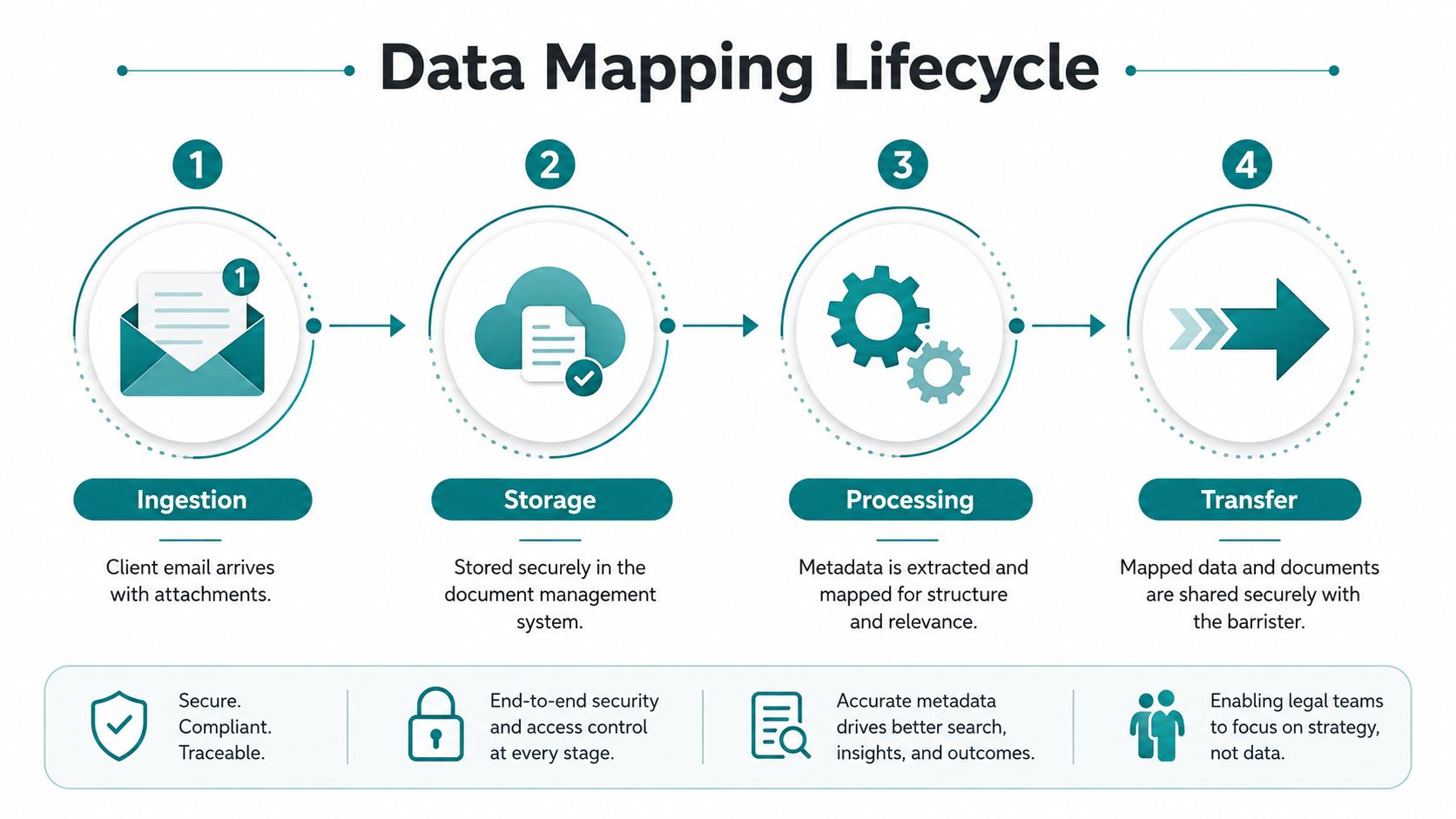
Start with a single matter and follow it end to end. A client sends an email. Intake captures contact details. The assistant opens a matter file in the document system. A cloud review platform gets loaded with exhibits. Billing exports flow into accounting. A transcription vendor sees a recording. Opposing counsel gets copied on correspondence. Every one of those steps can create personal data, special-category data, or records that need a legal reason to exist.
Build the map around the matter, not the software
A useful map answers four questions for each system. What data goes in, where it sits, who can see it, and where it leaves. If a partner keeps drafts in a personal cloud folder, that is part of the map too. If marketing stores lead forms in a separate platform, that is part of the map too. Shadow IT is not a side issue in a law firm, it's usually where the weakest controls live.
The documentation should be simple enough for a successor privacy lead to use without guesswork. List the system, the business purpose, the categories of data, the recipients, the retention logic, and any transfer outside the firm. That inventory becomes the backbone for records of processing, retention rules, vendor reviews, and risk analysis. It also tells you where to focus security effort first, which is why a basic cyber review is worth doing alongside privacy work. A good reference point is CasePulse's essential guide to firm cybersecurity, because mapping data without checking security controls is just organized exposure.
A law firm with a web-first growth strategy should also treat the website as a system, not a brochure. Lead capture forms, live chat, scheduling tools, and remarketing tags all create data paths that need to be on the map. If those paths are unclear, your GDPR work will drift and your marketing stack will become a liability.
The map should be readable by a managing partner, a practice manager, and outside counsel. If only IT can understand it, it's not operationally useful.
The finished inventory should feel boring. If it feels clever, it's probably too abstract. The right output is a defensible record of what the firm holds, why it holds it, and who else can reach it.
Choosing the Right Lawful Basis for Each Processing Activity
Consent is the lazy answer, and in legal services it's usually the wrong one. You need a lawful basis that matches the actual purpose of the processing.
For ordinary client work, contract is often the right basis when you're opening and managing a matter. Legal obligation fits things like AML duties or tax-related recordkeeping. Legitimate interests can support some marketing to past clients, but only if you can explain why your interest isn't overridden by the individual's rights. Vital interests is narrow and rare, the kind of thing you would use in an emergency. Public task applies when the firm is doing public-sector work that sits inside a statutory role.
Match one purpose to one basis
Don't stack multiple bases because the file feels complicated. Pick the basis that fits the purpose, document it, and move on. If the purpose changes, the basis may need to change too. That's where firms get sloppy, especially when a matter evolves from service delivery into retention, marketing, or analytics.
The most overused basis is legitimate interests. It isn't a blank check. You need a balancing exercise, and the result has to make sense in ordinary language. If a former client gets a reasonable, relevant update from the firm, that may be defensible. If the same person gets broad outreach with no clear relationship to the original engagement, the argument gets weaker fast.
Special category data needs extra care. Health information, criminal-offence data, and other sensitive material show up in legal files more often than partners expect. If it's in a witness statement, a workplace investigation, or a family matter, treat it as sensitive by default and check both Article 6 and Article 9 before you rely on a processing activity.
| Processing Activity | Typical Lawful Basis | Common Mistake |
|---|---|---|
| Opening and managing a new matter | Contract | Using consent when the firm actually needs the data to perform the engagement |
| AML checks and recordkeeping | Legal obligation | Treating statutory recordkeeping like optional admin |
| Marketing to former clients | Legitimate interests | Skipping the balancing test and ignoring objection rights |
| Emergency contact or welfare issue | Vital interests | Using it for routine client communications |
| Public-sector legal work | Public task | Assuming every government-related file automatically fits public task |
If your firm is using AI tools for intake or lead handling, the lawful basis has to follow the activity, not the tool. A chatbot can't create a basis you don't already have. The same rule applies to website forms, newsletter systems, and CRM automations.
Running a DPIA on the Work That Actually Carries Risk
A DPIA is not paperwork for its own sake. It's the point where you admit a process could hurt someone and force the firm to design around that risk.
High-risk processing in a modern firm usually involves AI-assisted intake and triage, systematic employee monitoring, combining multiple sources to score people, or processing children's data. The common thread is scale, sensitivity, or automation with real consequences. If your firm is rolling out a client intake chatbot, that should be reviewed as a privacy and privilege issue before it goes live.
Use the four-step test on the vendor, not just the policy
- Describe the processing. What does the AI tool collect, what prompts does it see, and where does the data go?
- Assess the risk. Could the tool capture privileged facts, sensitive personal data, or more information than the matter needs?
- Mitigate the risk. Limit inputs, remove unnecessary fields, set retention rules, and block model training on client content unless the contract clearly says otherwise.
- Consult if needed. If the residual risk stays high after mitigation, don't pretend it's fine. Escalate.
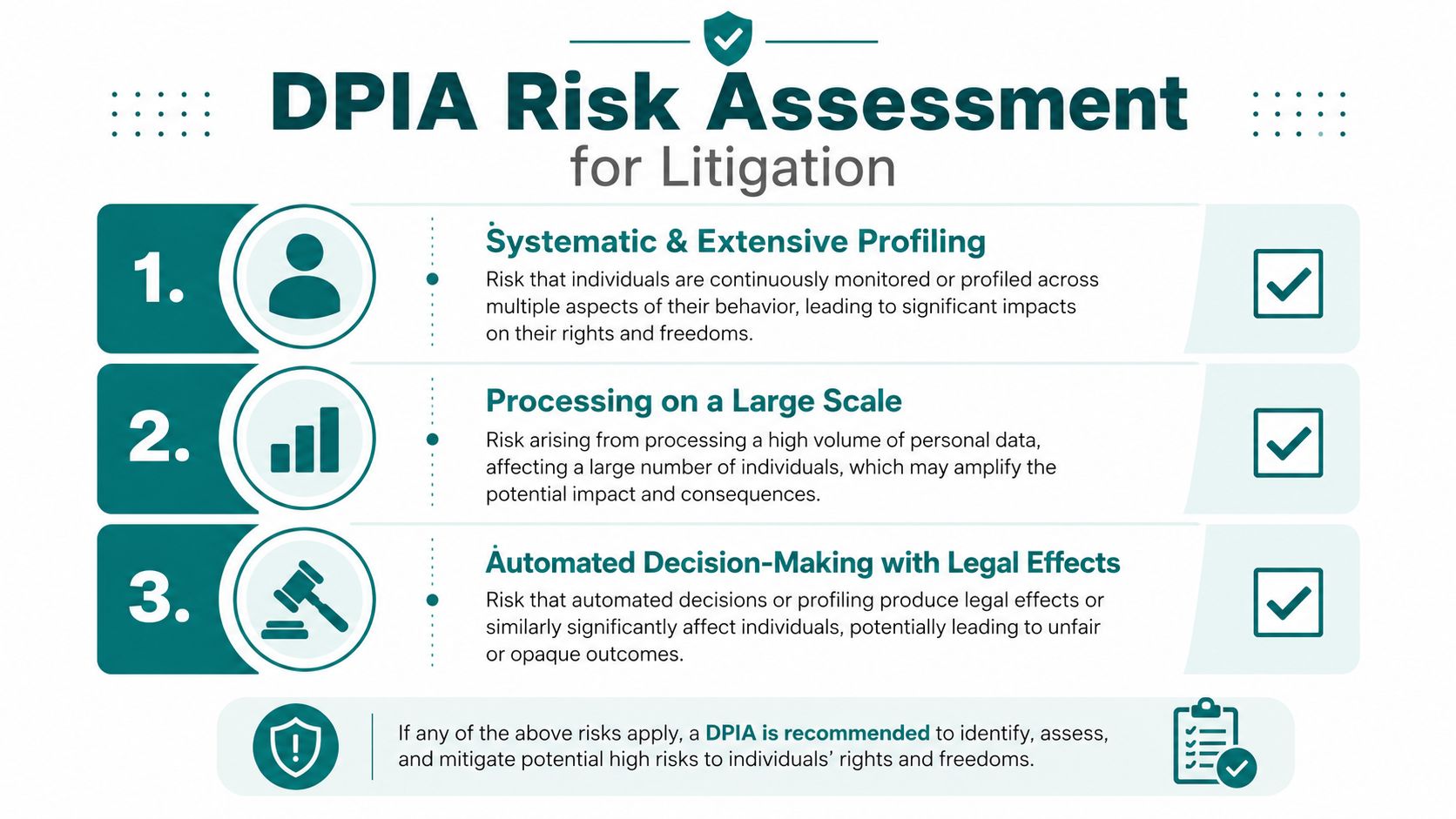
The questions you ask the vendor matter. Who can access the data? Is the content used to improve models? Where is data stored? Can the firm delete matter-level records on demand? Can the tool isolate one matter from another? If the answers are vague, the product isn't ready for legal work.
A practical DPIA template for a law firm can stay short: processing name, business purpose, data categories, people affected, risk to rights and confidentiality, controls in place, residual risk, and decision and owner.
If a tool touches intake, triage, or analysis before a human has reviewed the file, assume the DPIA belongs in the procurement process, not after deployment.
The law doesn't require you to fear automation. It requires you to govern it. If a firm can't explain how a chatbot handles client intake, it shouldn't be using one on the public website.
Responding to a Breach Without Burning Privilege
A small-firm ransomware event is usually messy before it's obvious. The inbox freezes, a cloud provider sends an alert, and someone in the office starts asking whether the copied files include client files, HR records, or both.
That's when the 72-hour clock starts to matter. You do not get to wait until every privilege question is solved. You need a triage team on the call fast, usually the managing partner, the general counsel or outside counsel, IT, and whoever owns client confidentiality decisions. The first task is to separate what happened from what you're willing to disclose. Those are not the same thing.

Decide notification in layers
Some incidents need regulator notification. Some need client notification. Some need both. Some also trigger law-enforcement steps, especially when access was clearly criminal. The point is to decide quickly and document the reasoning. If your vendor has already noticed the breach, ask for the technical facts immediately and freeze any automated deletion or cleanup until you've captured the evidence.
The privilege problem is real. You can't casually circulate breached emails and attachments across the firm just because the file is hot. Limit access to people who need to triage the incident and preserve the record. If you need a practical reference for disposal and breach handling, Beyond Surplus has a useful Beyond Surplus disposal guide that helps firms think through what happens when devices or media leave the office chain of custody.
The best incident response plans are short enough to use under pressure. Include: who declares an incident, who assesses privilege, who contacts the vendor, who drafts the notice, who approves external communication, and where the evidence is stored.
After the initial response, look hard at the systems that made the breach possible. If the firm relies on a public website or portal, the security review should not be separate from the privacy response. Security maintenance is part of reducing the odds that the same failure happens again.
A breach playbook should be rehearsed once before it is needed. If the firm only reads it after an incident, the response will be slower and sloppier than it needed to be.
Handling UK and EU Cross-Border Transfers the Right Way
Cross-border transfers are where U.S. firms make avoidable mistakes. They assume a vendor is "cloud-based" and stop there, which is not enough.
If personal data leaves the EEA or the UK, you need a lawful transfer mechanism. For some destinations, adequacy decisions simplify the work. For others, you need contractual safeguards. The main issue for a law firm is not memorizing the rule set, it's recording the mechanism clearly so it doesn't disappear when a partner changes vendors or when an audit starts.
Compare the main options before you sign
| Mechanism | Best For | Key Limitation |
|---|---|---|
| EU Standard Contractual Clauses | Transfers from the EEA to vendors outside adequate jurisdictions | Needs a transfer assessment and often supplementary measures |
| UK International Data Transfer Agreement | Transfers from the UK to non-adequate destinations | UK-specific structure, so it doesn't replace EU transfer paperwork |
| Adequacy decision | Transfers to jurisdictions the EU recognizes as adequate | Only works where the destination is on the adequacy list |
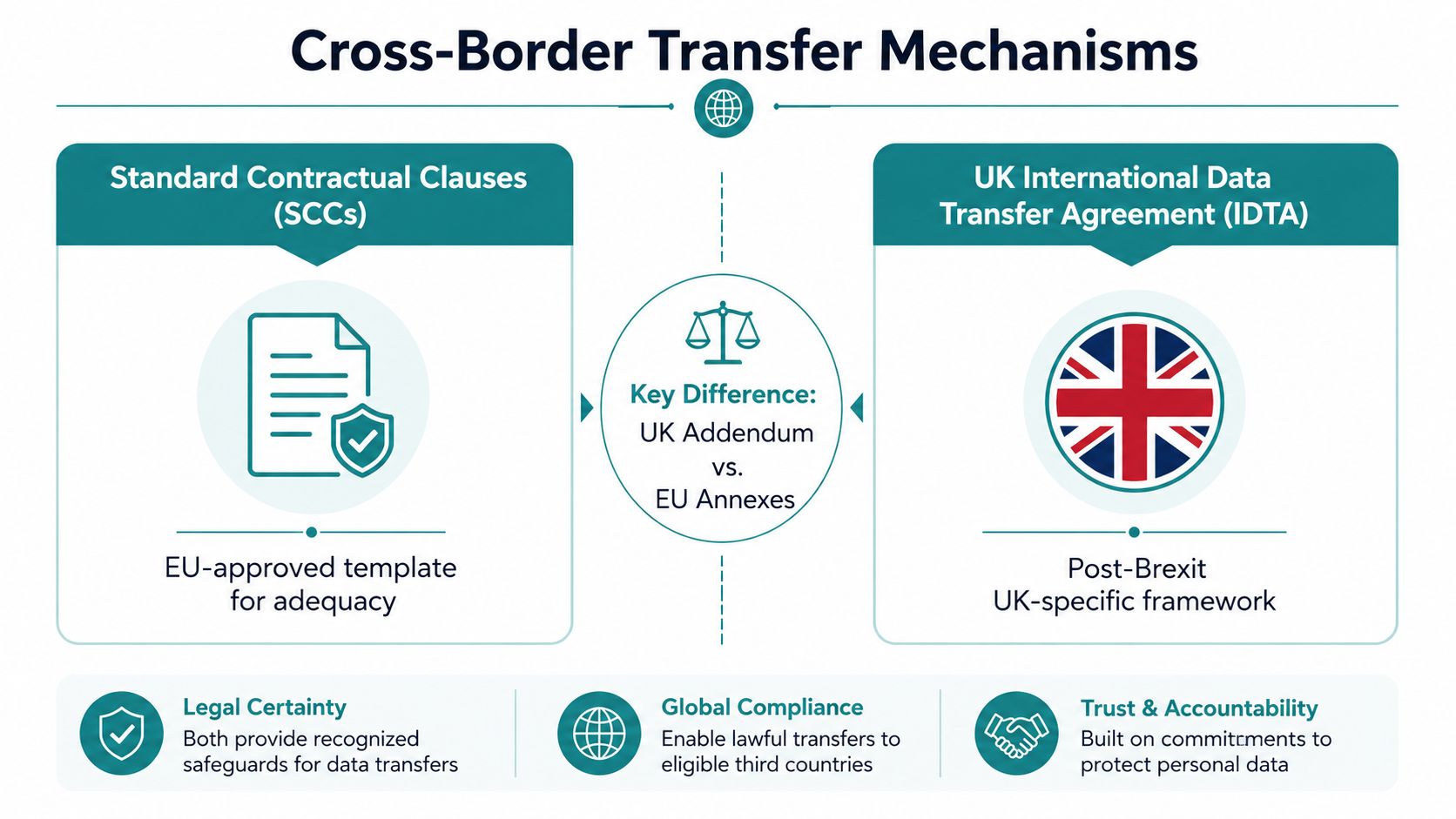
If your vendor is in the U.S., ask whether it sits inside the EU-U.S. Data Privacy Framework or whether another transfer route is being used. If the vendor contract mentions SCCs or the UK IDTA, check whether supplementary measures are required for the actual data path. That usually means looking at encryption, access controls, and whether the vendor's service architecture gives third-country access to the data.
For a practical outside perspective, the Seattle data transfer guide after Schrems II is a helpful reminder that contract language alone isn't the whole answer. It's the same point for law firms in Cincinnati. The paperwork matters, but the actual flow matters more.
Once the mechanism is chosen, put it in the RoPA and in the vendor file. If the firm can't tell a successor privacy lead how data gets out of the EEA or UK, the transfer program isn't finished.
Your 12-Month GDPR Maintenance Rhythm
Treat this as a recurring operating rhythm, not a project with an end date. The firms that drift usually do so because nobody owns the calendar.
Quarterly, review new tools, new forms, and any vendor changes. Annually, refresh the RoPA, recheck retention logic, and test the subject access request workflow before anyone needs it. Train staff on the narrow set of habits that matter, like not forwarding client data into unapproved tools and not improvising on deletion requests.
If a new AI intake tool goes live without a DPIA, the program has already slipped. If a vendor moves data to a new region, the transfer records need to be updated immediately. If the website changed, the data map probably changed too.
The easiest way to keep this real is to align it with your marketing and operations calendar. A firm that's reviewing SEO, portal design, or lead capture should also review privacy scope at the same time, not six months later. A GDPR compliance checklist is the kind of resource that should sit next to your website and vendor review notes, because compliance breaks most often where growth and operations meet.
If you want a partner that understands how privacy, websites, and lead generation fit together, HDM builds and maintains the systems that carry this risk in the first place. Visit HDM if you want your next website, portal, or digital campaign designed with compliance and growth in the same conversation.