


Most advice on HIPAA website hosting gets the first part right and the important part wrong. A compliant server matters, but it doesn't solve the core issue if your forms, email tool, analytics tag, or backup vendor can still touch electronic protected health information, because HIPAA compliance lives across the full stack, not just on the box your site runs on.
If your website is purely informational, you may not need specialized hosting at all. The moment a patient can send symptoms, appointment details, portal messages, or other PHI through your site, the hosting conversation changes fast, and so does your risk profile. That's why a Cincinnati practice needs more than a sales pitch from a host, it needs a clear review of every vendor that touches data, from the web platform to the form processor to the email system, and that's the lens HDM uses when it looks at healthcare sites through its web wellness framework.
A useful starting point is to compare the platform itself with the communication tools around it. If you're sorting through vendors and trying to understand how hosted platforms fit into the bigger compliance picture, a practical resource is Call Loop's compare HIPAA compliant platforms guide, because the host is only one piece of the stack.
Why HIPAA Hosting Is Bigger Than Your Server
Buying "HIPAA hosting" doesn't make a website compliant any more than buying a lock makes a building secure. HIPAA was enacted in 1996, but the hosting question most business owners face today comes from the HIPAA Security Rule, which requires administrative, physical, and technical safeguards for ePHI. In plain English, the issue isn't where your files sit, it's whether every system that handles PHI is built to protect it.
A basic informational site may never need a Business Associate Agreement. That changes the moment a site collects, stores, or transmits PHI through forms, portals, or hosted applications, because then the infrastructure has to support encryption, access controls, logging, and disaster recovery. A modern guide calls a signed BAA the "essential starting point" for HIPAA-compliant hosting, and that's the right attitude, because the host, the form tool, and the email vendor all matter.
The real compliance boundary
Practical rule: if a vendor can see, store, or route PHI, assume it belongs in your HIPAA review.
That's the part many small practices miss. They shop for a compliant server, then wire in a contact form, a scheduling plugin, a CRM, and a newsletter tool without checking whether each one will sign a BAA. The result is a site that looks secure but still leaks compliance through the seams.
For Cincinnati-area healthcare practices, the right way to think about this is simple, review the full chain, not just the host. HDM's HIPAA-compliant web design work is relevant here because web design choices, form logic, and vendor selection affect compliance just as much as server choice. If a workflow touches patient data, the hosting environment is only one part of the legal and technical picture.
The practical takeaway is blunt, if your site never handles PHI, don't overbuy. If it does, don't let a marketing label substitute for a complete vendor audit.
Core Requirements for HIPAA Compliant Hosting
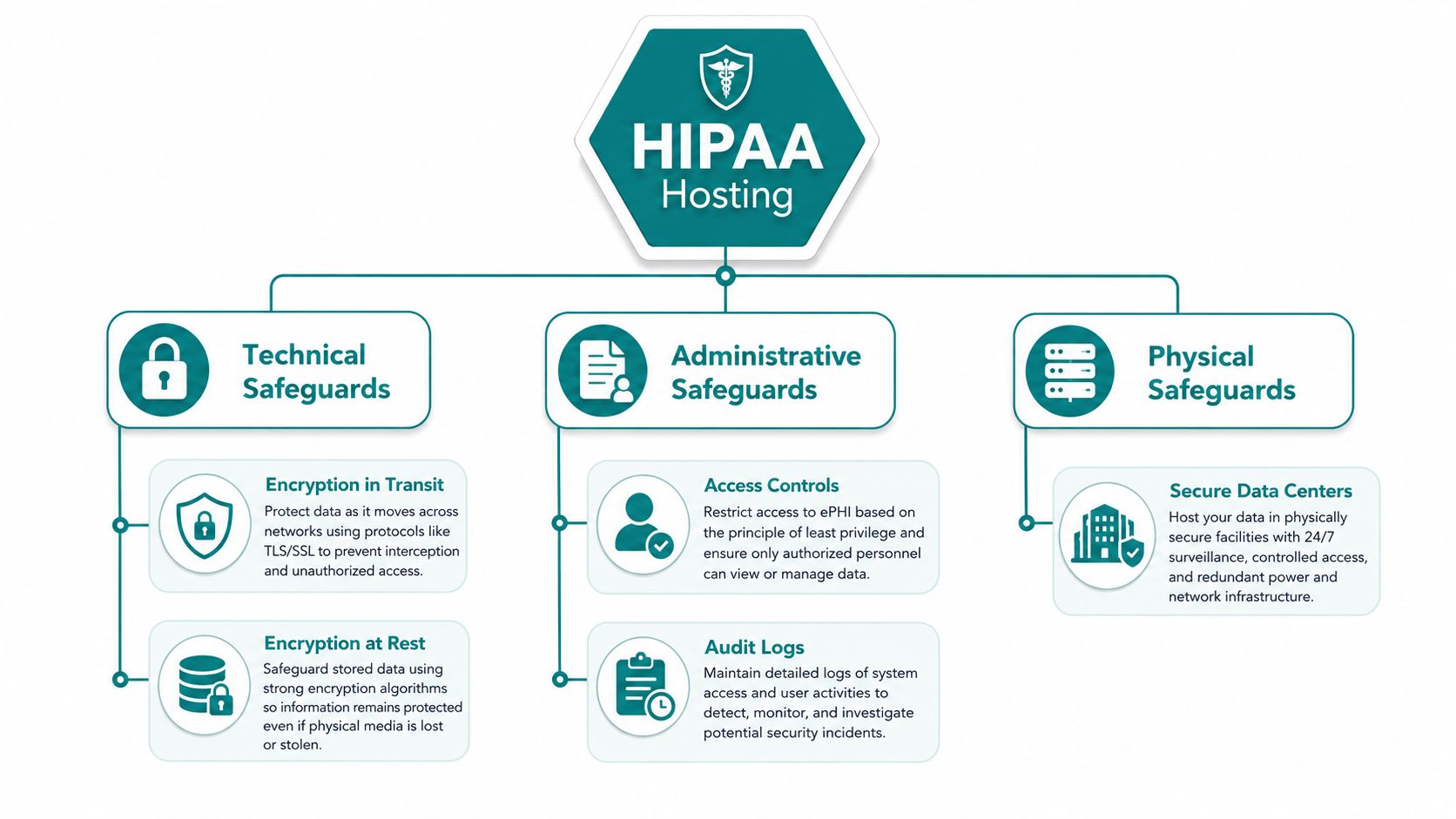
HIPAA-compliant hosting comes down to a few essentials, and they're not exotic. Think of encryption in transit like a sealed envelope instead of a postcard, and encryption at rest like putting the envelope in a locked file cabinet. If traffic is intercepted or storage is compromised, encrypted data is far harder to read.
Security controls that actually matter
A technically sound stack uses TLS 1.2+ for data in transit and AES-256 or equivalent for data at rest, including databases and backups, which is what Aptible's hosting model emphasizes in its certificate and key management approach. That matters because partial encryption isn't enough. If the site encrypts the page load but leaves backups exposed, you still have a gap.
Access controls are just as important. Picture a hotel key card that only opens your floor, not every room in the building. HIPAA-oriented hosting should support MFA, least privilege, unique user accounts, and restricted administrative access, so one stolen password doesn't open the entire environment.
Logging and recovery are the pieces business owners ignore until something breaks. Detailed audit logs show who touched what, while off-site backups and disaster recovery plans help you restore service after an incident. Neutral industry guidance recommends separating web and database servers, restricting host access, and maintaining detailed logging and off-site backups, because a breach in one layer shouldn't expose everything.
The difference between a public marketing site and a PHI-handling site is scope. Public content can often sit on ordinary hosting if it never touches patient data. Once a form, portal, or app starts handling PHI, the stack needs the safeguards above, and you need to know exactly where the data goes.
One useful way to think about the handoff is responsibility. If you're using a managed cloud stack, you need to know what the provider handles and what your team still owns. WebinOne's AWS responsibilities after handover resource is helpful because that shared-responsibility question is where many healthcare projects get fuzzy.
Your host can be technically solid and still leave you exposed if your access model is sloppy or your backups aren't protected.
The Hidden Vendor Gaps That Break Compliance
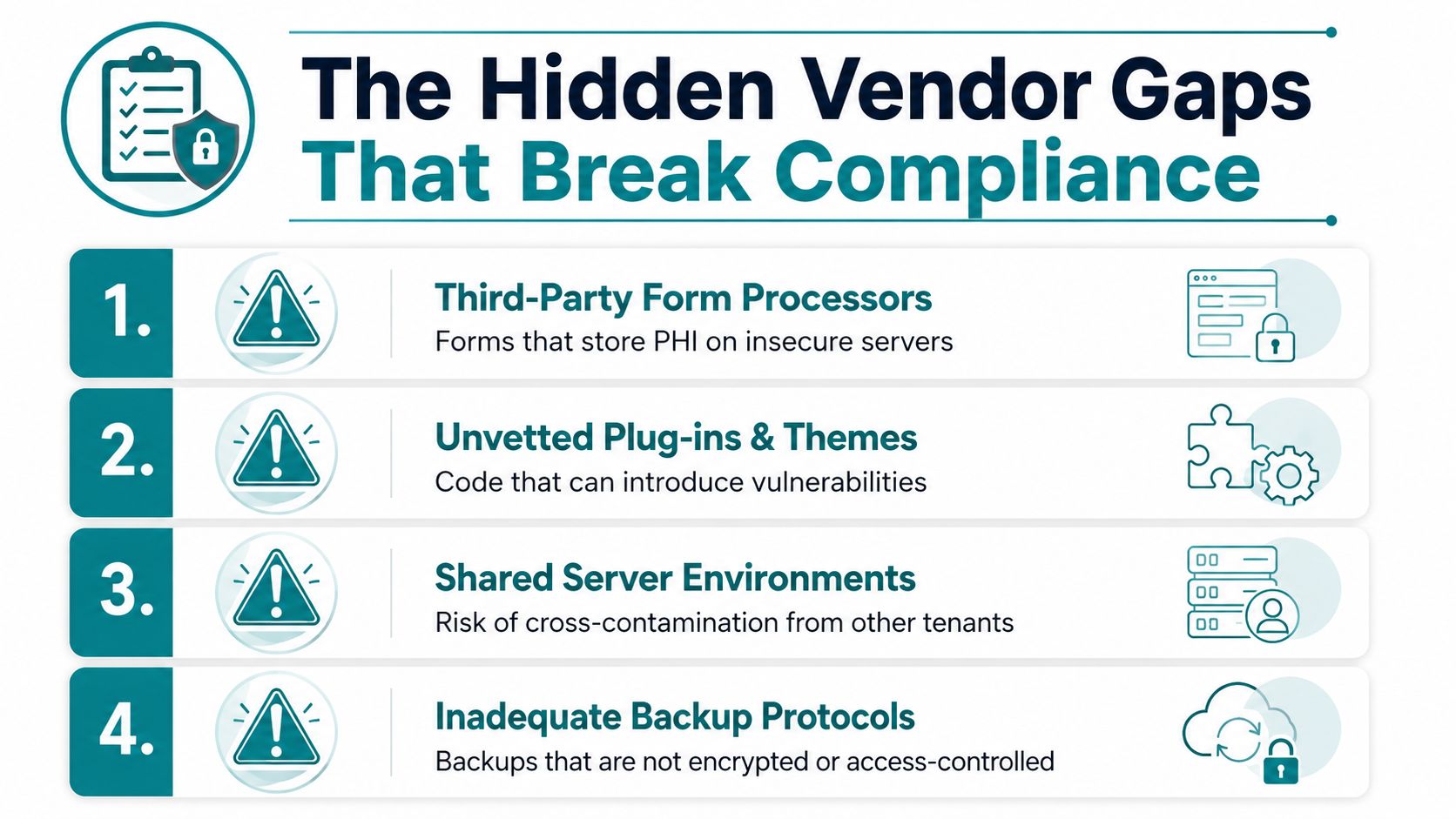
Most HIPAA hosting conversations stop at the server, and that is where practices get burned. The actual exposure usually sits in the tools around the site, not the host itself. A secure environment does nothing for you if a form processor stores submissions on a non-BAA server, or if an email vendor logs PHI in its own systems.
Where compliance usually leaks
Forms are the first leak. A patient intake form, appointment request form, or callback form becomes a HIPAA issue the moment it collects identifiable health information. If the form processor will not sign a BAA, the workflow is exposed even when the server underneath is locked down.
Email is the second leak. Many practices still route form submissions to inboxes, marketing tools, or ticketing systems that were never built for PHI. If those vendors can read or store the content, they belong in the compliance review whether the owner noticed them or not.
Analytics is the third leak. A tracking tool that captures patient identifiers in URL parameters, page paths, or event payloads can move PHI into a system you never meant to regulate. Agency teams should treat analytics as a compliance decision, not as a default plugin choice.
Backups and plugins are the fourth leak. A compliant host can still be undermined by backup services, add-ons, or themes that are not covered by a BAA or that create untracked data copies. Independent guidance makes the point clearly, every vendor touchpoint that handles ePHI needs a signed BAA, and that includes hosting, email, forms, analytics, backups, and support if those services may access ePHI.
The penalty risk is not theory. HIPAA penalties can reach $1.5 million per violation, per year according to the HHS.gov penalty calculator, and a 2025 healthcare-breach roundup reported more than 35 million individuals affected by major healthcare breaches. Those numbers do not identify the weak vendor, but they show why a casual "secure enough" approach gets expensive fast.
What to audit first
Start with the stack that touches patient data. Ask who stores it, who forwards it, who backs it up, and who can access it. If the answer includes a vendor that will not sign a BAA, stop there and replace the tool.
A Cincinnati practice should ask an agency to run that review before redesigning forms or adding new marketing tools.
Comparing Hosting Architectures and Managed Options
There isn't one HIPAA hosting model that fits every practice. A small clinic with a few PHI workflows doesn't need the same setup as a telehealth platform or a patient portal with heavy traffic. The right choice depends on how much patient data the site handles, how much technical support you have, and how much operational complexity you're willing to own.
HIPAA Hosting Tiers at a Glance
| Tier | Monthly Cost | Best For | Key Trade-Off |
|---|---|---|---|
| Basic HIPAA-compliant cloud VPS | About $30/month | Small sites with limited PHI workflows | Low cost, but you own more configuration |
| Redundant server with managed security | $800–$2,500/month | Practices that need strong resilience | More reliable, more expensive |
| HA pair with managed database and storage | $2,500–$6,000/month | Heavier PHI workloads and continuity needs | High operational maturity, highest cost |
| Fully managed dedicated environment | Exceeding $600/month | Teams that want less day-to-day burden | Easier to operate, still requires oversight |
A few mainstream providers now offer HIPAA-eligible WordPress hosting, including WP Engine, Pressable, Kinsta, and Cloudways, which shows the market has matured beyond niche healthcare vendors. That doesn't mean every plan is right for every practice. It means you have real choices, and you should evaluate them carefully.
Shared or multi-tenant hosting can work only when the HIPAA scope is tightly controlled and the provider is contractually covered. A VPS gives you more isolation and more control, but you'll usually carry more of the maintenance burden. Dedicated servers add more isolation still, while fully managed environments reduce the amount of hands-on administration your team has to handle.
The cheaper option isn't automatically the smarter one. If your staff can't maintain logs, patching, backups, and access review, a low-cost setup can become the expensive one after the first problem. The market data supports that reality, because basic compliant cloud hosting can start around $30/month, while fully managed dedicated environments exceed $600/month, and the extra cost is often about labor, not just hardware.
For local businesses, there's also a clean architectural strategy, separate public content from PHI-heavy workflows when possible. Marketing pages, blog content, and general service pages don't always need to live in the same environment as appointment forms or patient messaging. That split can reduce cost, reduce scope, and make compliance documentation easier.
Your Provider Evaluation Checklist
A HIPAA host should answer your questions plainly, not hide behind polished sales language. If they can't explain their controls in ordinary English, that's already a problem. The right provider should help you understand the legal and technical shape of the setup before you sign anything.
Ask these questions in every sales call
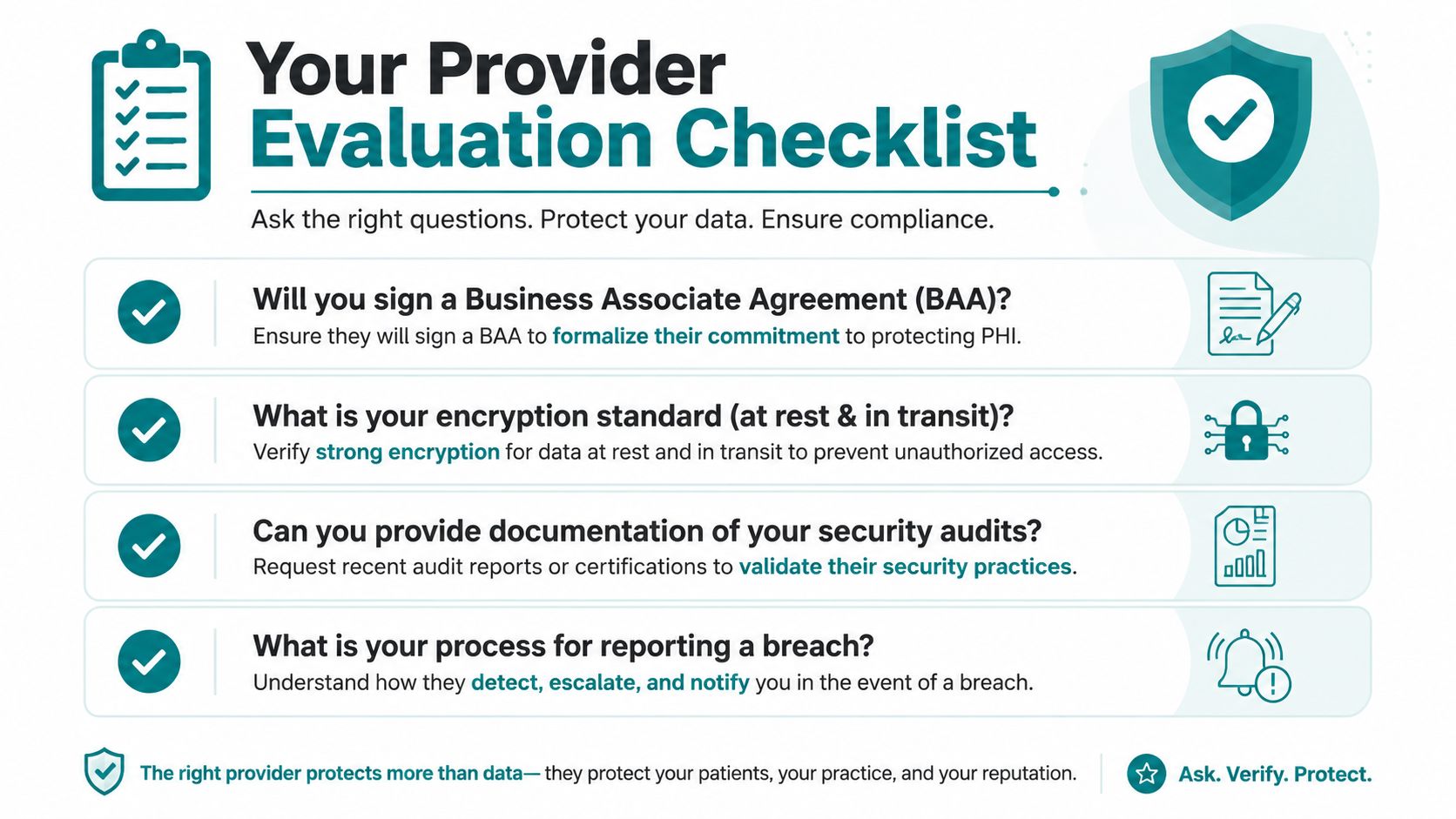
- Will you sign a Business Associate Agreement? If the answer is anything but yes, stop. A BAA is the legal foundation, not an optional add-on.
- What encryption standards do you use at rest and in transit? You want clear language about AES-256 for storage and TLS 1.2+ for transmission.
- How do you handle access controls and MFA? Good answers mention role-based access, unique accounts, and limited administrative permissions.
- What does your audit logging capture? You want to know whether access attempts, changes, and data activity are recorded and reviewable.
- How are backups stored and tested? The answer should cover encryption, off-site storage, and recovery testing, not just "we back up regularly."
- What is your breach notification process? You need to know how fast they notify you, who gets called, and what information you receive.
- Do your subcontractors also sign BAAs? If the provider relies on third parties, those vendors matter too.
- Where is data stored and processed? Data residency can affect risk, legal review, and operational complexity.
The right conversation also includes support and documentation. Ask for evidence of security reviews, recent testing, and the process they use when a system changes. If you're evaluating your stack with a healthcare-focused agency, HDM's healthcare website development services page is relevant because provider selection and website architecture should be discussed together, not as separate projects.
If a host can't explain its compliance in plain language, it's not ready for patient data.
Planning Your Migration and Onboarding
Moving to HIPAA-compliant hosting is a project, not a switch. The cleanest migrations start with a risk review, because you need to know which forms, plugins, email routes, and integrations touch PHI before you move anything. Skip that step, and you just recreate the same problem in a more expensive environment.
A realistic onboarding sequence
In weeks one and two, the team audits the site, the forms, and every connected vendor. That means deciding what stays public, what gets isolated, and what needs a BAA before migration starts.
Weeks three and four are for environment setup. The host is configured, access controls are defined, logging is turned on, and backups are tested before any data moves.
Weeks five and six are for migration and testing. Existing content, databases, forms, and integrations are moved carefully, then checked in a staging environment so you can verify that submissions, notifications, and patient workflows still work.
Week seven and beyond is go-live and monitoring. DNS cutover happens only after testing passes, and the team keeps watching logs, backup jobs, and error reports so the system doesn't drift back into bad habits.
The non-technical part matters just as much. You need a documented risk analysis, a data retention policy, and an incident response plan. Those documents turn a technical move into something defensible if questions come up later.
For a Cincinnati practice, an agency like HDM can be useful if it's managing the transition end-to-end, because migration usually touches web design, SEO, tracking, and compliance at the same time. The biggest mistake is treating hosting as a one-day purchase. It's an operational change, and it should be handled that way.
Making the Right Decision for Your Practice
The decision comes down to where PHI lives. If your website is informational only, standard hosting may be enough, and you shouldn't overspend just because a vendor's sales page says "HIPAA" a lot. If your site has a few PHI workflows, isolate them and make sure every vendor in the chain signs a BAA and supports encryption, logging, and recovery.
If you run a patient portal, telehealth workflow, or a site with ongoing PHI handling, treat hosting as a core compliance control, not a technical detail. That's where managed environments and dedicated setups start to make sense, because they reduce the burden on your staff and lower the odds that a missed setting becomes a problem.
The clean decision tree is simple. Public only, keep it simple and don't add HIPAA complexity you don't need. Hybrid site, separate public content from PHI workflows and audit every connected vendor. Full PHI environment, choose a provider and support model that can sustain logging, encryption, backups, and regular review without relying on guesswork.
If you're in Greater Cincinnati and you're not sure where your site stands, get a real audit before you redesign or replatform. The right first move is not buying the most expensive plan. It's finding the hidden vendor gaps, documenting the workflow, and fixing the parts that put patient data at risk.
HDM helps healthcare practices review website architecture, forms, vendor touchpoints, and hosting choices so the whole stack lines up with HIPAA realities, not marketing language. If you're planning a new site or cleaning up an existing one, visit HDM and ask for a compliance-focused website audit before the next launch or vendor change.


