


A client portal is a secure, login-protected website where clients can access files, messages, invoices, and project updates in one place. In healthcare research, one portal study found 109,200 registrants among 505,503 patients, showing how a portal can become an active service channel rather than a passive webpage.
You may be considering one because your inbox has become the unofficial filing cabinet. A Cincinnati client asks you to resend a proposal, your team searches through email for the latest revision, and an approval gets buried between a text message and a voicemail. A portal gives that work a dedicated front door. The practical question isn't whether the software sounds useful. It's whether your clients will use it, whether it will protect their information, and whether it will connect cleanly to the systems you already depend on.
What Is a Client Portal in Plain English
A client portal is a private online space where your business and its clients can communicate, exchange information, and complete tasks after signing in. Instead of scattering documents across email threads, text messages, shared drives, and third-party links, the portal keeps each client's relevant files, messages, approvals, and status updates together.
A client portal is your business's secure online lobby, where each client gets a private room and a clear list of things they can see or do.
That boundary matters. Your public website is designed for anyone to visit. It explains your services, answers common questions, and helps prospects contact you. An internal staff tool is built for employees and may expose operational information that clients should never see. A client portal sits between the two. It serves people outside your company, but it uses authenticated access and permissions to show each person only the information intended for them.
For a Cincinnati accounting firm, that might mean a client uploads receipts and reviews a completed return. For a design agency, it could mean a client approves a homepage revision and downloads final brand assets. For a medical practice, the portal might support appointment requests and laboratory-result access. The shared idea is controlled, client-facing service delivery.
You should also distinguish a portal from a basic file-sharing link. A link may deliver one document, but a portal can organize an ongoing relationship. It can give clients a place to submit information, answer requests, approve work, sign documents, review invoices, and find previous communication.
The rest of this guide focuses on the decisions that determine whether a portal helps or becomes another neglected login. You'll see how the technology works, which features earn their keep, where security and compliance fit, how real businesses use portals, and what to include in a launch plan. If clients ever see an error or maintenance screen, understanding why your client portal is unreachable can also help your team explain the problem clearly and respond without confusion.
How a Client Portal Actually Works
Think about your bank's online lobby. You enter your credentials, the bank verifies your identity, and the system shows your accounts, not another customer's balance. A properly designed client portal follows the same basic pattern, even if the business workflow is much simpler.
The three steps behind the login
-
The client identifies themselves. They enter a username and password, use single sign-on, or complete multi-factor authentication. The portal checks that the login is valid rather than accepting an account or document ID typed into a browser.
-
The system confirms the relationship. The application determines which organization or client account the user belongs to and what role they have. A client contact, outside collaborator, and internal employee may all receive different permissions.
-
The portal returns permitted information. The system loads only the files, messages, tasks, invoices, and records that the user is authorized to access. This check should happen on every request, not only when the dashboard first opens.
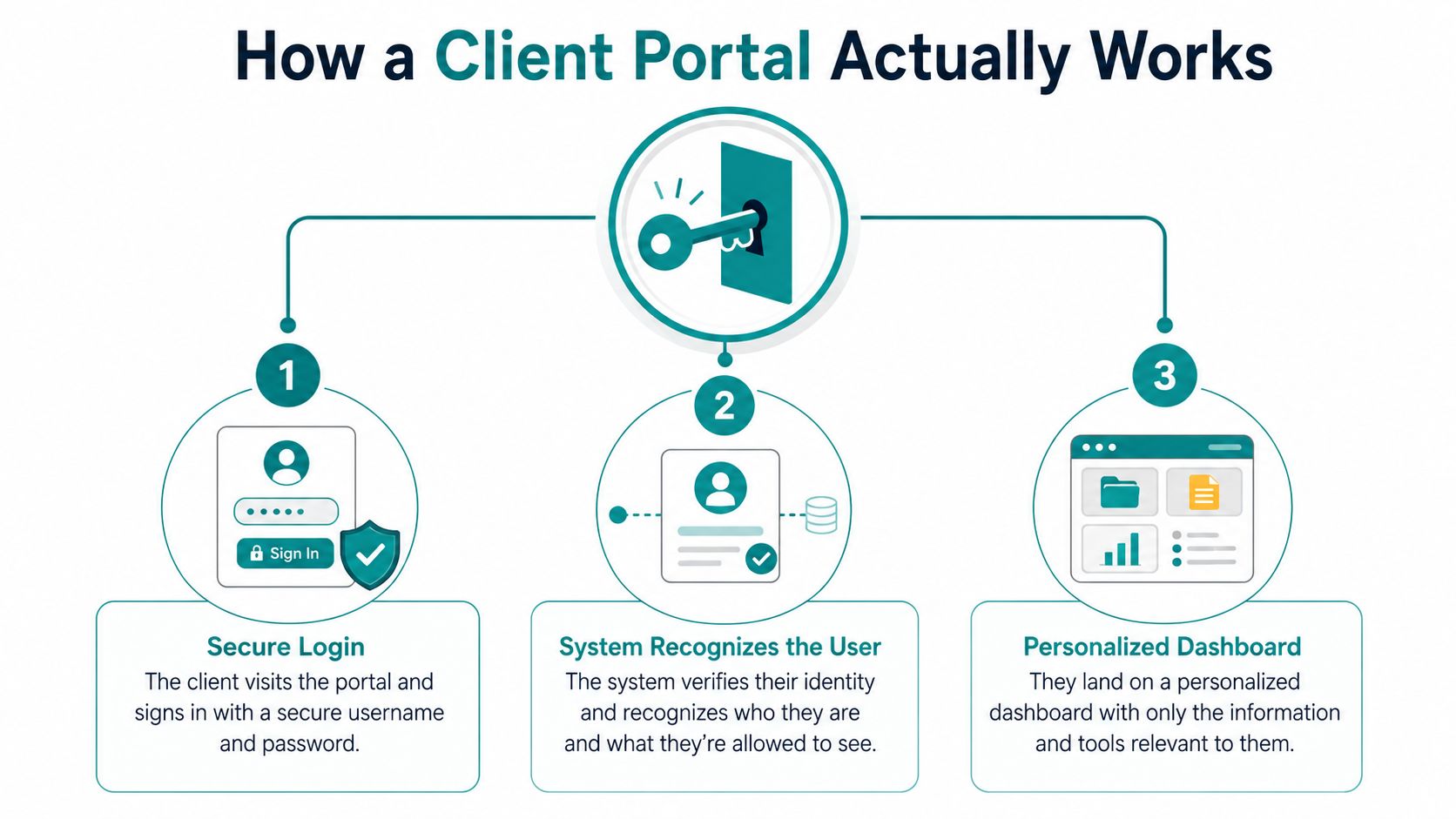
A secure portal therefore needs more than a polished login page. The server must authenticate the session, resolve active organization membership, and enforce access rules for every file, record, and workflow action. Practical architecture guidance from HDM's SaaS platform development perspective emphasizes this application boundary because browser-supplied identifiers can't be trusted on their own.
Clients can do more than look around
Modern portals are transactional. A client may request an appointment, upload a tax document, approve a design, sign an agreement, or pay an invoice. That difference changes the business value. A dashboard that only displays information may reduce questions, while a portal that lets clients complete the next step can reduce handoffs.
Healthcare usage illustrates the distinction. In a UCLA Health study of 505,503 patients, 109,200 registered for a portal, and 92.29% of account holders logged in at least once. Users viewed laboratory results, requested appointments, and canceled appointments, while the study recorded an average of 1.92 logins per user per month. The findings are summarized in the client portal guide with the UCLA Health data.
The point isn't that every small business needs a healthcare-style system. It's that a portal works best when it gives clients a reason to return and a clear action to complete.
This short video offers another visual explanation of the basic portal process:
<iframe width="100%" style="aspect-ratio: 16 / 9;" src="https://www.youtube.com/embed/Jk7ZUEeuVf0" frameborder="0" allow="autoplay; encrypted-media" allowfullscreen></iframe>Common Features You Should Expect
Feature lists can make every portal look identical. Your job is to connect each feature to a recurring business problem, then leave out capabilities your clients won't use.
Features mapped to business friction
| Feature | Problem It Solves | Best For |
|---|---|---|
| Secure document sharing | Attachments get lost, duplicated, or sent to the wrong person | Law firms, accountants, healthcare practices, agencies |
| E-signatures | Agreements wait in inboxes for approval | Proposals, contracts, engagement letters |
| Messaging and notifications | Important questions disappear in long email threads | Ongoing service relationships |
| Tasks and approvals | Clients don't know what action is waiting on them | Design reviews, content approvals, onboarding |
| Invoicing and payments | Billing conversations happen separately from delivery | Agencies, consultants, professional services |
| Reporting dashboards | Clients ask for status updates your team repeatedly prepares | Projects, recurring services, account management |
Secure document sharing is usually the foundation. A marketing agency might place a campaign brief, approved copy, and final creative in one client workspace. A law firm could use the same pattern for case documents, but would need more careful permissions and audit records.
E-signatures become valuable when a client already has the document open and the next action is obvious. A signed proposal can move directly into the next workflow instead of waiting for a separate email exchange. The same applies to approvals. A client should be able to see the design revision, leave a comment if needed, and approve it without asking which version is current.
Messaging and notifications need restraint. A portal shouldn't recreate every noisy conversation from your inbox. It should surface useful events, such as a new document request, a pending approval, or a completed payment.
Start with the workflow, not the feature catalog
"Role-based access" means permissions follow a person's job or relationship. A client contact might view invoices and approve deliverables, while a subcontractor can upload files to one project but can't access billing records. SSO, or single sign-on, lets users authenticate through an identity provider they already use, which can make access easier to manage.
A sensible first release may need only document exchange, messages, notifications, and one approval workflow. Adding payments, reporting, CRM synchronization, or automated reminders can wait until the core experience works. A portal with fewer, well-used functions is more useful than an expensive system filled with buttons your clients ignore.
Real-World Client Portal Use Cases
A portal earns its place by improving a repeated handoff. The right design depends on what clients need to do, how often they do it, and which systems must connect after launch. A new login adds little value if it only recreates email and shared folders.
A healthcare practice
A healthcare practice can use a HIPAA-aligned portal for patient communication, laboratory-result viewing, and appointment requests. The UCLA Health research cited earlier found that 79.7% of users viewed laboratory results, 12.72% requested appointments, and 9.66% canceled appointments. These patterns show a portal supporting service interactions, not merely displaying educational material.
The study also found a mobile access gap, with 9.62% logging in from a mobile device at least once. A practice should test phone access before launch and make activation support part of the rollout. The healthcare portal adoption research provides further context for planning adoption and user support.
A law firm
A law firm may share matter-specific documents, collect signed engagement agreements, and keep client messages tied to the correct case. The practical benefit is a clearer boundary around confidential exchanges. Permissions can follow each matter instead of exposing a broad shared folder, while the firm can define which contacts may view or submit information.
A marketing agency
An agency can use a branded hub for project briefs, asset delivery, design approvals, content comments, and invoices. Clients see the current project state and the next requested action in one place. That visibility reduces status questions, but only if the portal reflects the agency's actual workflow.
A Cincinnati agency such as HDM may also need to plan integrations carefully. Connecting a portal to project management, accounting, CRM, or payment tools can create maintenance work when one system changes. Start with the handoff that causes the most repeated effort, then add connections after clients use the core workflow.
A wholesale retailer
An e-commerce retailer may give wholesale or high-value customers a private view of order history, product information, invoices, and reordering options. This differs from a public storefront because the portal reflects a specific account relationship and limits data by permission.
The market has continued commercial momentum. One estimate places the global client portal software market at about US$1.8 billion in 2024 and projects US$2.6 billion by 2030, with a projected 6.6% CAGR, as reported in this client portal market and workflow overview. Those figures do not prove that every Cincinnati business needs a portal. They do suggest that centralized digital service delivery has moved beyond a niche experiment.
Security and Compliance Essentials
Security should be discussed in terms of decisions you can verify, not acronyms you're expected to trust. Ask a vendor or developer to explain what each control protects and how your team will see evidence that it works.
Controls that deserve clear answers
- Role-based access control: Each person sees only the files, records, tasks, and actions assigned to their role. Ask whether permissions can be applied at the client, project, folder, and record level.
- HTTPS and TLS encryption: Encryption protects information as it travels between a user's browser and the portal. It helps prevent someone on an unsafe network from reading data in transit.
- Multi-factor authentication: MFA adds a second verification step beyond a password, such as an authenticator app, SMS code, biometric check, or hardware security key. Current portal guidance treats MFA as a core expectation, not a decorative option.
- Single sign-on: SSO lets users authenticate through an approved identity provider. It can simplify account management, especially when a business needs to remove access quickly.
- Audit logging: Logs record meaningful actions, such as access, uploads, downloads, approvals, and permission changes. They give your team a trail for investigation and compliance review.
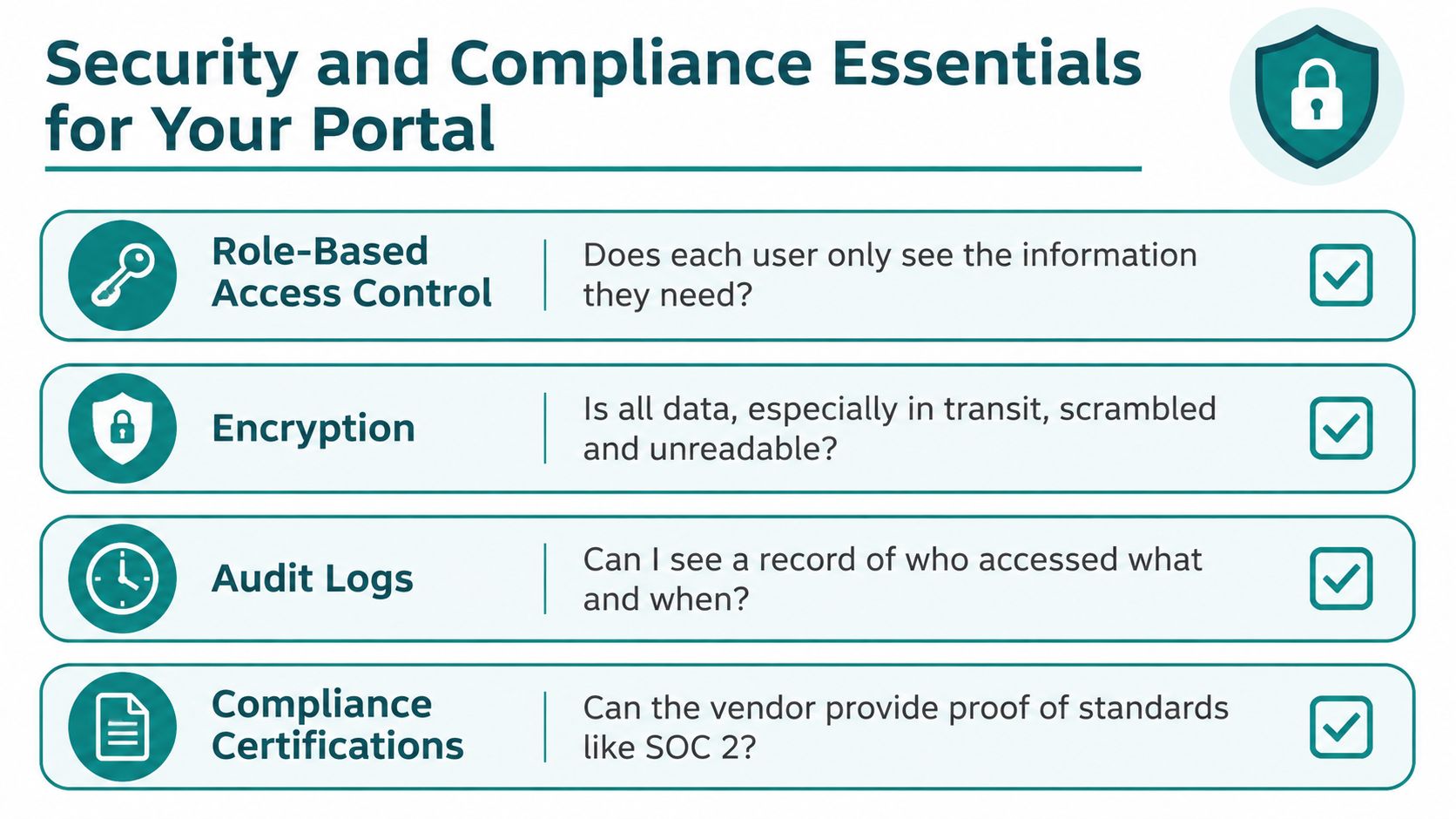
A secure portal also needs server-side authorization on every request. Architecture guidance from client portal API security practices explains why an application shouldn't trust identifiers supplied by the browser. The server should validate the session, confirm the user's organization membership, and check the policy before returning a record or allowing an action.
Healthcare requires extra diligence
A healthcare practice handling patient information must confirm that its portal supports HIPAA-aligned safeguards. That includes encrypted communication and protections around login, data transfer, and access logging. A vendor's marketing page isn't enough. Ask what documentation, agreements, configuration controls, and operational processes support the claim.
Integrations create a trade-off that feature comparisons often overlook. Every connection to a CRM, payment processor, practice-management system, analytics tool, or plugin expands the threat surface. Security guidance for client portals recommends treating integrations as ongoing security decisions, not one-time setup tasks. MFA adoption is also becoming a broader identity priority, with Okta reporting 70% of users using MFA in January 2025 in its cited research.
Ask these questions before signing:
- Access: Can you demonstrate how users are separated by organization and role?
- Monitoring: What events enter the audit log, and who reviews them?
- Recovery: How are backups, account recovery, and offboarding handled?
- Integrations: How are connected tools reviewed and updated?
- Compliance: What evidence supports the standards relevant to your industry?
For deeper internal planning, HDM's guide to cybersecurity best practices gives business owners a broader security framework beyond the portal itself. If a vendor must demonstrate controls around testing and compliance, review the practical requirements for meeting SOC 2 pentest requirements as part of your due diligence.
Getting Clients to Actually Use the Portal
A portal can be secure, well designed, and connected to your systems, then fail because nobody knows where it is. Adoption is often the hidden bottleneck. In the healthcare survey cited in the research, 17% of non-users were unaware they had a portal, while 13% didn't know how to access it. At the same time, 48% used a portal at least monthly, and 82% felt confident in its security, which suggests that awareness and usability can matter as much as trust.
Make the first use personal
Don't send a generic announcement that says, "Your new portal is live." Send an invitation that names the client's immediate reason to sign in. "Your revised proposal is ready for review" gives a stronger prompt than "Explore our new client experience."
Have a team member guide important clients through the first login. On a call, show where to find the current document, how to respond to a task, and where future notifications will appear. That short orientation addresses both uncertainty and access confusion.
Use familiar touchpoints to reinforce the habit:
- Invoices: Add the portal link where clients already check account information.
- Email signatures: Point clients to the portal instead of inviting another attachment exchange.
- Onboarding messages: Explain what belongs in the portal and what still belongs in email or phone calls.
- Recurring work: Put the next required document or approval inside the portal so the client has a practical reason to return.
A portal becomes part of your service only when clients know what they should do there next.
Connect adoption to the business case
Efficiency benefits don't arrive at launch. They appear when clients use the portal as the default channel. Industry commentary reports that organizations implementing portals can reduce cycle times by 54% on average, with top performers cutting cycle times by more than 90%, according to client portal workflow analysis. Treat those figures as directional context, not a promise for your business. Your results depend on the workflow, client behavior, internal follow-through, and quality of the implementation.
Track whether clients activate accounts, complete requested actions, and return for later work. Pair those measures with operational observations, such as fewer repeated file requests or less time spent locating approvals. HDM's client onboarding process guidance can help you think through the broader journey, because portal adoption starts before the first login.
Your Client Portal Launch Checklist
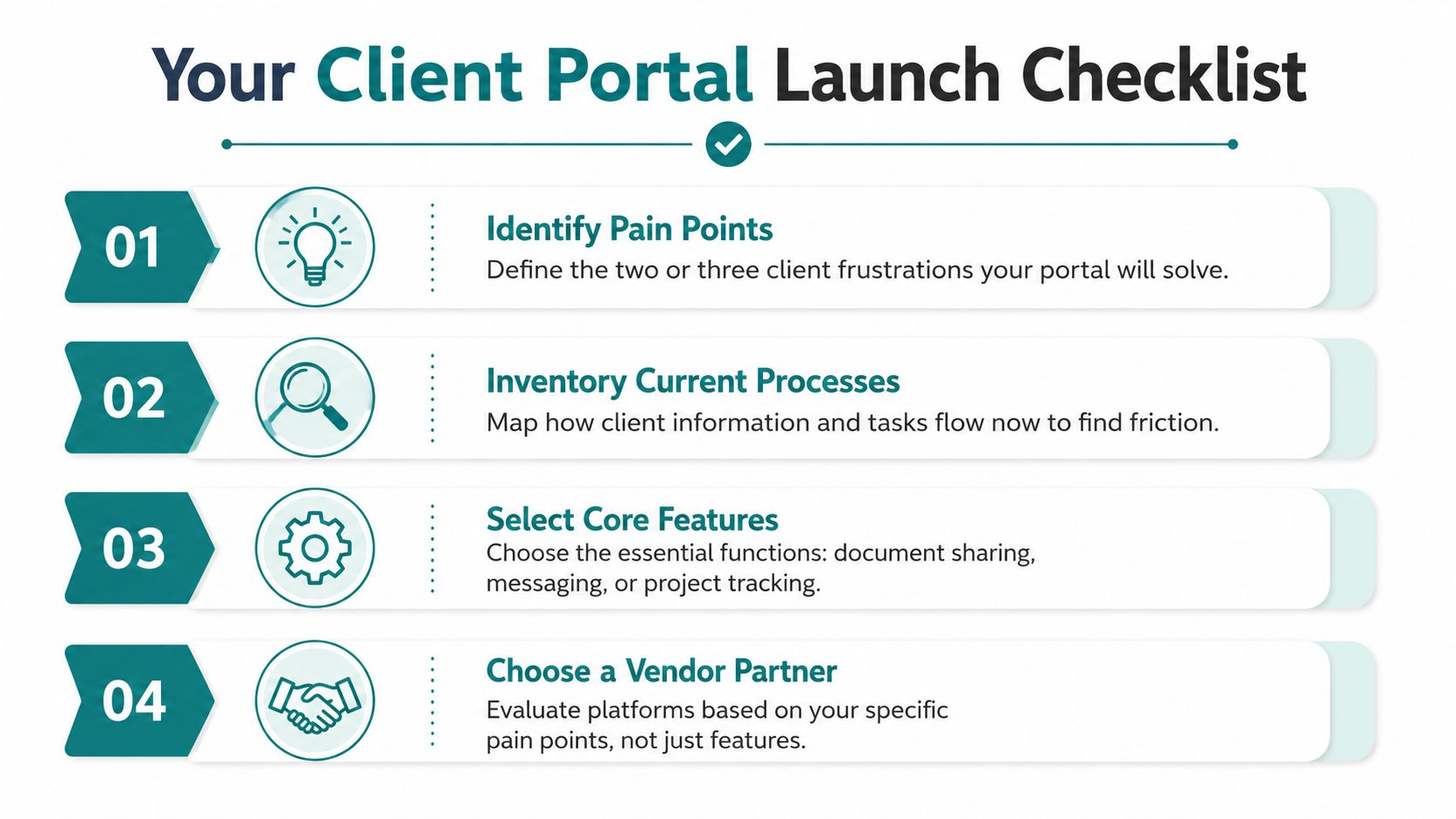
A successful launch starts with a narrow business problem. Before comparing platforms, write down the client frustrations your team hears repeatedly and the internal work those frustrations create.
Work through these decisions in order
- Define the pain points: Choose the two or three client problems the portal must solve. Examples include repeated document requests, unclear approval status, or payment follow-up.
- Map current systems: Inventory the CRM, email platform, payment tools, practice-management software, project system, and document storage your team uses. Note where information is duplicated or manually re-entered.
- Confirm security requirements: Decide whether your industry requires HIPAA-aligned safeguards, audit records, MFA, specific retention practices, or other controls. Ask vendors to demonstrate the controls rather than describing them only in sales language.
- Choose the delivery approach: Compare an off-the-shelf portal with a custom build. A packaged tool may be faster to configure, while custom development can fit unusual workflows and integrations more precisely.
- Select essential features: Begin with the functions that support the stated pain points. Document sharing, messaging, approvals, payments, and reporting should earn their place through a real client task.
- Pilot with friendly clients: Invite a small group of clients who will give direct feedback. Watch where they hesitate, which instructions they miss, and whether the portal replaces the old process.
- Measure after launch: Review activation, recurring use, completed tasks, support questions, and cycle-time results after 60 days. Use what you learn to simplify the experience before adding more integrations.
MFA should sit in your baseline requirements, not in the "maybe later" column. A portal that makes access easy but leaves identity controls weak can create more risk than the scattered process it replaces. For the rollout itself, an effective client onboarding playbook can help your team document invitations, training, reminders, and handoffs.
HDM builds custom client portals and integrations for Cincinnati-area businesses, including HIPAA-compliant healthcare work. That's one option to evaluate alongside configurable software, especially when your workflow crosses several systems or requires a client experience built around your brand.
Start with one painful handoff, make the next client action obvious, and earn broader adoption through a useful first release. A portal doesn't need to transform every part of your operation on day one. It needs to make one important client relationship easier, safer, and more organized.
If your Cincinnati-area business is sorting through portal requirements, HDM can help map the workflow, evaluate custom development and integration needs, and connect the portal to a broader website, SEO, or digital growth plan. Visit HDM to discuss the client experience you want to improve and the systems that need to support it.


