

A Cincinnati business owner usually reaches the SaaS question after a familiar pattern. Your team is paying for several disconnected tools, copying information between systems, and working around software that wasn't designed for your process. A vendor offers a custom platform, the quote looks substantial, and you have to decide whether you're buying a growth engine or an expensive distraction.
SaaS platform development isn't mainly a coding decision. It's a business decision about ownership, efficiency, customer experience, and the limits you're willing to accept from someone else's product. The SaaS market has moved far beyond an experimental delivery model. One industry estimate places worldwide SaaS revenue at USD 408.21 billion in 2025, with a projection of about USD 1.37 trillion by 2035, according to Precedence Research's SaaS market analysis. That scale matters, but it doesn't mean every Cincinnati company should build its own platform.
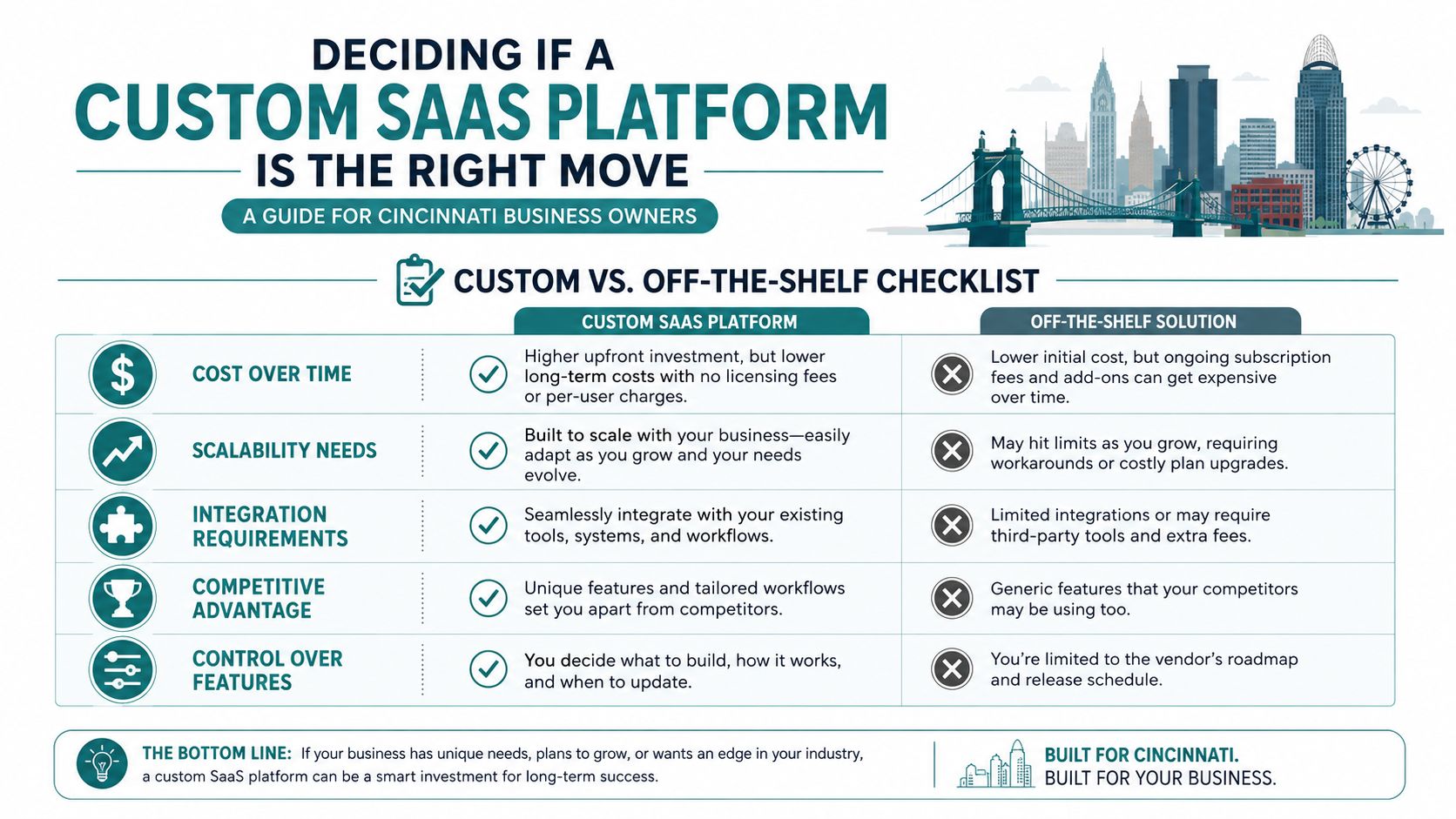
Deciding If a Custom SaaS Platform Is the Right Move
A growing Cincinnati logistics company may have a dispatch process that depends on spreadsheets, email, and a general-purpose customer management tool. A mid-sized medical practice may need a patient-facing portal that connects scheduling, documents, billing, and internal workflows. In both cases, the question isn't, "Can someone build this?" A competent team probably can. The better question is whether a custom platform will create enough business value to justify its ownership burden.
Start with the problem, not the feature list.
Test the business case before discussing technology
Ask these questions with your leadership team:
- Is the problem recurring? If employees face the same delay or error every day, software may be justified. If the issue happens occasionally, a process change or existing tool could be enough.
- Is the process specific to your business? Custom software makes more sense when your workflow, pricing, permissions, or customer experience gives you an advantage that generic tools can't reproduce.
- What will the total cost of ownership look like? Compare licensing, implementation, training, support, integrations, hosting, security work, and future changes over three years. A custom build may cost more upfront but give you control. It may also become costly if nobody owns the roadmap.
- Where do off-the-shelf tools create a ceiling? Identify the point where workarounds slow sales, service delivery, reporting, or expansion.
- Who will make decisions during development? A platform needs an accountable business owner, not a committee that changes direction every week.
A custom platform can give you data ownership, tighter process fit, and a differentiated customer experience. It also creates responsibilities around maintenance, security, support, and product decisions. Saying no is often the right answer when the process isn't distinctive, demand hasn't been validated, or the business can't protect the project from shifting priorities.
Practical rule: Don't approve development until you can explain which business constraint the platform removes and how your team will measure that improvement.
Look at adjacent needs, too. An employee training platform, for example, may reveal whether your real requirement is a custom product or a better implementation of an existing system. HDM's employee training platform guidance can help frame that distinction.
Your next step is validation. Before a developer writes production code, find out whether real prospects care enough to change behavior, commit budget, or join a pilot.
Validating the Idea and Scoping Your MVP
The cheapest time to discover that nobody wants a feature is before you build it. For a Cincinnati SMB, validation doesn't require a large research department. It requires direct conversations with the people who would use or buy the platform.
Begin with interviews. Speak with current customers, prospects, employees, and the person who handles the problem manually. Ask what they do today, what breaks, what they pay for, and what they tried before. Don't pitch your solution too early. You want evidence about the pain, not compliments about your idea.
Use real buying signals
A waitlist can show curiosity. A pilot commitment, deposit, signed letter of intent, or scheduled implementation conversation shows stronger intent. None guarantees demand, but each gives you better information than internal enthusiasm.
Use a simple discovery checklist:
- Identify the core problem. Write one sentence describing who struggles, what they need to accomplish, and why current options fail.
- Survey target prospects. Combine interviews with a short survey, but prioritize conversations where you can ask follow-up questions.
- Define core features only. Select the smallest set that solves the central problem from start to finish.
- Set a realistic budget and timeline. Reserve room for testing, revisions, launch support, and post-launch decisions.
- Choose a development partner. Look for someone who can explain trade-offs in business language and show how ownership transfers after launch.
An MVP, or minimum viable product, isn't a cheap version of the final dream. It's a focused version that lets customers complete a valuable job and lets you learn what deserves investment next.
Write user stories in plain English. "A practice administrator can invite a staff member and assign access based on their role" is more useful than "build user management." Add acceptance criteria that define what must be true for the feature to count as complete. For the example above, the invited user should receive instructions, the administrator should see the assigned role, and unauthorized records should remain inaccessible.
Keep the scope visible
Use MoSCoW prioritization:
- Must have: Without it, the product can't solve its primary problem.
- Should have: Valuable, but the first release can function without it.
- Could have: Useful later, once demand is clearer.
- Won't have yet: Explicitly excluded from the first release.
Track a small set of outcomes, such as completed onboarding, successful payments, active usage, support requests, and customer renewals. Avoid vanity measures that make a launch look busy without proving value. A clear MVP protects your budget because it tests the product before you expand it. For research discipline, Cincinnati owners can also use HDM's market research and analysis resource when organizing discovery.
Choosing an Architecture and Tech Stack That Fit Your Business
Technical architecture affects your budget, launch speed, hiring options, and ability to serve customers reliably. You don't need to choose every framework yourself, but you do need to understand what your development partner is buying you and what future obligations come with that choice.
SaaS architecture often involves multiple customers using one product. A multi-tenant design can share infrastructure while separating customer records logically or physically. A single-tenant or dedicated arrangement gives stronger isolation but usually adds operational work. The correct model depends on customer expectations, regulatory requirements, performance needs, and pricing.
Compare the choices by business consequence
| Choice | Business Benefit | Trade-Off |
|---|---|---|
| Monolithic application | Faster initial delivery, simpler deployment, and easier troubleshooting for a small team | Larger changes can become harder to manage as the product grows |
| Multi-tenant architecture | Shared infrastructure can support efficient operations and a consistent product experience | Tenant isolation, provisioning, updates, and monitoring require deliberate design |
| Serverless hosting | Less infrastructure administration and a flexible way to handle variable workloads | Usage patterns can be harder to forecast, and some workloads may fit poorly |
| Traditional managed hosting | Clearer operating model, predictable services, and familiar support practices | Your team may manage more infrastructure decisions as usage expands |
| Packaged integrations | Faster connections to payment, CRM, email, or calendar systems | You depend on vendor limits, pricing, and API changes |
| Custom integrations | Better control over specialized workflows and data movement | More maintenance, testing, and responsibility when connected systems change |
Google's cloud-native guidance recommends evolving toward containers, managed services, effective CI/CD, and native services for databases, messaging, networking, content delivery, and storage. It also warns against decomposing into microservices before scale and team maturity justify the added complexity. For most small and mid-sized businesses, that means choosing a standardized, supportable foundation before chasing architectural fashion.
A practical stack might combine a mainstream application framework, a managed relational database, cloud hosting, a payment service such as Stripe, an email provider, and an analytics platform. The exact names matter less than portability, documentation, security practices, and whether another developer can take over.
Choose technology your next development partner can understand, not technology that only your current vendor can maintain.
The choice between Node.js and React.js often gets confused because they serve different roles. HDM's explanation of Node.js versus React.js is useful when reviewing a proposed web application stack. Ask your partner to explain the stack in terms of delivery time, ongoing support, scalability ceiling, and hiring flexibility. If the answer is a list of trendy tools without business consequences, keep asking.
Building, Testing, and Launching the First Version
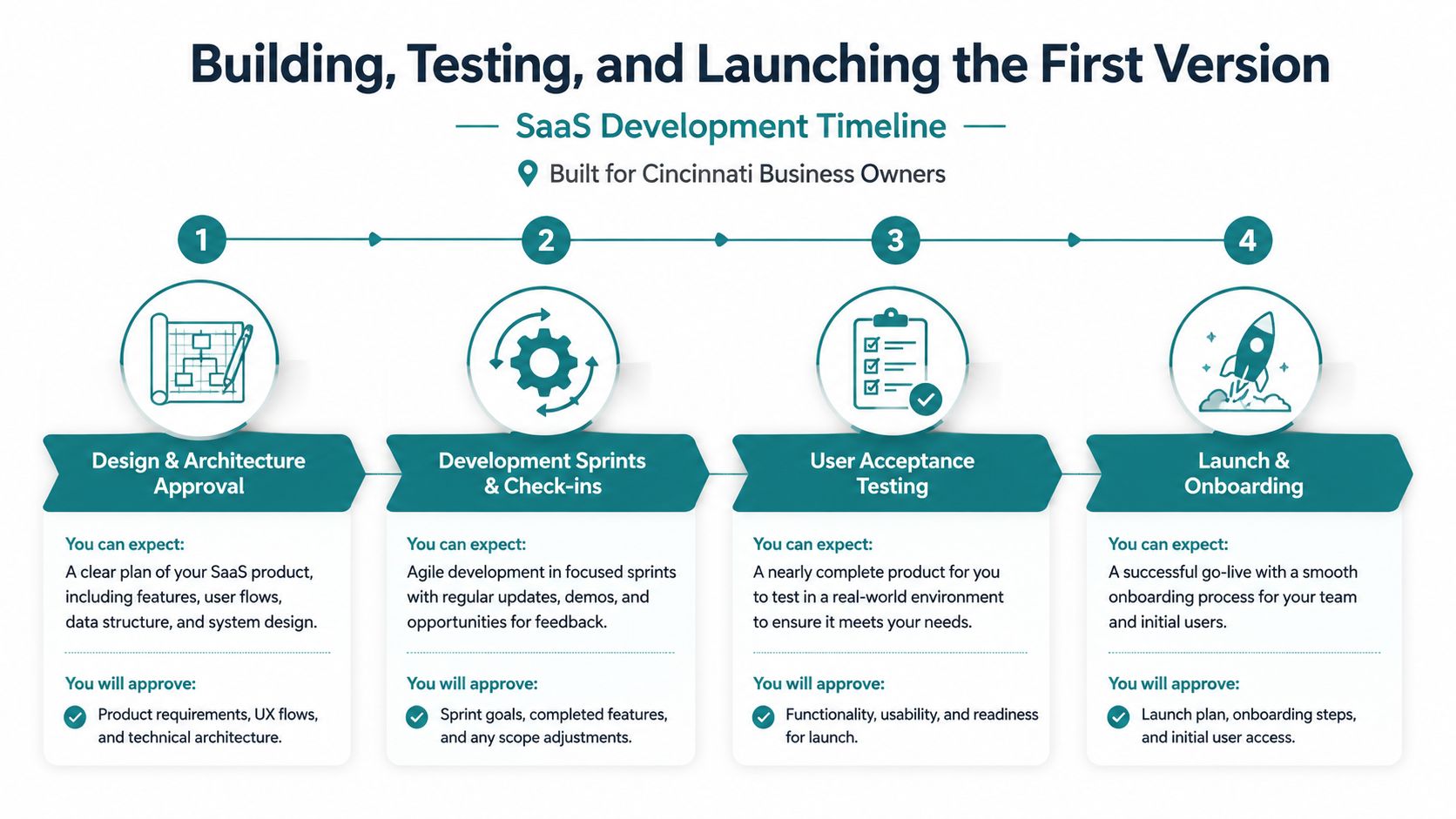
A well-run build gives you visibility without forcing you to manage every technical task. The project should move in short delivery cycles, with a shared demonstration at the end of each cycle and one business-side decision-maker who can approve priorities. A two-week sprint is a practical rhythm because it creates frequent checkpoints and limits the time a bad assumption can survive.
Your role is to review working behavior, not just attractive screens. Approve the workflow, identify what doesn't match the business process, and decide which feedback changes the current release versus the later roadmap.
What the build should look like
The sequence usually follows a clear pattern:
- Design and architecture approval: Review the main user journeys, data boundaries, integrations, hosting approach, and release scope. Don't approve screens without understanding what happens after a user clicks through them.
- Development sprints and check-ins: The team builds a small slice, demonstrates it, records decisions, and adjusts priorities. Keep one decision-maker accountable so feedback doesn't conflict.
- Quality assurance: QA tests whether the product behaves as designed, including error conditions, permissions, mobile layouts, and integrations.
- User acceptance testing: Your staff tests realistic business scenarios. They answer a different question, whether the platform works for actual daily operations.
- Beta testing: A limited group of real customers uses the product under controlled conditions. Their confusion and support questions often expose gaps internal reviewers missed.
- Launch and onboarding: The team releases a stable, sellable slice, watches early usage, and helps customers start successfully.
Before approving launch, confirm that the onboarding flow works without private instructions from the development team. Billing should be connected and tested, the support email should be monitored, and someone should know how to roll back a bad release. Establish a short post-launch war-room window with clear ownership for urgent fixes.
A launch-ready product isn't flawless. It lets a real customer complete the promised job without embarrassment, while giving your team enough visibility to learn what needs improvement.
A concise overview of the development sequence can help nontechnical stakeholders align expectations before work begins.
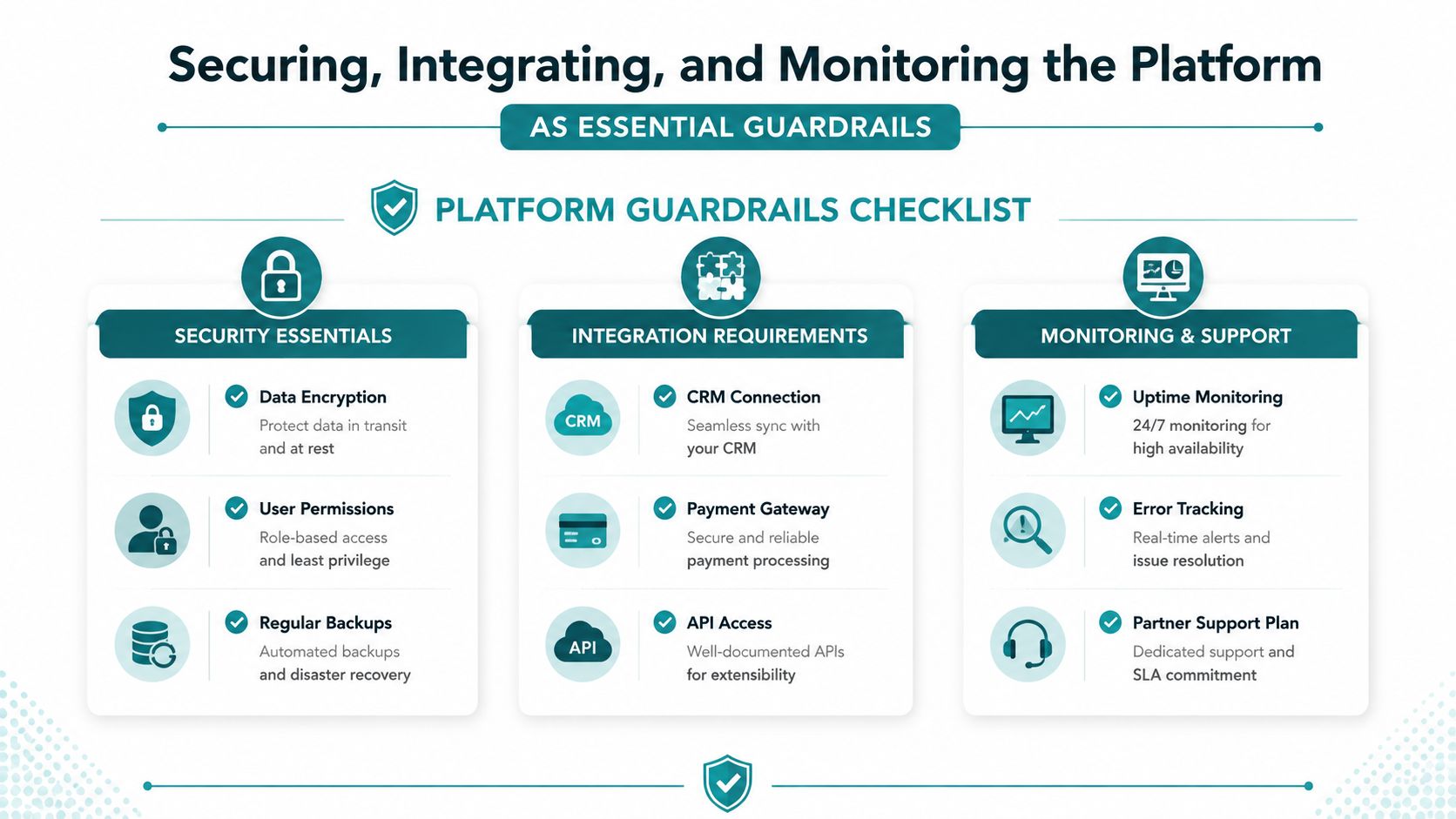
Securing, Integrating, and Monitoring the Platform
Security isn't a line item to add after launch. It determines whether a healthcare group, law firm, manufacturer, or professional services company can trust your platform with customer information. A Cincinnati dental practice group may need HIPAA-aligned controls around patient data. A law firm may require client-level permissions so one organization can never see another client's records.
Put the following requirements in writing before development begins.
Security essentials
- Identity controls: Support appropriate sign-in options, including single sign-on when the customer environment requires it.
- Role-based access: Give administrators, managers, staff, customers, and outside users only the access they need.
- Encryption: Protect data both while it moves between systems and while it sits in storage.
- Backups and recovery: Define backup frequency, retention, restoration testing, and ownership of recovery decisions.
- Compliance posture: For healthcare and legal work, document how the platform addresses relevant obligations. Don't treat a compliance label as a substitute for a real review.
Integrations deserve the same scrutiny. At minimum, map the systems that move money, manage customer relationships, send messages, schedule work, and generate reports. Confirm who owns API credentials, what happens when an integration fails, and how the platform records or retries an incomplete transaction.
Build for change without paying for everything now
An open API can make future connections possible, but "open" should still mean documented, authenticated, permissioned, and supported. You don't need to build every integration in the first release. You do need an integration boundary that won't force a full rebuild when the business adopts a new CRM or payment provider.
Monitoring turns hidden failures into visible work. Request uptime monitoring, error tracking, alerts for important workflows, and a regular health report that a business owner can understand. Per-customer visibility also matters in shared SaaS environments because an aggregate dashboard can hide one customer's slow reports or failed imports.
A 2025 survey described a growing operations burden, with one IT person per 108 employees, 60% of teams reporting excessive manual work, and automation adoption at 34% for onboarding and 40% for offboarding, as reported by CIO Influence's State of SaaS 2025 coverage. Design provisioning, permissions, onboarding, and offboarding as product workflows rather than leaving them to manual administration.
Launching to Market and Scaling Without Burning Out
A platform can work technically and still fail commercially. Pricing, onboarding, support, customer feedback, and retention have to develop alongside the product. Choose the pricing model based on how customers experience value, not on what makes the billing code easiest.
Per-seat pricing fits products where each additional user creates value. Usage-based pricing works when consumption closely tracks customer benefit or cost. Tiered pricing gives buyers a simpler choice between capability levels. A freemium model can reduce friction, but it also creates support and conversion demands. Paid-only access makes the commercial signal clearer, provided the first offer solves an urgent problem.
Avoid the predictable scaling traps
- Hiring engineers too early: Add technical capacity when product demand and a clear roadmap justify it, not because a larger team feels safer.
- Skipping customer success: Someone must help buyers reach value, identify confusion, and protect renewals.
- Ignoring churn dashboards: Watch cancellations, failed payments, inactive accounts, support themes, and reasons customers don't continue.
- Adding features before the core loop works: Improve the central journey from signup to value to payment before expanding the menu.
- Leaving operations manual: Provisioning, access changes, billing exceptions, and support routing should become repeatable workflows.
SaaS adoption is widespread. One 2026 industry summary reports that 99% of organizations use at least one SaaS application, while a separate estimate places public cloud deployment at 89.42% of SaaS market share in 2025, according to Show Me Your SaaS's market trends summary. Buyers already expect software to be accessible, dependable, and easy to adopt. Your advantage won't come from calling the product SaaS. It will come from solving a specific problem better than the alternatives.
If onboarding, support documentation, scheduling, or administrative work starts consuming your core team's time, an external staffing option such as hiring Latin American virtual assistants can help you evaluate operational support without immediately expanding every internal function. Keep customer-facing quality and data access controls under close management.
Use a 30-60-90 day operating plan
Weeks one through four: Onboard the first ten paying customers, observe every confusing step, and tighten the feedback loop. Fix activation barriers before adding major features.
Days 31 through 60: Build a referral process, document objections, and turn credible early-user results into case studies. Keep the stories specific to the customer's problem and outcome without overstating what the platform delivered.
Days 61 through 90: Assign an operations lead, review support and billing workflows, and revisit the architecture for the next thousand customers. That review should focus on capacity, tenant isolation, monitoring, cost visibility, and the parts of the product that still require manual intervention.
Your next action is straightforward. Schedule a business-and-technical discovery session, bring your current workflow, customer feedback, existing software contracts, and three-year ownership assumptions, then ask for an MVP recommendation rather than a feature-heavy proposal.
HDM helps Cincinnati-area businesses plan and build custom web applications, SaaS platforms, client portals, dashboards, integrations, and performance-focused digital experiences. Visit HDM to discuss your workflow, validate the opportunity, and decide what should be built first.