
Three quotes landed this week and none of them agree. One prices a headless rebuild with a custom front end at roughly double your budget. One describes a hybrid setup that sounds like the site you already have, with a bill attached. One says fix the slow pages and leave the platform alone.
Each vendor can defend the number. The headless vs hybrid CMS decision rarely comes down to a feature chart, though. It comes down to a question most proposals never answer: after launch, who does the work?
Most Cincinnati businesses weighing this aren't running a product team. They have one or two marketers, a developer they call when something breaks, and a website that now has to do several jobs at once, from ranking local service pages to feeding a patient or client portal. That staffing reality decides more than any architecture diagram.
The honest comparison comes down to what each model asks of your team, what it costs over three years, and the conditions that should settle the choice.
Headless vs Hybrid CMS Side by Side
Picture the week before a launch. The marketing manager has a new Cincinnati service page written and ready. The developer has a different deadline: the same service descriptions need to appear inside a client portal shipping next quarter. Neither wants to retype anything, and neither wants to wait on the other.
A headless CMS stores content as structured data and delivers it through an API to a front end built and maintained as a separate application. A hybrid CMS keeps that API delivery and adds a built-in page layer, with visual editing and in-context preview, so a marketer can assemble and publish a page without a deploy.
Strictly speaking, the delivery contract is the same in both. What changes is whether the page itself lives inside the CMS or outside it.
| Criterion | Headless CMS | Hybrid CMS |
|---|---|---|
| Content model | Structured content served by API to any front end | Structured content plus an optional built-in page layer |
| Visual editing and preview | Usually custom-built for each front end | Built in, with in-context preview |
| Front-end control | Full freedom with custom code | Standard templates with custom options |
| Developer dependency | High for new pages and layout changes | Lower for routine page updates |
| Channel reuse | Strong: website, app, kiosk, portal | Good: website plus API-connected channels |
| Performance | Set by rendering choices and build quality | Set by build quality; templates can be fast by default |
| Team needed | Developers plus front-end engineers | Marketers with occasional developer support |
| Cost pattern | Higher upfront build and ongoing upkeep | Moderate upfront build, lower routine upkeep |
| Typical fit | Multi-channel products and custom applications | Websites that also need reusable content |
The two models differ mainly in who controls the page layer. A headless build hands the live page to whoever writes the front-end code. A hybrid build leaves it with the person writing the copy, while the API still lets developers pull the same content into an app, portal, or kiosk.
One clarification worth holding onto: hybrid isn't a watered-down headless. It's API-first delivery with an authoring layer on top, which is why a hybrid site can serve a mobile app later without starting over.
If you're weighing headless specifically for a storefront, PlatformDTC's headless setup guide for DTC brands covers the commerce side that content-focused comparisons skip: catalogue modelling, cart and checkout plumbing, and keeping a product feed in sync.
Everything else in this comparison, budget, timeline, who you have to hire, follows that one ownership question.
How Editing and Preview Workflows Differ
Take a Cincinnati law firm with four practice areas. Its marketers want to add an estate planning page, swap the photo on the probate page, and update an intake disclaimer, all without filing a ticket. Its developer is separately feeding attorney bios and practice descriptions into a client intake portal.
That's the whole trade-off in miniature: editorial control versus front-end independence. Pure headless architecture exposes content through REST or GraphQL and lets one structured model feed websites, apps, kiosks and portals, but as Jahia's comparison of headless and traditional CMS models explains, visual preview, page composition, routing, SEO metadata and publishing workflows usually require custom front-end implementation.
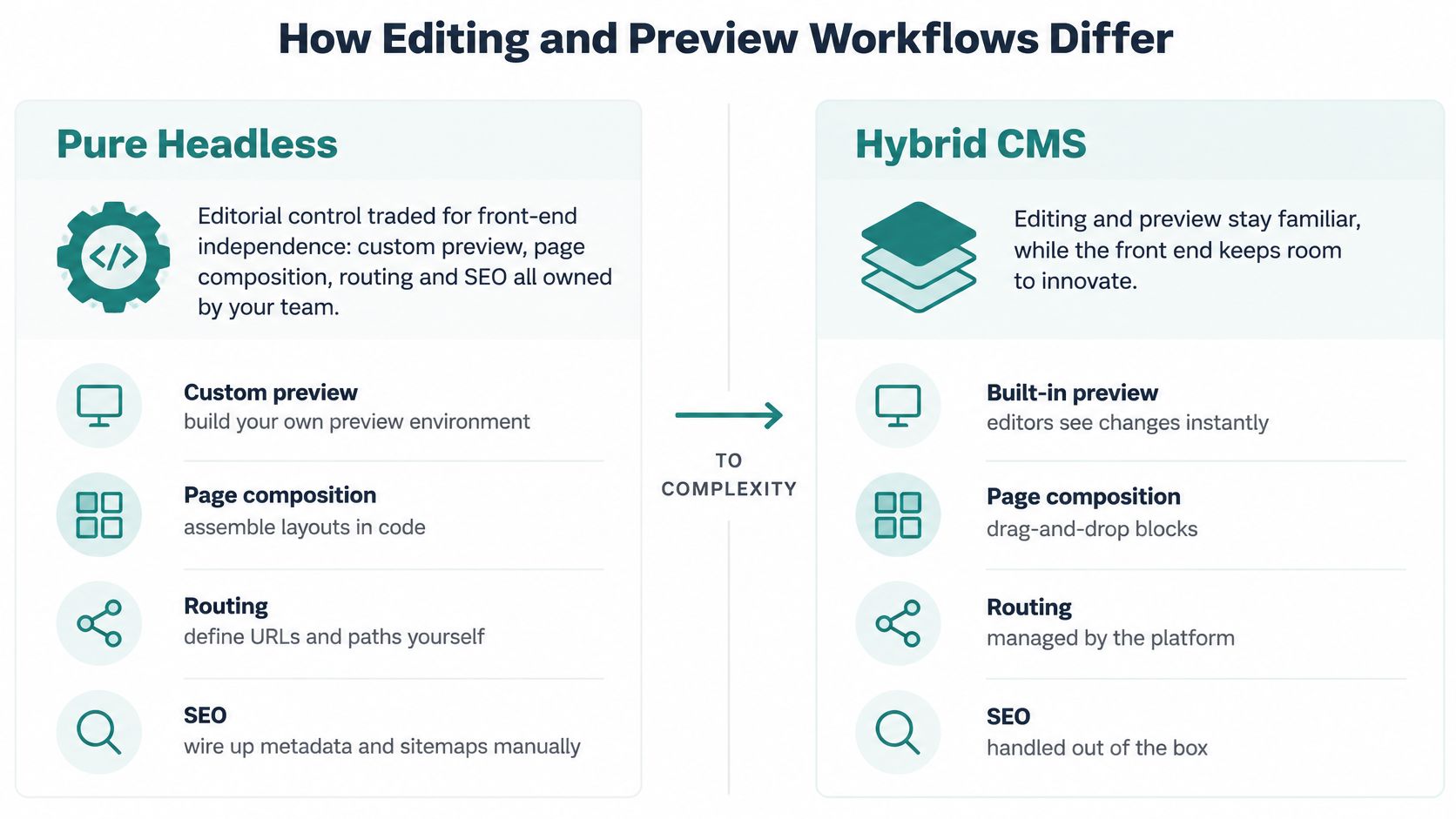
Under pure headless, publishing that estate planning page usually runs like this:
- The marketer writes the copy into structured fields in the CMS.
- The marketer files a ticket for a new template or route.
- A developer adds the route, builds the layout, wires the title, meta description, canonical URL and sitemap entry, then opens a pull request.
- Someone reviews and deploys the change.
- The marketer checks the live page, finds a spacing problem, and the request goes back to step two.
Four or five steps, two or three people, and a queue between them. Under a hybrid setup the same page takes fewer:
- The marketer opens the page, drags a block in, types the copy.
- The marketer fills the SEO fields in the same screen and previews the rendered result.
- The marketer publishes. Rollback is a click if the layout misfires.
Developers still get the API. The bios flow into the intake portal from the same content model, unchanged.
The cost of the hybrid route is architectural complexity. Two delivery paths exist, so someone has to decide which content renders through the built-in templates and which gets assembled in a custom application, and keep both on one design system. Skip that governance and you end up with two visual identities and a support ticket nobody can route.
Key Insight: The question isn't which tool is more modern. It's who should be able to change a live page on a Tuesday afternoon, and how long that takes.
Three questions to put to any vendor about preview and editing:
- Show me the preview. Can an editor see the change rendered exactly as it will ship, before publishing, without a build step?
- Name the publisher. Can a marketer publish a new page and roll it back without a developer, and who signs off?
- Locate the SEO fields. Are titles, descriptions, canonical URLs and sitemap entries editable by the editor, or set in code?
Once several teams touch the same content, Outrank's guide to enterprise content management is a useful reference on how larger operations split ownership and keep publishing consistent, which is the work a hybrid setup forces you to write down.
Integrations and Who Owns the Complexity
Most comparisons treat headless as the advanced choice and hybrid as the safe compromise. That framing hides the part that costs money after signing: a headless build doesn't remove work, it moves the work onto your side of the table.
Who sits on the other end of that ownership matters more than the architecture diagram.

Concretely, a headless implementation asks someone to own the front-end applications, the API layer, preview environments, caching rules, deployments, permissions and monitoring. Brights' review of CMS trends makes the governance point that vendor comparisons tend to skip: this burden lands hardest on small and mid-sized businesses, healthcare organizations, law firms and agencies that don't have dedicated platform engineers.
A hybrid system keeps templates and API delivery, which can reduce the number of custom services your marketers and developers have to coordinate. Fewer moving parts, fewer people in the approval chain, and one place to look when a page renders wrong.
Coexistence is the norm rather than the exception. The same 2025 survey reported by Brights found that 61% of CMS users operate more than one CMS, while 44% need several systems to cover their channels.
Consider a Cincinnati healthcare practice with a website for service pages, a patient intake form, and an appointment tool writing into the practice management system. Under a headless build, three applications talk to one content source through APIs. When the intake form stops submitting at 9 p.m. on a Friday, four things could be at fault and none of them is the content.
The test I'd apply: when the form breaks at 9 p.m., can you name the person who picks up, and do they have access to the API, the host, and the form tool?
Forms are usually where this shows first, so keep that layer simple and testable. Where a site needs many of them, Kiwiform's unlimited form creation keeps submissions in one place you can check, rather than spread across three integrations nobody owns.
Our walkthrough of a headless CMS implementation covers how the work gets sequenced, if you want to see what the build involves week by week.
Here's how the delivery layer and its integrations fit together in practice:
<iframe src="https://www.youtube.com/embed/mOWJv9PNeYs" width="100%" height="400" frameborder="0" allowfullscreen></iframe>Four questions to settle with any agency before signing:
- Who handles incidents? Not "is there support," but a name, a response window, and who triages first when the CMS vendor, the host and the front end are all suspects.
- Who approves releases? If every content change rides the deploy train, marketing waits on engineering, and the queue becomes the product.
- Who owns the preview environment? Preview is infrastructure. When nobody maintains it, editors stop trusting it and go back to guessing.
- Who maintains integrations after launch? API keys expire, plugins update, form endpoints change. Ask for the schedule and the owner.
Performance and Accessibility Depend on Build Quality
A headless CMS doesn't make a site faster. It gives you more control over the things that make a site faster, and more ways to get them wrong.
The work that moves those numbers is engineering, not licensing.

Rendering method does more for speed than the platform label. Static-site generation and server-side rendering deliver finished HTML, while browser-only rendering asks the visitor's phone to assemble the page after downloading the JavaScript. API call count matters next, because every uncached content request adds latency before the first pixel appears. JavaScript weight compounds both, especially on a mid-range Android phone on a suburban connection.
Storyblok's comparison of headless and monolithic website performance turns that into targets worth writing into a contract: API latency below one second, with response times under 200 ms generally considered preferable. Third-party scripts, image sizes, hosting and cache configuration routinely outweigh the CMS choice itself.
Key Insight: Static or server rendering at the edge is the safer default for any page that has to rank or convert. Browser-only rendering belongs on screens that behave like applications.
A peer-reviewed architecture study of a headless CMS combined with serverless computing reported average response times ranging from 88 to 782 milliseconds, an error rate below 2%, CPU utilization no higher than 56% and RAM no higher than 39% under tested conditions (the published architecture study). That shows the mechanics of a well-built decoupled system. It isn't a promise for your site, because front-end code, images, APIs and caching decide the rest.
Accessibility follows the same pattern. The 2025 Web Almanac CMS chapter found median accessibility scores ranging from 76 to 95 across major CMS platforms, with Wix at 95, Squarespace at 94 and 1C-Bitrix at 76. A more composable stack isn't automatically more accessible. The European Accessibility Act began applying on June 28, 2025 to many consumer-facing digital services, including e-commerce, which turns conformance into a business question rather than a developer preference.
Four numbers to record before any migration
- Mobile Core Web Vitals. Largest Contentful Paint, Interaction to Next Paint and Cumulative Layout Shift, measured on a throttled phone rather than a desktop.
- Server response time. Time to first byte from your host, plus API latency where content comes from a CMS.
- JavaScript weight. Total compressed script on the heaviest template.
- Conversion rate on the two or three pages that earn money: the service page, the intake form, the checkout.
Helbling Digital Media optimizes sites for Core Web Vitals, and the practical version of that is measurement before and after, not a platform checkbox. Server-side rendering versus client-side rendering goes deeper on the rendering decision if your developer wants the technical case.
What Each Option Really Costs Over Three Years
The build price is the smallest part of a three-year comparison, and it's the part everyone argues about.
Four costs sit inside the total: the initial build, ongoing developer requests, content duplicated across channels, and maintenance and security updates. The first one gets quoted. The other three get estimated badly or not at all, which is how a headless proposal looks competitive at signing and expensive by year two.
An Adobe report on hybrid CMS cites an IDC study in which a documented hybrid implementation reported a 65% improvement in total staff time, tied to more efficient content management and delivery. Take a firm spending 20 staff hours a month on developer requests, layout fixes and routine updates. To match that improvement, it needs to recover about 13 hours a month.
| Item | Value |
|---|---|
| Monthly staff hours on developer requests, layout fixes and routine updates | 20 |
| Hours recovered per month at a 65% improvement | 13 |
| Hours recovered per year | 156 |
| Hourly cost of staff time | Your own rate, applied as hours × rate × 36 months |
That's 156 hours a year and roughly 468 hours across 36 months. Multiply by your loaded hourly cost, and the result usually dwarfs the gap between the two build quotes.
The formula: hours recovered per month × your hourly cost × 36 months, set against the extra build cost of a headless setup.
The 65% figure describes one documented hybrid case, not a guarantee for your site. It's still the right shape of calculation, because it puts the recurring dependency where it belongs instead of treating developer time as a one-time line item.
What to track for four weeks before you choose
- Developer tickets. Count every request that needed a developer to change something visible.
- Duplicate entries. Note each time someone pasted the same content into a second system.
- Revision cycles. How many rounds a page went through before it published.
- Launch time. Days from "campaign page approved" to "live".
Our builds are quoted as fixed-price packages rather than hourly billing, so the number is settled before work starts, and senior, multi-disciplinary work lands at 30 to 60 percent of the same roles hired in-house. That comparison matters most when the alternative is adding headcount to run a front end. A web development cost guide for Ohio businesses covers what those line items typically look like.
Matching Architecture to Your Business and Next Steps
Hybrid suits most small and mid-sized businesses whose real need is a strong website with reusable content. Headless suits teams running several channels or a custom front end, with developers who will own that layer after launch.
Read that as a default, not a rule for every case. The failure mode is identical on both sides: buying the architecture someone wants to build rather than the one your team can run in year three.
For a Cincinnati business, this usually shows up as three local service pages that need to go live this month, with the same descriptions wanted in a mobile experience or partner feed next year. Hybrid gets the pages out now and keeps the API open for later, without a second publishing system.
The market signal behind hybrid
Gartner's web-content-management analysis recommends a "head-on and head-optional" model, because organizations may need both template-based publishing and decoupled, reusable content across channels, as CMSWire's summary of the Gartner Magic Quadrant for web content management reports. That's the hybrid argument in one phrase: the page layer stays available, and the API stays open.
Adoption points the same direction without settling your decision. A 1,015-respondent study of CTOs, CMOs and IT decision-makers reported that 73% of organizations used headless architecture in some form, against approximately 59% in 2021 and 34% in 2019 (Focus Reactive's collection of headless CMS statistics). That's an architectural trend among organizations with platform teams, not evidence that a 15-person company needs a custom front end.
Spending forecasts show the category growing faster than content management as a whole. One market analysis estimated global headless CMS software at $1.8 billion in 2025 and projected $6.2 billion by 2033, a 17.5% compound annual growth rate, while a broader CMS forecast put that market at 7.68% (Research and Markets). Treat both as projections with different definitions, and notice what they measure: category spend, not fit for your business.
Where each situation lands
| Situation | Better Fit | Why It Fits |
|---|---|---|
| Brochure or service website with a small marketing team | Hybrid | Marketers edit pages visually without waiting for developers |
| Local service pages for a Cincinnati business | Hybrid | Fast launches with direct control over SEO fields |
| Website plus customer portal or mobile app | Headless, or hybrid with API access | One content source feeds both the site and the app |
| E-commerce store with a large catalogue sold across channels | Headless for complex needs, hybrid for standard stores | Catalogue data needs reuse across storefronts and apps |
| Multi-location healthcare practice with a patient portal | Hybrid | Simpler review and governance for compliance work |
| Agency building sites for many clients | Headless | Custom front ends for each client brand |
| Single website with no developers on staff | Hybrid | Avoids running a custom front end nobody can maintain |
Two rows carry the most weight. A single website with no developers on staff is the clearest hybrid case, because a custom front end nobody can maintain turns into maintenance cost rather than a performance win. The agency row leans the other way, since each client brand gets its own front end and the agency absorbs that ownership across projects.
The rule of thumb: go headless only when at least two channels need the same content and a developer team will own the front end after launch. Otherwise a hybrid or a well-built conventional site gets you a comparable result with fewer moving parts.
Three answers to bring to a vendor conversation
Walk in with three things and the sales deck stops working:
- Your channels. Which surfaces will use this content in the next 24 months: website, portal, mobile app, in-store display, marketplace.
- Your logged hours. The four-week count of developer tickets, duplicate entries, revision cycles and launch time.
- Your owner. The person, by role, who runs the platform after launch, and what happens when they're on vacation.
Then ask for a before-and-after measurement plan covering publishing time, developer tickets, revision cycles and campaign launch time. A vendor who can't say how they'll measure the improvement is selling an opinion.
Our web development work covers custom websites, headless CMS builds, redesigns and landing pages on React, WordPress and Shopify, which is deliberate: React and Next.js front ends where a client needs a headless build, WordPress where marketers want to keep the page layer. We start with an audit, then you choose the build or integration you need.
If you want a straight answer on which architecture your business can support in year three, including what it costs and who does the work, Helbling Digital Media builds both: headless implementations on React and Next.js for companies running several channels, and hybrid WordPress sites where your marketing team keeps control of the page layer. We'll audit the channels you have now, the hours your team loses to publishing work, and the person who'll own the platform after launch, then recommend the build that fits. Visit Helbling Digital Media to book a free strategy call.