

Two proposals are sitting on your desk. One says the new site will be server rendered and quotes a number; the other says client rendered and quotes a lower one. Both firms show you attractive reference sites, neither explains what those words mean for a plumbing company in Blue Ash, and you have a Tuesday meeting to get through.
Here's the short version before the details arrive. Rendering is the process of turning stored content into the page a visitor sees. Someone has to do that assembly, and the only real question is whether your server does it or your visitor's phone does it.
The stakes aren't abstract. Google's analysis of 11 million mobile landing pages across 213 countries found that 70% took more than five seconds to display the visual content above the fold, according to its mobile page speed benchmarks. Five seconds is roughly when a person standing in a parking lot taps the back arrow and calls your competitor instead.
What follows is the version of the server side rendering vs client side conversation you'd get from a web team lead who has to live with the decision for five years: what each model does, where the numbers favor one over the other, and why the right answer changes from page to page on the same website.
Server Side and Client Side Rendering Side by Side
Server side rendering (SSR) means the server builds the whole page and sends finished HTML, so the words and images are already there when the page lands. Client side rendering (CSR) means the server sends a nearly empty page plus JavaScript, and the visitor's browser assembles the content itself.
Think about a restaurant kitchen. A server rendered page is a kitchen that plates the meal before it leaves the pass, so the plate arrives ready to eat. A client rendered page hands the diner a box of ingredients, a recipe card and a hot plate, and dinner appears after the assembly work. Same ingredients. Completely different first minute.
The comparison a business owner actually needs
| Factor | Server Side Rendering (SSR) | Client Side Rendering (CSR) |
|---|---|---|
| Where the page HTML is built | On the server before it is sent | In the visitor's browser by JavaScript |
| What the first visit shows | Readable content almost immediately | Often a blank or loading shell until scripts run |
| Search and social crawler reading | Content readable without running JavaScript | Depends on crawlers executing JavaScript |
| Server workload | Higher, because pages are built per request or cached | Lower per request, since data is fetched as needed |
| Speed after the first load | Each new page may need a server round trip | Moving between views can feel instant |
Read the middle column and then the right one and you'll notice the table never declares an overall winner. Each row is a trade-off. Server rendering does more work up front and hands the visitor something readable; client rendering does less up front and keeps more of the app's behavior in the browser after that first load.
The last two rows are the ones owners feel most. Server rendering raises workload because pages are built per request unless they're cached, and each new page may need another round trip. Client rendering shifts that effort onto the phone in the visitor's hand, which is why a well built application can feel instant once it's running and sluggish while it starts.
Most business websites already mix the two, whether or not anyone called it a hybrid. The useful question isn't which model wins the argument. It's which model each page needs, and that answer changes as you move from the homepage to the login area.
How Each Model Builds a Page for Your Visitors
Follow one visitor through both models. A homeowner in West Chester searches for a remodeler, taps a result, and waits.
A server rendered visit, step by step
- The request. Her browser asks your server for the page.
- The build. The server pulls the content from your CMS or database and assembles the full HTML, headline, service copy, photos and all.
- The paint. Her browser renders the text and images straight away, so she starts reading while the request is still finishing.
- The wiring. JavaScript arrives and attaches to markup that's already on screen, so menus open and buttons respond. That handover is called hydration, and the plainest way to describe it is the moment the page becomes clickable.
A client rendered visit, in the same hand
- The request. Same tap, same server.
- The shell. The server returns a nearly empty HTML file with links to JavaScript files.
- The fetch. The browser downloads the script bundle, and the script then asks a data source for the content.
- The build. The browser assembles the page on screen. Until it finishes, she may be looking at a spinner or an empty grey box.
Here's the same journey as a diagram, which is worth showing to anyone on your team who assumes the two models are cosmetic.
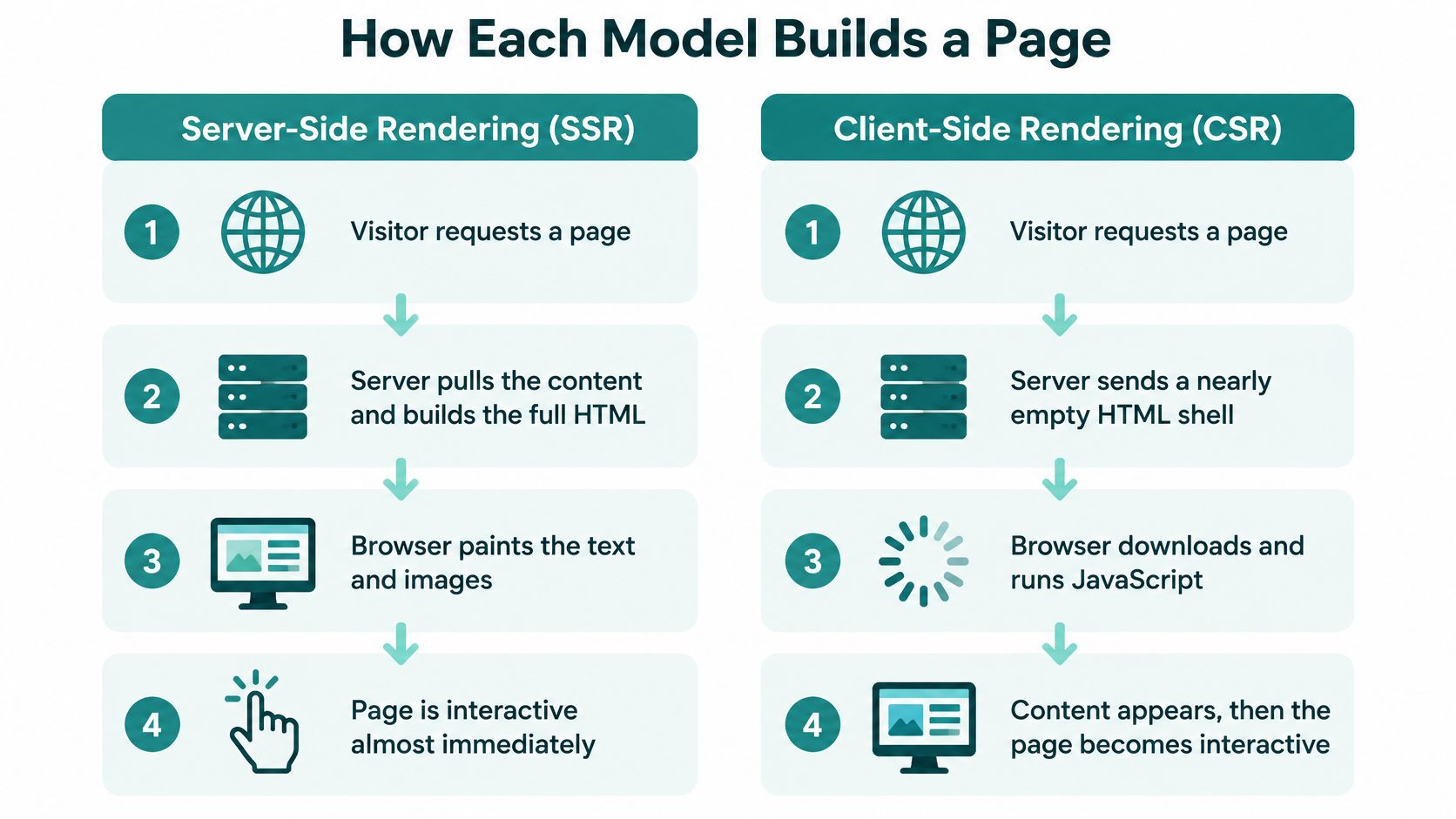
The models aren't rivals in a boxing match. As the MDN entry on server side rendering sets out, server side rendering creates the page's HTML on the server before sending it, client side rendering creates it in the browser with JavaScript, and a site can send an initial server rendered page and then use browser side JavaScript to make it interactive. MDN also flags the commercially important part: search engines, social media crawlers and other bots can read server rendered content without executing JavaScript, while major search engines may run JavaScript but social crawlers often cannot.
One variable sits underneath both models and gets blamed on the wrong one constantly. Time to first byte is how long your server takes to start responding at all, and a slow host will make either model look broken. Before you redesign anything, work through how to improve your site's TTFB through hosting and caching, because server response time often moves a page's numbers more than a rendering change would.
Practical rule: If your main headline is missing from View Page Source, you don't have a rendering debate on your hands. You have a rendering problem.
The test takes thirty seconds. Right-click any page, choose View Page Source, and search for your main headline and a paragraph of body copy. If the text is there, the server built it. If you see script tags and almost nothing else, the browser builds it. Teams planning building scalable React applications hit this question early, usually as a decision about which routes get pre-rendered and which get assembled in the browser.
Speed Results on Mobile and Slow Connections
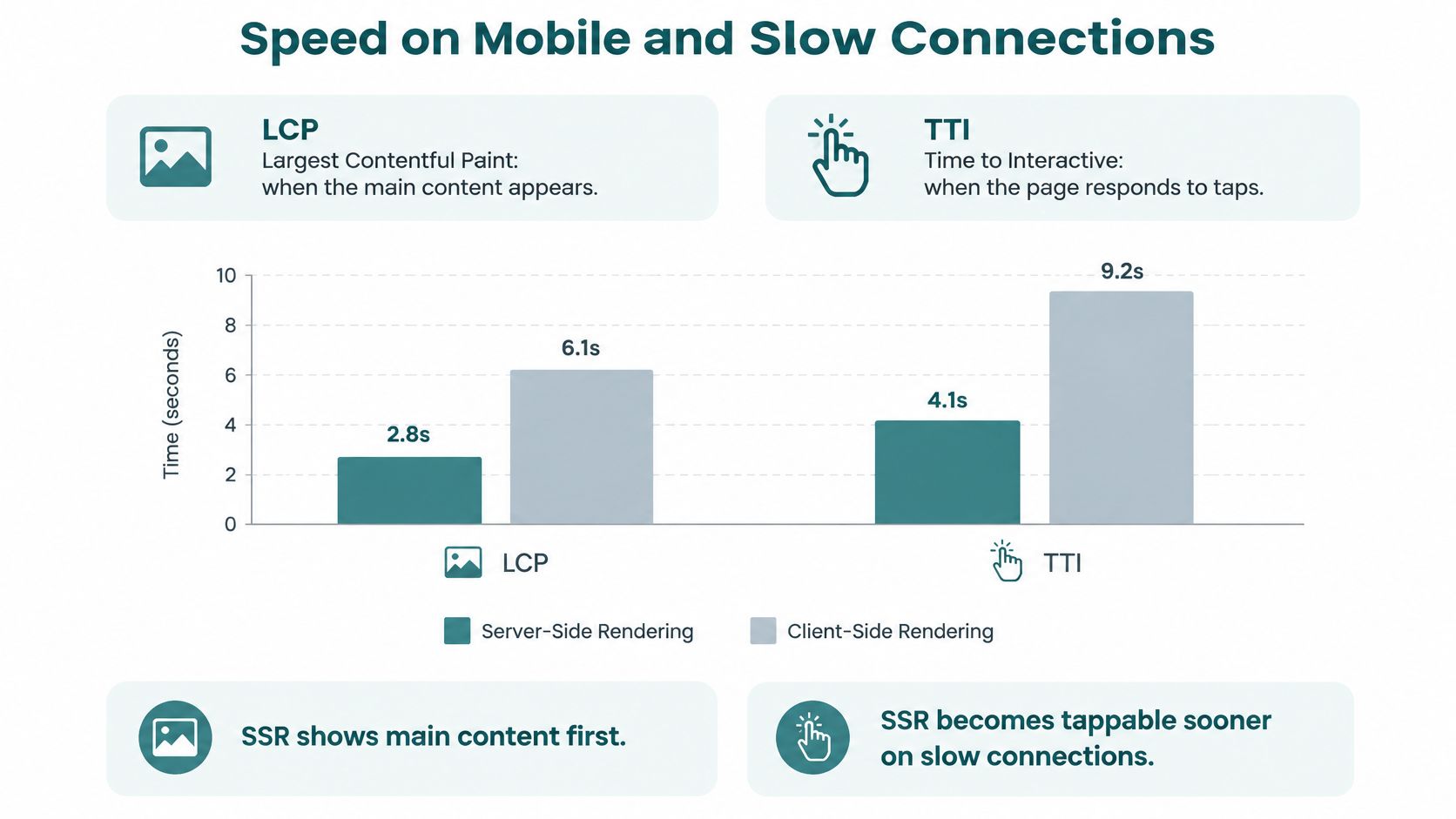
Two measures carry most of the weight in these comparisons. Largest Contentful Paint (LCP) is the moment the main content appears on screen, meaning the headline or hero photo a visitor came for. Time to Interactive (TTI) is the moment the page reliably responds to a tap, so a thumb on the "Call now" button does something instead of nothing.
Start with the harshest condition, because it shows the widest gap. Under 3G, a controlled comparison found server side rendering reduced LCP by approximately 70% against client side rendering, at roughly 8 seconds versus 27 seconds. On Wi-Fi, the same work found client side rendering produced a slightly better average LCP, 5.08 seconds against 5.46 seconds, as reported in the study of rendering under constrained networks. Bandwidth changes the answer, which is the whole reason a single site-wide verdict is risky.
| Condition | SSR result | CSR result | What it means |
|---|---|---|---|
| 3G mobile network | LCP about 8 seconds | LCP about 27 seconds | SSR reduced LCP by about 70% |
| Wi-Fi connection | LCP 5.46 seconds | LCP 5.08 seconds | CSR slightly faster on average |
| Constrained network | LCP 14.56 seconds | LCP 16.04 seconds | Speed Index 2.34 vs 3.3 seconds, favoring SSR |
| Large data payloads | TTI reduced by 62.3% | Baseline (CSR) | LCP reduced by 58.7% with SSR |
| Small data payloads | Slower First Contentful Paint | Faster First Contentful Paint and Speed Index | CSR can show content sooner on small pages |
A separate comparison run under constrained conditions measured server side rendering at approximately 14.56 seconds LCP versus 16.04 seconds for client side rendering, with Speed Index at about 2.34 seconds against 3.3 seconds, according to the rendering performance comparison. That same work notes client rendering can respond faster once everything has loaded, because later navigation and state changes happen locally without asking the server for a new document.
Data volume widens the gap further. In a 2025 controlled study of photo-gallery applications tested across payloads from 498 kilobytes to 26 megabytes, server rendering cut average TTI by 62.3% and average LCP by 58.7% compared with client rendering, and the study found statistically significant differences across every metric it measured, per the comparative rendering study. Small, light pages behaved differently: client rendering was faster on First Contentful Paint and Speed Index when datasets were small.
What the numbers mean for your site
The pattern is consistent enough to act on. Server rendering protects the first impression on heavy pages and slow connections. Client rendering feels smoother once it has loaded, which is why it suits tools people use for twenty minutes rather than pages they glance at for eight seconds.
These are controlled experiments, not predictions for your site. Your hosting, caching, image sizes, script bundle and API speed all sit on top of the rendering choice.
What to measure: Pick one priority page, throttle to a slow mobile connection in browser developer tools, and write down LCP and TTI before and after any change. PageSpeed Insights gives you the same signals from Google's side.
Synthetic tests show what a fast desktop in an office sees. Real user monitoring collects what actual visitors on actual phones experience, and this guide to real user monitoring explained covers how to segment that data by device and connection before you touch the architecture. Helbling Digital Media optimizes sites for Core Web Vitals as part of rebuild work, and the Core Web Vitals optimization checklist is the practical place to start on what Google measures and how each number is graded.
What Search Engines and Social Crawlers See
You'll hear that a client rendered site can't rank. That's the wrong worry. Google does index pages it has to render, and plenty of JavaScript-heavy sites rank well. The risk is slower discovery and thinner previews, not a penalty.
Google's crawling doesn't read a client rendered page in one pass. Googlebot retrieves and parses the HTML first, then, when resources are available, uses a headless Chromium browser to render the page and execute its JavaScript, then parses the rendered HTML again and queues any links it finds for crawling, as Google's JavaScript SEO guidance explains. Content and navigation that only exist after scripts run can therefore be found later than content sitting in the initial HTML. Google also notes that server side or pre-rendering makes pages faster for users and crawlers, and that some bots can't run JavaScript at all.
A robot reading your page twice, once raw and once after the scripts, is a fair mental picture.

Social crawlers are the more immediate loss. The bots that build link previews on Facebook and LinkedIn frequently don't execute JavaScript, so a post sharing your new service page can show up with a blank card, a missing image and a generic title. A Cincinnati law firm paying for a referral partnership doesn't want its shared link to look broken.
A five-minute check on any key page
Open View Page Source on a page that earns money and confirm these are present in the raw HTML:
- Page title in the head of the document
- Main heading and the first few paragraphs of service or product copy
- Navigation links to your other important pages
- Phone number and address, especially for a location page
- Structured data for your business type, such as LocalBusiness or Product markup
Then open URL Inspection in Google Search Console, enter one priority service page, and read how Google rendered that specific URL. Do it before a change and again after, because that report is the closest thing to seeing your site through Google's eyes. A technical SEO audit follows the same evidence rather than guessing from a homepage glance.
Server rendering is the safer default for public marketing pages, no argument there. But visible content beats the label on the architecture. A client rendered page whose headline, copy and metadata ship in the first response can outperform a poorly configured server rendered one.
Hybrid Options That Blend Both Approaches
Hybrid isn't one new technology. It's a menu, and most modern builds pick two or three items from it.
| Approach | How pages are produced | Main trade-off |
|---|---|---|
| Static site generation (SSG) | Built ahead of time and served as files | Updates need a rebuild |
| Incremental static regeneration (ISR) | Static pages refreshed in the background on a timer | Content can be briefly out of date |
| Edge rendering | Pages built on servers close to the visitor | More complex setup and monitoring |
| Server side rendering (SSR) | Built on the server per request, often cached | Higher server load and hydration cost |
| Client side rendering (CSR) | Built in the browser after scripts load | Slow first view and weaker crawler reading |
| Selective hydration | Only interactive parts of an SSR page run JavaScript | Requires careful component planning |
Read the middle column as a cost statement rather than a technical one. Static generation produces a file once and serves it thousands of times, which is the cheapest thing a server can do. Per-request rendering builds the same page again for every visitor who arrives, which is the most expensive. ISR sits between them and refreshes in the background so a price change appears within a minute or two rather than immediately.
Two words explain most of the savings. A cache keeps a finished copy of a page so the server doesn't rebuild it for every visitor. A CDN is a network of servers spread across regions that delivers those copies from a location near the visitor. Without caching, server rendering does the work on every request; with it, you get the readable first paint and pay for the build far less often.
The financial side deserves more attention than it usually gets. Current guidance treats server rendering as a speed and crawler win but says less about server capacity, caching, personalization and hydration costs, and Google recommends server rendering, static rendering or hydration rather than dynamic rendering as a workaround, per its guidance on rendering for crawlers. A sound evaluation compares total cost of ownership, including server rendering time, cache hit rates, JavaScript and hydration payloads, CDN usage, observability, deployment complexity and what happens when a server fails, rather than chasing one Lighthouse score.
Ask your developer: "Which of my pages are built on every request, and what's the cache hit rate on those routes?" The answer tells you more about your hosting bill than any framework name.
The first practical step is a page list, not a technology choice. Write down each page type on your site, estimate how often its content changes, and match it to a row above. A page that changes twice a year and a page that changes price hourly shouldn't be built the same way.
Which Model Fits Each Type of Business Page
Here's the mapping that resolves most of the argument.
| Business page | Recommended model | Reason |
|---|---|---|
| Homepage and service pages | SSG or SSR | Crawlers and visitors read the content immediately |
| Product and category pages | SSR or ISR | Prices and stock change while search must index them |
| Blog and location pages | SSG | Content changes rarely, so it is fast and cheap to serve |
| Healthcare or legal content | SSR with clear metadata | Accuracy and reliable first views matter |
| Client portal or dashboard | CSR | Private pages with long sessions and frequent updates |
| Booking or quote calculator | CSR widget inside an SSR page | Only the widget needs interactivity |
Take a Cincinnati-area professional services firm as a running example. Its homepage and three practice-area pages should be static or server rendered, because prospective clients find the firm through search and make a judgment in seconds. Its blog belongs on static generation, since posts change rarely and should load from a cache. Its client portal should be client rendered, because it sits behind a login, search engines never see it, and clients stay inside it for long sessions.
That last case is where client rendering earns its place. Once the initial shell and assets arrive, updates can be fetched from an API instead of downloading a whole new HTML document, which can be quicker and reduces server load, as the MDN entry on client side rendering notes. Dashboards, portals, account areas and calculators all fit that description: interfaces that change constantly without full page navigation. The cost sits at the front door, where the initial page may carry little meaningful content until JavaScript executes.
Three edge cases trip people up.
- A store with shifting prices. If stock and pricing change hourly, static files go stale and per-request rendering repeats work you don't need. ISR or cached server rendering gets you indexed content plus fresh prices within a short window.
- A calculator on a service page. A roofing cost estimator doesn't need to render on the server at all. Ship the page server rendered for the copy and let the calculator be a client side widget inside it.
- A healthcare site. Patients arrive anxious and often on older phones. Reliable first loads, clear page titles and accurate descriptions matter more than interaction tricks, which argues for server rendering with clean metadata and text that appears before scripts do.
Match your own ten most important pages to these rows rather than adopting one model for the entire site. A model that fits a dashboard becomes a burden on a landing page, and the reverse is just as true.
Confirm the Right Rendering Model Before You Rebuild
You don't need permission or a consultant to run this check. Work through it in an afternoon.
- List your ten most important pages. Start with the homepage, your top three service pages, product or category pages, and any client login area.
- Mark each one public or private. Anything behind a login has different rules from anything Google can crawl.
- Match each page to a page type from the table above and write the recommended model beside it.
- Run the page-source check on the pages that matter most and note whether the headline and body copy appear in the raw HTML.
- Check two priority service pages in URL Inspection, and read how Google rendered each one.
- Record the chosen model per page type in a short document your developer can respond to, including the caching plan for any page built per request.
- Agree scope and price before work starts. Rendering changes rarely arrive alone; they sit inside a rebuild, and a written scope protects your budget.
Before you sign: Get the rendering model for each page type written into the scope document next to the price, so nobody discovers the architecture by accident halfway through.
A simple audit often shows that most pages need no change at all. The homepage may already ship server rendered HTML while the portal does its work in the browser, which is the correct split. Helbling Digital Media builds websites on three platforms, React, WordPress and Shopify, which matters here because the platform you choose should follow the rendering decision rather than lead it. Rebuild work is quoted with scope and price agreed up front, and if the findings raise questions, a Cincinnati-area agency can review the list with you on a free strategy call instead of guessing from a proposal.
Helbling Digital Media builds websites and custom web apps, and we treat rendering as a per-page decision rather than a slogan, so your service pages, product listings and client portal each get the approach that fits how visitors use them in practice. If a proposal is sitting on your desk and you want a straight answer on what it means for speed, search visibility or the cost to run, bring your list of key pages to a call and we'll walk through it with you. Visit Helbling Digital Media to book a free strategy call.