


A prospective patient in Blue Ash searches for a dentist from their phone between appointments. A business owner downtown looks for a lawyer after a stressful incident. They click your listing, see a blank hero area, wait for the page to respond, and then choose the next company in the results. Your marketing may have earned the visit, but the website lost the opportunity.
That loss is easy to misdiagnose. You might blame the ad, the keyword, or the visitor. Often, the actual problem is that the page loads slowly, responds late, or shifts while someone is trying to tap a button. Core Web Vitals optimization addresses those practical failures by measuring how real people experience your website, not just how attractive it looks in a design review.
Why Your Cincinnati Website Is Losing Clients Before It Loads
A local searcher rarely arrives with patience. They're comparing several providers, often on mobile data, while commuting through the suburbs, sitting in a waiting room, or trying to solve an urgent problem. If your contact button appears late or the page freezes after the first tap, the visitor doesn't need to understand the technical reason. They just move on.
That matters especially in competitive Cincinnati markets such as healthcare and legal services. A law firm may spend heavily on content and local search visibility, only to send a potential client to a slow consultation page. A medical practice may have excellent credentials, but a patient who can't quickly find the phone number or appointment form may choose another provider.
Google defines Core Web Vitals as three field metrics for real-world loading, interactivity, and visual stability: Largest Contentful Paint (LCP), Interaction to Next Paint (INP), and Cumulative Layout Shift (CLS). Google recommends an LCP at or below 2.5 seconds, an INP under 200 milliseconds, and a CLS under 0.1 for the good range, evaluated at the 75th percentile of page views. You can review Google's Core Web Vitals guidance for Search to see how those measurements work.
The hidden cost is lost momentum
A slow site doesn't only create a poor first impression. It interrupts the path from search impression to phone call, form submission, store visit, or appointment request. Every unnecessary delay gives the visitor another reason to reconsider, especially when competing businesses are only a back button away.
Design can make a website memorable, but design can also create problems. Large background videos, animated page builders, tracking tools, chat widgets, and unoptimized photographs may look polished during a presentation while making the live experience cumbersome. A site can be visually impressive and commercially ineffective at the same time.
For a practical review of the broader issues that can affect a business website, Cincinnati owners can also explore website wellness guidance. The useful question isn't whether your homepage looks modern. It's whether a real customer can load it, understand it, and act on it without friction.
Decoding the Three Metrics That Drive Modern Search Rankings
Core Web Vitals become easier to manage once each metric is connected to a visible customer experience. They aren't abstract grades. They describe whether the important content appears, whether the site reacts, and whether the page stays where the visitor expects it to stay.
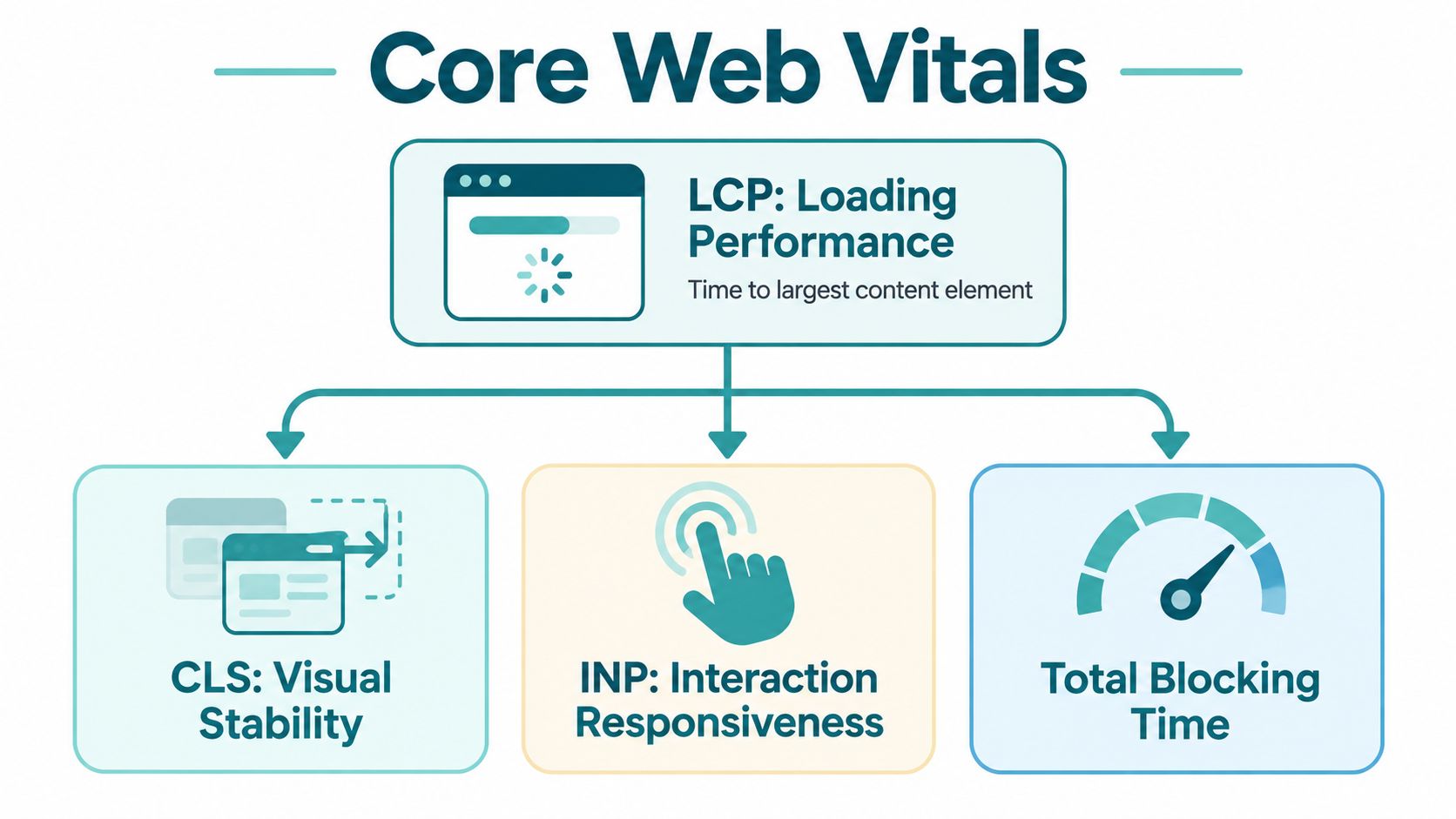
LCP shows whether the page gets to the point
Largest Contentful Paint measures how long it takes the main content to appear. On a Cincinnati dentist's website, that might be the headline explaining emergency appointments, the primary photograph of the practice, or the introductory service section. If that element is delayed by a large image, slow server response, or render-blocking code, the visitor sees a partially formed page instead of a clear reason to continue.
Google's guidance identifies an LCP of 2.5 seconds or less as good. The target isn't about making every decorative element appear instantly. It's about delivering the content that answers the visitor's immediate question.
INP measures the experience after the page appears
Interaction to Next Paint measures responsiveness across a page's lifetime. A visitor may see the headline quickly, then tap the navigation menu, select a service, open a form, or use a location finder. If JavaScript is busy processing unrelated work, the page may appear to ignore the interaction.
Google replaced First Input Delay with INP in March 2024, shifting the focus from the first interaction to responsiveness across the page's lifetime, as explained in Google's INP and Core Web Vitals overview. A site that loads quickly but hesitates whenever someone interacts still feels broken.
CLS protects trust and prevents mis-clicks
Cumulative Layout Shift measures unexpected movement. A late-loading banner can push a phone number down the screen. An image without reserved dimensions can move a consultation button just as someone taps it. An embedded scheduling tool can expand after the surrounding content has already rendered.
Google recommends a CLS of 0.1 or less for the good range. The Chrome Web Vitals explanation of the recommended thresholds connects CLS with visual stability, which is particularly important when a visitor is trying to complete a sensitive task such as requesting legal help or booking healthcare.
The 75th percentile matters because averages can hide slow experiences. A website might perform well on a modern office computer while struggling for visitors using older phones, crowded networks, or mobile connections around Greater Cincinnati. Field data shows how most real visits behave, which makes it more useful than relying on one carefully controlled laptop test.
A Step-by-Step Diagnostic Workflow for Non-Technical Owners
You don't need to read JavaScript to find the first performance problem. You do need a repeatable process that separates real-user evidence from a single lab score.
Start with the pages that produce business
Begin with your homepage, but don't stop there. Check the service page that ranks for your most valuable local search, the contact page, the appointment page, and the product or checkout template if you sell online. A fast homepage won't compensate for a slow page where the customer makes contact.
Use Google PageSpeed Insights for an initial review. Enter one URL, inspect the mobile results, and look for field data when it's available. The lab recommendations can suggest possible causes, while the field data shows how actual visitors experience the page.
Then open Google Search Console and select the Core Web Vitals report. Google uses real-user data and groups URLs according to their worst-performing metric once enough information exists. That means a collection of similar service pages may point to one shared template problem rather than dozens of unrelated page errors.
Find the metric that fails first
Google classifies LCP as good at 2.5 seconds or less, needs improvement from 2.5 to 4 seconds, and poor above 4 seconds. INP is good at 200 milliseconds or less, needs improvement from 200 to 500 milliseconds, and poor above 500 milliseconds. CLS is good at 0.1 or less, needs improvement from 0.1 to 0.25, and poor above 0.25, according to the Google Search Console Core Web Vitals report.
Google classifies a URL by its worst-performing metric. If LCP is good but CLS is poor, the page still has a Core Web Vitals problem. Don't average the metrics together or celebrate two green results while ignoring the red one.
Use this order of investigation:
- Confirm the page group: Determine whether the issue affects one URL, one service template, or the entire website.
- Identify the worst metric: Start with the metric that places the page in the poorest category.
- Inspect the likely cause: Review image delivery for LCP, long JavaScript tasks for INP, and unreserved dynamic elements for CLS.
- Prioritize commercial pages: Fix pages tied to calls, forms, appointments, store visits, or purchases before low-value archive pages.
- Test again: Compare the same page and device type after the change, then monitor field data as it updates.
A mobile-first review is sensible for local businesses because customers often search while away from a desk. Test with a real phone as well as a desktop browser. Ask someone unfamiliar with the site to find the phone number or submit a basic inquiry, and observe where they hesitate.
A short visual walkthrough of performance reporting can help owners understand what to look for before handing findings to a developer.
<iframe width="100%" style="aspect-ratio: 16 / 9;" src="https://www.youtube.com/embed/0fONene3OIA" frameborder="0" allow="autoplay; encrypted-media" allowfullscreen></iframe>For a broader non-technical review of maintenance, security, and performance concerns, use this business website health checklist. The aim isn't to chase a perfect score in every tool. It's to identify the bottleneck that is most likely blocking a customer from taking the next step.
Tactical Fixes That Deliver the Highest ROI for Local Businesses
The right fix depends on the failing metric. Rebuilding an entire website because one hero image is oversized is wasteful. Installing another optimization plugin while a third-party script blocks the main thread is equally unproductive. Start with the cause, then choose the smallest intervention that removes it.
Google's performance guidance reports that among pages with poor LCP, LCP images are delayed by 1,290 milliseconds at the 75th percentile, more than half of the 2.5-second budget for a good experience. Those figures appear in Web.dev's Core Web Vitals optimization guidance. For many local sites, the first practical question is whether the most important image is being delivered promptly and at an appropriate size.
Compare the main levels of intervention
| Problem area | First fix to consider | When a larger change makes sense |
|---|---|---|
| Image-heavy LCP | Resize the image, compress it, use a modern format, and avoid lazy-loading the primary above-the-fold image | The server or CMS repeatedly delivers oversized assets across the site |
| Slow server response | Improve hosting, caching, and page generation | The CMS creates complex pages dynamically and the hosting environment can't handle demand |
| INP delays | Remove unnecessary scripts, defer nonessential work, and break up long tasks | The page depends on a JavaScript-heavy application or overloaded visual builder |
| CLS movement | Reserve dimensions for images, videos, banners, forms, and embeds | Layout behavior is controlled by a theme or component system that needs redesign |
| Regional delivery | Use a content delivery network for static assets | Visitors are distributed widely or the current host has inconsistent response times |
Images are usually the clearest starting point. A large photograph can dominate the first screen, particularly on a healthcare or legal homepage that uses editorial photography as a trust signal. Compress it, serve the dimensions required by the design, and use an appropriate modern format. Teams managing product catalogs can also review this practical resource on optimizing product photos for Amazon Etsy Shopify.
Treat third-party scripts as business decisions
Chat tools, analytics tags, review widgets, appointment embeds, heatmaps, and advertising scripts all have a cost. Some support revenue, while others remain installed because nobody remembers who added them. Audit each script and ask whether it contributes to calls, qualified forms, appointments, or purchases.
INP deserves particular attention because Google replaced FID with INP in March 2024, making page-wide interaction responsiveness the relevant metric. A page can show its main content quickly and still feel sluggish when a visitor opens a menu or submits a form. Removing redundant scripts often helps more than adding another caching layer.
Reserve space before dynamic content arrives
CLS problems usually come from predictable sources. Set dimensions for images and videos. Reserve room for review widgets, consent banners, ads, and scheduling tools. Don't inject a promotional bar above a button after the page has already displayed.
A CDN can help deliver static assets, but it won't repair a layout that shifts. A new server can improve response time, but it won't make an oversized image useful. Good core web vitals optimization matches the tool to the failure instead of treating hosting, code, and design as interchangeable solutions.
Industry-Specific Optimization for Healthcare, Legal, and E-Commerce
A performance plan should reflect what visitors are trying to do. A healthcare website, law firm, and online store may share the same metrics, but they don't share the same conversion path or risk tolerance.
Industry-wide performance remains uneven. One 2026 benchmark reported that 49.1% of mobile sites and 58.0% of desktop sites passed all three Core Web Vitals, with mobile sites behind desktop sites, according to the benchmark coverage from SHNO. The practical lesson for a Cincinnati business isn't to compare itself with an industry average. It's to find the template and interaction that lose customers.
Healthcare needs clarity and restraint
Patients often arrive with an urgent, specific need. They may want the office phone number, insurance information, directions, a provider profile, or an appointment request. Put those actions in stable, prominent locations and avoid filling the first screen with unnecessary animation.
Healthcare organizations also need to evaluate third-party tools carefully. Patient portals, scheduling systems, analytics, chat features, and marketing integrations can add value, but each can introduce scripts, data considerations, or delays. A lightweight page with a clear path to care is often more useful than a feature-rich page that makes visitors work.
Organizations evaluating healthcare website development services should treat performance, accessibility, privacy, and workflow integration as one project rather than separate afterthoughts.
Legal websites must preserve trust at the moment of action
Legal visitors often make decisions under pressure. A moving consultation button, a delayed attorney profile, or a form that appears unresponsive can undermine confidence before the firm has made its case.
Keep high-value pages structurally predictable. Load the attorney's qualifications and practice-area explanation promptly, keep consultation actions visible, and reserve space for any reviews or external content. A restrained design usually outperforms a crowded page when the visitor needs reassurance and a clear next step.
E-commerce has more technical surfaces to protect
Online stores combine product photography, filters, search, cart functions, payment tools, recommendations, and promotional messaging. Each addition can affect loading, interaction, or layout stability. Compressing product media and reviewing app integrations should be routine, not a one-time launch task.
A store owner should map performance to the purchase journey. Check category pages, product pages, cart interactions, and checkout behavior rather than judging only the homepage. For broader guidance on e-commerce conversion tactics for 2026, focus on changes that reduce friction without adding another layer of scripts.
The best target for every sector is not a green badge by itself. It's a visitor who can complete the intended action without waiting, guessing, or recovering from a page that moved.
Turning Performance Into a Competitive Advantage for Your Brand
Core Web Vitals optimization works best as an operating discipline, not a rescue project every time a redesign launches. Websites change when someone adds a campaign banner, installs a plugin, embeds a video, publishes a new template, or changes the checkout. Any of those decisions can affect the experience customers receive.
Independent 2025 to 2026 coverage reports that only about 42% of mobile sites pass all three Core Web Vitals, while one large 2025 study found roughly 30% of mobile sites score poorly on INP because JavaScript blocks the main thread. These figures are reported in Digital Applied's coverage of page speed and performance. They reinforce a practical point: many businesses are still fixing images while leaving interaction problems untouched.
Connect the metric to the business outcome
A useful performance dashboard should track more than a score. Pair the technical evidence with the pages and actions that matter:
- Search visibility: Monitor important local landing pages and their Core Web Vitals status.
- Lead generation: Watch phone clicks, form starts, completed forms, and appointment requests.
- Customer friction: Test navigation, filters, menus, and embedded tools on mobile devices.
- Change control: Recheck performance after redesigns, campaign launches, CMS changes, and new integrations.
Practical rule: Don't approve a redesign only because it looks polished in a meeting. Approve it after someone tests the real customer path on the devices your audience uses.
A Cincinnati competitor may have stronger branding, a larger advertising budget, or more reviews. You can't solve all of those variables with performance work. You can make sure the visitor who does choose your listing receives a fast, stable, responsive experience from the first tap.
That's where professional support can make sense. HDM offers SEO audits that include Core Web Vitals work, technical foundation fixes, prerendering and server-side rendering, schema, and indexation cleanup, while its Website Wellness service includes ongoing speed optimization. An agency that understands both the code and the lead-generation path can prioritize fixes by commercial importance instead of handing you a list of disconnected warnings.
A slow website steadily taxes every other marketing investment. Before increasing ad spend or commissioning another visual redesign, test the pages that generate calls, consultations, appointments, and orders. The businesses that act on those findings give Cincinnati customers fewer reasons to leave.
HDM can audit your website, identify the Core Web Vitals issues affecting key Cincinnati landing pages, and connect performance fixes to SEO and lead generation. Visit HDM to request a practical review and discuss the next steps for a faster, more reliable site.