

Technical SEO is the behind-the-scenes work that lets search engines find, read and list your pages. It has almost nothing to do with the words on your homepage and everything to do with whether a search engine can reach that page, download it, understand it, and decide it deserves a place in results.
Most Cincinnati business owners meet this topic by accident. The site was rebuilt eighteen months ago, the copy was sharpened last spring, and someone at a networking event said the site "needs SEO." Then a report arrives with 214 warnings, no explanation of which ones cost money, and no clear order of work. Meanwhile the contact form gets quieter every quarter and nobody can say why.
The warnings are not equally expensive. Some cost you customers today. Others are cosmetic notes on pages nobody visits. Technical SEO is the discipline that separates the two.
What Technical SEO Is and How Search Finds Your Pages
Google runs Search in three stages, and its documentation on how Search works is blunt about the order: crawling, indexing, serving. Content that fails at any stage never reaches a results page, no matter how good the writing is.
Think of your website as a shop. The copy, photos and service pages are the merchandise. Technical SEO is the front door, the aisle layout, the signage and the stockroom. You can stock beautiful merchandise and still sell nothing if the door is locked or the aisles dead-end into a wall.
Here's the whole journey on one page:

The three stages, one at a time
- Crawling. Google sends automated programs to download a page's resources, text, images and video included. If a page is reachable only through the search box on your own site, or blocked in a file called robots.txt, the program may never arrive.
- Indexing. Google analyzes what it downloaded and files the usable parts in its index. A page that arrives as a blank screen because its content depends on scripts that never run contributes almost nothing.
- Serving. When someone types a query, Google matches it against indexed content and picks the most relevant results. Nothing gets served that wasn't indexed first.
None of this involves sprinkling keywords into paragraphs. Technical SEO answers a narrower and more practical question: can a search engine reach this page and reliably understand it?
The controls you own
Five settings do most of the work, and each has one job.
- Your XML sitemap lists the addresses you want found. Google says a sitemap helps it identify new or updated pages and can prioritize listed URLs for crawling, though inclusion guarantees neither crawling nor indexing.
- robots.txt controls crawling access. It's a gate, not a lock on the results page.
- A noindex directive keeps a crawlable page out of results. This is the right tool for internal search pages, thank-you screens and staging URLs.
- Canonical tags nominate the preferred version when the same content lives at several addresses.
- Internal links are the roads between pages. A service page nothing links to is a shelf with no aisle leading to it.
Blocking a page in robots.txt does not hide it. Google's guidance on consolidating duplicate URLs explains that URLs blocked in robots.txt may still be indexed without their content, so a blocked page can surface in results with nothing useful behind it. If a page must disappear, let Google crawl it, serve a noindex tag, then confirm the removal.
Where owners notice the problem first
Picture a roofing company that added a new service page in March but never regenerated its sitemap. The file still lists a holiday promotion pulled two years ago and omits the new page entirely. That new page has one internal link, buried in the footer, and appears in no navigation menu. Nothing is technically "broken," and the page still won't be found for months.
Practical rule: before blaming content or keywords, check three things in Google Search Console. Pages reported as not indexed, pages excluded by a noindex tag you didn't intend, and the processing status of your sitemap.
If you want to see how a full audit is sequenced before you touch anything, Grumspot's technical SEO audit guide walks through the tooling and the order of checks.
The Core Elements of Technical SEO at a Glance
Nine elements cover the territory. Read them from access to safety, because that's the order in which a problem stops a site from working.
| Element | What It Controls | What Goes Wrong | Plain Example |
|---|---|---|---|
| Crawlability | Whether search engines can reach your pages | Pages blocked in robots.txt or left without internal links | A service page reachable only through the site search box |
| Indexing | Whether pages are stored and eligible to appear in results | Noindex tags left on pages after a redesign | A new landing page missing from Google results |
| Site architecture | How pages connect and are organized | Key pages buried several clicks deep | Core services hidden under three menu levels |
| Structured data | Machine-readable labels that describe content | Business address or hours not labeled clearly | Opening hours not recognized as opening hours |
| Canonicalization | Which version of a duplicate page is preferred | The same page live at www and non-www addresses | Two URLs splitting the ranking signals for one page |
| Redirects | Sending old URLs to their new equivalents | Retired pages returning errors after a launch | A discontinued product page showing a not-found error |
| Hreflang | Matching the right language or regional version | Wrong language version shown to searchers | A Spanish page shown to English-speaking searchers |
| Mobile performance | Speed and visual stability on phones | Slow loading and content jumping around | A banner pushing the menu down as the page loads |
| Security | Encrypted HTTPS connection and a clean, safe site | Browser warnings or malware flags | A site loading without the secure padlock |

How the groups behave
Crawlability, indexing and architecture decide access. Get these wrong and nothing downstream matters, which is why good site architecture for SEO keeps important pages within a few clicks of the homepage.
Structured data, canonicalization and redirects handle meaning. Schema is labels that tell a machine whether a block of text is an address, a set of opening hours or a customer review. Without them, your hours are just numbers on a page.
Hreflang matters only if you publish versions in different languages or regions. Most Cincinnati businesses can ignore it entirely.
Mobile performance and security cover experience and trust. Security means the encrypted connection and the absence of malware flags, which browsers and search engines both watch closely. Mobile performance gets the next section in full.
If you can't say where your pages are blocked, duplicated, slow or insecure, you haven't looked at the foundation yet.
Why Page Speed and Mobile Experience Count
A diner stands outside a restaurant, phone in hand, and taps "reserve a table." The photo of the dining room loads late, the button jumps, and her thumb lands on "order online" instead. She closes the tab. Nothing on that page was broken in the usual sense. It was just slow and unstable, which to a customer feels identical.
Core Web Vitals are Google's attempt to measure what that diner felt, not what a developer sees on a fast laptop in an air-conditioned office. Google measures all three metrics from actual page loads and expects at least 75% of visitors to get a good experience, judged separately on mobile and desktop, as web.dev's explanation of the thresholds sets out.
| Metric | What It Measures | Target | Common Reason It Is Missed |
|---|---|---|---|
| Largest Contentful Paint (LCP) | Time until the main content is visible | 2.5 seconds or less | Oversized hero images and slow server responses |
| Interaction to Next Paint (INP) | Delay between a tap or click and the page's response | 200 milliseconds or less | Heavy scripts and third-party chat or ad widgets |
| Cumulative Layout Shift (CLS) | How much content moves during loading | 0.1 or less | Images, banners and embeds without reserved space |
The three metrics in plain terms
LCP asks a simple question: how long before the visitor sees the thing they came for? The fix is usually boring. Compress the hero image, serve it at the size it displays, and stop letting a 4,000-pixel photograph do a 900-pixel job.
INP measures the pause between a tap and the page reacting. Long JavaScript tasks and stacked third-party widgets (chat bubbles, review carousels, ad tags) all compete for the same processing time. Remove what you don't use, defer what you do, and test on a mid-range Android phone rather than a desktop.
CLS counts how much the layout moves while loading, and it caused the lost reservation in the story above. Reserve explicit width and height, or a fixed aspect ratio, for every image, banner and embedded form so nothing gets shoved into a customer's thumb.
Across the web, this is still an unfinished job. Roughly half of mobile and desktop pages still fail to reach a good overall Core Web Vitals assessment, and mobile is where the bulk of the failures sit. That matters less as a ranking question than as a triage question. If your site is in the failing half and your competitor's isn't, the visitor with a slow connection finds out first.
One more thing sits underneath all three metrics: the server. A slow host delays everything that follows, so optimizing Core Web Vitals starts with a look at hosting, caching and response times before anyone touches an image tag. Fixing images on top of a server that takes seconds to respond is rearranging furniture in a building with no foundation.
Duplicate Pages, Redirects and Site Moves
A page can be live at several addresses at once without anyone noticing. The most common case is small: the same service page answering at both the www and non-www version of your domain, or at a version with marketing tracking codes stuck on the end. To Google, those are separate addresses competing with each other.
A canonical tag settles that. It's a label on the page naming the preferred version, and it works by nominating rather than blocking.

Redirects handle the other half of the problem, the moment an address stops existing. A permanent 301 redirect sends both visitors and search engines from an old address to its closest new equivalent.
The order to do it in
Say a plumbing company launches a rebuilt site and, to save time, points every retired page at the homepage. Drain cleaning, water heater repair and emergency service all inherit whatever standing the homepage had, which is none of it. Each service page loses the history it earned.
Here's the sequence that avoids that.
- Map every important old address to its closest new page, one line per URL in a spreadsheet, before launch.
- Set a permanent redirect for each mapped address, pointing at the matching page and not the homepage.
- Give each new page a self-referencing canonical tag, so it declares itself the preferred version.
- Update internal links and the sitemap so both point only at new addresses.
- Watch Google Search Console for several weeks after launch, looking for crawl and indexing errors rather than waiting for traffic to drop.
Google recommends exactly this shape of migration: a self-referencing canonical on each new URL and permanent redirects from the old ones, per its guide to moving a site. Multi-language sites add hreflang tags on top, and everyone else can skip that step.
If you want the redirect mechanics explained from first principles, this 301 redirect guide for small businesses covers the difference between temporary and permanent moves and why it matters.
<iframe src="https://www.youtube.com/embed/OlhMBY6DosE" width="100%" height="400" frameborder="0" allowfullscreen></iframe>The full sequence, with the checks to run before and after launch, is worth working through in a website migration checklist rather than improvising on go-live day.
Which Technical Problems to Fix First
The usual answer to what is technical SEO is a long list of things to fix. The useful question is which one earns its place this month.
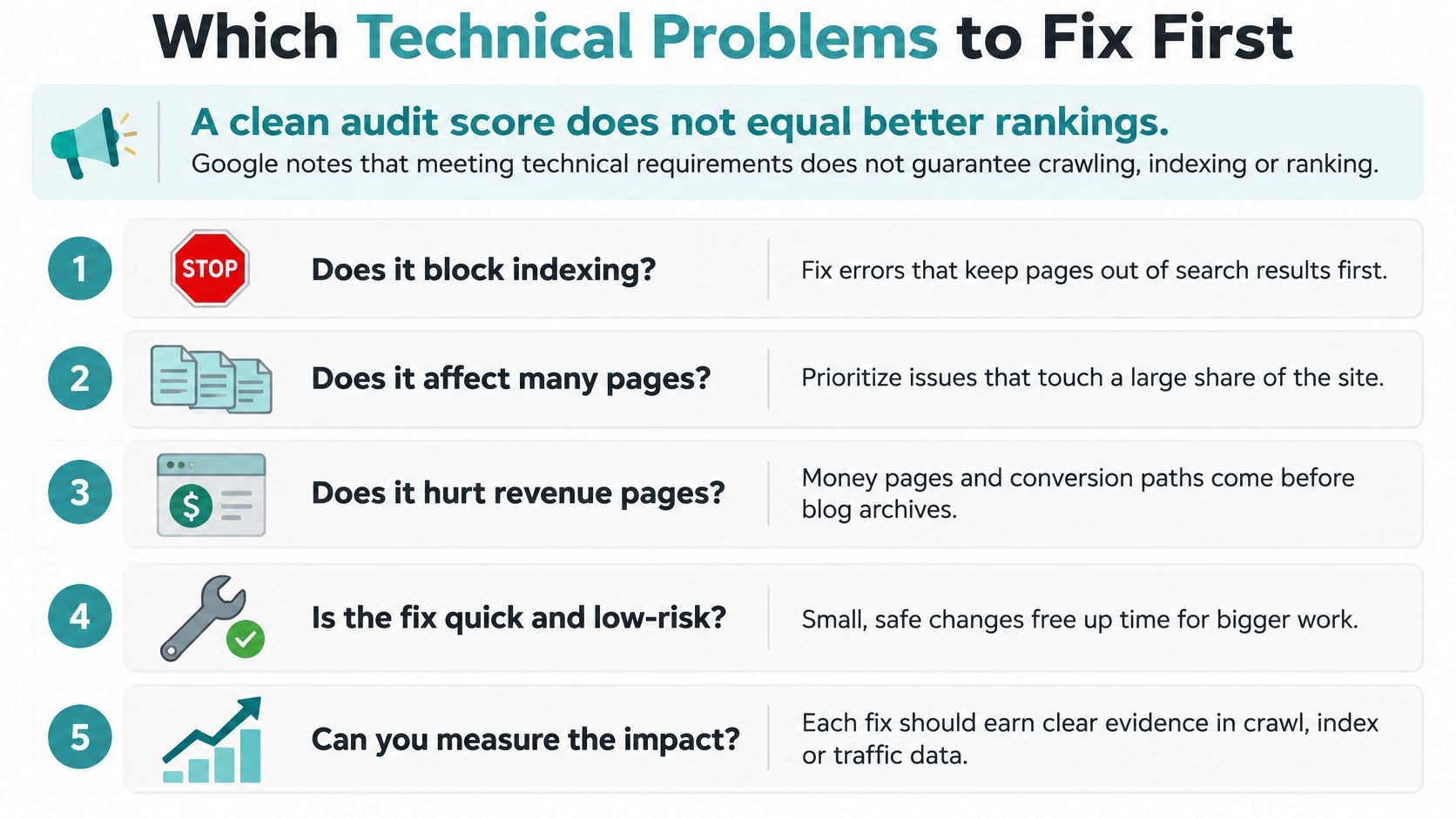
A perfect audit score is a vendor metric, not a business result. Google states plainly that satisfying technical requirements doesn't guarantee crawling, indexing or serving, as its Search Essentials guidance notes. Its systems still choose. That means every fix has to justify itself against something other than a score.
The order that saves money
- Revenue pages that customers can't reach. A blocked, orphaned or painfully slow service page that brings calls comes first, every time.
- Conflicting signals on those same pages. Two addresses for one page, a canonical pointing somewhere stale, a redirect chain three hops long. These dilute pages that already earn money.
- Indexed pages that shouldn't exist. Old event listings, thin tag archives, expired promotions. Remove them or set noindex so crawl attention goes where it belongs.
- Warnings on pages nobody visits. A missing meta description on a 2019 blog post can wait indefinitely.
When a fix isn't worth doing
Skip it when three things are true at once: the page attracts little or no search demand, no customer path depends on it, and the work would consume budget better spent on a revenue page.
What to track instead of warning counts: the number of important pages that are indexed, search visits to revenue pages, and qualified inquiries from search over the next quarter.
That's the honest test. Not fewer warnings, but fewer defects standing between a customer and the content that answers their question.
Run a Technical Check on Your Site This Month
Five checks, maybe ninety minutes, and no paid tools required.
- Open Google Search Console and read the Pages report. Find important addresses that aren't indexed. Investigate any revenue page on that list before anything else.
- Run PageSpeed Insights on your homepage and your top service page. Read the mobile numbers first and note which of the three Core Web Vitals is failing.
- Confirm one secure version of your domain. Every other version, with or without www, over HTTP, should redirect to that single address.
- Audit the sitemap. It should list only live, preferred pages. Strip out staging addresses and anything retired.
- Test three retired addresses. Each should land on a relevant new page, not the homepage.
Record the results each time so you can compare quarter to quarter. When a release ships and pages vanish from results, fixing indexation gaps after a release is a sensible reference before you start changing settings at random.
Outside help earns its place in three situations: the site runs outdated software, plugins go unmanaged, or AI search tools can't read and understand the content. Helbling Digital Media, a Cincinnati-area agency, offers a PHP, Security and AI-Readiness Audit that checks which software the site runs, what's publicly exposed, and whether AI search tools can read and understand the site, at a fixed price agreed up front.
Repeat the checks each quarter. Sites drift with every plugin update, form change and new landing page.
Helbling Digital Media builds and maintains the technical foundation this guide describes, from crawl and indexation cleanup to Core Web Vitals work on mobile and desktop. If your Pages report shows revenue pages sitting outside Google's index, or you need someone to map redirects and clean up duplicates before a rebuild, the team can take that on. Visit Helbling Digital Media to start the conversation.