You've probably seen this after a Cincinnati website redesign. The new site looks cleaner, loads well, and has polished service pages. Yet the plumbing, HVAC, dental, or roofing pages that should generate calls barely appear in Google. The owner assumes the problem is weak copy or intense competition, but the actual issue may be that search engines can't easily understand how the pages connect.
Site architecture for SEO is the connective tissue between your content and your customers. It includes navigation, internal links, URL hierarchy, and the way you group pages by service and intent. A well-organized site makes important pages easy to discover. A disorganized one can leave valuable content isolated, inconsistently labeled, or buried several clicks below the homepage.
This matters especially for small and mid-sized businesses. You don't need an Amazon-scale catalog to create structural problems. A local company can produce a confusing site by adding service-area pages, blog posts, landing pages, and redesign URLs without deciding how they fit together.

Why Your Site Structure Is Quietly Costing You Rankings
A Cincinnati HVAC company launches a beautiful redesign in January. The homepage points to "Services," the services page points to "Heating," and the heating page contains links to furnace repair, heat-pump installation, and maintenance. The structure is clear enough for a visitor.
The trouble starts when several valuable pages sit outside that path. A furnace replacement page is linked only from an old blog post. A service-area page is reachable through a footer dropdown that nobody updates. Another page uses /hvac-repair-cincinnati/, while related pages use /services/heating/furnace-repair/. Google can crawl all of them, but the site sends no consistent signal about which pages belong together or which deserve priority.
The difference between connected and buried
Strong architecture gives a business:
- Clear service silos: Heating pages connect to heating pages, while cooling pages form their own useful group.
- Shallow crawl paths: Important revenue pages sit close to the homepage or a strong service hub.
- Descriptive URLs: A visitor can understand the topic from the address without seeing the page.
- Useful internal links: Service pages, location pages, and educational content support one another where the relationship is genuine.
Weak architecture creates the opposite pattern. Pages become orphans, meaning no internal link points to them. Others sit five clicks from the homepage, use inconsistent slugs, or compete with several pages targeting the same service. A sitemap might list those URLs, but a list of URLs doesn't explain their role in the site.
Practical rule: If a page matters to revenue, a user should be able to reach it through normal navigation or contextual links, not only through a search result or XML sitemap.
On-page SEO can't fully rescue an architecturally unreachable page. Strong headings, careful copy, and optimized title tags still matter, but they work better when internal linking and hierarchy reinforce the page's purpose. In local audits, this is often the hidden diagnosis behind service pages that look adequate yet fail to gain traction.
Understanding Crawl Depth and the 3-Click Rule
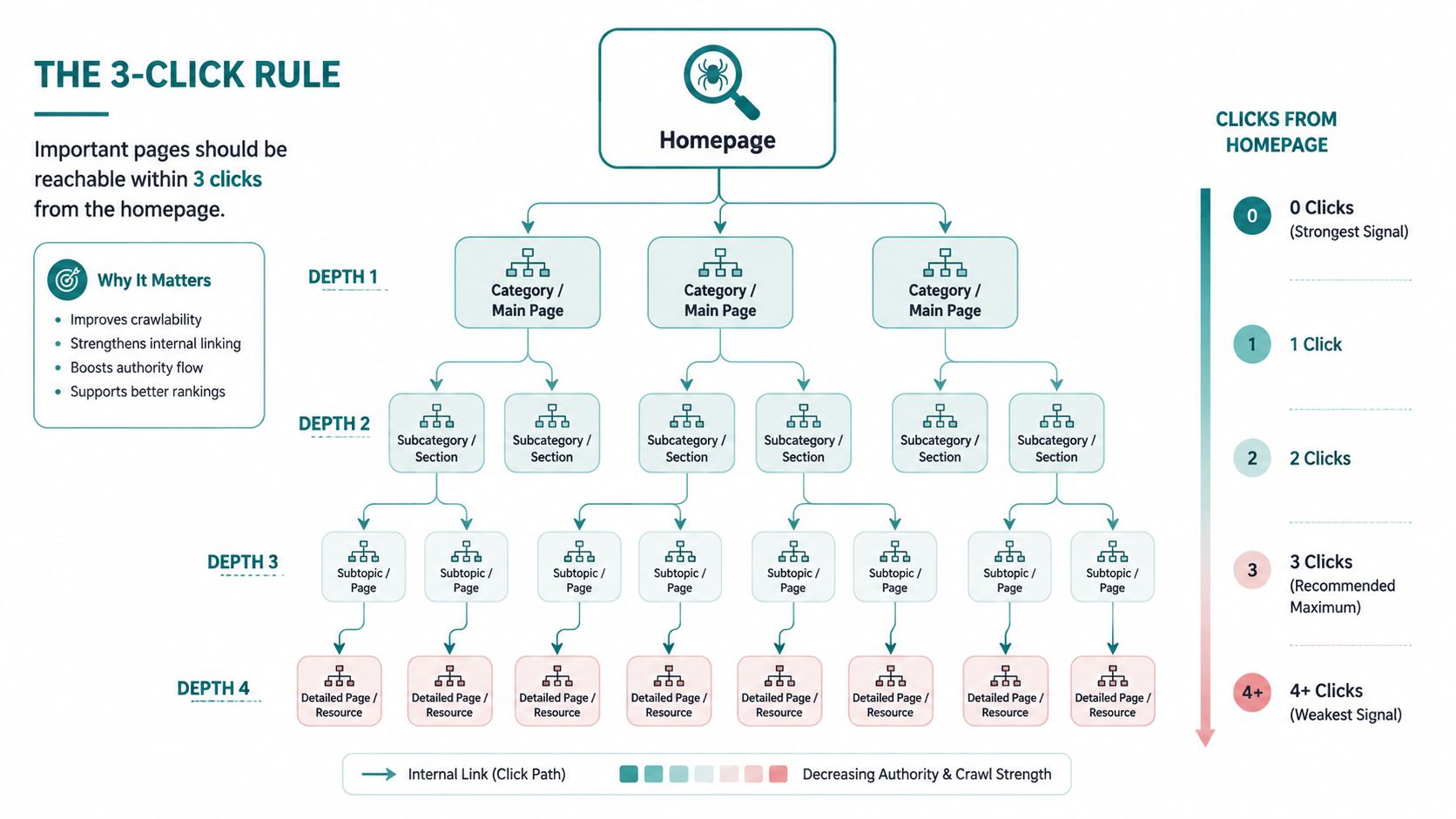
Crawl depth is the number of clicks between the homepage and a page. The homepage sits at depth 0, a page linked directly from it sits at depth 1, and each additional link adds another level. The measure helps identify whether search engines and visitors can reach important content efficiently, as explained in SEOclarity's guide to crawl depth.
For a Cincinnati dentist, a sensible path might be:
- Homepage, depth 0
- Services, depth 1
- General Dentistry, depth 2
- Cleanings and Exams, depth 3
A core service page at depth 3 is usually a reasonable target. Add a "Patient Resources" folder and an archive page, however, and that same page could sit at depth 5. The content has not changed, but its distance from the homepage and the site's strongest internal signals has.
Use the rule as a target, not a law
The 3-click rule is a planning guideline, not a Google requirement. A page can rank at a greater depth when prominent internal links, relevant content, and external signals support it. For small Cincinnati service businesses, keeping revenue pages within three clicks of top-level hubs remains a practical standard, consistent with technical SEO guidance on crawl depth and internal links.
Depth 4 or deeper deserves review, especially when only a few internal links point to the page. One crawl-audit benchmark recommends keeping pages at depth 4 or deeper below 10% of the site, since excessive depth can contribute to under-crawling and inconsistent indexing. The benchmark appears in this crawl-depth audit workflow.
A simple depth check
For an SMB site, export crawl-depth data and sort it from shallowest to deepest. Review these groups first:
- Priority pages at depth 4 or deeper, particularly service and location pages.
- Pages with no internal links, which may be orphaned.
- Important URLs reached only through filters, search, or archives.
- Clusters without a clear hub, where related pages fail to support one another.
Enterprise sites face larger coverage problems. One industry source reports that unoptimized enterprise sites may have only 40% of strategic URLs crawled by Google each month, while more than 50% of pages may not be crawled at all. Those figures come from industry guidance on enterprise site architecture. A Cincinnati business usually has fewer pages, so the practical lesson is narrower: direct internal-linking effort toward pages that help customers and generate leads, rather than spreading it across low-value archives or thin variations.
Designing URL Structure, Siloing, and Hubs That Make Sense
URL structure, siloing, and hub pages solve the same underlying problem: they show users and search engines how your content fits together. Treating them as separate tricks usually produces a site with tidy URLs but weak navigation, or strong navigation with a chaotic address system.
For many Cincinnati service businesses, a sensible pattern looks like this:
example.com/service-area/service-name/
A real site might use /services/roofing/ or /cincinnati/dental-cleanings/, depending on its primary organization. The exact folder name matters less than consistency. Keep slugs short, readable, and aligned with the page's actual purpose. Avoid strings of repeated city names or keyword variations that make URLs look manufactured.
Build around hubs and spokes
A hub page is the primary resource for a service category. A roofing company might create a main Roofing Services page that links to:
- Roof repair
- Roof replacement
- Roof inspections
- Storm damage roofing
Each supporting page should link back to the hub when that link helps the visitor, and related sibling pages can connect where the services overlap. This creates a topical cluster rather than a collection of isolated landing pages.
Siloing doesn't mean locking every page into a rigid box. A roof inspection page may naturally link to storm damage services, financing information, or an insurance claims guide. The discipline is choosing one primary home for each page while using contextual links to connect related intent.
Keep local pages useful
A service-area page should earn its place by helping someone in that area. If a Cincinnati business serves Mason, West Chester, and Northern Kentucky, each page needs a legitimate local purpose, such as service boundaries, scheduling details, relevant project considerations, or access information. A series of near-identical city pages creates clutter rather than authority.
The same principle applies to content systems. If you're evaluating a technically flexible platform, HDM's explanation of headless CMS architecture can help clarify how content presentation and content management may be separated. That flexibility can support growth, but it won't automatically create a logical SEO hierarchy. People still need to define hubs, relationships, and navigation.
Flat vs Deep Architecture and Which Fits Your Business
Most Cincinnati local service businesses should start with a flat architecture. A plumber, dentist, or roofer with a focused service list can link core services directly from the homepage or a primary Services hub. Visitors won't need to move through several editorial layers to find furnace repair or emergency dental care.
A deeper structure becomes useful when the business has enough content to justify categories and supporting relationships. A multi-location provider, a company publishing consistently, or an e-commerce-light business with meaningful product groups may benefit from pillar pages and topic clusters. Depth should clarify intent, not exist because a CMS automatically creates another folder.
| Factor | Flat Architecture | Deep (Cluster) Architecture |
|---|---|---|
| Best fit | One-location service businesses with a focused menu | Multi-location, content-driven, or e-commerce-light businesses |
| Typical organization | Homepage or Services hub linked directly to core pages | Category pillar linked to supporting guides and subtopics |
| Sample URL pattern | /services/furnace-repair/ | /services/heating/furnace-repair/ |
| Main advantage | Keeps monetizable pages easy to reach | Builds meaningful topical relationships as content grows |
| Main risk | Can become a list with little context | Important pages can become buried |
| Internal-link approach | Core pages receive links from navigation, hubs, and related services | Pillars link to spokes, while spokes link back and across relevant siblings |
Three signals should guide the choice
First, count your core services. A tight list usually favors flat navigation. A broad set of related offerings may need category hubs to prevent the menu from becoming overwhelming.
Second, examine your publishing cadence. If you rarely publish educational content, building a deep blog hierarchy creates maintenance work without much benefit. If you publish substantial material around distinct customer questions, clusters can make those relationships easier to manage.
Third, consider whether topical authority matters in your market. A straightforward emergency plumbing page may need direct access and clear conversion paths. A healthcare, legal, or technical business may need deeper supporting content to explain complex services and build trust.
A deeper structure isn't automatically advanced, and a flat structure isn't automatically thin. The best architecture keeps high-value pages shallow while allowing deeper content where additional context improves relevance.
Internal Linking, Sitemaps, Pagination, and Faceted Navigation
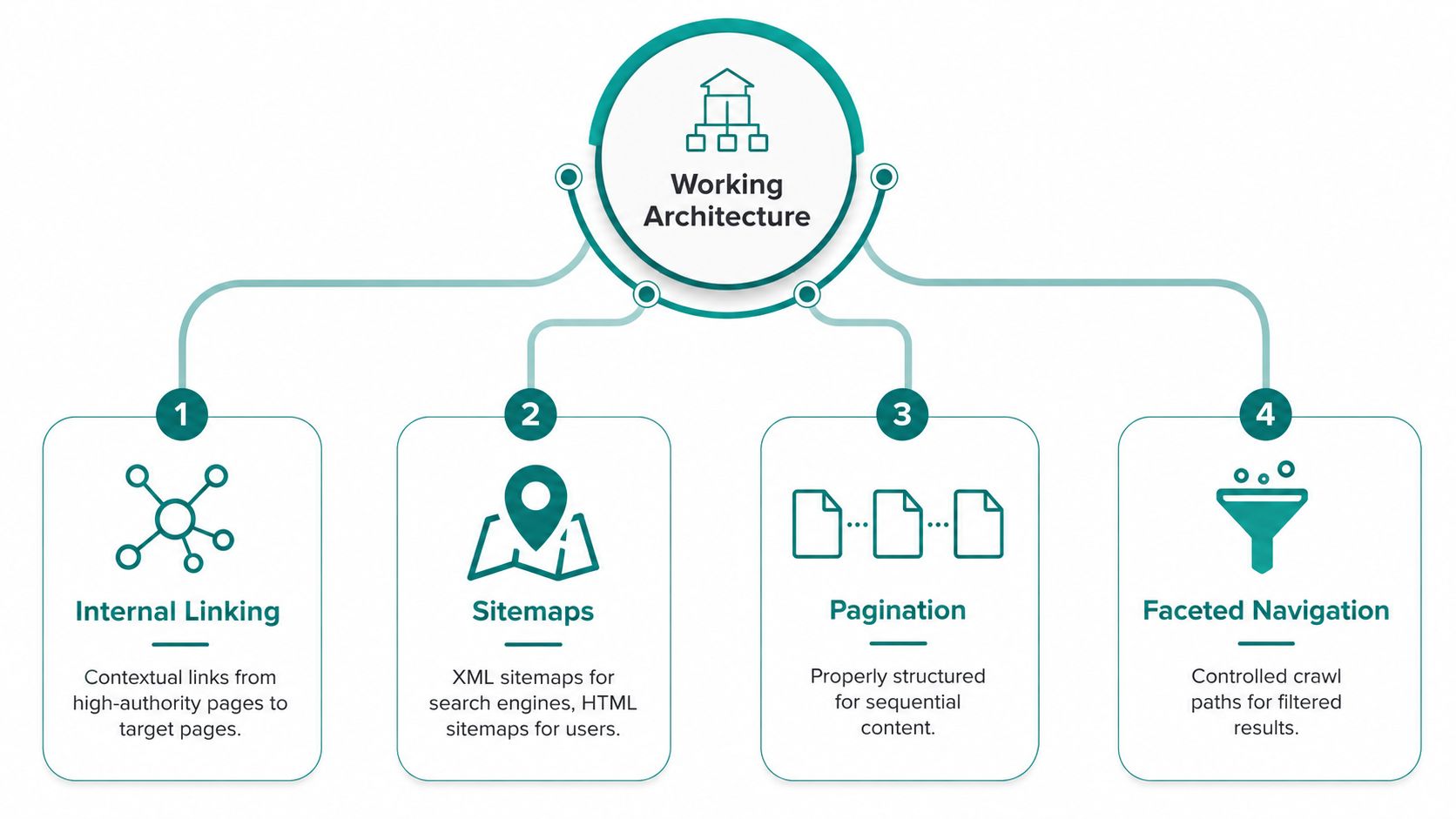
Architecture only works when the operational details support it. Four areas deserve regular attention: internal links, XML sitemaps, pagination, and faceted navigation.
Internal links should follow value and context
Link from a page that has earned visibility or authority to a page that deserves discovery. A Cincinnati roofing guide about storm preparation can naturally link to roof inspections and storm damage repair. A service page can link to financing or maintenance when those resources help a prospective customer.
Use descriptive, natural anchor text. Partial-match phrases usually read better than repeating an exact keyword in every link. Reciprocal links between sibling pages can help when the relationship is useful, but don't add links just to make a diagram look symmetrical.
A large-scale study of 23 million internal links across 1,800 websites found that 71% of contextual links appeared in the first two hierarchy levels, while less than 6% reached depth 4 or deeper. The findings are discussed in this internal-linking architecture analysis. For a small business, the practical takeaway is to put links to important services where users already spend attention, not to scatter dozens of links across every page.
Sitemaps help, but they don't replace links
An XML sitemap should contain canonical, indexable URLs that you want search engines to consider. Keep the file accurate, submit it through Google Search Console, and remove redirected, duplicate, or non-indexable addresses. Google has explained that sitemap submission can assist discovery, but it isn't a substitute for crawlable link architecture, as outlined in Google's discussion of link architecture.
For an SMB, a single clean sitemap may be enough. Larger sites can separate content types for easier troubleshooting. The sitemap is a discovery hint. Internal links explain importance and relationships.
Treat pagination and filters as controlled pathways
Paginated service directories, product lists, and resource archives should provide a sequential path that users and crawlers can follow. Use self-referencing canonicals where appropriate, keep each page meaningfully accessible, and don't let a long archive become the only route to valuable content.
Faceted navigation creates a different risk. Filters can generate duplicate parameter combinations, such as a product category combined with color, size, brand, and availability. Let users interact with filters, but decide deliberately which combinations deserve indexable landing pages. Duplicate or low-value combinations should generally be controlled through canonicalization or other crawl directives rather than exposed as unlimited indexable URLs.
For a deeper operational discussion, Sibley Digital's SEO consultancy on faceted navigation is a useful resource. The right decision depends on whether a filtered state represents a real search demand and whether you can provide unique value on that page.
For e-commerce planning and broader technical considerations, HDM's complete guide to e-commerce SEO provides additional context. A small Cincinnati retailer doesn't need Amazon-scale complexity, but it still needs rules that prevent filters from creating an uncontrolled crawl path.
Auditing Your Existing Architecture in One Afternoon
You don't need to rebuild a site to understand its structural problems. A crawl audit can produce a practical punch list that you or your agency can work through.
Start with a crawl, then sort by risk
Use Screaming Frog in list mode or crawl the live site from the homepage. Export the pages and focus on four findings:
- Orphan URLs, where no internal link points to the page.
- Depth 4 or deeper pages, especially revenue pages.
- Redirect chains and loops, with particular attention to chains longer than one hop.
- Duplicate title tags and H1s, which can reveal pages that overlap or were created from the same template.
The crawl shows the structure that exists in practice, not the structure you intended to build. A visual sitemap or navigation plan may look logical while the live internal links tell a different story.
Compare the crawl with Search Console
Open Google Search Console and compare the crawl export with the Pages report and coverage exclusions. Look for pages Google knows about but your internal links don't support, along with important pages that remain excluded or undiscovered.
A sitemap-versus-crawl comparison catches another common mismatch. If an URL appears in the sitemap but doesn't appear in the crawl, users may have no ordinary path to it. If the crawl finds a page that isn't in the sitemap, decide whether it should be canonical and indexable before adding it.
Audit principle: Don't treat every error as equal. Fix the structural issues that affect important pages and major hubs before polishing low-value archive URLs.
Put everything in one shared sheet. Create columns for URL, page type, primary hub, crawl depth, internal links, sitemap status, Search Console status, redirect status, title, and H1. Tag each row as urgent, important, or monitor.
Prioritize fixes touching the most-linked pages first. Improving a strong hub can redistribute internal link value to several related services. Then add direct contextual links to orphaned pages that deserve to remain, consolidate pages that overlap, and remove paths that create no customer value.
For many Cincinnati SMB sites, one crawl surfaces 20 to 50 fixable items, a practical audit expectation included in the workflow described in the brief. Treat that as a possible range, not a guarantee. The audit should tell you what to fix first, not pressure you into a full rebuild.
Migration Pitfalls and a 30-Day Architecture Checklist
Redesigns often create SEO problems before the new site goes live. The most damaging mistakes are predictable: launching before mapping 301 redirects, changing URLs without updating internal links, replacing the XML sitemap without resubmitting it in Search Console, and dropping canonical tags during the cutover.
URL decisions become harder to reverse after traffic, backlinks, and indexation accumulate. That doesn't mean every URL must remain untouched forever. It means the team should document changes, preserve valuable destinations, and test the new paths before launch.
A practical launch schedule
Week 1
- Crawl the current site.
- Identify priority service, location, and contact pages.
- Record existing URLs, titles, canonicals, and internal links.
- Decide which URLs will stay, change, consolidate, or disappear.
Week 2
- Map every changed URL to its closest relevant destination.
- Build and test the 301 redirect list in staging.
- Update navigation and internal links to use final URLs.
- Review service silos, hubs, and page depth.
Weeks 3 and 4
- Crawl the staging site.
- Test redirect chains, canonical tags, navigation paths, and priority page access.
- Confirm that the new sitemap contains only canonical, indexable URLs.
- Launch only after the redirect and internal-link checks pass.
- Monitor Search Console for crawl errors, exclusions, and indexation changes after launch.
A site migration also changes the root-domain context that ties URLs together, so teams should understand what a root domain is before restructuring subdomains, staging environments, or platform connections.
Use the following video as a supplementary walkthrough while you document the launch process:
<iframe width="100%" style="aspect-ratio: 16 / 9;" src="https://www.youtube.com/embed/bGPB-rtxt-I" frameborder="0" allow="autoplay; encrypted-media" allowfullscreen></iframe>HDM is one Cincinnati-area option for businesses that need website development, SEO systems, or a migration planned around internal links, structured content, and Search Console monitoring. Whether you work with HDM, another agency, or your own developer, insist on a documented URL map and a crawl-based quality check before the new site goes live.
If your Cincinnati website has valuable services buried in confusing paths, HDM can audit the existing architecture, organize service hubs, strengthen internal linking, and support redesign or migration planning. Visit HDM to discuss your site structure and identify the fixes most likely to improve discovery, usability, and lead generation.