

A cited page can beat a popular one. A 2025 analysis covered by Search Engine Land found AI Overviews on about 18% of Google searches, and a companion look at 3,119 informational queries across 42 organizations reported a 61% decline in organic click-through rate when an AI Overview was present. Cited websites in that analysis saw a 35% higher organic click-through rate. 58% of users hit at least one summary during the study period.
That split is the whole argument for an SEO content marketing strategy in 2026. Publishing more articles does not fix a page that never earns a citation, a branded search, or a call. For a Cincinnati owner comparing web design, SEO, or marketing help, the useful test is simpler. Does this page move someone toward a form, a phone call, or a sale, and can a search system quote it without flattening your expertise?
Generic tips fail that test. A service page with a real price range, a local constraint, or a step your staff uses can still win when broad how-to posts lose clicks. The work below is a system for choosing those pages, not a content calendar for its own sake.
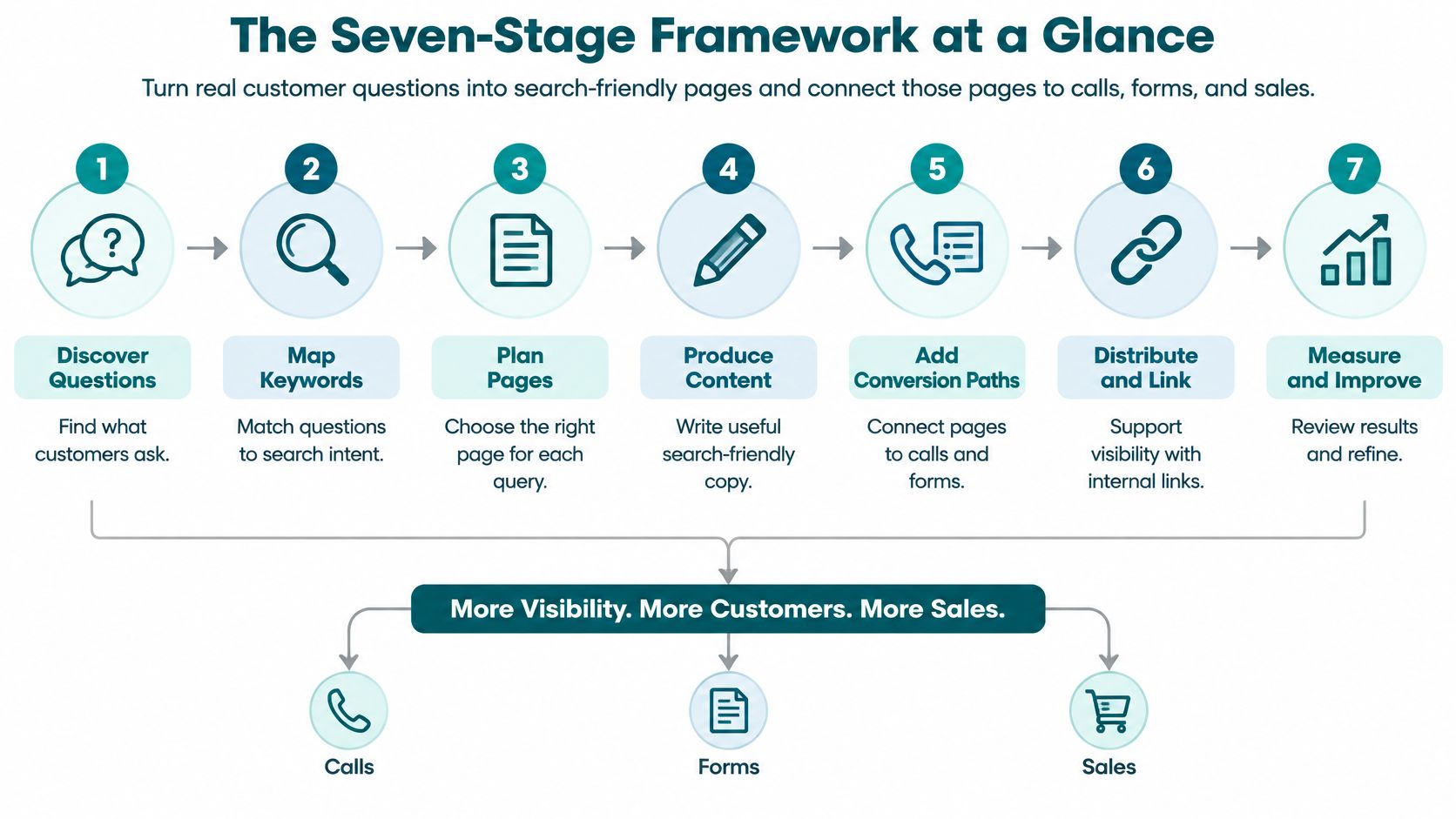
The Seven-Stage Framework at a Glance
An SEO content marketing strategy is a repeatable system. It turns real customer questions into search-friendly pages, then connects those pages to calls, forms, and sales. The file is not the strategy. In the Content Marketing Institute's 2025 B2B benchmark, 29% of marketers with a documented content strategy said it was extremely or very effective, while 58% described it as moderately effective. The same research reported that 87% of B2B marketers said content marketing created brand awareness during the previous 12 months. Awareness shows up often. Revenue does not follow unless each stage has an owner.
Use the seven stages as a checkpoint you score against, not a binder you file. Content-led growth advice from Contesimal is a useful outside view of how publishing should create demand. Your operating sheet still has to name the question, the page, and the sale.
| Stage | Core question | Output | Typical time |
|---|---|---|---|
| Audience and keyword research | What are buyers asking? | Question list and keyword set | 1-2 weeks |
| Content mapping | Which page answers which intent? | Topic map with one page per intent | About 1 week |
| Editorial calendar | What gets published and when? | 90-day calendar | 2-3 days |
| Production workflow | How is each page made and checked? | Briefs and quality checklist | 3-5 days per page |
| Distribution and promotion | Where will people find it? | Channel plan | Ongoing |
| Measurement | Is it working? | Monthly dashboard of leads and assisted conversions | Monthly review |
| Optimization | What should be fixed, merged or retired? | Quarterly update list | Quarterly |
Why the checkpoint beats the calendar
A calendar answers only row three. Rows one and two stop you from writing three posts that answer the same question. Row six stops you from calling a busy month a success when no form was filled. Row seven is where overlapping pages get merged instead of left to compete with each other.
Practical rule: If a stage has no named output and no date, you do not have that stage yet.
Score your current efforts against each row this week. Note which stage is missing. That gap, not a shortage of topic ideas, is usually why the site feels busy and the phone does not.
Research Questions and Keywords Before You Write
Search is where buyers start, and it has been for a long time. In 2002, Pew Research Center reported that 85% of American internet users had used an online search engine to find information. Search has only become more habitual since. Your next customer in Cincinnati is already typing the question. The job is to collect that wording before you draft.

A short walkthrough of how questions become a page plan helps if your team has never built a brief together.
<iframe src="https://www.youtube.com/embed/VPDe8XL7Mh8" width="100%" height="400" frameborder="0" allowfullscreen></iframe>Five steps before any draft
- Collect questions already asked. Pull wording from sales calls, emails, form submissions, and front-desk conversations. Keep the customer's phrase, not your service name. A page titled in your jargon will miss the search.
- Match those phrases to search. Pull queries from Google Search Console and the questions people ask on your Google Business Profile. The guide to content planning with SemDash explains keyword research in a way a non-technical owner can follow. You want overlap with real conversations, not a giant export.
- Cluster by problem. Group related questions, such as "how much does a website cost" and "how long does a website take." One cluster becomes one page. Two clusters that share a verb still need two pages when the buyer wants a different answer.
- Search each cluster yourself. Guides, service pages, map packs, and AI answers tell you what format the question demands. If Google shows local listings and service pages, an essay will not match. Our guide on answering the questions customers already ask applies the same habit across a full site.
- Score business value, competition, and demand. Value comes first. A Cincinnati dental office should prefer "do I need a crown or a filling" over "dental tips," even when the tip phrase looks busier. The crown question sits next to a treatment decision. The tip list mostly attracts browsers.
Rules change by industry. Healthcare and legal pages need tighter claims, careful wording, and review because a bad answer can create real risk. E-commerce clusters need product modifiers such as size, material, compatibility, and price. Agency work should be scored by whether it can lead to retained services, fulfillment capacity, or a referral partner, not by impressions alone.
Start with clusters that have a clear path to a paid service, even when monthly demand looks modest.
I would rather publish four of those clusters in a quarter than twenty tip posts that never name a next step.
Map Topics to Funnel Stages and Set a Publishing Rhythm
Content mapping gives each topic one job and one page. If two URLs chase the same question, they split links, confuse the reader, and make reporting messy. The table is the assignment sheet.
| Funnel stage | Page type | Cincinnati example | Conversion goal |
|---|---|---|---|
| Awareness | Explainer article | How long does a kitchen remodel take in Cincinnati? | Email signup |
| Consideration | Comparison or checklist | Checklist for choosing a web designer in Cincinnati | Checklist download or phone call |
| Decision | Service or pricing page | Website design services for Cincinnati businesses | Consultation request |
| Support | FAQ or how-to guide | How to update your Google Business Profile hours | Repeat visit or review |
What each row is for
Awareness answers a timing or cost question a stranger can use before they know your name. The kitchen remodel explainer earns an email because the reader is planning, not ready to sign. Do not hide a hard sell in the first screen.
Consideration helps someone compare options. The web designer checklist should name what to ask about scope, mobile layout, and who owns the site after launch. The download or the phone call is the point. A vague "learn more" button wastes the visit.
Decision is the service or pricing page. "Website design services for Cincinnati businesses" should state who it is for, what is included, and how to request a consultation. This is the page every earlier article should be able to link to with a plain description of the offer.
Support keeps a customer after the sale. Updating Google Business Profile hours is a small job that still brings people back and can prompt a review. It should not pretend to be a lead magnet.
Build the quarter around one pillar
Pick one pillar page per quarter for a core service, such as a guide to choosing a web designer in Cincinnati. Plan four to six supporting pages that link back to it with descriptive anchor text, not "click here." For a small team, two to four supporting pieces a month is enough. More is worse when the new page repeats a page you already have.
Log every planned URL in a shared sheet with its primary question, funnel stage, owner, conversion goal, and publish date. Review that sheet monthly and drop anything that does not point at a decision page. A pillar without supporting links stays thin. Supporting posts without a pillar never hand the reader a way to buy.
Produce Each Page with a Repeatable Workflow
Speed without a brief creates pages nobody can update. Google's search essentials favor helpful, people-first pages, with the reader's own search language in the title and main heading, and with important content kept crawlable. A one-page brief is how a Cincinnati service business hits that standard without a large staff.
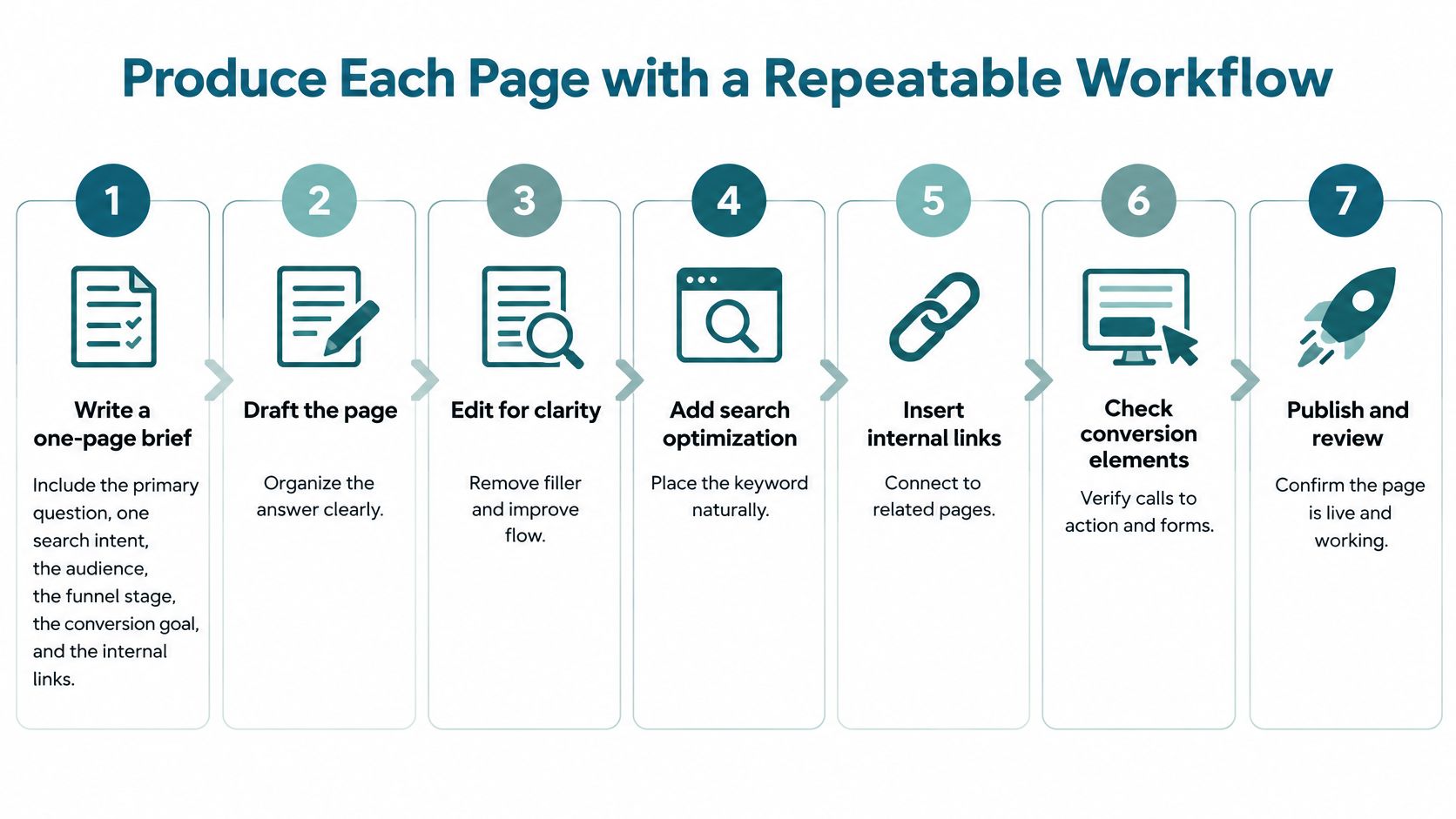
- Write the brief. One page covers the primary question, one search intent, the audience, the funnel stage, the conversion goal, and the internal pages to link. Example: "What does a spring HVAC tune-up include?" for homeowners in Butler County, with a link to the maintenance plan.
- Outline from the research list. Put the direct answer near the top. If the tune-up covers filter, coils, and thermostat check, say that in the first screen.
- Draft from real material. Use a customer quote you have permission to share, a timeline from a recent job, or a price range from your own quotes. Invented ranges get you in trouble the moment someone calls.
- Check every claim. For healthcare or legal topics, a credentialed reviewer signs off before publishing. A marketing manager should not be the last word on a clinical or case-related sentence.
- Set the on-page basics. Title, main heading, image alt text, and two to four internal links with descriptive anchors. "Spring HVAC tune-up checklist" beats "read more."
- Open the page on a phone. Look for slow load and layout jumps before you call it done. A shifted button is a lost call.
- Confirm it is live in search. Check that the URL is indexed, validate any structured data with Google's Rich Results Test, and log the publish date.
The markup trap
Schema is not a ranking shortcut. Markup that hides text, goes stale, or describes something the visitor cannot see can knock a page out of rich results even when the writing is strong. Encode only what the page already shows, in JSON-LD, and retest after every edit.
Many businesses already have an in-house marketing manager. We work alongside those teams. An outside partner can carry steps 2 through 7 while your manager keeps the brief, because the brief is the part only the business can own.
Distribute and Promote Each Page
A page earns nothing until someone sees it. Build the distribution plan before you hit publish, and keep it in the same shared sheet as the calendar, with an owner and a date for each channel.
- Google Business Profile. Post a short update that links to the new page and answers a question customers already ask there. A plumber's post about frozen-pipe prep should point at the winter checklist, not at the homepage.
- Email. Send it in the customer newsletter with one sentence on who it helps. A blast to your whole list, with no reason to open, trains people to ignore you.
- Social. Post on the one or two platforms your customers already use. Lead with the question, then the link. Our notes on which post types fit which channel keep a small team from copying the same caption everywhere.
- Referral partners. Send the guide to a supplier, a local association, or a complementary business, such as a realtor or an accountant, only when it helps their clients. A random "please share" note gets deleted.
- Repurpose the answer. Turn the direct-answer paragraph into a short video or a one-page handout for front-desk and sales staff. Each version links back with descriptive anchor text.
Spend about 30 minutes promoting each page in its first week. Thirty days later, open Google Search Console and see whether the URL earned impressions. No impressions means the promotion missed, the title is unclear, or the page is not indexed. Fix that before you write the next one.
Measure Results and Decide What to Fix
Clicks are no longer the whole score. A Pew Research Center analysis of nearly 69,000 Google searches from 900 U.S. adults found that users clicked a traditional result in only 8% of searches when an AI Overview appeared, compared with 15% without one, just 1% clicked a source link inside the summary, and 26% of searches with an AI Overview ended the browsing session, versus 16% without one. A page can shape demand by being cited even when the click never comes. A generic page that ranks and says nothing original may do neither.
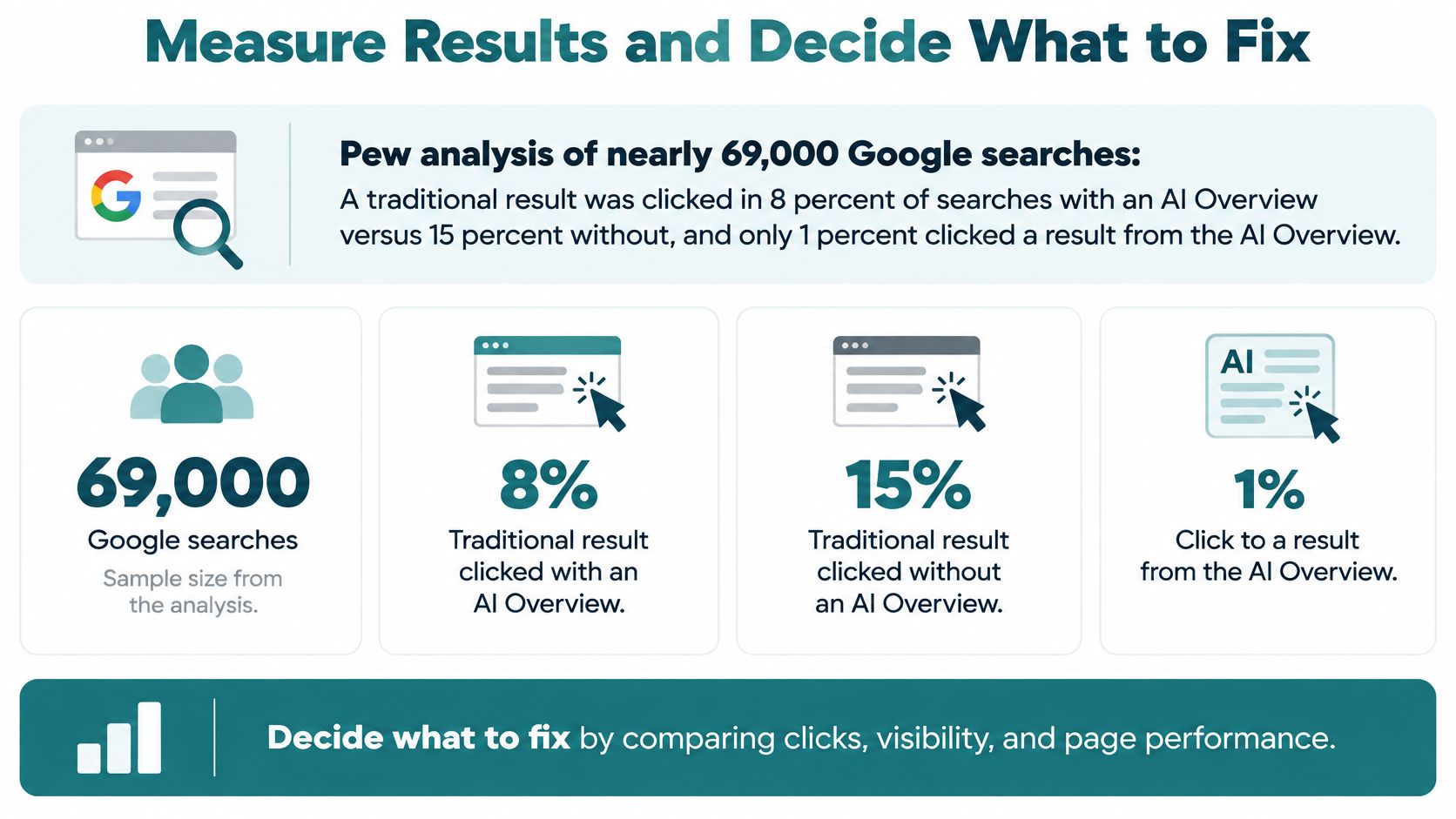
Google has disputed how far these findings travel, so treat them as a prompt to segment rather than a verdict. Break your reporting down by query type, industry, device, and whether an AI summary appeared on the results page. One sitewide average will lie to you, and a Cincinnati service business that blends emergency queries with research queries is averaging two very different pages into one number.
Four measures that tie to money
Track branded searches and direct visits to service pages, qualified non-brand visits, calls and form submissions tied to each URL, and assisted conversions, which show a page helped a sale even when it was not the last click. Review visibility monthly and assisted conversions quarterly. The guide on connecting content engagement to leads explains why sessions alone mislead a small team. Pair it with a data-driven marketing strategy so the dashboard matches how you sell.
What counts as a lead changes by industry. A healthcare page earns a call only if your intake process can use it. A legal page earns a consultation request that your advertising rules permit you to act on. An e-commerce page earns an add-to-cart or an email signup, not a phone call. Score each URL against the conversion it can produce.
An Ahrefs analysis is a useful warning against page-count goals: only 1.74% of newly published pages reached Google's top 10 for at least one keyword within one year, and across more than 277,000 sites, median traffic ran from 12 clicks for sites with fewer than 10 indexed pages to 132,889 for sites with 5,000 or more. Those figures are observational, not a promise that adding pages creates growth.
Three decisions, then a speed check
- Consolidate pages that answer the same question. Keep the stronger URL and redirect the rest.
- Upgrade pages that rank or convert but lack original detail. Add a first-hand example, a local price range, or a comparison table.
- Retire generic articles with no traffic and no leads over 12 months that support no service page.
Refresh when search intent shifts, when rules or prices change, or when impressions fall three months running. On speed, Google's Core Web Vitals score real-user data at the 75th percentile over 28 days, with Largest Contentful Paint at 2.5 seconds or less, Interaction to Next Paint under 200 milliseconds, and Cumulative Layout Shift under 0.1. Compress oversized images on your five most important service pages, then retest. Spend the next quarter on pages only you could have written.
Choose Your Industry Rules and First Three Topics
Pick your row before you write. The constraint is not a style preference. It is what you are allowed to say, and what will get a page taken down or a lead you cannot legally use.
| Industry | Main constraint | Publish first | Avoid |
|---|---|---|---|
| Healthcare | HIPAA-compliant handling and sourced clinical claims | Insurance, appointment and treatment FAQs | Medical advice without clinician review |
| Legal | Advertising rules and client confidentiality | Practice-area pages with a what-happens-next FAQ | Case-result promises and generic blog posts |
| E-commerce | Product data quality, shipping and returns policies | Buying guides, size or fit explainers, product comparisons | Duplicate product descriptions |
| Agencies | Client approvals and reporting | Service playbooks and anonymized case studies | Templates reused across clients |
Healthcare. Patient privacy rules protect health information. A page can explain how to book, what insurance questions to ask, and what a visit covers. It should not invite someone to type symptoms or personal details into a public form. Clinical claims need a sourced reviewer.
Legal. Advertising rules limit what a firm may promise about results, and client facts stay confidential. A practice-area page with a what-happens-next FAQ helps a nervous caller. A post that implies a guaranteed outcome does not.
E-commerce. Shipping, returns, and product facts have to be true on every path to checkout. Buying guides and fit explainers earn the click an AI summary cannot finish. Copied manufacturer descriptions do not.
Agencies. Nothing goes out under a client's name without that client's approval. Playbooks and anonymized case studies show how you work. The same template pasted onto ten client blogs is how accounts get burned.
Three decisions this month
- Name the rule set and one reviewer who signs off on every factual, medical, or legal claim.
- Pick three topics from your research clusters. Each one must link to a decision page, such as a service or pricing page.
- Set a review 90 days out using branded demand, qualified visits, leads by page, and assisted conversions.
If you want a second opinion on that plan and the measurement setup, we offer a free 30-minute strategy call. You can also request a proposal or send a message when you are ready to start.
Helbling Digital Media is a Cincinnati-area agency that builds SEO and content strategy around buyer questions, measurable leads, and pages that can be cited, not around posting volume. If you want that plan scored against your current site, visit Helbling Digital Media and book a free 30-minute strategy call or request a proposal. Bring your three topic ideas and we will tell you which ones deserve a page.