You signed the agreement. You're relieved. You're optimistic. Then, a few hours later, you start wondering what happens next, who needs what from you, how many meetings are coming, and whether this whole project is about to eat your week.
That moment matters more than most business owners realize.
If you're a Cincinnati company hiring help for web design, SEO, or digital marketing, the client onboarding process is your first real experience with the agency you chose. Not the pitch. Not the proposal. Not the polished sales deck. The actual working relationship. A smooth start builds confidence fast. A sloppy one creates friction before any campaign, website build, or reporting dashboard has a chance to prove itself.
The mistake I see most often is treating onboarding like paperwork. It's not paperwork. It's the first operational test of whether the agency can guide your team, reduce confusion, and move a project forward without draining your attention.
Beyond the Welcome Email What Onboarding Really Means
The welcome email is easy. Anyone can send a friendly note, a calendar link, and a checklist. That's not the hard part.
The hard part is helping a business owner move from “we bought this” to “we know exactly what's happening next.” That gap is where doubt shows up. You may have a GM, marketing manager, office administrator, and outside IT contact all asking different questions at the same time. If the agency responds by dumping every request into one long email, the project feels heavier than it should.
The first two weeks shape the whole relationship
A lot of onboarding advice focuses on logistics. Access requests. Intake forms. Kickoff scheduling. Folder setup. Those things matter, but they aren't the full story. Most agency onboarding guides focus on logistics but miss a critical gap: managing client cognitive load. A recent study found that 42% of new clients report feeling overwhelmed in the first 14 days, which often delays key project approvals (OnboardMap).
That finding tracks with what business owners experience. The agency may need your logo files, website logins, brand notes, sales process details, target locations, service priorities, legal approvals, and stakeholder feedback. None of those requests are unreasonable on their own. The problem is when they arrive all at once, with no sequence and no explanation of why each item matters.
Practical rule: Good onboarding reduces decisions. Bad onboarding creates new ones.
A strong client onboarding process answers four questions immediately:
-
What happens first: The client shouldn't have to guess the order.
-
What does the agency need now: Not everything. Only the next critical inputs.
-
Who owns each task: Confusion grows when multiple people assume someone else is handling it.
-
When will value show up: Clients stay calmer when they know what early progress looks like.
Onboarding is the first deliverable
For a local business owner, this isn't just about convenience. It affects trust. If an agency can't organize kickoff, communication, and early decisions, it's hard to believe they'll manage SEO priorities, web revisions, campaign launches, or analytics with discipline later.
That's why the best onboarding doesn't feel like admin. It feels like guidance.
In practice, that means smaller asks, clearer deadlines, and fewer live meetings than most agencies schedule. It also means giving clients a way to learn or respond on their own time. The same principle shows up in product adoption work. If you want a useful outside perspective on improving product user habits, the logic applies here too. People follow through more consistently when the path is simple, visible, and not overloaded.
When onboarding works, clients don't just feel welcomed. They feel oriented. That's the difference between a project that starts with momentum and one that starts with drag.
The Four Phases of a Successful Onboarding Framework
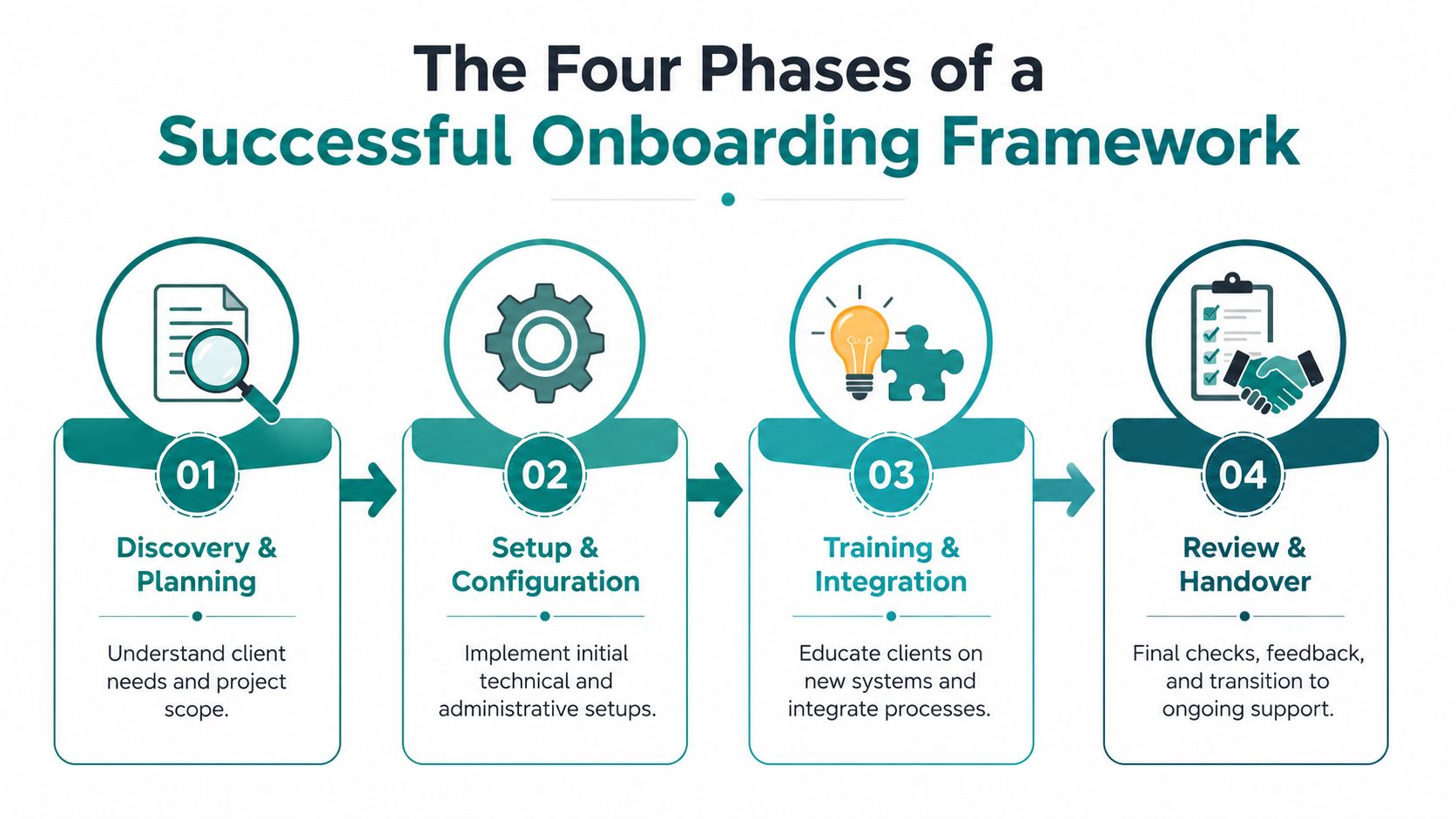
A reliable client onboarding process needs structure, but it shouldn't feel rigid. The best systems give the client a clear path without forcing every business through the exact same sequence.
I prefer a four-phase framework because it's simple enough for an owner to understand and detailed enough for an agency team to execute consistently.
Phase one starts before the client sees anything
Before the first welcome message goes out, the agency should run an internal handoff. Sales notes, proposal promises, timelines, decision-makers, and known risks need to move into operations cleanly. If that doesn't happen, the client ends up repeating information they already gave during the buying process.
This is also where staffing matters. A standardized onboarding process often involves assigning two distinct team members: one for technical setup (like CMS access) and another for relationship management, ensuring operational and interpersonal tracks run in parallel without bottlenecks (agency onboarding guide PDF).
That split works because technical setup and client confidence are different jobs. One person should chase access, integrations, and setup dependencies. Another should manage communication, expectations, and strategic alignment.
The four phases in plain language
| Phase | Key Goal | Typical Timeline | Primary HDM Role |
|---|---|---|---|
| Internal Handoff and Welcome | Confirm scope, owners, and immediate next steps | Right after signing | Relationship lead |
| Information Gathering and Access | Collect only the inputs needed to begin work | Early onboarding window | Technical lead |
| Strategic Kickoff | Align on goals, priorities, success criteria, and approvals | After critical inputs are in | Relationship lead |
| Delivering the First Win | Show early progress the client can understand and trust | Within the first month | Delivery team |
Internal Handoff and Welcome
The client should receive a short, confident welcome. Not a giant packet.
This phase works best when the agency sends three things only:
-
A brief welcome note
-
A simple timeline for the next few steps
-
One place to upload or review materials
If the client gets ten attachments, five links, and a long questionnaire before anyone explains the process, the onboarding already feels harder than it needs to.
Information Gathering and Access
At this stage, many projects start to wobble. Agencies often ask for everything immediately because they want to feel productive. That impulse backfires.
Ask for access in waves. Website and analytics credentials may be urgent. Historic creative files or broader internal documents may not be. Group requests by decision type, not by department. That reduces back-and-forth and makes it easier for a business owner to delegate.
Ask for the minimum needed to begin. Then ask for the next layer when the client understands why it matters.
This is also the phase where a few operational habits save time. Shared checklists. a portal instead of long email threads. Clear due dates. If your team constantly feels buried, a solid guide to time management for busy professionals is useful because onboarding delays often come from calendar chaos more than strategy problems.
Strategic Kickoff
The kickoff meeting shouldn't be a document review session. It should settle the important business questions.
For a Cincinnati manufacturer, that may mean clarifying whether the website's first priority is better lead quality or cleaner sales support. For a law firm, it may mean identifying which practice areas need visibility first. For a healthcare organization, it may mean deciding who approves compliance-sensitive content and communication.
A strong kickoff covers:
-
Business priorities: What has to improve first
-
Success criteria: What the client will consider a meaningful early result
-
Stakeholder roles: Who approves, who advises, who just needs updates
-
Communication rhythm: How often the agency reports and where updates live
Delivering the first win
Clients need proof that progress is real. Agencies should deliver at least one quick win within the first 30 days to build confidence and demonstrate value early (ALM Corp).
That quick win doesn't need to be dramatic. It might be a cleaned-up analytics view, a resolved tracking issue, a better homepage wireframe direction, a paid search cleanup, or a technical fix that removes a clear obstacle. What matters is that the client can understand it without a translator.
A good onboarding framework isn't flashy. It's calm, clear, and hard to derail.
Mastering Communication and Setting Expectations
Communication is the engine of onboarding. Process helps, but communication is what keeps a client from feeling lost.
The biggest failures usually don't come from one catastrophic mistake. They come from silence, vague requests, mismatched expectations, and the wrong information going to the wrong person. A 2025 study of digital agencies revealed that 63% of onboarding failures happened when technical requests were made before non-technical success criteria were defined, causing significant kickoff delays (Zoomforth).

One source of truth beats five email threads
If you're the client, you shouldn't have to search your inbox to figure out what's pending. The agency should create one shared home for the project. That can be a client portal, a project board, or a well-organized dashboard. The tool matters less than the discipline behind it.
A useful source of truth includes:
-
Open items: What the client still needs to provide or approve
-
Current status: What the agency is working on now
-
Upcoming milestones: What happens next and when
-
Reference files: Brand assets, logins, notes, and decisions
If the agency also uses automation to keep tasks moving, that's a plus. Thoughtful systems reduce dropped follow-ups. This is part of why many firms build structured marketing automation workflows into client communication, not just lead nurturing.
Different stakeholders need different updates
A business owner doesn't need the same message as the marketing manager or IT support person.
The owner usually wants confidence, pace, and business alignment. The marketing contact needs task clarity, deadlines, and campaign context. The technical contact needs clean requests, exact access needs, and known dependencies. If everyone gets the same update, somebody gets too much detail and somebody else gets too little.
The fastest way to slow onboarding is to ask the wrong person the wrong question in the wrong format.
This matters even more in regulated industries. For healthcare clients, communication can't just be convenient. It has to be secure, role-appropriate, and compliant. If protected information is involved, the onboarding process should reflect HIPAA-safe communication habits from day one.
A simple welcome and next-steps email template
Most welcome emails are too long. A better one is short enough to read quickly and specific enough to reduce uncertainty.
Sample email Subject: Welcome aboard, here's what happens next Hi [Client Name], We're glad to get started. Your project is now in onboarding, and our immediate focus is making the first steps clear and manageable. Here's what to expect this week:
We'll send one short access request list We'll confirm your kickoff meeting time We'll organize project communication in one shared location
Before kickoff, we need:
Your primary point of contact Any existing brand files or website access you already have handy Any business goals you want us to keep front and center
If something isn't available yet, that's fine. We'll work in sequence and let you know what's urgent versus what can wait. Thanks, [Agency Contact]
A message like that lowers pressure. It tells the client they don't need to solve everything immediately.
A clear communication rhythm matters just as much. Weekly updates are usually enough during onboarding. More frequent contact only helps if it adds clarity. Otherwise, it becomes noise.
Later in the process, it can help to show clients a practical walkthrough like this one:
Clients don't need constant messaging. They need useful messaging.
Essential Tools for a Seamless Onboarding Experience
Most small and midsize businesses don't need an enterprise software stack to create a professional onboarding experience. They need a few tools that work together and don't create extra friction.
The easiest way to choose tools is by function, not by brand hype. If a tool doesn't make the client experience simpler, it's probably not helping.

Project management tools keep momentum visible
Asana, Trello, ClickUp, and Monday.com all solve the same core problem. They show what's active, what's blocked, and what's next.
For a client, that visibility matters more than the software brand. A shared board can prevent the classic “I thought your team was handling that” problem. It also helps owners delegate internally because they can see which tasks belong to marketing, leadership, operations, or IT.
Portals and CRMs reduce scattered communication
Email alone is weak for onboarding. It's fine for notifications. It's bad for managing a growing body of requests, files, deadlines, and approvals.
That's where a portal or CRM earns its keep. HubSpot is common. Some agencies use Notion, Airtable, or custom systems. Others build more specific experiences through client portal solutions when the workflow needs secure file access, approvals, dashboards, or role-based views.
A good portal should do three things well:
-
Centralize communication: Fewer lost threads
-
Store files logically: No digging through old attachments
-
Show status clearly: Clients know whether something is waiting on them or the agency
Intake forms should collect smart information, not every possible detail
Typeform, Gravity Forms, Jotform, and similar tools can improve onboarding fast. But only if the questions are disciplined.
The best intake forms ask for decisions the agency needs at that stage. They don't ask clients to write essays. They don't request technical items before the business goals are clear. They also use plain language. “Primary service areas” is better than “geographic targeting priorities.” “Who needs approval rights?” is better than “identify governance stakeholders.”
The right form shortens meetings. The wrong form creates them.
Email support tools still matter
Even with portals and project systems, email remains part of the process. That means teams need better visibility into follow-ups, opens, and task handoffs. If your team lives in Gmail, a practical roundup on how to boost your inbox efficiency can help you tighten communication without adding another heavy platform.
A solid onboarding stack doesn't need to be expensive. It needs to be understandable, consistent, and easy for the client to use without training.
Measuring Onboarding Success and Proving Value
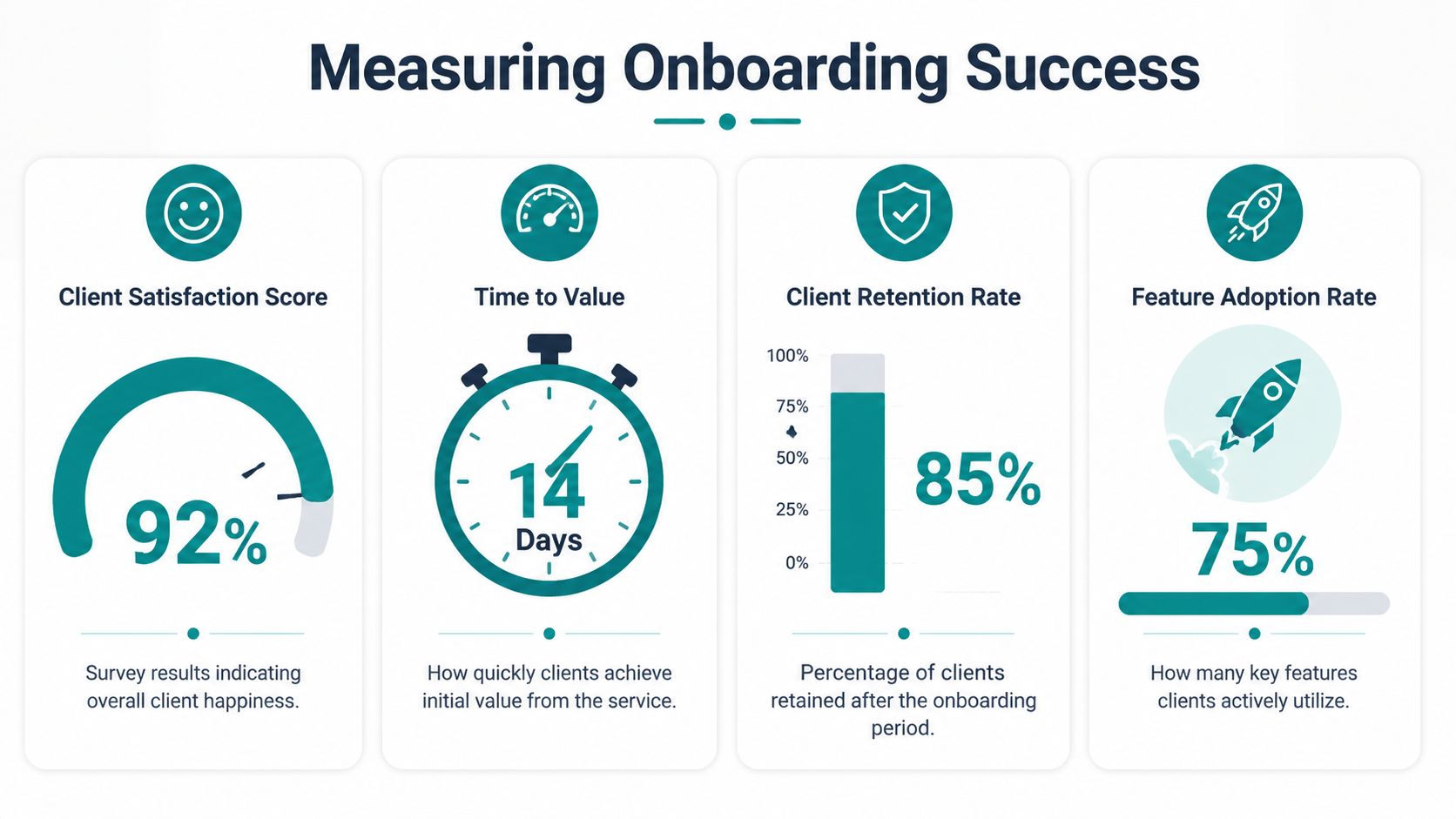
A client onboarding process shouldn't be judged by how organized it looks internally. It should be judged by whether the client gets oriented quickly, sees progress early, and stays engaged.
That means measuring outcomes, not just checking boxes.
Start with time to first value
The first metric I'd watch is time to first value. In plain English, that's how long it takes before the client can point to something useful and say, “Yes, this is moving in the right direction.”
For a website project, first value might be a sharper sitemap, approved wireframe direction, or a resolved technical issue. For SEO, it might be a clean baseline report, local visibility priorities, or corrected tracking. For paid media, it could be a tighter account structure or better attribution setup.
The exact milestone depends on the engagement. What matters is defining it early and recording when it happens.
Personalization shows up in the numbers
Not every client should move through onboarding the same way. An owner, office manager, and technical contact have different needs. So do a law firm, manufacturer, and healthcare provider.
That's why personalization is more than a nice touch. Failing to personalize onboarding paths for different client personas can result in a 50% higher churn rate at the 90-day mark. Companies that achieve over 60% personalization see NPS scores increase by 15+ points (Textmagic).
Those numbers point to a simple truth. The more closely onboarding matches the client's role, goals, and decision style, the more likely the relationship is to stabilize early.
Keep the scorecard simple
You don't need a complicated dashboard to monitor onboarding health. A practical scorecard can fit on one screen.
Track items like:
-
Time to first value: When did the client first see a meaningful result?
-
Completion of key onboarding tasks: Did access, approvals, and kickoff decisions happen cleanly?
-
Client sentiment: Did the client sound confident, confused, or stalled?
-
Adoption of shared tools: Are they using the portal, dashboard, or reporting view?
-
Early retention risk signals: Slow replies, repeated confusion, or stakeholder drift
For agencies that want stronger visibility, tying this into a proper reporting setup helps. Clean measurement becomes much easier when you already have a reliable analytics foundation, whether that lives in GA4, Looker Studio, or a more customized analytics approach for growth marketing.
If you can't define the first meaningful win, the client probably can't see it either.
Onboarding success isn't about making the agency look organized. It's about making progress legible to the client.
Troubleshooting Common Onboarding Roadblocks
Even a good client onboarding process hits friction. Clients get busy. Access requests stall. New ideas surface during kickoff. The answer isn't to act surprised. The answer is to have a calm response ready.
If the client goes quiet
This happens all the time, especially with owners juggling sales, staffing, and operations.
Don't send a vague “just checking in” email. Send a short note with a decision-ready path.
-
Acknowledge reality: “I know your team has a lot moving right now.”
-
Reduce the ask: “To keep momentum, we only need these two items this week.”
-
Show impact: “Once we have those, we can begin the audit and prep kickoff.”
If silence continues, offer options. A brief call. A delegated point of contact. A revised sequence that lets the project move with fewer dependencies.
If technical access becomes a mess
Website logins, domain access, analytics permissions, and CMS credentials can derail a project fast.
When that happens, narrow the issue. Don't keep stacking new requests on top of the unresolved one. Identify the blocker, name who likely owns it, and give the client a plain-language summary they can forward internally.
A useful script sounds like this:
We're paused on one technical item. We need access to [platform] from the person who currently manages it. Once that's resolved, the rest of setup can continue normally.
That keeps the issue contained instead of making onboarding feel broken.
If scope starts expanding during kickoff
This is common when the client finally gets all stakeholders in one room. New ideas show up. New needs surface. Someone says, “While we're at it, can we also add...”
Don't shut it down abruptly. But don't absorb it casually either.
Use a three-part response:
-
Validate the idea: It may be a good addition.
-
Separate it from onboarding: Don't let it blur the current start-up work.
-
Assign next action: Review now, queue for phase two, or estimate separately.
That protects momentum and keeps everyone clear on what was purchased.
If approvals keep getting delayed
Approval delays usually mean one of two things. Either the right approver isn't in the loop, or the agency is sending material that requires too much interpretation.
Fix both. Confirm who has final say. Then package approvals in a simpler format. Fewer choices. Clear recommendation. Specific deadline. One question at a time.
A healthy onboarding process isn't friction-free. It's resilient. When problems show up, the client should feel that the agency has seen this before and knows how to move it forward.
If you're evaluating agencies and want a team that treats onboarding like the start of real business results, not just paperwork, take a look at HDM. HDM works with businesses across Greater Cincinnati on web design, SEO, development, analytics, and growth strategy, with a practical approach that keeps communication clear and momentum steady from day one.