

A Cincinnati service company can lose a lead before anyone notices. A prospect fills out a website form, the message lands in one inbox, a salesperson copies it into a CRM, an office manager re-enters the customer into invoicing, and a follow-up task gets created somewhere else. Each tool works, but the business still spends time moving information instead of serving the customer.
That problem grows as a company adds Shopify, QuickBooks, HubSpot, Salesforce, booking software, email marketing, analytics, or a custom portal. Enterprise integration architecture provides the plan for making those systems work together reliably. For a small or mid-sized business, the goal isn't to build a massive corporate platform. It's to connect the right systems in a way that supports growth, protects customer data, and remains manageable when the business changes.

Why Disconnected Systems Slow Your Business Down
Consider a Cincinnati home-services company that receives inquiries through its website, schedules appointments through a field-service platform, tracks prospects in a CRM, and sends invoices through accounting software. The owner may not call this an integration problem. They may describe it as slow callbacks, duplicate records, outdated reports, or staff members asking one another whether a customer has already been contacted.
Those symptoms usually have the same root cause. The systems hold important information, but they don't share it consistently. A new lead might sit in an email inbox until someone enters it manually. A completed appointment might not update the sales pipeline. An invoice could be issued with an old address because the accounting system never received the latest customer details.
The cost of disconnected work
Manual handoffs create more than inconvenience.
- Employees repeat data entry: Staff copy names, phone numbers, order details, and appointment information between tools.
- Customers receive slower responses: A lead waits while someone notices the form, interprets the request, and creates the next task.
- Managers lack a dependable view: Reports may disagree because each system contains a different version of the customer record.
- Small errors become operational problems: A misspelled email address can affect scheduling, marketing, billing, and customer support at the same time.
Point-to-point integration, where each system connects directly to several others, often becomes harder to maintain as the number of systems grows. A research summary reports that point-to-point usage fell from 68% in 2018 to 32% in 2024, while API-based approaches increased during the same period, as documented in this research summary on integration architecture trends.
Growth needs a connection plan
The answer isn't automatically "buy an enterprise platform." A retailer may need a dependable connection between Shopify and inventory. A healthcare practice may need a secure flow between forms, scheduling, and approved vendors. A professional-services firm may only need to synchronize website inquiries, its CRM, and billing.
HDM, a Cincinnati-area agency, can help businesses evaluate those choices alongside web design, SEO, analytics, and custom development. The important first step is to document what happens after a customer submits a form, places an order, books an appointment, or requests support. Once those handoffs are visible, you can decide which connections deserve automation and which can remain simple.
What Enterprise Integration Architecture Really Means
Think of a busy Cincinnati restaurant. The dining room, kitchen, host stand, delivery counter, and accounting office all need information, but they shouldn't yell messages across the building whenever something changes. A good operating plan defines who receives each request, what information gets passed along, and what happens when someone is unavailable.
Enterprise integration architecture applies the same idea to software. It is the design for how applications, data, and business processes communicate. The design includes the connections themselves, the rules governing those connections, security controls, error handling, monitoring, and ownership.
A one-off connection answers a narrow question: "Can our website send this form to the CRM?" An architecture asks broader questions:
- Which system owns the customer record?
- Which applications need the information?
- Should the receiving system respond immediately or process the message later?
- How will the connection authenticate?
- Who gets notified when the transfer fails?
- Can the same connection support another website, location, or workflow?
Three ideas make the model durable
Loose coupling means systems don't depend too heavily on one another's internal details. If a CRM changes its internal database, the website connection should continue working through a stable interface.
Reusability means a connection or data service can support multiple workflows. A customer profile service might support a website portal, a sales dashboard, and an email preference center without requiring three unrelated custom connections.
Scalability means the design can handle additional products, locations, users, or transactions without forcing the team to rebuild every connection. Enterprise architecture evolved from point-to-point and middleware approaches toward SOA, ESB, API-based integration, cloud platforms, and real-time synchronization. The history of enterprise architecture and integration patterns provides useful context for that progression.
The practical definition: Integration architecture is the set of decisions that makes information move safely, predictably, and usefully across the systems your business depends on.
For owners, this matters because a connected system supports a connected customer journey. A headless CMS, for example, may deliver content to multiple experiences through APIs, an idea explained in this resource on how a headless CMS works. You can also explore this guide to integrate platforms for business performance when you want a broader explanation of how connected systems support operations.
The architecture doesn't need to be complicated to be intentional. It needs clear ownership, sensible boundaries, secure data flows, and a way to recover when a connection stops working.
Comparing Your Main Integration Approaches
Vendors may use different names for similar ideas, so start with the business outcome rather than the product label. API-led integration is usually a good fit when one application needs to request information or trigger an action in another. A website can ask a CRM to create a lead, or a customer portal can retrieve an order status.
Event-driven integration works differently. One system announces that something happened, such as an order being placed or a payment being completed. Other systems can respond without the original application waiting for every downstream task to finish. In a global Salesforce integration study, an event-driven design reduced latency by 3x to 5x compared with the incumbent synchronous architecture, while sustaining higher throughput under peak load without saturating API governor limits. The study's analysis of event-driven Salesforce integration performance defines latency, throughput, and fault tolerance in its methodology.
ESB and SOA use shared services and a central integration layer to coordinate communication among applications. This can suit organizations with substantial legacy middleware or many systems that need common transformation, routing, and governance. It can also introduce platform administration and architectural overhead that a smaller company may not need.
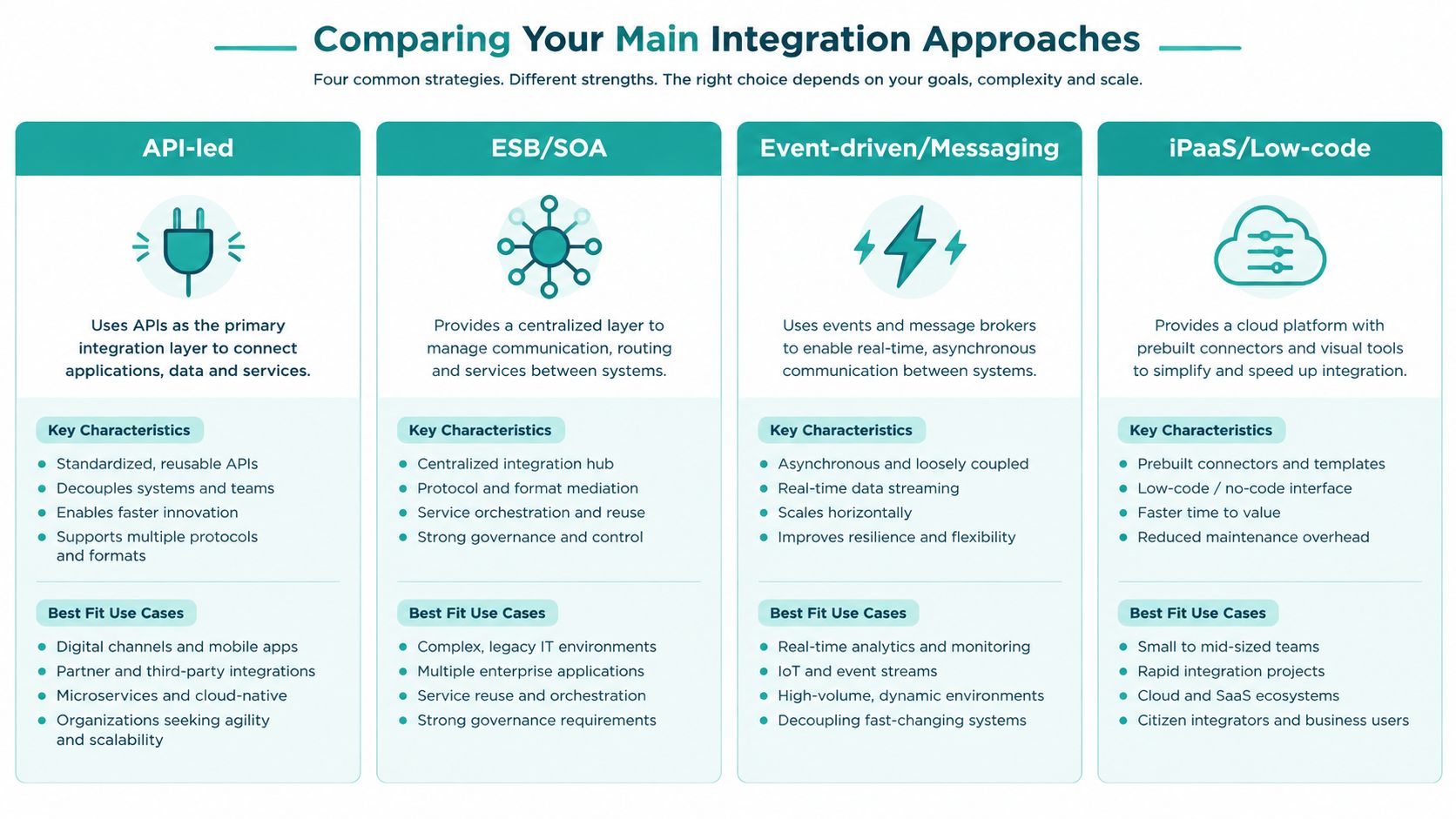
iPaaS and low-code platforms provide hosted connectors, workflow builders, monitoring, and reusable templates. They can help a marketing or operations team connect common tools without asking developers to write every integration from scratch. The trade-off is that unusual business rules, sensitive data flows, or high-volume workloads may still require custom engineering.
Match the approach to the job
| Approach | Best For | Trade-Off to Consider | Governance Need |
|---|---|---|---|
| API-led | Immediate requests, lookups, and actions | Requires stable APIs, authentication, and version management | Clear contracts, access controls, and monitoring |
| Event-driven | Notifications, status changes, and independent workflows | Requires reliable delivery, replay handling, and event ownership | Defined event names, schemas, and failure procedures |
| ESB or SOA | Legacy estates and shared enterprise services | Can require specialized administration and central coordination | Strong service ownership and change control |
| iPaaS or low-code | Common SaaS connections and straightforward automation | Platform limits or subscription dependence may affect complex work | Connector permissions, data rules, and vendor oversight |
A small retailer might use iPaaS to connect Shopify, email marketing, and a CRM, then use APIs for a customer portal. A manufacturer with older systems may need an integration platform to translate data formats before newer applications can use it. A company handling operational alerts may use events so each alert can trigger the right workflow without blocking other work.
For a practical look at CRM and ERP connection decisions, this playbook on system integration can help owners frame requirements before speaking with vendors. The right answer may be a combination, not a single pattern.
Core Components and Patterns That Make Integration Work
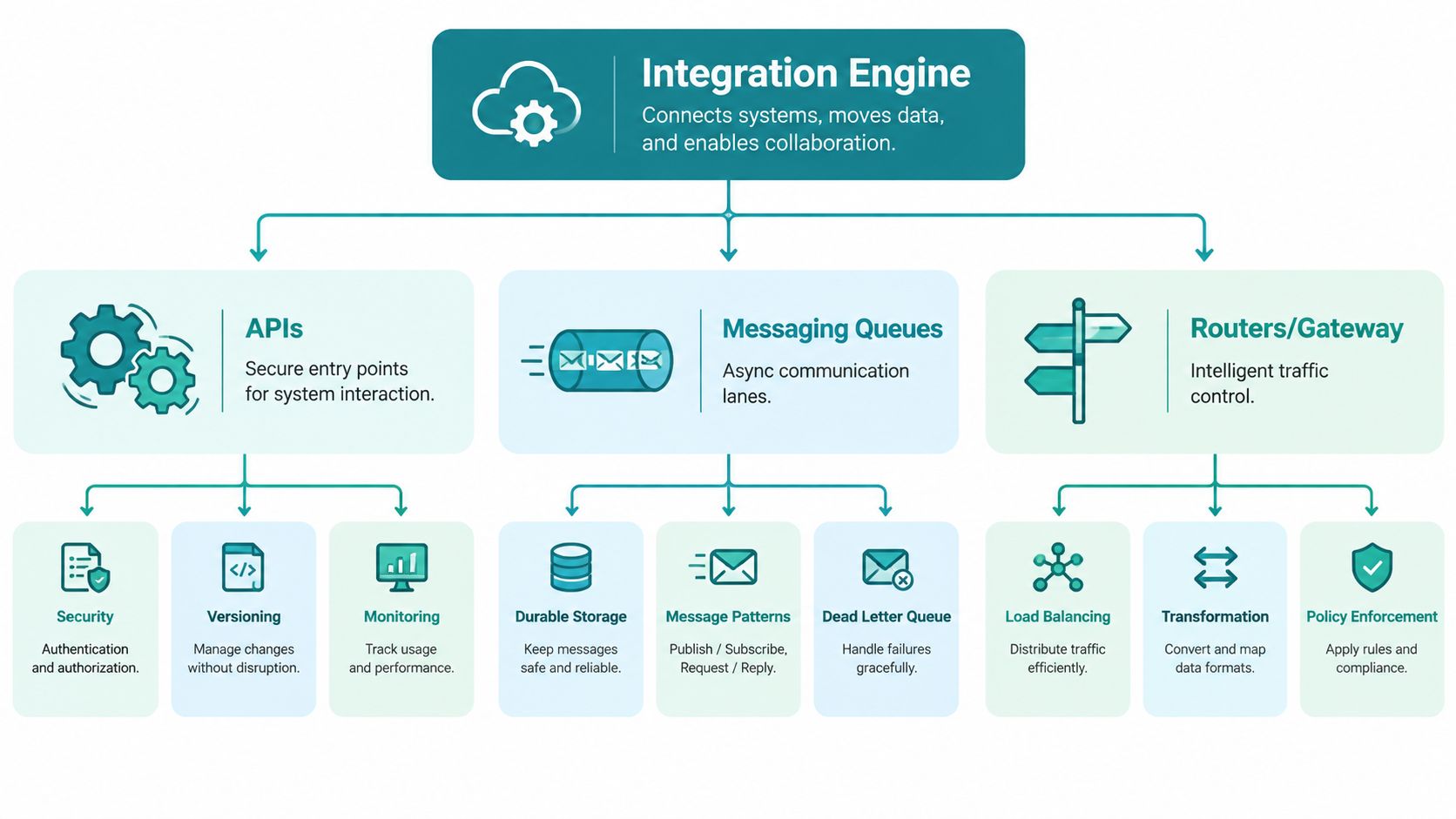
An integration architecture is easier to understand when you treat its components as business tools.
An API is a controlled doorway. It lets an approved application request data or ask another system to perform an action. An API can support a website form, a customer login, a product lookup, or a payment status request without exposing the entire application.
A message queue is a waiting line for work. Instead of forcing the website to wait while every downstream system processes a new order, the website can place a message in the queue. Other services collect and process it according to their responsibilities.
A router directs information to the right destination. A content-based router might send a healthcare inquiry to a protected workflow, a wholesale order to a sales queue, and a general question to customer support.
Reusable patterns in plain English
Production systems commonly use named patterns that prevent teams from rebuilding the same logic as fragile custom scripts. These include the following enterprise system connectivity patterns:
- Message Router: Sends each message to the correct destination.
- Content-Based Router: Makes that decision using information inside the message.
- Aggregator: Combines related messages into one business view, such as assembling order details from several sources.
- Splitter: Separates one large message into smaller tasks that systems can process independently.
- Translator: Converts one system's data format into another's, such as changing field names or date formats.
- Saga: Coordinates a multi-step business process and defines what should happen if one step fails.
- Outbox: Stores an outbound change reliably before sending it to another system, reducing the risk of losing an update.
- Change-Data-Capture: Detects changes in a source system and publishes them for other systems to consume.
These patterns matter because they assign familiar responsibilities. A translator handles mismatched formats. An aggregator assembles a complete picture. An outbox protects an important update. That separation makes troubleshooting more practical than searching through a large custom script.
Ask what happens when things go wrong
A vendor should explain more than the successful path. Ask whether failed messages can be retried, how duplicate messages are handled, where someone can see the error, and which team owns the connection.
For a Cincinnati business, that might mean knowing whether a missed website inquiry creates an alert, whether an order can be safely replayed, and whether an employee can correct a mapping without waiting for a developer. Custom integration and API development can support more specialized workflows, including the kinds of web app integrations offered by HDM, but the operating rules should be documented before implementation begins.
Security, Scalability, and Governance Without the Jargon
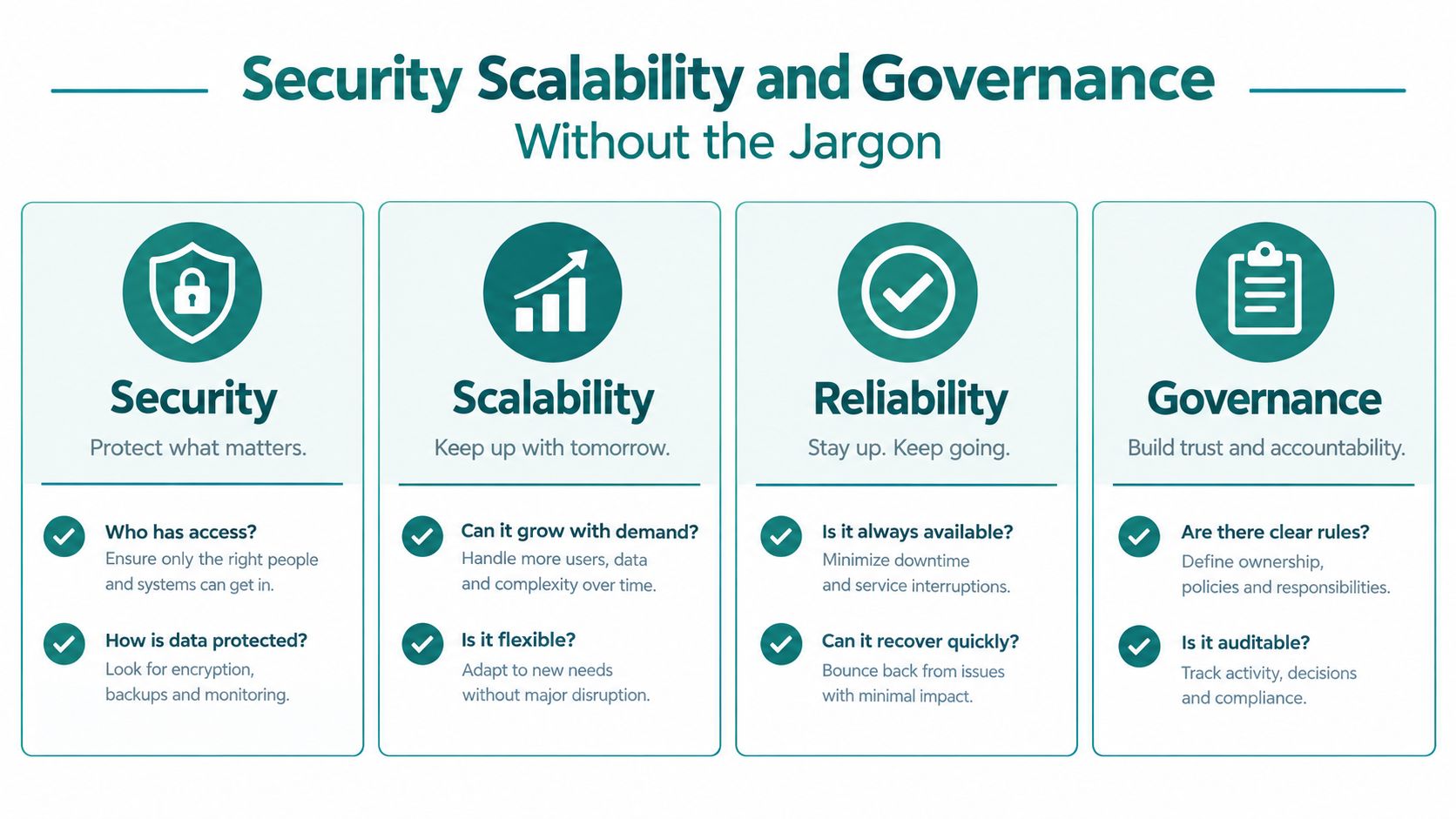
Security isn't a feature you add after connecting the systems. It belongs in the design from the first conversation, especially when a business handles health information, payment details, employee records, or confidential client data.
Start with four practical questions.
Security asks who can see and change information
Use HTTPS and TLS to protect data while it moves between systems. Use encryption at rest to protect stored information. Apply access controls so employees, applications, and vendors receive only the permissions they need. Maintain audit logging so the business can review who accessed information, what changed, and when the activity occurred.
Healthcare organizations need particular care. A HIPAA-compliant website handling protected health information should address HTTPS/TLS in transit, encryption at rest, access controls, audit logging, and signed business associate agreements with every vendor that touches PHI. That can include hosting, forms, email, analytics, and booking tools, as explained in this guide to HIPAA website requirements.
Scalability asks what happens during a busy period
A connection that works for ordinary activity may struggle during a product launch, seasonal rush, enrollment period, or campaign response. Ask whether the design supports queued work, controlled retries, rate limits, monitoring, and recovery after an outage.
Event-driven systems can separate the moment an action occurs from the time each downstream service completes its work. That design can help systems absorb bursts without forcing the customer-facing application to wait for every internal process.
Governance assigns responsibility
Governance sounds formal, but owners can reduce it to a short checklist:
- Name an owner: Every integration needs a team or person responsible for its operation.
- Document the contract: Record what data moves, where it goes, and what each field means.
- Control changes: Review API versions, credentials, mappings, and workflow changes before release.
- Test recovery: Confirm that the team can find, retry, and reconcile failed transactions.
- Review vendors: Know which external providers handle customer or business data.
A proposal should answer these questions in plain English. If it only shows a diagram of boxes and arrows, it hasn't shown how the connection will operate safely. HDM's cybersecurity best practices for businesses provide a useful starting point for broader website and digital-operation discussions.
Real-World Examples of Integration Done Right
A Cincinnati commercial cleaning company may begin with a website form, a shared inbox, a CRM, scheduling software, and accounting. In the disconnected version, an office coordinator reads every inquiry, enters the contact manually, sends a quote, creates a scheduling record, and later re-enters billing details.
A more deliberate design can use an API to create the CRM lead as soon as the form passes validation. A workflow can assign the lead based on service area, while an event announces that the quote was accepted. Scheduling and invoicing systems then receive the information they need without forcing the website to wait for every step.
The owner doesn't need to know whether the message uses REST, a queue, or a translation layer. The useful result is that staff see the same customer details, salespeople receive a clear follow-up task, and billing starts with cleaner information.
Retail connects the customer journey
A regional retailer using Shopify may have product information in one system, inventory in another, email automation in a third, and customer service in a fourth. A low-code platform may handle standard connections, while an API supports a custom loyalty account or store-locator experience.
The architecture should define which system owns inventory, when an order becomes eligible for fulfillment, and how cancellations reach every affected system. That prevents the marketing team from promoting an item that operations can't fulfill and gives support staff a more complete view of the order.
Legacy systems don't require a complete replacement
A manufacturer may rely on an older inventory or production system that doesn't offer modern APIs. An integration platform can act as a relay, translating older file formats or database changes into messages that newer tools can understand. The business can modernize the customer-facing website and reporting layer while keeping the legacy system in place until replacement becomes financially sensible.
The same principle applies to AI workflows. An AI assistant needs controlled access to current, explainable information. It shouldn't receive unrestricted access to every system. Recent discussion of AI-driven integration reports that 87.3% of organizations experienced major integration difficulties, with 63.7% citing technical integration as the main cause of longer implementation timelines, according to this analysis of the AI-driven future of enterprise integration. A governed API, event stream, or approved data service gives AI a safer foundation than an undocumented web of connections.
Your Next Steps to a Connected Business
Start with a map, not a platform purchase. List the systems that hold customer, order, appointment, payment, and operational information. For each handoff, record the trigger, destination, owner, sensitivity of the data, and what staff do when the transfer fails.
Use this decision guide:
- Choose API-first when a user or workflow needs an immediate request, lookup, or update.
- Choose event-driven integration when a completed action should notify several systems independently or when peak activity requires decoupled processing.
- Choose iPaaS or low-code when common SaaS tools need straightforward automation and your team values speed over deep customization.
- Use middleware or a relay when legacy systems, complex transformations, or broad enterprise governance make direct connections impractical.
Bring in an experienced partner when duplicate records affect customer service, no one owns critical integrations, sensitive data crosses multiple vendors, or a change in one system repeatedly breaks another. Measure outcomes that matter to the owner, such as faster lead follow-up, fewer manual entries, cleaner reporting, and more dependable customer communication.
A right-sized architecture can grow with the business without turning every new tool into a technical emergency. The best first project is usually a contained workflow with a clear owner and a visible business payoff.
HDM offers systems architecture, custom integrations, API development, web applications, SEO, analytics, and conversion-focused digital marketing for businesses in the Greater Cincinnati area and beyond. Visit HDM to discuss a secure, practical integration plan for your website and growth operations.


