
A headless CMS is a backend-only content platform that stores content separately from the front-end display and delivers it through APIs, letting businesses update content once and publish it everywhere. By 2025 and 2026, the category had reached estimated market values of about $1.56 billion to $1.82 billion, with projections reaching $4.42 billion by 2031 or $6.67 billion by 2035, depending on the research firm, as reported by Mordor Intelligence.
You may be feeling the problem before you know the term. A new service needs a landing page, your marketing team wants a campaign update, sales needs product information in a client portal, and someone has mentioned a mobile app or in-store display. Meanwhile, a seemingly small change to your current website is waiting on a developer, a plugin update, or a template that wasn't built for the job.
For a Cincinnati business owner, the important question isn't whether headless architecture sounds modern. It's whether your team can publish efficiently, maintain governance, support search visibility, and justify the added technical investment. This guide explains what a headless CMS is, how it works, where it helps, and when a simpler platform may be the more responsible choice.

Why Your Website Architecture Matters More Than You Think
A business owner in Cincinnati watches a competitor launch a new product line across its website, mobile app, and in-store kiosks on the same day. Their own team is still trying to force the same announcement into a template-locked WordPress site. The copy needs reformatting, the product page needs a plugin adjustment, and the kiosk content lives somewhere else entirely.

That frustration usually gets blamed on the website. Often, the deeper issue is architecture, meaning the way content, design, integrations, and delivery fit together. In a traditional CMS, the content database and the presentation layer are closely connected. Editors create content inside pages and templates that were designed to display it, so changing the design or adding a new channel can require substantial development work.
This model still works well for many organizations. It gives marketing teams familiar editing tools, pre-built themes, and a relatively direct route from draft to published page. The trouble starts when the company needs content in places the original system wasn't designed to support.
The business cost of a coupled system
A tightly connected CMS can create several operational bottlenecks:
- Duplicated publishing: Teams re-enter the same product, service, or campaign information for different channels.
- Template limitations: A page can only behave as flexibly as its theme and plugins allow.
- Developer queues: Editors depend on technical staff for changes that should be routine.
- Maintenance exposure: The website, database, plugins, and presentation code may need coordinated updates.
Headless architecture separates the content system from the front end. The CMS stores and manages the content, while developers decide how a website, app, kiosk, or other interface presents it. The headless CMS architecture overview describes this separation as a way to centralize editorial work while allowing multiple delivery channels to consume the same canonical content.
That shift turns the CMS into a business infrastructure decision. If your growth plan includes multiple sites, digital products, commerce experiences, or frequent campaign changes, separating content from presentation may reduce future constraints. If you mainly need a brochure website and a blog, the additional architecture may solve a problem you don't have.
Understanding Headless CMS Architecture
The easiest way to understand headless architecture is to think about a restaurant.
The content repository is the pantry. It contains the ingredients, organized so the kitchen staff can find them quickly. In a business website, those ingredients might include an article title, service description, product image, video, author profile, location details, or call to action.
The API layer is the pass-through window between the kitchen and the dining room. It carries the requested ingredients or finished content to the place that needs them. The three-layer explanation of headless CMS architecture identifies the repository, API, and frontend as the core parts of the system.
The frontend is the dining room. It determines what customers see, how information is arranged, and how the experience behaves on a particular device. A website, mobile app, kiosk, or connected display can each have a different presentation while drawing from the same content source.
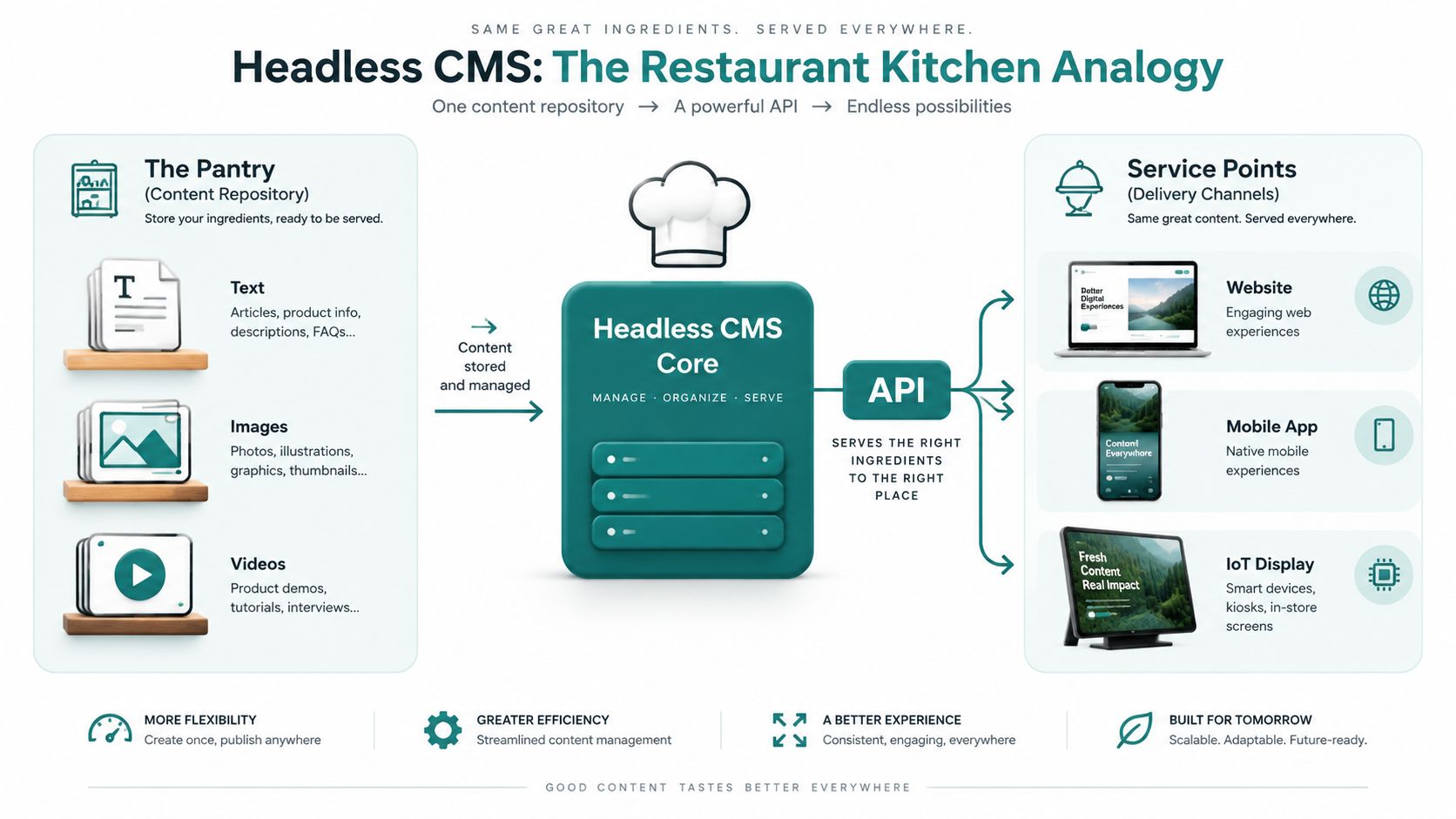
How the three layers work together
The repository stores structured content. A blog post isn't saved only as a finished webpage. Its headline, body, author, image, summary, category, and SEO fields can be stored as separate, reusable fields. Product information can follow its own model, as can locations or events.
The API delivers the requested content. Developers connect the frontend to the CMS through REST or GraphQL APIs. When a page needs a service description, the frontend requests that content and receives it in a machine-readable format, often JSON.
The frontend presents the experience. Developers can use React, Next.js, or another framework to render the content. The same service information might appear as a full web page, a compact mobile component, or a card on a digital display.
Editors don't need to design every channel from scratch. They work in the CMS interface, follow defined content fields, review the result, and publish. Developers can improve the front end without moving the underlying content into a new system.
Practical rule: A headless CMS makes content reusable, but reuse only works when the team models content carefully from the beginning.
The distinction between headless and decoupled matters too. A decoupled CMS separates backend and frontend responsibilities but may still include built-in templates or presentation capabilities. A headless CMS removes the presentation layer entirely, which provides more developer control but also creates responsibility for building and maintaining the frontend, as explained by Contentful's comparison of headless and decoupled CMS platforms.
For a deeper look at the commerce side of this architecture, Presidio's headless migration guide offers useful context on separating commerce services from a custom storefront.
Headless CMS vs Traditional CMS Platforms
The choice isn't between old technology and new technology. It's between two operating models with different strengths.
A traditional CMS such as WordPress, Drupal, or Joomla combines content management and page presentation. A headless CMS stores content separately and makes the front end a separate application. That difference affects cost, speed, editorial independence, and the amount of technical support your team needs.
A practical comparison
| Dimension | Headless CMS | Traditional CMS |
|---|---|---|
| Initial investment | Usually requires more planning, frontend development, and integration work | Often launches faster with themes, templates, and established plugins |
| Long-term flexibility | Frontends and delivery channels can evolve independently | Changes are shaped by the platform, theme, and plugin ecosystem |
| Content reuse | One structured source can serve websites, apps, kiosks, and other channels | Content is commonly organized around a primary website |
| Performance control | Developers can choose rendering, caching, CDN, and frontend strategies | Performance depends heavily on server configuration, database work, themes, and plugins |
| Editorial experience | Can be efficient, but preview and page-building workflows must be designed well | Often familiar to marketers, especially for page-based editing |
| Technical requirements | Needs frontend development and ongoing technical ownership | Marketing teams can often handle routine visual edits independently |
| Scalability | Suits growing channel and integration needs | Suits straightforward sites with limited delivery requirements |
| Maintenance model | Backend and frontend can be managed separately | Core, plugins, theme, hosting, and database updates may remain closely connected |
Headless doesn't automatically mean cheaper. The upfront work can be higher because someone must build the frontend, establish content models, create preview workflows, connect analytics and integrations, and document the publishing process. The potential benefit is greater control as the business adds channels or redesigns the customer experience.
Traditional CMS platforms have a meaningful advantage for a small professional practice, local contractor, or service firm that needs a reliable website, location pages, and occasional blog updates. A well-configured WordPress site may get the job done without introducing a separate frontend team.
Where different businesses tend to fit
| Business situation | Likely fit | Reason |
|---|---|---|
| One marketing website, modest content volume, limited technical support | Traditional CMS | Faster launch and familiar editing |
| Multiple brands or websites sharing services and media | Headless or hybrid | Centralized structured content can reduce duplication |
| Website plus mobile app, portal, or kiosk | Headless | Multiple frontends can consume the same source |
| Frequent campaigns with sophisticated preview and approvals | Headless with strong editorial tooling | Workflow design becomes a buying criterion |
| Very small team with no developer partner | Traditional CMS | Lower operational complexity may matter more than flexibility |
Adoption has moved beyond a narrow enterprise experiment. One 2025 market summary reported 44% of organizations use a headless CMS, with adoption reaching 53% among companies under 5,000 employees, while another report described 30% of businesses as already running headless and 45% planning to switch within five years. Those figures appear in OneSevenTech's 2025 headless CMS comparison, but they shouldn't replace a business-specific evaluation.
Real Business Use Cases and Example Stacks
A headless CMS earns its keep when content must travel beyond a single website or when the presentation layer needs to change independently from editorial operations. It creates unnecessary work when a company has one simple site and no near-term plans for additional channels.
Consider a Cincinnati healthcare provider. The communications team may need to manage service descriptions, provider biographies, location information, educational articles, and appointment guidance. A possible architecture could use Contentful for structured content, Next.js for the website frontend, Vercel for frontend hosting and delivery, and secure integrations for patient-facing systems.
That setup can separate general editorial content from the application logic that handles sensitive experiences. It doesn't make an organization automatically HIPAA compliant. The provider still needs appropriate safeguards, vendor agreements, access controls, logging, encryption, and a careful decision about what information belongs in the CMS at all.
For an e-commerce retailer, Shopify can serve as the commerce backend while a custom React storefront controls the customer experience. The same product catalog can support a website, mobile experience, and in-store kiosk. The retailer gains freedom to design a distinctive storefront without replacing Shopify's established product, inventory, and checkout capabilities.
A Cincinnati manufacturer with multiple product categories might also use a headless CMS for technical content, installation guides, and sales resources. The website could present detailed specifications to buyers, while a customer portal uses selected content for authenticated users.
Example stacks by business need
| Business Scenario | CMS Platform | Frontend Framework | Hosting / CDN | Best For |
|---|---|---|---|---|
| Healthcare provider with public content and digital patient experiences | Contentful | Next.js | Vercel with secure application integrations | Structured publishing across public and authenticated experiences |
| Retailer with a custom shopping experience | Shopify as commerce backend | React | CDN-backed frontend hosting | Product content across web, mobile, and physical displays |
| Manufacturer with product education and sales resources | A headless CMS such as Contentful or another API-first platform | Next.js or React | Cloud hosting with CDN delivery | Reusable technical and marketing content |
| Local law, accounting, or consulting firm | WordPress | WordPress theme or page builder | Managed WordPress hosting | One primary website with straightforward publishing |
The HDM guide to building scalable React applications provides relevant background for organizations considering a custom frontend. The technology matters, but the workflow matters more. Editors need clear fields, useful previews, approval stages, version control, permissions, and a documented process for publishing across channels.
A headless platform may be the wrong choice for a local professional services firm with a simple blog-and-brochure site. If the team publishes infrequently, has no app or portal, and values visual page editing above channel flexibility, a traditional CMS can be the more practical investment.
SEO Performance and Security Implications
Headless architecture can support strong SEO, but it doesn't create search visibility by itself. Search engines still need crawlable pages, useful content, clear internal linking, accurate metadata, structured data where appropriate, and a frontend that renders content reliably.
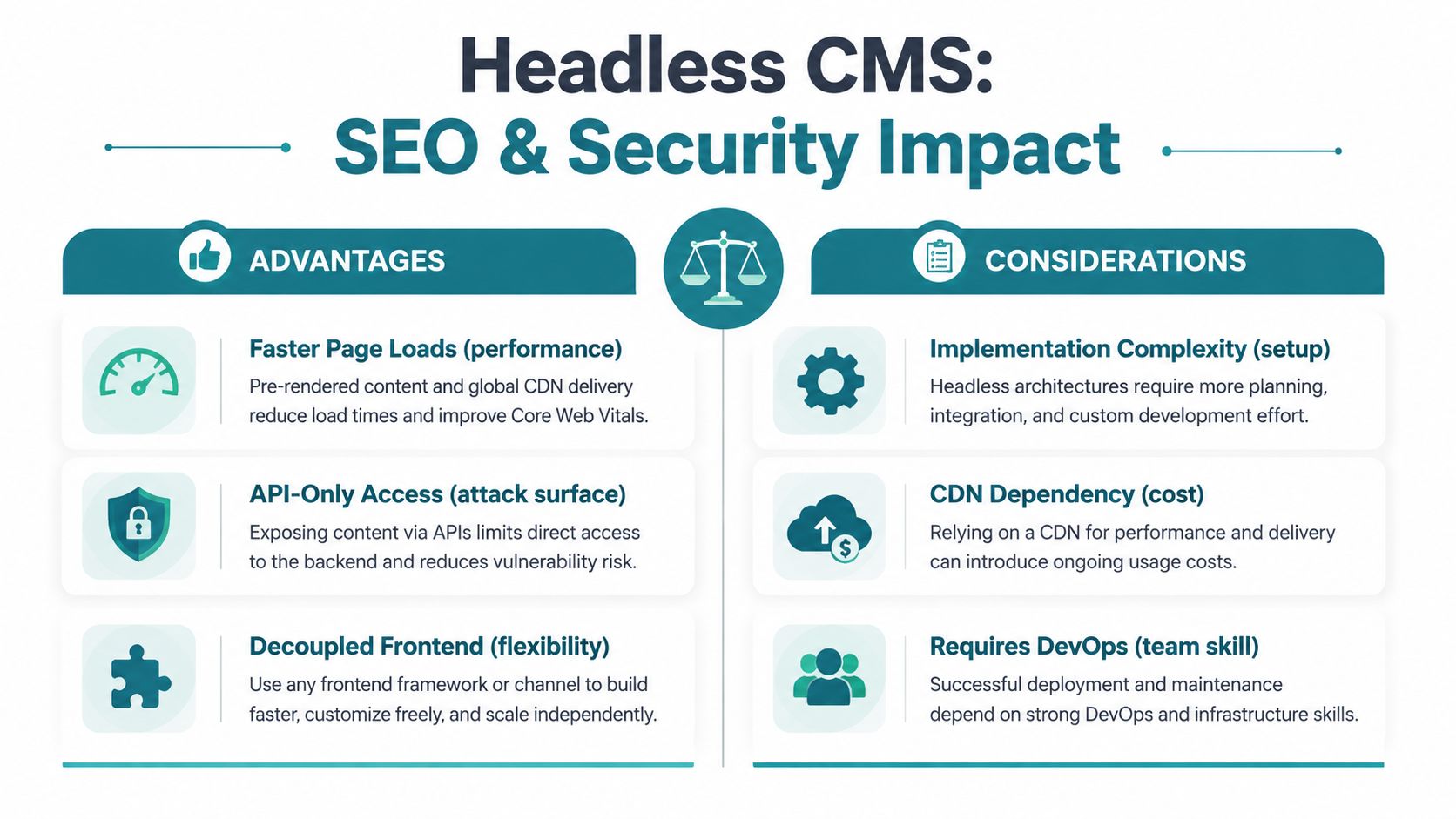
The main SEO opportunity comes from frontend control. Developers can use server-side rendering or static site generation to produce complete HTML, then deliver pages through caching and a CDN. That approach can improve the experience for visitors and crawlers compared with a poorly configured client-side application that depends on browser scripts before showing meaningful content.
The main risk is implementation quality. A headless CMS may store excellent title tags and descriptions, but those fields do nothing if the frontend fails to output them correctly. The same applies to canonical URLs, XML sitemaps, redirects, image alt text, schema markup, and social sharing metadata.
Security requires deliberate boundaries
A decoupled setup can reduce the public exposure of the content administration layer because the website frontend doesn't need to expose the same server and database structure as a monolithic installation. API authentication, role-based permissions, rate controls, secret management, monitoring, and vendor security practices still require active ownership.
For healthcare organizations, architecture must follow compliance requirements rather than marketing claims. Teams should confirm how providers handle encryption in transit, audit logging, access control, data retention, and business associate agreements before putting regulated information into a platform. Public educational content may belong in a CMS, while protected patient information may belong in a separately secured application.
SEO and security rule: Treat the CMS as one part of the system. Review the content model, rendering layer, APIs, hosting, integrations, and editorial permissions together.
Businesses can use HDM's website security and wellness services as one reference point when planning ongoing maintenance and security oversight. The right decision framework asks whether the expected SEO and delivery benefits justify the development and operational responsibilities. For a regulated organization, compliance readiness may outweigh frontend flexibility. For a local retailer, performance and structured content may matter, but only if the team can maintain the implementation.
Migration Planning and Implementation Considerations
Migrating to headless isn't a matter of exporting pages, changing a theme, and pressing publish. A traditional website organizes content around pages. A headless system organizes it around reusable content types and fields, so the migration changes how your team thinks about publishing.
Start with a content audit. Identify which pages are valuable, which are outdated, which assets are duplicated, and which pieces should become reusable components. A service description, location address, author profile, or product feature shouldn't be copied into several unrelated pages if the business needs to update it consistently.
A responsible migration sequence
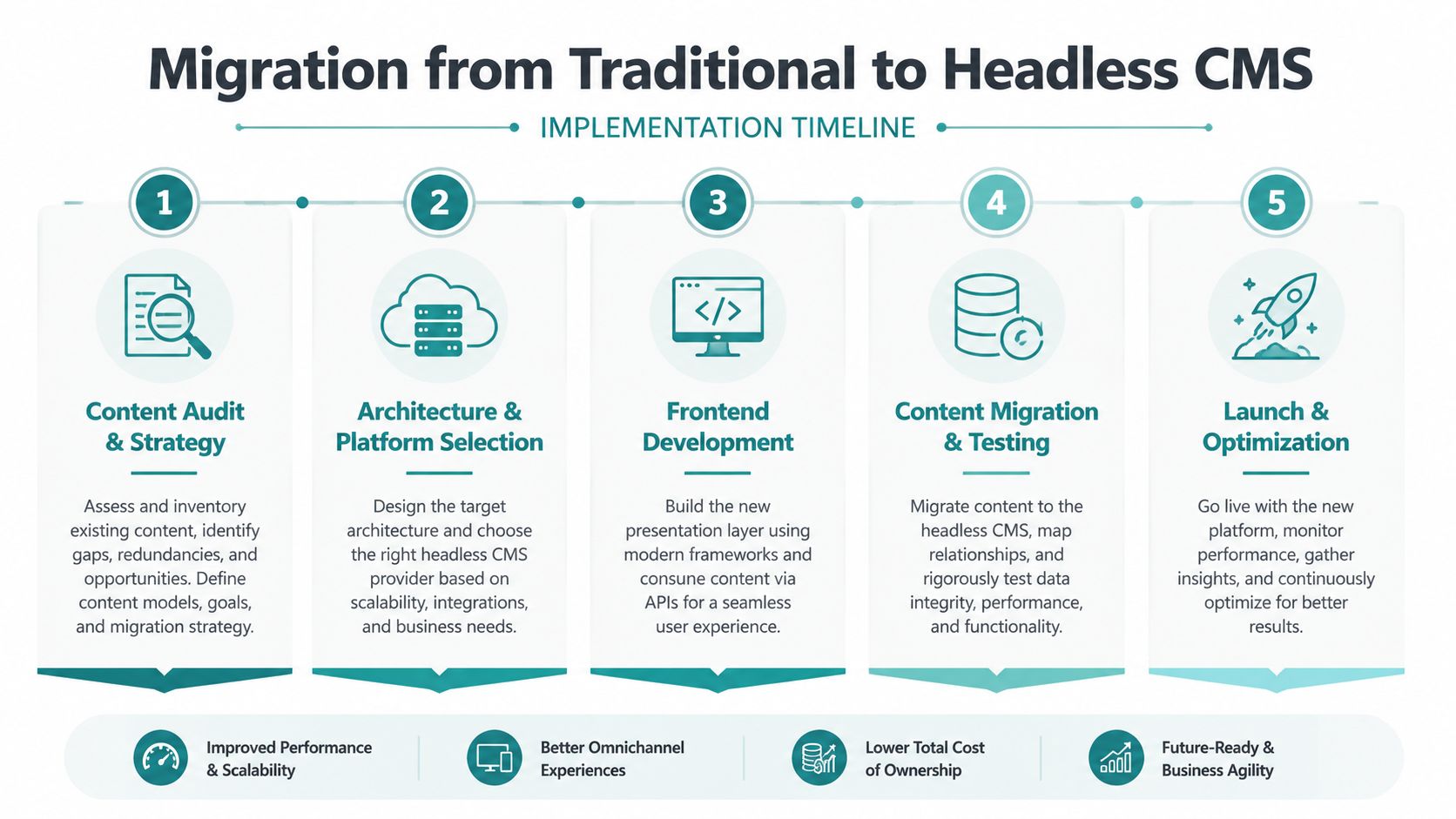
Audit the existing content. Record page purpose, owner, traffic role, metadata, media, redirects, and approval requirements. Keep the business goal in view, not just the URL inventory.
Design the content model. Define fields for articles, services, products, locations, authors, and reusable calls to action. Editors should understand what each field means and when to use it.
Select the platform and architecture. Evaluate editor usability, preview, permissions, API capabilities, integrations, localization, documentation, and vendor support. The cheapest license won't be the cheapest system if it creates daily workflow friction.
Build a frontend slice. Start with a lower-risk content area, such as a resource library or selected service section. Use it to test rendering, analytics, search controls, image handling, approvals, and editor training.
Migrate, test, and launch in phases. Validate content, redirects, forms, metadata, accessibility, performance, permissions, and analytics before moving additional sections.
Your team also needs to plan for CRM connections, marketing automation, analytics, search, commerce, translation, image optimization, CDN configuration, API limits, backups, and error monitoring. Editors accustomed to a visual page builder may need new guidance for structured entry, previewing a page that isn't rendered inside the CMS, and understanding which changes affect multiple channels.
A useful guide to legacy system migration from Rite NRG can help frame the broader planning concerns around dependencies, risk, and sequencing. For headless-specific implementation considerations, HDM's headless CMS implementation resource offers another relevant planning reference.
Don't promise a fixed schedule or budget before completing discovery. The effort depends on content quality, integration depth, frontend scope, compliance requirements, migration method, and the amount of custom editorial tooling required. Common surprises include underestimating frontend development, rebuilding features that the old CMS provided automatically, and forgetting that a custom presentation layer needs ongoing updates.
Making the Right Choice for Your Business
A headless CMS makes sense when your publishing operation has outgrown a single website. Before choosing a platform, answer these five questions:
- Multiple channels: Does your team need to publish the same content to a website, app, portal, kiosk, or another interface?
- Compliance: Does your organization need carefully controlled, auditable content delivery for healthcare or another regulated environment?
- Template limits: Are marketing campaigns, product launches, or service updates repeatedly blocked by your current theme?
- Technical support: Do you have developers in-house or a trusted agency partner who can own the frontend and integrations?
- Performance priorities: Is site speed important enough to justify investing in rendering, caching, CDN delivery, and ongoing technical monitoring?
If most answers are no, a well-maintained traditional CMS may be the smarter option. Headless architecture isn't a badge of digital maturity. It's an operating choice that should reduce friction for a real team.
HDM's evaluation process should begin with a content audit and workflow assessment, not a platform recommendation. For a Cincinnati business, that means reviewing how staff create, approve, update, measure, and reuse content before deciding whether to adopt a fully headless system, a hybrid approach, or a more focused traditional CMS implementation.
You can also start gradually. A new campaign site, resource center, product catalog, or customer portal can use a decoupled approach while the existing website remains in place. That gives the team a chance to test editorial workflows and technical ownership before committing to a complete migration.
HDM helps Cincinnati-area businesses plan and build high-performance websites, headless CMS implementations, custom applications, e-commerce systems, and ongoing security and performance programs. Visit HDM to request a discovery conversation or technical audit focused on your content workflow, SEO goals, integrations, and growth plans.