


Your current ecommerce setup probably isn't failing in one dramatic way. It's more likely nagging you in a dozen small ones, a clunky admin screen, a checkout that feels dated, product changes that take too long, and SEO work that never quite seems to stick after every update. For a lot of Cincinnati owners, that's the moment Shopify starts looking less like a trendy platform choice and more like a practical business decision.
The right shopify migration services don't just move data. They protect revenue, preserve search visibility, and make sure the new store is easier to run than the old one. That's the standard business owners should use, because a migration that creates new problems is just an expensive delay in disguise.
Why Cincinnati Businesses Are Migrating to Shopify in 2026
A local owner usually feels the pressure in day-to-day operations first. The current platform slows down when traffic spikes around a seasonal promotion, a developer has to touch every small change, or the store looks fine on paper but a competitor down the road updates faster, converts better, and feels easier to trust. At that point, the question is whether the site is still helping the business grow.
The broader market signal backs up that shift. According to a 2026 migration crawl from migration crawl report, 31,946 stores moved to Shopify from seven major competitors, while 10,271 stores left Shopify, for a 3.1:1 inbound ratio and a net gain of 21,675 stores. Magento / Adobe Commerce showed a 17.8:1 ratio in Shopify's favor. That kind of movement does not mean every business should switch, but it does show where merchants land when their current platform has started to hold them back.
The WooCommerce breakdown points to a similar pattern. The same crawl showed 16,660 inbound moves from WooCommerce, or 52.1% of inbound migrations. For Cincinnati companies weighing platform fit, an enterprise platform comparison helps separate the systems that can handle complexity from the ones that create more work for the team.
The practical takeaway is straightforward. Shopify has become the default landing spot for merchants who want less maintenance and more room to grow. If you are still comparing platforms, this guide to the best ecommerce platforms for small business is a useful starting point for smaller teams that need to balance cost, control, and day-to-day manageability.
Practical rule: if your team spends more time keeping the store stable than improving it, the platform is already costing you growth.
Planning Your Shopify Migration for Success
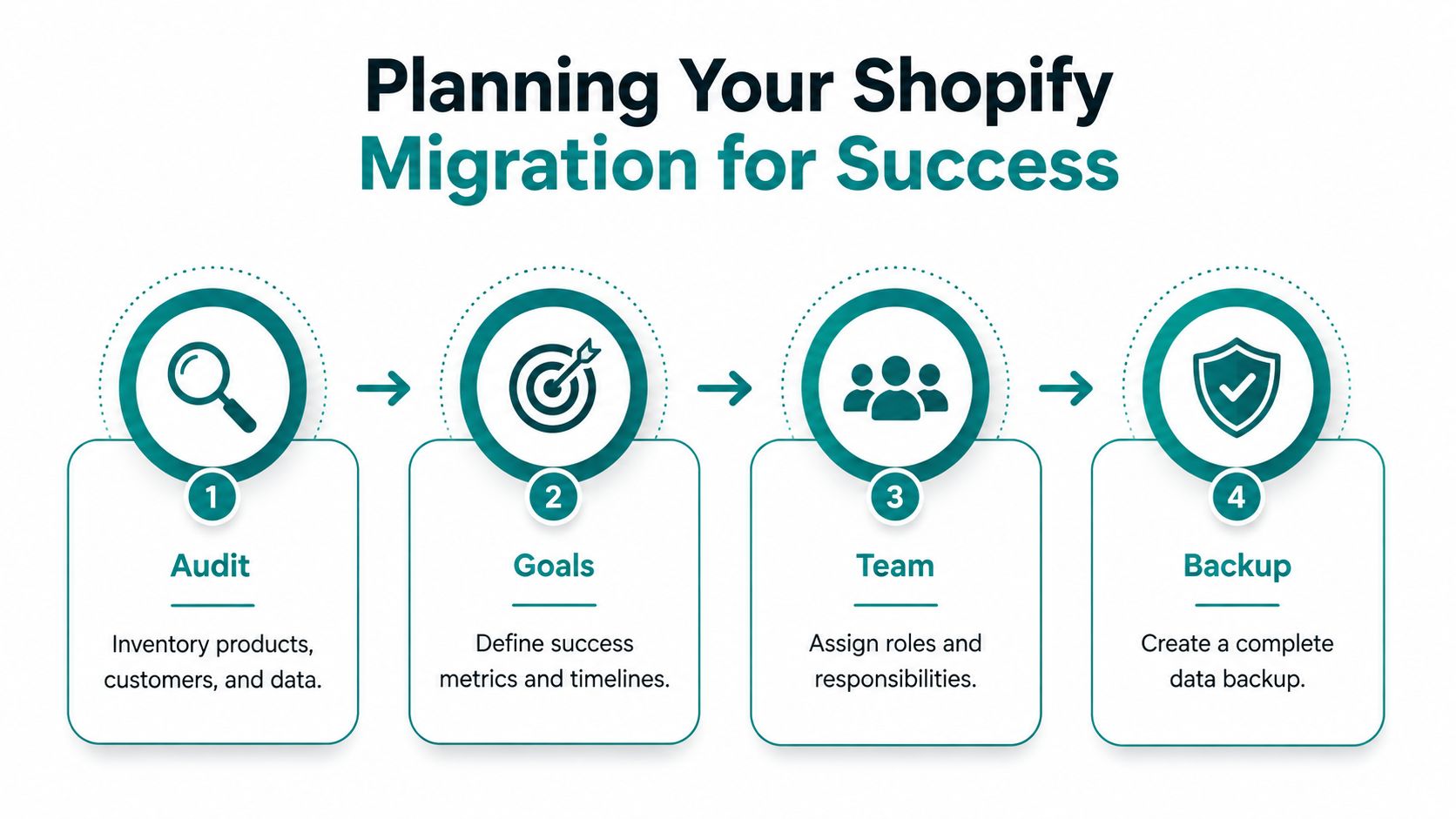
The strongest migrations begin with a clear inventory of what the store already holds. That includes products, customers, orders, pages, blog content, apps, integrations, tracking scripts, and every URL that still brings in traffic or conversions. Skip that work and the project gets harder to measure, because you lose sight of what needs to move and what needs to stay intact.
Scope decides the real project
Shopify's own enterprise guidance says Shopify Plus migrations typically take three to four months from kickoff to go-live. Shopify also says brands migrating to its platform implement 20% faster, are 66% more likely to implement on time, and are 3x more likely to implement on budget. Those figures do not replace planning, they explain why scope control matters so much.
The scope question is not only whether the site should move, but what should change at the same time. Some stores need a straight platform switch. Others need subscriptions, B2B logic, multi-currency, custom integrations, or a theme rebuild that supports new merchandising. Independent migration guidance notes that project cost can swing from under $1,000 for a DIY move to $50,000+ for enterprise work, depending on integrations, complexity, and scope. That is why the best scoping conversation starts with revenue goals, not design preferences.
Decide what stays the same
One question too many migrations ignore is whether a redesign is needed at all. Sometimes the smarter move is to keep the storefront experience intact and focus only on the platform switch, especially when SEO risk and conversion stability matter more than a visual refresh. A new look can help, but it can also create avoidable uncertainty if the current site already converts well.
Practical rule: if the current layout is helping customers buy, don't tear it up just because the backend is changing.
That mindset matters for Cincinnati businesses running with lean teams. A move to Shopify should reduce friction, not create a long redesign project that pulls attention away from sales. For teams that want help deciding what to keep, what to rebuild, and what to postpone, our ecommerce migration services framework keeps the focus on revenue impact instead of unnecessary scope.
Build the team and backup plan early
Before anyone touches exports, assign who owns product data, who signs off on content, who approves redirects, and who verifies checkout. Then create a complete backup. A migration stays easier to control when roles are clear and each checkpoint has one accountable owner.
For business owners, the right plan answers four questions up front. What are we moving, what are we leaving alone, who is responsible for each part, and how will we know the launch was successful. If those answers are not clear, the project is not ready yet.
For spreadsheet cleanup and field mapping, the DPP Grid Shopify CSV resources page is a practical reference when source exports need normalization before import.
Moving Your Store Data to Shopify Correctly
Data migration is where many projects either protect future revenue or create cleanup work that keeps showing up after launch. Shopify's migration guidance lays out a phased sequence, starting with an audit of the source stack and URL inventory, then cleaning exported data into Shopify's CSV or API schema, mapping legacy entities to Shopify objects and metafields, rebuilding the theme and integrations, and then validating redirects, staging, and cutover with a final delta sync before DNS switch-over. That order works because each step catches a different failure before customers ever see it.
Use the platform's import tools the right way
Shopify's Store Migration app can import data from WooCommerce, Wix, Lightspeed, Etsy, Amazon, eBay, Square, and Clover by CSV upload. The tool helps, but it does not clean up messy source data for you. Shopify also tells teams to normalize headers, variants, images, and weights, then run a validation pass after import to confirm the products matched correctly. For spreadsheet cleanup and field mapping, the DPP Grid Shopify CSV resources page is a practical reference when source exports need normalization before import. Good CSV work is not flashy, but it is where a lot of migrations stay on schedule.
| Platforms Supported by Shopify Store Migration App | Migration Support |
|---|---|
| WooCommerce | CSV upload |
| Wix | CSV upload |
| Lightspeed | CSV upload |
| Etsy | CSV upload |
| Amazon | CSV upload |
| eBay | CSV upload |
| Square | CSV upload |
| Clover | CSV upload |
Scope decides the project
One structural constraint trips up a lot of larger catalogs. Shopify's standard product model supports only 3 options and 100 variants per product. If your current store uses complex SKUs, bundles, or custom options, that data often needs to be restructured before import. Skip that work and you are likely to break merchandising logic, lose data, or end up with awkward workarounds later.
That matters most for owners who assume a migration is only a file transfer. It requires a data model decision. The product structure that worked on your old system may not fit Shopify cleanly without thoughtful cleanup.
Move content with the customer journey in mind
Orders, customers, pages, and blog content all need different handling. Products can often be normalized into clean import files. Blog content needs internal links checked. Historical orders may help customer service, but they should not drive the whole migration plan. Move the information customers and staff use, then verify it after import.
For Cincinnati owners reading an external service page like ecommerce migration services, the important distinction is simple. A tool can move records, but a migration partner makes sure the records still support sales, service, and reporting once they arrive.
Practical rule: if your export file looks "done" but nobody has checked variants, weights, and image mapping, it is not ready.
Preserving SEO and User Experience During Migration
A Shopify migration should protect the traffic you already earn and the buying experience that turns that traffic into revenue. In Cincinnati, I see owners lose time and money when they treat SEO as a late-stage check instead of part of the launch plan. The right approach keeps old URLs working, moves content with care, and leaves the parts of the storefront that already convert alone unless there is a clear reason to change them.
Protect the URLs people already trust
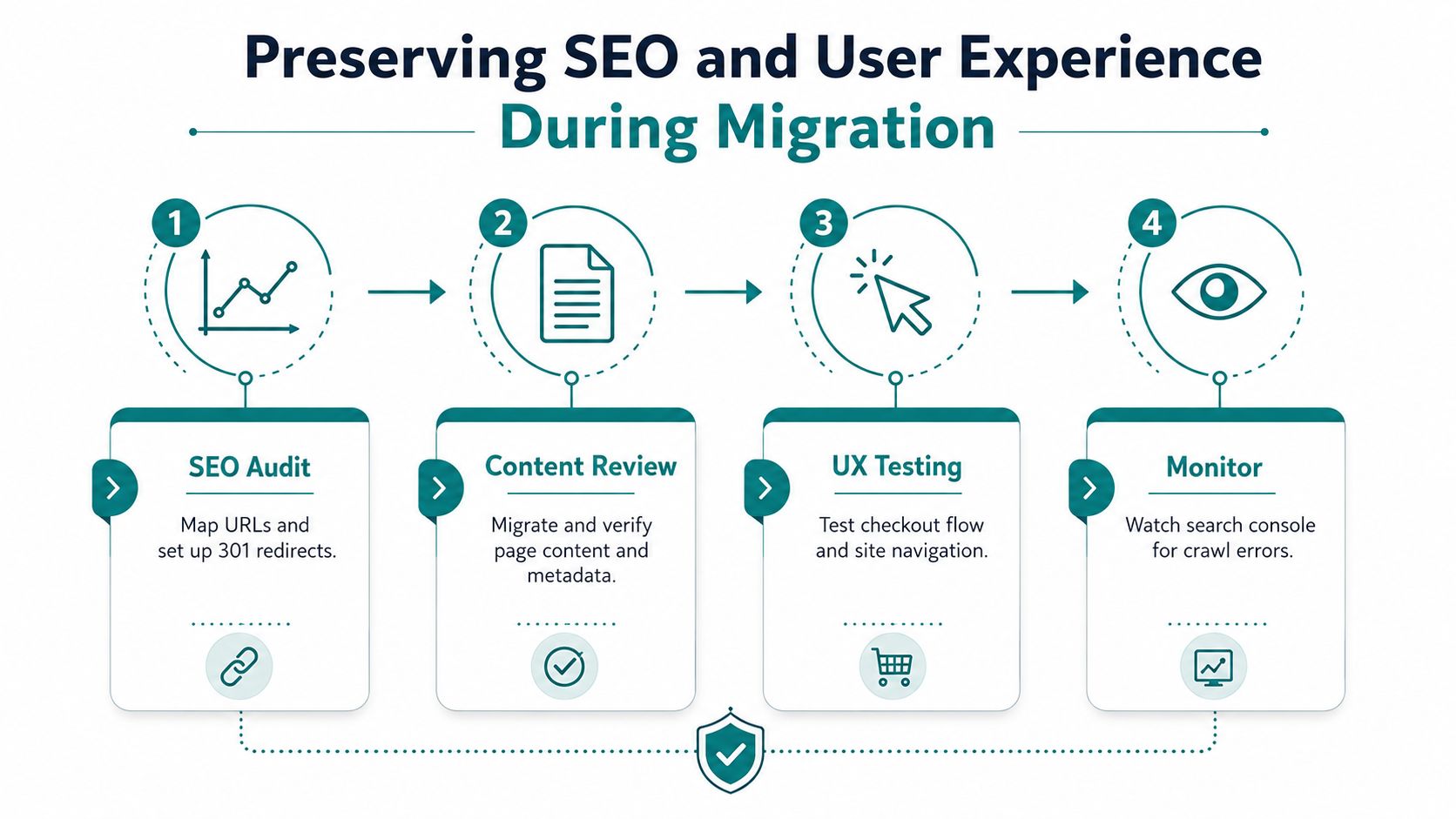
URL mapping and 301 redirects need to be part of the launch plan from the start. If the old paths do not point to the right new pages, search visibility drops and customers land on dead ends. That is why pre-launch URL mapping has to happen before traffic is switched, not after the store is live.
A clean migration usually includes these controls:
- Map every important URL: products, collections, pages, and blog posts need a one-to-one redirect plan.
- Check content before launch: titles, descriptions, and on-page copy should move without missing sections or formatting errors.
- Test internal links: customers shouldn't hit dead ends inside the new site.
- Watch Search Console after launch: crawl errors are easier to fix early than after traffic has already settled.
If you want a practical reference for preserving rankings during the move, HDM's complete guide to ecommerce SEO is a useful companion to the migration plan.
Keep the storefront familiar where it matters
A redesign is not required for a successful migration. If the current store already converts well, preserving the familiar layout and navigation can protect revenue while the team focuses on the platform change itself. Shopify gives you room to improve the front end later, but changing too much at once adds risk that many owners do not need.
Headless architecture deserves a separate decision. It can fit brands with real operational reasons for more control, but it should not be chosen just because custom work sounds more impressive. Every extra layer increases the number of things that can fail on launch day.
Validate the business systems, not just the pages
A migration can look fine in the browser and still fail where money is made. Payments, taxes, and shipping handoff need live testing, because checkout problems do not show up in a screenshot. Shopify's own guidance calls for a final check with a live order before launch, and that is the standard that matters because lost orders are more expensive than a few extra hours of testing.
Search visibility now reaches beyond traditional rankings too. The AI search visibility guide for SaaS teams is a good reminder that buyers use more than one path to find products and content. If a migration strips out pages, weakens internal links, or buries helpful copy, it affects both discovery and conversions at the same time.
Executing Your Launch Day and Post-Launch Plan
A launch day that goes smoothly usually looks boring from the outside. The team has already frozen changes, finished the final data pass, and agreed on who owns each step of the handoff from the old store to Shopify. If product edits or price changes are still happening in the legacy system while the new site is being finalized, the migration can drift out of sync fast.
The freeze window matters more than most owners expect
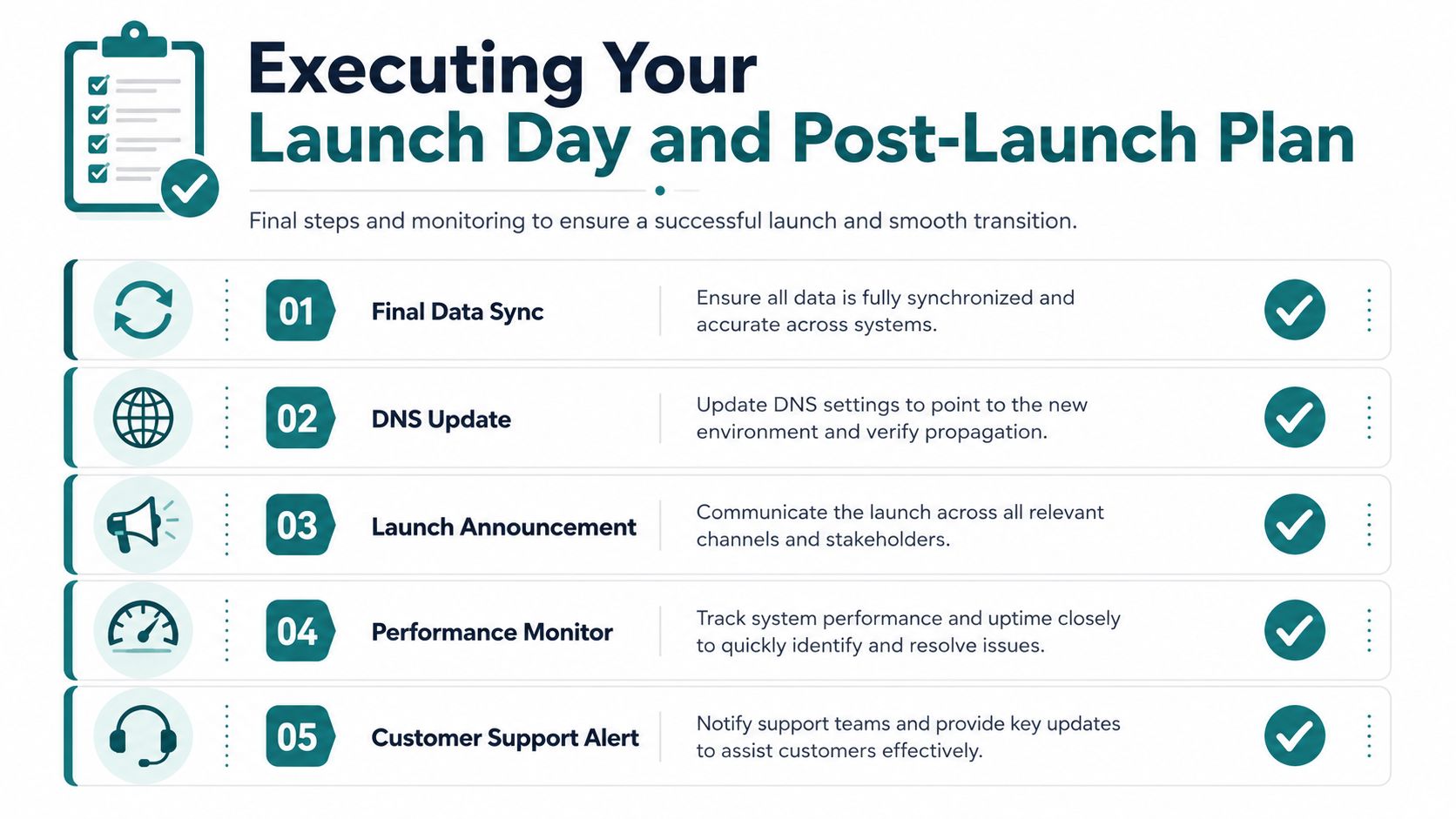
A freeze window gives the migration team a clean cutoff. Content updates, price changes, and manual order edits stop on the legacy system, then the team runs a final delta migration before DNS points traffic to Shopify's servers. That final pass catches the changes made since the last import, which is why skipping it can leave you with stale inventory, duplicate customer records, or orders that never arrive in the new store.
The launch checklist should stay short and specific.
- Final data sync: capture the last changes before the switch.
- DNS update: point traffic to the new Shopify store.
- Live order test: verify payments and tax calculations with a real checkout.
- Shipping check: confirm fulfillment handoff still works.
- Support watch: make sure someone is ready to respond quickly if a customer hits an issue.
Shopify's earlier migration guidance sets the expectation that a migration can take three to four months from kickoff to go-live, which is why launch prep should never be rushed. A slower, planned rollout gives your team room to verify the checks that protect revenue and reduce avoidable support tickets.
Monitor what customers actually do after launch
The first days after launch are for observation, not celebration. Traffic patterns, conversion behavior, error logs, and customer feedback all need close attention so you can catch problems before they spread. If product pages load but conversions fall, the issue may sit in navigation, checkout, or a broken integration rather than the migration itself.
Post-launch review also needs to confirm that search engines are reading the new structure the way you intended. The business test is simple. Customers should find what they need, complete checkout without friction, and keep buying without hitting hidden errors. That is the point where good Shopify migration services earn their keep. The work is not finished at go-live. It is finished when the store is stable, search engines are crawling the new structure correctly, and customers are buying without friction.
Common Migration Pitfalls and When to Hire Professional Help
The most expensive migration mistakes are usually preventable. Teams skip the freeze window, move stale data, under-test redirects, or underestimate how many systems are tied to the old store. The result is often the same, broken customer records, confused inventory, checkout issues, or a search drop that takes longer to recover from than the migration itself.
The failures are usually operational, not technical
Skipping the freeze window creates conflicting data. Missing a redirect plan creates dead URLs. Not checking payments, taxes, and shipping after launch means the store can look healthy while failing at checkout. Those are business problems first, technical problems second.
A lot of owners try to solve them all internally because the project sounds manageable at first. That works for a straightforward store move with light customization. It stops working fast once the catalog has complex variants, the business relies on ERP or custom API connections, or the team wants headless architecture, B2B logic, subscriptions, or multi-currency support.
Know when DIY stops making sense
If the migration is basically a clean platform swap, Shopify's own tools can cover a lot of the mechanics. If the store has operational complexity, outside help becomes cheaper than the mistakes. A Cincinnati-based agency like HDM can be a practical option, since HDM handles platform migrations, custom integrations, and post-launch support as part of its ecommerce work.
A simple decision frame helps:
- Move it yourself if the catalog is small, the data is clean, and the store doesn't rely on custom workflows.
- Bring in help if SEO equity matters, integrations are layered, or you can't afford downtime and cleanup.
- Plan for ongoing support if you need someone to keep monitoring the store after launch rather than disappearing once the files are imported.
The main question isn't whether you can click the buttons. It's whether the move protects revenue while creating a cleaner operating model on the other side.
Practical rule: if one missed redirect or one broken checkout flow would hurt the month, the project is already bigger than a DIY weekend.
If your Cincinnati business is weighing a move to Shopify, HDM can help scope the project, protect the SEO value you've already earned, and make the launch less stressful for your team. Visit HDM to talk through your store, your current platform, and what a clean migration should look like for your growth goals.


