
Website maintenance is the ongoing work that keeps your site secure, fast, backed up, and accurate, not a one-time fix. In 2026, monthly maintenance ranges from about $5 to $75 for a personal blog, $50 to $500 for a small or medium business site, and $300 to $1,000 for an ecommerce store, with more complex websites costing substantially more.
That distinction matters when you run a Cincinnati business. You may launch a polished website, return to serving customers, and assume the job is finished. Then a contact form stops sending, an online booking tool disconnects, or a software update creates a blank page the morning a prospective customer is ready to reach you.
A website is more like a storefront with plumbing, locks, electrical systems, and changing signs than a printed brochure. Someone has to keep those systems working. Maintenance is recurring business risk management, and the right cadence depends on how much revenue, customer information, and day-to-day work your website handles.
What Website Maintenance Really Means for Your Business
A contractor in Greater Cincinnati can begin Monday with a site that appears fine, then discover Wednesday that a form integration has stopped working. The pages still load, so the failure may remain hidden until a customer says a quote request never arrived. It may be a small operational problem rather than a dramatic cyberattack, but the business consequence is real.
Website maintenance means regularly caring for the systems, content, and customer paths that make your website useful. The work includes security patches, software updates, backups, uptime checks, performance reviews, accurate content, and tests of the actions that matter to your business. If visitors call, submit a form, schedule an appointment, request a quote, or buy something, those paths need routine attention.
A website isn't finished at launch
A launch date starts an operating cycle. Content becomes outdated, browsers change, third-party services revise their requirements, and tools inside a content management system need updates. A site that worked perfectly on launch day can still develop a broken connection or outdated message later.
A Cincinnati storefront provides a practical standard for care. You replace a burned-out light, repair a sticking door, update the hours on the sign, and check the alarm system before a customer gets hurt. Your website deserves that same regular attention, because its broken parts can prevent people from contacting or buying from you.
Maintenance protects more than technology
A healthy website protects several business assets at once:
- Customer access: Visitors can find accurate information and complete important actions.
- Revenue opportunities: Forms, checkout, booking, and phone links continue to work.
- Trust: A secure, current site looks dependable when someone compares local providers.
- Search visibility: Useful content, functioning pages, and a usable experience help people discover the business.
- Business continuity: Verified recovery points provide a way back after a failed change or outage.
The right maintenance plan follows risk, not page count. A local service business with a simple contact form may need a different update, backup, and security cadence from a high-volume online store handling orders and customer information. The more revenue and daily work your site carries, the more often its important paths should be checked.
Practical rule: Budget for the consequences your website can create, not just the number of pages it contains.
How Website Maintenance Works Behind the Scenes
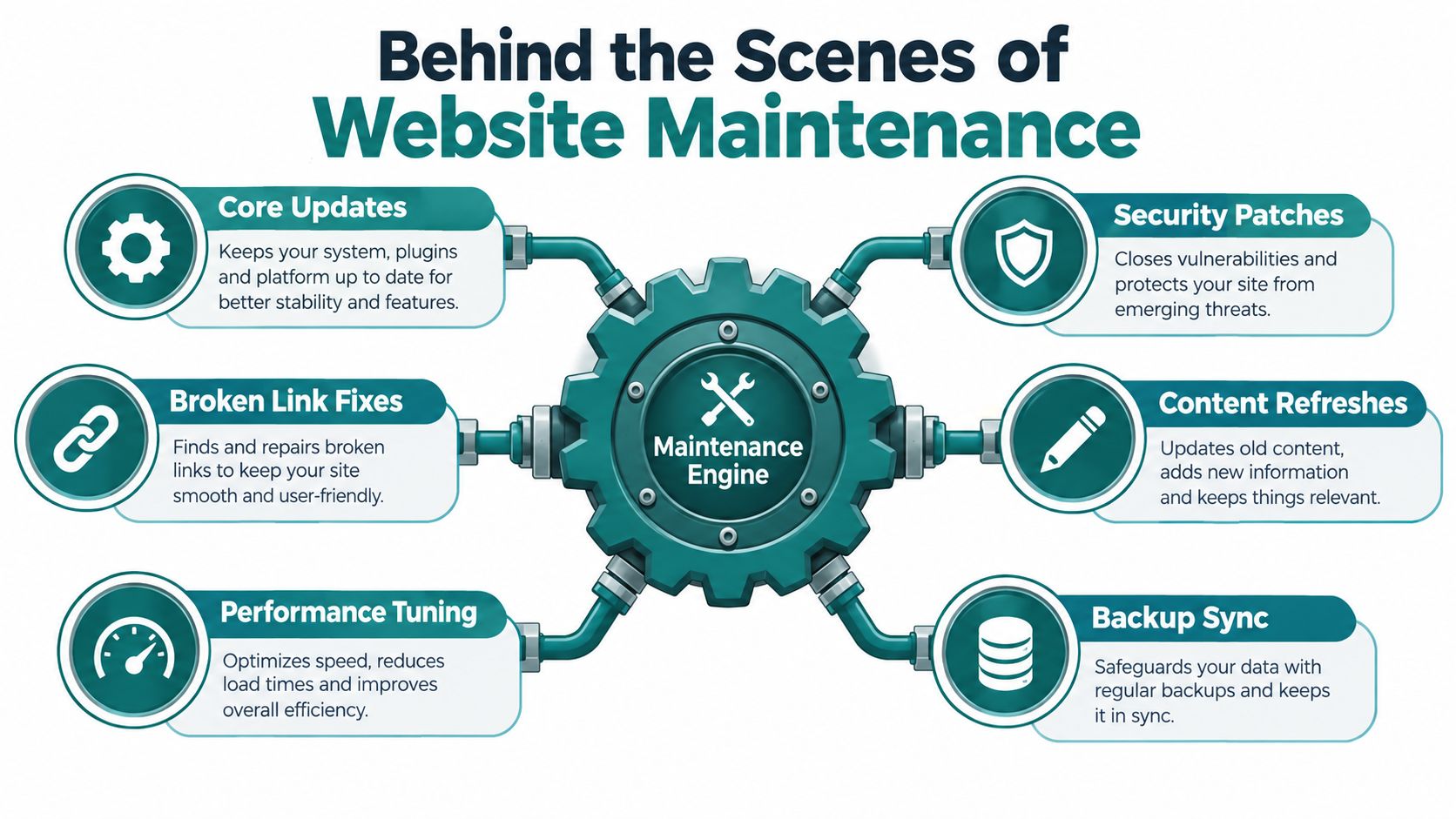
Behind the scenes, maintenance coordinates your content management system, theme, plugins, hosting, database, and connected services. These parts must work together so an update does not break a form, checkout, page layout, or customer handoff. A small Cincinnati service site may have fewer moving parts than an online store, but either site can lose revenue when an important path fails.
The maintenance engine
A typical business website uses a content management system, such as WordPress, alongside a theme, plugins, integrations, hosting, and databases. Each component changes over time. Maintenance manages those changes as one connected system instead of treating them as unrelated chores.
Updates can add fixes and improvements, but they can also conflict with forms, checkout, layouts, or outside services. A careful process begins in a staging environment, a private copy where changes can be reviewed before visitors see them. After deployment, the responsible person checks important pages, forms, logs, and error activity.
The cadence should match the site's complexity and revenue risk. A brochure site with one contact form may need less frequent review than a store processing orders every day. The more business a website carries, the more often its key customer paths deserve testing.
Security became part of routine operations
Software-driven websites made patching an ongoing responsibility. A 2026 WordPress industry roundup reported 11,334 vulnerabilities discovered in 2025, with 96% coming from plugins and 52% attributed to outdated plugins (Your Web Team's 2026 roundup). The same source said exploits can occur within 5 hours of disclosure, while about 35% of vulnerabilities disclosed in 2024 remained unpatched in 2025.
Those figures do not mean every Cincinnati business faces the same exposure. They show why "we'll update it sometime" is not a dependable security plan. Someone must track changes, test the site afterward, and respond when a serious issue appears.
A functioning maintenance system connects:
- Updates, which keep software compatible.
- Security monitoring, which identifies suspicious activity and urgent patches.
- Backups, which provide a recovery option.
- Performance checks, which catch slow pages and broken customer journeys.
- Content review, which keeps public information accurate.
- Documentation, which records changes and recovery steps.
Essential Website Maintenance Tasks Every Owner Should Know
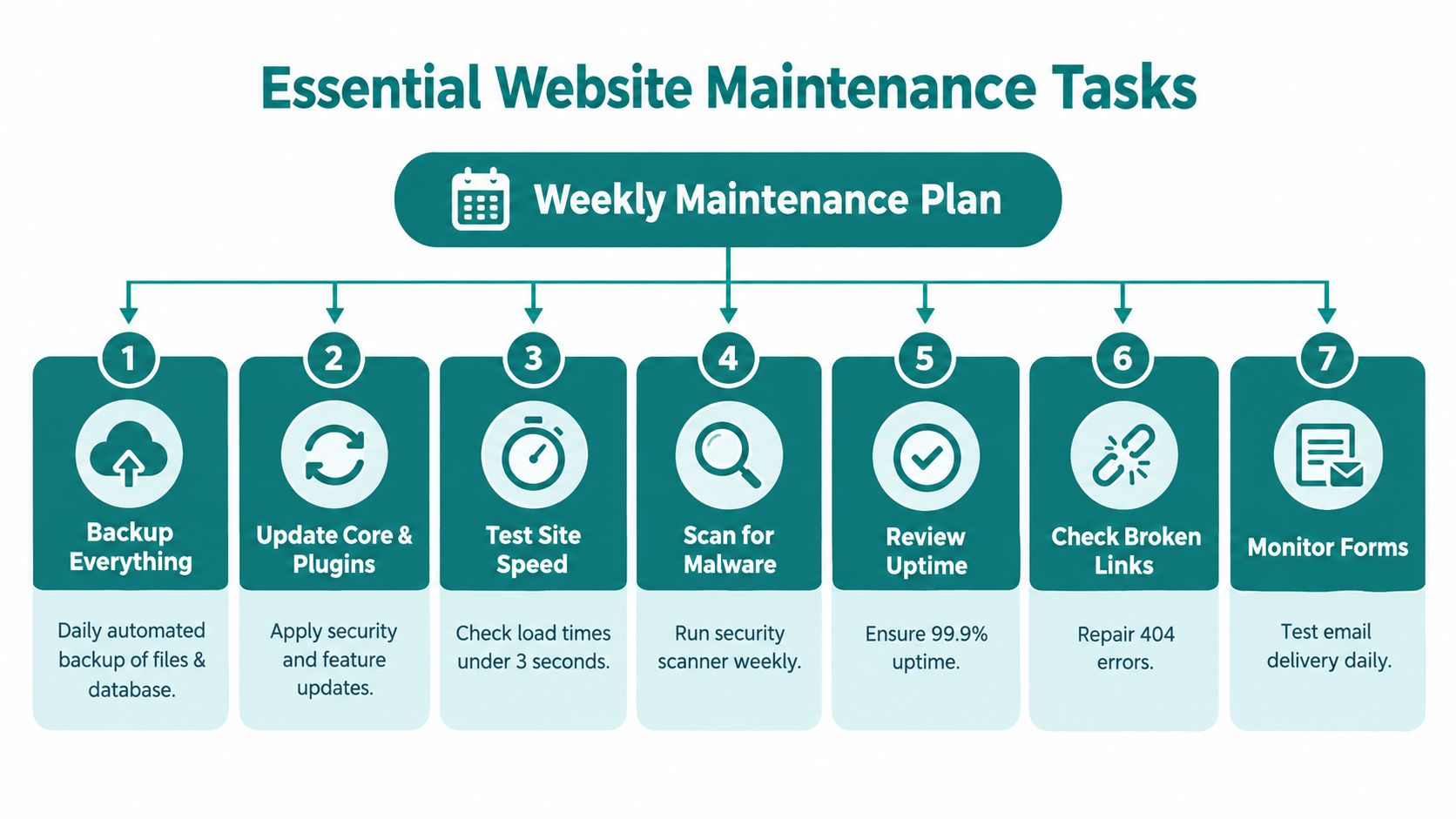
A complete plan isn't just "install updates." It assigns responsibility for several distinct jobs and confirms that each one protects a business outcome.
Keep software compatible
The content management system, theme, plugins, and connected services need controlled updates. A provider should review changes in staging, apply them thoughtfully, and check the live site afterward. An update that succeeds technically can still disrupt a form or change how a page displays.
Watch security and SSL
Security work includes monitoring, vulnerability scans, access review, and keeping the SSL certificate current. SSL is what helps establish an encrypted connection between a visitor and your site. If it expires, browsers may warn people away even though your business itself hasn't changed.
Critical or zero-day patches deserve a defined response window. One maintenance SLA guide recommends deployment or mitigation within 24 to 72 hours of public disclosure or vendor release, while routine updates generally fit a 14- to 30-day window after staging tests (Element8's maintenance SLA guide).
Prove that backups work
A backup file sitting in the same hosting account isn't a full recovery plan. Maintain an independent, off-site copy, document the restoration process, and test a full site-and-database restore on a recurring schedule. Guidance from Butterfly's website maintenance guide emphasizes that restore testing is what demonstrates recoverability.
Check speed, uptime, and errors
Monitoring should alert someone when the site goes down or begins returning errors. Performance checks should include important pages, mobile usability, images, scripts, and the customer actions that support revenue. A fast homepage doesn't help if the quote form or checkout stalls.
Review content and SEO health
Business hours, service areas, staff information, pricing, policies, and contact details can become wrong without anyone changing the design. Regular content review protects trust and gives SEO work a healthier foundation. Look for outdated pages, broken redirects, missing titles, weak internal links, and search queries that no longer match the page.
Include accessibility
Accessibility belongs in ongoing care. Review alt text, color contrast, keyboard navigation, form labels, captions, and heading structure. A 2026 checklist recommends quarterly accessibility audits and notes that WCAG AA requires a 4.5:1 contrast ratio for normal text (Connect Media Agency's maintenance checklist).
For a broader owner-friendly review, HDM's website wellness checklist can help you identify gaps before they become customer-facing problems.
Why Consistent Maintenance Pays Off and What Neglect Costs
Consistent maintenance gives you something valuable: fewer surprises. Your team can find a broken form during a planned check instead of discovering it through a missed lead. You can review an update in a controlled environment instead of making a risky change directly on the live site. You can restore a known-good version instead of hoping an old backup contains everything you need.
Neglect creates a different pattern. Small problems remain invisible until they affect customers, rankings, staff time, or revenue. A slow page can discourage a visitor. A stale service page can create a bad sales conversation. A failed integration can make your business appear unresponsive even when your team is working hard.
The business benefits are operational
Maintenance supports:
- Stronger security: Patches and monitoring reduce the time vulnerabilities remain exposed.
- More reliable customer journeys: Forms, checkout, booking, and calls receive regular checks.
- Steadier search performance: Accurate content, usable pages, and technical health support your SEO program.
- Better planning: Scheduled work is easier to budget than emergency troubleshooting.
- Preserved credibility: Visitors see a site that reflects the business you operate today.
The value isn't limited to technical stability. A Cincinnati manufacturer may rely on a quote request, while a healthcare practice may depend on appointment information and privacy-aware systems. A retailer may care most about product data, payments, inventory connections, and checkout. Each business needs a maintenance model that follows its most important customer path.
A maintenance plan should answer one business question clearly: what must keep working, and how quickly do we need to know when it doesn't?
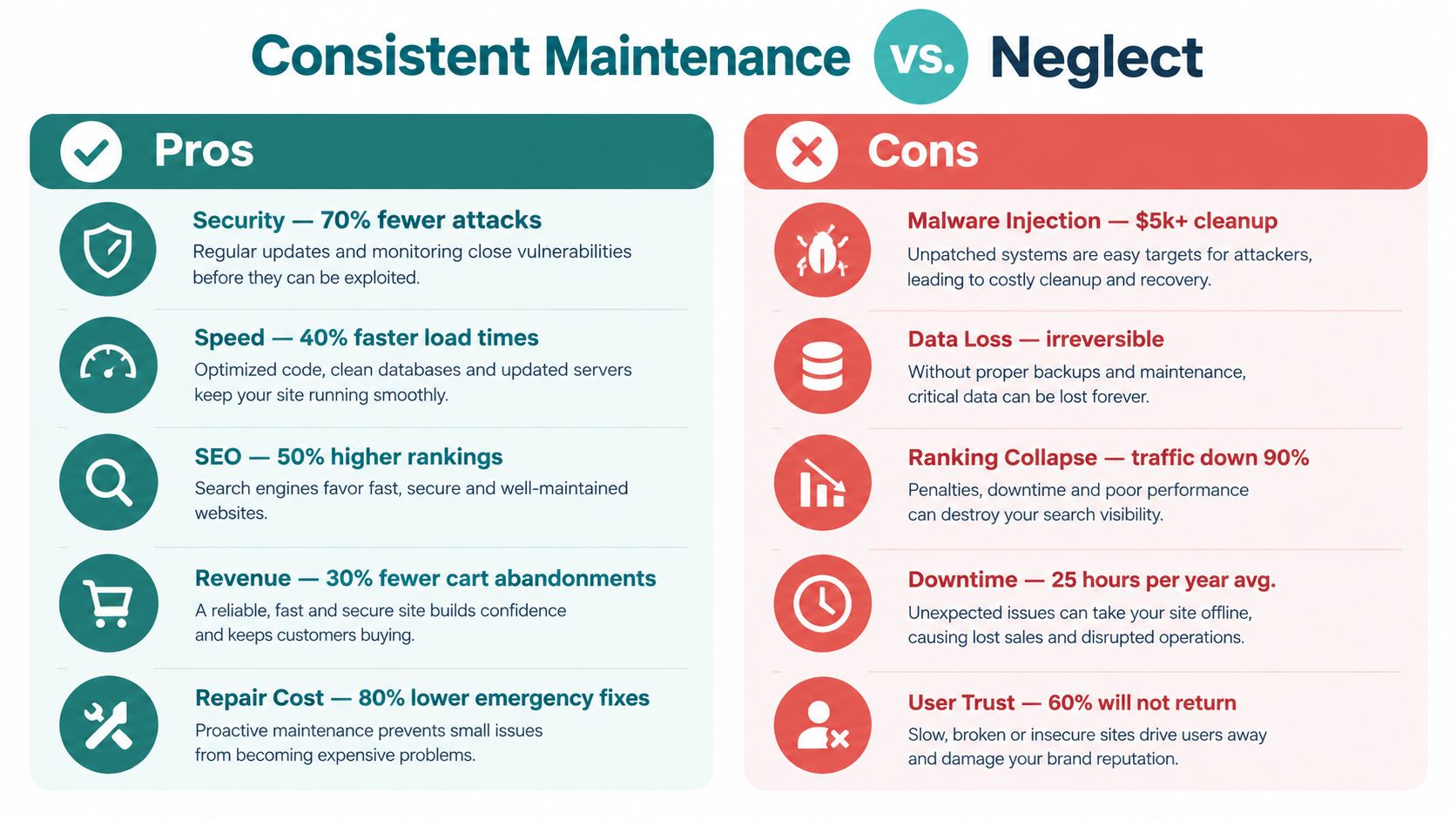
Neglect also makes recovery harder. You may not know which software changed, whether the backup includes the database, or who can access the hosting account. The resulting emergency work often costs more than planned upkeep because it combines diagnosis, repair, communication, and business disruption.
How Often to Maintain Your Website and What It Costs
A five-page brochure site and an online store should not follow the same maintenance calendar. The right cadence depends on how often the site changes, how many systems it connects to, what information it handles, and how much revenue depends on each customer path. A Cincinnati service business may need regular form and booking checks, while a retailer needs closer attention to checkout, inventory, payments, and integrations.
Use this schedule as a planning guide:
- Daily: Automated backups and security monitoring when the site's risk justifies them.
- Weekly: Uptime, error, and key-path checks, particularly after changes.
- Monthly: Software updates, broken-link reviews, performance checks, and content maintenance.
- Quarterly: Deeper reviews of SEO, accessibility, content, recovery, and business goals.
The higher the business risk, the shorter the distance between checks. A missed update on a simple site may create inconvenience. On a store or lead-generation site, the same problem can interrupt sales or inquiries.
| Site Type | Recommended Cadence | Typical Monthly Cost |
|---|---|---|
| Personal blog | Routine checks and periodic updates | $5 to $75 |
| Small to medium business site | Monthly planned maintenance, with monitoring based on risk | $50 to $500 |
| Ecommerce store | Frequent checks of checkout, integrations, security, and performance | $300 to $1,000 |
| Large corporate or custom site | Structured operations, monitoring, testing, and support | $1,000 to $5,000 or more |
| Enterprise website | Continuous governance and specialized support | $2,000 to $25,000 or more |
These 2026 ranges come from GoDaddy's website maintenance cost guide. They show why a monthly fee needs context. A plan that appears inexpensive may exclude the work that protects your most important revenue path.
Ask what the fee covers: staging, emergency response, backups outside the hosting account, restore testing, content edits, reporting, and third-party integrations. A plan that only applies updates may leave recovery and business-critical testing uncovered.
HDM's website maintenance plan guide can help you define that scope before comparing providers. The goal is a maintenance rhythm that matches your site's complexity and the cost of downtime.
A Simple Process and Tools to Keep Your Site Healthy
You don't need to become a developer to manage maintenance well. You need a repeatable process, clear ownership, and proof that each important safeguard works.
Use a controlled update routine
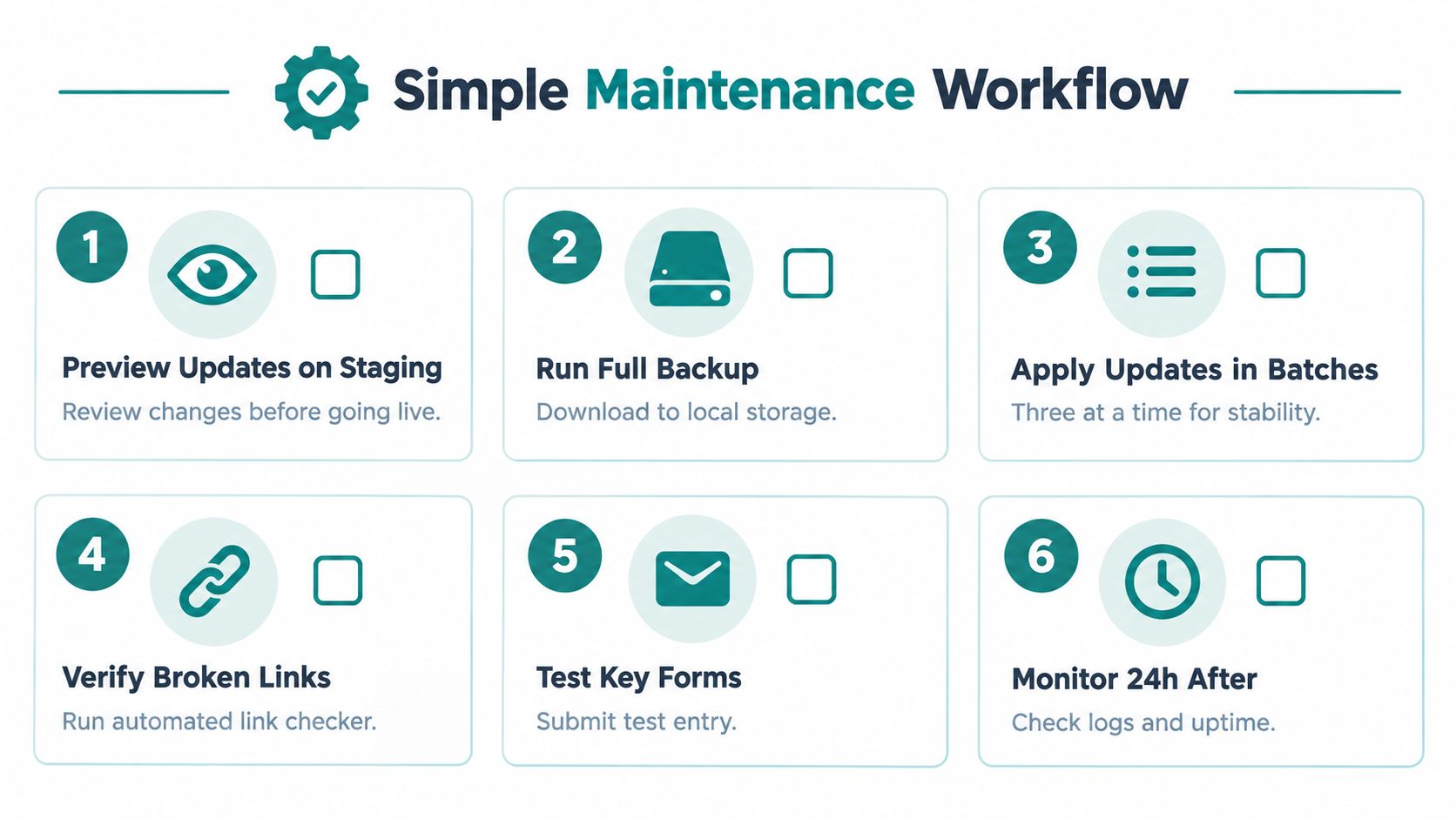
Start by recording the current site version and creating a full backup. Apply changes in staging, inspect the pages that matter, and test forms, checkout, booking, and integrations. Deploy to production only after the review is complete.
After deployment, check the site from a visitor's perspective. Submit a test form, open key pages on a phone, review error logs, and watch uptime and performance alerts. Monitoring after a change matters because some problems appear only when real traffic reaches a new configuration.
Treat recovery as a tested capability
Store an independent backup outside the live hosting account. Then document who can restore it, where the credentials are held, which files and databases are included, and how the team will communicate during an outage. Build-a-Web-Site's maintenance guide specifically emphasizes asking how restoration is tested, not merely whether backups exist.
Useful tools can automate alerts and routine checks, but alerts only help when someone owns the response. Choose tools that monitor uptime, security events, broken links, forms, performance, and backup status, then keep the notifications in a shared place rather than one employee's inbox.
For performance planning, HDM's guide to load testing explains why testing under expected demand can reveal weaknesses before a campaign or busy period exposes them.
Keep a simple maintenance record
After each maintenance window, note what changed, who approved it, whether key paths passed, and whether monitoring stayed clear afterward. That record makes future troubleshooting faster and helps a business owner see whether the service being paid for is being performed.
Getting Help With Website Maintenance and Next Steps
DIY maintenance can work when your site is simple, your team has time, and a missed form or short outage won't create serious consequences. It becomes harder when your website connects to payment systems, customer portals, scheduling tools, marketing platforms, or sensitive information. It also becomes harder when nobody on staff feels comfortable restoring a database or investigating a security alert.
A managed service should define its work clearly. Look for coverage such as:
- Software care: Staged updates for the CMS, theme, plugins, and dependencies.
- Protection: Security monitoring, patch response, SSL renewal, and access review.
- Recovery: Off-site backups and documented, tested restoration.
- Reliability: Uptime, errors, forms, checkout, and performance monitoring.
- Support: A named response process when something breaks.
- Reporting: Plain-English records showing what was checked and changed.
HDM's Website Wellness service combines ongoing maintenance, security updates, backups, performance tuning, uptime alerts, reporting, and technical support for businesses that need dependable coverage without assigning every task to an owner or office manager. A local provider can also understand the practical needs of Greater Cincinnati organizations, from service-area messaging to lead generation and customer experience.
Maintenance is only one part of online growth. If local discovery is also a concern, this resource on Google Maps ranking help offers a useful starting point for evaluating local visibility work.
Start by listing your website's revenue-producing paths, current integrations, backup process, and response contacts. Then ask a provider to review those items and put the scope, cadence, and emergency expectations in writing.
HDM can help keep your website updated, secure, backed up, monitored, and ready to support your marketing goals through Website Wellness and related digital services. Visit HDM to request an assessment and discuss a maintenance approach that fits your Cincinnati business.