

A lot of Cincinnati business owners hit the same point at the same time. The website that worked as a brochure no longer works as a sales channel. You want online orders, cleaner inventory management, better search visibility, and a store that does not become a headache six months after launch.
That is where platform choice stops being a web design decision and becomes a business decision.
The best ecommerce platforms for small business are not "best" in the abstract. They are best for your catalog, your staff, your growth plans, and your tolerance for ongoing maintenance. A Hyde Park retailer selling a focused product line has different needs than a Mason manufacturer with dealer pricing, or a healthcare brand that has to think carefully about compliance and data handling.
Most comparison articles flatten those differences. They rank platforms as if every business starts from the same place. They do not. A local store trying to launch fast needs one answer. A business with a successful WordPress site may need another. A company expecting more advanced workflows, B2B logic, or HIPAA-adjacent requirements needs a very different conversation.
This guide takes the practical route. It looks at what works, what becomes expensive later, and where owners often underestimate the full cost of the decision.
Choosing Your Digital Storefront in Cincinnati
A local business owner usually starts with a simple question. "What platform should we use?" The harder question sits underneath it. "What kind of online business are we building?"
A platform is your digital storefront. In Cincinnati terms, that decision is closer to choosing a retail space than choosing a logo. Some businesses need a clean, efficient setup that gets them selling quickly. Others need room for heavier traffic, custom workflows, multiple locations, or tighter controls over content and customer data.
If you are selling a manageable catalog and want a straightforward launch, an all-in-one platform can be the right move. If you already depend on WordPress for content, SEO, and lead generation, bolting on ecommerce may make more sense than rebuilding from scratch. If your business spans online orders, in-person sales, and specialty fulfillment, the wrong "easy" choice can become costly fast.
What local owners usually underestimate
The first mistake is treating monthly price as the whole budget.
The second is assuming migration will be easy later.
The third is ignoring who on your team will manage products, orders, promotions, and content once the site is live. A platform that looks impressive in a demo can become frustrating when your office manager or marketing coordinator has to use it every day.
For businesses that want a local view of online selling, HDM's overview of Cincinnati ecommerce website services is useful because it frames ecommerce as an operations and growth issue, not just a design project.
The right platform should make daily work easier. If it adds friction to product updates, fulfillment, reporting, or marketing, it is not the right fit, no matter how polished the demo looked.
The practical lens
The strongest ecommerce decisions start with business reality.
Ask these first:
- How fast do you need to launch
- Who will maintain the store
- How complex are your products
- Do you sell in person as well as online
- Will compliance matter
- Are you choosing for the next year or the next five
That last question matters most. The cheapest launch is not always the lowest-cost decision.
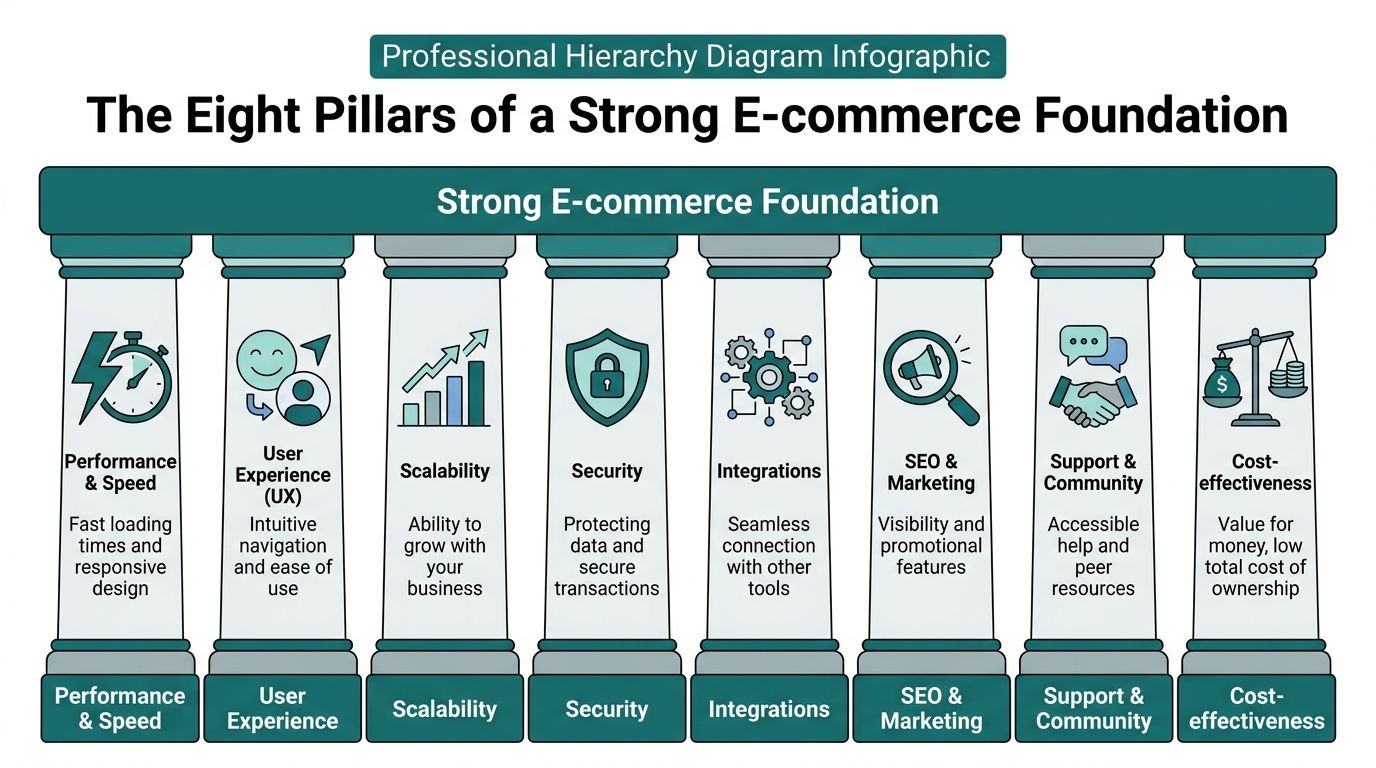
The Eight Pillars of a Strong E-commerce Foundation
Before comparing tools, use a scorecard. Without one, owners tend to chase features they may never use and miss the issues that drive cost, complexity, and revenue friction.
Total cost of ownership
This is the pillar that gets ignored most often. Monthly subscription is only one line item.
You also need to think about transaction fees, paid apps, theme costs, developer help, support burden, redesign risk, and the eventual cost of changing platforms. A platform that looks affordable on day one can become expensive once you start adding must-have functionality.
Ease of use
A store is only as good as your team's ability to run it.
If adding products, changing homepage content, updating shipping rules, or launching a promotion requires too much technical help, work slows down. That usually means missed opportunities and more outside support than you planned to pay for.
Scalability
Scalability is not a buzzword. It means the platform can support your next stage without a rebuild.
For some companies, that means more products. For others, it means wholesale pricing, multiple storefronts, stronger reporting, or handling peak traffic without performance problems.
Design flexibility
Some businesses need a clean store and nothing more. Others need content-rich category pages, a custom user journey, subscription flows, or landing pages tied to ad campaigns.
Design flexibility matters most when brand experience directly affects how you sell. It also matters when your marketing team needs to move quickly without waiting on a developer for every update.
Integrations
Your ecommerce platform rarely works alone.
It may need to connect to email platforms, CRM tools, accounting systems, inventory software, shipping services, ERP systems, booking tools, or in-store POS. Integration problems create manual work. Manual work creates mistakes.
Payment processing
Payment setup affects margins and checkout experience.
Look at processor options, platform transaction fees, wallet support, and how hard it is to manage refunds or reconciliations. If you already use a payment ecosystem in-store, this part deserves extra attention.
SEO and marketing tools
A store that looks good but cannot attract qualified traffic will underperform.
Good ecommerce platforms support clean site structure, editable page content, metadata control, product organization, and marketing workflows. If search is part of your growth plan, this pillar has to be evaluated early. Businesses that want a stronger organic foundation should also understand how ecommerce SEO works in practice, because platform choice affects far more than product pages.
Security and compliance
Hosted platforms reduce a lot of infrastructure burden. Self-hosted platforms give more control, but they also put more responsibility on your business or your developer.
For healthcare-adjacent, legal, or regulated businesses, "secure enough" is not a strategy. You need to know what the platform handles, what your team handles, and where custom requirements may push you beyond a standard setup.
A fast scoring method
Use a simple red-yellow-green review for each pillar.
- Green means the platform fits your current needs with room to grow.
- Yellow means it works, but adds compromise or future friction.
- Red means it creates avoidable risk, cost, or dependency.
Owners make better platform decisions when they rank business fit first and feature count second.
Comparing the Top E-commerce Platforms for 2026
The best ecommerce platforms for small business usually come down to a short list. For most Cincinnati-area SMBs, that list includes Shopify, WooCommerce, BigCommerce, and a group of simpler builders such as Wix and Squarespace.
Here is the fast scan first.
E-commerce Platform Quick Comparison
| Platform | Best For | Typical Monthly Cost | Ease of Use |
|---|---|---|---|
| Shopify | Small businesses that want fast launch and room to grow | $29/month to $299/month | Easy |
| WooCommerce | WordPress-based businesses that want control | Varies by hosting, plugins, and support | Moderate to hard |
| BigCommerce | Growth-focused stores with more built-in ecommerce features | Platform pricing varies by plan | Moderate |
| Wix | Small brands that want an easy site builder with ecommerce | $17 to $25/month on starter-level comparisons | Easy |
| Squarespace | Design-led brands and simple catalogs | Qualitatively lower to mid-range | Easy |
Shopify
Shopify is the default recommendation for many small businesses for one reason. It removes a lot of complexity.
It is widely adopted, hosted for you, easier to manage than self-hosted tools, and built around selling. Shopify powers 5.6 million live merchant stores as of recent 2026 data according to Mailmodo's ecommerce platform statistics guide. The same source notes that 79% of Shopify's traffic comes from mobile devices, which reinforces why its mobile-first experience matters for modern storefronts.
Shopify pricing starts at a lower monthly rate for Basic plans and increases for Advanced, with a transaction fee per sale on the Basic plan. It also has a large number of apps in its ecosystem, plus built-in tools like abandoned cart recovery, Shopify Magic, Sidekick, POS integration, and support available through phone, email, and chat.
Where Shopify works best
Shopify is a strong fit when you need speed, lower technical burden, and a platform your staff can learn without much drama.
It works well for:
- Retail and DTC brands with standard product catalogs
- Businesses selling online and in person that want POS tied together
- Owners with limited technical resources who do not want to manage hosting, security, and updates
- Teams that need app flexibility for marketing, inventory, subscriptions, or analytics
For many companies, this is the right trade. You accept some platform dependency in exchange for faster execution.
Where Shopify gets expensive
The biggest issue is not the base subscription. It is what gets layered on top.
Transaction fees can become a concern if you are not using Shopify Payments. App dependence can also push total cost upward. A lot of stores start clean and simple, then accumulate paid add-ons for reviews, subscriptions, advanced search, custom reporting, upsells, and workflow automation.
Shopify is often the safest choice for a first serious store. It is not always the cheapest long-term choice once app sprawl sets in.
If you are already leaning in this direction, HDM also has a page on Shopify ecommerce solutions that outlines the kinds of use cases where Shopify makes sense.
WooCommerce
WooCommerce is the strongest option when WordPress is already central to your business.
If your company website generates leads through content, location pages, blogging, or strong organic search visibility, WooCommerce lets you keep that ecosystem and add ecommerce without moving to a different platform. That can be smart. It can also be messy if your hosting and maintenance practices are weak.
WooCommerce's strength is control. You own more of the stack. You can shape more of the site, extend it more thoroughly, and build around specific business rules. If your business has unusual product logic, niche integrations, or content-heavy marketing, that flexibility matters.
Where WooCommerce works best
WooCommerce is a strong fit for:
- Businesses already invested in WordPress
- Content-led brands where SEO and publishing are core growth channels
- Companies with access to a developer or technical partner
- Stores that need unusual workflows or deep customization
For a service business adding a product line, or a company with a mature WordPress marketing site, WooCommerce can be a logical move instead of a rebuild.
Where WooCommerce breaks down
It is not plug-and-play.
With WooCommerce, your business or your developer is responsible for hosting quality, plugin management, updates, backups, security hardening, and performance. If those are neglected, the store suffers. That may show up as slow pages, checkout issues, compatibility conflicts, or maintenance surprises after simple updates.
The platform is powerful. The burden is real.
For non-technical owners, WooCommerce often works best when there is already a reliable support structure in place. Without that, the control it offers can turn into operational drag.
BigCommerce
BigCommerce is often overlooked by smaller businesses, but it deserves serious consideration, especially if you expect complexity or scale.
Its value is not simplicity first. Its value is stronger built-in commerce capability. BigCommerce reports 100% uptime every Cyber Week since 2016, and its article also cites a Forrester finding of 211% ROI within three years for average customers, according to BigCommerce's ecommerce platform comparison. The same source highlights 99.99% annual uptime, no additional platform transaction fees, Level 1 PCI compliance, Multi-Storefront, B2B Edition, BOPIS, and one-page checkout.
Where BigCommerce works best
BigCommerce is a smart fit for:
- Businesses planning significant growth
- Stores with larger or more complex catalogs
- B2B or hybrid B2B-DTC models
- Companies that want more native functionality and fewer apps
- Teams concerned about transaction fee structure
This is often the better choice when Shopify starts to feel too app-dependent but Adobe-level complexity would be overkill.
Where BigCommerce is harder to live with
The learning curve is steeper.
Absolute beginners usually find Shopify more approachable. BigCommerce asks more from the user early on. The backend is built for merchants who need more control and more catalog depth, not for owners who want the fastest possible launch with the least setup thought.
That is the trade-off. If your business is simple today and likely to stay simple, BigCommerce may feel heavier than necessary. If your business is likely to get more complex, that extra depth can save you from bolting together too many add-ons later.
BigCommerce is often the platform for owners who already know their catalog, fulfillment, or B2B needs are going to outgrow a lighter setup.
Wix and Squarespace
Wix and Squarespace are not bad options. They are often the right short-term option for the right business.
They work best when the ecommerce component is important but not highly involved in operations. Think curated product lines, service businesses with some merchandise, creator brands, visual portfolios with shop functionality, or a local business that needs to start selling without much setup friction.
Wix stands out for ease and accessibility at the lower end of the market. Starter-level comparisons often place it around $17 to $25/month, as noted in MDS's discussion of small business ecommerce platforms and migration costs. Squarespace remains attractive for visually polished, brand-first sites with relatively straightforward ecommerce needs.
Where starter builders work well
These builders make sense for:
- Simple catalogs
- Brands that care heavily about visual presentation
- Very small teams
- Businesses testing ecommerce before investing more seriously
For a local maker, artist, boutique service brand, or early-stage concept, that can be enough.
Where they become limiting
They usually become less appealing once operations get more serious.
The common pain points are:
- Less flexibility for complex catalogs
- Fewer advanced integrations
- Harder migration later
- Redesign risk if you outgrow the platform
- More limitations around custom workflows
That does not mean you should never use them. It means you should choose them only when their simplicity matches the business you are building.
A practical recommendation by business type
| Business situation | Best-fit direction |
|---|---|
| Need to launch quickly and sell with minimal technical overhead | Shopify |
| Already have a strong WordPress presence and want full control | WooCommerce |
| Expect more catalog complexity, B2B needs, or want fewer app dependencies | BigCommerce |
| Need a lightweight store with strong visual editing and simple operations | Wix or Squarespace |
The right answer is often less about features than about future friction. Owners usually regret platforms for one of two reasons. Either the system was too limited too soon, or it required more technical care than the business was ready to handle.
When to Consider Advanced or Custom Solutions
Some businesses should not stop at the standard small-business shortlist.
If your store has unusual product logic, multiple brands, compliance constraints, advanced B2B requirements, or a need for highly customized user experiences, you may be moving beyond the "pick a template and go" stage.

Shopify Plus and enterprise-style growth
At the high end of the Shopify ecosystem, Shopify Plus exists for businesses that need more scale, stronger reporting, more advanced workflows, and enterprise-grade support structure.
That kind of move only makes sense when the store is no longer "small business simple." If your team is managing heavier order volume, larger campaigns, more operational roles, or more customized checkout and backend needs, a standard small-business plan can start to feel narrow.
Headless commerce in plain English
Headless commerce separates the storefront experience from the ecommerce engine underneath it.
That matters when your business needs a more custom frontend than a standard theme-based platform can comfortably provide. You keep the commerce engine for products, checkout, and order management, but the customer-facing site can be designed and developed with far more freedom.
This is useful when:
- Brand presentation is a competitive advantage
- Performance matters across complex content and product experiences
- Multiple channels need to share the same backend
- You want more control over how content and commerce work together
For many businesses, headless is unnecessary. For the right business, it solves problems that template-driven setups keep creating.
BigCommerce as a more advanced SaaS path
BigCommerce often enters the conversation here because it sits in a middle ground. It is not a custom stack, but it can handle more complexity than many owners expect.
Its reliability story matters for scaling businesses. BigCommerce states that it has delivered 100% uptime every Cyber Week since 2016, and cites a Forrester finding of 211% ROI within three years for average customers. Those facts are part of why growth-stage merchants look at it when traffic spikes, multi-storefront needs, or B2B requirements become a bigger part of the business.
When fully custom becomes reasonable
A fully custom stack is not the first choice for most SMBs. It becomes reasonable when off-the-shelf platforms force too many workarounds.
That can happen when:
- Products require custom configuration logic
- Pricing depends on customer roles, contracts, or quotes
- Internal systems need deep integration
- Healthcare or legal requirements narrow what can be done in standard SaaS tools
- The customer portal matters as much as the storefront
For HIPAA-adjacent use cases, the conversation gets especially careful. No mainstream ecommerce platform should be treated as automatically solving HIPAA requirements on its own. The right setup depends on what data is collected, where it is stored, how forms and integrations work, and what third-party tools are connected. In those cases, businesses often need a more customized architecture and a more controlled set of integrations.
One practical option for companies in that situation is working with a development partner that handles ecommerce builds on Shopify, WooCommerce, headless implementations, or custom stacks. Cincinnati-area businesses sometimes take that route when the store is tied to operations, compliance, and long-term marketing growth rather than just online checkout.
The Hidden Costs of Choosing the Wrong Platform
Most owners compare monthly fees and feature lists. That is useful, but it is incomplete.
The full cost of a platform decision often shows up later, when the business grows and the original choice stops fitting.

Migration is rarely clean
Existing platform comparisons often underplay migration risk. MDS notes that platform reviews rarely quantify the hidden costs of switching, especially for SMBs that outgrow starter tools like Wix, which it places around $17 to $25 per month in that comparison context. The same article highlights data export limits, redesign requirements, and business disruption as a significant but underexplored risk to total cost of ownership.
That problem is common.
A business starts on a lightweight builder because it looks inexpensive and easy. Then it needs stronger SEO control, better integrations, more flexible checkout, or a more advanced catalog. At that point, moving is not just a subscription change.
What a switch affects
Changing platforms can mean rebuilding far more than the store itself.
You may need to deal with:
- Product data cleanup
- Collection and category remapping
- Redirect planning for old URLs
- Theme redesign
- App replacement
- Customer account transitions
- Order history handling
- Search visibility risk during the move
If the old and new platforms structure data differently, the migration gets harder. If the site has built up rankings, backlinks, or content momentum, SEO becomes part of the risk too.
The wrong starter platform can cost more in rework than the right scalable platform would have cost from the beginning.
Lock-in is not just technical
Platform lock-in also affects how you market and operate.
If key store functions rely on proprietary apps, limited templates, or workflows that cannot be reproduced elsewhere cleanly, your business loses flexibility. That may show up when you want better reporting, new fulfillment logic, a wholesale portal, or a redesign that the current system resists.
This is why "easy now" should never be the only buying criterion.
A better way to evaluate cost
Look at cost over the likely life of the platform, not just the next invoice.
Ask:
- Will this platform still fit when sales grow
- How much do we need to bolt on
- Can our team manage it without constant outside help
- What happens if we need to move in two years
Those questions usually expose more truth than the pricing page.
Your Action Plan for Selecting the Right Platform
If the options still feel crowded, narrow the choice by business situation, not by hype.
If you need speed and simplicity
Choose Shopify if you want to launch quickly, avoid infrastructure headaches, and give your team a manageable backend.
This is often the right call for retail, DTC, and local businesses that want a reliable system without needing a developer for normal store operations.
If WordPress already drives your business
Choose WooCommerce if your site already runs on WordPress and your content strategy matters as much as the store.
That path makes sense when you want tighter control over content and customization, and you either have technical help or are prepared to invest in maintenance.
If growth complexity is already visible
Choose BigCommerce if you know your store will need stronger native features, more catalog flexibility, multi-storefront capability, B2B functionality, or a fee structure that avoids added platform transaction charges.
This is usually the better fit for businesses thinking ahead, not just trying to get online fast.
If your store is a smaller part of the business
Choose Wix or Squarespace if the catalog is simple, the site needs to look polished, and ecommerce is important but not highly involved in operations.
For some businesses, that is enough. The mistake is assuming it will still be enough after the store becomes a bigger revenue channel.
A practical decision checklist
Use this before you commit:
- Team fit. Can the people who will manage the store use it confidently?
- Growth fit. Will the platform still work when your catalog, traffic, or sales process gets more complex?
- Marketing fit. Does it support the SEO, content, and campaign work you plan to do?
- Integration fit. Can it connect cleanly to the systems you already use?
- Compliance fit. If you operate in healthcare, legal, or another sensitive category, does the setup support your real obligations?
- Exit fit. If you outgrow it, how painful will the move be?
The simplest rule
Pick the platform that matches your next stage, not just your current comfort level.
Too many businesses buy for today's budget and today's simplicity, then pay for that decision with a rushed rebuild later.
Frequently Asked Questions About E-commerce Platforms
What is the best ecommerce platform for small business owners who are not technical
For most non-technical owners, Shopify is the safest starting point. It reduces hosting, security, and maintenance burden, and it is generally easier for staff to manage day to day.
If the business already lives on WordPress, WooCommerce can still be the right answer, but it usually needs more hands-on support.
Is WooCommerce cheaper than Shopify
Sometimes. Not always.
WooCommerce can look cheaper at first because the core plugin model is flexible, but total cost depends on hosting, premium plugins, maintenance, security work, and support. Shopify can be simpler to budget for, though apps and transaction fees can raise the true monthly cost.
When should I worry about migration costs
Right now, before you choose.
Migration becomes a real issue when a business starts on a lightweight builder and later needs deeper ecommerce features, better integrations, stronger SEO control, or more customization. That is why platform selection should include an "outgrow this" scenario from the start.
What about HIPAA compliance for healthcare-related ecommerce
Be careful here.
If protected health information is involved, do not assume a standard ecommerce platform is compliant by default. Compliance depends on what data you collect, where it is stored, how forms and integrations work, and what third-party tools are connected. Businesses in healthcare-adjacent spaces often need a more customized setup and legal review of workflows.
When is it time to bring in an agency
Usually when one of three things is true.
- The store affects core revenue
- The build involves integrations or compliance concerns
- The cost of choosing wrong is higher than the cost of expert planning
That is the point where outside guidance can prevent a lot of rework.
If you want help choosing a platform that fits your catalog, growth plan, SEO goals, and operational reality, HDM works with Cincinnati-area businesses on ecommerce strategy, Shopify and WooCommerce builds, headless implementations, and custom development when off-the-shelf tools are not enough.