You launch a clean, welcoming website for your counseling practice, add an online booking button, install Google Analytics to see where referrals come from, and wire your contact form to your office inbox. Everything carries a padlock icon in the browser bar, so the setup feels safe. Then a prospective client types a paragraph about panic attacks and medication into that contact form at midnight, while an ad pixel fires in the background and your email provider drops the message into an unencrypted inbox.
Most privacy failures on HIPAA compliant websites for therapists happen right there, inside everyday workflows rather than on the homepage itself. Encryption protects data while it travels across the internet, yet it can't fix an unapproved tracking script, a text reminder that exposes a diagnosis on a shared phone, or a contact box that invites crisis messages with no guardrails.
Compliance isn't a seal you buy from a website builder. It's a map of every touchpoint along the patient journey, paired with proof that each vendor and setting matches the sensitivity of the information you collect.
Which Website Features Handle Patient Data
A therapy website enters HIPAA territory the moment a visitor can submit, view, or trigger information that identifies someone seeking clinical care. Your job isn't to lock down every word on the internet. It's to separate public marketing pages from features that handle protected health information (PHI), the federal term for identifiable health details tied to an individual.
Reviewing every feature on your site side by side makes the boundary obvious. The table below breaks down whether common tools touch patient data, what safeguard each requires, and who in your practice should sign off before it goes live.
| Website feature | Handles patient data? | Safeguard it needs | Who approves |
|---|---|---|---|
| Public home, about and service pages | No, if they contain no patient-specific details | Plain-language content; no patient stories without written consent | Practice owner |
| General contact form | Sometimes, when visitors type health details | Warning not to share clinical details; secure channel for follow-up | Practice owner and compliance lead |
| New-patient intake form | Yes | Encrypted connection, limited fields, access limited to clinical staff | Compliance lead and vendor BAA |
| Online appointment request or self-scheduling | Yes | Signed vendor BAA, minimal data, no service details in confirmation emails | Practice owner and vendor |
| Patient portal or secure messaging | Yes | Personal logins, role-based access, audit logs | Compliance lead |
| Analytics and advertising pixels | Yes on intake and portal pages | Switched off on sensitive pages unless reviewed | Practice owner and agency |
| Email and text reminders | Yes if they name the provider or service | Generic wording, documented consent, signed vendor BAA | Practice owner |
| Live chat or chatbot | Yes if visitors share health details | Signed vendor BAA, visible warning, transcript retention limit | Compliance lead and vendor |
Two Features Practice Owners Routinely Overlook
Most clinicians expect an intake packet or client portal to require strict protection. Two quieter features trip up small practices far more often.
First, analytics tools and advertising pixels such as Google Analytics or Meta Pixel routinely capture page addresses, button clicks, and device identifiers. When those scripts run on an intake page, a booking confirmation screen, or a logged-in portal, they can pass identifiable health-seeking behavior to third-party marketing companies without patient authorization.
Second, a general contact form meant for simple scheduling inquiries turns into a clinical channel the second a stressed visitor types symptoms, medications, or a crisis note into the message box. Moving clinical details into HIPAA compliant web forms protects both the client and your practice, while keeping your public contact box strictly limited to basic callback details.
Practical test: Open a spreadsheet today and list every form, chat widget, scheduling embed, script, and automated email your site triggers. Mark each row Yes or No for whether a visitor could include identifiable health details. Every Yes belongs on your safeguard list before you spend another dollar on design or ads.
Live chat widgets deserve the same scrutiny. Unless your chat vendor signs a business associate agreement (BAA), displays a clear warning telling visitors not to share clinical details, and enforces a strict transcript retention limit, turn the chat widget off.
Why HIPAA Applies to a Therapist Website
HIPAA applies to your website whenever your practice is a regulated provider and the site collects identifiable health details. The law follows the data, not the label on your website template.
Federal privacy and security requirements stem from the Health Insurance Portability and Accountability Act of 1996, and the HHS HIPAA Security Rule overview marks February 20, 2003, as the milestone when federal standards took shape for protecting electronic protected health information (ePHI) through administrative, physical, and technical safeguards. Those rules bind covered entities, including therapists and group practices that bill insurers electronically, along with business associates, the external vendors that store, transmit, or process patient data on a provider's behalf.

Why Small Therapy Practices Are Not Too Small to Count
Solo counselors and five-clinician practices often assume federal enforcement only targets hospital systems. Healthcare breach records paint a very different picture.
- Public reporting starts at 500 people: The HHS Office for Civil Rights breach portal states that federal law under Section 13402(e)(4) of the HITECH Act requires HHS to publicly list breaches of unsecured PHI affecting 500 or more individuals. One compromised office email inbox holding a few years of intake messages can cross that threshold overnight.
- Large breaches remain widespread: According to CNIC Solutions' summary of HHS OCR breach portal data, the portal listed 725 large healthcare data breaches in 2024, each affecting at least 500 individuals.
- Exposure continues at massive scale: In 2025, at least 61,556,256 individuals had their protected health information exposed or impermissibly disclosed, according to the HIPAA Journal's 2025 Healthcare Data Breach Report analyzing HHS OCR data.
- Smaller incidents are climbing too: The HHS 2024 Breach Report to Congress recorded 74,299 breaches affecting fewer than 500 individuals in 2024, up 9% from 68,315 in 2023.
For a small practice in Greater Cincinnati, even an incident below 500 records means mandatory patient notification letters, potential regulatory review, lost trust with referral sources, and days pulled away from client sessions. Virtual care amplifies those stakes even further. Practices expanding into teletherapy, much like clinics explaining finding online psychiatric care in Florida, rely on web-connected scheduling, intake, and messaging as the front door to treatment.
Treat your website as part of your regulated clinical system the moment it collects health information. Compliance comes from documented engineering choices and signed vendor agreements, never from a generic badge pasted into your footer.
Vendors, Tracking Scripts and Business Associate Agreements
Before you pick a theme, form plugin, or booking app, build a one-page data-flow inventory. List every page, form, portal link, and script on your site, write down what data each element collects, and name every outside company that receives it.
That single sheet tells you where you need a business associate agreement (BAA), the signed contract in which a vendor legally commits to safeguard PHI it creates, receives, maintains, or transmits on your behalf. Use a straightforward rule of thumb. If a tool sees a client's name, email address, therapy specialty, or appointment time, assume it requires a BAA until the vendor confirms in writing that it never touches PHI.
| Vendor type | Usually handles patient data? | BAA needed? | What to ask |
|---|---|---|---|
| Web hosting | Yes, when forms or portals store data | Yes, if it stores or transmits PHI | Will it sign a BAA, and are backups encrypted? |
| Intake or contact form tool | Yes for intake forms | Yes | Who can view submissions, and how long are they kept? |
| Scheduling software | Yes | Yes | Do reminders name the provider or service? |
| Email marketing platform | Only if patient lists are uploaded | Yes if it receives PHI | Are clients kept out of marketing lists? |
| Analytics or advertising pixel | Often, through page addresses | Yes, if active on intake or portal pages | Is it switched off on intake and portal pages? |
| Drag-and-drop website builder | Yes, on plans with built-in forms or bookings | Yes, confirm in writing before launch | Does my plan include a signed BAA? |
| Freelance developer or theme author | Only with access to patient data | Yes if they can access PHI | Who holds admin logins, and are they removed when the work ends? |
Tracking Pixels and Why Cookie Banners Fall Short
Marketing tags cause more accidental disclosures than almost any other website component. Guidance from the HHS Office for Civil Rights on online tracking technologies makes clear that regulated entities must ensure any disclosures to tracking-technology vendors are permitted under the Privacy Rule, and a website cookie-consent banner alone does not count as valid HIPAA authorization.
Reviewing clear privacy documentation from health-focused organizations, such as Orange Neurosciences privacy practices, shows how transparent data-handling disclosures separate public browsing from sensitive user information. On a therapy site, the cleanest technical move is simple: disable analytics and ad pixels completely on intake pages, scheduling embeds, and client portals, and verify that tracking only runs on public educational or marketing pages after review.
Do not let a marketing agency install a site-wide tracking container until you have excluded every URL where a patient can log in, submit a form, or request an appointment.
Questions to Put in Writing Before Hiring an Agency
Drag-and-drop builders like Wix or Squarespace and practice tools like SimplePractice or JaneApp all handle compliance differently across pricing tiers. Never assume a paid plan includes a BAA by default. Get the vendor's written confirmation and verify whether third-party apps plugged into that builder are excluded from the agreement.
When you evaluate a web design partner, such as Helbling Digital Media here in the Cincinnati area or another regional agency, ask three concrete questions before signing a contract:
- Vendor roster: Which exact hosting provider, form platform, and scheduling tool will sit behind the site?
- Contract ownership: Who signs each BAA, and will my practice receive countersigned copies before launch?
- Data boundaries: Where will patient form submissions live, and how will public marketing pages stay isolated from protected workflows?
Once your site is configured, run a quick verification. Open your browser's network inspector on your intake and portal pages, submit a dummy test entry, and confirm that data flows strictly to approved BAA-covered vendors with zero marketing pixels firing.
Technical Safeguards to Build Into Your Site
Vendor contracts set legal accountability, while technical engineering prevents actual leaks. According to Cobalt's review of the 2025 Verizon Data Breach Investigations Report, Verizon recorded 1,710 healthcare data-breach incidents in 2024, including 1,542 cases involving confirmed data disclosure. Weak access controls, unpatched plugins, and sloppy form routing account for far too many avoidable exposures.
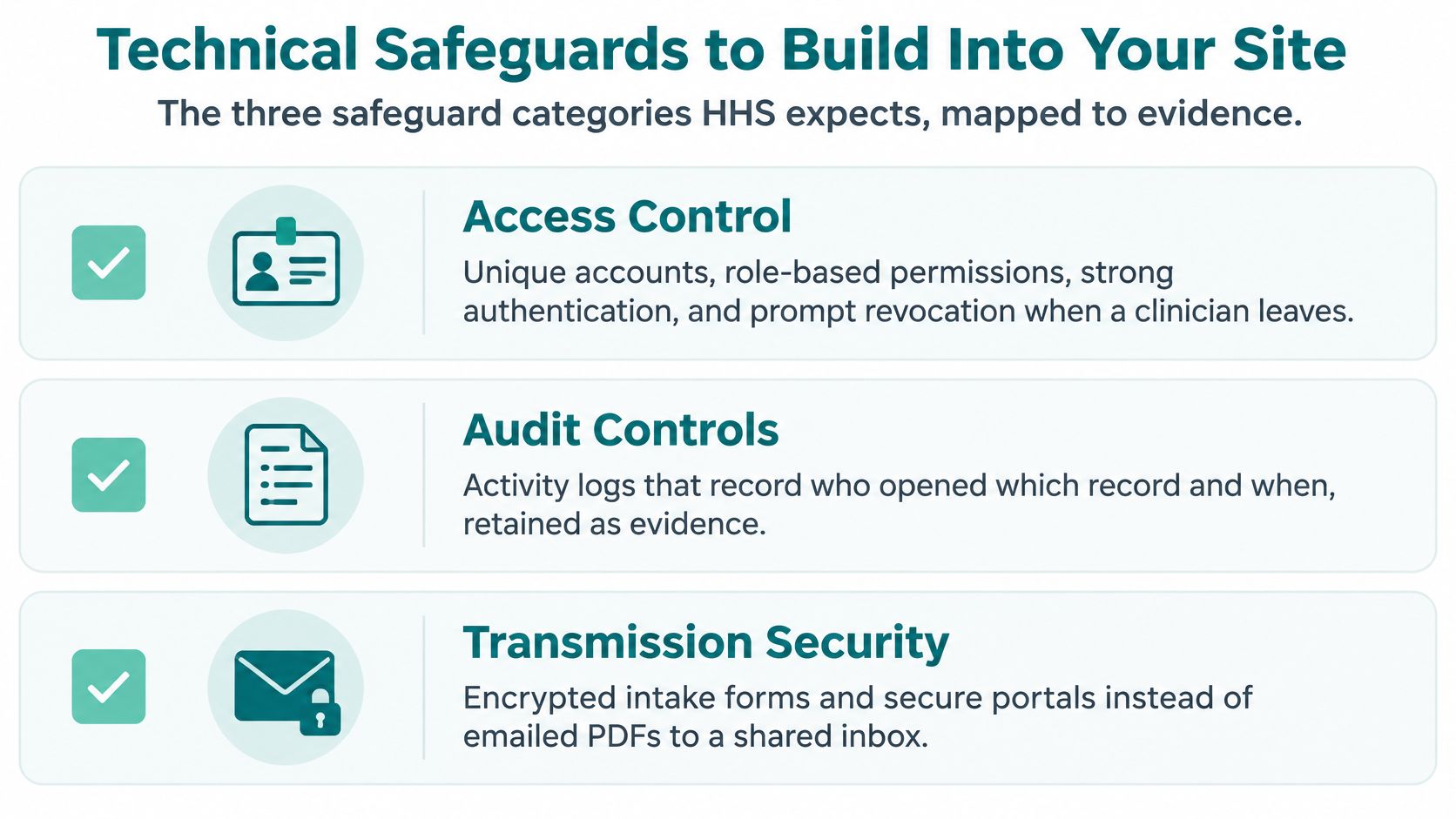
The HHS Security Rule laws and regulations framework organizes technical expectations into three core pillars: access control, audit controls, and transmission security. Your hosting environment, forms, and portal should map directly to those three categories and generate tangible proof you can hand to a reviewer.
Seven Technical Checks You Can Complete in a Day
You don't need an enterprise IT department to tighten the fundamentals on a small practice site. Work through these seven controls with your web developer or hosting provider:
- Current TLS encryption across every page and form. A lapsed SSL certificate or mixed-content form leaves submissions exposed in transit. Set certificates to auto-renew and force HTTPS on every endpoint, especially if you're evaluating HIPAA website hosting for WordPress or a custom portal.
- Individual staff accounts with least-privilege access. Shared office logins like
frontdesk@practice.comdestroy accountability because you can't tell who opened a record. Create unique accounts for clinicians, intake coordinators, administrators, and outside contractors, enforce multi-factor authentication, and revoke logins the day someone leaves. - Active, tamper-resistant audit logs. If you can't show who accessed a form entry or exported a client list, you can't investigate an incident. Turn on logging for form submissions, portal logins, failed sign-in attempts, and admin permission changes, and store logs where a standard user can't edit them.
- Zero patient details in URLs, email subjects, or browser storage. Some poorly built forms pass a client's name or service type in the web address (
?client=Jane&service=anxiety), which drops PHI straight into server logs and browser histories. Configure forms to transmit via encrypted POST requests and strip all clinical details from email notifications. - Scheduled patching and vulnerability scans. Outdated WordPress themes and forgotten contact plugins are easy targets for automated bots. Put core software, themes, and plugins on a documented update cadence paired with recurring vulnerability scans.
- Tested encrypted backups. A backup you have never restored is just a hope. Schedule encrypted backups with your BAA-covered host and run a live restore test to confirm files and databases come back intact.
- A one-page incident response sheet. When something goes wrong at 4:30 p.m. on a Friday, nobody should be searching Google for next steps. Write a single page listing who gets called first (your compliance lead, IT contact, and healthcare attorney), how you isolate an affected system, and where you preserve logs.
Mapping Controls to Audit Evidence
HIPAA relies on a "reasonable and appropriate" safeguard standard. Regulators expect your controls to match your practice's size, workflows, and risk profile, backed by written documentation rather than a one-time launch checklist. Keep a shared compliance folder containing the artifacts in this table.
| Control category | What to implement | Evidence to keep |
|---|---|---|
| Access control | Unique logins, role-based permissions, strong authentication, prompt revocation | User list with roles, access-review date, offboarding checklist |
| Audit controls | Tamper-resistant logs of submissions, logins, failed sign-ins and exports | Log retention policy and a sample log export |
| Transmission security | Current TLS on forms and portals, no PHI in subject lines or URLs | TLS certificate scan, form configuration screenshot |
| Integrity and backup | Scheduled backups tested by restore | Restore test date and result |
| Incident procedure | Named first contact and notification steps | Dated incident plan with staff sign-off |
| Risk analysis | Written note of why each control fits the practice | Dated risk analysis document |
Designing the Patient Experience Without Leaking Information
Strong encryption on your server won't protect a client whose partner reads a pop-up notification on a shared iPad. Technical compliance and real-world privacy aren't the same thing, and behavioral health practices feel that gap more sharply than almost any other specialty.
The HHS telebehavioral health privacy guide advises providers to talk directly with patients about real-world privacy risks, including whether virtual sessions take place in a private room and how household devices and notifications are secured. Your website shapes those habits before the first session ever starts.
Contextual Privacy Defaults and Crisis Wording
Small design choices prevent everyday disclosures inside a client's home or workplace. Build safe defaults straight into your site's communication workflows:
- Channel preferences up front: Let new clients choose whether they want phone calls, portal messages, or text alerts, and give them a clear link to update or revoke that channel later.
- Discreet notification copy: Keep appointment confirmations and alerts neutral so a lock screen never announces a therapist's specialty, clinic name, or visit type to a coworker or family member.
- Clear expectations before intake: Helpful orientation pages, like clinics sharing guides on starting CBT with Uptown Psychology, answer first-visit questions publicly so anxious prospects don't feel forced to overshare personal history inside an unmonitored contact box.
Crisis language needs to sit right above every public contact form, never buried in fine print at the bottom of the page. Use plain, unmistakable wording:
If you are experiencing a mental health emergency or thoughts of self-harm, call or text 988 to reach the Suicide and Crisis Lifeline, or call 911 now. This contact form is for general scheduling questions and is not monitored 24 hours a day.
That short notice protects visitors in acute distress and removes any false impression that an office inbox acts as an emergency triage line.
Building the 30-Day Records Access Rule Into Your Site
Many practice websites treat medical records requests as an afterthought, hiding them behind a generic "Contact Us" page. That creates real operational risk. Under the HHS Right of Access guidance, a covered entity generally must act on a patient's request to access PHI within 30 calendar days of receiving it.
One extension of up to 30 additional calendar days is allowed only if the practice sends a written explanation of the delay and provides a completion date within the original 30-day window. The same Privacy Rule standard limits copy fees to reasonable, cost-based charges covering copying labor, supplies, postage, and, when requested, labor to prepare a summary or explanation. Outsourcing costs can't be passed along to the patient.
Translate those rules directly into your website structure. Create a dedicated Records Request page or portal pathway that clearly separates formal access requests from routine appointment inquiries, explains how identity is verified, routes requests to the responsible staff member, and tracks receipt dates. Never promise "instant record downloads" on your site copy unless your portal delivers them reliably every time.
A Therapy Practice Site Before and After
Rules make much more sense when you watch them play out on a real site structure. Say a solo counselor in Cincinnati's Hyde Park neighborhood builds her website on a standard drag-and-drop website builder during a busy weekend between client sessions.

The Before State Four Quiet Leaks
On the surface, the site looks warm, modern, and trustworthy. Underneath, four everyday shortcuts create steady compliance exposure:
- Emailed intake PDFs: New clients download a fillable PDF, type out trauma history and insurance IDs, and email it to a shared office Gmail account with no BAA.
- Unrestricted marketing scripts: Google Analytics and a Meta advertising pixel fire on every single URL, including the intake instructions page and the booking confirmation page.
- Open-ended contact form: The homepage contact box asks "What brings you in?" with no warning, encouraging prospective patients to share detailed symptoms and crisis thoughts in an unencrypted message.
- Blended email newsletter: Every former client's email address gets exported into a Mailchimp newsletter list alongside community workshop leads, exposing who received care.
The After State Six Practical Fixes
Instead of tearing down her brand and starting over, the counselor keeps her public homepage, bio, and service pages intact and rewires the patient journey in six focused steps:
- Replace emailed PDFs with a BAA-covered encrypted intake tool. She moves all clinical intake questionnaires into an encrypted portal form backed by a signed BAA, eliminating attachments from her inbox entirely.
- Exclude sensitive pages from tracking. She disables Google Analytics and the Meta Pixel on all intake, scheduling, and portal URLs, limiting tracking strictly to public blog posts and service overviews.
- Rewrite the public contact form. She replaces "What brings you in?" with basic fields for name, preferred callback method, and general availability, placing a bold 988/911 crisis notice directly above the submit button.
- Separate clinical contacts from marketing lists. She removes active and former clients from her newsletter platform and sets an office policy that marketing subscriptions require explicit opt-in through a public blog signup box.
- Switch reminders to neutral copy. She updates her scheduling software so appointment texts confirm only a date and time, stripping out her clinic name and therapy focus.
- Document the inventory and schedule a review. She saves a one-page data-flow inventory, files every signed BAA in one folder, and puts a recurring calendar reminder six months out to audit plugins, scripts, and user logins.
The payoff is practical, not theoretical. Her site collects fewer unnecessary fields, relies on one vetted vendor per function, and sits behind a short written record explaining every decision. Practices exploring mental health website solutions often follow this exact split between clean public marketing pages and locked-down patient workflows. Keep in mind this scenario is a teaching example, and your exact checklist will hinge on your state's mental health confidentiality rules and the specific software stack your practice selects.
Confirm Compliance Before You Launch or Hire
Whether you're launching a brand-new practice site or cleaning up an older build, never push a site live on a handshake and a guess. Run a four-step sign-off before you announce the URL:
- Match your data-flow inventory to the live site. Open every page and confirm every active form, chat widget, scheduling embed, and script appears on your one-page inventory with an assigned owner.
- Verify signed BAAs in one folder. Confirm you hold countersigned copies for every vendor that stores, routes, or can access patient details, including hosting, forms, scheduling, and portals.
- Run live end-to-end form tests. Submit a test entry through every form on your site, trace exactly where the confirmation and data land, and check that zero analytics or advertising pixels fire on intake or portal pages.
- Assign a quarterly reviewer and change triggers. Name the person who checks logins, updates, and backups each quarter, and write down the events that trigger an immediate extra review, such as adding a new form, switching schedulers, or hiring a marketing contractor.
Deciding How to Build and Support Your Site
Every practice owner faces the same fork in the road: manage the website in-house, hire a specialized agency, or split the work by keeping marketing edits internal while handing technical security and hosting to a partner. If you bring in outside help, ask three questions on your first call. Which exact platforms and hosting stack do you build on? How do you isolate public marketing pages from PHI workflows? And who owns patching, backups, and plugin reviews six months after launch?
If you'd rather not untangle those technical pieces alone, you can book a free 30-minute strategy call with Helbling Digital Media (HDM), a Cincinnati-based agency that works with healthcare clients on HIPAA-compliant digital solutions. During a call like that, you can map out which pages belong in your public marketing layer and which workflows need a patient-safe build. After launch, our Website Wellness™ plan handles ongoing maintenance, including security updates, performance work, backups, and support so compliance safeguards don't drift out of date. One boundary always holds true: a digital agency handles architecture, hosting, and technical safeguards, and never replaces a qualified healthcare attorney or compliance officer for legal advice.
Ready to turn your practice website into a clear, patient-safe path from first search to booked session? Helbling Digital Media builds HIPAA-compliant digital solutions for healthcare and mental health practices across Greater Cincinnati and beyond, backed by ongoing Website Wellness™ security updates, backups, and support. Visit Helbling Digital Media to book your free 30-minute strategy call and map out a site architecture that protects your clients and grows your practice.