

You're probably looking at one of three situations right now.
Your website says "Not Secure," your developer mentioned SSL and you're not sure what that means, or your site already has HTTPS but you have no idea whether it's installed correctly. For a Cincinnati business owner, that's not a minor technical detail. It affects whether people trust your site enough to call, fill out a form, book an appointment, or buy.
SSL certificate installation sounds like backend IT work, but it's really a customer confidence issue. If someone lands on your site from Google, sees a warning in the browser, and hesitates, you've already lost ground before your copy, design, or offer even gets a chance to work.
A good SSL setup protects data in transit, removes trust-killing browser warnings, and gives your website the baseline security modern customers expect. A bad setup causes broken pages, renewal problems, scary alerts, and support headaches. The difference usually comes down to choosing the right certificate, installing it cleanly, and verifying every part after launch.
Why That Little Padlock Icon Matters More Than Ever
A customer searches for a local service, clicks your website, and sees "Not Secure" near the address bar. Few will stop to analyze what that means. They'll just feel that something is off.
That reaction matters because trust online is instant and fragile. The padlock icon tells visitors their connection to your site is encrypted. In plain English, that means information submitted through your forms, checkout, login, patient intake, or contact pages is protected while it travels between their browser and your website.
As of early 2025, over 87% of all websites use a valid SSL certificate, up from 18.5% six years earlier, according to SSL adoption data from SSL Dragon. That changes the business context completely. An unsecured website no longer looks normal. It looks neglected.
What the padlock means for a business owner
The business value is simple:
- Customer confidence: People are more comfortable filling out a quote form or consultation request on a secure site.
- Sales protection: If you sell online, secure checkout is a baseline expectation.
- Lead quality: A secure experience removes one more reason for a prospect to bounce.
- Search visibility: Security supports the technical foundation search engines expect from a modern site.
If you're thinking about web design or SEO, SSL isn't separate from those conversations. It's part of the foundation. This is one reason technical setup belongs alongside content, speed, mobile usability, and indexing. If you want a broader look at that baseline, this guide on the SEO foundation every website needs is worth reviewing.
Practical rule: If your site collects any information at all, even a basic contact form, SSL is no longer optional.
Security is layered, not one checkbox
SSL handles one specific job. It protects the connection between a visitor and your website. It doesn't replace secure hosting, software updates, backups, or access controls.
That's why smart business owners treat it as one layer in a larger defense plan. If you want a straightforward overview of that approach, IT Cloud Global for business security explains layered protection in a way that makes sense outside of an IT department.
The takeaway is simple. The padlock icon is small, but the signal it sends is big. It tells a customer your business takes the web seriously.
Choosing the Right Certificate for Your Business
Most small business owners don't need to memorize certificate terminology. You just need to choose the certificate that matches the kind of trust your website needs to establish.
Think of the main options like levels of identity checking.
A Domain Validation certificate, usually called DV, is like proving you control the property. An Organization Validation certificate, or OV, goes further and verifies the business behind it. Extended Validation, or EV, exists too, but for most local businesses it's rarely where the decision should start.
The practical choice for most Cincinnati businesses
For most small-to-medium businesses in Cincinnati handling standard customer data, a DV certificate is the most cost-effective and sufficient option. For healthcare or legal businesses handling sensitive information, an OV certificate is recommended to verify the business's legal identity and build greater trust, according to Bitdefender's SSL guidance for small businesses.
That lines up with real-world use.
If you run a local restaurant, home service company, contractor business, salon, or brochure-style professional services site, DV is usually the right fit. If your site mainly needs to secure forms, booking requests, and regular traffic, it gets the job done well.
If you run a medical practice, law firm, financial service, or another operation where visitors share more sensitive information, OV deserves serious consideration. It adds another layer of identity verification that can support trust in a higher-stakes environment.
SSL Certificate Types Compared
| Certificate Type | What It Verifies | Best For | Typical Cost |
|---|---|---|---|
| DV | Control of the domain | Brochure sites, local service businesses, restaurants, contractors, standard lead-gen websites | Usually the most cost-effective option |
| OV | Domain control plus verified business identity | Healthcare, legal, financial, or any business collecting more sensitive information | Higher than DV |
| EV | Stronger organizational vetting | Businesses with specialized compliance, procurement, or enterprise trust needs | Typically the highest-cost option |
How to decide without overbuying
A lot of businesses buy the wrong certificate for one of two reasons. They either assume the cheapest option must be risky, or they buy a more complex certificate because it sounds more "professional."
Neither instinct is reliable.
Use this simpler filter instead:
- Choose DV if your site is mostly informational, collects normal lead form data, or supports routine customer communication.
- Choose OV if your site supports sensitive client or patient interactions, especially where verified business identity adds reassurance.
- Pause before choosing EV if no one can clearly explain why your business specifically needs it.
Buy for your actual risk level, not for the most impressive label on a reseller page.
Match the certificate to the site structure too
The certificate type is only one part of the decision. The shape of your website matters too.
If you only need to secure one main site, the setup is straightforward. If you have multiple subdomains, separate client portals, staging environments, or a store running apart from your main marketing site, the certificate plan can get more complicated fast. That's where a business owner should stop trying to force a one-size-fits-all purchase and get technical advice before buying anything.
The right certificate should fit both your trust needs and your website architecture. If either side gets ignored, SSL certificate installation gets messy later.
The SSL Installation Process Demystified
SSL certificate installation looks intimidating because people often explain it from the server side instead of the business side. The cleaner way to understand it is as a three-part process: request, approval, and install.
If your hosting company gives you a one-click SSL button, much of this happens in the background. If you bought a certificate from a third party or your website runs on a custom setup, you may need to do more manually.
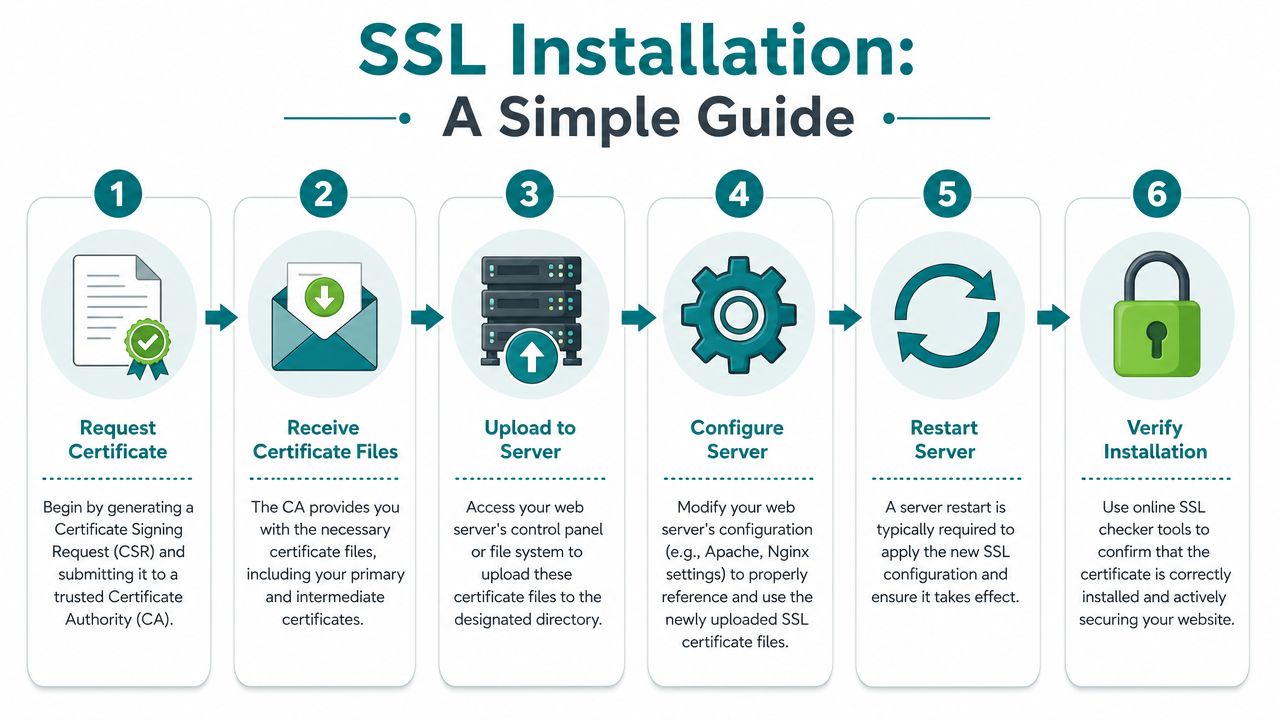
Request
The first step is generating a Certificate Signing Request, usually called a CSR. Think of it as the official application paperwork for your certificate.
It includes details that need to match your website and, depending on the certificate type, your business identity. Misalignment here often causes projects to go sideways.
A common failure point is generating an imprecise CSR. Mismatched details, such as an incorrect company name or domain, can cause the certificate to be rejected and lead to delays and installation problems, according to ComodoSSLStore's guide to common SSL mistakes.
Here's what matters most during the request stage:
- Use the correct domain name: If the site lives on one web address and the certificate is requested for another, browsers will complain.
- Match business details carefully: This matters most for OV and other validated certificates.
- Protect the private key: The private key is the secret half of the certificate pair. It must be stored securely and handled carefully.
- Slow down: Rushing this step creates the kind of mistake that burns time later.
Approval
Once the CSR is submitted, the certificate authority reviews it. For DV, that usually centers on verifying control of the domain. For OV, there's more identity checking.
This stage tends to be easy when the paperwork is clean. It tends to become frustrating when names, domains, or business details don't line up.
If you're using a common hosting company, the approval process may be tightly integrated into the dashboard. If you're using a third-party provider, you may have to complete a few extra verification steps before certificate files are issued.
Install
After approval, you receive the certificate files. Then they have to be installed on the server that delivers your website.
For many Cincinnati small businesses, the path diverges:
- One-click hosting setup: Many hosts offer automated SSL tools that handle installation for you.
- Manual installation: If you buy from a third-party certificate provider or use a custom server, someone may need to upload files and connect them properly in the server settings.
Most hosting providers used by small businesses offer automated tools that remove much of the technical friction. But when a certificate comes from a third-party vendor, the process often requires manual upload and server configuration, including the settings that tell the server to use the new certificate files.
What usually works and what usually doesn't
What works well is simple. Use your host's native SSL tool when your site is on standard shared or managed hosting and your needs are basic.
What doesn't work well is piecing together instructions from five different tutorials, buying a certificate before confirming what your host supports, and guessing your way through a custom environment.
If your site includes a store, portal, multiple subdomains, or a custom application stack, treat SSL installation like infrastructure, not a plugin.
A straightforward brochure site can often be handled through the hosting panel. A WooCommerce store, SaaS product, member portal, or HIPAA-sensitive site is where SSL certificate installation becomes something you want done carefully the first time.
Verifying Your Installation and Fixing Common Errors
The most common SSL mistake isn't buying the wrong certificate. It's assuming the job is finished once the certificate appears to install.
The biggest bottleneck after deployment is failing to verify the certificate by testing HTTPS access and confirming the padlock icon, according to LeaderSSL's write-up on issuing and installation mistakes. That sounds basic, but it's where a surprising amount of avoidable trouble starts.

Start with what your customer sees
Before you touch any settings, open the site the same way a customer would.
Check the homepage. Check the contact page. Check the checkout, login, patient intake, or lead form page if you have one. Then look for the padlock in the browser and make sure the site loads over HTTPS without warnings.
Use this quick checklist:
- Open the HTTPS version directly: Don't assume a redirect is working unless you test it.
- Check key pages: Home, contact, forms, cart, account, and thank-you pages should all load securely.
- Look for browser warnings: Any security warning means the job isn't done.
- Run an SSL checker: A basic online checker can catch chain and trust issues that aren't obvious at a glance.
If your business depends on form leads or online transactions, ongoing security checks matter just as much as the first installation. A structured service such as website security monitoring and support can help catch problems before customers do.
Mixed content is one of the most common problems
A page can have a valid certificate and still show warnings if it loads insecure elements. This is called mixed content.
The simplest way to think about it is this: your front door is locked, but one of the side windows is still open. The page itself loads over HTTPS, but an image, script, font, video embed, or form asset still loads over HTTP.
Typical fixes include:
- Update hard-coded links: Old internal links to images or scripts often cause the problem.
- Check theme and plugin settings: WordPress sites commonly store older asset URLs in settings fields.
- Review third-party assets: Embedded tools, old tracking scripts, and legacy widgets can trigger warnings.
A short walkthrough can help if you're checking this yourself:
When a certificate shows as not trusted
If a browser says the certificate isn't trusted, don't ignore it. That usually points to a chain issue, a mismatched domain, or an installation problem.
Older devices and legacy browsers can be especially tricky. Some won't trust a valid certificate if the intermediate chain isn't installed correctly. In those cases, the fix may involve importing the correct cross-signed intermediate and making sure the wrong root isn't being used. That's not a normal DIY task for a business owner, but it is a real issue in environments where older systems still matter.
A site can be "secure" on one device and broken on another if the trust chain isn't installed cleanly.
One dangerous shortcut to avoid
Never bypass certificate validation in production just to make a warning disappear. Disabling validation removes the authentication piece of TLS. At that point, you haven't solved the problem. You've hidden it.
If the browser doesn't trust the connection, fix the trust issue. Don't work around it.
Automating Renewals and Advancing Your Security
The riskiest SSL strategy is the one many businesses still use. Install the certificate once, set a reminder, and hope someone renews it before it expires.
That was never a great process. It's becoming worse.
By 2026, the maximum validity period for most SSL certificates is projected to shrink to six months, according to Network Solutions' SSL and TLS trends overview. Shorter certificate life improves security, but it also makes manual renewal much easier to miss.
Manual renewals create business risk
A missed renewal doesn't just create a technical alert. It creates a public trust problem. Customers hit warnings. Forms stop converting. Checkouts get abandoned. Staff scramble to figure out who bought the certificate and where the login lives.
For a small business, that's wasted time and avoidable stress. For an e-commerce site, legal practice, healthcare organization, or SaaS platform, it can become a serious interruption.
That's why automation is the right default.

What to automate
Most businesses don't need to manage certificates by hand anymore. Good hosting environments and managed website setups can automate the issuance and renewal cycle so the certificate stays current without someone chasing calendar reminders.
What you want in place is:
- Automatic renewal: The certificate renews before expiration without manual intervention.
- Monitoring: Someone gets alerted if renewal fails.
- Secure key handling: The private key is stored and managed properly.
- Post-renewal checks: The site is verified after changes, not just renewed in the background.
If your team runs Linux-based infrastructure or custom hosting, this overview of Fivenines' Linux certificate operations gives a useful look at the operational side of certificate handling.
For business owners who'd rather not own this process internally, managed hosting is usually the cleanest answer. A properly configured environment, such as managed hosting for business websites, reduces the odds of missed renewals and server-side misconfiguration.
The next level after the certificate is installed
Once your certificate is stable and renewals are automated, there are stronger security upgrades worth considering.
HSTS tells browsers to use HTTPS automatically and refuse the insecure version. That reduces the chance of a visitor hitting the wrong protocol first.
OCSP stapling helps speed up certificate validation and can improve how efficiently browsers verify trust.
These are good upgrades, but they aren't "click and forget" settings on every site. If they're configured poorly, they can create headaches. For that reason, they're best treated as professional hardening steps, especially on e-commerce stores, custom apps, and compliance-sensitive websites.
The best SSL setup is boring. It renews on time, stays trusted, and never forces your staff to think about it.
Your Next Steps for a Secure Cincinnati Website
If your website is part of how you win business, SSL certificate installation is part of your sales and trust system. It protects visitor data, removes obvious friction, and helps your site meet the standard people now expect from any legitimate business online.
The good news is you don't need to become a server admin to make smart decisions. You only need to know what to check and when a setup is simple enough to handle through your hosting panel versus when it's time to bring in technical help.
Use this short review list on your own site:
- Check the browser bar: Make sure your main pages load with HTTPS and show the padlock.
- Match the certificate to the business: DV is usually enough for standard sites. OV makes more sense when sensitive information is involved.
- Verify after installation: Don't stop at "it installed." Test what customers see.
- Fix trust warnings quickly: Mixed content, chain problems, and mismatched domains don't resolve themselves.
- Automate renewals: Manual reminders are too fragile for an important business asset.
A secure website doesn't need to be complicated. It needs to be correct.
If you're unsure whether your current SSL setup is clean, current, and protecting the parts of your site that matter most, getting a professional review is usually faster and cheaper than troubleshooting a broken configuration after customers start seeing warnings.
HDM is a Cincinnati-area digital partner that helps businesses build secure, high-performing websites that support growth. If you want a second set of eyes on your SSL setup, hosting environment, or overall website health, HDM can help you identify risks, tighten security, and make sure your site feels as trustworthy online as your business does in person.


