A lot of Cincinnati business owners are in the same spot right now. The website is getting traffic. Phones ring during the day. Form fills come in. Then the office closes, the front desk gets busy, or the team is tied up helping existing customers, and the next person lands on your site with a simple question that never gets answered in time.
That gap costs real business. A law firm misses an after-hours intake. A dental office gets the same insurance and scheduling questions over and over. A home services company loses a weekend lead because nobody replied until Monday. Most of the time, people don't complain. They just leave.
An AI chatbot for customer service is becoming the practical fix for that problem. Not a gimmick. Not a sci-fi add-on. It's a digital front desk that greets people, answers common questions, captures leads, and routes more complicated issues to the right human.
That shift is happening fast. By 2026, the AI customer service market is projected to reach $15.12 billion, and Gartner reports that 80% of companies are either using or planning to adopt AI-powered chatbots for customer service according to ChatMaxima's roundup of AI customer support statistics. For local businesses, that matters because customer expectations usually move faster than internal operations do.
Your Digital Front Door Is Always Open
A business website used to act like a brochure. Today, it acts more like a lobby.
Someone lands on your homepage at 8:40 p.m. They want to know whether you take their insurance, whether you serve their neighborhood, whether a product is in stock, or whether they can get an estimate without calling. If they don't get an answer quickly, they keep moving.
What customers expect after hours
For a Cincinnati business owner, this problem shows up in ordinary ways:
-
Missed intake opportunities: A prospect is ready to book, but the office is closed.
-
Repeating questions: Your team answers the same pricing, location, and service questions every day.
-
Slow routing: People don't know whether to call sales, support, billing, or scheduling.
-
Staff overload: Good employees spend too much time on low-value back-and-forth.
An AI chatbot for customer service fills that first-response gap. It doesn't replace your team. It makes sure every visitor gets acknowledged, helped, and pointed in the right direction, even when your staff is busy or off the clock.
Practical rule: If your website gets questions your staff already knows how to answer, a chatbot can probably take the first pass.
Why local businesses can't treat this as optional
This isn't just something national brands are doing anymore. The tools are more accessible, easier to connect to websites and CRMs, and far more useful than the old scripted chat widgets most owners remember.
In Cincinnati, that matters for competitive reasons. If two companies offer similar services, the one that responds first usually gets the better chance to earn the call, consultation, or appointment. A fast response also lowers friction for existing customers who just need basic help.
The strongest chatbot setups don't try to sound magical. They do simple things well. They answer common questions, collect key details, and know when to hand a conversation to a real person. That's what makes them useful.
What an AI Chatbot Actually Does for Your Business
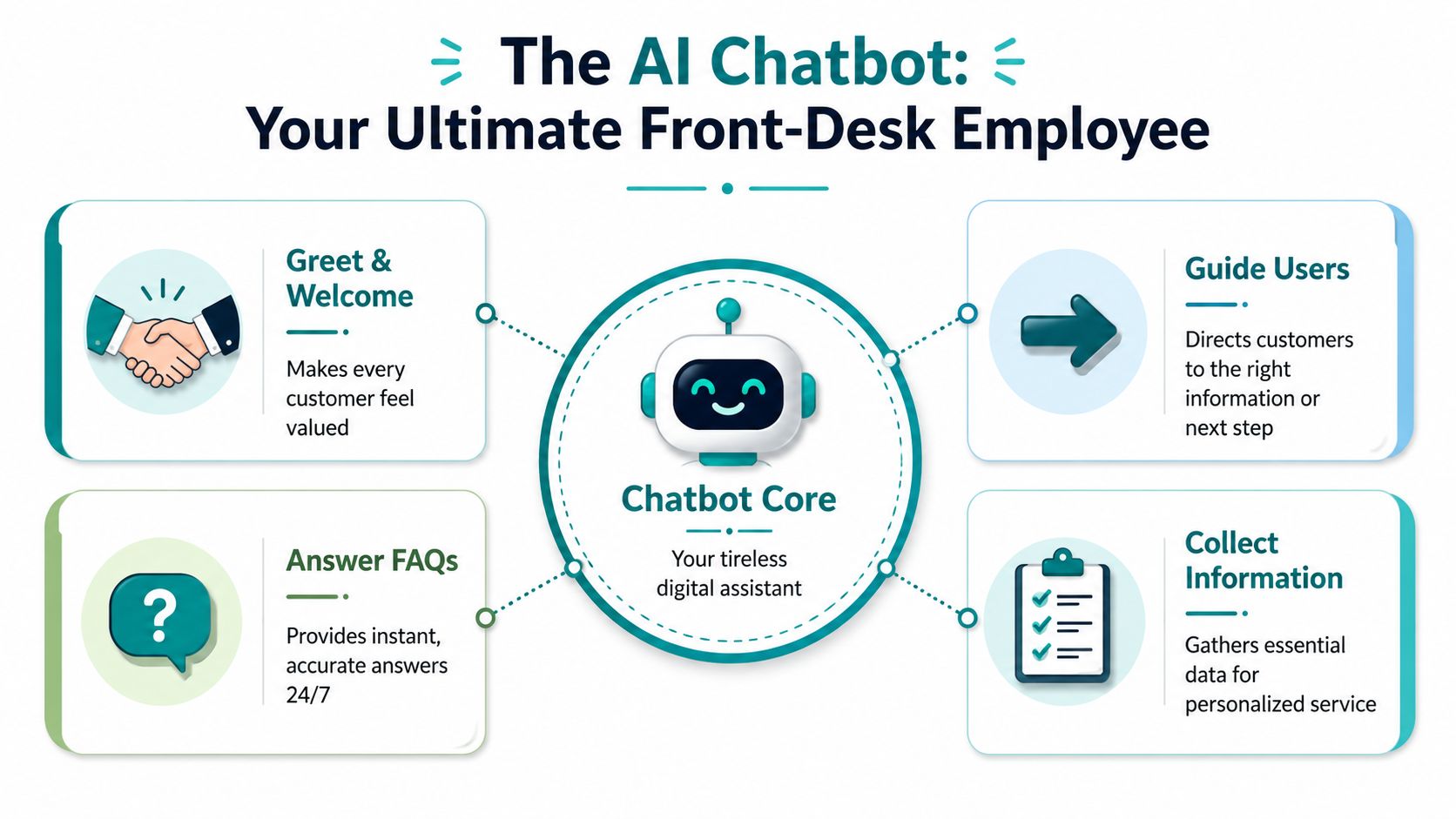
An AI chatbot for customer service handles the first layer of customer communication on your website, Facebook page, or intake flow. Its job is straightforward. Understand the request, respond with the right information, collect useful details, and route the conversation to the right person or system.
That sounds simple, but execution is what separates a helpful chatbot from the clunky tools many Cincinnati owners tried a few years ago. Older bots depended on rigid scripts and exact keywords. Newer systems can interpret plain-language questions, keep track of context, and pull from your approved business information instead of forcing visitors through a canned menu.
The basic jobs a chatbot should handle
For a small or midsize business, the most useful chatbot work usually falls into five categories:
-
Answer common questions: business hours, locations, service areas, financing options, pricing ranges, appointment rules, return policies, and basic service details.
-
Collect lead information: name, phone, email, service needed, timeline, urgency, and any notes your team needs before calling back.
-
Help with scheduling: send people to the correct booking page, explain what to prepare, or gather the details needed for a staff follow-up.
-
Route support requests: separate billing from service, new patient inquiries from existing patient questions, or sales from general support.
-
Guide the next step: point visitors to the right form, page, office location, or phone number without making them dig through the site.
The best setups also know their limits. A chatbot should not guess, improvise policy, or answer sensitive questions outside the rules you set.
What separates a weak bot from a useful one
Useful chatbots do more than answer. They help complete a task.
A basic widget can spit back a canned reply. A stronger system connects to your scheduling tool, CRM, knowledge base, or support workflow so the conversation leads somewhere concrete. For a home services company, that might mean collecting zip code and job type before sending a lead to the right estimator. For a medical practice, it might mean handling non-clinical FAQs while keeping anything that touches protected health information inside a HIPAA-compliant process.
That trade-off matters. The more connected the chatbot is, the more value it can create. It also takes more planning, tighter guardrails, and closer review from your team.
A plain-English example
A Cincinnati med spa visitor asks, "Do you have Saturday appointments, and how do I book a consultation?" A weak bot returns a generic services page. A useful bot answers the scheduling question based on current office rules, explains how consultations work, offers the correct booking link, and captures contact details if no slot is available.
The same logic applies in other local industries. A law firm chatbot can screen practice area and urgency before a callback. A dental office chatbot can answer insurance and new-patient questions without touching clinical advice. A contractor can pre-qualify project type, location, and timeline before the office opens on Monday morning.
That is where business value shows up in real life. Fewer dead-end conversations. Better lead intake. Less time spent by staff answering the same questions over and over.
The strongest chatbot programs are built around clear rules, accurate business information, and a clean handoff process. That matters even more for Cincinnati healthcare practices and other regulated businesses, where privacy, documentation, and HIPAA boundaries need to be defined before the bot goes live.
Key Business Benefits for Cincinnati SMBs
For most business owners, the question isn't whether AI sounds impressive. The question is whether it saves time, saves money, and helps bring in more business.
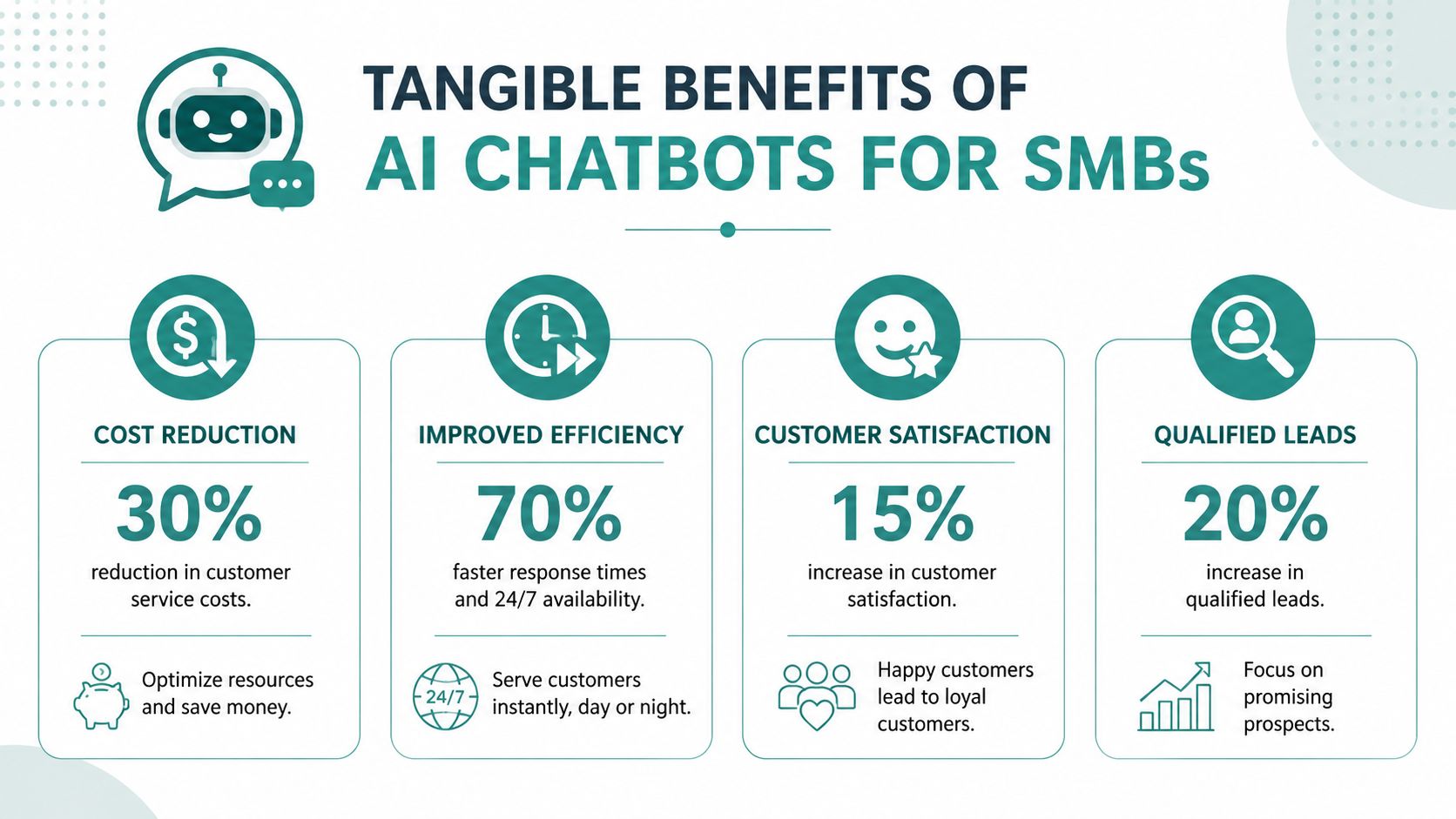
A well-built AI chatbot for customer service can do all three. It handles routine conversations immediately, keeps your team from drowning in repetitive questions, and helps visitors take the next step while interest is still high.
Where the financial value shows up
The clearest return usually comes from routine support and lead handling. According to ChatSpark's breakdown of small-business chatbot benefits, AI chatbots can autonomously handle 80 to 85% of routine customer inquiries, allowing small and mid-sized businesses to save $30,000 to $50,000 annually compared to hiring additional human support staff, with some adopters reporting up to $70,000 in yearly savings.
That doesn't mean every Cincinnati company should cut staff. In many cases, the smarter move is to let the bot absorb repetitive work so your team can focus on sales conversations, complex service issues, and customer retention.
Benefits owners usually notice first
-
Faster first response: Visitors get help right away instead of waiting for office hours.
-
More captured leads: People who would have bounced can start a conversation on the spot.
-
Less interruption for staff: Employees stop answering the same low-complexity questions all day.
-
Better consistency: Customers hear the same approved message every time.
This short video gives a useful overview of how businesses are putting that into practice:
Why this matters for local growth
For Cincinnati SMBs, the opportunity isn't just cost control. It's operational efficiency. A smaller team can serve more people without creating a worse customer experience.
That's especially valuable in businesses where a missed inquiry can mean a missed consultation, missed estimate, or missed order. If your website already gets qualified traffic from SEO, paid ads, referrals, or social media, a chatbot can help convert more of that attention into actual conversations.
A good chatbot also cleans up internal workflow. Instead of sending every inquiry into one overloaded inbox, it can sort and label requests before a human ever steps in.
How Local Industries Can Use AI Chatbots Safely
Different industries need different chatbot rules. A retail store can be more flexible. A law office has intake concerns. A medical practice has privacy obligations that can't be treated casually.
That's where a lot of generic chatbot advice falls apart. It focuses on engagement and automation but skips the risk side entirely.
Healthcare, legal, and service business examples
A Cincinnati healthcare practice can use a chatbot to answer non-sensitive questions about office hours, appointment types, directions, insurance basics, and next steps for scheduling. It should not improvise medical advice or collect protected health information in a careless workflow.
A law firm can use a chatbot to ask practice-area questions, collect contact details, and route urgent matters for quick follow-up. It should avoid creating the impression that legal advice has already been given.
A home services company can use chat to qualify service area, job type, timing, and preferred contact method, then route the lead to dispatch or sales. That kind of use case is often straightforward and high value.
The compliance issue most guides skip
According to Edgetier's analysis of chatbot risk in customer service, most how-to guides ignore the risks of AI hallucination and compliance violations, even though bots can misrepresent policy or violate HIPAA and data privacy laws, creating serious liability. The article points to auto-QA for factuality and compliance on every interaction as a professional best practice.
That matters a lot for healthcare and other regulated industries around Cincinnati. If a bot gives the wrong answer about billing, privacy, eligibility, or treatment-related information, the problem isn't just customer frustration. It can become a legal and reputational issue.
A chatbot should never "guess" its way through a regulated conversation.
What safe implementation looks like
Businesses in sensitive industries should look for a setup that includes:
-
Approved knowledge sources: The bot should answer from reviewed material, not from loose assumptions.
-
Clear limits: It should know what topics it can handle and what topics require a person.
-
Escalation rules: High-risk conversations should move quickly to staff.
-
Ongoing review: Someone needs to audit conversations for accuracy and compliance.
If you run a medical or dental practice, HDM has a useful guide to HIPAA-compliant web design for healthcare organizations that helps frame the broader privacy side of these customer interactions.
Why "set it and forget it" doesn't work
Chatbots need oversight. Policies change. Services change. Staff changes. New questions come in. A bot that was accurate three months ago can become a liability if nobody updates the knowledge behind it.
The safest approach is controlled automation. Let the bot handle repetitive, low-risk tasks. Build direct handoff paths for anything sensitive, urgent, or unclear.
Measuring Chatbot Success and ROI
A Cincinnati business owner usually sees the same pattern first. The bot is handling plenty of chats, but the front desk is still answering the same questions, staff is still cleaning up bad handoffs, and lead quality has not improved. That is why volume metrics by themselves are a poor way to judge performance.
Containment rate gets too much attention. It only shows that the conversation ended without a person stepping in. For a dental practice, law office, home services company, or multi-location retailer, that number can look strong while the customer still leaves confused, abandons the process, or calls back frustrated.
The KPI that matters more
Resolution rate is a better operating metric because it measures whether the customer got the answer, next step, or completed action they came for. In practice, I also look at whether the bot handled the request within its approved boundaries. That matters even more for regulated organizations. A healthcare office around Cincinnati should count a conversation as successful only if it solved the issue safely and stayed within HIPAA-aware rules for what the bot can and cannot handle.

What to put on your dashboard
For a small or midsize business, the best scorecard ties chatbot activity to service performance and revenue outcomes:
| Metric | Why it matters |
|---|---|
| Resolution rate | Shows whether the bot solved the customer's issue |
| Lead quality | Shows whether conversations are producing sales-ready opportunities |
| Conversion from chatbot leads | Measures whether chats turn into calls, consults, appointments, or sales |
| Customer satisfaction feedback | Helps spot weak answers and frustrating paths early |
| Escalation quality | Shows whether staff receive the right context and can pick up quickly |
One more point gets missed in a lot of reporting. Time saved only counts if the team feels it. If your office manager still has to reread transcripts, re-ask intake questions, or fix bad routing, the bot is shifting work, not reducing it.
First contact matters
First contact resolution is one of the clearest ways to judge whether the chatbot is helping. If a visitor starts with the bot, then has to repeat the same details by phone, form, or email, the customer experience is slower and your labor cost goes up.
For a good primer on that concept, Doczen on first contact resolution is worth reading. It explains why solving the issue on the first interaction matters more than closing the chat window.
If customers keep repeating themselves after a chatbot handoff, the workflow is broken even if the dashboard looks clean.
How owners should judge ROI
A useful ROI review is simple. Did the bot reduce repetitive service work, improve after-hours lead capture, increase booked appointments, or shorten response time without adding cleanup for staff?
That review should happen monthly at first. Businesses usually learn fast where the bot performs well, where it needs tighter guardrails, and which conversations should go straight to a person. For teams planning a broader rollout, this AI implementation roadmap for Cincinnati and Dayton businesses is a practical next step.
If the chatbot produces transcripts and activity reports but does not improve service, lead flow, or staff efficiency, it is not delivering return.
A Practical Roadmap for Chatbot Implementation
Most chatbot projects don't fail because the software is bad. They fail because the business skipped the planning.
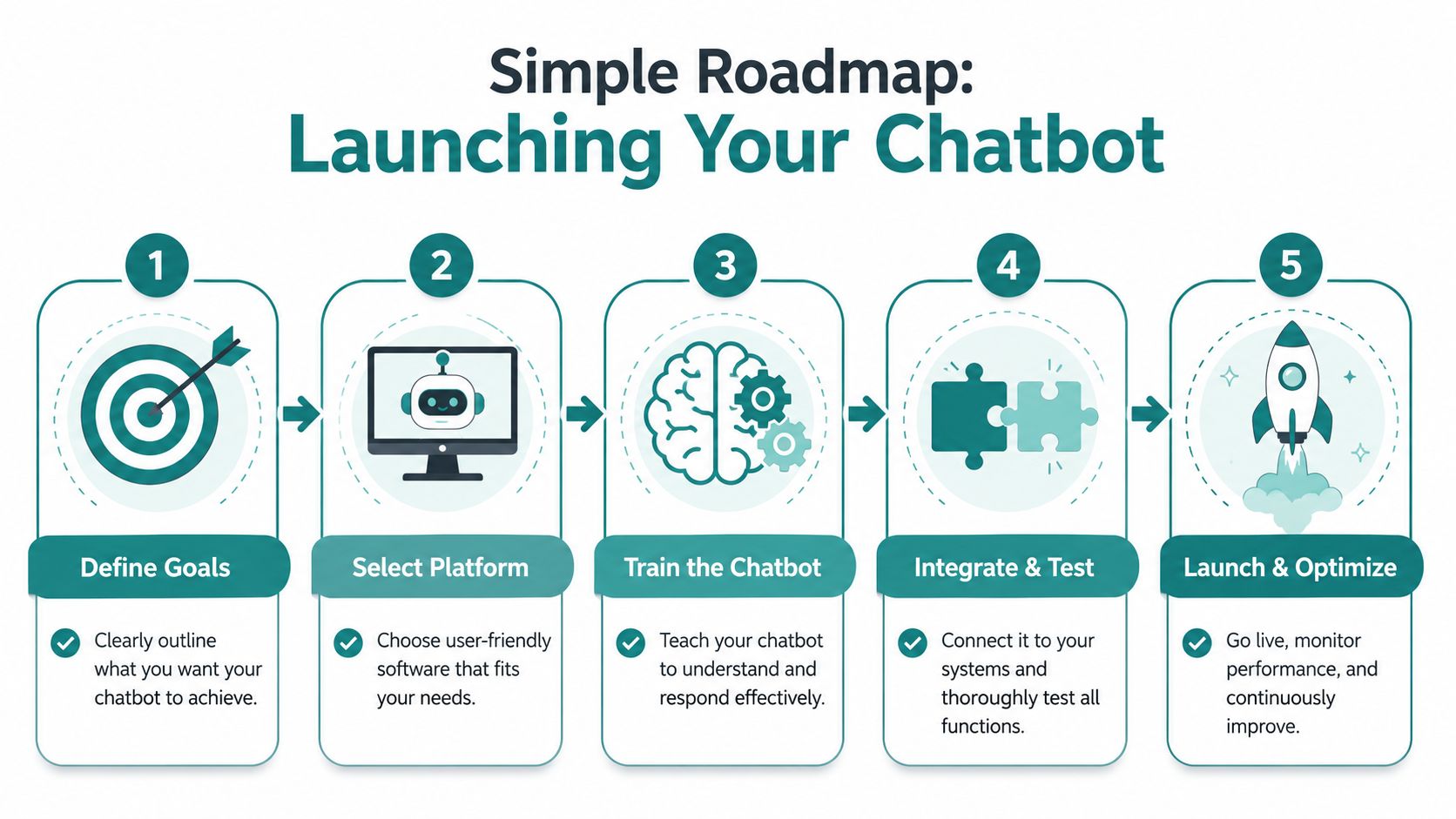
A useful rollout starts with one clear operational goal. Maybe you want to reduce repetitive support questions. Maybe you want better after-hours lead capture. Maybe you need faster intake for a legal or healthcare office. Pick one primary use case first.
Start with the business goal, not the software demo
Before choosing a platform, answer a few basic questions:
-
What should the bot handle first? Focus on a narrow set of repeat questions or a specific intake path.
-
What information does it need? Pull from approved FAQs, policies, service details, and routing logic.
-
What systems should it connect to? That might include your CRM, scheduling tool, contact forms, or help desk.
-
Who owns updates? Someone has to review logs, adjust content, and catch weak answers.
This planning step is where many projects get rushed. Business owners see a polished demo, but the essential work is deciding what the bot should say, what it should never say, and where the conversation should go next.
Design the handoff before the conversation flow
A critical step often goes overlooked. According to Zoom's guidance on AI chatbots for customer service, many organizations underdesign the post-interaction workflow and escalation path, where 80% of AI efficiency gains land. Their advice is direct: perfect the escalation path first, and make sure the bot admits when it doesn't know something and transfers the customer cleanly.
That idea is simple and important. A chatbot should fail in a controlled way.
-
If confidence is low, escalate
-
If the issue is sensitive, escalate
-
If the customer is frustrated, escalate
-
If the policy answer isn't certain, escalate
Build in review loops from day one
A chatbot launch isn't the finish line. Review actual conversations. Look for repeated confusion. Tighten the wording of answers. Add missing FAQs. Fix dead-end paths.
For companies that need a broader planning framework, this AI implementation roadmap for Cincinnati and Dayton businesses is a useful reference point because it looks at AI as an operational rollout, not just a website feature.
Keep the first version small
Don't try to automate every customer interaction at once. Start with one lane where the questions are common, the risk is manageable, and the payoff is clear. Then expand.
That approach usually delivers better results than launching a giant bot that tries to answer everything and ends up doing nothing particularly well.
Choosing the Right AI Chatbot Partner
Picking a chatbot vendor or agency shouldn't start with features. It should start with your business model, your customer journey, and your risk level.
A retail store, a dental office, and a law firm might all want an AI chatbot for customer service, but they don't need the same implementation. The right partner will ask about intake process, approval workflows, compliance boundaries, and how your team handles follow-up.
Questions worth asking before you sign anything
Some businesses can use an off-the-shelf platform with careful setup. Others need custom integration with scheduling, CRM, forms, or internal workflows. If you're comparing options, use a simple checklist like this:
| Criteria | What to Look For |
|---|---|
| Integration fit | Can it connect to your CRM, scheduling system, forms, and support tools? |
| Compliance readiness | Can it support regulated workflows, including HIPAA-sensitive environments where needed? |
| Escalation design | Does it support clean handoff to a human with context preserved? |
| Knowledge control | Can your team easily update approved answers and policies? |
| Reporting | Does it show resolution quality, lead outcomes, and handoff performance? |
| Support model | Will the vendor or partner help with setup, testing, optimization, and governance? |
What a solid partner should understand
Look for practical experience, not buzzwords. The team should understand website UX, lead handling, analytics, content structure, and operational workflow. If they only talk about the model and never ask how your staff works, that's a warning sign.
One local option businesses can evaluate is HDM's overview of AI chatbot developers in Cincinnati and Dayton. Use that kind of resource to compare capabilities, especially if your chatbot needs to tie into web design, SEO, or a larger digital growth plan.
The right setup should feel like part of your business process, not a disconnected widget pasted onto the site.
If you're exploring how an AI chatbot fits into your website, lead generation, or customer support workflow, HDM can help you evaluate the strategy, compliance needs, integrations, and rollout plan in plain English. That's often the difference between a chatbot that looks interesting and one that improves operations.