
A lot of Cincinnati-area business owners hit the same wall with ecommerce. They launch a store, invest in design, add products, maybe run some ads, and then wait for sales that never quite match the effort. Traffic trickles in. A few orders come through. But the site doesn't feel like it's working as hard as it should.
Most of the time, the problem isn't the platform or the product line. It's that the site was built like a catalog, not a sales system. That's where a solid content strategy for ecommerce changes the game. It helps your store answer questions, remove doubt, guide shoppers toward the right products, and keep customers coming back after they buy.
Your Website Is More Than a Digital Catalog
A Cincinnati shop owner can spend real money on a good-looking ecommerce site and still end up with a store that underperforms. The homepage looks polished. The checkout works. The product photos are solid. Then a shopper clicks deeper and finds thin category copy, supplier-written descriptions, and no clear help on what to buy, why it fits, or what happens after the order.
That kind of website leaves sales on the table every day.
An ecommerce site has to do the job your staff would do in the store. It has to answer the first question, handle the objection, explain the difference between options, and make the next step obvious. If the site only displays products, the customer has to connect the dots alone. A lot of them will not.
This matters even more for local owners who are not trying to become full-time marketers. You do not need a huge publishing machine. You need a site that supports revenue at each stage of the sale. That includes pre-purchase content, decision-stage content, and the post-purchase pages that cut down on buyer's remorse, support tickets, and refund requests. Agencies like HDM usually end up fixing all three because weak content rarely shows up in just one place.
Every page needs a sales role
Good ecommerce content works best when each page has a specific job. In practice, that usually means three jobs across the site:
- Bring in qualified traffic with category copy, buying guides, gift guides, and question-based content that matches how people search
- Help shoppers choose with product details, comparison points, fit or usage guidance, FAQs, and clear explanations of who each item is for
- Reduce friction after the click with shipping details, return policies, care instructions, setup help, reorder prompts, and follow-up content that supports repeat purchases
Owners often try to make up for weak content with bigger ad budgets or more frequent discounts. That can produce a short-term lift. It also cuts margin and makes sales harder to maintain when ad costs rise.
Helpful content does a cheaper job over time.
What this looks like on a real store
A home goods category page should do more than say "shop our collection." It should explain the difference between materials, call out where each product works best, and help a buyer narrow the options fast.
An apparel product page should answer the questions that hold up the sale. How does it fit? What does the fabric feel like? Is it easy to wash? What type of customer usually likes this style and who probably should skip it?
A specialty product store needs more than random blog posts that chase traffic. The content should line up with the questions people ask before buying, the concerns they have after checkout, and the reasons they come back six months later to buy again.
That is the shift. Your site stops acting like a shelf of products and starts working like a sales system.
Start by Auditing Your Existing Content
Before you create anything new, look hard at what's already on the site. Most stores don't need more content right away. They need better content in the places that already matter.
Start simple. Open your site like you're a first-time customer who knows nothing about your business. Don't look at it as the owner. Look at it as someone deciding whether to trust you with their money.
Check the pages closest to the sale
Start with the money pages first. That means product pages, category pages, and any pages that rank well or get regular traffic.
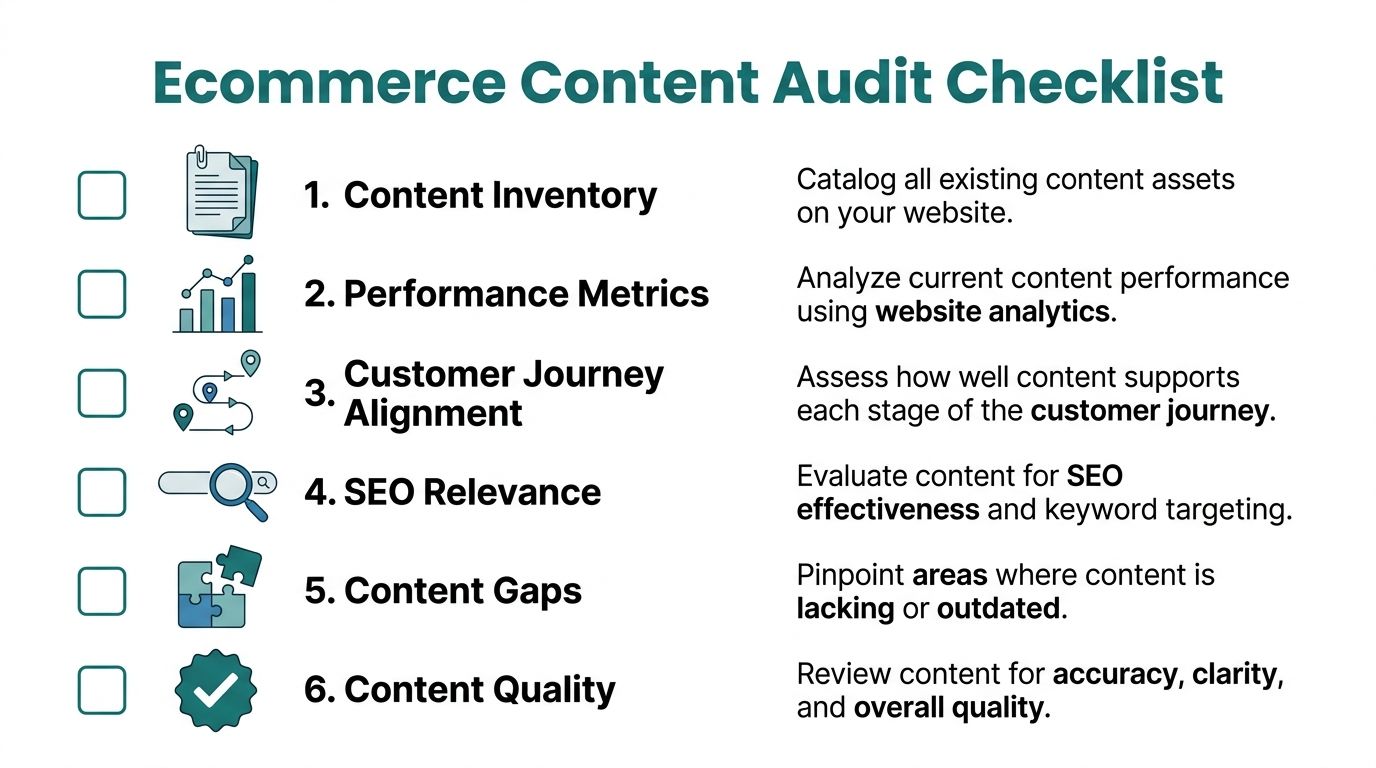
Use this checklist:
- Product descriptions: Do they explain what the item is for, who it's for, and why it's different?
- Category pages: Do they guide shoppers, or do they just dump products into a grid?
- Navigation copy: Are labels obvious, or do customers have to guess?
- FAQ content: Are common objections answered before checkout?
- Mobile readability: Is the content easy to scan on a phone?
- Trust details: Are shipping, returns, warranties, and support easy to find?
A weak product page usually has one of two problems. It's too thin, or it's too generic. Thin pages don't answer enough questions. Generic pages answer the wrong questions.
Look for content that sounds right but doesn't help
Many owners get tripped up at this point. A page can sound professional and still do nothing for sales.
Watch for red flags like:
| Page type | Common problem | Better approach |
|---|---|---|
| Product page | Manufacturer copy pasted in | Rewrite around buyer concerns and use cases |
| Category page | One-line intro with no guidance | Add selection help, differences, and buying context |
| Blog post | Broad topic with no clear intent | Target a real customer question tied to products |
| About page | Brand story only | Blend story with trust, process, and why buy here |
Practical rule: If a customer reads the page and still has to call, email, or leave to research elsewhere, the content isn't finished.
Audit with your customer's questions in mind
A good audit doesn't start with keywords. It starts with friction.
Write down the questions you hear from customers and sales staff. What do people ask before buying? What confuses them? What causes returns? What keeps people from choosing between two products? Those questions point straight to content gaps.
For a small team, that alone can uncover plenty. If the site is larger, or if traffic is strong but conversions are soft, a deeper review helps. That's where an agency can spot hidden issues like overlapping pages, weak internal linking, messy content hierarchy, or pages that rank but don't convert. Those aren't always obvious from the front end.
A clean audit gives you something most businesses don't have. A clear list of what to fix first, instead of guessing what to publish next.
Build Your Revenue-Focused Content Plan
Random posting wears people out. It creates activity without momentum. A revenue-focused content plan works better because every piece has a reason to exist.
The simplest way to think about it is this. Who are you trying to reach, what are they trying to solve, and what content helps them take the next step?
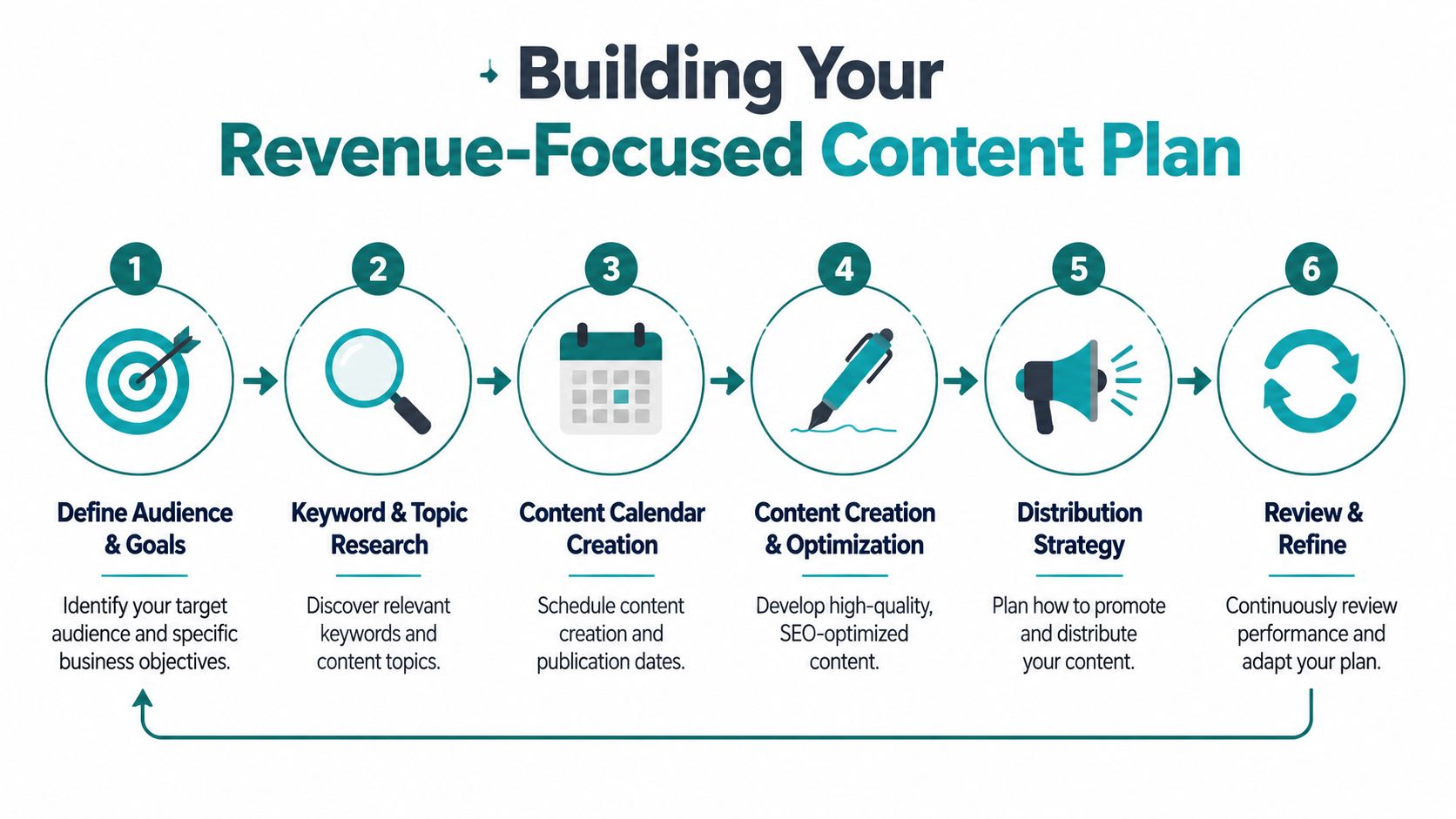
A useful framework comes from SEOPROFY's guide to ecommerce content strategy. It describes a high-performing approach as a repeatable operating system. Start with customer data, create buyer personas, map topics to the buyer journey, assign channels and KPIs, and review performance regularly.
Start with people, not personas on a slide
“Buyer persona” can sound like agency jargon, but it's really just a shortcut for understanding patterns in your customers.
You don't need a 20-page document. You need a working picture of the people most likely to buy from you.
Think in practical terms:
- What are they trying to get done
- What do they worry about before buying
- What would make them choose the wrong product
- What information helps them feel confident
If you sell outdoor gear, one shopper may care about durability and technical details. Another may want something simple for weekend trips with the family. Those buyers need different content, even if they're looking at the same category.
Map content to buying stages
One reason ecommerce content underperforms is that too much of it sits at the top of the funnel. There are plenty of broad blog posts, but not enough content that helps someone compare, choose, and buy.
A workable planning model looks like this:
| Buying stage | What the shopper needs | Best content types |
|---|---|---|
| Early research | Basic education and options | Guides, how-to articles, short videos |
| Comparison | Clear differences between products | Comparison pages, category copy, FAQs |
| Purchase decision | Confidence and reassurance | Product pages, reviews, shipping and returns info |
| After purchase | Help using the product well | Care guides, setup help, email sequences |
That last row gets ignored too often. It matters more than many owners realize.
Build a calendar you can actually keep
A content calendar shouldn't be ambitious. It should be realistic.
For most small and mid-sized businesses, consistency beats volume. One well-built guide, two stronger category pages, and a batch of improved product descriptions will usually outperform a pile of generic blog posts no one reads.
Try planning content by business priority instead of by date alone:
- Fix high-traffic pages first that already influence sales.
- Create decision-stage content next for products with the most margin or demand.
- Add educational content where customers clearly need more context.
- Support retention with post-purchase pages and emails.
If you're comparing whether to do this in-house or bring in help, that usually comes down to bandwidth and execution discipline. A team like HDM can handle the moving parts across strategy, SEO, content structure, and ecommerce implementation. If you want a broader look at how those pieces connect, HDM's article on digital marketing services for ecommerce is a useful reference.
Good planning removes two expensive habits. Publishing content no one needs, and ignoring pages that already have buying intent.
Create Content That Answers Questions and Sells Products
A Cincinnati business owner does not need fifty new blog posts. They need the right pages to answer the questions that keep people from buying.
That changes how content gets planned. The goal is not to publish more. The goal is to remove hesitation, help shoppers choose, and support the sale before and after checkout.

Product pages should remove doubt
A product page earns its keep when it answers the same questions a good in-store salesperson would handle in two minutes.
That usually means covering:
- Who the product is for
- What problem it solves
- How it fits, works, feels, or performs
- What objections a buyer may have
- What they should know before ordering
Plain language wins here. Clear copy, useful photos, sizing details, material information, shipping expectations, and honest FAQs do more for sales than clever branding lines.
For many stores, product pages also carry search traffic with strong purchase intent. If you want to improve rankings without weakening conversion copy, HDM's guide to ecommerce SEO is a good companion to this work.
Category pages should help people choose
Category pages do real selling work. They are not just shelves with filters.
A strong category page helps shoppers understand the differences between options, narrow the list fast, and click into the right products with confidence. That matters because category traffic often includes people who are interested but not ready to choose between three similar products on their own.
If you sell skincare, explain the difference between gel, cream, exfoliating, and sensitive-skin cleansers. If you sell furniture, explain size, materials, durability, room fit, and care. If you sell industrial supplies or specialty equipment around Cincinnati, spell out use cases, compatibility, and ordering mistakes to avoid.
Useful guidance increases conversion because it reduces decision fatigue.
A category page should guide selection and move buyers closer to checkout.
Blog content should support buying intent
Blog content still has a place, but only if it helps a shopper make progress toward a purchase.
The strongest topics usually fall into a few practical groups:
- Buying guides that explain how to choose
- Comparison pages that clarify options
- Problem-solving articles tied to what you sell
- Use-case content that shows where the product fits in real life
The weak version is easy to spot. Broad articles with vague advice may bring in visits and still do nothing for revenue. I see this a lot with smaller ecommerce brands that were told to "do content" but never built a plan around margin, product demand, or actual customer questions.
Good content quality matters more than sheer output. A well-built guide that supports one profitable product line can outperform ten generic posts. That is usually the trade-off. Fewer assets to publish, more work per page, better odds of turning traffic into orders. An agency like HDM often helps owners make that call because someone has to connect SEO, merchandising, copy, and conversion instead of treating them as separate jobs.
Here's a useful walkthrough on content planning in action:
<iframe width="100%" style="aspect-ratio: 16 / 9;" src="https://www.youtube.com/embed/WLCNd8yUNTk" frameborder="0" allow="autoplay; encrypted-media" allowfullscreen></iframe>Don't stop at the checkout page
A lot of ecommerce content plans stop at the sale. That leaves money on the table.
According to Blackbelt Commerce's guidance on ecommerce content strategy, post-purchase and retention content is often overlooked. That includes content that reduces returns, builds confidence, and increases repeat purchases, such as size guides, care instructions, styling tips, abandoned-cart education, and post-purchase email flows.
This work is not flashy. It affects margin.
Post-purchase content can include:
- Setup and care pages that help customers use the product correctly
- Fit, sizing, or usage guides that reduce bad purchases and returns
- Cross-sell education that introduces the next logical product
- Follow-up emails that answer common questions before support tickets stack up
For a non-technical owner, this is one of the easiest places to miss revenue. If a customer buys once, gets confused, uses the product wrong, and never comes back, the problem is not just service. It is content.
Use AI as an assistant, not the author of your brand
AI can speed up outlines, briefs, drafts, and repurposing. It helps with production. It does not replace judgment, product knowledge, or customer understanding.
If you publish generic AI copy without editing it, your site starts sounding flat and interchangeable. That hurts trust. It also makes product pages and articles less persuasive because they stop reflecting how real customers talk, compare, and buy.
Use AI for the rough draft work. Then have a real person add specifics, examples, objections, and context from your business. That is how content starts sounding like a company that knows its products and knows its customers.
Measure What Matters Most Your Bottom Line
A Cincinnati owner does not need another pretty dashboard. You need to know whether your content helped someone buy, buy again, or cost you less to support.
That changes how you measure success.
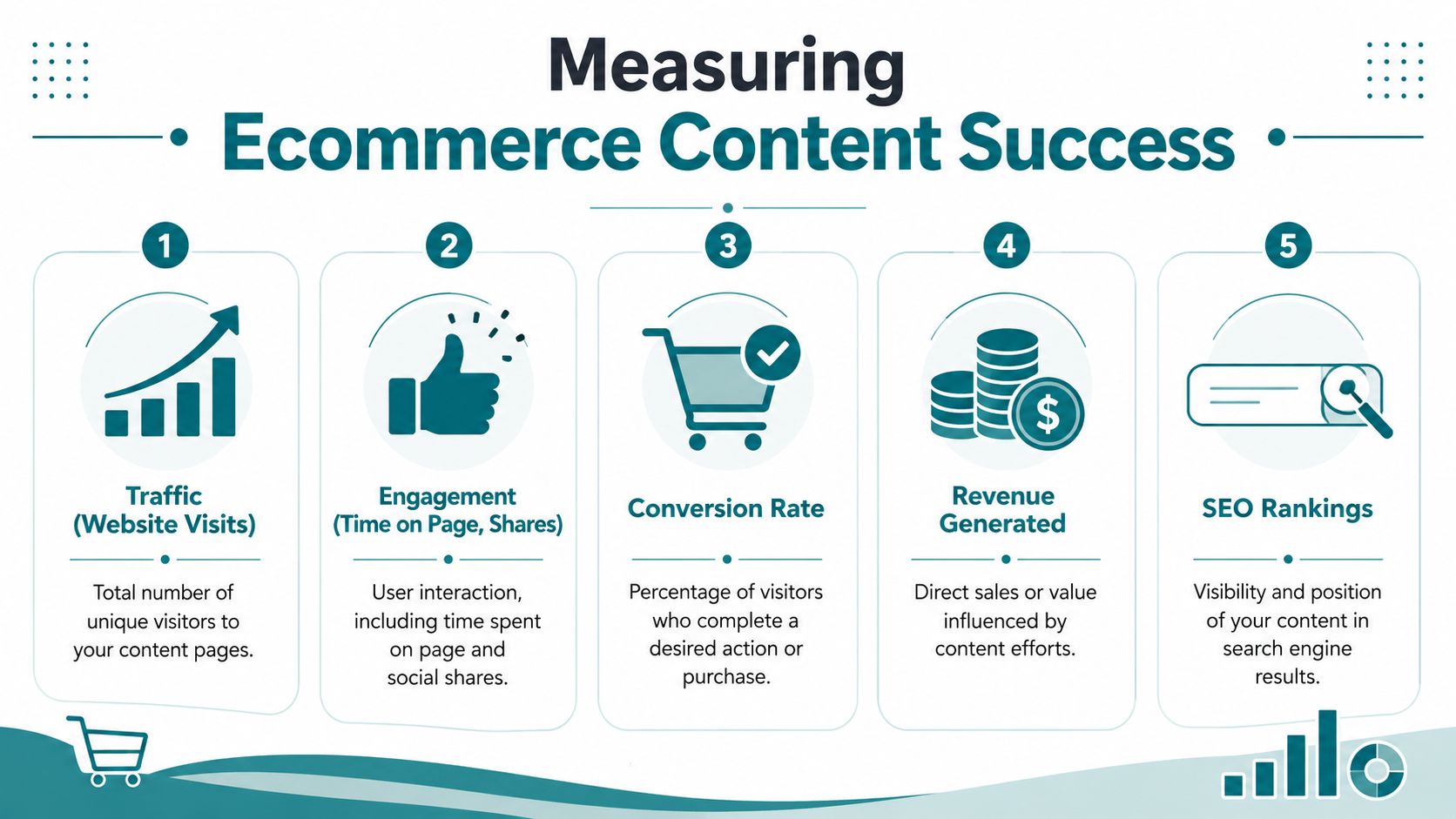
Pageviews and impressions can still be useful diagnostic numbers, but they are not business outcomes. A guide that brings in traffic and never leads to product views, email signups, assisted conversions, or repeat orders is not pulling its weight. A smaller page that consistently helps people choose the right product often matters more.
Tie content to money, not just attention
The practical question is simple. What did this page do for revenue?
For a non-technical business owner, that usually means tracking content in three buckets:
- Content that brings in qualified traffic to product, category, or high-intent educational pages
- Content that improves conversion by answering objections before a customer leaves
- Content that protects margin by reducing returns, support tickets, or one-and-done customers
That third bucket gets ignored all the time. If a sizing guide lowers return volume or a care email reduces avoidable support requests, that content is doing real financial work even if it never ranks on Google.
Keep distribution simple and visible
You do not need a dozen promotion channels. For many small and mid-sized ecommerce brands around Cincinnati, three are enough to start:
- Search, so buyers can find product pages, collections, and buying guides
- Email, so you can bring shoppers back with relevant education and offers
- On-site placement, so useful content appears on the pages where people make decisions
Placement matters more than owners expect. A buying guide buried in a blog archive gets missed. The same guide linked from a collection page, product page, or cart email can influence revenue every week.
Watch a short list of metrics you will actually review
A monthly report should be readable in a few minutes. If it takes half an hour to explain, it is probably tracking too much.
Watch these:
| Metric | Why it matters | What it tells you |
|---|---|---|
| Traffic to key pages | Shows whether buyers are finding your money pages | Visibility |
| Conversion rate on content-assisted pages | Shows whether content helps people decide | Persuasion |
| Revenue from content pathways | Connects content to orders | Business impact |
| Email clicks to product pages | Shows whether follow-up content moves buyers closer | Purchase intent |
| Return or support patterns | Shows whether educational content is preventing problems | Customer quality |
Use these numbers together. Traffic without conversion usually points to a mismatch in intent, weak calls to action, or content that answers the wrong question. Conversion without enough traffic usually means the page deserves better placement, stronger internal linking, or SEO work.
Bottom-line test: If a page gets attention but does not help sales, retention, or support efficiency, revise it, relocate it, or remove it.
Review content like inventory
Content needs the same discipline as products on a shelf. Some pages sell. Some assist sales. Some just take up space.
A useful review process usually looks like this:
- Improve pages that already influence revenue by updating examples, FAQs, product links, and calls to action.
- Fix commercial pages with weak conversion by tightening copy, answering objections, and improving page layout.
- Merge or remove low-value content that gets little useful traffic and does not support sales or customer retention.
This is the kind of cleanup an agency like HDM often handles for busy teams. It is not glamorous work, but it is where a lot of ecommerce growth comes from. Better measurement usually leads to better decisions about what to keep, what to fix, and what platform limits are getting in the way. If your current setup makes that hard, this breakdown of e-commerce platform software options for growing brands helps clarify the trade-offs.
Choosing the Right Technology for Growth
Your content strategy needs the right home. The platform you choose affects how easily your team can update pages, publish useful content, and scale without constant workarounds.
Shopify, WooCommerce, and headless
Here's the simple version:
| Platform | Best fit | Trade-off |
|---|---|---|
| Shopify | Businesses that want a fast, managed ecommerce setup | Less flexibility for deeper custom needs |
| WooCommerce | Businesses already invested in WordPress content and SEO workflows | More hands-on maintenance and plugin management |
| Headless | Brands that need custom experiences across content and commerce | More complexity, usually higher build requirements |
Shopify is often the practical choice for owners who want to get moving quickly. It handles a lot out of the box and keeps operations straightforward.
WooCommerce makes sense when content is a major part of the business and your team already lives in WordPress. It gives you more control, but that control comes with more upkeep.
Headless is for businesses that need something more custom. Think unique content models, advanced integrations, or a front-end experience that can't be boxed into a standard theme. If you're comparing those options in more detail, HDM's article on e-commerce platform software breaks down the trade-offs from a business perspective.
The right choice depends less on trends and more on what your team can manage well. A platform should support your growth, not become the next thing you have to work around.
If your store looks good but isn't converting the way it should, HDM can help you sort out the content, SEO, ecommerce structure, and platform decisions that affect revenue. Learn more about HDM.