Your store still takes too long to update. Your team avoids touching the backend because one wrong move breaks something. Customers abandon carts on mobile, and every new feature sounds simple until the estimate comes back bigger than expected.
That's usually when Cincinnati business owners start asking the question. Not "How do we patch this?" but "Are we on the wrong platform entirely?"
An ecommerce store can become a growth engine or a bottleneck. If it's hard to manage, hard to scale, and hard to market, it's no longer just a website problem. It's a sales problem, an operations problem, and eventually a customer trust problem.
When Your Online Store Is Holding You Back
A Cincinnati owner usually notices the problem in the middle of a normal week, not during some big strategy session. The team is trying to launch a promotion before the weekend. Pricing needs an update, a shipping rule breaks, mobile checkout still feels clunky, and a simple landing page request turns into a developer ticket. Sales keep coming in, but every change costs too much time, too much money, or both.
That's the point where the platform stops being a background tool and starts affecting growth.
The signs usually show up in daily operations
The warning signs are practical, not abstract.
- Your team delays routine changes: Product updates, content edits, and seasonal promos take longer than they should.
- Marketing keeps hitting friction: Search, email campaigns, paid traffic, and landing page tests are harder to launch and harder to measure.
- Customers feel the rough spots: Site search misses obvious products, checkout adds extra steps, or the mobile experience costs you conversions.
- Growth exposes weak systems: More SKUs, more orders, or more traffic create operational headaches instead of better margins.
A migration is the decision to move your store onto a platform that can handle the business you're building. That might mean leaving a patched-together custom system for Shopify. It might mean replacing a plugin-heavy WooCommerce setup that has become expensive to maintain. In some cases, it means cleaning up the architecture so merchandising, content, and reporting stop fighting each other.
The overlooked risk is what happens after launch. A store can look better and still lose revenue if redirects are sloppy, category pages disappear, or product URLs change without a plan. I've seen businesses spend heavily on a new build, then watch organic traffic soften for months because SEO was treated like a checklist instead of part of the migration strategy. Our complete guide to ecommerce SEO covers the pieces owners need to protect before, during, and after a move.
Good migration planning also means deciding what should and should not come over. Old apps, broken processes, duplicate product data, and years of workaround logic usually do not deserve a fresh start. Strong teams now use audits, crawl data, and AI-based risk checks to catch redirect gaps, template issues, and content loss early, before they turn into ranking drops or checkout problems. If you want a second perspective, these successful ecommerce replatforming tips line up with what we see in real projects.
Many owners wait because the current store still functions. The fundamental question is cost. If your platform makes every campaign slower, every improvement pricier, and every integration more fragile, it is already affecting sales, operations, and customer retention.
That is when ecommerce migration services start to make business sense. The goal is a store that gives your team room to grow without fighting the system every week.
What an Ecommerce Migration Really Involves
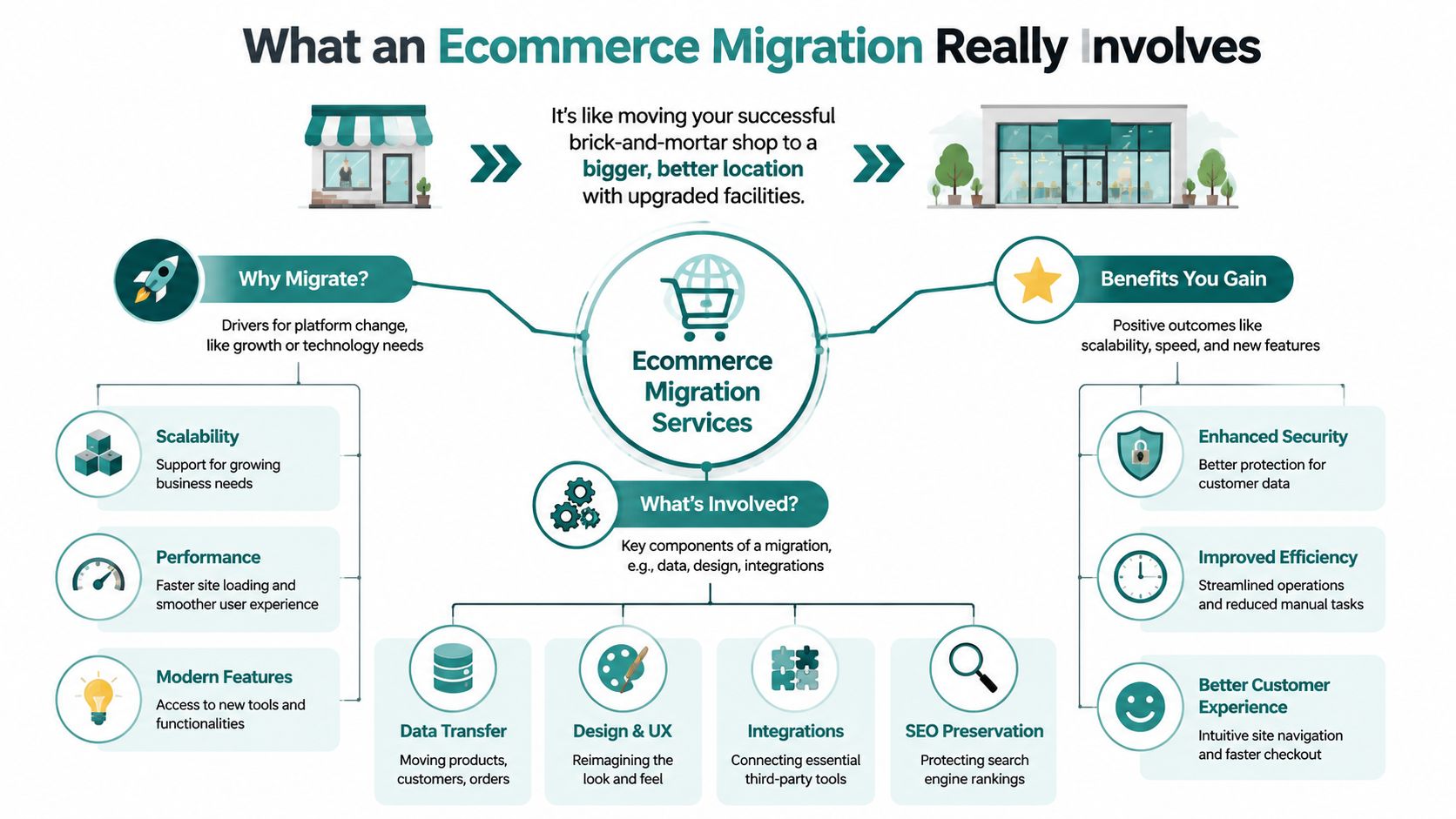
It's like moving a successful retail store to a better location.
You're not just carrying boxes from one address to another. You're moving inventory, signage, customer records, payment systems, store layout, staff workflows, and the little operational details that keep the doors open. Ecommerce migration services work the same way. A proper migration moves data, preserves what's valuable, improves what's outdated, and reconnects all the systems your business depends on.
What gets moved
Most owners assume the job is just products and pages. It's much broader than that.
- Catalog data: Products, variants, pricing, categories, images, and inventory rules.
- Customer records: Accounts, addresses, purchase history, and sometimes segmentation data.
- Order history: Past transactions, statuses, refunds, and fulfillment information.
- Content and design: Homepage content, product pages, collections, blog posts, navigation, and conversion paths.
- Operational connections: Payment gateways, shipping tools, ERP systems, CRMs, email platforms, analytics, tax tools, and search apps.
If any of those pieces transfer poorly, the new store can launch with hidden damage. A checkout button may work while fulfillment data fails downstream. Product pages may look fine while internal search returns weak results. That's why migration isn't a copy-and-paste job.
What needs to happen before the move
The prep work matters as much as the transfer itself. Businesses need to identify every system tied to the store before touching the live environment. That includes applications, databases, infrastructure components, and the dependencies between them. Businesses also need to classify assets by complexity, criticality, and compliance needs such as HIPAA, GDPR, and PCI DSS, as outlined in this cloud migration best practices overview from Cortex.
Practical rule: If you don't know every system connected to your store, you're not ready to migrate it.
A good planning process also includes design choices, content structure, SEO preservation, and integration testing. If you want a useful outside perspective on process and sequencing, these successful ecommerce replatforming tips are worth reviewing alongside your project plan.
Why SEO belongs in the middle of the project
Owners often think about SEO after launch. That's too late. URL changes, content changes, template changes, and platform changes can all affect rankings. If search visibility matters to your business, your migration plan should include it from day one. This complete guide to ecommerce SEO is a good reference for understanding what needs protection before the switch happens.
A strong migration service coordinates all of this so the new store doesn't just look better. It works better, sells better, and gives your team more control.
Your Step-by-Step Migration Roadmap
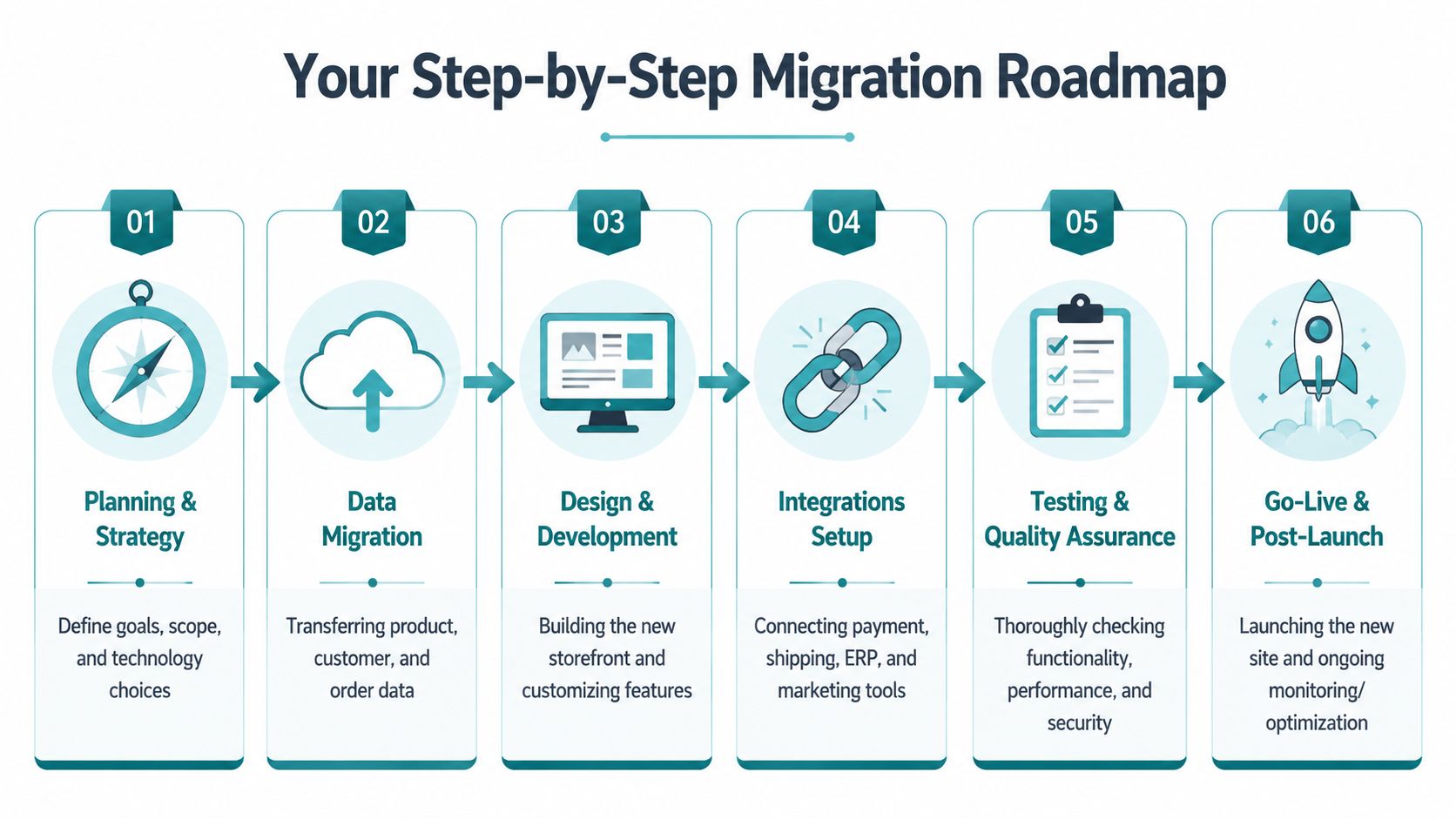
Most successful migrations follow a clear sequence. The exact tools vary, but the logic doesn't. You plan first, move data carefully, rebuild what matters, test everything, then launch in a controlled way.
A visual roadmap helps make the process less abstract.
Phase one through three
- Planning and strategy
The project enters its concrete definition phase. The business defines what's changing, what must be preserved, and what success looks like. That includes platform choice, feature requirements, content structure, integrations, and operational constraints.
If your internal team can't explain why you're migrating in business terms, the project is already at risk.
- Data migration Data moves from the old platform into a staging environment on the new one. Products, customers, orders, collections, media, and settings all need review. This step also exposes messy data, duplicate records, inconsistent naming, and outdated content that should never have been carried forward.
- Design and development
During a migration, many owners make a costly mistake. They try to rebuild the old store exactly as it was. A migration is the right time to fix navigation, simplify checkout paths, improve mobile usability, and clean up page layouts. Recreating old friction on a new platform is wasted effort.
Phase four through six
Before the final cutover, teams also need to understand how rollout works in practice. This short video gives a helpful overview of migration thinking from a launch perspective.
- Integrations setup
Your store doesn't operate alone. Payment processors, shipping logic, email systems, ERP connections, inventory syncs, and analytics all need to connect and behave properly. In this environment, small misses create expensive downstream issues.
- Testing and quality assurance Testing is the final walkthrough before opening the doors. Can customers search, add to cart, check out, receive confirmation emails, and complete payment correctly? Do discounts apply? Does shipping calculate properly? Do key tools pass data where they should? A useful rollout method is to send approximately 1% of user traffic to the new solution first, validate functionality through integration and smoke testing, and then increase traffic gradually before fully decommissioning the old platform, based on Google Cloud's ecommerce migration guidance.
Launching all traffic at once is like opening a new store without testing the registers, phones, or lights.
- Go-live and post-launch support Launch day matters, but the first stretch after launch matters more. Teams should monitor order flow, integration behavior, customer issues, site performance, and search visibility. Post-launch support is where good migrations stabilize and weak ones unravel.
How long this usually takes
Most business owners want a date. That's fair. But timeline depends on complexity, especially custom workflows and connected systems. If you want a realistic view of how web projects unfold, this web development timeline guide gives a useful framework for setting expectations with your team.
For brands coming from a direct-to-consumer setup, this guide for DTC brands transitioning from Shopify is also helpful because it shows how platform decisions affect operations, not just design.
Choosing Your Next Ecommerce Platform
A lot of Cincinnati owners hit this point after the same frustrating week. Marketing wants faster landing pages. Operations wants fewer order issues. Finance wants a clearer picture of total platform cost. The current store still works, but it keeps forcing workarounds, and growth starts to feel more expensive than it should.
That is usually the core platform decision. The goal is not to pick the platform with the loudest hype or longest feature list. The goal is to choose a system your team can run profitably for the next stage of the business.
A simple comparison
| Platform | Best fit | Strengths | Trade-offs |
|---|---|---|---|
| Shopify | SMBs that want simplicity and speed | Managed environment, strong app ecosystem, easier admin experience | Less freedom for deep custom behavior |
| WooCommerce | Businesses already invested in WordPress | Flexible content control, broad plugin options, familiar publishing workflow | Can become messy if too many plugins pile up |
| Headless commerce | Brands with advanced content, UX, or integration needs | More control over frontend experience, modular architecture, strong long-term flexibility | Higher complexity, stronger technical requirements |
Shopify for straightforward growth
Shopify is a strong fit for businesses that want fewer moving parts. If your team is tired of patching hosting issues, chasing plugin conflicts, or relying on one developer who knows all the quirks, Shopify often lowers operational drag and gets staff back to selling.
The trade-off is control. Shopify works best when the business can align to platform conventions instead of forcing highly custom workflows into a system built for consistency and speed.
That trade can be smart. Many growing stores do better with a platform their team can manage reliably than a more flexible setup they struggle to maintain.
WooCommerce for content-heavy businesses
WooCommerce makes sense when content drives sales and WordPress is already central to the business. Companies with active SEO programs, resource libraries, or editorial-heavy marketing often like having commerce and publishing in one environment.
The catch is maintenance discipline.
A WooCommerce store can serve a business well for years, but only if someone governs plugins, theme changes, security updates, and custom code. I have seen stores look inexpensive on paper and turn costly in practice because every new feature depended on another plugin, and no one cleaned up the stack. That kind of technical debt slows campaigns, creates checkout bugs, and makes migration harder later.
Headless for businesses with bigger ambitions
Headless commerce fits companies with a specific reason to separate the storefront from the commerce engine. That reason might be multi-brand operations, advanced personalization, complex integrations, or a content experience that a standard theme cannot support well.
It is not a shortcut. It is a bigger operating model.
Modern replatforming often points toward API-first, decoupled architecture, cloud-native infrastructure, and CI/CD workflows, as outlined in this ecommerce replatforming architecture overview from NIX United. That approach can improve speed and flexibility, but only if the business is ready for higher build costs, more technical oversight, and stricter coordination across marketing, development, and operations.
There is also a risk owners often miss. More flexibility creates more places for SEO, analytics, and conversion tracking to break during migration. Teams using AI-assisted QA and monitoring can catch missing redirects, schema issues, broken internal links, and feed errors faster, before organic traffic starts slipping. That matters more than the architecture diagram.
If you want a broader framework for comparing options, this guide to e-commerce platform software is a useful place to weigh platform choices against business goals, team capacity, and growth plans.
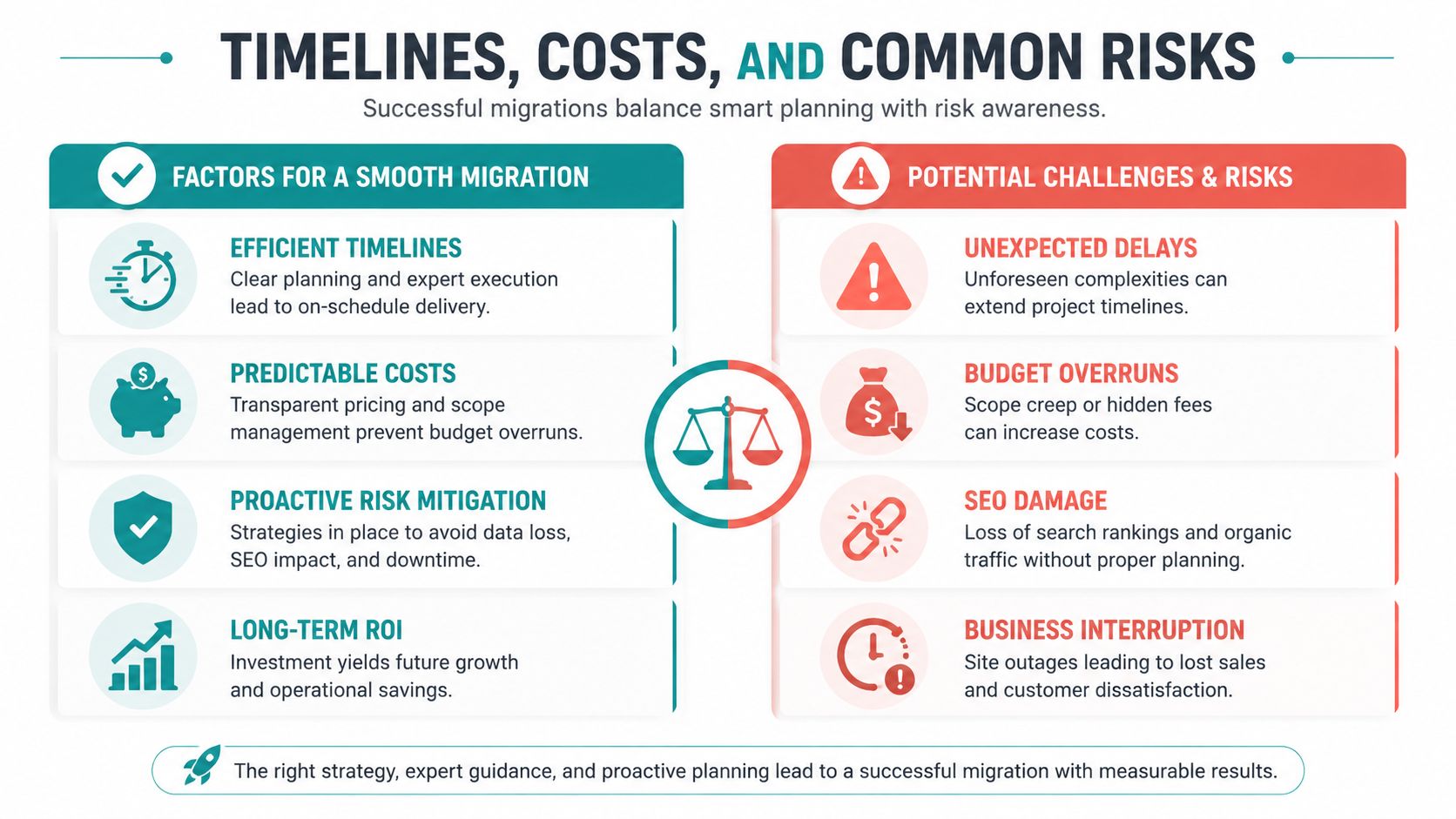
Timelines Costs and Common Risks
A Cincinnati owner usually asks the same two questions once the platform short list is done. How long will this take, and what happens if it goes sideways during our busy season?
Those are the right questions, because a migration touches revenue, operations, marketing, and customer trust at the same time.
What affects timeline and cost
Cost and timing are driven less by the platform itself and more by the mess surrounding it. A store with clean product data, standard checkout rules, and a few stable integrations can move far faster than a business carrying years of custom pricing logic, duplicate SKUs, outdated apps, and ERP workarounds.
In practice, five things usually push a project up or down:
- Catalog complexity: variant-heavy products, bundles, subscriptions, and customer-specific pricing all add review time
- Data quality: old imports, inconsistent attributes, and duplicate records create cleanup work before anything moves
- Integrations: ERP, CRM, shipping, tax, email, search, and inventory tools often decide the timeline
- Design scope: migrating data is one project, rebuilding templates and conversion paths is another
- Testing depth: the more order scenarios, payment rules, and edge cases you validate, the lower the launch risk
This is why two stores on the same platform can have very different budgets.
I usually tell owners to plan around decision speed, not just developer speed. If your team needs two weeks to approve data mappings, product rules, or checkout behavior, the calendar stretches fast. The opposite is also true. A focused internal team can save real money by resolving open questions early.
Three risks that deserve real attention
| Risk | What causes it | Mitigation strategy |
|---|---|---|
| SEO loss | URL changes, content shifts, weak redirects | Redirect planning, URL review, content validation |
| Data issues | Dirty exports, bad mapping, skipped testing | Data cleanup, staged imports, validation checks |
| Downtime and disruption | Rushed cutover, broken integrations, weak launch plan | Controlled rollout, rollback planning, live monitoring |
SEO gets the attention first, and it should. If product pages move without a clean redirect plan, Google has to relearn parts of your store, and that often shows up as fewer rankings, weaker category visibility, and lower revenue from non-branded search. Fiare's overview of common ecommerce migration challenges covers the usual failure points well.
A 301 redirect map is a page-by-page forwarding plan from the old store to the new one. The right target is the matching product, category, or content page. Sending everything to the homepage protects almost nothing.
Data risk is less visible but just as expensive. If customer groups, tax rules, order history, or product attributes import incorrectly, your team ends up fixing problems while trying to serve customers. That is why strong teams run staged imports, compare record counts, spot-check edge cases, and test real purchase paths before launch.
Downtime risk usually comes from cutover decisions, not from the migration script itself. Payment gateways fail, shipping rates stop returning, transactional emails miss a trigger, or inventory sync lags behind live orders. Good planning reduces that exposure. Teams that study solutions for Shopify migration challenges often focus on this operational layer, because the launch-day problems are usually tied to apps, feeds, and business rules rather than raw data transfer.
The overlooked risk after launch
The bigger problem for many SMBs is not launch day. It is the quiet slide that starts two or three weeks later.
Post-migration SEO decay happens when the site technically launches, but important details drift. Internal links point to old paths. Collection pages lose copy. Canonical tags change. Product schema disappears on some templates. In headless or highly customized builds, rendering or caching problems can leave search engines with an incomplete version of key pages. Optimum7 examines several of those patterns in this analysis of post-migration SEO issues.
This is one place where AI-assisted QA is useful. It can scan large sets of URLs, compare metadata before and after launch, flag redirect gaps, detect broken schema, and catch template-level errors faster than a manual review alone. That does not replace strategy. It gives your team a faster warning system before traffic loss turns into a sales problem.
The business takeaway is simple. A migration budget should cover more than build and launch. It should also cover validation, monitoring, and a short stabilization period after the new store goes live.
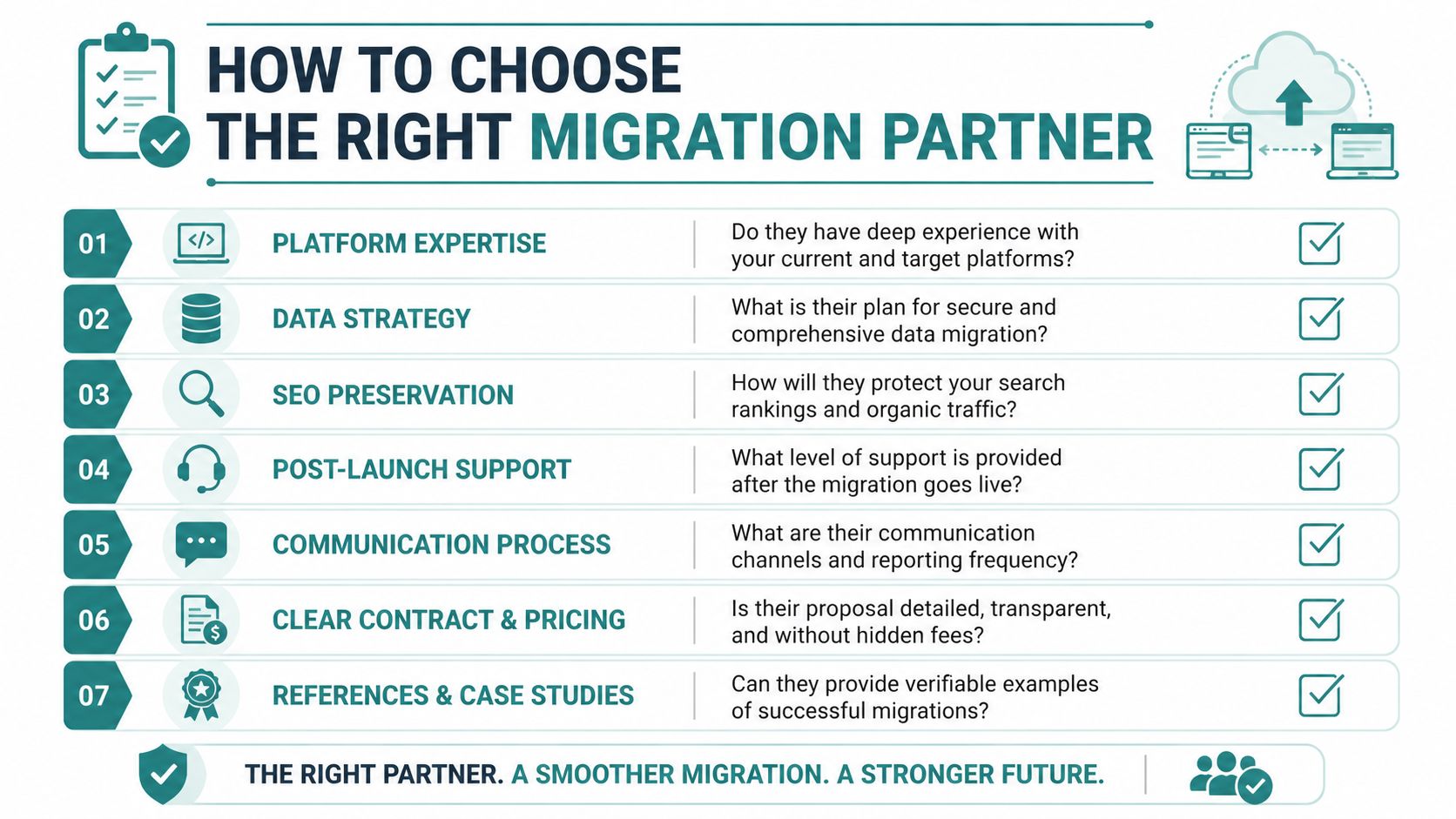
How to Choose the Right Migration Partner
A migration partner isn't just a developer with a proposal. You're choosing the team that will touch your revenue path, your customer data, your SEO equity, and your internal workflows.
That decision should be treated like hiring a strategic operator, not just a vendor.
Questions that reveal real expertise
Ask direct questions and listen for specific answers.
- Platform depth: Have they worked extensively with both your current platform and the platform you're moving to?
- SEO process: Can they explain exactly how they'll preserve rankings and handle redirects, templates, and content validation?
- Data handling: How will they audit, clean, map, and verify product, customer, and order data?
- Integration planning: What's their process for testing ERP, shipping, email, CRM, tax, and payment connections?
- Post-launch support: Who monitors the site after launch, and what happens if orders or integrations fail?
- Communication rhythm: How often will they report progress, risks, and budget status?
What strong answers sound like
Good partners talk clearly about process. They can describe how they track migration health during execution, including migration velocity, schedule adherence, budget overrun percentages, and rollback or failure rates, based on this cloud migration metrics guide from Tkxel.
Weak partners stay vague. They talk about "smooth transitions" and "proven systems" without telling you how they validate anything.
If an agency can't explain its rollback plan in plain English, it probably doesn't have one.
Ask about AI, but ask the right way
AI has become a buzzword in migration conversations, and a lot of the talk around it is shallow. Field mapping alone isn't the interesting part. The more important question is whether AI can help identify failure points before they become expensive outages.
A fair question is this: how do we know AI will prevent downtime, not just speed up the process? A critical nuance is that AI needs training on historical migration failure datasets so it can predict when and where integrations may break, not just automate repetitive setup work, as explained in this Virtocommerce discussion of AI in ecommerce migration.
If you want another practical perspective on recurring pitfalls, these solutions for Shopify migration challenges are useful because they focus on the operational issues that often get missed in sales conversations.
Is a Migration Right for Your Business
If your current store is easy to manage, supports your marketing, handles growth well, and doesn't frustrate customers, you may not need to move yet.
But if your site slows down your team, blocks new features, creates checkout friction, or makes every marketing improvement harder than it should be, a migration may be the clearest path to growth. This is especially true when the issue isn't one broken feature but a stack of limitations that keep adding cost and complexity.
A smart migration isn't just a technical replacement. It's a chance to clean up operations, improve customer experience, protect search visibility, and give your business a platform that fits the next stage of growth.
That's why ecommerce migration services matter. Done poorly, they create disruption. Done well, they give you a stronger foundation for sales, marketing, and day-to-day execution.
If you're a Cincinnati-area business owner weighing whether to fix, rebuild, or replatform, the right first step is a candid conversation about your goals, your constraints, and what your store needs to do next.
If you want a practical second opinion on whether a migration makes sense, HDM can help you evaluate the business case, the platform options, and the risks before you commit. It's a low-pressure way to figure out whether your current store still fits where your company is headed.