

A standard Cincinnati business website usually takes 6 to 12 weeks to launch. If you're building something more involved, like e-commerce or a platform with integrations, that timeline can stretch to 16 to 36 weeks.
That's the part most owners want to know first. The harder truth is that your web development timeline has less to do with "how fast a team can code" and more to do with what the site needs to accomplish, how prepared your team is, and how quickly decisions get made.
If you're reading this, you're probably weighing a redesign, a first real website, or a rebuild of something that's been patched together for too long. You want a straight answer on timing because timing affects budget, staffing, launch plans, SEO, and revenue expectations. Fair. A website isn't a side project. For most Cincinnati businesses, it's a sales tool, a hiring tool, and a credibility check all in one.
The mistake I see most often is treating all website projects like they belong in the same bucket. They don't. A five-page brochure site for a local service business is one thing. A healthcare portal, a law firm intake system, or a Shopify build with custom workflows is another. If you don't separate those early, the timeline and budget conversation gets sloppy fast.
How Long Does a New Website Really Take
You sit down in January and say, "We need the new site live before spring." That sounds reasonable until the project turns out to include new messaging, better lead routing, cleaned-up service pages, CRM integration, and three people who all want final say. That is how a website planned as a quick refresh turns into a longer, more expensive business project.
For a Cincinnati business owner, the useful answer is not one generic number. The useful answer is whether your budget, goals, and internal readiness match the kind of site you are trying to build.
What the timeline depends on
Complexity sets the schedule. Business clarity keeps it on track.
A site moves faster when the goal is simple. Explain what you do, show proof, capture leads, and make it easy to call or fill out a form. The schedule stretches when the website also needs to support sales operations, content marketing, hiring, customer access, or system integrations.
That distinction matters because budget and timeline rise together. If your site needs custom workflows, product logic, gated content, or a modern content setup such as a headless CMS implementation for growing marketing teams, you are no longer buying a basic marketing site. You are funding strategy, configuration, testing, and coordination across teams.
Here is the clean way to size it up:
-
Lead-generation website: Usually the fastest path, especially if content and approvals are ready.
-
Marketing-driven site: Takes longer because SEO structure, copy, page hierarchy, and conversion paths need more planning.
-
E-commerce or booking site: More time goes into product setup, payments, rules, integrations, and testing edge cases.
-
Portal or custom functionality: This is software work inside a website project. Expect a longer build and a higher review load.
Where timelines slip
The coding phase is rarely the first problem.
Delays usually show up earlier, in places owners underestimate. Content is half-finished. Service lines are still changing. Nobody has decided which forms connect to which inbox. Legal or compliance review appears late. Leadership wants to "see a few directions" after the sitemap is approved. Each one sounds small. Together, they add weeks.
I have seen this for years across Greater Cincinnati. The businesses that launch on time are not the ones with the fanciest brief. They are the ones with a decision-maker, clear priorities, and source material ready before design starts.
If you want a realistic timeline before you commit budget, answer these questions first:
-
What business goal is the site supposed to support first?
-
Who approves content, design, and functionality?
-
What existing content can be reused, and what must be rewritten?
-
Which systems need to connect to the site?
-
What has to be migrated, redirected, or preserved for SEO?
Get those answers early, and your timeline becomes far more predictable. Skip them, and even a modest website can drag.
Website Timelines by Project Type
A Cincinnati owner asks for a "simple website" and a fast launch. Ten minutes later, it becomes clear the site needs service pages, proposals, a staffing portal, location pages, old URLs preserved, and a quote form that routes to three departments. That is not a simple website. It is a different project category, and the category drives both timeline and budget.
If you want a realistic schedule, stop asking, "How many pages is it?" Ask, "What does this site need to do for the business?"
Estimated Web Development Timelines by Project Type 2026
| Website Type | Typical Timeline | Best For |
| --- | --- | --- |
| Brochure site (5 to 15 pages) | 4 to 10 weeks | Local service businesses, consultants, small firms |
| Small business site | 6 to 12 weeks | Companies needing lead generation, credibility, and core SEO pages |
| Mid-size organizational site (15 to 50 pages) | 10 to 16 weeks | Multi-service businesses, associations, larger professional firms |
| E-commerce or transactional platform | 16 to 36 weeks | Retail, DTC brands, paid acquisition-focused stores |
| Enterprise-scale rebuild | 6 to 12 months | Large organizations, multi-system migrations, custom functionality |
Those ranges are useful, but only if you put your business in the right bucket. Owners often place themselves one tier too low because they are thinking about design, not operations.
A brochure site is usually the fastest path. It works best when the goal is credibility, clear messaging, and a straightforward conversion action like a call or contact form.
A small business growth site takes longer because it has to do more selling. You usually need stronger page structure, clearer service positioning, better copy, and local SEO support. That is still manageable. It just requires more decisions.
A mid-size organizational site brings complexity that owners rarely price in upfront. More stakeholders review content. More departments want input. More templates need to work across different page types. The build itself is rarely the only reason the schedule expands.
Transactional and custom projects belong in a different conversation. If people need to buy, book, register, apply, log in, calculate, or interact with business systems, you are no longer budgeting for marketing pages alone. You are budgeting for process design, integration planning, testing, and exception handling.
How to place your business in the right bucket
Use this filter instead of page count alone:
-
Brochure site: You need trust, clarity, and a clean path to contact.
-
Growth site: You need lead generation, search visibility, and stronger conversion paths.
-
Transactional site: You need the site to handle purchases, bookings, registrations, or account actions.
-
Custom build: You need the website to support part of the business operation itself.
Here is the rule I give clients. If a broken form would be annoying, you likely have a marketing site. If a broken function would disrupt revenue or staff workflow, you likely have a software-level project inside the website.
Where owners misjudge the timeline
A 12-page site can still take months if it includes CRM integration, gated content, approval workflows, or complex lead routing.
A 40-page site can move faster if the content is organized, approvals are tight, and the required functionality is standard.
That is why a budget-to-timeline framework matters more than a generic range. The question is not just how big the site looks. The question is how much business responsibility you are putting on it.
When architecture changes the schedule
Platform choice affects timing early. A basic builder can move quickly. A CMS build usually takes more setup and QA. A custom application takes longer because more has to be defined, built, and tested before launch.
Some Cincinnati companies also outgrow the standard setup faster than they expect. If your team needs flexible content models, multi-channel publishing, or a decoupled front end, the architecture decision should be made on purpose. This guide to headless CMS implementation explains why that choice can extend the build now but reduce constraints later.
The right timeline matches the business goal, the technical load, and the decision speed on your side. Get that alignment right, and the schedule becomes far more believable.
The Six Phases of Web Development
A good website project isn't random. It moves through a series of stages, and each one has a business purpose. If you understand the phases, your web development timeline becomes easier to manage because you know what your team needs to provide and when.
The most important phase is Discovery and Planning. It often takes 1 to 2 weeks for simple projects and 4 to 6 weeks for complex applications, and Wonderment describes it as the project's "bedrock" in its overview of web development stages. That wording is right. Skip or rush this phase, and problems show up later when they're more expensive.
Here's the process in a way that makes sense to a business owner:
Discovery and planning
At this stage, the agency learns what the site is supposed to accomplish, not just what it should look like.
That means clarifying goals, audiences, required features, content needs, sitemap structure, and technical constraints. If you're a law firm, the intake process matters. If you're in healthcare, privacy and compliance matter. If you're in manufacturing, product organization and lead routing may matter more than flashy visuals.
Design
Design turns strategy into something visible. Usually that starts with wireframes, then page mockups, then mobile and desktop refinement.
This phase answers practical questions. Can a customer find what they need quickly? Does the homepage guide the next step? Does the contact flow feel easy, or does it create friction? Good design is business logic made visual.
Development
Now the build starts. Front-end work shapes what users see. Back-end work handles data, forms, integrations, content management, and system behavior.
Many owners often believe the "real work" starts with development. It doesn't. Development only moves cleanly when discovery and design were handled well first.
Owner's takeaway: The fastest builds usually come from projects with the clearest decisions made before coding begins.
Content integration
A website without content is a shell. This stage loads the approved copy, images, videos, metadata, and calls to action into the build.
Stalled projects often reveal themselves. If the copy isn't approved, if the team is still hunting for photos, or if product information keeps changing, the timeline drifts. Not because the agency is slow. Because the site still doesn't have the materials it needs to launch.
Testing and QA
QA means quality assurance. In plain English, it means checking whether the site works.
Teams review mobile responsiveness, forms, navigation, page speed, browser behavior, and edge cases. If your site has checkout, booking, user accounts, or protected content, testing gets more involved because each path has to work the way a real customer would expect.
Deployment and launch
Launch is not the finish line people think it is. It's the moment the site moves from project mode to real-world use.
That includes deployment, final review, analytics checks, and post-launch validation. Then the long-term work begins: updates, security patches, content changes, performance tuning, and feature improvements. A serious website needs ongoing care after launch because your business won't stand still, and your website can't either.
Key Factors That Impact Your Timeline

The biggest myth in website planning is that once you get a quote, the timeline is fixed. It isn't. A web development timeline is a moving target unless the scope, content, approvals, and compliance needs are tightly managed.
That's not bad news. It's useful news. It means a lot of delays are preventable.
The delays owners can control
Most project slippage comes from a few repeat offenders:
-
Scope creep: You approved one project, then added "one more feature" every other week.
-
Slow approvals: Design, copy, and functionality sit in review too long.
-
Missing content: Photos, bios, service descriptions, and product data aren't ready.
-
Too many decision-makers: Everyone has input, nobody has final authority.
-
Late technical surprises: Hosting, integrations, analytics, or migration issues show up after work has started.
A project manager can reduce chaos, but they can't remove indecision from the client side. If your team takes two weeks to approve a wireframe, the project takes two more weeks. Simple.
The compliance issue most timelines ignore
Healthcare is where generic website advice breaks down fast.
In regulated sectors, the HIPAA compliance review bottleneck can add a fixed 4-week buffer to a project timeline, as noted in Naturaily's guide to website development budget and timeline planning. That's the kind of delay many broad website guides miss. They talk about content readiness in general terms, but regulated content goes through legal review, privacy review, and revision cycles that ordinary business sites don't face.
If you run a healthcare practice, provider group, or patient-facing service, build that legal review time into the plan from day one. Don't treat it like an afterthought.
If legal, compliance, or leadership approval happens late, your launch date becomes a wish instead of a schedule.
Project management matters more than owners think
The tool doesn't run the project, but the right system helps everyone see what's due, what's blocked, and what needs approval. If your internal team works on Apple hardware, Chronoid's Mac project software guide is a solid resource for evaluating project management options that won't create extra friction.
The larger point is this: a website project needs one operating rhythm. One task system. One approval path. One owner on your side.
For budgeting, timing and cost always move together. More custom requirements, more review layers, and more rounds of change mean more hours. If you want a clearer picture of that relationship, this Ohio web development cost guide is a practical companion to the timeline conversation.
My blunt advice
Do these three things before you hire anyone:
-
Name one internal decision-maker.
-
Gather your content early.
-
Write down the must-have features before design starts.
That won't remove every surprise. It will remove most of the avoidable ones.
Visualizing a Typical 12 Week Project Plan
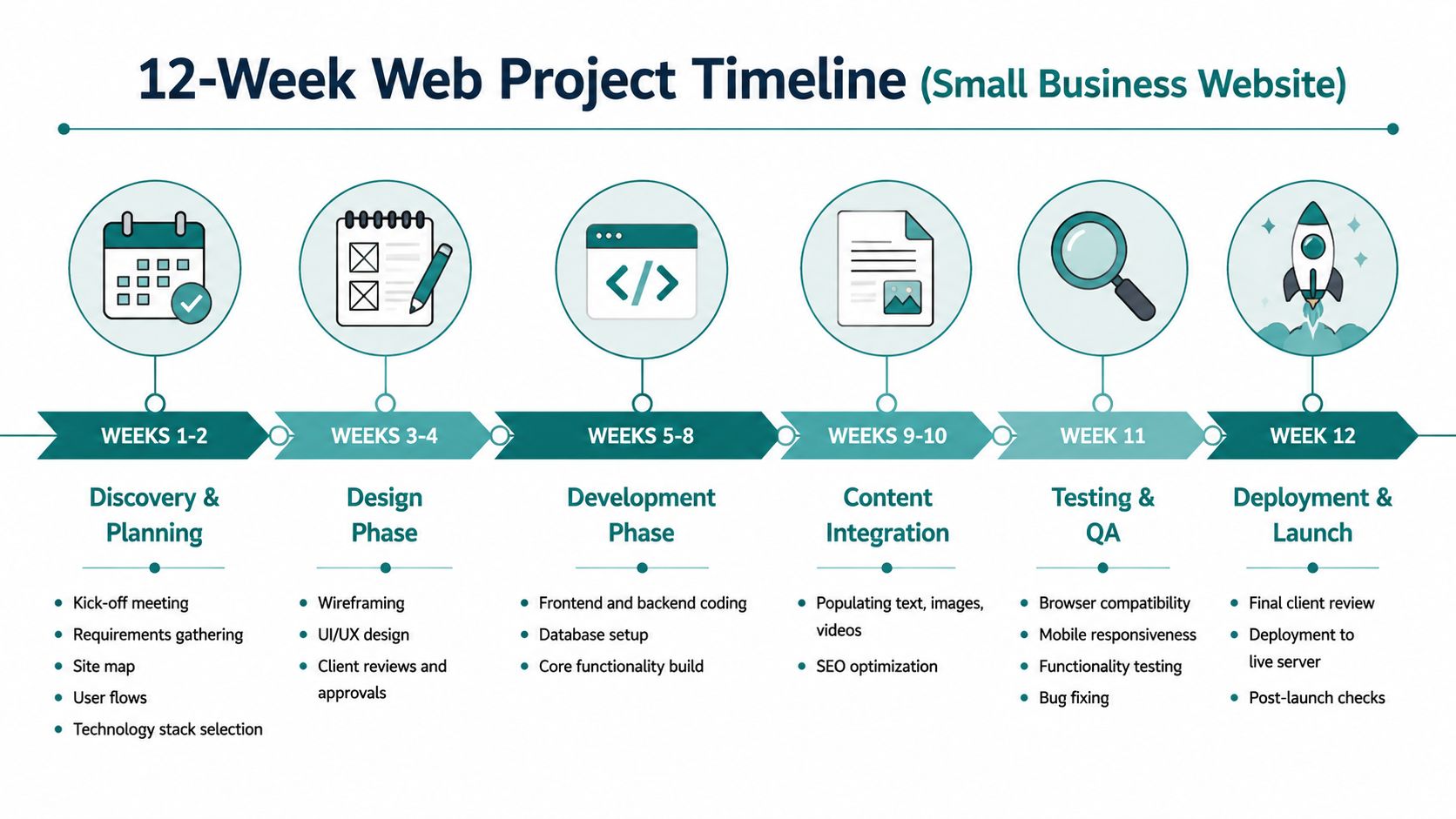
A 12-week website project feels abstract until you map it to actual work and approvals. Once you can see the sequence, the timeline stops feeling mysterious and starts feeling manageable.
For a typical small business build, the schedule usually works best when each phase has a clear checkpoint. The critical sign-offs include discovery, sitemap, wireframes, design, content delivery, and user acceptance testing, based on the milestone guidance covered earlier from Butterfly. Those approvals matter because they stop expensive rework before launch.
Here's what that looks like in practice:
A realistic week by week flow
Think of this as a sample roadmap, not a law of physics.
- Weeks 1 to 2
Kickoff, discovery, requirements, sitemap, and technical direction. During these weeks, bad assumptions are caught early.
- Weeks 3 to 4
Wireframes and design review. You're approving structure first, then visual direction.
- Weeks 5 to 8
Development. Core page templates, CMS setup, forms, integrations, and functionality come together here.
- Weeks 9 to 10
Content loading, on-page SEO work, and page-level refinement. At this stage, polished projects pull ahead of rushed ones.
- Week 11
QA and bug fixing. The team tests on mobile, desktop, forms, and key user flows.
- Week 12
Final review, launch, and post-launch checks.
Where owners usually hold up the plan
Week numbers don't slip by themselves. People slip them.
The biggest choke points are usually sitemap approval, content delivery, and UAT. Owners tend to move quickly at kickoff, then disappear during the exact weeks when feedback matters most. A site can't launch if the content is half-finished or if nobody has signed off on the final user flows.
Milestone discipline matters: every formal approval closes one door so the project can move through the next one cleanly.
What a healthy timeline feels like
A healthy project has momentum. The team knows what's under review, what's approved, and what's next. The client knows when input is needed and who's responsible for giving it.
If your timeline feels murky by week three, it usually means one of two things: either the scope isn't clear, or the approval process isn't clear. Both are fixable, but only if someone addresses them early.
Tips for a Smooth Launch and Beyond
A website launch goes smoothly when the owner treats it like an operating project, not a side task. You don't need to become technical. You do need to stay organized, decisive, and available.
The businesses that launch cleanly usually do a handful of basic things well.
What to do before the project starts
Start with preparation, not design.
-
Assign one point person: Pick one internal owner with authority to gather feedback and make final calls.
-
Collect content early: Bios, service descriptions, product info, case examples, logos, and photos should be in progress before development starts.
-
Know your must-haves: Separate essentials from nice-to-haves. That protects the timeline when ideas multiply.
-
Align leadership first: If partners, directors, or department heads disagree on the site's purpose, settle that before kickoff.
-
Plan launch around the business calendar: Don't schedule a major rollout during your busiest operational window if your team won't have time for reviews.
How to make approvals easier
Don't invite ten opinions into every decision. Ask for input, then centralize the response.
A clean approval process usually looks like this:
-
Internal stakeholders review on a set deadline.
-
One person consolidates feedback.
-
The agency gets one clear response.
-
Revisions happen once, not in circles.
That sounds simple because it is. Most timeline pain comes from ignoring simple things.
Launch is the start of ownership
Once the site is live, you still have work to do. Staff may need CMS training. Analytics should be checked. Forms should be monitored. Search performance should be reviewed. Security updates and plugin updates don't stop because the design is finished.
That's why ongoing maintenance matters. Some agencies call it support. Some call it care plans. At HDM, it's framed as Website Wellness, which is a smart way to think about it. A healthy website gets maintained, monitored, and improved over time.
If you want to better understand site speed issues after launch, this guide to web performance diagnosis gives a plain-English explanation of waterfall reports and how performance bottlenecks show up.
Choose the right partner, not just the lowest estimate
A cheap timeline is often fiction. A responsible timeline includes planning, review cycles, testing, launch checks, and post-launch support.
When you evaluate agencies, ask these questions:
-
How do you handle discovery and scope definition?
-
What approvals are required from my team?
-
What happens if content is late?
-
Who handles QA and launch validation?
-
What support exists after launch?
If you're comparing options, this guide to choosing a digital marketing agency can help you ask better questions before you sign anything.
The right partner won't promise miracles. They'll give you a realistic web development timeline, explain what can change it, and build a process your team can keep up with.
If you want a website plan that matches real business goals instead of vague promises, HDM can help. HDM works with Cincinnati-area businesses on web design, custom development, SEO, growth marketing, and ongoing Website Wellness, with a practical focus on building sites that launch cleanly and keep performing after they go live.