You may be in a familiar Cincinnati business situation. Orders are coming through, but your team is copying customer details into another system, checking inventory by hand, adding plugins to handle special pricing, and answering shipping questions that the website should answer itself. The store technically works, yet every new requirement feels like another workaround.
Short answer: Custom ecommerce solutions build or extend an online store around how your business actually sells, from pricing rules to inventory and fulfillment. They make sense when off-the-shelf plugins and manual workarounds start costing more time than they save.
That tension is why custom ecommerce solutions deserve a practical look. U.S. ecommerce represented 17.1% of total retail sales in the second quarter of 2026, with estimated online retail sales of $340.2 billion, according to the U.S. Census Bureau's ecommerce data. Online selling is now part of the core operation for many retailers, manufacturers, service businesses, and B2B companies.
A custom build isn't automatically the right answer. A well-configured Shopify or WooCommerce store may be the smarter choice for a business that needs to launch quickly and keep operations simple. The right decision depends on your customer journey, internal processes, integrations, budget, and appetite for ongoing ownership. This guide uses plain language to help you decide whether to stay with a hosted platform, extend it, or build something more custom, with practical considerations around architecture, migration, checkout, speed, security, accessibility, and AI.
When Your Online Store Outgrows the Template
A Cincinnati specialty retailer might start with a standard theme, a product catalog, and a payment gateway. At first, that setup feels like a ready-made storefront. Customers browse, add products to a cart, and place orders without anyone on staff needing to understand the machinery behind it.
Then the business adds wholesale customers. Some buyers need account-specific pricing, while others want to reorder from a saved list. Inventory lives partly in an accounting system and partly in a warehouse spreadsheet. Certain products ship only within selected regions, and local customers want pickup options. The owner adds an app for each new requirement, but the apps don't always share data cleanly.
The problem isn't that the original platform was bad. It solved the original problem. The problem is that the business has developed a more complicated operating model than the template anticipated.
A custom store should remove the workarounds that slow your business down, not add technical complexity for its own sake.
Custom development can shape the storefront around the way you already sell. That may include a B2B ordering portal, customer-specific price rules, subscription logic, product configurators, inventory synchronization, or a checkout that changes based on delivery method. It can also connect the store with systems your staff already uses, including CRM, ERP, fulfillment, customer service, and marketing tools.
Before choosing a path, document where people lose time. Ask your team which orders require manual correction, which customer questions repeat, and which reports they can't produce without combining several systems. Those answers are more useful than choosing technology because another business uses it.
For a practical comparison of platform flexibility and custom Shopify work, you can compare Shopify development approaches before speaking with an agency. A Cincinnati-area partner such as HDM can then help translate your operational needs into a sensible web, SEO, and ecommerce plan, without assuming that every business needs a fully custom platform.
The goal is confidence. By the end of your evaluation, you should know what belongs in a standard platform, what requires careful extension, what justifies custom engineering, and what can wait until your sales process proves the need.
What Custom Ecommerce Really Means for Owners
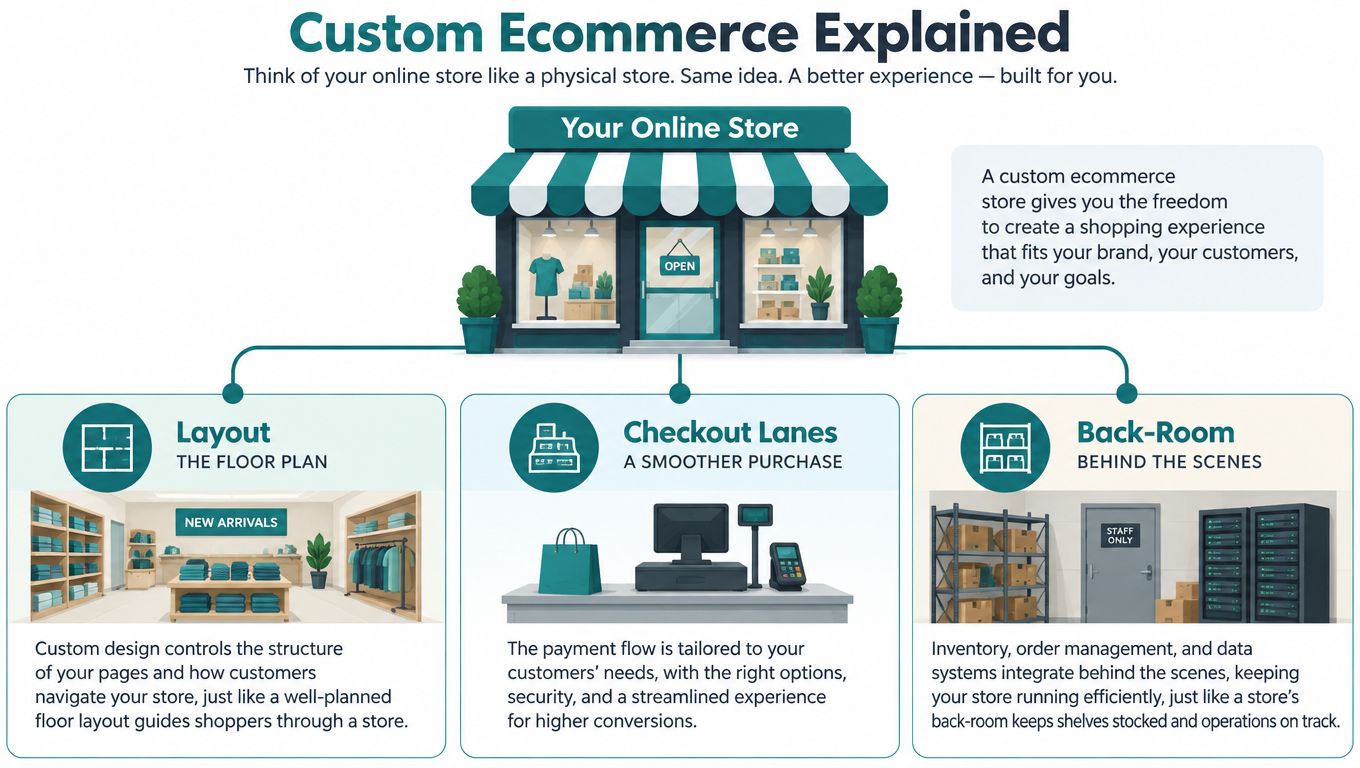
A custom build works like a floor plan drawn around your operation. You decide where aisles go, how checkout works, and how the stockroom connects to the front. A hosted ecommerce platform provides useful fixtures already installed, while custom development lets you redesign more of the building around customers and staff.
The front of the store
The front end includes navigation, category and product pages, search, promotions, cart behavior, and checkout. Custom work shapes those parts around the way you sell, rather than forcing customers into a generic theme.
A manufacturer may need buyers to select dimensions before seeing a price. A distributor may give approved accounts a dashboard for repeat orders. A Cincinnati retailer may need one product page to show delivery, pickup, and local store availability. Each example changes the customer journey because the business has a different operating model.
The checkout lanes
Checkout determines which information customers provide, how shipping is calculated, which payment methods appear, when tax is determined, and what happens after a failed authorization. A custom implementation can show business fields only to business accounts, request delivery details only after delivery is selected, and retain cart information when a shopper returns.
That control matters for an owned sales channel. Owned websites and apps generated 7.08% of total EU enterprise turnover, compared with 1.30% through online marketplaces, according to Eurostat's data on enterprise ecommerce. An owned channel gives a business more control over customer relationships, merchandising, content, data collection, and post-purchase communication than a marketplace listing.
The back room
The back end holds products, inventory, orders, customer records, shipping rules, and integrations. Customers never see it, but an error there reaches them quickly. If the site shows an item as available while the warehouse has none, staff must correct the order and explain the problem.
Custom ecommerce does not require rebuilding every system. It requires assigning ownership for each type of information and connecting systems reliably. Your ERP can remain the inventory source, your payment provider can process cards, and your CRM can manage customer communication. The store coordinates those systems according to your rules.
For owners, the practical question is simple: can the store behave like the business? A sensible custom project improves that fit without adding complexity that staff cannot maintain.
How to Choose Between SaaS and Custom Builds
The simplest way to compare options is to start with the job your store must perform. SaaS, or software as a service, means a hosted platform such as Shopify or a managed WooCommerce setup handles much of the infrastructure. You typically get a faster launch, standard features, updates, and a large ecosystem of themes and extensions.
A custom build gives you more control over the customer experience, data flow, and business rules. It also requires more planning, testing, documentation, and long-term ownership. Neither option wins in every situation.
SaaS vs Custom Ecommerce at a Glance
| Option | Best Fit | Trade-off |
|---|---|---|
| SaaS platform | A new store, straightforward catalog, standard payments, and a small team that wants to launch quickly | You work within platform rules and may rely on apps for advanced needs |
| Extended Shopify or WooCommerce | A growing business that needs familiar commerce features plus selected integrations or custom functions | Extensions can create maintenance, compatibility, and data-flow issues |
| Custom ecommerce | Complex pricing, B2B accounts, product configuration, subscriptions, portals, or specialized fulfillment | Higher planning demands and greater responsibility for maintenance |
| Headless commerce | A brand that needs a highly flexible front end while keeping commerce services behind it | More moving parts require experienced development and monitoring |
A store often deserves custom consideration when the same manual task appears in every order, when staff maintain duplicate product or inventory records, or when customers need different journeys based on account type. Other warning signs include custom subscription rules, regional fulfillment logic, complicated product bundles, and checkout requirements that available extensions can't handle cleanly.
Don't confuse “custom design” with “custom ecommerce.” A distinctive color palette and homepage layout may improve branding, but they don't solve a broken inventory sync or a pricing rule that staff still calculate in a spreadsheet.
You can use this overview of ecommerce platforms to clarify the difference between a platform and the broader operating system around your store.
A useful staff-meeting test
Write down the customer journey from product discovery through delivery. Next to each step, record whether the platform handles it automatically, handles it with an extension, or requires staff intervention. Then identify which manual steps affect sales, customer trust, fulfillment accuracy, or reporting.
If most issues are cosmetic, stay with SaaS and improve design, content, and SEO. If the problems involve business rules and data movement, ask an agency to estimate targeted custom work before considering a full rebuild. HDM can be one option for that evaluation, alongside other qualified Shopify, WooCommerce, and custom development partners.
Understanding Headless Shopify Plus WooCommerce and Custom Stacks
These technology labels describe where the storefront lives and where commerce operations run. Shopify provides a hosted foundation, WooCommerce extends WordPress, headless commerce separates presentation from commerce services, and a custom stack turns the store into a business application.
Shopify handles much of the infrastructure, while your team manages products, content, orders, and marketing. Shopify Plus adds enterprise-oriented capabilities and operational scale within the Shopify ecosystem. It may suit a Cincinnati business that wants Shopify's foundation but needs deeper configuration, multiple storefronts, or more structured support.
WooCommerce adds ecommerce functions to WordPress. It often fits a business whose marketing team publishes there every day and wants close control over product pages, content, and extensions. It can work well when the catalog and fulfillment process are clear, integrations remain stable, and someone owns WordPress updates, security, backups, and troubleshooting.
What headless changes
A headless setup separates the customer-facing interface from the commerce engine. A modern front end may handle the shopping experience, while Shopify, WooCommerce, or another service manages products, carts, orders, and payments behind the scenes.
That separation supports specialized experiences across a website, mobile application, kiosk, or customer portal. It can also support a content-rich, mobile-first site with a flexible CMS. The trade-off is operational: your team must maintain more connections, testing surfaces, deployment steps, and performance checks. A faster-looking front end does not automatically create a better checkout if the services behind it respond slowly or fail to share data correctly.
For a plain-English introduction, HDM's guide to what headless commerce means can prepare owners for a developer conversation. Tagada explains checkout architecture, including why checkout functions need to work together instead of behaving like isolated page elements.

Choosing by business fit
A standard Shopify store may suit a retailer with conventional products and a straightforward customer journey. WooCommerce may fit a content-led business whose team works in WordPress. Headless commerce makes more sense when content, performance, or several digital touchpoints justify added engineering work.
A fully custom stack fits a store that also operates as a business application. Examples include a client portal with account permissions, a dashboard for recurring commercial orders, a marketplace with vendor workflows, or product configuration that sends structured data to manufacturing and fulfillment.
Ask an agency to explain maintenance in ordinary language. Who updates the commerce platform? Who owns the CMS? What happens when a payment provider changes its requirements? Who investigates a failed inventory synchronization? The architecture succeeds only when your team can operate it after launch.
Why Checkout Speed and Trust Decide Revenue
A shopper may want the product and still leave when checkout feels slow, uncertain, or harder than expected. Baymard's research places average cart abandonment at 70.19%. Its review of 344 leading U.S. and European ecommerce sites found that 65% had a mediocre-or-worse checkout experience, while only 2% rated good. The findings combine moderated usability sessions, eye tracking, quantitative studies involving 11,777 participants, and more than 30,000 manually reviewed checkout elements in Baymard's checkout usability research.
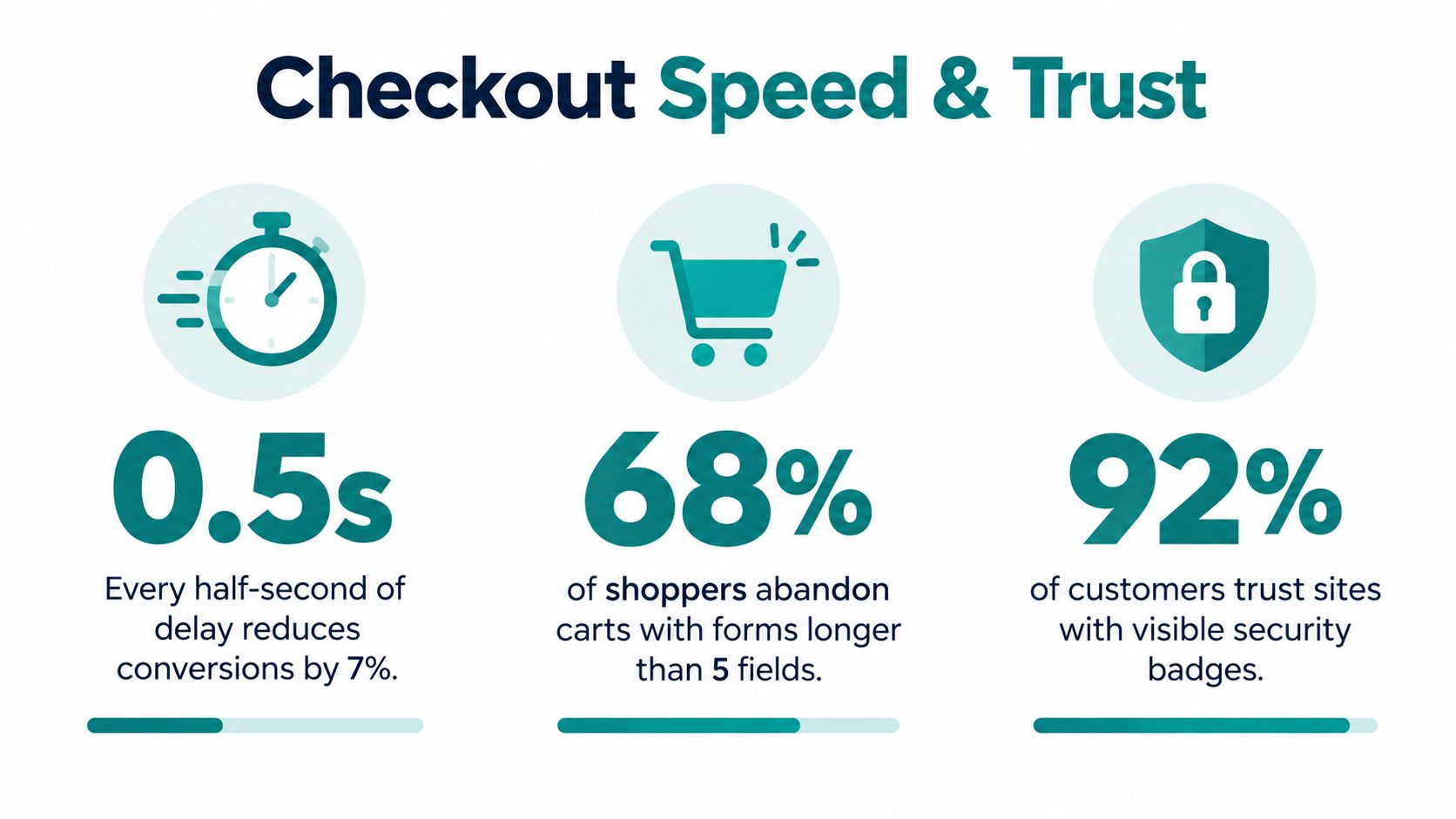
For a Cincinnati small business, checkout works like the counter at a local shop. Customers need to see the final bill, understand what happens next, and complete payment without asking for help. A custom checkout should show total cost before payment, allow guest checkout where appropriate, preserve the cart, and explain errors in plain language.
Track each stage, including cart view, shipping started, payment started, payment error, and order completed. Analysts can then identify where shoppers stop instead of guessing.
Baymard reports that 23% of U.S. online shoppers abandoned an order because the total cost wasn't estimated upfront, as recorded in its cart abandonment research. Shipping, tax, discounts, inventory, and payment authorization should therefore work as dependable services with clear failure messages. Owners can review practical ways to reduce cart abandonment with checkout tips before commissioning custom work.
Fewer fields, fewer chances to quit
Baymard reports that the average U.S. checkout displays 23.48 form elements by default. An optimized flow can use approximately 12 to 14 elements, including only 7 to 8 actual fields. Those figures give an agency a useful starting point, not a universal template.
Progressive disclosure keeps the first screen focused. Request business details only after a buyer chooses a business account. Show delivery instructions when delivery is selected. Offer account creation after the order rather than requiring registration before purchase.
<iframe width="100%" style="aspect-ratio: 16 / 9;" src="https://www.youtube.com/embed/A-7pTamjBIw" frameborder="0" allow="autoplay; encrypted-media" allowfullscreen></iframe>Speed is part of the buying experience
Google recommends Largest Contentful Paint within 2.5 seconds, Interaction to Next Paint under 200 milliseconds, and Cumulative Layout Shift below 0.1, according to its Core Web Vitals guidance. In plain terms, product content should appear promptly, taps should receive quick responses, and prices or buttons should stay in place.
Test category pages, product pages, cart actions, and checkout on real mobile devices. Compress product images, limit unnecessary third-party scripts, reserve space for images and banners, and measure payment and shipping integrations rather than testing only the page shell.
Speed also depends on fulfillment. The Federal Trade Commission's online shopping guidance explains that when a seller doesn't promise a shipping time, the seller generally must ship within 30 days after receiving the customer's name, address, and payment or permission to charge the account. Show realistic delivery expectations before payment, separate in-stock products from backordered items, and alert staff as an order approaches its promised deadline.
Planning Cost ROI Migration Security and Accessibility
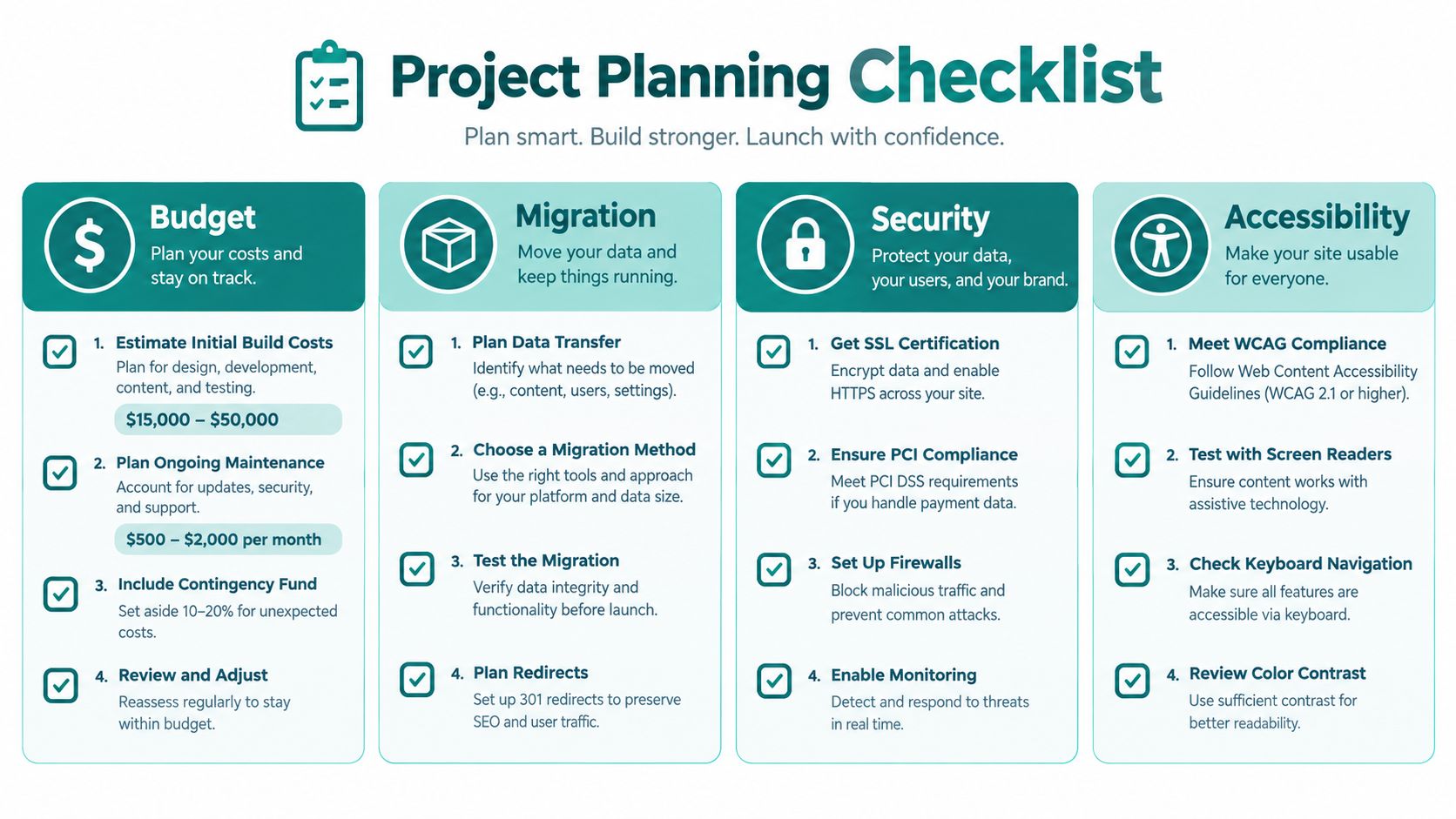
A sound project begins with business outcomes, not a list of fashionable features. Decide what you need to improve, such as completed orders, average order value, repeat purchases, revenue by channel, fulfillment accuracy, or time spent correcting orders. A custom ecommerce project should connect each major feature to one of those outcomes.
Build the project brief around risk
Before migration, inventory products, variants, categories, customer accounts, orders, discounts, redirects, analytics, integrations, and content. Don't assume that exporting a product spreadsheet is a complete migration plan. Historical URLs, customer permissions, subscription records, and tracking events may need separate treatment.
A statement of work should identify who owns data mapping, redirect testing, payment configuration, accessibility remediation, security updates, backups, and post-launch monitoring. HDM describes this kind of transition through its website migration checklist, but your project team should adapt the process to your systems and customers.
Healthcare organizations need additional caution. If a store or patient experience handles protected health information, the architecture, vendors, access controls, logging, contracts, and workflows must support HIPAA-aware operations. Don't place sensitive patient information into a marketing tool, AI assistant, analytics platform, or form service without confirming the appropriate safeguards and agreements with qualified compliance professionals.
Treat accessibility as a build requirement
Recent auditing found that only 2% of ecommerce websites allowed users to complete checkout without encountering a major accessibility barrier, while 84% of checkout pages failed the Name, Role, Value criterion needed for controls such as form fields and buttons to work correctly with assistive technologies, according to the Contentsquare Foundation accessibility report.
Include keyboard testing, screen-reader testing, automated checks, mobile testing, and regression monitoring in the project plan. Also assign responsibility for fixing issues after launch, especially when payment, review, consent, personalization, or chat tools change.
AI needs the same discipline. Consumer research in the Publicis Sapient digital commerce survey found that 57% of surveyed consumers had neither used a conversational chatbot nor had one help with a purchase decision. Only 34% were comfortable with generative AI analyzing personal online data, while 43% were uncomfortable. Another 2025 U.S. survey found that 85% of consumers had concerns about AI shopping, including privacy and data security at 43%, misinterpreted preferences at 37%, and irrelevant recommendations at 35%.
Start with lower-risk uses such as catalog enrichment, internal analysis, or customer-service triage. Don't add an autonomous shopping assistant merely because it sounds modern. Set clear data boundaries, disclose AI use, provide human escalation, prohibit actions such as autonomous refunds or purchases, and compare accuracy, complaints, assisted conversion, and opt-outs against a non-AI experience.
Growing Online With Confidence in Cincinnati
A Cincinnati retailer may discover that a template store slows down on mobile, while a manufacturer struggles with account pricing and ERP connections. A healthcare organization faces a different concern: its online experience must protect sensitive information and follow appropriate privacy controls. These businesses may all sell online, but their storefronts need different foundations.
The right custom ecommerce solution fits the way your company sells, gives customers a clear route to purchase, and reduces repetitive work for staff. Start with a short operating inventory:
- Customer journey: Record how people find products, ask questions, pay, and receive orders.
- Staff workload: List spreadsheets, duplicate entries, approvals, and manual corrections.
- Measurement: Choose results to monitor, such as completed orders, repeat purchases, fulfillment accuracy, and revenue by channel.
- Risk ownership: Assign responsibility for security, accessibility, backups, integrations, and post-launch fixes.
- Platform fit: Compare a standard store, selected extensions, headless commerce, and custom application logic against those needs.
For healthcare organizations, involve privacy and security owners before selecting integrations, analytics, chat, or personalization tools. A HIPAA-aware review should identify what information enters each system, where it is stored, who can access it, and how vendors handle it. If an integration cannot meet those requirements, leave it out or replace it.
Keep shipping promises consistent across product pages, checkout, confirmation emails, and advertising. Apply the same shipping standard described earlier: without a promised time, plan to ship within 30 days of receiving order details and payment authorization. Clear language gives customers a reliable expectation and gives operations a standard to meet.
For owners in Greater Cincinnati, a local conversation can make technical choices easier to evaluate. HDM operates from Springboro, Ohio, and works with businesses on custom ecommerce, Shopify, WooCommerce, headless CMS implementations, SEO, performance marketing, security, accessibility, and ongoing Website Wellness support. The right partner should recommend the smallest dependable solution for your next stage of growth and document how your team will maintain it.
HDM can help Cincinnati-area businesses review a platform, plan a migration, improve checkout and SEO, or build around operational needs. Visit HDM to discuss your store, integrations, performance goals, and next practical step.
Frequently asked questions
- When does a business need custom ecommerce?
- When special pricing, inventory, fulfillment or integration needs can't be handled cleanly with standard store features or plugins.
- Can custom features be added to Shopify or WordPress?
- Often, yes. Many needs can be met by extending an existing platform rather than starting from scratch.
- What should be tested before launching store changes?
- Checkout, payments, taxes, shipping, inventory sync, mobile usability and analytics tracking.