You might be in this spot right now. Your website looks fine, people call after finding you on Google, maybe a few orders come in through forms, Facebook messages, or email, but the process is clunky. Someone on your team checks stock manually, sends invoices by hand, and hopes nothing gets missed.
That setup works until it doesn't. Orders slip through. Customers wait. Staff wastes time on repeat tasks. Meanwhile, competitors around Cincinnati are taking orders online at all hours because they built something more than a brochure site.
That's where the question what is an e commerce platform matters. It isn't just a shopping cart. It's the operating system behind online sales.
Retail behavior has already moved hard in that direction. Global retail e-commerce sales reached $6.86 trillion by the end of 2025, grew 8.3% year over year, and are projected to reach $7.89 trillion by 2028. In 2026, 21.8% of all retail purchases are expected to happen online according to global e-commerce statistics from Craftberry. If your business depends on being easy to buy from, this isn't a side issue anymore.
For a practical outside view on how online revenue systems fit into broader growth planning, this breakdown from Next Point Digital for online sales is also useful.
Selling Online Is More Than Just a Website
A standard website answers questions. An e-commerce platform handles transactions, operations, and follow-up.
That distinction matters because many businesses start with the wrong tool. They launch a good-looking site, add a contact form, and assume they're set up to sell online. Then actual problems show up. Inventory lives in a spreadsheet. Shipping prices are guessed. Customer records are split across email, QuickBooks, and sticky notes.
What business owners usually mean when they say they need e-commerce
Most owners aren't asking for "technology." They're asking for a cleaner process.
They want to:
- Take orders without phone tag: Customers should be able to browse, choose, and pay without needing a staff member to intervene.
- Reduce manual work: Re-entering orders into accounting, shipping, or inventory systems burns hours and creates mistakes.
- Look more credible: A polished buying experience builds trust faster than "call us to place an order."
- Create room to grow: If every new order creates extra admin work, growth becomes a staffing problem instead of a sales win.
Practical rule: If your team has to touch every order by hand, you don't have a true e-commerce system yet.
The difference between digital presence and digital operations
Think about a physical store. The front of the store matters. So do the shelves, the register, the stockroom, the receipts, and the customer records. Online selling works the same way.
A website by itself is the sign on the building and the showroom. The platform is everything behind it that keeps the business running. That includes products, payments, tax rules, order flow, shipping logic, and customer history.
That's why platform selection has real business consequences. Pick something too basic and your team creates workarounds for years. Pick something too complex and you pay for flexibility you'll never use.
For many Cincinnati-area companies, the smartest move isn't chasing whatever platform gets mentioned most on YouTube. It's matching the system to how you sell. If your buyers are consumers, the requirements are one thing. If you sell wholesale, manage custom pricing, or need secure workflows for healthcare-related transactions, the answer changes fast.
The Digital Engine of Your Online Business
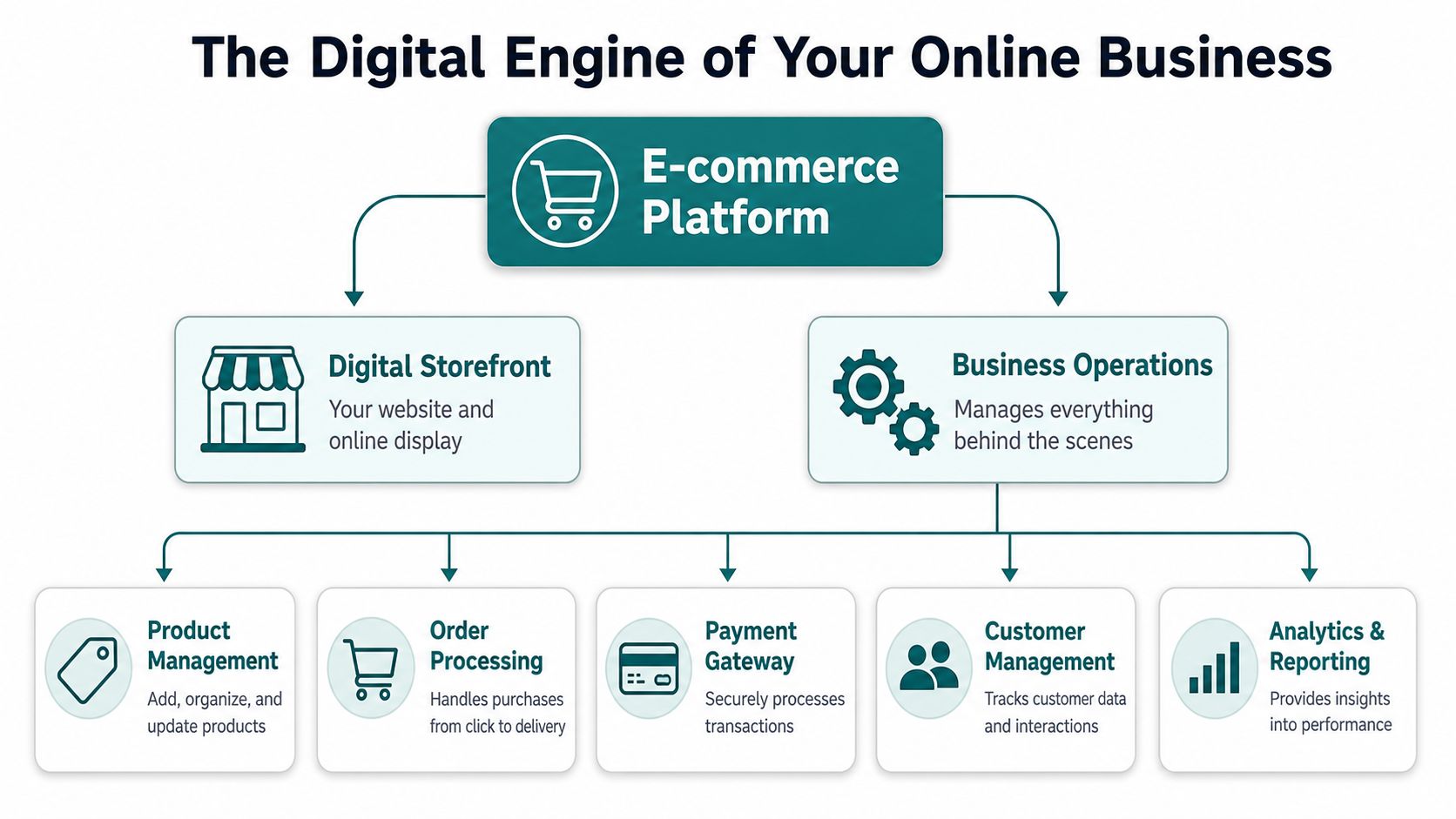
An e-commerce platform is the software that runs your online sales operation. If your website is the showroom, the platform is the cash register, stockroom, filing cabinet, and order desk combined.
That's why these systems have become such a large part of modern commerce. The market now powers over 28 million active online stores worldwide as of 2026, with platforms such as WooCommerce supporting 6.5 million stores and Shopify powering over 4 million, according to global e-commerce platform market data from AppMySite.
What the platform actually does every day
The easiest way to understand it is to look at its jobs.
| Business function | What the platform handles |
|---|---|
| Product management | Adds products, prices, descriptions, images, options, and availability |
| Payment processing | Connects checkout to secure payment tools so customers can pay online |
| Order processing | Captures the order, confirms it, routes it for fulfillment, and updates status |
| Customer management | Stores customer details, purchase history, and account information |
| Reporting | Shows what's selling, what isn't, and where sales are coming from |
A strong platform doesn't just "display products." It coordinates moving parts.
When a customer buys one item at 10:30 p.m., the platform should know whether it's in stock, calculate the correct price, apply shipping rules, process payment, send confirmation, and notify your team what happens next. If any of that still depends on someone checking an inbox the next morning, the system is incomplete.
Why owners should care about the back office
Most technology conversations focus on themes, templates, and homepage design. Those matter, but they're not where the cost of a weak setup shows up. The hidden cost lands in staff time, order mistakes, delayed shipping, and disconnected customer data.
The platform you choose determines whether online sales feel like leverage or extra administrative burden.
For a small or mid-sized business, that's the entire game. A good system makes order volume easier to handle. A bad one makes every extra sale harder to fulfill.
SaaS Open Source and Headless Explained
The three platform models most business owners run into are SaaS, open source, and headless. Each can work. Each also creates different trade-offs in cost, control, and complexity.
SaaS is the fastest path for many businesses
A SaaS platform such as Shopify is like leasing a finished storefront in a busy retail center. The lights are on, the register works, security is handled, and you can start selling quickly. The trade-off is that you operate inside the system's rules.
This is usually a strong fit if you want speed, lower technical burden, and a cleaner maintenance path.
Open source gives you more control
Open-source platforms like WooCommerce are closer to owning the building. You can remodel more freely, connect more custom processes, and shape the experience around your business. The trade-off is responsibility. Hosting, updates, plugin compatibility, and security don't manage themselves.
This model often fits companies with unique workflows, content-heavy sites, or teams that need flexibility beyond a standard template setup.
Headless is for businesses that need flexibility across channels
Headless commerce separates the customer-facing storefront from the back-end commerce engine. In plain English, your website design and your commerce logic are no longer tied together.
That matters when performance and flexibility are priorities. Headless architecture can improve frontend page load speed by 30% to 50%, and 53% of mobile visits are abandoned if a page takes longer than 3 seconds to load, based on e-commerce architecture guidance from Itransition.
For owners comparing approaches, this article on choosing your headless platform is a helpful outside read. If you want to see how that model gets implemented in practice, HDM also has a useful overview of headless CMS implementation.
Faster storefronts don't matter because they're trendy. They matter because slow mobile experiences lose buyers before they even see your offer.
E-Commerce Platform Types Compared
| Platform Type | Example | Best For | Cost Model | Technical Skill Needed |
|---|---|---|---|---|
| SaaS | Shopify | Businesses that want to launch quickly and avoid managing infrastructure | Monthly subscription plus apps and transaction-related costs | Low to moderate |
| Open Source | WooCommerce | Businesses that need more customization and control over site behavior | Hosting, development, maintenance, and extensions | Moderate to high |
| Headless | Shopify plus a custom frontend, or a custom commerce stack | Businesses with advanced UX, multi-channel sales, or complex content and commerce needs | Platform costs plus custom development and ongoing support | High |
The wrong way to choose is by asking which model is "best." The better question is which one fits your current operation and the next stage of growth.
Must-Have Features of a Modern E-Commerce Platform
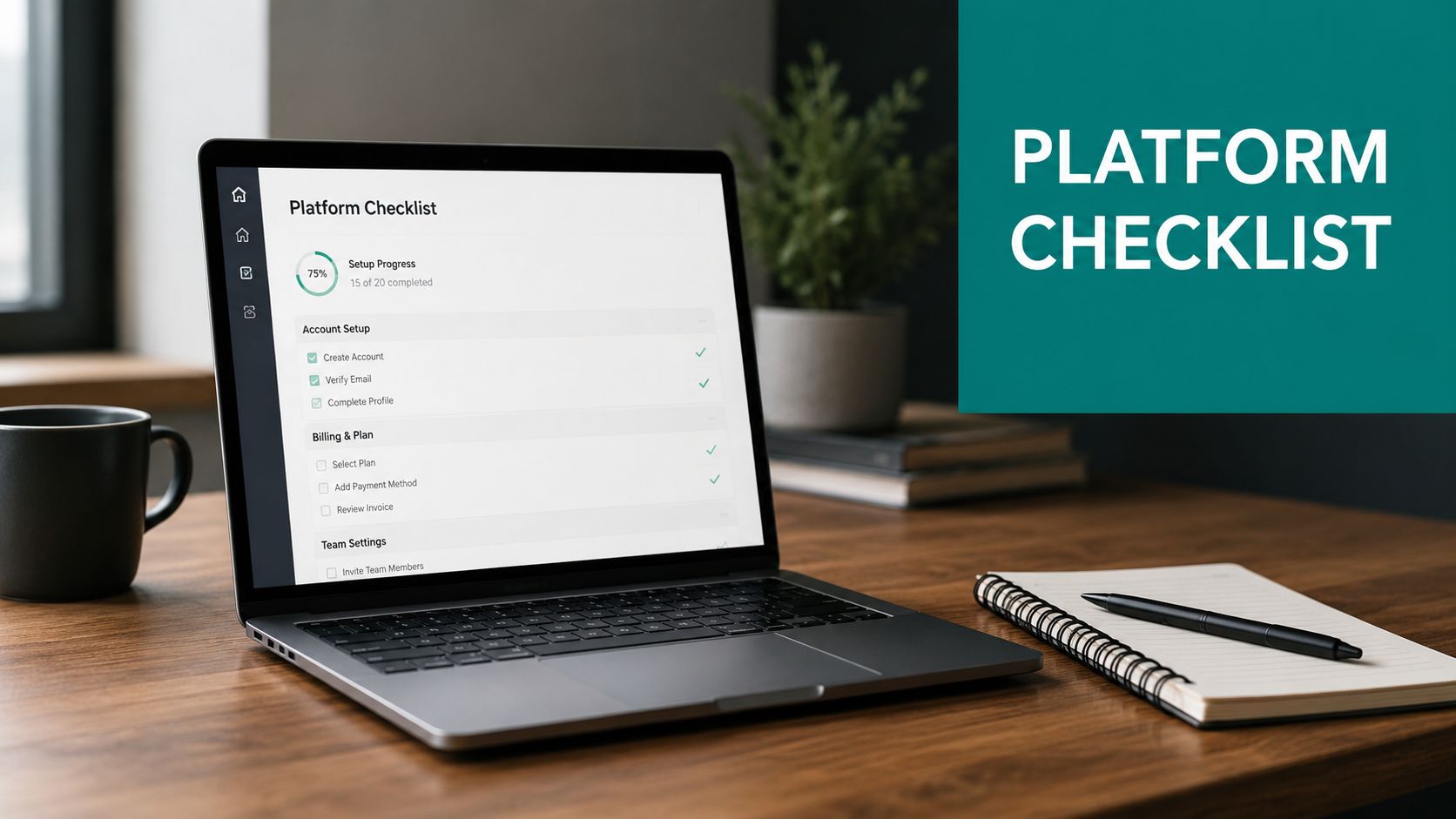
Once you move past the basic cart and checkout, the key selection criteria become clearer. A modern platform should remove operational friction, help customers buy faster, and give you better control over growth.
Features that save money or protect revenue
One of the biggest examples is inventory. The average small store can lose up to 11% of its annual revenue due to inadequate inventory management software implementation, according to small online store operations data from Hieing. That's not a design problem. It's a systems problem.
Here's what to look for.
- Inventory control that updates in real time: If stock counts lag behind actual sales, you get overselling, backorders, and awkward customer service calls.
- Flexible shipping rules: You need accurate shipping logic for local delivery, standard shipping, freight situations, or product-specific restrictions.
- Order status visibility: Customers expect confirmation, tracking, and updates without calling your office.
Features that support marketing and growth
A platform should also help your marketing team do its job.
- SEO-friendly site structure: Clean URLs, editable page titles, product metadata, and category organization help your products show up in search.
- Promotions and discount tools: You should be able to run sales, coupon codes, bundles, and seasonal campaigns without custom coding every time.
- Analytics and reporting: You need a simple way to see which products sell, where buyers come from, and where checkout drop-off happens.
- Customer accounts and segmentation: Repeat buyers should have an easier experience than first-time visitors. Good platforms make that possible.
A platform earns its keep when it cuts repetitive work for your team and reduces buying friction for customers.
The common mistake is buying based on appearance alone. A nice theme can hide weak workflows. It's smarter to test the day-to-day tasks first. Add products. Update pricing. Process a refund. Create a discount. Export orders. If those tasks feel awkward in a demo, they'll feel worse six months after launch.
Choosing the Right Platform for Your Cincinnati Business
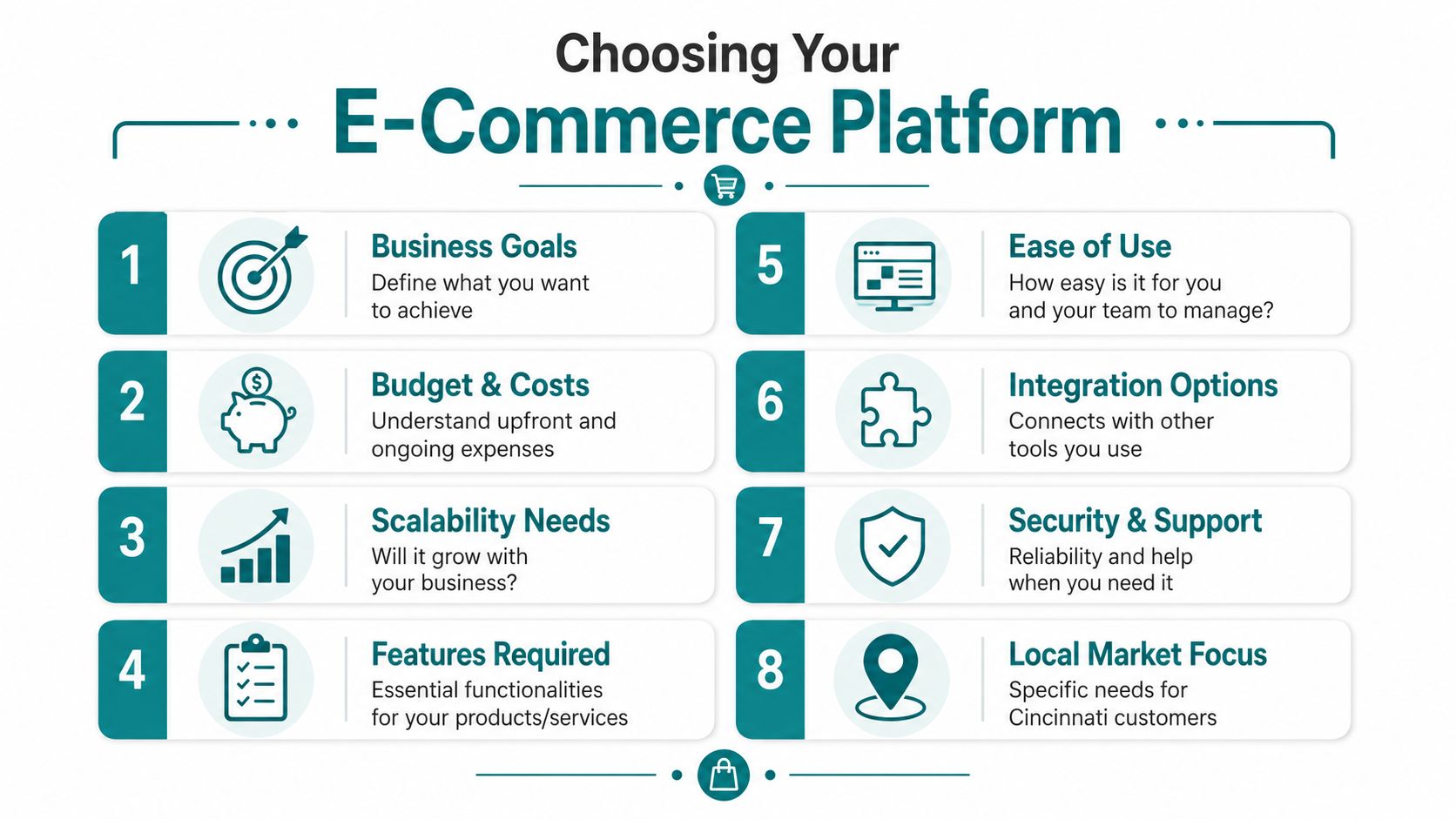
The right platform depends less on popularity and more on fit. A Cincinnati manufacturer, a local retailer, a healthcare practice, and a regional distributor may all sell online, but they don't need the same system.
Start with the sales model, not the software
If you sell directly to consumers, you may be able to work well within a more standardized platform. If you sell business to business, the requirements change fast.
73% of B2B buyers now expect self-service ordering, but only 34% of platforms natively support complex catalog management, ERP integration, and role-based pricing without heavy customization, based on B2B e-commerce requirements analysis from Znode. That same gap is especially important for HIPAA-compliant e-commerce where secure, audit-ready workflows matter.
For local businesses in healthcare, medical supply, or any regulated environment, generic templates usually aren't enough. If patient information, protected records, or secure portal access touches the buying process, architecture choices affect compliance risk.
Questions worth asking before you sign anything
Use this as a screening list when talking to agencies or platform vendors.
- How do your customers buy today: One-time checkout, repeat wholesale ordering, quotes, subscriptions, or account-based purchasing all point to different platform needs.
- Do you need customer-specific pricing: That's common in B2B and often awkward on platforms built mainly for retail.
- What has to connect: Accounting systems, CRM tools, shipping software, ERP platforms, or internal inventory systems should be part of the decision early.
- Who on your team will manage it: A platform that looks powerful in a demo may become a bottleneck if your staff can't use it comfortably.
- What are the compliance requirements: Healthcare and other sensitive industries can't treat security as an afterthought.
Here's a practical explainer that compares Shopify BigCommerce B2B features if wholesale capability is on your list. For a broader local perspective on platform fit, HDM's write-up on e-commerce platform software is useful too.
A short video can also help frame the decision before you get into proposals and scopes:
Where local context matters
Cincinnati-area businesses often have one extra wrinkle. They're not starting from zero. They already have sales reps, legacy accounting processes, existing websites, or a customer base that expects a certain way of doing business.
That's why "just use Shopify" or "just use WooCommerce" is rarely complete advice. The better move is to define the platform's job clearly before choosing the software.
Budgeting and Planning Your E-Commerce Launch
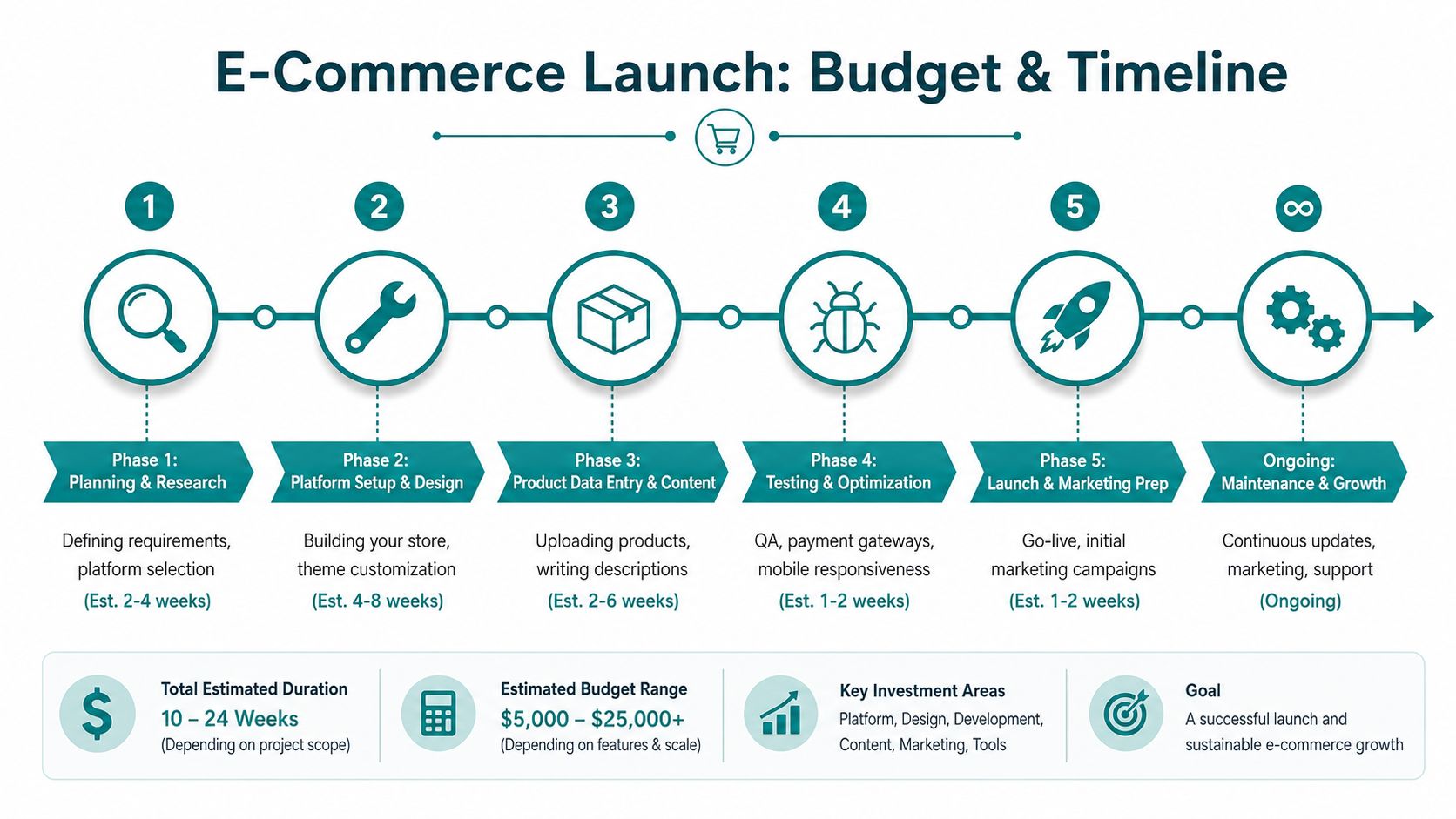
The monthly platform fee is only one line item. Owners get into trouble when they budget for software but not for setup, content, integrations, training, and post-launch support.
What you're actually paying for
For many small businesses, Shopify is a common starting point, with plans starting around $39 per month, or $29 annually, according to this small business platform review from I Feel Tech. But that doesn't mean your total launch cost is just the subscription.
A real budget usually includes:
- Design and setup: Theme customization, page creation, navigation, product templates, and mobile testing
- Product content: Photos, descriptions, categories, variants, and data cleanup
- Integrations: Payment tools, shipping providers, CRM connections, accounting sync, or ERP links
- Training: Someone on your team needs to know how to update products, process orders, and manage promotions
- Ongoing maintenance: Updates, bug fixes, security reviews, and performance tuning
Budget for the system you'll operate, not just the software you'll subscribe to.
Planning the launch without surprises
Timelines depend more on decision-making speed and content readiness than on the platform itself. Businesses often delay launch because product data is incomplete, internal approvals drag out, or system integrations weren't scoped early enough.
A cleaner planning sequence looks like this:
- Define scope first: Nail down products, customer types, payment methods, shipping rules, and must-have integrations.
- Choose the platform second: Don't reverse that order.
- Prepare content early: Product copy, photos, policies, and FAQs always take longer than expected.
- Test the full buying process: Browsing is only part of the job. Test taxes, shipping, payment, confirmation emails, and admin workflows.
- Plan for post-launch work: SEO, paid media, conversion improvements, and merchandising continue after the site goes live.
If you're replacing an existing store, migration planning becomes its own project. This guide to ecommerce migration services is worth reviewing before moving products, customer accounts, and order data into a new system.
The practical takeaway is simple. "Launch" isn't the finish line. It's the point where your new sales infrastructure starts doing real work.
Your Next Steps to Online Growth
An e-commerce platform is the system that turns a website into a selling operation. It manages products, payments, orders, customer information, and the workflows that keep online revenue moving. That's the plain-English answer to what is an e commerce platform.
The harder question isn't what it is. It's which version fits your business.
A smaller retail brand may need a clean SaaS setup and disciplined product management. A B2B company may need account-based pricing, quote workflows, and ERP connections. A healthcare-related organization may need a more specialized solution because compliance and data handling shape the architecture from day one.
That's why good platform decisions start with business reality. How your customers buy. What your staff can manage. What systems already exist. Where growth is headed.
If you're stuck between too-simple and too-complex options, that's normal. Most owners don't need more platform jargon. They need a short list of practical choices, clear trade-offs, and a rollout plan they can trust.
If you want help sorting through those choices, HDM works with Cincinnati-area businesses on e-commerce strategy, platform selection, custom builds, and growth-focused digital marketing. A good first conversation usually starts with your sales process, current bottlenecks, and what the platform needs to do for your business.