

If you're running a growing business around Cincinnati, you probably already know where paperwork starts to pile up. Vendor invoices arrive in different formats. Intake forms come in as PDFs, scans, email attachments, and phone photos. Contracts get copied from old files, tweaked by hand, and saved with names nobody can find later.
That mess costs time twice. First, your team spends hours entering, checking, renaming, filing, and chasing documents. Then you pay again when a typo, missing field, or delayed approval slows billing, onboarding, or service delivery. For many small and mid-sized businesses, document work isn't just admin. It directly affects cash flow, customer experience, and how fast the business can grow.
Your Guide to Document Automation in 2026
Document automation tools are getting serious attention because they solve a very ordinary business problem: too much repetitive document work and too little margin for error. This isn't a niche category anymore. The global document automation software market was valued at USD 9.06 billion in 2025 and is projected to reach USD 28.04 billion by 2033, with a CAGR of 15.18% from 2026 to 2035. That tells you something important. Businesses of every size are moving this work out of email inboxes and spreadsheets and into structured systems.
For a Cincinnati business owner, the practical question isn't whether automation matters. It's where it fits into your operation right now. A manufacturer may want cleaner purchase order handling. A medical practice may need intake packets routed properly. A law office may want repeatable drafting and filing processes. A service company may want proposals, approvals, and signed documents to stop living in five different tools.
Why this matters now
The biggest shift is that document automation isn't just for enterprise IT teams anymore. Modern tools let smaller companies automate recurring tasks without rebuilding their whole operation. A basic setup can pull information from forms, place it into templates, trigger approvals, and store final records in the right place.
But there's a catch. Buying software doesn't fix messy processes by itself.
Practical rule: The businesses that get value from document automation tools usually automate one painful workflow first, not every document in the company at once.
Where owners get tripped up
Most frustrations don't start with the software. They start with inconsistent files, unclear naming, duplicate templates, and no agreed process for review. That's why the best implementation plans focus as much on workflow discipline as technology.
If you're evaluating digital systems as part of a broader growth plan, document automation often fits alongside website improvements, CRM cleanup, lead handling, and internal workflow design. It becomes part of how your business runs online, not just a back-office add-on.
What Is Document Automation and How Does It Work
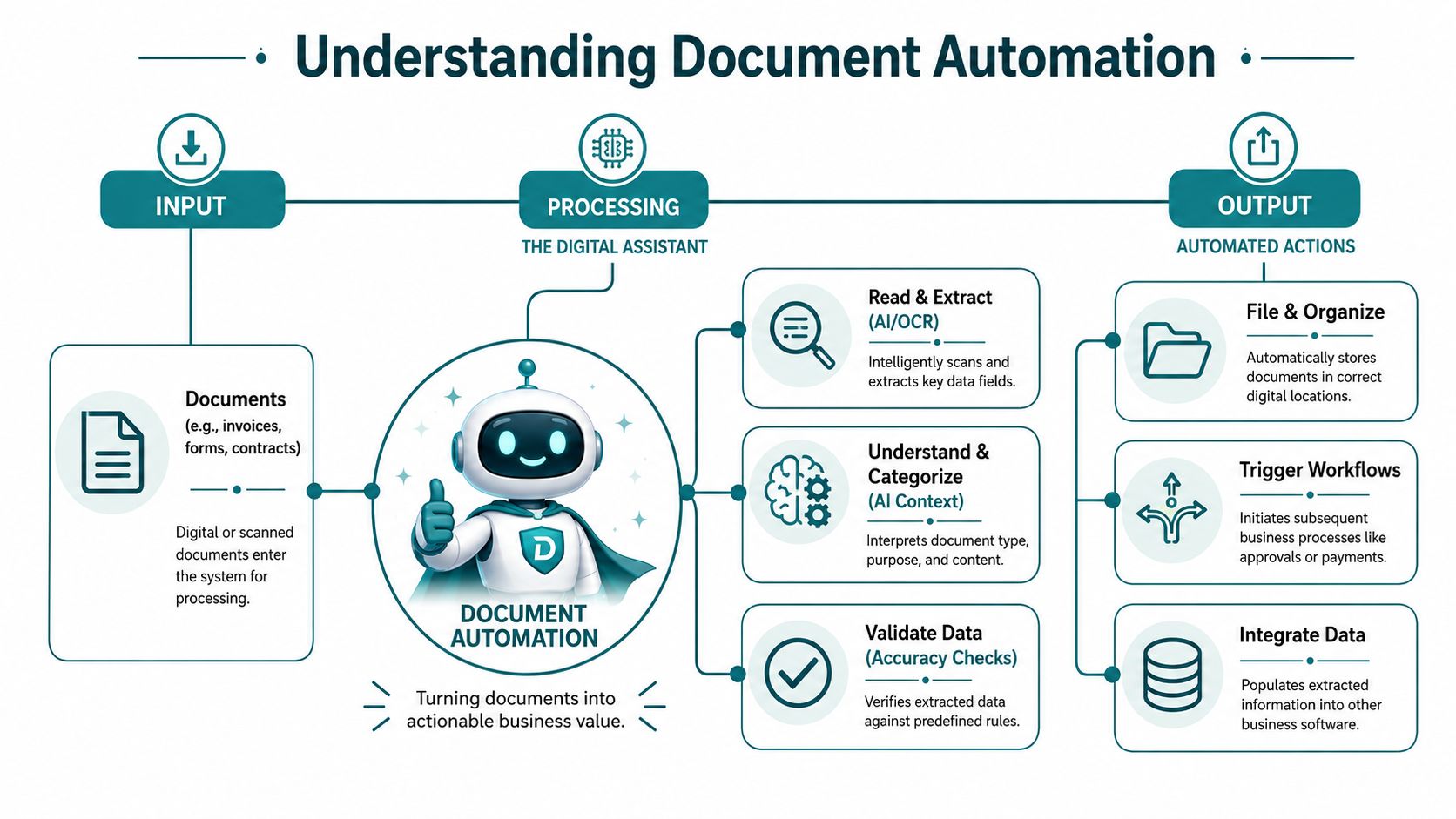
Think of document automation as a digital assistant that doesn't just store files. It can read them, pull out the important details, decide what kind of document it's looking at, and send the result where it needs to go.
A simple document automation tool works from structured templates. You create a document once, mark the fields that should change, and let the system fill in names, dates, pricing, addresses, or legal language from a form or database. That's the modern version of mail merge, but much more useful in day-to-day operations.
More advanced systems go further. Intelligent Document Processing combines OCR, NLP, and ML to automate data extraction from unstructured documents like invoices, contracts, and emails that lack predefined formats. In plain English, that means the software can deal with documents that don't all look the same.
The simple version
Here's how the core pieces work:
- OCR as the eyes helps the system read text from scans, PDFs, and image-based files.
- NLP as the brain helps it understand context, such as whether a number is an invoice total or an account number.
- Machine learning as the pattern engine helps it improve classification and extraction across document types and layout variations.
That combination matters because most real businesses don't receive perfect files. One vendor sends a clean PDF. Another sends a blurry scan. A third emails a screenshot. Basic template tools struggle there. IDP-style tools are built for that reality.
Basic generation versus intelligent processing
The easiest way to evaluate document automation tools is to separate them into two camps.
Template-driven tools are best when your business controls the format. Think proposals, contracts, onboarding packets, employment letters, or internal forms. They save time by generating consistent documents from approved templates.
Intelligent processing tools are best when other people control the format. Think invoices from vendors, insurance paperwork, emailed forms, statements, claim documents, or scanned records. These tools have to interpret what they receive before they can route or extract data.
That distinction matters more than most vendors admit. A tool that's excellent at generating a sales proposal may be a poor fit for processing messy AP documents.
For businesses comparing automation across departments, this is also where strategy starts to overlap with broader operational AI. If you're exploring connected workflows, HDM has a useful piece on AI workflow automation for business processes. And if legal workflow is part of your evaluation, Ares offers a helpful overview of efficiency in legal document processing, especially for firms dealing with repeatable drafting and review tasks.
A good document automation setup doesn't just create files faster. It reduces handoffs between people and systems.
The Real-World Benefits for Your Small Business
The value of document automation tools shows up in the places owners feel friction every week. Not in abstract productivity talk. In the tasks that slow invoicing, create rework, or force a staff member to spend half a day moving information from one document to another.

A finance-heavy small business is a good example. Platforms like Docsumo can extract structured data from unstructured documents in seconds, helping financial SMBs reduce manual data entry time by up to 90% and move decision-making from days to minutes. Even if your exact workflow looks different, the lesson is the same. The less your team rekeys information, the faster work moves and the fewer mistakes slip through.
Benefits that actually hit the bottom line
A few outcomes tend to matter most:
- Faster billing and collections means invoices get processed, approved, and sent without sitting in someone's inbox.
- Cleaner records reduce the headaches that come from duplicate files, wrong versions, and missing attachments.
- Better client onboarding helps you move from signed agreement to active work with less delay.
- Lower clerical risk matters when a wrong date, amount, or client detail creates a service issue or legal problem.
A lot of owners underestimate the cost of small document mistakes because no single error looks catastrophic. But repeated manual entry creates a steady drag on operations.
Where teams notice the change first
In practice, the first improvements usually show up in one of these areas:
| Business process | Manual pain point | Automation result |
|---|---|---|
| Invoice handling | Staff re-enter values from mixed-format files | Faster extraction and routing |
| Client intake | Repetitive form review and follow-up | Cleaner onboarding workflow |
| Contracts and proposals | Copying old files and editing by hand | More consistent outputs |
| Internal approvals | Documents stall between email threads | Clearer workflow steps |
If your team is trying to picture how this works in motion, this quick overview helps.
The less obvious benefit
Automation also frees your best people from low-value document handling. That matters more than software features. When your office manager, operations lead, or bookkeeper spends less time on repetitive document correction, they can spend more time on decisions, customer communication, and process improvement.
For a small business, that's often the true return. You don't just save minutes. You reclaim attention.
How to Choose the Right Document Automation Tools
A vendor demo can make document automation look easy. Then your team loads a batch of crooked scans, emailed PDFs, photos from phones, and half-complete forms, and the project stalls in week two.
That gap between the demo and real operations is where tool selection usually goes wrong. The right platform has to handle your actual document conditions, not a clean sample set prepared for a sales call.
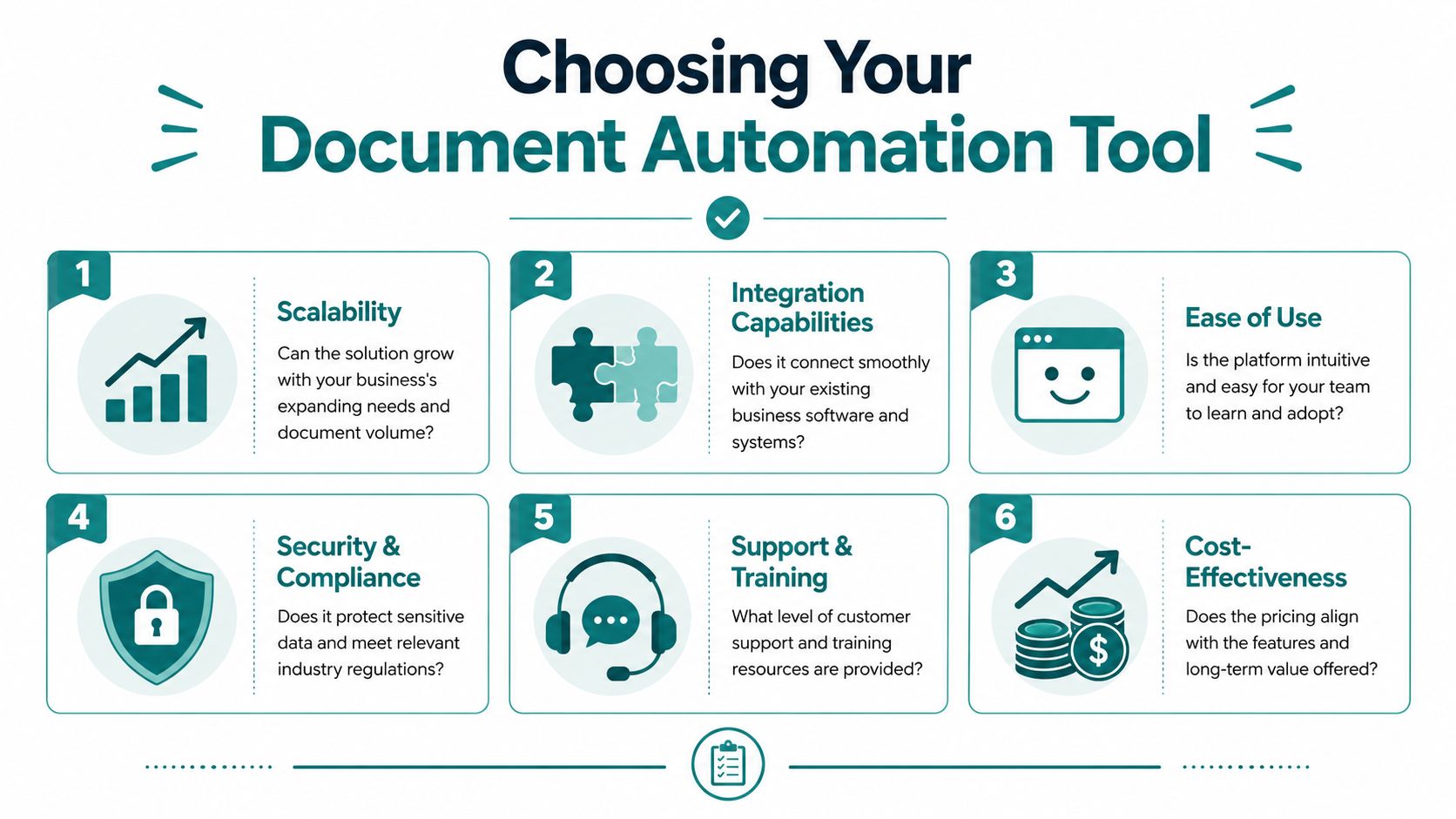
Start with your messiest documents
Before comparing features, collect 20 to 30 real files from the process you want to automate. Include the ugly ones. Blurry scans, rotated pages, handwritten notes, missing fields, multi-page packets, and files sent in inconsistent formats tell you more than any feature sheet will.
Then answer four practical questions:
- Where do these documents come from? Internal templates are easier to automate than files sent by customers, vendors, or referral partners.
- How much variation do they have? A standard contract is one problem. Mixed invoices from different suppliers are another.
- What happens when data is missing or unreadable? If the process cannot stop, you need a review queue and clear exception handling.
- Who signs off before the record is final? In many businesses, especially regulated ones, human validation is part of the process, not a failure of the software.
That last point gets skipped too often. Good automation reduces manual work. It does not remove judgment where judgment is still required.
Evaluate workflow fit before feature depth
A tool can have strong OCR, templates, and integrations and still be the wrong choice. What matters is whether it fits the path your documents follow through the business.
Map the process in plain language. Who receives the file first? What system needs the final data? Who reviews exceptions? What triggers approval, rejection, or follow-up? If a vendor cannot show that flow clearly, the implementation will depend on workarounds.
The safest buying approach is to ask vendors to process your real samples during the demo. Do not accept polished examples. Ask them to show what happens when a field is low confidence, when a page is unreadable, or when the document type is misclassified. Those moments decide whether the tool saves time or creates a new cleanup job.
Security and control need a practical review
If the platform will touch contracts, HR files, financial records, or patient-related documents, security review belongs in the buying process. Ask direct questions. Where is data stored? What logs are available? Can you control retention? How are user permissions handled? What happens to your data if you leave the platform?
Plain answers matter more than vague promises.
This is also where ownership matters. Some systems need an internal admin who can maintain templates, validation rules, and routing logic. Others shift more of that work to the vendor. Neither model is automatically better. A small team may prefer vendor support. A larger operation may want more internal control so changes do not sit in a support queue.
Tool tiers that make sense for SMBs
Most small businesses end up choosing from four practical categories:
| Tool Tier | Best For | Example Use Case |
|---|---|---|
| Basic template automation | Businesses with repeatable internal documents | Generate proposals, letters, and standard agreements |
| Mid-market workflow automation | Teams that need approvals and connected records | Route intake documents into operations or accounting |
| Intelligent document processing | Businesses dealing with messy incoming files | Extract fields from invoices, statements, and emailed forms |
| Industry-specific legal or compliance tools | Regulated or document-heavy firms | Manage legal drafting or controlled record workflows |
The mistake is buying too high or too low. A basic template tool will not solve document chaos from outside sources. An advanced IDP platform can be excessive if your documents are already standardized and your main problem is version control.
What to ask on demos
Bring a short list and keep the conversation grounded in operations:
- Show our documents, not sample files: Use real examples from your business.
- Show confidence scores or review logic: You need to see how the system flags uncertain extractions.
- Explain exception handling step by step: Ask who gets notified, where the document goes, and how corrections are logged.
- Map the integration in detail: "We integrate with your system" is not enough. Ask what data moves, when it moves, and what can fail.
- Confirm who maintains it after launch: Someone will own templates, rules, users, and change requests.
If contracts are part of the pain point, this overview on how to simplify small business contracts is worth reading before you compare vendors. It helps separate contract workflow needs from broader document intake and extraction problems.
For owners evaluating software across multiple categories, this guide to top AI tools for Ohio small businesses gives broader context on where document automation fits in the stack.
Automation for Regulated Industries like Healthcare and Legal
In regulated industries, document automation can't be judged on speed alone. The bigger question is whether the process is defensible when something goes wrong.
A healthcare organization isn't just moving PDFs around. It may be handling protected patient information, intake records, consent forms, or billing documents that require strict controls. A legal practice isn't just generating letters. It may need version control, traceable edits, matter-based organization, retention discipline, and reliable handoff between staff.
Why generic tools often fall short
Consumer-friendly automation apps can look impressive in demos. The problem is that regulated work usually exposes their weak spots. They may generate documents well enough, but break down when you need auditability, permission control, workflow traceability, or nuanced exception handling.
Healthcare teams also have to think beyond the document itself. They need to know where data is stored, who can access it, how it moves, and what vendor obligations apply. That's why automation decisions often overlap with broader digital infrastructure, including secure websites, portals, and forms. For Cincinnati-area providers evaluating those requirements, this guide to HIPAA-compliant web design is a useful companion to the software conversation.
Legal workflows need depth, not just templates
Legal document automation tools can be useful, but the trade-offs matter. ContractWorks has been noted as scalable to 10,000+ documents while maintaining consistency, though 2025 evaluations also pointed out limits in advanced logic and deep integrations. That's a good reminder that scale alone doesn't equal fit.
A mid-sized firm may need:
- Reliable clause control for standard language
- Version discipline so staff don't work from stale drafts
- Workflow visibility across review, approval, and storage
- Integration depth with the systems the firm already uses
A simple legal template tool can still be valuable. But if the workflow includes complex intake, matter management, or compliance review, the software has to support that reality.
In healthcare and legal, human review isn't a sign the automation failed. It's often the control that makes the system safe to use.
The role of human validation
Many automation projects falter. Vendors often sell a touchless future. Real regulated environments don't work that way. Teams need confidence thresholds, exception queues, and designated review points for unclear or risky records.
For example, a blurry scan, incomplete intake form, or unusual contract language shouldn't move straight through the workflow just because the software found something in the file. It should pause, flag uncertainty, and route to the right person.
That's not inefficiency. That's good operations.
A Practical Roadmap to Get Started with Automation
Monday starts with a simple goal. Get invoices, intake forms, or signed agreements into the right system without another round of manual cleanup. By Wednesday, the team is fixing crooked scans, renaming files, chasing missing fields, and wondering why the new automation tool keeps misfiring.
That pattern is common. The software usually is not the first problem. Document chaos is.
Start small, and start where the mess is expensive. Pick one document process that shows up every week, slows people down, and creates avoidable rework. Good candidates include invoice intake, client onboarding packets, contract generation, records filing, or approval routing.
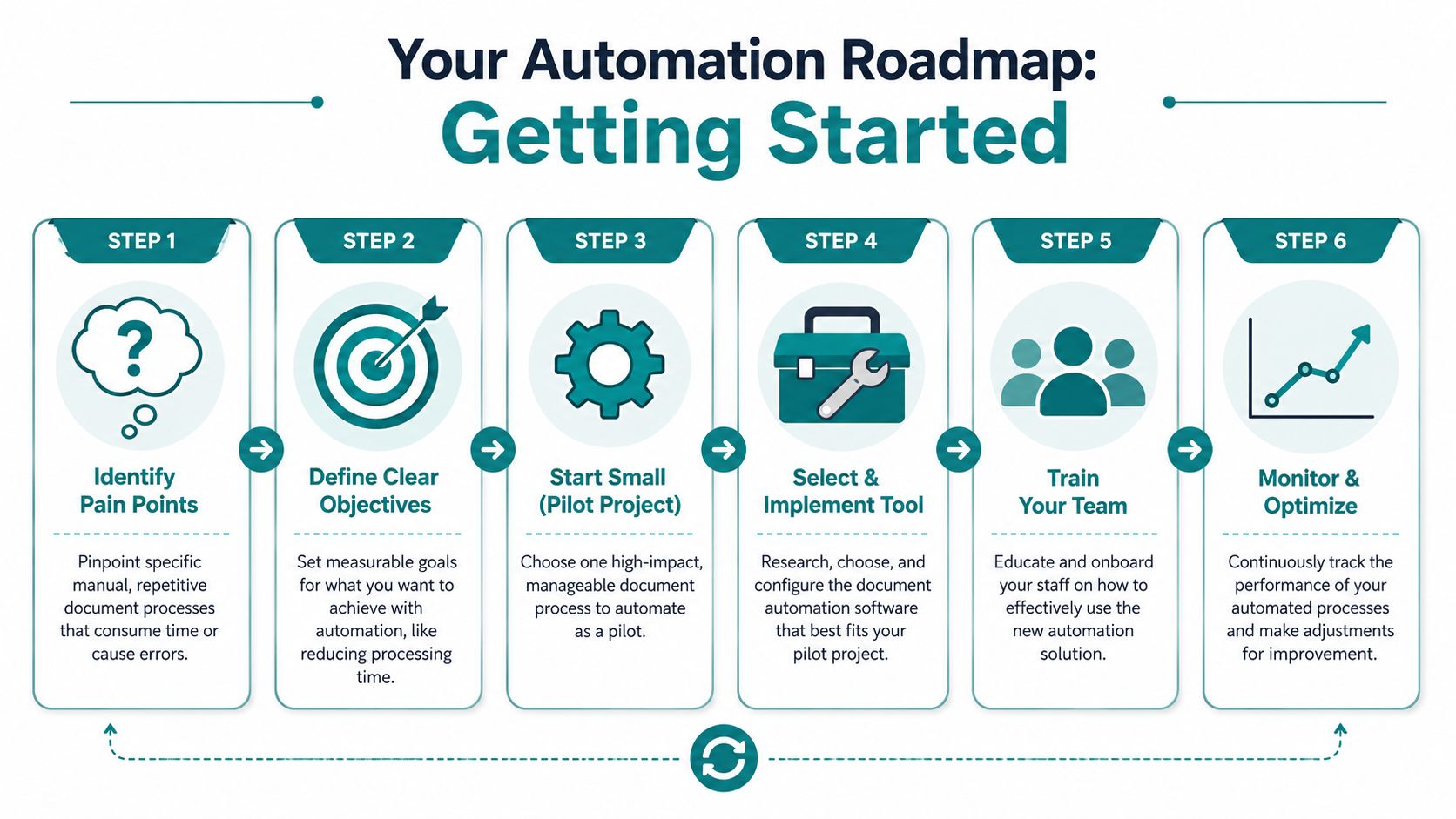
Step one and two
The first two steps are operational.
- Identify the bottleneck Choose the process where staff lose the most time to repetition, handoffs, corrections, or status checks. If the problem is vague, it is too early to automate it.
- Clean up the inputs Poor input quality often derails projects. Bad scans, inconsistent templates, handwritten edits, missing values, and file naming habits all reduce extraction quality.
Koncile recommends standardizing inputs, using high-quality scans, and training models on multiple layout variations because inconsistent inputs and unstructured layouts cause many document automation failures. In practice, that means setting scanner standards, reducing form variations, and agreeing on what a valid submission looks like before a file ever reaches the automation layer.
I have seen teams blame the platform when the actual issue was that five versions of the same form were circulating across departments.
Step three and four
Once the inputs are controlled, run a pilot with tight boundaries.
- Choose a pilot workflow Limit the scope. Use one document type, one team, and one clear business outcome such as shorter processing time or fewer data entry corrections.
- Design the review path Add human validation at the start, not after errors show up. If the system is unsure about a field, a classification, or a missing attachment, it should route the file to review.
That review path should define:
- What can pass automatically because the document is routine and the extracted data is clear
- What should be flagged because a field is missing, the scan is poor, or the format does not match expectations
- Who handles exceptions and how those corrections are fed back into the workflow
Operational takeaway: Automate routine documents. Route uncertain cases to review. Keep risky records under human control.
That last point matters most in healthcare, legal, finance, and any business where a bad document decision creates compliance exposure.
Step five and six
After the pilot proves it can hold up under normal work conditions, expand it carefully.
- Train the people who run the process Include the staff who scan, upload, verify, approve, and retrieve documents. A tool fails quickly when only the admin team understands how exceptions are supposed to be handled.
- Measure quality, not just speed Time saved matters. So does whether the document was classified correctly, the right fields were captured, and the file reached the right destination without someone repairing it later.
As noted earlier, broad accuracy numbers can hide weak performance on specific document types. Ask vendors and internal teams for results by document class and by real workflow outcome. A business owner does not need a polished dashboard. They need to know whether the process finishes cleanly.
What a strong rollout looks like
A practical rollout usually includes these pieces:
| Rollout element | What good looks like |
|---|---|
| Document scope | One high-friction workflow first |
| Input quality | Standard naming, cleaner scans, clearer forms |
| Exception handling | Defined review queue for uncertain cases |
| Integration plan | Clear destination for extracted data |
| Team adoption | Staff know when to trust the system and when to check it |
The companies that get results from document automation tools treat them as operating systems for document work. They set rules, clean inputs, and build review steps that match the risk of the process.
If your business is weighing document automation alongside web design, AI workflows, CRM integration, or compliance-sensitive digital operations, HDM can help you evaluate the optimal fit. HDM works with Cincinnati-area and Ohio businesses that need more than a software subscription. They need a connected system that supports growth, reduces manual work, and holds up in practice.