Your Shopify or WooCommerce store is probably doing several jobs at once. It's taking orders, sending shipping updates, running paid traffic, and collecting email addresses. Yet when someone views a product, abandons checkout, returns an item, or buys for the first time, your marketing may still treat that person like everyone else.
That gap costs revenue. Marketing automation for ecommerce connects storefront behavior with timely messages, advertising audiences, onsite experiences, and reporting. For a Cincinnati-area retailer, the objective isn't to add another impressive dashboard. It's to make every customer interaction more useful and more measurable.
What Marketing Automation Actually Does for an Online Store
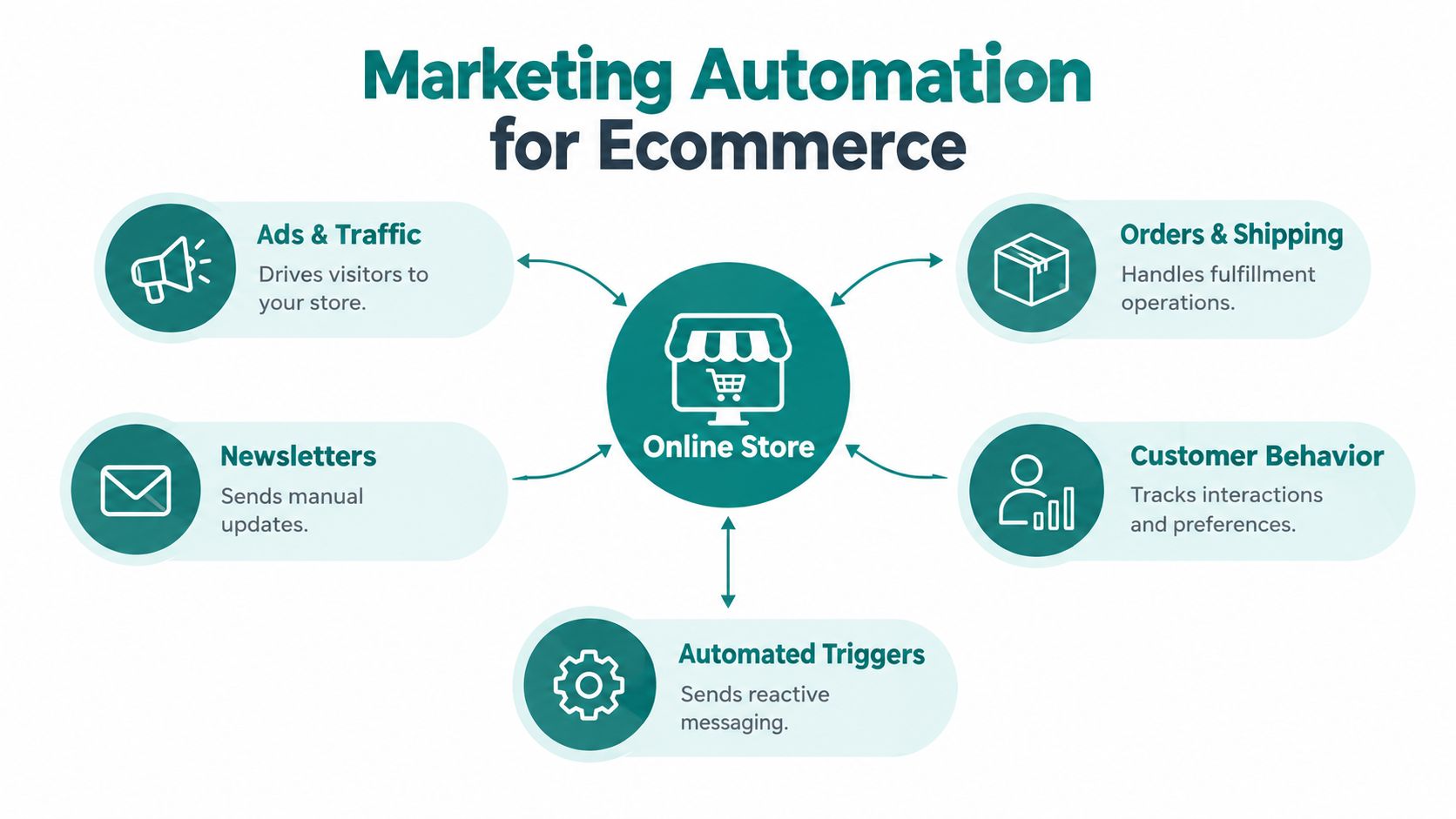
Marketing automation is software that watches for customer behavior and responds with a relevant action. A product view can start a browse reminder. A completed order can suppress cart messages and begin a delivery or review sequence. A period of inactivity can move a customer into a win-back audience.
That's different from a scheduled newsletter. A campaign blast goes to a selected audience at a chosen time, whether or not each recipient has shown current buying intent. A triggered flow starts because something happened, or failed to happen, in the storefront.
The difference matters because automated messages can be evaluated against commercial outcomes. In a benchmark of more than 20 billion campaign emails and 470 million automated sends across over 27,000 brands, automated emails converted at 1.49%, compared with 0.08% for one-off campaign emails, roughly 18 times the conversion rate of batch sends (Hello Retail's ecommerce email statistics). That benchmark isn't a promise for your store. It does show why behavior-based flows deserve priority testing.
Treat automation as a connection layer
You don't need to replace every tool you already use. You need the tools to share reliable signals.
- The storefront records product views, carts, checkouts, purchases, refunds, and customer accounts.
- The messaging platform turns those events into email or SMS workflows.
- Advertising platforms use audiences for suppression, retargeting, or acquisition.
- Analytics connects a message or audience to orders, revenue, margin, and customer retention.
- Customer service and order systems provide context when a buyer needs help rather than another promotion.
This is why a platform name matters less than the integration discipline around it. A beautifully designed flow still fails if it sends after purchase, recommends unavailable products, or counts every last-click order as incremental revenue.
Start with one behavioral problem, define the revenue outcome, and identify the event that proves success. That approach turns automation from a software purchase into an operating layer for the store you already run.
The Foundation Every Automation Needs Before You Launch a Flow
Most automation failures begin before the first email is written. The store doesn't capture the right event, the customer record is fragmented, or the workflow has no rule for stopping after a purchase.
Build the foundation in a practical order.
Capture events consistently
Create one event schema for browsing, product views, cart creation, checkout initiation, purchase, refund, and consent. Each event should use consistent names and carry useful context, such as the product identifier, order value, currency, and checkout stage.
Without that structure, one system may call an event “checkout started” while another calls it “begin checkout.” Your reports then split one customer action into separate categories. You also risk sending a cart reminder to someone who already ordered through a different device.
Unify the customer record
Bring email address, phone number, order history, consent status, and relevant behavior into a dependable customer profile. Make identity matching explicit, especially when a shopper browses anonymously and later identifies themselves during checkout.
Then assign clear lifecycle states:
- Prospect: Has shown interest but hasn't purchased.
- First-time buyer: Has completed an initial order.
- Repeat buyer: Has purchased again and may need retention or cross-sell messaging.
- Lapsed customer: Has moved beyond your defined purchase window without ordering.
Your team, not your developer, should own the business definitions. A marketing manager should be able to explain why someone entered a segment and what event removes them from it.
Protect deliverability and consent
Set up domain authentication, maintain permission records, and separate promotional messages from transactional notices. Starting in February 2024, Google required bulk senders, defined as organizations sending close to 5,000 or more messages to personal Gmail accounts within 24 hours, to authenticate outgoing email and support one-click unsubscribe through List-Unsubscribe headers (Google's Gmail sender requirements).
For an owner connecting Shopify with an email platform, a practical implementation reference such as the Klaviyo Shopify integration guide can help clarify the data and connection points before launch.
Use this readiness checklist
- Events: Browsing, cart, checkout, purchase, refund, and consent events are recorded consistently.
- Identity: Profiles connect known email, phone, order, and consent data.
- Suppression: A purchase immediately exits cart recovery.
- Lifecycle: Prospect, first-time buyer, repeat buyer, and lapsed states have clear definitions.
- Deliverability: Authentication and unsubscribe handling are tested.
- Reporting: Every flow has a revenue metric and an attribution window.
This work is manageable for a small team when treated as a defined implementation project. Skipping it creates ongoing manual cleanup.
High-Impact Workflows to Launch First
Don't begin with the most advanced-sounding workflow. Begin with the one that responds to clear intent and has a clean revenue outcome.
A small ecommerce team should usually start with these flows:
- Welcome series: Trigger after consented signup. Introduce the brand, explain the product value, answer common buying questions, and use a discount only when it protects margin and serves a clear purpose. Suppress the series when the subscriber purchases.
- Browse abandonment: Trigger after a known shopper views a product or category without adding to cart. Send useful information, such as fit guidance, availability, or product comparisons, rather than assuming a discount is necessary.
- Cart abandonment: Trigger after a cart or checkout event stops without purchase. A practical sequence sends the first reminder immediately, a second after approximately 24 hours, and a final message around 72 hours. Suppress the entire workflow as soon as an order is placed.
- Post-purchase: Trigger after purchase and focus first on confirmation, delivery expectations, product use, and support. Ask for a review after the customer has had a reasonable opportunity to evaluate the product.
- Win-back: Trigger when a customer becomes lapsed. Start with a relevant reason to return, then test an incentive only if the customer's history justifies it.
- Review request: Trigger after delivery or another meaningful fulfillment milestone. Exclude customers with an unresolved service case, return, or fulfillment problem.
A benchmark covering more than 143,000 abandoned-cart flows reported a 50.5% average open rate, 6.25% click rate, 3.33% placed-order rate, and $3.65 revenue per recipient (Darkroom's abandoned-cart email benchmark). Those are averages, not guarantees. The placed-order rate is the share of recipients who placed an order, not the percentage of abandoned carts recovered.
| Workflow | Trigger Event | Typical Cadence | Primary Metric |
|---|---|---|---|
| Welcome series | New consented subscriber | Immediate, then follow-up messages | First-order rate |
| Browse abandonment | Known product or category view | Follow-up after the visit | Revenue per recipient |
| Cart abandonment | Cart or checkout without purchase | Immediate, approximately 24 hours, approximately 72 hours | Placed-order rate |
| Post-purchase | Completed order | Confirmation, delivery, education, review request | Repeat purchase and support outcomes |
| Win-back | Customer becomes lapsed | Initial reactivation, then controlled follow-up | Incremental orders per eligible customer |
| Review request | Delivery or fulfillment milestone | After product use | Review completion and repeat purchase |
Benchmark reporting on 2023 ecommerce data found that welcome, browse-abandonment, and cart-abandonment programs together were responsible for 88% of automated email orders (Tabular's email marketing statistics). One-off campaigns still have a role, but they should support lifecycle flows rather than compete with them.
Respond to demonstrated intent, not assumed interest.
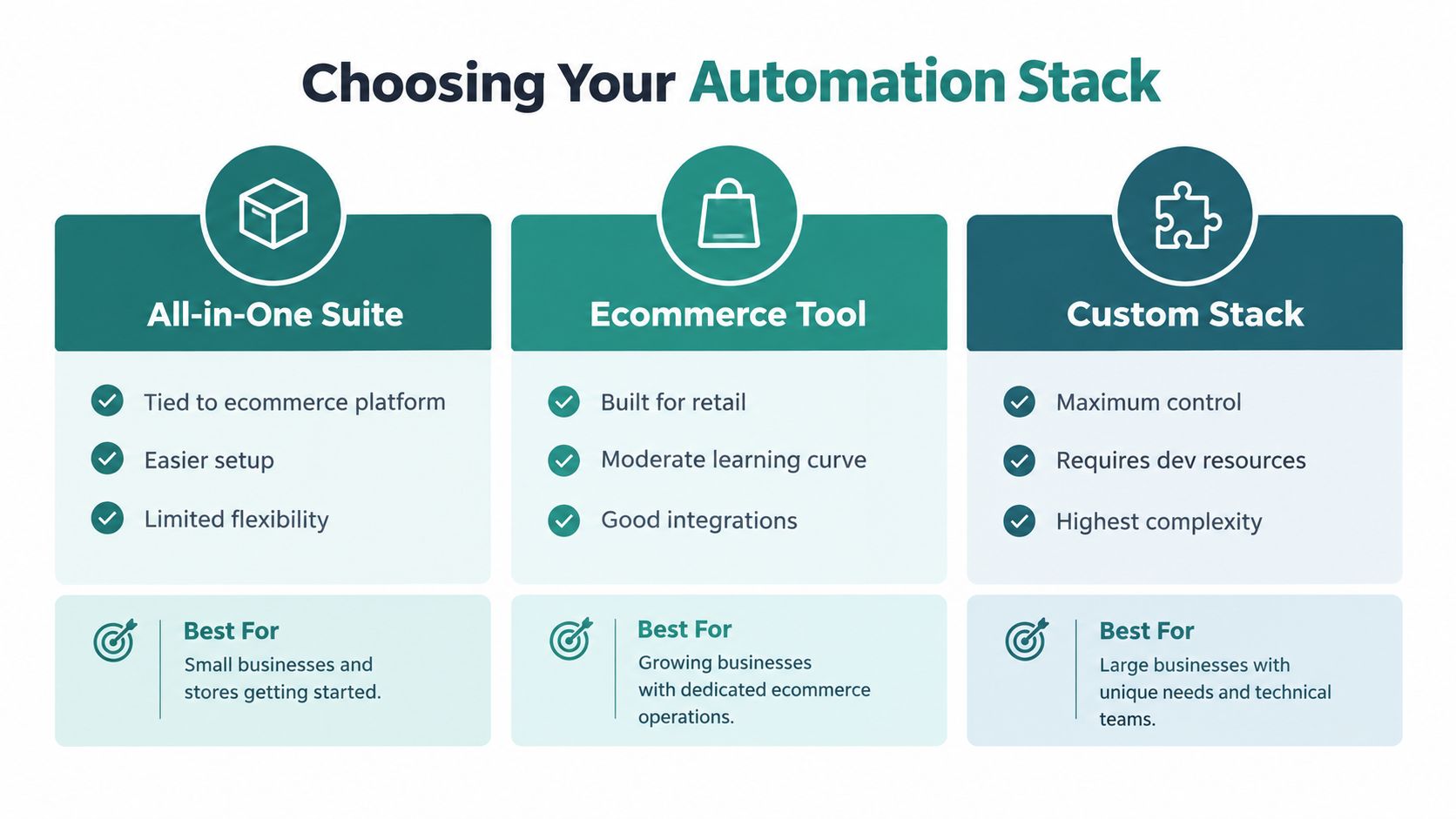
Choosing Between All-in-One Suites, Ecommerce Tools, and Custom Stacks
Cincinnati-area retailers usually face three realistic choices. The right answer depends less on the platform's feature list than on how quickly you need to launch, how well the tool connects to your storefront, and who will maintain the data.
All-in-one suites
A platform tied closely to Shopify or WooCommerce offers the fastest path to welcome, cart, browse, and post-purchase flows. Klaviyo for Shopify and Mailchimp for WooCommerce are familiar examples. You'll usually get a visual workflow builder, audience tools, and basic revenue reporting in one place.
The trade-off is flexibility and cost control. Pricing can rise with contact or send volume, and custom business rules may require workarounds. This path fits an owner who needs dependable lifecycle coverage without building a larger technical system.
Ecommerce-native tools with separate layers
An ecommerce-focused automation tool can handle customer and order behavior while a separate analytics or advertising layer manages acquisition and measurement. This structure gives you more freedom than a single suite, but every connection needs testing.
Use it when your store has distinct requirements, such as complex product catalogs, multiple advertising channels, or reporting that needs to combine marketing and operational data. Assign one person to own the event definitions and suppression rules.
Custom stacks
A custom build through an agency such as HDM makes sense when the storefront, CRM, ads, analytics, customer service, or returns systems need coordinated journeys that standard tools can't manage cleanly. A headless stack can provide maximum control, but it also requires development resources, documentation, monitoring, and ongoing maintenance.
Before choosing, compare these criteria:
- Cost at your current list size: Include implementation, platform, sending, analytics, and maintenance costs.
- Integration depth: Confirm that the system receives real purchase, refund, inventory, and consent events.
- Data ownership: Know where customer profiles and event history live and how you'd export them.
- Multichannel growth: Check whether email, SMS, ads, and onsite experiences can share suppression logic.
- Maintenance burden: Identify who fixes broken integrations and validates tracking after store updates.
For a broader platform decision, the best ecommerce platforms for small business comparison can help frame the storefront choice before you evaluate automation.
In 2024, automated messages represented only 2% of total email volume but generated 37% of all email-attributed sales, according to Omnisend data cited by industry benchmark reporting (Omnisend email marketing statistics). The lesson is simple. Choose the simplest stack that can capture intent, stop messages at the right moment, and report revenue accurately.
Segmentation and Tagging That Keep Messages Relevant
Segmentation turns customer data into a decision about who should receive a message. It doesn't require dozens of complicated audiences. It requires definitions that reflect how your business sells.
Start by separating static tags from dynamic segments. A static tag records a fact that may remain useful, such as “attended showroom event” or “requested wholesale information.” A dynamic segment updates as behavior changes, such as “viewed outdoor furniture recently” or “hasn't purchased within the defined lapsed period.”
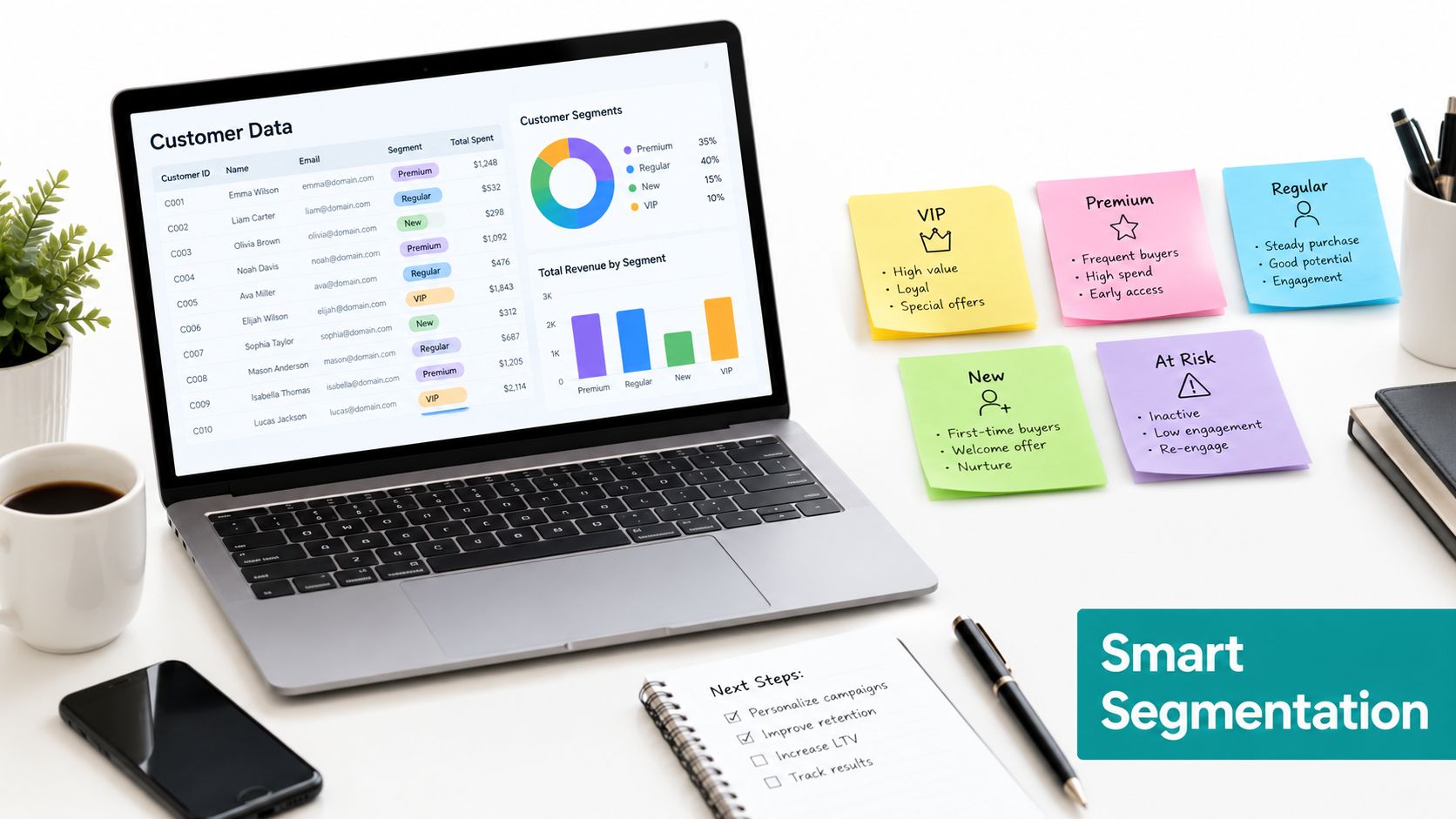
Use tags for durable context. Use dynamic segments for changing intent. Don't turn every click into a permanent label, or your customer profiles will preserve outdated assumptions.
Practical segment recipes
- VIP customers: Define the group by lifetime spend, purchase frequency, or another margin-aware business rule. Give them early access, service recognition, or product information before reaching for a blanket discount.
- Recent category interest: Group shoppers who viewed a product category within the last 30 days. Keep the content focused on that category, but remove anyone who purchases or changes their stated preference.
- Cart savers: Identify customers who abandoned three or more times in a week. Don't automatically increase discounts. Flag the pattern for testing around shipping clarity, payment options, product questions, or checkout friction.
- Lapsed customers: Create a dynamic audience for customers who haven't purchased in 90 days, then tailor the message to the product's normal replacement or buying cycle.
A segment is only useful if it has entry criteria, an exit event, a suppression rule, and an owner. If a customer enters a cart flow, broad promotional campaigns should exclude that person until the flow ends. If a customer unsubscribes from promotional email, the suppression list must override every audience rule.
The content strategy for ecommerce should inform these segments. A buyer who needs sizing education requires different content from a repeat customer waiting for a new collection.
Watch the walkthrough below for a visual example of how segmentation can support customer journeys.
<iframe width="100%" style="aspect-ratio: 16 / 9;" src="https://www.youtube.com/embed/6mugRyElbd0" frameborder="0" allow="autoplay; encrypted-media" allowfullscreen></iframe>Ten well-defined segments outperform fifty vague ones. Review segment membership regularly, document the business reason behind each group, and let marketing own the definitions so they stay connected to customer experience and revenue.
Connecting Automation to Checkout, Returns, and Personalization Gaps
A cart reminder can't repair a confusing checkout. It can only bring the shopper back to the same obstacle.
Baymard reports that about 70% of ecommerce visitors abandon their shopping cart, and its research found that many checkouts can reduce the default number of form elements by 20% to 60% (Baymard's checkout usability research). That means your team should test two separate interventions: the reminder sequence and the checkout itself.
Baymard's 2025 checkout research reports that 65% of ecommerce sites have checkout performance rated mediocre or worse. It also says solvable usability problems can produce a 35.26% conversion-rate increase for the average large ecommerce site (Baymard's checkout usability research). For a smaller retailer, the exact effect will differ, but the operating principle holds. Measure unexpected costs, form length, payment limitations, mobile friction, and uncertainty instead of treating every abandonment as an email problem.
Resources on issue online shopping solutions can help teams think beyond messaging and identify the experience problems that interrupt a purchase.
Returns need their own journey
A generic post-purchase sequence can promote a second order while the customer is waiting for a return label, exchange decision, refund, or service response. That timing damages trust.
Create separate events for return initiation, carrier receipt, inspection, refund confirmation, exchange recommendation, delivery failure, and resolution. Pause promotional campaigns during an unresolved case. Distinguish a voluntary return from a fulfillment failure, and don't recommend the same product after a fit or quality complaint.
The ecommerce checkout optimization guidance should sit alongside returns planning, because conversion and retention depend on the complete purchase experience.
Personalization must feel useful
A 2025 survey of more than 1,500 consumers in the United States and Europe found that 41% felt like strangers to their favorite retailers, while only 20% experienced frequent personalization (Constructor's 2025 State of Ecommerce report). More automation won't solve that gap if it only repeats old behavior.
Combine behavioral, transactional, contextual, and zero-party data. Set frequency caps across email, SMS, ads, and onsite messages. Stop promoting a category when the customer's actions show that their needs have changed.
Measurement, Optimization, and Scaling Without Breaking Trust
Automation should earn its place by producing measurable business value without making the customer experience worse. Open and click rates help diagnose delivery and creative problems, but they aren't the final score.
Track each workflow with a consistent measurement set:
- Placed-order rate: Shows how many eligible recipients completed an order.
- Revenue per recipient: Connects flow performance to the audience exposed to it.
- Incremental orders per eligible customer: Compares exposed customers with a holdout or control cell.
- Unsubscribe and complaint rate: Shows whether the workflow creates fatigue or trust problems.
- Refund and margin-adjusted revenue: Prevents a flow from looking successful while producing low-quality or unprofitable orders.
Last-click revenue often overstates automation's value. A shopper who was already ready to buy may click the reminder, complete the order, and receive full credit in the report even though the message didn't cause the purchase. Holdout groups, frequency caps, and incentive-free control cells provide a more credible estimate of incremental revenue.
Keep compliance operational
The CAN-SPAM Act applies when an email promotes products or services in the United States. The Federal Trade Commission's CAN-SPAM compliance guide requires commercial emails to explain clearly how recipients can opt out. Businesses must honor an opt-out request within 10 business days, and the opt-out method must remain able to process requests for at least 30 days after the message is sent.
Maintain a suppression list that blocks future promotional sends immediately. Include a visible unsubscribe control in marketing emails, and classify each workflow as transactional or promotional before deciding how it should operate. An automated message is not exempt just because software sends it.
Scale in controlled stages
Add channels only when the existing journey has clear ownership and suppression logic. If you introduce SMS or push notifications, define which messages belong in each channel and prevent the same customer from receiving identical reminders everywhere.
As the customer base grows, expand into cross-sell, replenishment, subscription renewal, back-in-stock, and service-recovery workflows. Each new flow needs an entry event, exit event, audience eligibility rule, attribution window, and test plan.
Returns make this discipline especially important. The National Retail Federation estimated $849.9 billion in U.S. merchandise returns for 2025, equal to 15.8% of annual retail sales, and reported that 71% of consumers said a poor returns experience makes them less likely to shop with a retailer again (National Retail Federation returns analysis). Treat returns automation as trust protection and future-revenue recovery, not just a way to reduce support workload.
Practical rule: Pick one flow, instrument it properly, and let the data determine the next decision. Don't add tools to compensate for unclear events or weak measurement.
When storefront, CRM, ads, analytics, customer service, and returns systems exceed what your internal team can maintain, bring in an implementation partner that can document the architecture and own the handoff. The goal isn't maximum automation. It's a dependable system that responds to real intent, protects customer trust, and shows which actions produce profitable growth.
HDM helps Cincinnati-area businesses connect web design, ecommerce development, SEO, analytics, conversion optimization, and marketing automation around measurable revenue goals. If your storefront, email, ads, or customer data aren't working as one system, contact HDM to choose a high-impact flow, connect the right events, and build a practical path to scale.