If you're a Cincinnati business owner, VR probably sits in the same mental bucket as "interesting, but not for us yet." You're busy hiring, training, trying to stand out online, and figuring out where to put your next marketing dollar. A headset can feel far removed from the day-to-day reality of running a company in Mason, West Chester, Covington, or Over-the-Rhine.
But that's changed.
For small and mid-sized companies, VR in business isn't mainly about novelty. It's about solving a concrete problem better than the current process. That might mean training new employees without pulling senior staff off the floor, showing a product before it's built, or giving buyers a more confident way to say yes.
Beyond the Hype What VR Means for Your Business
Most Cincinnati-area SMBs don't need a futuristic lab. They need fewer mistakes, smoother onboarding, stronger sales conversations, and better use of staff time. That's the lens to use here.
Virtual reality is becoming part of normal business operations, not just consumer entertainment. The global virtual reality business market is estimated at $67.6 billion and projected to grow 24% annually, and enterprise users are expected to account for over 60% of total VR revenue by 2030 according to Anvio's VR business outlook. That matters because it signals where the technology is heading. Businesses are adopting VR for work that produces measurable value.
What SMB owners usually get wrong
A lot of owners assume VR only makes sense for huge brands with giant budgets. That view comes from years of coverage focused on flashy demos, trade show booths, and enterprise pilots.
In practice, the better question is simpler:
-
Training problem: Are new employees taking too long to get up to speed?
-
Sales problem: Do buyers struggle to understand what you're offering before they commit?
-
Operations problem: Are errors expensive, repeatable, and preventable?
-
Experience problem: Do you need a better way to stand out in a crowded market?
If the answer to any of those is yes, VR is worth a serious look.
Practical rule: Don't buy VR because it's impressive. Use it when it removes friction from a process that already costs you time, money, or credibility.
Why this matters locally
Cincinnati has the kind of business mix where VR can be practical fast. Healthcare groups need better patient education and staff training. Manufacturers need safe, repeatable instruction. Real estate teams need better remote presentations. Retailers need ways to help customers visualize products more accurately.
That local fit is what makes this conversation useful. You're not trying to become a tech company. You're trying to run your company better.
Explaining VR Without the Tech Jargon
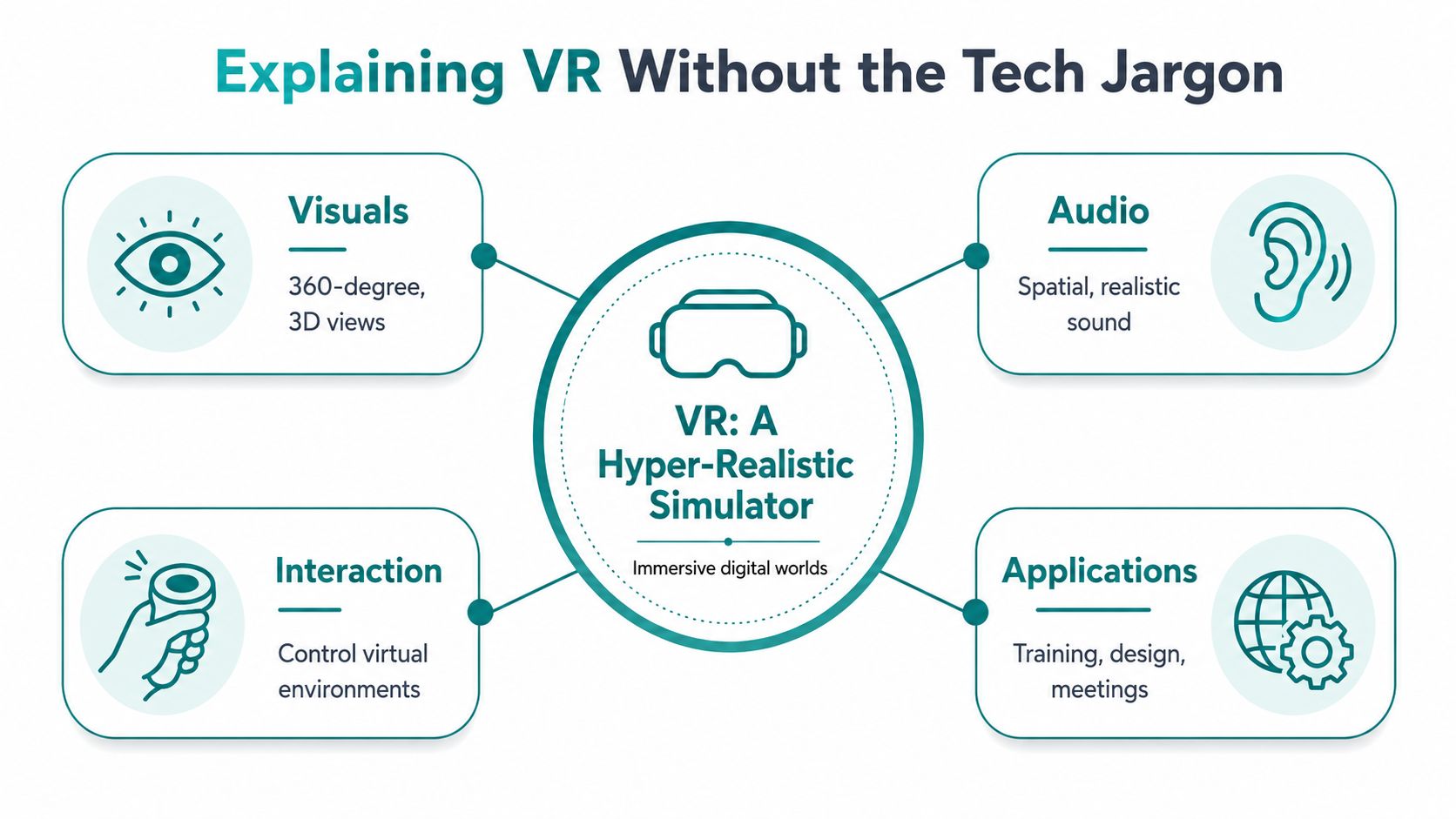
Think of VR as a hyper-realistic simulator for your business.
A flight simulator lets a pilot practice in a believable environment without putting anyone at risk. VR works the same way for business tasks. A trainee can practice a procedure, a sales rep can walk a buyer through a product, or a design team can review a space or object before spending money on its physical creation.
What VR is and what it isn't
Virtual Reality places the user inside a fully digital environment. They wear a headset, see a simulated space, hear audio designed for that space, and interact using hand controllers or hand tracking.
Augmented Reality, or AR, is different. AR overlays digital elements onto the physical world through a phone, tablet, or smart glasses. If you want a clear side-by-side explanation, this guide on understanding VR and virtual tour differences is useful because many business owners understandably mix those formats together.
A virtual tour is also not the same thing as full VR. A virtual tour often lets someone click through spaces and look around. VR goes further by creating immersion and interaction.
The basic parts in plain English
Most business VR setups come down to three pieces:
-
Headset: The device the user wears to enter the virtual environment.
-
Controllers or hand tracking: The tools used to point, select, move, or manipulate objects.
-
Software application: The actual experience, such as a training module, product demo, design review, or meeting environment.
The technical details matter later. At the start, the important thing is the business purpose.
VR is valuable when people need to learn, evaluate, or decide through experience instead of explanation.
Why immersion changes outcomes
A PDF explains. A video demonstrates. VR lets people participate.
That difference matters when the task is physical, spatial, high-risk, or difficult to describe with words alone. If you're training a technician, showing a property layout, or helping a buyer understand product scale, immersion can remove confusion that ordinary web content can't fully solve.
For non-technical owners, that's the simplest way to think about VR in business. It's not a gadget category. It's an environment category.
The Measurable ROI of Virtual Reality
The case for VR gets stronger when you stop treating it as a branding experiment and start evaluating it like any other operational investment. If it cuts training waste, reduces errors, or shortens the path to a confident purchase, it deserves the same attention you'd give a software upgrade or process redesign.

Training is where ROI shows up fastest
The clearest business case is often employee development. According to LineZero's overview of VR in business, employees using VR training retain 80% of what they learn after a full year, and companies at scale report saving 30% to 70% on training costs. The same source notes that organizations like Osso VR have shown trainees performing procedures 30% faster with 20% fewer errors after virtual practice.
Those numbers matter because they connect directly to issues SMBs already feel:
-
Turnover costs: New hires often need repeated instruction.
-
Manager time: Senior people spend hours reteaching the same steps.
-
Inconsistency: Different trainers teach the same process in different ways.
-
Avoidable mistakes: Errors happen when people know the theory but haven't practiced enough.
VR helps when repetition is essential but real-world practice is expensive, disruptive, or risky.
Better retention changes the economics
A lot of training fails subtly. Employees attend, nod, and move on. A week later, managers realize the team still isn't executing correctly.
VR can improve that because it asks employees to do, not just watch. For many businesses, that's the difference between training as an event and training as behavior change.
If you're already thinking about workflow efficiency, this broader look at AI automation for small business pairs well with VR. The strongest gains often come from redesigning systems together rather than treating each tool in isolation.
A training program is only efficient if people remember it and apply it correctly on the job.
ROI isn't limited to training
VR also creates value in sales, design, and operations.
In enterprise settings, VR can reduce human error by guiding users visually through tasks and by replacing physical prototypes with virtual models for design review, as described in Digital Aptech's look at VR in enterprise applications. That doesn't mean every local business needs a complex simulation environment. It means the return often comes from removing one expensive real-world step.
For an SMB, the practical formula is straightforward:
| Business area | What VR can improve | Why it matters |
| --- | --- | --- |
| Training | Practice and retention | Fewer repeat sessions and fewer mistakes |
| Sales | Product understanding | Better buyer confidence |
| Operations | Guided execution | More consistency across staff |
| Design | Early review before production | Less waste and fewer revisions |
The ROI question isn't "Will VR transform everything?" It's "Where does immersion make one costly process work better?"
Practical VR Use Cases for Local Industries
A West Chester manufacturer needs new operators on the floor faster, but every hour of hands-on training ties up a machine and a senior employee. A Hyde Park retailer loses margin on returns because shoppers guessed wrong about size, fit, or scale. Those are the kinds of problems VR can address for Cincinnati-area SMBs. The value comes from reducing waste in a process you already pay for.
Manufacturing and industrial training
Manufacturing is often the clearest starting point because the cost of mistakes is easy to see. Equipment downtime, scrap, safety incidents, and slow onboarding all hit the budget directly. VR gives teams a way to practice a sequence before they touch live equipment, which is useful for lockout procedures, inspection steps, changeovers, and safety drills.
Large manufacturers have used immersive tools for years. PwC reported that VR learners finished training faster than classroom learners and showed stronger confidence in applying what they learned in practice, which helps explain why industrial firms keep investing in simulation-based training. For a smaller shop in Greater Cincinnati, the practical takeaway is narrower. Use VR where repetition matters, errors are expensive, and access to equipment is limited.
Retail and showroom experiences
Retailers, especially those selling furniture, fixtures, home products, or premium accessories, run into a simple sales problem. Buyers hesitate when they cannot picture the item in their own space or on their own body.
That is why visualization matters. Shopify notes that IKEA's 3D and AR product previews helped reduce returns by giving customers a clearer sense of size and fit before purchase. A local retailer does not need a flagship-style VR installation to benefit from that idea. A targeted product visualization tool for a few high-return or high-consideration items can improve conversion quality and cut avoidable returns. If wearable products are part of the mix, PhotoMaxi's virtual try-on guide offers a helpful look at how immersive preview tools reduce uncertainty before checkout.
Real estate, healthcare, and service businesses
Service-based businesses can use immersive experiences in a different way. The goal is not entertainment. It is clarity.
A Cincinnati real estate team can give relocation buyers a stronger first pass on homes before anyone schedules a full day of tours. A healthcare practice or provider network can use VR for patient education, pre-procedure orientation, or staff scenario training when visual understanding improves communication. Field service companies can build guided practice modules for technicians who need to follow the same sequence every time in a customer's space.
Here is where these use cases tend to show up first:
| Industry | Application Example | Primary Business Benefit |
| --- | --- | --- |
| Manufacturing | Safety and process simulation for new hires | Faster ramp-up and fewer avoidable errors |
| Retail | Product visualization for furniture, decor, or wearable items | Better purchase confidence and fewer returns |
| Real estate | Immersive property previews for remote buyers | Better-qualified showings |
| Healthcare | Staff simulations and patient education experiences | Clearer communication and more consistent instruction |
| Service businesses | Technician walkthroughs for repeatable field tasks | More consistent execution |
For teams building repeatable training around standard workflows, this guide to choosing an employee training platform helps frame the larger system that supports the content.
The strongest VR use cases usually start with a recurring cost. Slow onboarding, poor visualization, inconsistent execution, or preventable rework.
Your Four-Step Roadmap to Getting Started with VR
Most SMB owners shouldn't begin with a custom build, a giant rollout, or a broad innovation initiative. They should begin with one business problem that can be tested cheaply and measured clearly.
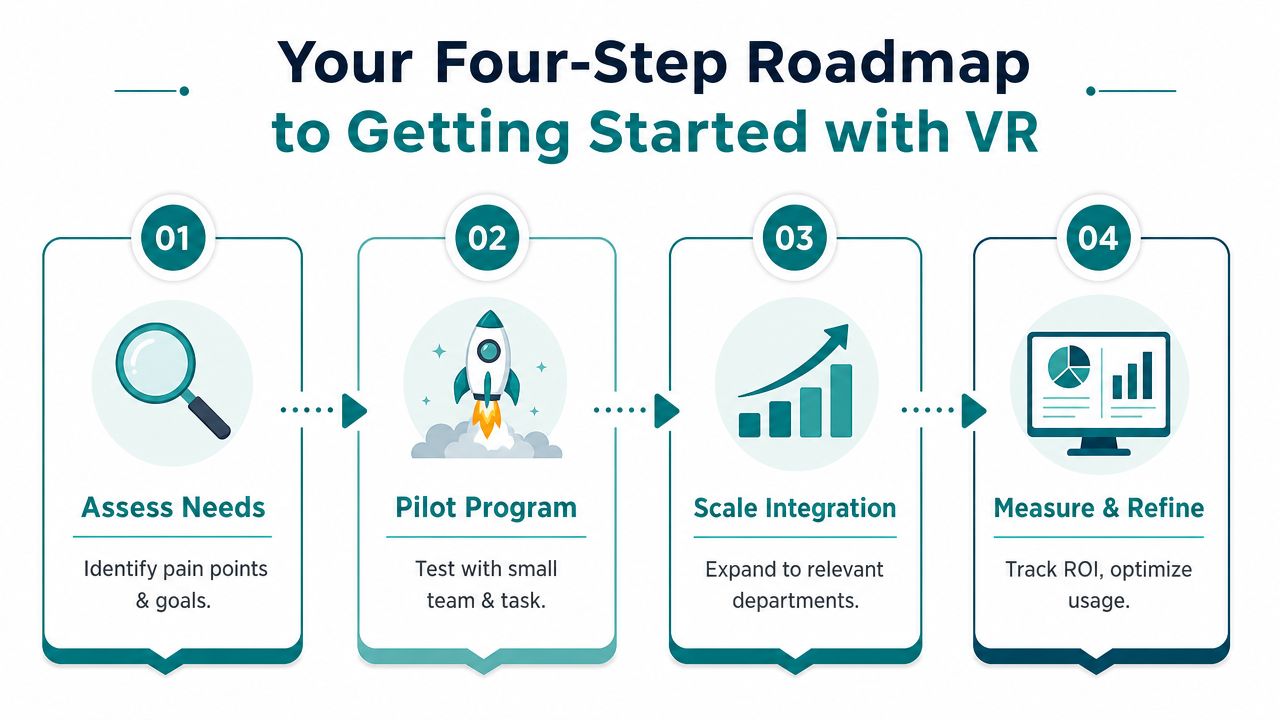
Step 1 Assess one painful process
Start where the friction is obvious.
If you're considering VR in business, ask which process already frustrates your team. New hire training. Equipment walkthroughs. Product demos. Client presentations. Choose the one that is repetitive, hard to standardize, and expensive when done wrong.
Keep the scope narrow. "We want to innovate" is too vague. "We want new installers to practice our inspection sequence before going on-site" is workable.
Step 2 Run a pilot before you scale
A pilot protects your budget and sharpens your thinking. Use a small group, a single scenario, and a clear success criterion.
That might look like this:
-
Pick one team: Start with a role that repeats the same process often.
-
Choose one task: Focus on one workflow, not the whole department.
-
Set one metric: Completion quality, speed to competency, or fewer support escalations.
-
Collect feedback: Ask where users got stuck, confused, or disengaged.
SMBs often need this phased approach because adoption support is still uneven. The JFF case for small business VR support notes that most VR attention goes to large companies, while small businesses often need funding help, training support, and capacity-building assistance to implement it well.
A short explainer can help if you're evaluating whether the rollout is manageable in practice.
Step 3 Choose off-the-shelf or custom
At this point, many projects either stay practical or become expensive too fast.
Off-the-shelf VR makes sense when your need is common. Meeting spaces, basic training environments, and standard visualization tools can get you moving quickly.
Custom VR makes sense when your process is specific to your business. If the experience needs your terminology, your workflow, your compliance standards, or your data, custom development becomes more attractive.
Step 4 Measure and refine
Treat the pilot like any other business system. Review what changed.
-
Look at adoption: Did staff use it without being pushed constantly?
-
Check workflow impact: Did the process become easier, faster, or more consistent?
-
Watch for friction: Hardware management, content updates, and onboarding still matter.
-
Decide what scales: Expand only after the small test proves its worth.
Not every pilot should grow. Some should stay niche. That's fine. The win is clarity.
Choosing the Right VR Tech for Your Needs
A Cincinnati business owner usually does not need the "best" VR system. They need the one their team will use without adding support headaches or dragging out setup.
Start with the day-to-day environment. If the headset will move between a training room, a sales floor, and the occasional client demo, standalone hardware is often the better fit. It is easier to hand to an employee, easier to transport between locations, and easier to maintain if you do not have in-house IT focused on VR.
PC-based systems still have a place. They make sense for detailed 3D product reviews, engineering visualization, or simulations where image quality affects the outcome. The cost is not just the headset. You also have to account for the computer, updates, cabling, setup time, and who on your team handles issues when something stops working.
That trade-off matters.
For a lot of small and midsize companies around Greater Cincinnati, convenience wins early. A manufacturer in Blue Ash testing safety training has different needs than a design firm showing immersive walkthroughs to clients in Over-the-Rhine. The right choice depends on whether your priority is realism or repeatable use.
Then decide on software approach
Software usually has a bigger effect on ROI than hardware.
| Option | Best fit | Trade-off |
| --- | --- | --- |
| Off-the-shelf software | Common use cases and faster pilots | Not customized for your workflow |
| Custom-built experience | Unique processes, branding, or integrations | More planning, testing, and ongoing management |
Off-the-shelf tools are a smart starting point when the use case is standard. Staff training, virtual meeting environments, and basic product demos can often run well without custom development. That keeps costs lower and shortens the time between idea and pilot.
Custom work earns its keep when VR needs to fit into how your business already operates. If the experience has to reflect your terminology, connect to your CRM, pull from a scheduling system, or report into a learning platform, custom development becomes easier to justify. At that point, VR stops being a one-off demo and becomes part of a real business process.
If you are weighing those integration decisions alongside automation and system planning, this guide to AI consulting for businesses gives useful context for how these projects fit into a broader digital strategy.
Don't overlook security and compliance
VR platforms still have to meet the same standards as the rest of your business systems.
If your company handles patient records, financial information, employee data, or sensitive customer details, review vendor permissions, data storage, user access, and device management before rollout. That is especially important for healthcare groups, legal firms, and businesses using VR for HR or training tied to regulated procedures.
Choose the system your team can manage consistently. A simpler setup that gets used every week will usually produce more value than an advanced system that sits on a shelf.
Is VR the Right Next Step for Your Business
VR makes sense when your business has a process that people need to experience, not just read about. Training, product visualization, guided demos, and operational simulations are the strongest starting points for most Cincinnati-area SMBs.
The smartest approach is modest. Pick one use case. Test it with a small group. Measure whether it improves clarity, consistency, or buyer confidence. If it does, expand. If it doesn't, you've learned something valuable without overspending.
That's the shift in VR in business. It's no longer only for giant brands with innovation budgets. It's a practical tool for specific problems, and the companies that benefit most are often the ones disciplined enough to use it narrowly at first.
If you're exploring how immersive tools fit into your website, training, SEO, or broader digital growth strategy, HDM is a strong local partner to talk with. HDM works with businesses across Greater Cincinnati on custom development, digital strategy, and performance-focused marketing, so the conversation can stay grounded in actual business goals instead of tech hype.