
Most advice about custom software starts with the wrong question: Should you build or buy? The more important question is whether your business can operate, secure, and improve the application after launch. A custom app can fit your workflows precisely, but it also creates an ongoing responsibility for maintenance, testing, data quality, access control, monitoring, and funding.
For a Cincinnati-area business, what is custom application development in practical terms? It's the process of building software specifically for one organization's requirements instead of adapting a standardized, mass-market product. The work translates your workflows, data structures, security rules, integrations, and user experience into a purpose-built web, mobile, desktop, or cloud application, as the U.S. Department of Housing and Urban Development explains.
What Building Custom Software Really Entails
Custom development is not a quick fix for disorganized operations. If your team follows inconsistent processes, keeps duplicate records, lacks clear ownership, or relies on unreliable information, an application will preserve those weaknesses and process them faster. Clean workflows and accountable data ownership must come first.
A custom application earns its place when a business has a workflow that existing tools cannot support without damaging how the operation works. Examples include a healthcare portal with specific patient experiences, a legal intake process with tightly controlled access, a manufacturing dashboard connected to legacy systems, or an e-commerce workflow combining inventory, quoting, and fulfillment rules.
The application then becomes part of your operating model. It can enforce business rules, show each user the screens they need, and automate work that generic products leave manual. That fit has value, but it also makes the business responsible for keeping the application accurate, secure, and useful as operations change.
Practical rule: Do not automate a process until you can explain who owns it, which data it uses, and what a successful result looks like.
What ownership actually costs
The initial build is only one part of the financial decision. Total ownership includes discovery, design, development, hosting, monitoring, security updates, dependency maintenance, user support, documentation, backups, testing, and future changes. If an agency uses AI-assisted coding to speed delivery, your business still needs code review and a process for correcting weaknesses.
A lower initial quote can hide those obligations. Faster coding may shorten development while increasing review, rework, security remediation, and upkeep. Recent research indicates that AI adoption can improve coding productivity while increasing review and rework, and that AI-generated code may pass functional tests while retaining security and maintainability weaknesses. The research is available here.
Set ownership before approving the build. Name the person or partner responsible for updates, access reviews, incident response, documentation, and modernization after launch. Without that operational commitment, your business is buying a system it cannot responsibly maintain.
Custom Builds Versus Off-the-Shelf Solutions
Buying an existing product is like purchasing a finished house. You can move in quickly, use established rooms, and let the builder handle much of the underlying upkeep. You may need to rearrange your habits around the floor plan, though, and you'll usually accept limits on what can be changed.
A custom application is closer to hiring an architect for a specific lot. The design can match your business, but you're responsible for decisions about structure, materials, repairs, security, and future renovations. That flexibility only creates value when the underlying business need justifies the responsibility.
| Feature | Off-the-Shelf Software | Custom Application |
|---|---|---|
| Primary design goal | Serve a broad market | Support one organization's operating model |
| Setup | Usually quicker to configure | Requires discovery, design, development, and testing |
| Workflow fit | Your team may adapt to the product | The product is designed around your workflow |
| Integrations | Limited to supported connectors and APIs | Can be engineered around required systems |
| Data model | Uses the vendor's structure | Can reflect your business entities and rules |
| Security approach | Shared vendor architecture and controls | Designed around your actual data flows and risks |
| Ownership | Vendor controls the product roadmap | Your business owns the product decisions and obligations |
| Long-term upkeep | Vendor maintains the core product | You need an internal team or maintenance partner |
Choose the least complicated option that works
Most businesses should start with an existing tool when their needs are common. Website publishing, email marketing, appointment scheduling, customer relationship management, and basic online sales often work well with established platforms. A subscription can be the sensible choice when speed, simplicity, and predictable operations matter more than differentiation.
Custom development becomes more defensible when the workaround is damaging revenue, employee productivity, customer experience, or data integrity. It also becomes attractive when you need several systems to share information but available connectors create manual work or unreliable synchronization.
The right question isn't whether custom software is more powerful. It usually is, but power creates responsibility. Ask whether the custom workflow will produce enough operational value to justify design, security, support, and future change.
For a small or midsize company, a staged approach often makes more sense than a full platform rebuild. Start with one workflow, prove that the data is usable, and make sure employees adopt the process before expanding the system.
The Custom Development Lifecycle Explained
Custom software succeeds or fails before the first line of code. Define the business problem, success criteria, users, systems, and information involved before approving a build. Otherwise, your team can spend months producing software that formalizes the wrong process.
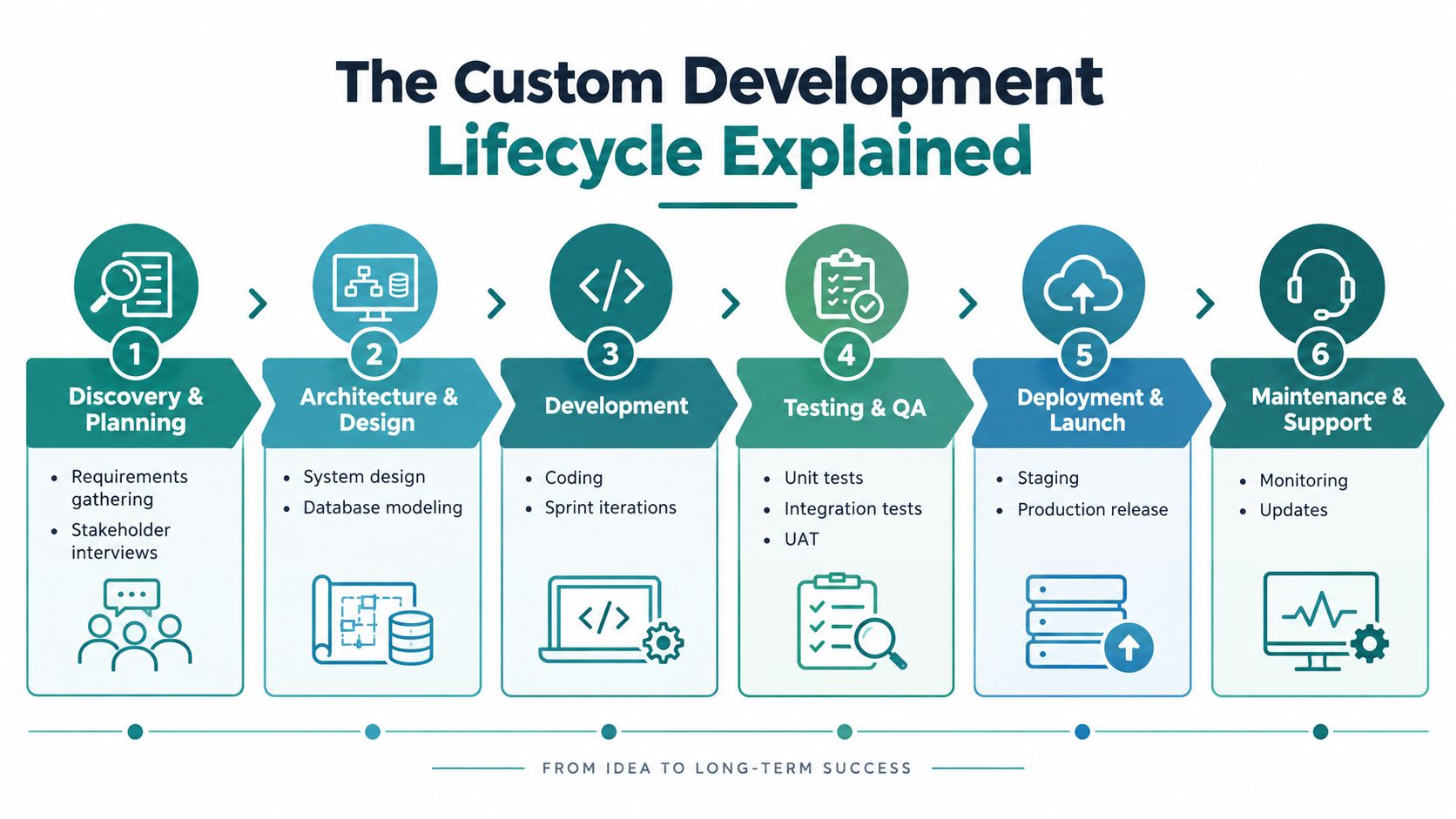
The stages behind a dependable application
-
Discovery and planning define users, workflows, constraints, integrations, risks, and business outcomes. Use stakeholder interviews and process mapping to expose exceptions and ownership gaps. Skipping this work lets developers build the wrong solution efficiently.
-
Architecture and design establish how the application will store data, communicate with other systems, authenticate users, and accommodate future changes. Interface design belongs here too. Employees and customers need a clear path through important tasks.
-
Development converts the approved design into working software. Developers write code, connect services, build interfaces, and release manageable increments. Coding matters, but it is only one part of the project.
-
Testing and quality assurance examine components, integrations, and real user workflows. Unit, integration, system, and acceptance testing identify different classes of defects. Test the business process, not only the code.
-
Deployment and launch moves the application from staging into production. Before users rely on it, prepare backups, release checks, monitoring, access permissions, and a rollback plan. A launch without these controls transfers avoidable risk to daily operations.
-
Maintenance and support address updates, defects, security work, performance monitoring, documentation, and later enhancements. NASA's documented lifecycle also includes requirements analysis, design, implementation, system testing, acceptance testing, and maintenance and operation. The lifecycle reference is documented by NASA. The sequence reinforces a practical point: custom development is an engineering process, not a coding event.
Require your development partner to specify the deliverables at every stage, decision owners, approval points, and the effect of requested changes. Review web development timeline guidance before signing, so discovery, testing, approvals, and launch have realistic expectations.
If you are assessing external staffing, hire developers in Latin America can help you compare that operating model. Choose a partner that can explain the system after launch, not one that only promises to deliver the first version.
The Hidden Costs of Long-Term Ownership
Launch day is when your ownership obligation becomes visible. Users find edge cases, browsers and operating systems change, third-party services update their interfaces, and attackers search for weaknesses. A custom application needs a defined operating model, not just a repository of source code.
What your maintenance agreement should cover
Ask a provider to specify who handles:
- Security updates: Review dependencies, investigate vulnerabilities, and apply fixes without disrupting critical workflows.
- Monitoring: Track application errors, infrastructure health, failed integrations, and unusual access activity.
- Testing: Run automated tests after changes and repeat acceptance checks for important business processes.
- Backups and recovery: Validate that backups work and define how the business responds to data loss or service interruption.
- Access governance: Remove former employees, review administrative privileges, and document who can reach sensitive information.
- Incident response: Establish who investigates an incident, communicates with stakeholders, and restores service.
- Documentation: Maintain system diagrams, integration details, deployment procedures, and ownership records.
AI-assisted development adds another layer of responsibility. AI can help a team produce code quickly, but speed doesn't replace architectural review, security testing, or human accountability. Code that passes a functional test can still create problems in authorization, dependency management, error handling, or future maintenance.
The question isn't whether AI helped build the application. The question is whether a qualified human reviewed the result and whether your team can maintain it.
Operate software as a service
A mature application should have measurable service objectives for availability, response time, error rate, recovery, and successful completion of critical transactions. Google's SRE guidance describes setting availability targets and reviewing performance regularly in its guidance on embracing risk. The principle is practical even for smaller businesses: define what reliable means before customers complain.
Your provider should combine centralized logs, application metrics, deployment checks, synthetic user tests, rollback procedures, backup validation, and realistic load testing. You don't need to manage every technical detail yourself, but you do need to know who does and how problems reach you.
Treat maintenance as a planned operating expense and governance function. If your budget only covers the initial build, choose off-the-shelf software or a smaller pilot instead.
Designing Security and Compliance From Day One
Security added at the end is usually expensive security. By launch, the application's data model, permissions, integrations, and deployment process may already make weak decisions difficult to replace.
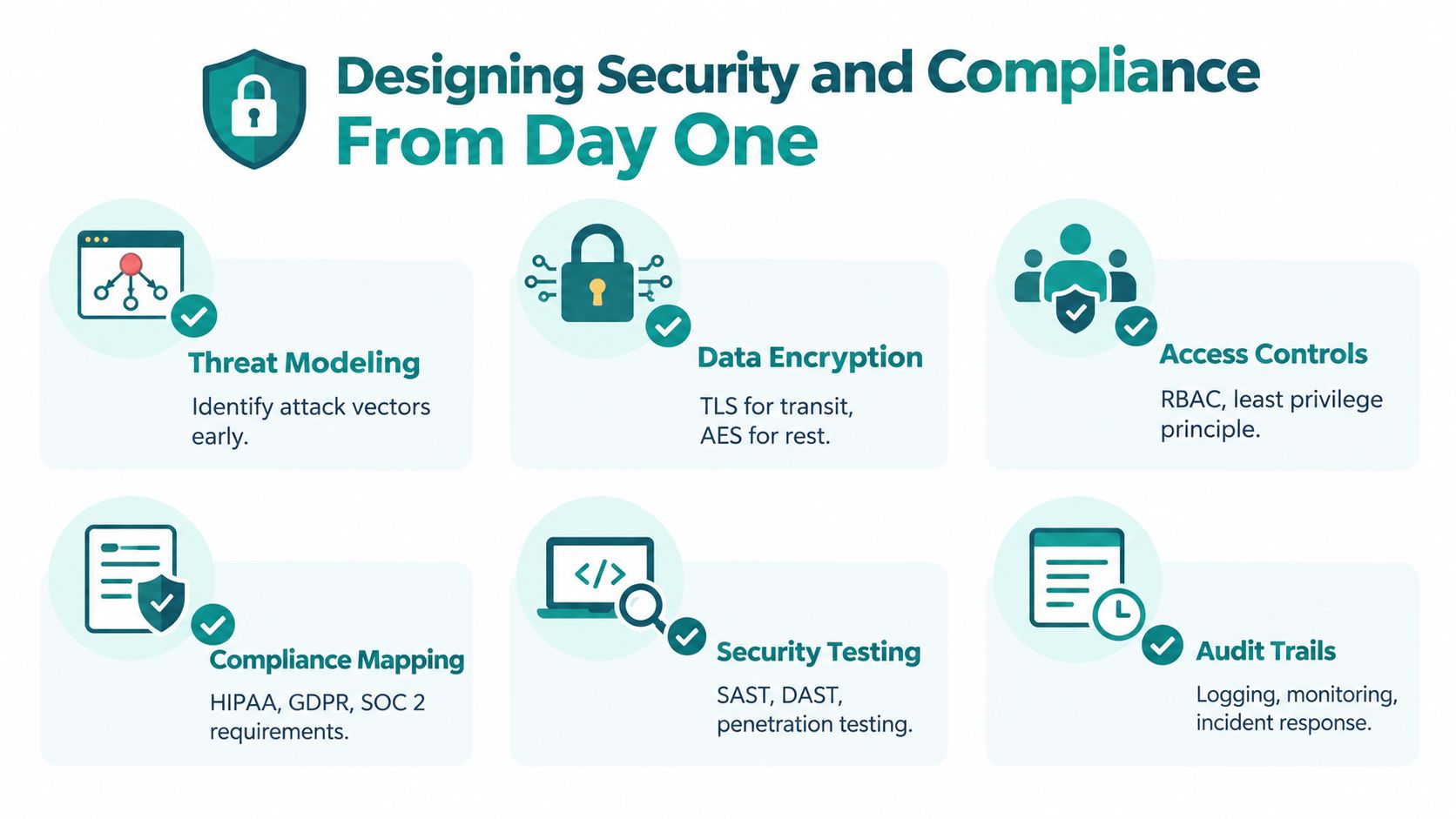
A healthcare organization needs to know where patient information moves, which users can view it, how sessions are protected, and how activity is recorded. A law firm needs controlled access to client material and a reliable audit trail. A business handling payments or personal information needs to understand the responsibilities shared among its application, hosting provider, vendors, and internal staff.
NIST recommends integrating security throughout the system development life cycle, from initiation through disposal, and identifying security roles at the beginning. Its lifecycle guidance supports a straightforward recommendation: define the data, access rules, ownership, and update process before development begins.
Demand evidence instead of reassurance
Ask a prospective developer for a written security plan that addresses:
- Threat modeling: What could go wrong, and which attack paths matter most?
- Authentication and authorization: How will the system verify identity and enforce least-privilege access?
- Data protection: How will information be protected in transit, at rest, in backups, and in logs?
- Testing: Which automated security tests, manual reviews, and vulnerability checks will be performed?
- Auditability: What activity will be recorded, how long will logs remain available, and who reviews them?
- Response and recovery: Who handles an incident, how will you be notified, and how will the system be restored?
The OWASP Application Security Verification Standard provides a concrete framework for this conversation. It covers 14 security areas and contains 286 verification requirements, including architecture and threat modeling, authentication, session management, access control, input validation, cryptography, logging, data protection, APIs, business logic, and configuration.
You don't need to administer that checklist personally. You should ask which verification level fits your application and whether findings, remediation decisions, and test results will be documented. For consumer brands exploring governance tooling, this overview of SOC 2 certification software for DTC brands offers useful context, but your developer still needs to explain how security applies to your actual application.
HDM's guide to cybersecurity best practices can help business owners prepare questions before a discovery meeting. Don't accept “secure by design” as a complete answer. Ask to see the design decisions behind the claim.
Is Your Business Actually Ready for Custom Software
Technology adoption is common, but adoption alone doesn't prove readiness for a complex custom build. The 2025 NFIB Technology Survey reports that 57% of small-business owners introduced new or significantly improved technology during the previous two years. The survey is available from NFIB.
Readiness depends on the condition of your business process and data. Before you commission software, determine whether the workflow is stable enough to automate and whether the people closest to it agree on how it should work.
Use this readiness test
Start with the workflow. Map what happens today, including exceptions, approvals, handoffs, spreadsheets, email messages, and duplicate entry. If different employees describe the same process differently, resolve that disagreement before asking developers to encode it.
Define the outcome. Choose a business result you can observe, such as fewer manual handoffs, quicker quote preparation, better visibility into open work, or a smoother customer intake experience. Don't approve features merely because they sound modern.
Inventory the data. List the systems that hold relevant information, identify duplicate fields, check who owns each dataset, and document the APIs or export processes available. Custom software can connect systems, but it can't make incomplete or contradictory records trustworthy by itself.
Assign decision owners. Name the person who approves requirements, the person responsible for compliance, and the person who will own the application after launch. A project stalls when every decision requires a meeting with no accountable owner.
Test adoption early. Include the employees and customers who will use the system. A technically sound application can still fail if it ignores how people work or asks them to maintain information they don't understand.
Readiness test: If you can't describe the current process clearly, don't build the future process yet.
Begin with a reversible commitment
A pilot should focus on one valuable workflow with a clear boundary. It might be a client intake portal, a quoting tool, a reporting dashboard, or one integration that removes repetitive entry. Keep the first release narrow enough that you can learn from real usage without committing the entire business to an unproven platform.
If the pilot reveals unstable requirements, poor data quality, or weak adoption, that's useful information. Fix the operating model before expanding the technology.
When to Invest in a Custom Application
Custom software earns its place when the workflow itself is a competitive capability, not merely a preference. A Cincinnati healthcare provider may need a patient experience that connects intake, scheduling, communications, and internal systems while applying carefully designed access rules. A law firm may need secure client intake, document routing, and matter-specific permissions that a general form tool can't support cleanly.
An e-commerce brand may need custom inventory and fulfillment connections across systems that weren't designed to work together. A manufacturer may need a dashboard that combines production information, orders, and operational alerts in a way that matches its plant-level decisions.

In each example, the case for custom development rests on a specific operating advantage. The business isn't building software because a generic product feels limiting. It's building because the workflow, data, customer experience, or integration layer directly affects how the organization delivers value.
A custom application can take the form of a client portal, dashboard, quoting system, SaaS product, headless CMS experience, or internal operations platform. HDM is one Cincinnati-area option that develops custom web applications, SaaS platforms, portals, dashboards, e-commerce systems, and integrations alongside SEO, analytics, and ongoing website wellness services.
Before choosing a partner, ask how it handles ownership, source code, hosting, documentation, support, updates, monitoring, and third-party dependencies. Businesses that need broader infrastructure oversight should also understand the considerations involved in selecting a managed IT services firm, particularly when application support and business continuity overlap.
For SaaS teams, HDM's information on SaaS platform development provides a useful starting point for discussing product architecture, user roles, integrations, and ongoing platform management.
This video offers another way to think about the difference between a digital presence and a purpose-built operational product:
<iframe width="100%" style="aspect-ratio: 16 / 9;" src="https://www.youtube.com/embed/jqo8VPxbSNM" frameborder="0" allow="autoplay; encrypted-media" allowfullscreen></iframe>If your needs are common, buy a proven tool and invest in implementation, content, SEO, and adoption. If your workflow is differentiated and your team is prepared to operate the result, document the process, define the pilot, and interview development partners with those requirements in hand.
HDM helps Cincinnati-area businesses plan and build custom websites, portals, dashboards, SaaS platforms, integrations, and growth-focused digital systems, with ongoing maintenance and security support after launch. Visit HDM to discuss whether custom development, a smarter off-the-shelf stack, or a focused pilot is the right next step for your business.